Data
Validation
CHAPTER 7
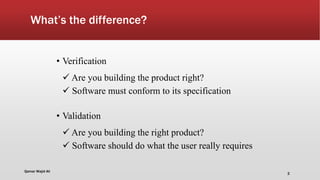
What’s the difference?
• Verification
 Are you building the product right?
 Software must conform to its specification
• Validation
 Are you building the right product?
 Software should do what the user really requires
Qamar Wajid Ali
2
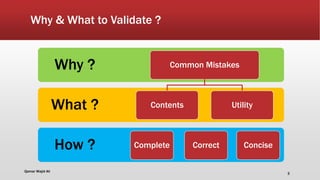
Why & What to Validate ?
How ?
What ?
Why ? Common Mistakes
Contents
Complete Correct
Utility
Concise
Qamar Wajid Ali
3
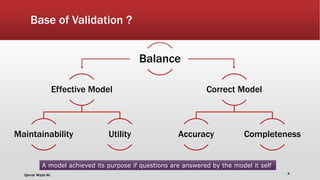
Base of Validation ?
Effective Model
Maintainability Utility
Correct Model
Accuracy Completeness
Balance
A model achieved its purpose if questions are answered by the model it self
Qamar Wajid Ali 4
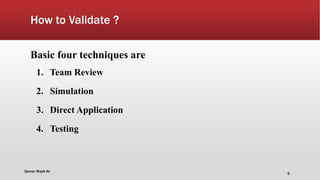
How to Validate ?
Basic four techniques are
1. Team Review
2. Simulation
3. Direct Application
4. Testing
Qamar Wajid Ali
5
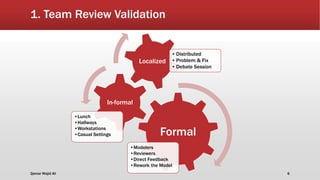
1. Team Review Validation
Formal
•Modelers
•Reviewers
•Direct Feedback
•Rework the Model
In-formal
•Lunch
•Hallways
•Workstations
•Casual Settings
Localized
• Distributed
• Problem & Fix
• Debate Session
Qamar Wajid Ali 6
7
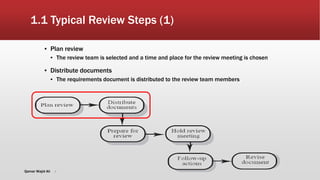
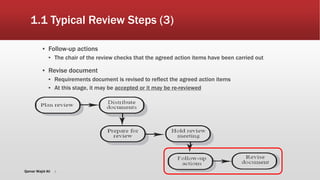
1.1 Typical Review Steps (1)
▪ Plan review
▪ The review team is selected and a time and place for the review meeting is chosen
▪ Distribute documents
▪ The requirements document is distributed to the review team members
Qamar Wajid Ali
8
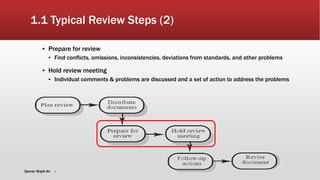
1.1 Typical Review Steps (2)
▪ Prepare for review
▪ Find conflicts, omissions, inconsistencies, deviations from standards, and other problems
▪ Hold review meeting
▪ Individual comments & problems are discussed and a set of action to address the problems
Qamar Wajid Ali
9
1.1 Typical Review Steps (3)
▪ Follow-up actions
▪ The chair of the review checks that the agreed action items have been carried out
▪ Revise document
▪ Requirements document is revised to reflect the agreed action items
▪ At this stage, it may be accepted or it may be re-reviewed
Qamar Wajid Ali
1.2 Typical Review Questions
▪ Stakeholders Needs
▪ Correct Stakeholders been Identified?
▪ Sufficient Model views to meet each stakeholder`s need?
▪ Well organized to permit rapid access to information?
▪ Model Construction
▪ Sufficient mappings?
▪ Assumptions been noted and justified?
▪ Strength and Weakness of the model?
▪ Model Contents
▪ Internally Consistent?
▪ Information Updated, correct and Complete?
▪ Relevant data been overlooked or incorrectly interpreted?
Qamar Wajid Ali 10
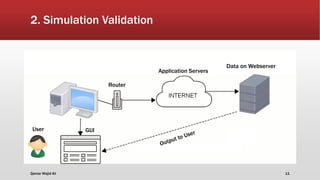
2. Simulation Validation
Data on Webserver
Router
Application Servers
User GUI
Qamar Wajid Ali 11
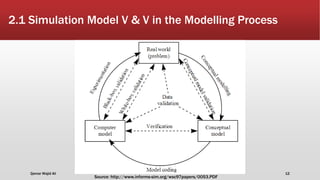
2.1 Simulation Model V & V in the Modelling Process
Source: http://www.informs-sim.org/wsc97papers/0053.PDF
Qamar Wajid Ali 12
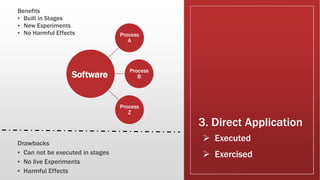
3. Direct Application
Benefits
▪ Built in Stages
▪ New Experiments
▪ No Harmful Effects
 Executed
 Exercised
Process
A
Process
B
Process
Z
Software
Drawbacks
▪ Can not be executed in stages
▪ No live Experiments
▪ Harmful Effects
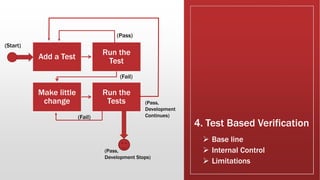
4. Test Based Verification
 Base line
 Internal Control
 Limitations
Add a Test
Run the
Test
Make little
change
Run the
Tests
(Pass)
(Fail)
(Fail)
(Pass,
Development
Continues)
(Pass,
Development Stops)
(Start)

Data validation

  • 1.
  • 2.
    What’s the difference? •Verification  Are you building the product right?  Software must conform to its specification • Validation  Are you building the right product?  Software should do what the user really requires Qamar Wajid Ali 2
  • 3.
    Why & Whatto Validate ? How ? What ? Why ? Common Mistakes Contents Complete Correct Utility Concise Qamar Wajid Ali 3
  • 4.
    Base of Validation? Effective Model Maintainability Utility Correct Model Accuracy Completeness Balance A model achieved its purpose if questions are answered by the model it self Qamar Wajid Ali 4
  • 5.
    How to Validate? Basic four techniques are 1. Team Review 2. Simulation 3. Direct Application 4. Testing Qamar Wajid Ali 5
  • 6.
    1. Team ReviewValidation Formal •Modelers •Reviewers •Direct Feedback •Rework the Model In-formal •Lunch •Hallways •Workstations •Casual Settings Localized • Distributed • Problem & Fix • Debate Session Qamar Wajid Ali 6
  • 7.
    7 1.1 Typical ReviewSteps (1) ▪ Plan review ▪ The review team is selected and a time and place for the review meeting is chosen ▪ Distribute documents ▪ The requirements document is distributed to the review team members Qamar Wajid Ali
  • 8.
    8 1.1 Typical ReviewSteps (2) ▪ Prepare for review ▪ Find conflicts, omissions, inconsistencies, deviations from standards, and other problems ▪ Hold review meeting ▪ Individual comments & problems are discussed and a set of action to address the problems Qamar Wajid Ali
  • 9.
    9 1.1 Typical ReviewSteps (3) ▪ Follow-up actions ▪ The chair of the review checks that the agreed action items have been carried out ▪ Revise document ▪ Requirements document is revised to reflect the agreed action items ▪ At this stage, it may be accepted or it may be re-reviewed Qamar Wajid Ali
  • 10.
    1.2 Typical ReviewQuestions ▪ Stakeholders Needs ▪ Correct Stakeholders been Identified? ▪ Sufficient Model views to meet each stakeholder`s need? ▪ Well organized to permit rapid access to information? ▪ Model Construction ▪ Sufficient mappings? ▪ Assumptions been noted and justified? ▪ Strength and Weakness of the model? ▪ Model Contents ▪ Internally Consistent? ▪ Information Updated, correct and Complete? ▪ Relevant data been overlooked or incorrectly interpreted? Qamar Wajid Ali 10
  • 11.
    2. Simulation Validation Dataon Webserver Router Application Servers User GUI Qamar Wajid Ali 11
  • 12.
    2.1 Simulation ModelV & V in the Modelling Process Source: http://www.informs-sim.org/wsc97papers/0053.PDF Qamar Wajid Ali 12
  • 13.
    3. Direct Application Benefits ▪Built in Stages ▪ New Experiments ▪ No Harmful Effects  Executed  Exercised Process A Process B Process Z Software Drawbacks ▪ Can not be executed in stages ▪ No live Experiments ▪ Harmful Effects
  • 14.
    4. Test BasedVerification  Base line  Internal Control  Limitations Add a Test Run the Test Make little change Run the Tests (Pass) (Fail) (Fail) (Pass, Development Continues) (Pass, Development Stops) (Start)