Introduction to Software Engineering 
Introduction (2) 
Muhammad Nasir 
m.nasir@iiu.edu.pk
Chapter - Topic Covered 
 Layered Technology 
 Software Process Framework 
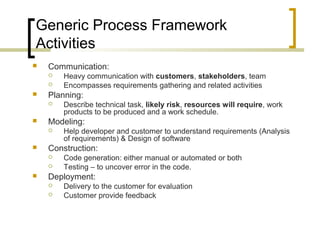
 Generic Process Framework Activities 
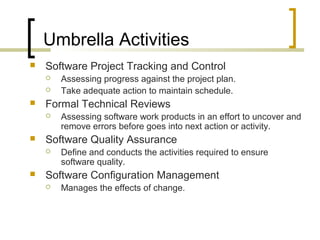
 Umbrella Activities
Software Engineering – Layered 
Technology 
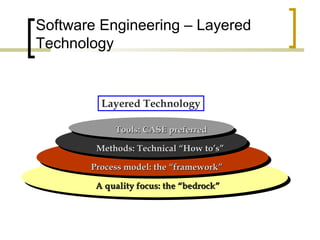
Layered Technology 
TToooollss:: CCAASSEE pprreeffeerrrreedd 
MMeetthhooddss:: TTeecchhnniiccaall ““HHooww ttoo’’ss”” 
PPrroocceessss mmooddeell:: tthhee ““ffrraammeewwoorrkk”” 
A qquuaalliittyy ffooccuuss:: tthhee ““bbeeddrroocckk””
Layered Technology 
A Quality Focus 
 Every organization rest on its commitment to quality. 
 Total quality management, Six Sigma, or similar continuous improvement 
culture and it is this culture ultimately leads to development of increasingly 
more effective approaches to software engineering. 
 The bedrock that supports software engineering is a quality focus. 
Process: 
 It’s a foundation layer for software engineering. 
 It’s define framework for a set of key process areas (KRA) for effectively 
manage and deliver quality software in a cost effective manner 
 The processes define the tasks to be performed and the order in which they 
are to be performed
Process Framework 
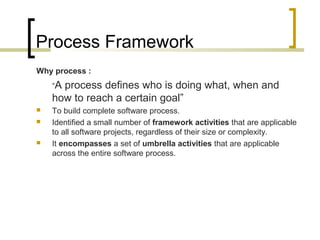
Why process : 
“A process defines who is doing what, when and 
how to reach a certain goal” 
 To build complete software process. 
 Identified a small number of framework activities that are applicable 
to all software projects, regardless of their size or complexity. 
 It encompasses a set of umbrella activities that are applicable 
across the entire software process.
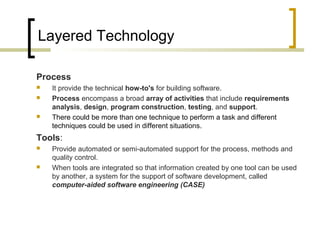
Layered Technology 
Process 
 It provide the technical how-to's for building software. 
 Process encompass a broad array of activities that include requirements 
analysis, design, program construction, testing, and support. 
 There could be more than one technique to perform a task and different 
techniques could be used in different situations. 
Tools: 
 Provide automated or semi-automated support for the process, methods and 
quality control. 
 When tools are integrated so that information created by one tool can be used 
by another, a system for the support of software development, called 
computer-aided software engineering (CASE)
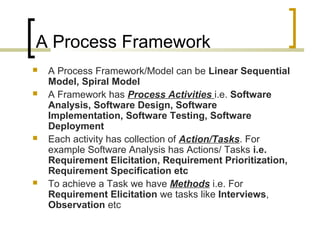
A Process Framework 
 A Process Framework/Model can be Linear Sequential 
Model, Spiral Model 
 A Framework has Process Activities i.e. Software 
Analysis, Software Design, Software 
Implementation, Software Testing, Software 
Deployment 
 Each activity has collection of Action/Tasks. For 
example Software Analysis has Actions/ Tasks i.e. 
Requirement Elicitation, Requirement Prioritization, 
Requirement Specification etc 
 To achieve a Task we have Methods i.e. For 
Requirement Elicitation we tasks like Interviews, 
Observation etc
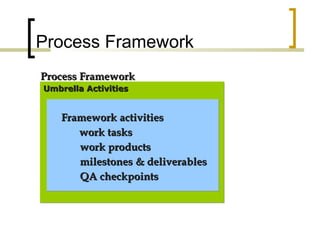
Process Framework 
PPrroocceessss FFrraammeewwoorrkk 
UUmmbbrreellllaa AAccttiivviittiieess 
FFrraammeewwoorrkk aaccttiivviittiieess 
wwoorrkk ttaasskkss 
wwoorrkk pprroodduuccttss 
mmiilleessttoonneess && ddeelliivveerraabblleess 
QQAA cchheecckkppooiinnttss
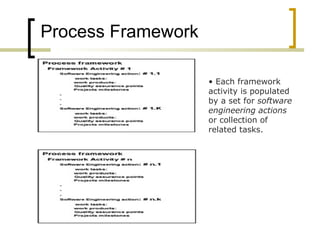
Process Framework 
• Each framework 
activity is populated 
by a set for software 
engineering actions 
or collection of 
related tasks.
Generic Process Framework 
Activities 
 Communication: 
 Heavy communication with customers, stakeholders, team 
 Encompasses requirements gathering and related activities 
 Planning: 
 Describe technical task, likely risk, resources will require, work 
products to be produced and a work schedule. 
 Modeling: 
 Help developer and customer to understand requirements (Analysis 
of requirements) & Design of software 
 Construction: 
 Code generation: either manual or automated or both 
 Testing – to uncover error in the code. 
 Deployment: 
 Delivery to the customer for evaluation 
 Customer provide feedback
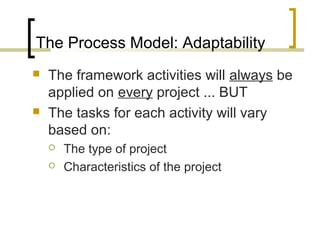
The Process Model: Adaptability 
 The framework activities will always be 
applied on every project ... BUT 
 The tasks for each activity will vary 
based on: 
 The type of project 
 Characteristics of the project
Umbrella Activities 
 Software Project Tracking and Control 
 Assessing progress against the project plan. 
 Take adequate action to maintain schedule. 
 Formal Technical Reviews 
 Assessing software work products in an effort to uncover and 
remove errors before goes into next action or activity. 
 Software Quality Assurance 
 Define and conducts the activities required to ensure 
software quality. 
 Software Configuration Management 
 Manages the effects of change.
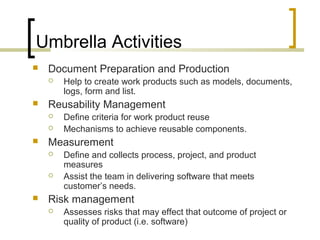
Umbrella Activities 
 Document Preparation and Production 
 Help to create work products such as models, documents, 
logs, form and list. 
 Reusability Management 
 Define criteria for work product reuse 
 Mechanisms to achieve reusable components. 
 Measurement 
 Define and collects process, project, and product 
measures 
 Assist the team in delivering software that meets 
customer’s needs. 
 Risk management 
 Assesses risks that may effect that outcome of project or 
quality of product (i.e. software)
What are software myths? 
 Beliefs about software and the process 
used to build it. Myths have number of 
attributes that have made them 
dangerous. 
 Misleading Attitudes - caused serious 
problem for managers and technical 
people.
Management Myths 
 Managers in most disciplines, are often 
under pressure to maintain budgets, 
keep schedules on time, and improve 
quality. 
 Myth1: We already have a book that's 
full of standards and procedures for 
building 
software, won't that provide my people 
with everything they need to know?
Management Myths 
Reality : 
 Are software practitioners aware of 
existence standards? 
 Does it reflect modern software 
engineering practice? 
 Is it complete? Is it streamlined to 
improve time to delivery while still 
maintaining a focus on quality?
Management Myths 
 Myth2: If we get behind schedule, we can 
add more programmers and catch up 
 Reality: Software development is not a 
mechanistic process like manufacturing. 
Adding people to a late software project 
makes it later. 
 People can be added but only in a planned 
and well-coordinated manner
Management Myths 
 Myth3: If I decide to outsource the 
software project to a third party, I can 
just relax and let that firm build it. 
 Reality: If an organization does not 
understand how to manage and 
control software projects internally, it 
will invariably struggle when it 
outsource software projects
What is a Customer? 
 Customer may be a person 
from inside or outside the 
company that has requested 
software under contract.
Customer Myths 
 Myth: A general statement of objectives is sufficient 
to begin writing programs— we can fill in the details 
later. 
 Reality: A poor up-front definition is the major cause 
of failed software efforts. 
 A formal and detailed description of the information 
domain, function, behavior, performance, interfaces, 
design constraints, and validation criteria is essential. 
 These characteristics can be determined only after 
thorough communication between customer and 
developer.
Customer Myths 
 Myth: Project requirements continually 
change, but change can be easily 
accommodated because software is flexible. 
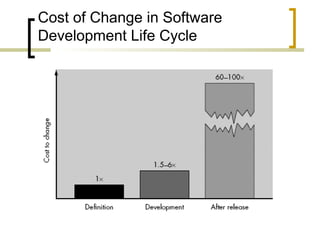
 Reality: Customer can review requirements 
and recommend modifications with relatively 
little impact on cost. 
 When changes are requested during 
software design, the cost impact grows rapidly. 
Below mentioned figure for reference.
Cost of Change in Software 
Development Life Cycle
Practitioners Myths 
 Myth1: Once we write the program 
and get it to work, our job is done. 
 Reality: Someone once said that "the 
sooner you begin 'writing code', the 
longer it'll take you to get done." 
Industry data indicate that between 60 
and 80 percent of all effort expended on 
software will be expended after it is 
delivered to the customer for the first 
time.
Practitioners Myths 
Myth2: Until I get the program 
"running" I have no way of assessing 
its quality. 
Reality: One of the most effective 
software quality assurance 
mechanisms can be applied from the 
inception of a project—the formal 
technical review.
Practitioners Myths 
 Myth3: The only deliverable work product for 
a successful project is the working program. 
 Reality: A working program is only one part 
of a software configuration that includes 
many elements. Documentation provides a 
foundation for successful engineering and, 
more important, guidance for software 
support.
Practitioners Myths 
 Myth4: Software engineering will make us 
create voluminous and unnecessary 
documentation and will definitely slow us 
down. 
 Reality: Software engineering is not about 
creating documents. It is about creating 
quality. Better quality leads to reduced 
rework. And reduced rework results in 
faster delivery times.
The End 
 Thanks for Listening