Unit II:
Computer Networks
Marks Weightage: 10
KENDRIYA VIDYALAYA No1 SAMBALPUR
Introduction
The advent of computer and communication technology have
changed our daily life. Observe the following daily life examples-
Watching Cable TV
Cash Withdrawal from ATM
Sending and receiving E-mails
Booking Railway or Air-lines Tickets.
Sending and receiving SMS through Mobile.
These services are provided by the collection of interconnected
communicating devices like computers, which make
Communication Network.
The communication over network are possible through transfer of
text/picture/audio/video data through wire or wireless
transmission medium.
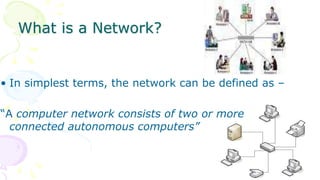
What is a Network?
• In simplest terms, the network can be defined as –
“A computer network consists of two or more
connected autonomous computers”
Goal of Networking
 Sharing Resources: Primary use of network is to share data and
peripherals among users irrespective of their physical location.
Ex. Sharing database, program files, audio and video files, printer and
scanners etc.
 Improved Communication: A computer network enables reliable,
secure and faster communication between users. It saves our time and
offers easy communication methods. Ex. e-mail, SMS and MMS etc.
 Reduced Communication cost: Sharing resources also reduces its
communication cost. Using today’s public network we can send a large
quantity of data at very low cost. Internet and Mobile network playing a
very important role in sending and receiving text, image, audio and
video data.
Components of a Network
• Sender: A device or a computer that sends the data.
• Receiver: A device or a computer that receives the data.
• Message: Information to be communicated. It may be text,
images, sound or video.
• Medium: A transmission medium is a physical path through
which the data flows from sender to receiver. A cable, fiber-
optics or radio waves can be the medium.
• Protocol: A set of rules that govern data communication. It
represents an agreement between the communicating
devices.
Evolution of Networking
• ARPANET: The Advanced Research Projects Agency Network was the
first wide-area packet-switched network with distributed control and
one of the first networks to implement the TCP/IP protocol suite.
• In 1969, The US govt. formed an agency named ARPANET to connect
computers at various universities and defense agencies. The main
objective of ARPANET was to develop a network that could continue to
function efficiently even in the event of a nuclear attack.
• ARPANET and the Defense Data Network officially changed to
the TCP/IP standard on January 1, 1983, hence the birth of the
Internet. All networks could now be connected by a universal language.
• The National Science Foundation Network (NSFNET) was a program of
coordinated, evolving projects sponsored by the National Science
Foundation(NSF) from 1985 to 1995 to promote advanced research
and education networking in the United States
Internet
• The Internet, sometimes called simply "the Net," is a worldwide
system of computer networks -- a network of networks in which users
at any one computer can, if they have permission, get information
from any other computer (and sometimes talk directly to users at
other computers). It was conceived by the Advanced Research Projects
Agency (ARPA) of the U.S. government in 1969 and was first known as
the ARPANET.
• Internet (INTERconnection NETwork): The Internet is a worldwide
network of computer networks. It is not owned by anybody. The
internet has evolved from ARPANET. The internet is a globally
connected network system that utilizes TCP/IP to transmit information.
following services are instantly available through internet : Email,
Web-enabled audio/video conferencing services, Online movies and
gaming , Data transfer/file-sharing, Instant messaging , Internet
forums , Social networking , Online shopping ,Financial services
Interspace
• Interspace: is a client/server software program that allows
multiple users to communicate online with real –time audio,
video and text chat in dynamic 3D environments. Interspace is a
software that allows multiple users in a client-server
environment to communicate with each other to send and
receive data of various types such as data files, video, audio and
textual data.
• The difference between Internet and Interspace: The
Interspace is a vision of what the Internet will become,
where users cross-correlate information in multiple
sources. It is an applications environment for interconnecting
spaces to manipulate information, much as the Internet is a
protocol environment for interconnecting networks to transmit
data.
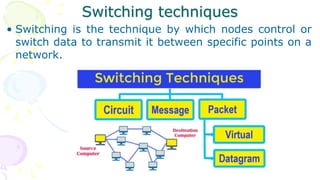
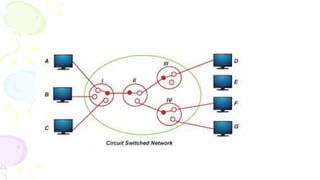
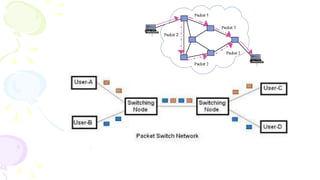
Switching techniques
• Switching is the technique by which nodes control or
switch data to transmit it between specific points on a
network.
Types of Network
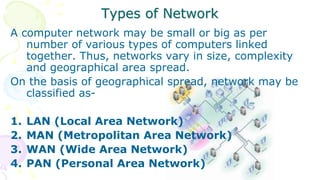
A computer network may be small or big as per
number of various types of computers linked
together. Thus, networks vary in size, complexity
and geographical area spread.
On the basis of geographical spread, network may be
classified as-
1. LAN (Local Area Network)
2. MAN (Metropolitan Area Network)
3. WAN (Wide Area Network)
4. PAN (Personal Area Network)
Types of Network
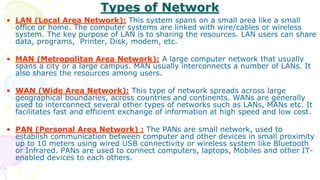
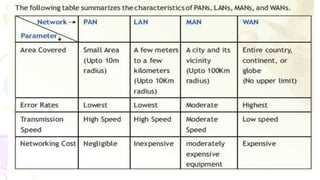
• LAN (Local Area Network): This system spans on a small area like a small
office or home. The computer systems are linked with wire/cables or wireless
system. The key purpose of LAN is to sharing the resources. LAN users can share
data, programs, Printer, Disk, modem, etc.
• MAN (Metropolitan Area Network): A large computer network that usually
spans a city or a large campus. MAN usually interconnects a number of LANs. It
also shares the resources among users.
• WAN (Wide Area Network): This type of network spreads across large
geographical boundaries, across countries and continents. WANs are generally
used to interconnect several other types of networks such as LANs, MANs etc. It
facilitates fast and efficient exchange of information at high speed and low cost.
• PAN (Personal Area Network) : The PANs are small network, used to
establish communication between computer and other devices in small proximity
up to 10 meters using wired USB connectivity or wireless system like Bluetooth
or Infrared. PANs are used to connect computers, laptops, Mobiles and other IT-
enabled devices to each others.
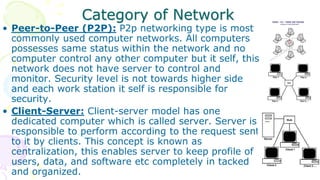
• Peer-to-Peer (P2P): P2p networking type is most
commonly used computer networks. All computers
possesses same status within the network and no
computer control any other computer but it self, this
network does not have server to control and
monitor. Security level is not towards higher side
and each work station it self is responsible for
security.
• Client-Server: Client-server model has one
dedicated computer which is called server. Server is
responsible to perform according to the request sent
to it by clients. This concept is known as
centralization, this enables server to keep profile of
users, data, and software etc completely in tacked
and organized.
Category of Network
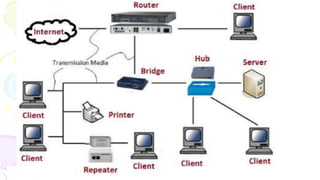
Networking Devices
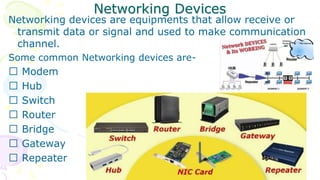
Networking devices are equipments that allow receive or
transmit data or signal and used to make communication
channel.
Some common Networking devices are-
Modem
Hub
Switch
Router
Bridge
Gateway
Repeater
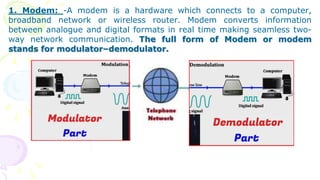
1. Modem: -A modem is a hardware which connects to a computer,
broadband network or wireless router. Modem converts information
between analogue and digital formats in real time making seamless two-
way network communication. The full form of Modem or modem
stands for modulator–demodulator.
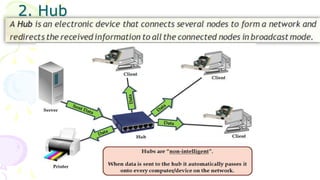
2. Hub
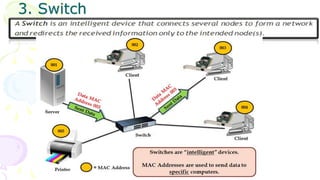
3. Switch
WLAN [Wireless LAN]
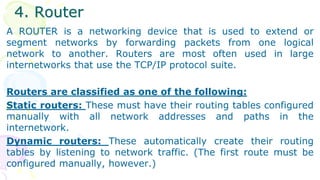
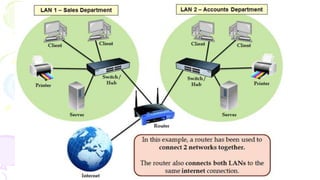
4. Router
A ROUTER is a networking device that is used to extend or
segment networks by forwarding packets from one logical
network to another. Routers are most often used in large
internetworks that use the TCP/IP protocol suite.
Routers are classified as one of the following:
Static routers: These must have their routing tables configured
manually with all network addresses and paths in the
internetwork.
Dynamic routers: These automatically create their routing
tables by listening to network traffic. (The first route must be
configured manually, however.)
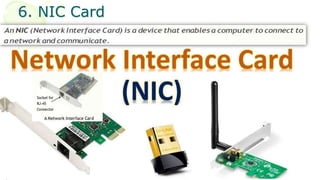
6. NIC Card
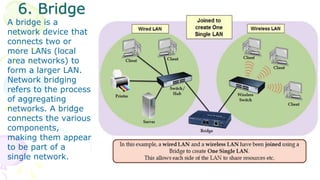
6. Bridge
A bridge is a
network device that
connects two or
more LANs (local
area networks) to
form a larger LAN.
Network bridging
refers to the process
of aggregating
networks. A bridge
connects the various
components,
making them appear
to be part of a
single network.
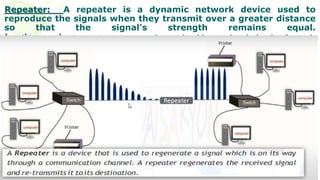
Repeater: A repeater is a dynamic network device used to
reproduce the signals when they transmit over a greater distance
so that the signal's strength remains equal.
In other words, A repeater, range extender, or signal booster is a device that forwards
signals from the router/switch/hub to cover a larger area.
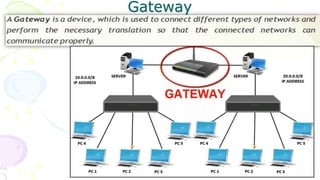
Gateway
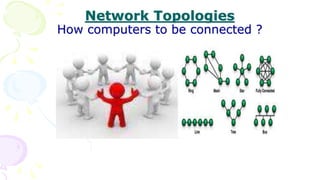
Network Topologies
How computers to be connected ?
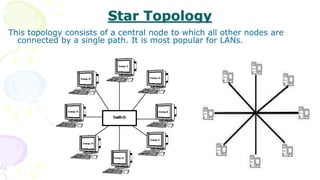
Star Topology
This topology consists of a central node to which all other nodes are
connected by a single path. It is most popular for LANs.
Star Topology
Advantages:
• Easy to setup and requires simple protocol.
• Easy to locate fault in case of network failure.
• It offers centralized control over the network.
Disadvantages:
• Increases cabling cost since each node is directly connected
to the center node.
• Difficult to expand due to limited connecting points at centre
node or device.
• All nodes are dependent on central node. If the central
device goes down then entire network rendered inoperable.
Bus Topology
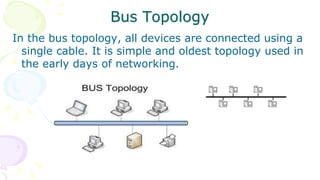
In the bus topology, all devices are connected using a
single cable. It is simple and oldest topology used in
the early days of networking.
Bus Topology
Advantages:
Simple layout and requires less cables.
Easy to expand since node may be connected at any point on
linear path.
Disadvantages:
Detection of fault is quite difficult because there is no centralized
control.
Node should be equipped with processing capability (intelligent)
because it requires complicated protocols.
To cover a long distance, Repeaters is needed to maintain the
signal intensity. Terminator is required to terminate the signal at
both end of the cable.
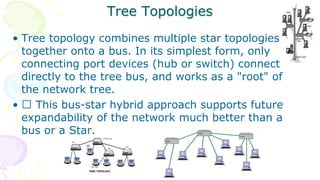
• Tree topology combines multiple star topologies
together onto a bus. In its simplest form, only
connecting port devices (hub or switch) connect
directly to the tree bus, and works as a "root" of
the network tree.
• This bus-star hybrid approach supports future
expandability of the network much better than a
bus or a Star.
Tree Topologies
Transmission Media
[Communication Channel ]
• All the computers or connecting devices in the network
must be connected to each other by a Transmission Media
or channel.
• A communication channel is either a physical transmission
medium such as a wire, or to a logical connection over a
multiplexed medium such as a radio channel in
telecommunications and computer networking.
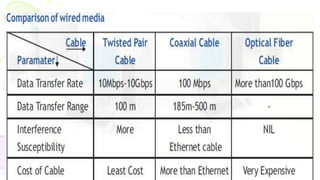
• The selection of Media depends on the cost, data transfer
speed, bandwidth and distance.
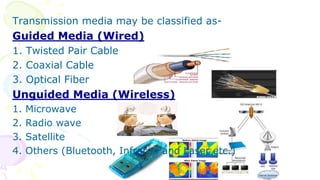
Transmission media may be classified as-
Guided Media (Wired)
1. Twisted Pair Cable
2. Coaxial Cable
3. Optical Fiber
Unguided Media (Wireless)
1. Microwave
2. Radio wave
3. Satellite
4. Others (Bluetooth, Infrared and Laser etc.)
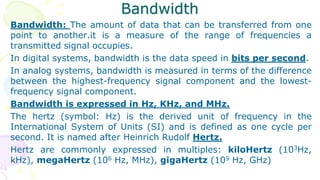
Bandwidth
Bandwidth: The amount of data that can be transferred from one
point to another.it is a measure of the range of frequencies a
transmitted signal occupies.
In digital systems, bandwidth is the data speed in bits per second.
In analog systems, bandwidth is measured in terms of the difference
between the highest-frequency signal component and the lowest-
frequency signal component.
Bandwidth is expressed in Hz, KHz, and MHz.
The hertz (symbol: Hz) is the derived unit of frequency in the
International System of Units (SI) and is defined as one cycle per
second. It is named after Heinrich Rudolf Hertz.
Hertz are commonly expressed in multiples: kiloHertz (103Hz,
kHz), megaHertz (106 Hz, MHz), gigaHertz (109 Hz, GHz)
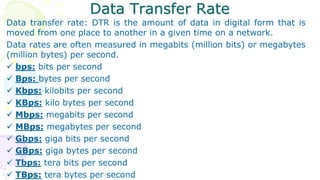
Data Transfer Rate
Data transfer rate: DTR is the amount of data in digital form that is
moved from one place to another in a given time on a network.
Data rates are often measured in megabits (million bits) or megabytes
(million bytes) per second.
 bps: bits per second
 Bps: bytes per second
 Kbps: kilobits per second
 KBps: kilo bytes per second
 Mbps: megabits per second
 MBps: megabytes per second
 Gbps: giga bits per second
 GBps: giga bytes per second
 Tbps: tera bits per second
 TBps: tera bytes per second
Radio Waves
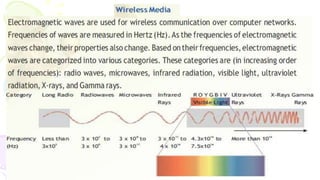
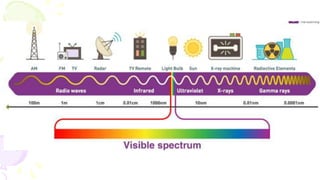
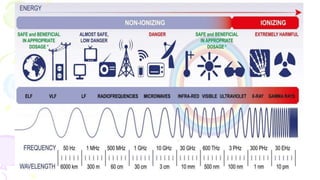
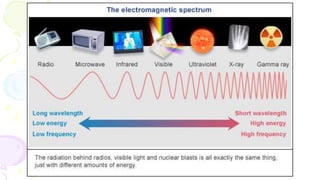
• Radio waves have a frequency range of 3 KHz to 3GHz. Radio
waves are used for communication over distances ranging from a
few meters (in walkie-talkies) upto covering an entire city. These
waves are easy to generate, can travel long distances and can
penetrate buildings easily. That's why they are widely used for
communication, both indoors and outdoors. Cordless phones, AM
and FM radio broadcast, Garage door openers etc. are examples
of radio wave transmission.
Micro waves
• Micro waves have a frequency range of 300MHz (0.3 GHz) to 300 GHz.
This range has some overlapping portion (0.3GHz - 3GHz) with radio
waves as there is no clear-cut demarcation between radio waves and
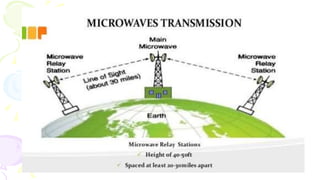
micro waves. Microwaves travel in straight lines and cannot penetrate
any solid object. Therefore for long distance microwave communication,
high towers are built and microwave antennas are put on their tops.
• Distance between two microwave towers depends on many factors
including frequency of the waves being used and heights of the towers.
These waves travel in straight lines and therefore the sending and
receiving antennas have to be aligned with each other.
• An example of usage of microwaves for communication is as follows:
In the big cities where land is very costly and a lot of formalities have to
be completed to get permission to dig land for cabling, microwave
antennas can be put on top of high rise buildings and communication
can be started in a short time.
Infrared waves
Infrared waves have a frequency range of 300 GHz to 400 THz. If you
recall VIBGYOR spectrum of light, you will also recall that red light has
the lowest frequency (400THz - 484THz) in this spectrum. Infrared
waves are so called because they have a frequency range of just less
than that of red light. These waves are used for short range
communication (approx. 5m) in a variety of wireless communications,
monitoring, and control applications. Home-entertainment remote-
control devices, Cordless mouse, and Intrusion detectors are some of
the devices that utilize infrared communication.
Bluetooth technology uses radio waves in the frequency range of 2.402
GHz to 2.480 GHz. This technology is used for short range
communication (approx. 10m) in a variety of devices for wireless
communication.
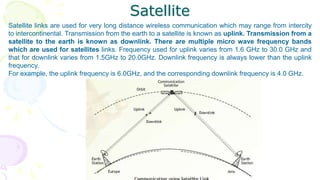
Satellite
Satellite links are used for very long distance wireless communication which may range from intercity
to intercontinental. Transmission from the earth to a satellite is known as uplink. Transmission from a
satellite to the earth is known as downlink. There are multiple micro wave frequency bands
which are used for satellites links. Frequency used for uplink varies from 1.6 GHz to 30.0 GHz and
that for downlink varies from 1.5GHz to 20.0GHz. Downlink frequency is always lower than the uplink
frequency.
For example, the uplink frequency is 6.0GHz, and the corresponding downlink frequency is 4.0 GHz.
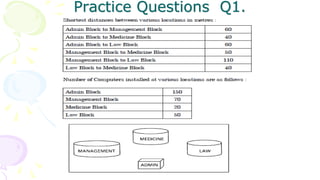
Practice Questions Q1.
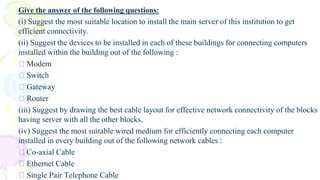
Give the answer of the following questions:
(i) Suggest the most suitable location to install the main server of this institution to get
efficient connectivity.
(ii) Suggest the devices to be installed in each of these buildings for connecting computers
installed within the building out of the following :
Modem
Switch
Gateway
Router
(iii) Suggest by drawing the best cable layout for effective network connectivity of the blocks
having server with all the other blocks.
(iv) Suggest the most suitable wired medium for efficiently connecting each computer
installed in every building out of the following network cables :
Co-axial Cable
Ethernet Cable
Single Pair Telephone Cable
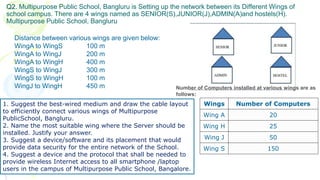
Q2. Multipurpose Public School, Bangluru is Setting up the network between its Different Wings of
school campus. There are 4 wings named as SENIOR(S),JUNIOR(J),ADMIN(A)and hostels(H).
Multipurpose Public School, Bangluru
Distance between various wings are given below:
WingA to WingS 100 m
WingA to WingJ 200 m
WingA to WingH 400 m
WingS to WingJ 300 m
WingS to WingH 100 m
WingJ to WingH 450 m
Wings Number of Computers
Wing A 20
Wing H 25
Wing J 50
Wing S 150
Number of Computers installed at various wings are as
follows:
1. Suggest the best-wired medium and draw the cable layout
to efficiently connect various wings of Multipurpose
PublicSchool, Bangluru.
2. Name the most suitable wing where the Server should be
installed. Justify your answer.
3. Suggest a device/software and its placement that would
provide data security for the entire network of the School.
4. Suggest a device and the protocol that shall be needed to
provide wireless Internet access to all smartphone /laptop
users in the campus of Multipurpose Public School, Bangalore.
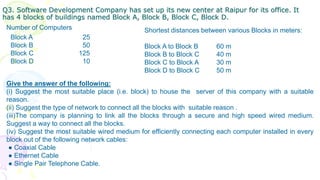
Q3. Software Development Company has set up its new center at Raipur for its office. It
has 4 blocks of buildings named Block A, Block B, Block C, Block D.
Block A 25
Block B 50
Block C 125
Block D 10
Number of Computers Shortest distances between various Blocks in meters:
Block A to Block B 60 m
Block B to Block C 40 m
Block C to Block A 30 m
Block D to Block C 50 m
Give the answer of the following:
(i) Suggest the most suitable place (i.e. block) to house the server of this company with a suitable
reason.
(ii) Suggest the type of network to connect all the blocks with suitable reason .
(iii)The company is planning to link all the blocks through a secure and high speed wired medium.
Suggest a way to connect all the blocks.
(iv) Suggest the most suitable wired medium for efficiently connecting each computer installed in every
block out of the following network cables:
● Coaxial Cable
● Ethernet Cable
● Single Pair Telephone Cable.
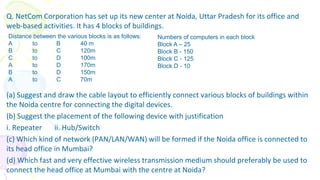
Q. NetCom Corporation has set up its new center at Noida, Uttar Pradesh for its office and
web-based activities. It has 4 blocks of buildings.
(a) Suggest and draw the cable layout to efficiently connect various blocks of buildings within
the Noida centre for connecting the digital devices.
(b) Suggest the placement of the following device with justification
i. Repeater ii. Hub/Switch
(c) Which kind of network (PAN/LAN/WAN) will be formed if the Noida office is connected to
its head office in Mumbai?
(d) Which fast and very effective wireless transmission medium should preferably be used to
connect the head office at Mumbai with the centre at Noida?
Distance between the various blocks is as follows:
A to B 40 m
B to C 120m
C to D 100m
A to D 170m
B to D 150m
A to C 70m
Numbers of computers in each block
Block A – 25
Block B - 150
Block C - 125
Block D - 10
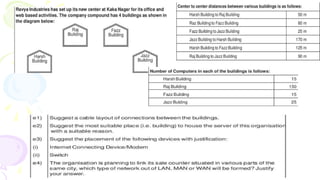
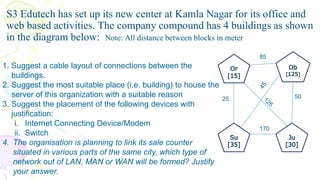
S3 Edutech has set up its new center at Kamla Nagar for its office and
web based activities. The company compound has 4 buildings as shown
in the diagram below: Note: All distance between blocks in meter
50
25
85
170
1. Suggest a cable layout of connections between the
buildings.
2. Suggest the most suitable place (i.e. building) to house the
server of this organization with a suitable reason
3. Suggest the placement of the following devices with
justification:
i. Internet Connecting Device/Modem
ii. Switch
4. The organisation is planning to link its sale counter
situated in various parts of the same city, which type of
network out of LAN, MAN or WAN will be formed? Justify
your answer.
Networking Terminology
• GSM : Global System Mobile
• SIM : Subscribe Identification Module
• TDMA: Time Division Multiple Access
• CDMA: Code Division Multiple Access
• GPRS: General Packet Radio Service
• EGPRS: Enhanced GPRS
• EDGE : Enhanced Data rate for Global Evolution
• SMS : Short Message Service
• IRC : Internet Relay Chat
• VoIP: Voice over Internet Protocol
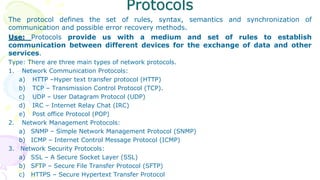
Protocols
The protocol defines the set of rules, syntax, semantics and synchronization of
communication and possible error recovery methods.
Use: Protocols provide us with a medium and set of rules to establish
communication between different devices for the exchange of data and other
services.
Type: There are three main types of network protocols.
1. Network Communication Protocols:
a) HTTP –Hyper text transfer protocol (HTTP)
b) TCP – Transmission Control Protocol (TCP).
c) UDP – User Datagram Protocol (UDP)
d) IRC – Internet Relay Chat (IRC)
e) Post office Protocol (POP)
2. Network Management Protocols:
a) SNMP – Simple Network Management Protocol (SNMP)
b) ICMP – Internet Control Message Protocol (ICMP)
3. Network Security Protocols:
a) SSL – A Secure Socket Layer (SSL)
b) SFTP – Secure File Transfer Protocol (SFTP)
c) HTTPS – Secure Hypertext Transfer Protocol
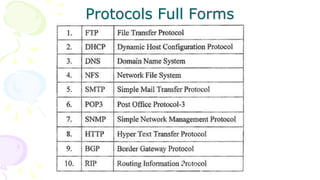
Protocols Full Forms
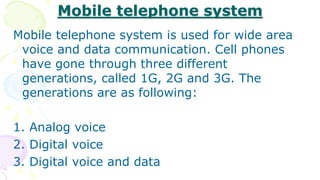
Mobile telephone system
Mobile telephone system is used for wide area
voice and data communication. Cell phones
have gone through three different
generations, called 1G, 2G and 3G. The
generations are as following:
1. Analog voice
2. Digital voice
3. Digital voice and data
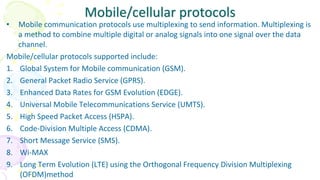
Mobile/cellular protocols
• Mobile communication protocols use multiplexing to send information. Multiplexing is
a method to combine multiple digital or analog signals into one signal over the data
channel.
Mobile/cellular protocols supported include:
1. Global System for Mobile communication (GSM).
2. General Packet Radio Service (GPRS).
3. Enhanced Data Rates for GSM Evolution (EDGE).
4. Universal Mobile Telecommunications Service (UMTS).
5. High Speed Packet Access (HSPA).
6. Code-Division Multiple Access (CDMA).
7. Short Message Service (SMS).
8. Wi-MAX
9. Long Term Evolution (LTE) using the Orthogonal Frequency Division Multiplexing
(OFDM)method
Wi-Fi and Wi-Max.
Wi-Fi and Wi-Max are used to create wireless network
connections.
• Wi-Fi is used to create small networks and used to connect
printers, computers, gaming consoles.
• Wi-Max uses spectrum to deliver connection to network.
Wi-Max is used to provide internet services such as Mobile
Data and hotspots.
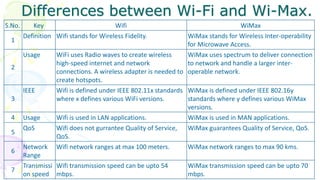
Differences between Wi-Fi and Wi-Max.
S.No. Key Wifi WiMax
1
Definition Wifi stands for Wireless Fidelity. WiMax stands for Wireless Inter-operability
for Microwave Access.
2
Usage WiFi uses Radio waves to create wireless
high-speed internet and network
connections. A wireless adapter is needed to
create hotspots.
WiMax uses spectrum to deliver connection
to network and handle a larger inter-
operable network.
3
IEEE Wifi is defined under IEEE 802.11x standards
where x defines various WiFi versions.
WiMax is defined under IEEE 802.16y
standards where y defines various WiMax
versions.
4 Usage Wifi is used in LAN applications. WiMax is used in MAN applications.
5
QoS Wifi does not gurrantee Quality of Service,
QoS.
WiMax guarantees Quality of Service, QoS.
6
Network
Range
Wifi network ranges at max 100 meters. WiMax network ranges to max 90 kms.
7
Transmissi
on speed
Wifi transmission speed can be upto 54
mbps.
WiMax transmission speed can be upto 70
mbps.
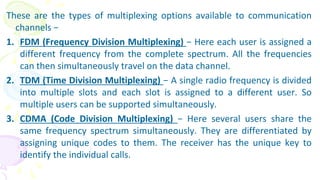
These are the types of multiplexing options available to communication
channels −
1. FDM (Frequency Division Multiplexing) − Here each user is assigned a
different frequency from the complete spectrum. All the frequencies
can then simultaneously travel on the data channel.
2. TDM (Time Division Multiplexing) − A single radio frequency is divided
into multiple slots and each slot is assigned to a different user. So
multiple users can be supported simultaneously.
3. CDMA (Code Division Multiplexing) − Here several users share the
same frequency spectrum simultaneously. They are differentiated by
assigning unique codes to them. The receiver has the unique key to
identify the individual calls.
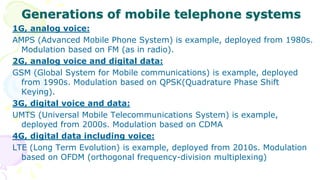
Generations of mobile telephone systems
1G, analog voice:
AMPS (Advanced Mobile Phone System) is example, deployed from 1980s.
Modulation based on FM (as in radio).
2G, analog voice and digital data:
GSM (Global System for Mobile communications) is example, deployed
from 1990s. Modulation based on QPSK(Quadrature Phase Shift
Keying).
3G, digital voice and data:
UMTS (Universal Mobile Telecommunications System) is example,
deployed from 2000s. Modulation based on CDMA
4G, digital data including voice:
LTE (Long Term Evolution) is example, deployed from 2010s. Modulation
based on OFDM (orthogonal frequency-division multiplexing)
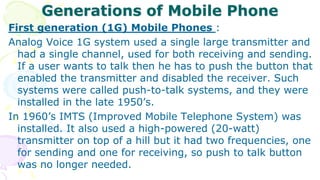
Generations of Mobile Phone
First generation (1G) Mobile Phones :
Analog Voice 1G system used a single large transmitter and
had a single channel, used for both receiving and sending.
If a user wants to talk then he has to push the button that
enabled the transmitter and disabled the receiver. Such
systems were called push-to-talk systems, and they were
installed in the late 1950’s.
In 1960’s IMTS (Improved Mobile Telephone System) was
installed. It also used a high-powered (20-watt)
transmitter on top of a hill but it had two frequencies, one
for sending and one for receiving, so push to talk button
was no longer needed.
Second generation (2G) Mobile phones :
Second generation (2G) Mobile phones : Digital voice The
first generation mobile phones was analog though second
generation is digital. It enables new services such as text
messaging. There was no worldwide standardization
during second generation. Several different systems were
developed and three have been deployed.
GSM (Global System for Mobile Communications). It is the
dominant 2G system.
Second generation 2G cellular telecom networks were
commercially launched on the GSM standard in Finland
by Radiolinja (now part of Elisa Oyj) in 1991.
Third generation (3G) Mobile Phones
Third generation (3G) Mobile Phones : Digital Voice and
Data The first generation was analog voice and second
generation was digital voice but 3rd generation is about
digital voice and data. 3G mobile telephony is all about
providing enough wireless bandwidth to keep future users
happy. Apple’s iPhone is the kind of 3G device but actually
it is not using exactly 3G , they used enhanced 2G
network i.e. 2.5G and there is not enough data capacity to
keep users happy.
CDMA2000 is a family of 3G mobile technology standards
for sending voice, data, and signaling data between
mobile phones and cell sites
Fourth generation (4G) Mobile Phones
Fourth generation (4G) Mobile Phones :
Broadband Internet Access with Digital Voice and
Data The fourth generation mobile phone is to
access internet along with digital voice and
digital data. It is more faster than 3G phones.
4G phones are capable to work like a computer.
4G phones made cloud services usable.
4G, digital data including voice LTE (Long Term
Evolution) is example, deployed from 2010s.
Fifth generation (5G) Mobile Phones
Fifth generation (5G) Mobile Phones : Super Fast
Connectivity and More Than 4G The fifth
generation mobile phones are to provide super
fast connectivity. It provides superior
performance with low latency. You will be able
to connect more devices than 4G. As 4G
network is not available all places so 5G
network will take time to make a perfect level
of coverage.
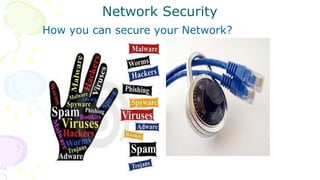
Network Security
How you can secure your Network?
Network Security is a process of providing security
at the boundaries of an organizational network by
keeping out unauthorized access.
Some common Network threats are-
Intrusion / Access Attack
– Snooping
– Eavesdropping
– Spamming
– Phishing
Denial of Service (DoS) attack
Malicious Program (Virus, Worm, Trojon
Horses)
Cybercrime
• A cyber crime is unlawful acts wherein the computer is either a tool or a
target or both.
• Cyber crimes can involve criminal activities that are traditional in nature,
such as theft, fraud, forgery, defamation and mischief, all of which are
subject to the Indian Penal Code.
• The abuse of computers has also given birth to a gamut of new age crimes
that are addressed by the Information Technology Act, 2000.
We can categorize Cyber crimes in two ways:
– The Computer as a Target :-using a computer to attack other computers.
e.g. Hacking, Virus/Worm attacks, DOS attack etc.
– Computer as a weapon :-using a computer to commit real world crimes.
e.g. Cyber Terrorism, IPR violations, Credit card frauds, Electronic funds transfer (EFT)
frauds, Pornography etc.
Cyber laws
• Cyber Law also called IT Law is the law regarding Information-technology
including computers and the internet. It is related to legal informatics and
supervises the digital circulation of information, software, information
security, and e-commerce.
• According to the Ministry of Electronics and Information Technology,
Government of India :Cyber Laws yields legal recognition to electronic
documents and a structure to support e-filing and e-commerce transactions
and also provides a legal structure to reduce, check cyber crimes.
• Importance of Cyber Law:
– It covers all transactions over the internet.
– It keeps eye on all activities over the internet.
– It touches every action and every reaction in cyberspace.
Area of Cyber Law:
The major areas of cyber law include:
1. Fraud:
2. Copyright:
3. Defamation:
4. Harassment and Stalking:
5. Freedom of Speech:
6. Trade Secrets:
7. Contracts and Employment Law:
Advantage of Cyber Law:
-Cyber Law provides both hardware and software security.
-Digital signatures have been given legal validity and sanction in the Act.
-Organizations are now able to carry out e-commerce using the legal
infrastructure provided by the Act.
-
Hacker and Cracker
• A hacker is a person who uses computers to gain unauthorized access
to data. Hackers are most often programmers. As such, hackers obtain
advanced knowledge of operating systems and programming
languages. They might discover holes within systems and the reasons
for such holes. Hackers constantly seek further knowledge, freely share
what they have discovered, and never intentionally damage data.
• A cracker is one who breaks into or otherwise violates the system
integrity of remote machines with malicious intent. Having gained
unauthorized access, crackers destroy vital data, deny legitimate users
service, or cause problems for their targets. Crackers can easily be
identified because their actions are malicious.
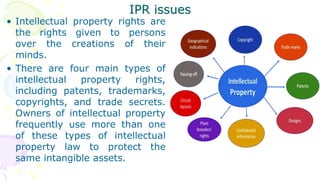
IPR issues
• Intellectual property rights are
the rights given to persons
over the creations of their
minds.
• There are four main types of
intellectual property rights,
including patents, trademarks,
copyrights, and trade secrets.
Owners of intellectual property
frequently use more than one
of these types of intellectual
property law to protect the
same intangible assets.
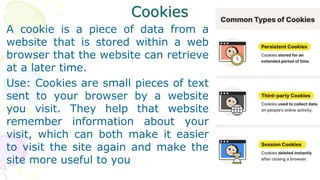
Cookies
A cookie is a piece of data from a
website that is stored within a web
browser that the website can retrieve
at a later time.
Use: Cookies are small pieces of text
sent to your browser by a website
you visit. They help that website
remember information about your
visit, which can both make it easier
to visit the site again and make the
site more useful to you
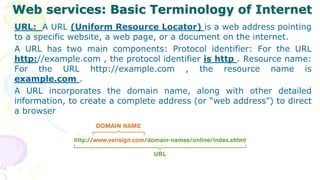
Web services: Basic Terminology of Internet
URL: A URL (Uniform Resource Locator) is a web address pointing
to a specific website, a web page, or a document on the internet.
A URL has two main components: Protocol identifier: For the URL
http://example.com , the protocol identifier is http . Resource name:
For the URL http://example.com , the resource name is
example.com .
A URL incorporates the domain name, along with other detailed
information, to create a complete address (or “web address”) to direct
a browser
Applications of Internet
• www: The World Wide Web -- also known as the web, WWW or W3 --
refers to all the public websites or pages that users can access on their
local computers and other devices through the internet. Documents and
downloadable media are made available to the network through web
servers and can be accessed by programs such as web browsers.
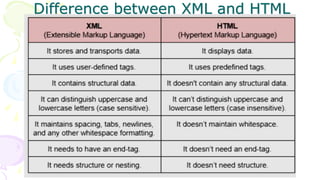
• HTML: HTML stands for Hyper Text Markup Language. HTML is the
standard markup language for creating Web pages. HTML describes the
structure of a Web page. HTML consists of a series of elements. HTML
elements tell the browser how to display the content
• XML: Extensible Markup Language is a markup language and file format
for storing, transmitting, and reconstructing arbitrary data. It defines a
set of rules for encoding documents in a format that is both human-
readable and machine-readable.
Difference between XML and HTML
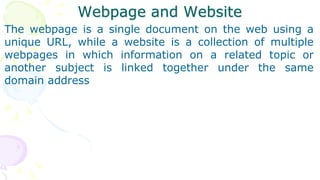
Webpage and Website
The webpage is a single document on the web using a
unique URL, while a website is a collection of multiple
webpages in which information on a related topic or
another subject is linked together under the same
domain address
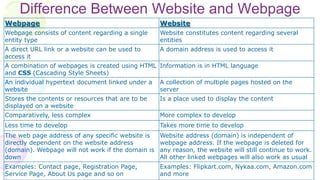
Difference Between Website and Webpage
Webpage Website
Webpage consists of content regarding a single
entity type
Website constitutes content regarding several
entities
A direct URL link or a website can be used to
access it
A domain address is used to access it
A combination of webpages is created using HTML
and CSS (Cascading Style Sheets)
Information is in HTML language
An individual hypertext document linked under a
website
A collection of multiple pages hosted on the
server
Stores the contents or resources that are to be
displayed on a website
Is a place used to display the content
Comparatively, less complex More complex to develop
Less time to develop Takes more time to develop
The web page address of any specific website is
directly dependent on the website address
(domain). Webpage will not work if the domain is
down
Website address (domain) is independent of
webpage address. If the webpage is deleted for
any reason, the website will still continue to work.
All other linked webpages will also work as usual
Examples: Contact page, Registration Page,
Service Page, About Us page and so on
Examples: Flipkart.com, Nykaa.com, Amazon.com
and more
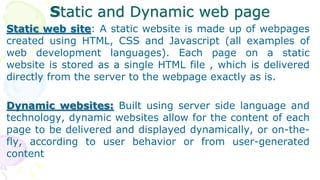
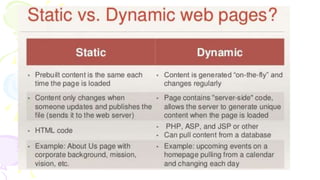
Static and Dynamic web page
Static web site: A static website is made up of webpages
created using HTML, CSS and Javascript (all examples of
web development languages). Each page on a static
website is stored as a single HTML file , which is delivered
directly from the server to the webpage exactly as is.
Dynamic websites: Built using server side language and
technology, dynamic websites allow for the content of each
page to be delivered and displayed dynamically, or on-the-
fly, according to user behavior or from user-generated
content
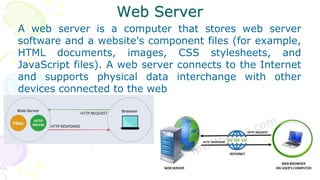
Web Server
A web server is a computer that stores web server
software and a website's component files (for example,
HTML documents, images, CSS stylesheets, and
JavaScript files). A web server connects to the Internet
and supports physical data interchange with other
devices connected to the web
Web Hosting
• A web hosting service is a type of Internet hosting service
that hosts websites for clients, i.e. it offers the facilities
required for them to create and maintain a site and makes
it accessible on the World Wide Web.
• When you have a company that has space on servers and
people buy space to store their websites so they can
appear on the Internet, this is an example of web hosting.
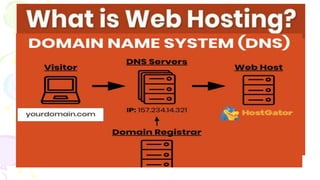
• Mapping a domain name to an IP Address is known
as Name-Address Resolution. The Domain Name Server
(DNS) Resolver performs this operation by consulting
name servers.
Protocols
The protocol defines the set of rules, syntax, semantics and synchronization of
communication and possible error recovery methods.
Use: Protocols provide us with a medium and set of rules to establish
communication between different devices for the exchange of data and other
services.
Type: There are three main types of network protocols.
1. Network Communication Protocols:
a) HTTP –Hyper text transfer protocol (HTTP)
b) TCP – Transmission Control Protocol (TCP).
c) UDP – User Datagram Protocol (UDP)
d) IRC – Internet Relay Chat (IRC)
e) Post office Protocol (POP)
2. Network Management Protocols:
a) SNMP – Simple Network Management Protocol (SNMP)
b) ICMP – Internet Control Message Protocol (ICMP)
3. Network Security Protocols:
a) SSL – A Secure Socket Layer (SSL)
b) SFTP – Secure File Transfer Protocol (SFTP)
c) HTTPS – Secure Hypertext Transfer Protocol
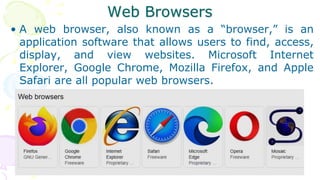
Web Browsers
• A web browser, also known as a “browser,” is an
application software that allows users to find, access,
display, and view websites. Microsoft Internet
Explorer, Google Chrome, Mozilla Firefox, and Apple
Safari are all popular web browsers.
Internet browser has settings
Every Internet browser has settings you can change,
including privacy options, security settings, search
engine preferences, autofill and autocomplete behavior,
and more. To access your Internet browser settings,
choose your browser from the list below and follow the
instructions.
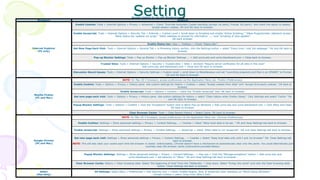
Setting
Browser Settings for use with Blackboard
Browsers Settings
Internet Explorer
(PC only)
Enable Cookies: Tools > Internet Options > Privacy > Advanced > Check "Override Automatic Cookie Handling (accept 1st party; Prompt 3rd party)" and check the option to always
accept session cookies. OK and OK back to browser.
Enable Javascript: Tools > Internet Options > Security Tab > Internet > Custom Level > Scroll down to Scripting and enable "Active Scripting," "Allow Programmatic clipboard access,"
"Allow status bar updates via script," "Allow websites to prompt for information ...," and "Scripting of Java applets".
OK back browser.
Enable Status bar: View > Toolbars > Check "Status Bar".
Get New Page Each Visit: Tools > Internet Options > General Tab > in Browsing history section, click the Settings button > select "Every time I visit the webpage." OK and OK back to
browser.
Pop-up Blocker Settings: Tools > Pop-up Blocker > Pop-up Blocker Settings ... > Add ucmo.edu and ucmo.blackboard.com > Close back to browser.
Trusted Sites: Tools > Internet Options > Security > Trusted sites > Sites > Uncheck "Require server verification for all sites in this zone"
Add ucmo.edu and blackboard.com > Close and OK back to browser.
Discussion Board Issues: Tools > Internet Options > Security Settings > Custom Level > scroll down to Miscellaneous and set “Launching programs and files in an IFRAME” to Prompt.
OK and OK back to browser.
Mozilla Firefox
(PC and Mac)
NOTE: for Mac OS X browsers, access preferences via the Application Menu (ex. Firefox>Preferences).
Enable Cookies: Tools > Options > Privacy > History pane: Use custom settings for history > Cookies > select “Accept cookies from sites” and "Accept third-party cookies." OK back to
browser.
Enable Javascript: Tools > Options > Content > check the “Enable Javascript” box. OK back to browser.
Get new page each visit: Tools > Options > Privacy > History pane: Use custom settings for history > select "Clear history when Firefox closes.“ Click Settings and select "Cache.” OK
and OK back to browser.
Popup Blocker Settings: Tools > Options > Content > Click the “Exceptions” button next to Block Pop-up Windows > Add ucmo.edu and ucmo.blackboard.com > Click Allow and Close.
OK back to browser.
Clear Browser Cache: Tools > Clear Recent History > Select Cache. OK back to browser.
Google Chrome
(PC and Mac)
NOTE: for Mac OS X browsers, access preferences via the Application Menu (ex. Chrome>Preferences).
Enable Cookies: Settings > Show advanced settings > Privacy > Content Settings... > Cookies > check "Allow local data to be set.." OK and close Settings tab back to browser.
Enable Javascript: Settings > Show advanced settings > Privacy > Content Settings... > Javascript > check “Allow sites to run Javascript”. OK and close Settings tab back to browser.
Get new page each visit: Settings > Show advanced settings > Privacy > Content Settings... > Cookies > Select "Keep local data only unitl I quit my browser” OK. Close Settings tab
back to browser.
NOTE: This will also clear your cookie each time the browser is closed. Unfortunately, Chrome doesn't have a mechanism to automatically clear only the cache. You could alternatively just
routinely clear the browser cache (instructions provided below).
Popup Blocker Settings: Settings > Show advanced settings > Privacy > Content Settings... > Pop-ups > Click the “Manage exceptions” button > Add ucmo.edu and
ucmo.blackboard.com > set behavior to "Allow." OK and close Settings tab back to browser.
Clear Browser Cache: History > Clear browsing data: Select "the beginning of time" from the "Obliterate..." drop down, Select "Emtpy the cache" and click the Clear brwosing data
button. Close Settings tab back to browser.
Safari
(Mac Only)
All Settings: Safari Menu > Preferences > click Security icon > Check: Enable Plugins, Java, & Javascript.Clear checkbox on "Block Popup Windows."
Accept Cookies > select "Only From Sites I Visit."
Thanks & Have a nice Day
The End
Powered by:
Lakhan Singh Pal,
PGT(Computer Science)

Computer Networking_XII_CS_CBSE_OFKVS.ppt

  • 1.
    Unit II: Computer Networks MarksWeightage: 10 KENDRIYA VIDYALAYA No1 SAMBALPUR
  • 2.
    Introduction The advent ofcomputer and communication technology have changed our daily life. Observe the following daily life examples- Watching Cable TV Cash Withdrawal from ATM Sending and receiving E-mails Booking Railway or Air-lines Tickets. Sending and receiving SMS through Mobile. These services are provided by the collection of interconnected communicating devices like computers, which make Communication Network. The communication over network are possible through transfer of text/picture/audio/video data through wire or wireless transmission medium.
  • 3.
    What is aNetwork? • In simplest terms, the network can be defined as – “A computer network consists of two or more connected autonomous computers”
  • 4.
    Goal of Networking Sharing Resources: Primary use of network is to share data and peripherals among users irrespective of their physical location. Ex. Sharing database, program files, audio and video files, printer and scanners etc.  Improved Communication: A computer network enables reliable, secure and faster communication between users. It saves our time and offers easy communication methods. Ex. e-mail, SMS and MMS etc.  Reduced Communication cost: Sharing resources also reduces its communication cost. Using today’s public network we can send a large quantity of data at very low cost. Internet and Mobile network playing a very important role in sending and receiving text, image, audio and video data.
  • 5.
    Components of aNetwork • Sender: A device or a computer that sends the data. • Receiver: A device or a computer that receives the data. • Message: Information to be communicated. It may be text, images, sound or video. • Medium: A transmission medium is a physical path through which the data flows from sender to receiver. A cable, fiber- optics or radio waves can be the medium. • Protocol: A set of rules that govern data communication. It represents an agreement between the communicating devices.
  • 6.
    Evolution of Networking •ARPANET: The Advanced Research Projects Agency Network was the first wide-area packet-switched network with distributed control and one of the first networks to implement the TCP/IP protocol suite. • In 1969, The US govt. formed an agency named ARPANET to connect computers at various universities and defense agencies. The main objective of ARPANET was to develop a network that could continue to function efficiently even in the event of a nuclear attack. • ARPANET and the Defense Data Network officially changed to the TCP/IP standard on January 1, 1983, hence the birth of the Internet. All networks could now be connected by a universal language. • The National Science Foundation Network (NSFNET) was a program of coordinated, evolving projects sponsored by the National Science Foundation(NSF) from 1985 to 1995 to promote advanced research and education networking in the United States
  • 7.
    Internet • The Internet,sometimes called simply "the Net," is a worldwide system of computer networks -- a network of networks in which users at any one computer can, if they have permission, get information from any other computer (and sometimes talk directly to users at other computers). It was conceived by the Advanced Research Projects Agency (ARPA) of the U.S. government in 1969 and was first known as the ARPANET. • Internet (INTERconnection NETwork): The Internet is a worldwide network of computer networks. It is not owned by anybody. The internet has evolved from ARPANET. The internet is a globally connected network system that utilizes TCP/IP to transmit information. following services are instantly available through internet : Email, Web-enabled audio/video conferencing services, Online movies and gaming , Data transfer/file-sharing, Instant messaging , Internet forums , Social networking , Online shopping ,Financial services
  • 8.
    Interspace • Interspace: isa client/server software program that allows multiple users to communicate online with real –time audio, video and text chat in dynamic 3D environments. Interspace is a software that allows multiple users in a client-server environment to communicate with each other to send and receive data of various types such as data files, video, audio and textual data. • The difference between Internet and Interspace: The Interspace is a vision of what the Internet will become, where users cross-correlate information in multiple sources. It is an applications environment for interconnecting spaces to manipulate information, much as the Internet is a protocol environment for interconnecting networks to transmit data.
  • 9.
    Switching techniques • Switchingis the technique by which nodes control or switch data to transmit it between specific points on a network.
  • 16.
    Types of Network Acomputer network may be small or big as per number of various types of computers linked together. Thus, networks vary in size, complexity and geographical area spread. On the basis of geographical spread, network may be classified as- 1. LAN (Local Area Network) 2. MAN (Metropolitan Area Network) 3. WAN (Wide Area Network) 4. PAN (Personal Area Network)
  • 17.
    Types of Network •LAN (Local Area Network): This system spans on a small area like a small office or home. The computer systems are linked with wire/cables or wireless system. The key purpose of LAN is to sharing the resources. LAN users can share data, programs, Printer, Disk, modem, etc. • MAN (Metropolitan Area Network): A large computer network that usually spans a city or a large campus. MAN usually interconnects a number of LANs. It also shares the resources among users. • WAN (Wide Area Network): This type of network spreads across large geographical boundaries, across countries and continents. WANs are generally used to interconnect several other types of networks such as LANs, MANs etc. It facilitates fast and efficient exchange of information at high speed and low cost. • PAN (Personal Area Network) : The PANs are small network, used to establish communication between computer and other devices in small proximity up to 10 meters using wired USB connectivity or wireless system like Bluetooth or Infrared. PANs are used to connect computers, laptops, Mobiles and other IT- enabled devices to each others.
  • 19.
    • Peer-to-Peer (P2P):P2p networking type is most commonly used computer networks. All computers possesses same status within the network and no computer control any other computer but it self, this network does not have server to control and monitor. Security level is not towards higher side and each work station it self is responsible for security. • Client-Server: Client-server model has one dedicated computer which is called server. Server is responsible to perform according to the request sent to it by clients. This concept is known as centralization, this enables server to keep profile of users, data, and software etc completely in tacked and organized. Category of Network
  • 20.
    Networking Devices Networking devicesare equipments that allow receive or transmit data or signal and used to make communication channel. Some common Networking devices are- Modem Hub Switch Router Bridge Gateway Repeater
  • 22.
    1. Modem: -Amodem is a hardware which connects to a computer, broadband network or wireless router. Modem converts information between analogue and digital formats in real time making seamless two- way network communication. The full form of Modem or modem stands for modulator–demodulator.
  • 23.
  • 24.
  • 25.
  • 26.
    4. Router A ROUTERis a networking device that is used to extend or segment networks by forwarding packets from one logical network to another. Routers are most often used in large internetworks that use the TCP/IP protocol suite. Routers are classified as one of the following: Static routers: These must have their routing tables configured manually with all network addresses and paths in the internetwork. Dynamic routers: These automatically create their routing tables by listening to network traffic. (The first route must be configured manually, however.)
  • 28.
  • 29.
    6. Bridge A bridgeis a network device that connects two or more LANs (local area networks) to form a larger LAN. Network bridging refers to the process of aggregating networks. A bridge connects the various components, making them appear to be part of a single network.
  • 30.
    Repeater: A repeateris a dynamic network device used to reproduce the signals when they transmit over a greater distance so that the signal's strength remains equal. In other words, A repeater, range extender, or signal booster is a device that forwards signals from the router/switch/hub to cover a larger area.
  • 31.
  • 32.
  • 33.
    Star Topology This topologyconsists of a central node to which all other nodes are connected by a single path. It is most popular for LANs.
  • 34.
    Star Topology Advantages: • Easyto setup and requires simple protocol. • Easy to locate fault in case of network failure. • It offers centralized control over the network. Disadvantages: • Increases cabling cost since each node is directly connected to the center node. • Difficult to expand due to limited connecting points at centre node or device. • All nodes are dependent on central node. If the central device goes down then entire network rendered inoperable.
  • 35.
    Bus Topology In thebus topology, all devices are connected using a single cable. It is simple and oldest topology used in the early days of networking.
  • 36.
    Bus Topology Advantages: Simple layoutand requires less cables. Easy to expand since node may be connected at any point on linear path. Disadvantages: Detection of fault is quite difficult because there is no centralized control. Node should be equipped with processing capability (intelligent) because it requires complicated protocols. To cover a long distance, Repeaters is needed to maintain the signal intensity. Terminator is required to terminate the signal at both end of the cable.
  • 37.
    • Tree topologycombines multiple star topologies together onto a bus. In its simplest form, only connecting port devices (hub or switch) connect directly to the tree bus, and works as a "root" of the network tree. • This bus-star hybrid approach supports future expandability of the network much better than a bus or a Star. Tree Topologies
  • 38.
    Transmission Media [Communication Channel] • All the computers or connecting devices in the network must be connected to each other by a Transmission Media or channel. • A communication channel is either a physical transmission medium such as a wire, or to a logical connection over a multiplexed medium such as a radio channel in telecommunications and computer networking. • The selection of Media depends on the cost, data transfer speed, bandwidth and distance.
  • 39.
    Transmission media maybe classified as- Guided Media (Wired) 1. Twisted Pair Cable 2. Coaxial Cable 3. Optical Fiber Unguided Media (Wireless) 1. Microwave 2. Radio wave 3. Satellite 4. Others (Bluetooth, Infrared and Laser etc.)
  • 41.
    Bandwidth Bandwidth: The amountof data that can be transferred from one point to another.it is a measure of the range of frequencies a transmitted signal occupies. In digital systems, bandwidth is the data speed in bits per second. In analog systems, bandwidth is measured in terms of the difference between the highest-frequency signal component and the lowest- frequency signal component. Bandwidth is expressed in Hz, KHz, and MHz. The hertz (symbol: Hz) is the derived unit of frequency in the International System of Units (SI) and is defined as one cycle per second. It is named after Heinrich Rudolf Hertz. Hertz are commonly expressed in multiples: kiloHertz (103Hz, kHz), megaHertz (106 Hz, MHz), gigaHertz (109 Hz, GHz)
  • 42.
    Data Transfer Rate Datatransfer rate: DTR is the amount of data in digital form that is moved from one place to another in a given time on a network. Data rates are often measured in megabits (million bits) or megabytes (million bytes) per second.  bps: bits per second  Bps: bytes per second  Kbps: kilobits per second  KBps: kilo bytes per second  Mbps: megabits per second  MBps: megabytes per second  Gbps: giga bits per second  GBps: giga bytes per second  Tbps: tera bits per second  TBps: tera bytes per second
  • 47.
    Radio Waves • Radiowaves have a frequency range of 3 KHz to 3GHz. Radio waves are used for communication over distances ranging from a few meters (in walkie-talkies) upto covering an entire city. These waves are easy to generate, can travel long distances and can penetrate buildings easily. That's why they are widely used for communication, both indoors and outdoors. Cordless phones, AM and FM radio broadcast, Garage door openers etc. are examples of radio wave transmission.
  • 48.
    Micro waves • Microwaves have a frequency range of 300MHz (0.3 GHz) to 300 GHz. This range has some overlapping portion (0.3GHz - 3GHz) with radio waves as there is no clear-cut demarcation between radio waves and micro waves. Microwaves travel in straight lines and cannot penetrate any solid object. Therefore for long distance microwave communication, high towers are built and microwave antennas are put on their tops. • Distance between two microwave towers depends on many factors including frequency of the waves being used and heights of the towers. These waves travel in straight lines and therefore the sending and receiving antennas have to be aligned with each other. • An example of usage of microwaves for communication is as follows: In the big cities where land is very costly and a lot of formalities have to be completed to get permission to dig land for cabling, microwave antennas can be put on top of high rise buildings and communication can be started in a short time.
  • 50.
    Infrared waves Infrared waveshave a frequency range of 300 GHz to 400 THz. If you recall VIBGYOR spectrum of light, you will also recall that red light has the lowest frequency (400THz - 484THz) in this spectrum. Infrared waves are so called because they have a frequency range of just less than that of red light. These waves are used for short range communication (approx. 5m) in a variety of wireless communications, monitoring, and control applications. Home-entertainment remote- control devices, Cordless mouse, and Intrusion detectors are some of the devices that utilize infrared communication. Bluetooth technology uses radio waves in the frequency range of 2.402 GHz to 2.480 GHz. This technology is used for short range communication (approx. 10m) in a variety of devices for wireless communication.
  • 51.
    Satellite Satellite links areused for very long distance wireless communication which may range from intercity to intercontinental. Transmission from the earth to a satellite is known as uplink. Transmission from a satellite to the earth is known as downlink. There are multiple micro wave frequency bands which are used for satellites links. Frequency used for uplink varies from 1.6 GHz to 30.0 GHz and that for downlink varies from 1.5GHz to 20.0GHz. Downlink frequency is always lower than the uplink frequency. For example, the uplink frequency is 6.0GHz, and the corresponding downlink frequency is 4.0 GHz.
  • 52.
  • 53.
    Give the answerof the following questions: (i) Suggest the most suitable location to install the main server of this institution to get efficient connectivity. (ii) Suggest the devices to be installed in each of these buildings for connecting computers installed within the building out of the following : Modem Switch Gateway Router (iii) Suggest by drawing the best cable layout for effective network connectivity of the blocks having server with all the other blocks. (iv) Suggest the most suitable wired medium for efficiently connecting each computer installed in every building out of the following network cables : Co-axial Cable Ethernet Cable Single Pair Telephone Cable
  • 54.
    Q2. Multipurpose PublicSchool, Bangluru is Setting up the network between its Different Wings of school campus. There are 4 wings named as SENIOR(S),JUNIOR(J),ADMIN(A)and hostels(H). Multipurpose Public School, Bangluru Distance between various wings are given below: WingA to WingS 100 m WingA to WingJ 200 m WingA to WingH 400 m WingS to WingJ 300 m WingS to WingH 100 m WingJ to WingH 450 m Wings Number of Computers Wing A 20 Wing H 25 Wing J 50 Wing S 150 Number of Computers installed at various wings are as follows: 1. Suggest the best-wired medium and draw the cable layout to efficiently connect various wings of Multipurpose PublicSchool, Bangluru. 2. Name the most suitable wing where the Server should be installed. Justify your answer. 3. Suggest a device/software and its placement that would provide data security for the entire network of the School. 4. Suggest a device and the protocol that shall be needed to provide wireless Internet access to all smartphone /laptop users in the campus of Multipurpose Public School, Bangalore.
  • 55.
    Q3. Software DevelopmentCompany has set up its new center at Raipur for its office. It has 4 blocks of buildings named Block A, Block B, Block C, Block D. Block A 25 Block B 50 Block C 125 Block D 10 Number of Computers Shortest distances between various Blocks in meters: Block A to Block B 60 m Block B to Block C 40 m Block C to Block A 30 m Block D to Block C 50 m Give the answer of the following: (i) Suggest the most suitable place (i.e. block) to house the server of this company with a suitable reason. (ii) Suggest the type of network to connect all the blocks with suitable reason . (iii)The company is planning to link all the blocks through a secure and high speed wired medium. Suggest a way to connect all the blocks. (iv) Suggest the most suitable wired medium for efficiently connecting each computer installed in every block out of the following network cables: ● Coaxial Cable ● Ethernet Cable ● Single Pair Telephone Cable.
  • 59.
    Q. NetCom Corporationhas set up its new center at Noida, Uttar Pradesh for its office and web-based activities. It has 4 blocks of buildings. (a) Suggest and draw the cable layout to efficiently connect various blocks of buildings within the Noida centre for connecting the digital devices. (b) Suggest the placement of the following device with justification i. Repeater ii. Hub/Switch (c) Which kind of network (PAN/LAN/WAN) will be formed if the Noida office is connected to its head office in Mumbai? (d) Which fast and very effective wireless transmission medium should preferably be used to connect the head office at Mumbai with the centre at Noida? Distance between the various blocks is as follows: A to B 40 m B to C 120m C to D 100m A to D 170m B to D 150m A to C 70m Numbers of computers in each block Block A – 25 Block B - 150 Block C - 125 Block D - 10
  • 60.
    S3 Edutech hasset up its new center at Kamla Nagar for its office and web based activities. The company compound has 4 buildings as shown in the diagram below: Note: All distance between blocks in meter 50 25 85 170 1. Suggest a cable layout of connections between the buildings. 2. Suggest the most suitable place (i.e. building) to house the server of this organization with a suitable reason 3. Suggest the placement of the following devices with justification: i. Internet Connecting Device/Modem ii. Switch 4. The organisation is planning to link its sale counter situated in various parts of the same city, which type of network out of LAN, MAN or WAN will be formed? Justify your answer.
  • 61.
    Networking Terminology • GSM: Global System Mobile • SIM : Subscribe Identification Module • TDMA: Time Division Multiple Access • CDMA: Code Division Multiple Access • GPRS: General Packet Radio Service • EGPRS: Enhanced GPRS • EDGE : Enhanced Data rate for Global Evolution • SMS : Short Message Service • IRC : Internet Relay Chat • VoIP: Voice over Internet Protocol
  • 62.
    Protocols The protocol definesthe set of rules, syntax, semantics and synchronization of communication and possible error recovery methods. Use: Protocols provide us with a medium and set of rules to establish communication between different devices for the exchange of data and other services. Type: There are three main types of network protocols. 1. Network Communication Protocols: a) HTTP –Hyper text transfer protocol (HTTP) b) TCP – Transmission Control Protocol (TCP). c) UDP – User Datagram Protocol (UDP) d) IRC – Internet Relay Chat (IRC) e) Post office Protocol (POP) 2. Network Management Protocols: a) SNMP – Simple Network Management Protocol (SNMP) b) ICMP – Internet Control Message Protocol (ICMP) 3. Network Security Protocols: a) SSL – A Secure Socket Layer (SSL) b) SFTP – Secure File Transfer Protocol (SFTP) c) HTTPS – Secure Hypertext Transfer Protocol
  • 63.
  • 64.
    Mobile telephone system Mobiletelephone system is used for wide area voice and data communication. Cell phones have gone through three different generations, called 1G, 2G and 3G. The generations are as following: 1. Analog voice 2. Digital voice 3. Digital voice and data
  • 65.
    Mobile/cellular protocols • Mobilecommunication protocols use multiplexing to send information. Multiplexing is a method to combine multiple digital or analog signals into one signal over the data channel. Mobile/cellular protocols supported include: 1. Global System for Mobile communication (GSM). 2. General Packet Radio Service (GPRS). 3. Enhanced Data Rates for GSM Evolution (EDGE). 4. Universal Mobile Telecommunications Service (UMTS). 5. High Speed Packet Access (HSPA). 6. Code-Division Multiple Access (CDMA). 7. Short Message Service (SMS). 8. Wi-MAX 9. Long Term Evolution (LTE) using the Orthogonal Frequency Division Multiplexing (OFDM)method
  • 66.
    Wi-Fi and Wi-Max. Wi-Fiand Wi-Max are used to create wireless network connections. • Wi-Fi is used to create small networks and used to connect printers, computers, gaming consoles. • Wi-Max uses spectrum to deliver connection to network. Wi-Max is used to provide internet services such as Mobile Data and hotspots.
  • 67.
    Differences between Wi-Fiand Wi-Max. S.No. Key Wifi WiMax 1 Definition Wifi stands for Wireless Fidelity. WiMax stands for Wireless Inter-operability for Microwave Access. 2 Usage WiFi uses Radio waves to create wireless high-speed internet and network connections. A wireless adapter is needed to create hotspots. WiMax uses spectrum to deliver connection to network and handle a larger inter- operable network. 3 IEEE Wifi is defined under IEEE 802.11x standards where x defines various WiFi versions. WiMax is defined under IEEE 802.16y standards where y defines various WiMax versions. 4 Usage Wifi is used in LAN applications. WiMax is used in MAN applications. 5 QoS Wifi does not gurrantee Quality of Service, QoS. WiMax guarantees Quality of Service, QoS. 6 Network Range Wifi network ranges at max 100 meters. WiMax network ranges to max 90 kms. 7 Transmissi on speed Wifi transmission speed can be upto 54 mbps. WiMax transmission speed can be upto 70 mbps.
  • 68.
    These are thetypes of multiplexing options available to communication channels − 1. FDM (Frequency Division Multiplexing) − Here each user is assigned a different frequency from the complete spectrum. All the frequencies can then simultaneously travel on the data channel. 2. TDM (Time Division Multiplexing) − A single radio frequency is divided into multiple slots and each slot is assigned to a different user. So multiple users can be supported simultaneously. 3. CDMA (Code Division Multiplexing) − Here several users share the same frequency spectrum simultaneously. They are differentiated by assigning unique codes to them. The receiver has the unique key to identify the individual calls.
  • 69.
    Generations of mobiletelephone systems 1G, analog voice: AMPS (Advanced Mobile Phone System) is example, deployed from 1980s. Modulation based on FM (as in radio). 2G, analog voice and digital data: GSM (Global System for Mobile communications) is example, deployed from 1990s. Modulation based on QPSK(Quadrature Phase Shift Keying). 3G, digital voice and data: UMTS (Universal Mobile Telecommunications System) is example, deployed from 2000s. Modulation based on CDMA 4G, digital data including voice: LTE (Long Term Evolution) is example, deployed from 2010s. Modulation based on OFDM (orthogonal frequency-division multiplexing)
  • 70.
    Generations of MobilePhone First generation (1G) Mobile Phones : Analog Voice 1G system used a single large transmitter and had a single channel, used for both receiving and sending. If a user wants to talk then he has to push the button that enabled the transmitter and disabled the receiver. Such systems were called push-to-talk systems, and they were installed in the late 1950’s. In 1960’s IMTS (Improved Mobile Telephone System) was installed. It also used a high-powered (20-watt) transmitter on top of a hill but it had two frequencies, one for sending and one for receiving, so push to talk button was no longer needed.
  • 71.
    Second generation (2G)Mobile phones : Second generation (2G) Mobile phones : Digital voice The first generation mobile phones was analog though second generation is digital. It enables new services such as text messaging. There was no worldwide standardization during second generation. Several different systems were developed and three have been deployed. GSM (Global System for Mobile Communications). It is the dominant 2G system. Second generation 2G cellular telecom networks were commercially launched on the GSM standard in Finland by Radiolinja (now part of Elisa Oyj) in 1991.
  • 72.
    Third generation (3G)Mobile Phones Third generation (3G) Mobile Phones : Digital Voice and Data The first generation was analog voice and second generation was digital voice but 3rd generation is about digital voice and data. 3G mobile telephony is all about providing enough wireless bandwidth to keep future users happy. Apple’s iPhone is the kind of 3G device but actually it is not using exactly 3G , they used enhanced 2G network i.e. 2.5G and there is not enough data capacity to keep users happy. CDMA2000 is a family of 3G mobile technology standards for sending voice, data, and signaling data between mobile phones and cell sites
  • 73.
    Fourth generation (4G)Mobile Phones Fourth generation (4G) Mobile Phones : Broadband Internet Access with Digital Voice and Data The fourth generation mobile phone is to access internet along with digital voice and digital data. It is more faster than 3G phones. 4G phones are capable to work like a computer. 4G phones made cloud services usable. 4G, digital data including voice LTE (Long Term Evolution) is example, deployed from 2010s.
  • 74.
    Fifth generation (5G)Mobile Phones Fifth generation (5G) Mobile Phones : Super Fast Connectivity and More Than 4G The fifth generation mobile phones are to provide super fast connectivity. It provides superior performance with low latency. You will be able to connect more devices than 4G. As 4G network is not available all places so 5G network will take time to make a perfect level of coverage.
  • 75.
    Network Security How youcan secure your Network?
  • 76.
    Network Security isa process of providing security at the boundaries of an organizational network by keeping out unauthorized access. Some common Network threats are- Intrusion / Access Attack – Snooping – Eavesdropping – Spamming – Phishing Denial of Service (DoS) attack Malicious Program (Virus, Worm, Trojon Horses)
  • 77.
    Cybercrime • A cybercrime is unlawful acts wherein the computer is either a tool or a target or both. • Cyber crimes can involve criminal activities that are traditional in nature, such as theft, fraud, forgery, defamation and mischief, all of which are subject to the Indian Penal Code. • The abuse of computers has also given birth to a gamut of new age crimes that are addressed by the Information Technology Act, 2000. We can categorize Cyber crimes in two ways: – The Computer as a Target :-using a computer to attack other computers. e.g. Hacking, Virus/Worm attacks, DOS attack etc. – Computer as a weapon :-using a computer to commit real world crimes. e.g. Cyber Terrorism, IPR violations, Credit card frauds, Electronic funds transfer (EFT) frauds, Pornography etc.
  • 78.
    Cyber laws • CyberLaw also called IT Law is the law regarding Information-technology including computers and the internet. It is related to legal informatics and supervises the digital circulation of information, software, information security, and e-commerce. • According to the Ministry of Electronics and Information Technology, Government of India :Cyber Laws yields legal recognition to electronic documents and a structure to support e-filing and e-commerce transactions and also provides a legal structure to reduce, check cyber crimes. • Importance of Cyber Law: – It covers all transactions over the internet. – It keeps eye on all activities over the internet. – It touches every action and every reaction in cyberspace.
  • 79.
    Area of CyberLaw: The major areas of cyber law include: 1. Fraud: 2. Copyright: 3. Defamation: 4. Harassment and Stalking: 5. Freedom of Speech: 6. Trade Secrets: 7. Contracts and Employment Law: Advantage of Cyber Law: -Cyber Law provides both hardware and software security. -Digital signatures have been given legal validity and sanction in the Act. -Organizations are now able to carry out e-commerce using the legal infrastructure provided by the Act. -
  • 80.
    Hacker and Cracker •A hacker is a person who uses computers to gain unauthorized access to data. Hackers are most often programmers. As such, hackers obtain advanced knowledge of operating systems and programming languages. They might discover holes within systems and the reasons for such holes. Hackers constantly seek further knowledge, freely share what they have discovered, and never intentionally damage data. • A cracker is one who breaks into or otherwise violates the system integrity of remote machines with malicious intent. Having gained unauthorized access, crackers destroy vital data, deny legitimate users service, or cause problems for their targets. Crackers can easily be identified because their actions are malicious.
  • 81.
    IPR issues • Intellectualproperty rights are the rights given to persons over the creations of their minds. • There are four main types of intellectual property rights, including patents, trademarks, copyrights, and trade secrets. Owners of intellectual property frequently use more than one of these types of intellectual property law to protect the same intangible assets.
  • 82.
    Cookies A cookie isa piece of data from a website that is stored within a web browser that the website can retrieve at a later time. Use: Cookies are small pieces of text sent to your browser by a website you visit. They help that website remember information about your visit, which can both make it easier to visit the site again and make the site more useful to you
  • 83.
    Web services: BasicTerminology of Internet URL: A URL (Uniform Resource Locator) is a web address pointing to a specific website, a web page, or a document on the internet. A URL has two main components: Protocol identifier: For the URL http://example.com , the protocol identifier is http . Resource name: For the URL http://example.com , the resource name is example.com . A URL incorporates the domain name, along with other detailed information, to create a complete address (or “web address”) to direct a browser
  • 84.
    Applications of Internet •www: The World Wide Web -- also known as the web, WWW or W3 -- refers to all the public websites or pages that users can access on their local computers and other devices through the internet. Documents and downloadable media are made available to the network through web servers and can be accessed by programs such as web browsers. • HTML: HTML stands for Hyper Text Markup Language. HTML is the standard markup language for creating Web pages. HTML describes the structure of a Web page. HTML consists of a series of elements. HTML elements tell the browser how to display the content • XML: Extensible Markup Language is a markup language and file format for storing, transmitting, and reconstructing arbitrary data. It defines a set of rules for encoding documents in a format that is both human- readable and machine-readable.
  • 85.
  • 86.
    Webpage and Website Thewebpage is a single document on the web using a unique URL, while a website is a collection of multiple webpages in which information on a related topic or another subject is linked together under the same domain address
  • 87.
    Difference Between Websiteand Webpage Webpage Website Webpage consists of content regarding a single entity type Website constitutes content regarding several entities A direct URL link or a website can be used to access it A domain address is used to access it A combination of webpages is created using HTML and CSS (Cascading Style Sheets) Information is in HTML language An individual hypertext document linked under a website A collection of multiple pages hosted on the server Stores the contents or resources that are to be displayed on a website Is a place used to display the content Comparatively, less complex More complex to develop Less time to develop Takes more time to develop The web page address of any specific website is directly dependent on the website address (domain). Webpage will not work if the domain is down Website address (domain) is independent of webpage address. If the webpage is deleted for any reason, the website will still continue to work. All other linked webpages will also work as usual Examples: Contact page, Registration Page, Service Page, About Us page and so on Examples: Flipkart.com, Nykaa.com, Amazon.com and more
  • 88.
    Static and Dynamicweb page Static web site: A static website is made up of webpages created using HTML, CSS and Javascript (all examples of web development languages). Each page on a static website is stored as a single HTML file , which is delivered directly from the server to the webpage exactly as is. Dynamic websites: Built using server side language and technology, dynamic websites allow for the content of each page to be delivered and displayed dynamically, or on-the- fly, according to user behavior or from user-generated content
  • 90.
    Web Server A webserver is a computer that stores web server software and a website's component files (for example, HTML documents, images, CSS stylesheets, and JavaScript files). A web server connects to the Internet and supports physical data interchange with other devices connected to the web
  • 91.
    Web Hosting • Aweb hosting service is a type of Internet hosting service that hosts websites for clients, i.e. it offers the facilities required for them to create and maintain a site and makes it accessible on the World Wide Web. • When you have a company that has space on servers and people buy space to store their websites so they can appear on the Internet, this is an example of web hosting. • Mapping a domain name to an IP Address is known as Name-Address Resolution. The Domain Name Server (DNS) Resolver performs this operation by consulting name servers.
  • 93.
    Protocols The protocol definesthe set of rules, syntax, semantics and synchronization of communication and possible error recovery methods. Use: Protocols provide us with a medium and set of rules to establish communication between different devices for the exchange of data and other services. Type: There are three main types of network protocols. 1. Network Communication Protocols: a) HTTP –Hyper text transfer protocol (HTTP) b) TCP – Transmission Control Protocol (TCP). c) UDP – User Datagram Protocol (UDP) d) IRC – Internet Relay Chat (IRC) e) Post office Protocol (POP) 2. Network Management Protocols: a) SNMP – Simple Network Management Protocol (SNMP) b) ICMP – Internet Control Message Protocol (ICMP) 3. Network Security Protocols: a) SSL – A Secure Socket Layer (SSL) b) SFTP – Secure File Transfer Protocol (SFTP) c) HTTPS – Secure Hypertext Transfer Protocol
  • 94.
    Web Browsers • Aweb browser, also known as a “browser,” is an application software that allows users to find, access, display, and view websites. Microsoft Internet Explorer, Google Chrome, Mozilla Firefox, and Apple Safari are all popular web browsers.
  • 95.
    Internet browser hassettings Every Internet browser has settings you can change, including privacy options, security settings, search engine preferences, autofill and autocomplete behavior, and more. To access your Internet browser settings, choose your browser from the list below and follow the instructions.
  • 96.
    Setting Browser Settings foruse with Blackboard Browsers Settings Internet Explorer (PC only) Enable Cookies: Tools > Internet Options > Privacy > Advanced > Check "Override Automatic Cookie Handling (accept 1st party; Prompt 3rd party)" and check the option to always accept session cookies. OK and OK back to browser. Enable Javascript: Tools > Internet Options > Security Tab > Internet > Custom Level > Scroll down to Scripting and enable "Active Scripting," "Allow Programmatic clipboard access," "Allow status bar updates via script," "Allow websites to prompt for information ...," and "Scripting of Java applets". OK back browser. Enable Status bar: View > Toolbars > Check "Status Bar". Get New Page Each Visit: Tools > Internet Options > General Tab > in Browsing history section, click the Settings button > select "Every time I visit the webpage." OK and OK back to browser. Pop-up Blocker Settings: Tools > Pop-up Blocker > Pop-up Blocker Settings ... > Add ucmo.edu and ucmo.blackboard.com > Close back to browser. Trusted Sites: Tools > Internet Options > Security > Trusted sites > Sites > Uncheck "Require server verification for all sites in this zone" Add ucmo.edu and blackboard.com > Close and OK back to browser. Discussion Board Issues: Tools > Internet Options > Security Settings > Custom Level > scroll down to Miscellaneous and set “Launching programs and files in an IFRAME” to Prompt. OK and OK back to browser. Mozilla Firefox (PC and Mac) NOTE: for Mac OS X browsers, access preferences via the Application Menu (ex. Firefox>Preferences). Enable Cookies: Tools > Options > Privacy > History pane: Use custom settings for history > Cookies > select “Accept cookies from sites” and "Accept third-party cookies." OK back to browser. Enable Javascript: Tools > Options > Content > check the “Enable Javascript” box. OK back to browser. Get new page each visit: Tools > Options > Privacy > History pane: Use custom settings for history > select "Clear history when Firefox closes.“ Click Settings and select "Cache.” OK and OK back to browser. Popup Blocker Settings: Tools > Options > Content > Click the “Exceptions” button next to Block Pop-up Windows > Add ucmo.edu and ucmo.blackboard.com > Click Allow and Close. OK back to browser. Clear Browser Cache: Tools > Clear Recent History > Select Cache. OK back to browser. Google Chrome (PC and Mac) NOTE: for Mac OS X browsers, access preferences via the Application Menu (ex. Chrome>Preferences). Enable Cookies: Settings > Show advanced settings > Privacy > Content Settings... > Cookies > check "Allow local data to be set.." OK and close Settings tab back to browser. Enable Javascript: Settings > Show advanced settings > Privacy > Content Settings... > Javascript > check “Allow sites to run Javascript”. OK and close Settings tab back to browser. Get new page each visit: Settings > Show advanced settings > Privacy > Content Settings... > Cookies > Select "Keep local data only unitl I quit my browser” OK. Close Settings tab back to browser. NOTE: This will also clear your cookie each time the browser is closed. Unfortunately, Chrome doesn't have a mechanism to automatically clear only the cache. You could alternatively just routinely clear the browser cache (instructions provided below). Popup Blocker Settings: Settings > Show advanced settings > Privacy > Content Settings... > Pop-ups > Click the “Manage exceptions” button > Add ucmo.edu and ucmo.blackboard.com > set behavior to "Allow." OK and close Settings tab back to browser. Clear Browser Cache: History > Clear browsing data: Select "the beginning of time" from the "Obliterate..." drop down, Select "Emtpy the cache" and click the Clear brwosing data button. Close Settings tab back to browser. Safari (Mac Only) All Settings: Safari Menu > Preferences > click Security icon > Check: Enable Plugins, Java, & Javascript.Clear checkbox on "Block Popup Windows." Accept Cookies > select "Only From Sites I Visit."
  • 97.
    Thanks & Havea nice Day The End Powered by: Lakhan Singh Pal, PGT(Computer Science)