Creating Havoc using Human
      Interface Device
        Nikhil Mittal
About Me
• SamratAshok
• Twitter - @nikhil_mitt
• Blog – http://labofapenetrationtester.blogspot.com
• Creator of Kautilya, Mareech and Nishang
• Interested in Offensive Information Security, new
  attack vectors and methodologies to pwn systems.
• Previous Talks
    – Clubhack’10, Hackfest’11, Clubhack’11, Black hat Abu
      Dhabi’11, Troopers’12
• Upcoming Talks
    – Training at Shakacon’12 and GrrCON’12
Agenda - Introduction

•   A typical Pen Test Scenario
•   How we are doing it
•   Need for new methods to break into systems
•   HID anyone?
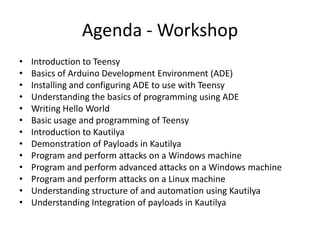
Agenda - Workshop
•   Introduction to Teensy
•   Basics of Arduino Development Environment (ADE)
•   Installing and configuring ADE to use with Teensy
•   Understanding the basics of programming using ADE
•   Writing Hello World
•   Basic usage and programming of Teensy
•   Introduction to Kautilya
•   Demonstration of Payloads in Kautilya
•   Program and perform attacks on a Windows machine
•   Program and perform advanced attacks on a Windows machine
•   Program and perform attacks on a Linux machine
•   Understanding structure of and automation using Kautilya
•   Understanding Integration of payloads in Kautilya
Agenda - Conclusion
•   Protection against HID based attacks
•   Pen Test Stories
•   Limitations
•   Future
•   Conclusion
Let’s get started
• Be as interactive as you can. Query me, ask nasty
  questions, insult me.
• It is mandatory to laugh on jokes, they be on slides or
  cracked by me.
• We will start slow and then pick up speed. Be patient if
  you know something, everybody is not good as you.
• I don’t have much theory so be ready to see demos
  and source code.
• Make sure you keep your eyes on. You should be able
  to program your device after this. I will keep checking if
  everyone is awake ;)
A typical Pen Test Scenario

• A client engagement comes with IP addresses.
• We need to complete the assignment in very
  restrictive time frame.
• Pressure is on us to deliver a “good” report
  with some high severity findings. (That “High”
  return inside a red colored box)
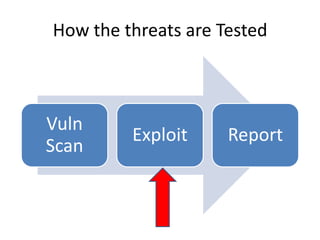
How the threats are Tested


Vuln
         Exploit     Report
Scan
• This is a best case scenario.
• Only lucky ones find that.
• Generally legacy Enterprise Applications or
  Business Critical applications are not upgraded
  and are the first targets.
• There is almost no fun doing it that way.
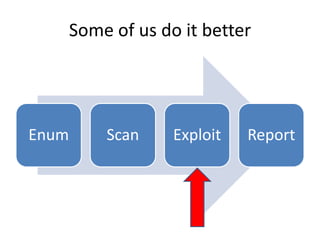
Some of us do it better


Enum       Scan     Exploit   Report
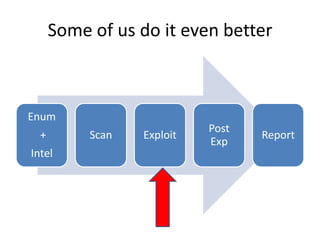
Some of us do it even better


Enum
                            Post
  +        Scan   Exploit          Report
                            Exp
Intel
Why do we need to exploit?
• To gain access to the systems.
• This shows the real threat to clients that we
  can actually make an impact on their business.
  No more “so-what” 
• We can create reports with “High” Severity
  findings which bring $$$
What do we exploit?
• Memory Corruption bugs.
    – Server side
    – Client Side
•   Mis-configurations
•   Open file shares.
•   Sticky slips.
•   Man In The Middle (many types)
•   Unsecured Dumpsters
•   Humans
•   <Audience>
Worse Scenario
• Many times we get some vulnerabilities but
  can’t exploit.
  – No public exploits available.
  – Not allowed on the system.
  – Countermeasure blocking it.
  – Exploit completed but no session was generated
    :P
Worst Scenario
•   Hardened Systems
•   Patches in place
•   Countermeasures blocking scans and exploits
•   Security incident monitoring and blocking
•   No network access

• We need alternatives.
Need for new methods to break into
              systems
• Bad guys are getting smarter.
• Smart attacks of 2011
   –   Sony (ok not so smart :P)
   –   RSA (clever attack), chained to Lockheed Martin
   –   Epsilon (Spear Phishing)
   –   Barracuda Networks (WAF turned off for little while)
   –   Some attacks on India
• Smart attacks of 2010
   – Stuxnet
   – Operation Aurora
• And Many more (like Apache in 2009)
Need for new methods to break into
              systems
• Breaking into systems is not as easy as done in
  the movies.
• Those defending the systems have become
  smarter (at many places :P) and it is getting
  harder to break into “secured” environments.
• Everyone is breaking into systems using the
  older ways, you need new ways to do it better.
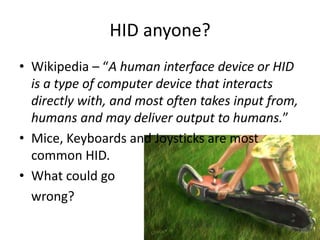
HID anyone?
• Wikipedia – “A human interface device or HID
  is a type of computer device that interacts
  directly with, and most often takes input from,
  humans and may deliver output to humans.”
• Mice, Keyboards and Joysticks are most
  common HID.
• What could go
  wrong?
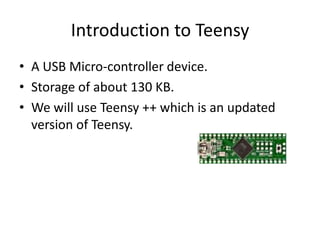
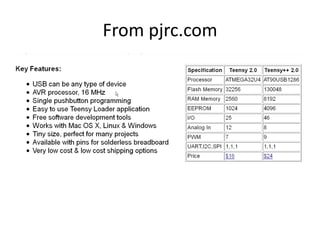
Introduction to Teensy
• A USB Micro-controller device.
• Storage of about 130 KB.
• We will use Teensy ++ which is an updated
  version of Teensy.
From pjrc.com
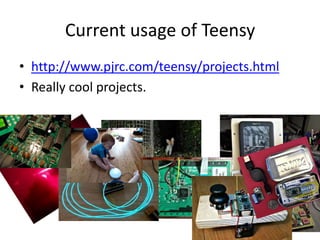
Current usage of Teensy
• http://www.pjrc.com/teensy/projects.html
• Really cool projects.
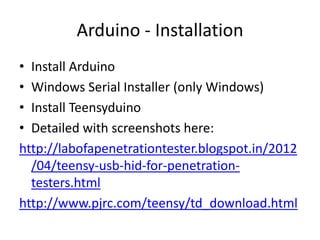
Arduino - Installation
• Install Arduino
• Windows Serial Installer (only Windows)
• Install Teensyduino
• Detailed with screenshots here:
http://labofapenetrationtester.blogspot.in/2012
  /04/teensy-usb-hid-for-penetration-
  testers.html
http://www.pjrc.com/teensy/td_download.html
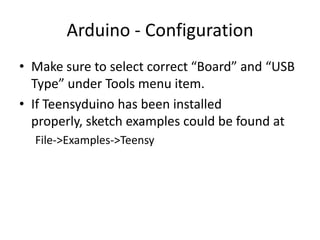
Arduino - Configuration
• Make sure to select correct “Board” and “USB
  Type” under Tools menu item.
• If Teensyduino has been installed
  properly, sketch examples could be found at
  File->Examples->Teensy
Programming using ADE
• Almost C++ like syntax is used in ADE
• Two functions are required at minimum
  – setup() which runs whenever Teensy is plugged or
    restarted.
  – loop() which keeps running after setup()
• Basic usage and programming of Teensy
• Writing Hello World with Teensy.
DEMO, Source Code and
   Programming
Kautilya
• It is a toolkit which aims to make Teensy more
  useful in Penetration Tests.
• Named after Chanakya a.k.a. Kautilya.
• Written in Ruby.
• It’s a menu drive program which let users
  select and customize payloads.
• Aims to make Teensy part of every Penetration
  tester’s tool chest.
Payloads
• Payloads are written for teensy without SD Card.
• Pastebin is extensively used. Both for uploads and
  downloads.
• Payloads are commands, powershell scripts or
  combination of both.
• Payload execution of course depends on privilege
  of user logged in when Teensy is plugged in.
• Payloads are mostly for Windows as the victim of
  choice generally is a Windows machine. 
Windows User Add
• Adds a user with Administrative privileges on
  the victim.
• Uses net user command.
Default DNS
• Changes the default DNS for a connection.
• Utilizes the netsh command.
Edit Hosts File
• Edit hosts file to resolve a domain locally.
Enable RDP
•   Enables RDP on victim machine.
•   Starts the service.
•   Adds exception to Windows firewall.
•   Adds a user to Administrators group.
Enable Telnet
•   Installs Telnet on victim machine.
•   Starts the service.
•   Adds exception to Windows firewall.
•   Adds a user to Administrators group and
    Telnetclients group..
Forceful Browsing
• Starts an invisible instance of Internet Explorer
  which browses to the given URL.
Download and Execute
• Downloads an exe in text format from
  pastebin, converts it back to exe and executes
  it.
Sethc and Utilman backdoor
• Using registry hacks, calls user defined
  executable or command when Shift is pressed
  5 times or Win + U is pressed.
• When the system is locked, the called exe is
  executed in System context.
Uninstall Application
• Uninstalls an msiexec application silently.
Chrome RDP
• This payload uses opens up chrome, launches
  Remote Desktop plugin, enters credentials
  and copies the access key to pastebin.
• This payload operates on browser window.
Information Gather
• Dumps valuable information from registry, net
  command and hosts file.
Sniffer
• This payload pulls the sniffer powershell script
  (by Robbie Fost) and executes it on the victim.
• The output is compressed and uploaded to
  ftp.
Hashdump
• This payload pulls powerdump script of msf
  from pastebin, schedules it as task to run in
  system context and upload the hashes to
  pastebin.
Keylogging
• This payload logs keys and pastes it to
  pastebin every twenty seconds.
• There is a separate script to parse the output.
Wireless Rogue AP
• This payload creates a hosted network with
  user define SSID and key.
• It also adds a user to Administrators and
  TelnetClients group.
• It installs and starts telnet and adds it to
  windows firewall exception.
Forced Wireless Connection
• This payload forces the victim to connect to an
  attacker controlled WiFi AP. The AP in this case
  is portable WiFi hotspot on a smartphone.
• Using this either payloads can be pulled from
  the smartphone or the internet using the AP
  thus effectively bypassing any internet
  restriction policies on the system.
Code Execution
• This payload uses the powershell code
  execution script (by Matt from exploit-monday
  blog).
• A meterpreter shell is executed completely in
  memory using this script.
Java Signed Applet Code Exec
• This payload browses in background to a url
  where Metasploit Java Signed Applet module
  is hosted and accepts the run prompt after
  few seconds.
Time based payload execution
• This payload waits till the given time,
  downloads a payload at the time and execute
  it.
WLAN keys dump
• This payload dumps WLAN keys in clear text
  and upload them to pastebin as a private
  paste.
Pen Test Stories    Could you
                   please plug
                    this in for
                       me?
Pen Test Stories
                Library Fun
• We were doing internal PT for a large media
  house.
• The access to network was quite restrictive.
• The desktops at Library were left unattended
  many times.
• Teensy was plugged into one system with a
  sethc and utilman backdoor.
• Later in the evening the system was accessed
  and pwnage ensued.
Pen Test Stories
         Breaking the perimeter
• A telecom company.
• We had to do perimeter check for the firm.
• The Wireless rogue AP payload was used and
  teensy was sold to the clients employees
  during lunch hours.
• Within couple of hours, we got a wireless
  network with a administrative user and telnet
  ready.
Pen Test Stories
           Help by the Helpdesk
• A pharma company.
• We replaced a user’s data card with a Teensy
  inside the data card’s cover.
• The payload selected was Keylogger.
• “Data card” obviously didn’t worked and we got
  multiple keylogging for the user and the
  helpdesk.
• Helpdesk guys had access to almost everything in
  the environment and over a workday, it was over.
Defense from malicious HID
• Use Endpoint Protector 4 :P :P
• Group Policy in Windows which prevent
  installation of hardware devices.
• UDEV rules for Linux.
Limitations with Teensy
• Limited storage in Teensy. Resolved if you
  attach a SD card with Teensy.
• Inability to “read” from the system. You have
  to assume the responses of victim OS and
  there is only one way traffic.
Limitations with Kautilya
• Many payloads need Administrative privilege.
• Lots of traffic to and from pastebin.
• Inability to clear itself after a single run.
• Not very stable as it is still a new tool and has
  not gone through user tests.
• For payloads which use executables you
  manually need to convert and paste them to
  pastebin.
Future
• Improvement in current payloads.
• Implementation of SD card.
• Use some payloads as libraries so that they
  can be reused.
• Support for Non-English keyboards.
• Maybe more Linux payloads.
• Implementation of some new payloads which
  are under development.
Thank You

•   Please complete the Speaker Feedback Surveys.
•   Questions?
•   Insults?
•   Feedback?

• Kautilya is available at
  http://code.google.com/p/kautilya/
• Follow me @nikhil_mitt
• http://labofapenetrationtester.blogspot.com/

Creating Havoc using Human Interface Device

  • 1.
    Creating Havoc usingHuman Interface Device Nikhil Mittal
  • 2.
    About Me • SamratAshok •Twitter - @nikhil_mitt • Blog – http://labofapenetrationtester.blogspot.com • Creator of Kautilya, Mareech and Nishang • Interested in Offensive Information Security, new attack vectors and methodologies to pwn systems. • Previous Talks – Clubhack’10, Hackfest’11, Clubhack’11, Black hat Abu Dhabi’11, Troopers’12 • Upcoming Talks – Training at Shakacon’12 and GrrCON’12
  • 3.
    Agenda - Introduction • A typical Pen Test Scenario • How we are doing it • Need for new methods to break into systems • HID anyone?
  • 4.
    Agenda - Workshop • Introduction to Teensy • Basics of Arduino Development Environment (ADE) • Installing and configuring ADE to use with Teensy • Understanding the basics of programming using ADE • Writing Hello World • Basic usage and programming of Teensy • Introduction to Kautilya • Demonstration of Payloads in Kautilya • Program and perform attacks on a Windows machine • Program and perform advanced attacks on a Windows machine • Program and perform attacks on a Linux machine • Understanding structure of and automation using Kautilya • Understanding Integration of payloads in Kautilya
  • 5.
    Agenda - Conclusion • Protection against HID based attacks • Pen Test Stories • Limitations • Future • Conclusion
  • 6.
    Let’s get started •Be as interactive as you can. Query me, ask nasty questions, insult me. • It is mandatory to laugh on jokes, they be on slides or cracked by me. • We will start slow and then pick up speed. Be patient if you know something, everybody is not good as you. • I don’t have much theory so be ready to see demos and source code. • Make sure you keep your eyes on. You should be able to program your device after this. I will keep checking if everyone is awake ;)
  • 7.
    A typical PenTest Scenario • A client engagement comes with IP addresses. • We need to complete the assignment in very restrictive time frame. • Pressure is on us to deliver a “good” report with some high severity findings. (That “High” return inside a red colored box)
  • 8.
    How the threatsare Tested Vuln Exploit Report Scan
  • 9.
    • This isa best case scenario. • Only lucky ones find that. • Generally legacy Enterprise Applications or Business Critical applications are not upgraded and are the first targets. • There is almost no fun doing it that way.
  • 10.
    Some of usdo it better Enum Scan Exploit Report
  • 11.
    Some of usdo it even better Enum Post + Scan Exploit Report Exp Intel
  • 12.
    Why do weneed to exploit? • To gain access to the systems. • This shows the real threat to clients that we can actually make an impact on their business. No more “so-what”  • We can create reports with “High” Severity findings which bring $$$
  • 13.
    What do weexploit? • Memory Corruption bugs. – Server side – Client Side • Mis-configurations • Open file shares. • Sticky slips. • Man In The Middle (many types) • Unsecured Dumpsters • Humans • <Audience>
  • 14.
    Worse Scenario • Manytimes we get some vulnerabilities but can’t exploit. – No public exploits available. – Not allowed on the system. – Countermeasure blocking it. – Exploit completed but no session was generated :P
  • 15.
    Worst Scenario • Hardened Systems • Patches in place • Countermeasures blocking scans and exploits • Security incident monitoring and blocking • No network access • We need alternatives.
  • 16.
    Need for newmethods to break into systems • Bad guys are getting smarter. • Smart attacks of 2011 – Sony (ok not so smart :P) – RSA (clever attack), chained to Lockheed Martin – Epsilon (Spear Phishing) – Barracuda Networks (WAF turned off for little while) – Some attacks on India • Smart attacks of 2010 – Stuxnet – Operation Aurora • And Many more (like Apache in 2009)
  • 17.
    Need for newmethods to break into systems • Breaking into systems is not as easy as done in the movies. • Those defending the systems have become smarter (at many places :P) and it is getting harder to break into “secured” environments. • Everyone is breaking into systems using the older ways, you need new ways to do it better.
  • 18.
    HID anyone? • Wikipedia– “A human interface device or HID is a type of computer device that interacts directly with, and most often takes input from, humans and may deliver output to humans.” • Mice, Keyboards and Joysticks are most common HID. • What could go wrong?
  • 19.
    Introduction to Teensy •A USB Micro-controller device. • Storage of about 130 KB. • We will use Teensy ++ which is an updated version of Teensy.
  • 20.
  • 21.
    Current usage ofTeensy • http://www.pjrc.com/teensy/projects.html • Really cool projects.
  • 22.
    Arduino - Installation •Install Arduino • Windows Serial Installer (only Windows) • Install Teensyduino • Detailed with screenshots here: http://labofapenetrationtester.blogspot.in/2012 /04/teensy-usb-hid-for-penetration- testers.html http://www.pjrc.com/teensy/td_download.html
  • 23.
    Arduino - Configuration •Make sure to select correct “Board” and “USB Type” under Tools menu item. • If Teensyduino has been installed properly, sketch examples could be found at File->Examples->Teensy
  • 24.
    Programming using ADE •Almost C++ like syntax is used in ADE • Two functions are required at minimum – setup() which runs whenever Teensy is plugged or restarted. – loop() which keeps running after setup() • Basic usage and programming of Teensy • Writing Hello World with Teensy.
  • 25.
    DEMO, Source Codeand Programming
  • 26.
    Kautilya • It isa toolkit which aims to make Teensy more useful in Penetration Tests. • Named after Chanakya a.k.a. Kautilya. • Written in Ruby. • It’s a menu drive program which let users select and customize payloads. • Aims to make Teensy part of every Penetration tester’s tool chest.
  • 27.
    Payloads • Payloads arewritten for teensy without SD Card. • Pastebin is extensively used. Both for uploads and downloads. • Payloads are commands, powershell scripts or combination of both. • Payload execution of course depends on privilege of user logged in when Teensy is plugged in. • Payloads are mostly for Windows as the victim of choice generally is a Windows machine. 
  • 28.
    Windows User Add •Adds a user with Administrative privileges on the victim. • Uses net user command.
  • 29.
    Default DNS • Changesthe default DNS for a connection. • Utilizes the netsh command.
  • 30.
    Edit Hosts File •Edit hosts file to resolve a domain locally.
  • 31.
    Enable RDP • Enables RDP on victim machine. • Starts the service. • Adds exception to Windows firewall. • Adds a user to Administrators group.
  • 32.
    Enable Telnet • Installs Telnet on victim machine. • Starts the service. • Adds exception to Windows firewall. • Adds a user to Administrators group and Telnetclients group..
  • 33.
    Forceful Browsing • Startsan invisible instance of Internet Explorer which browses to the given URL.
  • 34.
    Download and Execute •Downloads an exe in text format from pastebin, converts it back to exe and executes it.
  • 35.
    Sethc and Utilmanbackdoor • Using registry hacks, calls user defined executable or command when Shift is pressed 5 times or Win + U is pressed. • When the system is locked, the called exe is executed in System context.
  • 36.
    Uninstall Application • Uninstallsan msiexec application silently.
  • 37.
    Chrome RDP • Thispayload uses opens up chrome, launches Remote Desktop plugin, enters credentials and copies the access key to pastebin. • This payload operates on browser window.
  • 38.
    Information Gather • Dumpsvaluable information from registry, net command and hosts file.
  • 39.
    Sniffer • This payloadpulls the sniffer powershell script (by Robbie Fost) and executes it on the victim. • The output is compressed and uploaded to ftp.
  • 40.
    Hashdump • This payloadpulls powerdump script of msf from pastebin, schedules it as task to run in system context and upload the hashes to pastebin.
  • 41.
    Keylogging • This payloadlogs keys and pastes it to pastebin every twenty seconds. • There is a separate script to parse the output.
  • 42.
    Wireless Rogue AP •This payload creates a hosted network with user define SSID and key. • It also adds a user to Administrators and TelnetClients group. • It installs and starts telnet and adds it to windows firewall exception.
  • 43.
    Forced Wireless Connection •This payload forces the victim to connect to an attacker controlled WiFi AP. The AP in this case is portable WiFi hotspot on a smartphone. • Using this either payloads can be pulled from the smartphone or the internet using the AP thus effectively bypassing any internet restriction policies on the system.
  • 44.
    Code Execution • Thispayload uses the powershell code execution script (by Matt from exploit-monday blog). • A meterpreter shell is executed completely in memory using this script.
  • 45.
    Java Signed AppletCode Exec • This payload browses in background to a url where Metasploit Java Signed Applet module is hosted and accepts the run prompt after few seconds.
  • 46.
    Time based payloadexecution • This payload waits till the given time, downloads a payload at the time and execute it.
  • 47.
    WLAN keys dump •This payload dumps WLAN keys in clear text and upload them to pastebin as a private paste.
  • 48.
    Pen Test Stories Could you please plug this in for me?
  • 49.
    Pen Test Stories Library Fun • We were doing internal PT for a large media house. • The access to network was quite restrictive. • The desktops at Library were left unattended many times. • Teensy was plugged into one system with a sethc and utilman backdoor. • Later in the evening the system was accessed and pwnage ensued.
  • 50.
    Pen Test Stories Breaking the perimeter • A telecom company. • We had to do perimeter check for the firm. • The Wireless rogue AP payload was used and teensy was sold to the clients employees during lunch hours. • Within couple of hours, we got a wireless network with a administrative user and telnet ready.
  • 51.
    Pen Test Stories Help by the Helpdesk • A pharma company. • We replaced a user’s data card with a Teensy inside the data card’s cover. • The payload selected was Keylogger. • “Data card” obviously didn’t worked and we got multiple keylogging for the user and the helpdesk. • Helpdesk guys had access to almost everything in the environment and over a workday, it was over.
  • 52.
    Defense from maliciousHID • Use Endpoint Protector 4 :P :P • Group Policy in Windows which prevent installation of hardware devices. • UDEV rules for Linux.
  • 53.
    Limitations with Teensy •Limited storage in Teensy. Resolved if you attach a SD card with Teensy. • Inability to “read” from the system. You have to assume the responses of victim OS and there is only one way traffic.
  • 54.
    Limitations with Kautilya •Many payloads need Administrative privilege. • Lots of traffic to and from pastebin. • Inability to clear itself after a single run. • Not very stable as it is still a new tool and has not gone through user tests. • For payloads which use executables you manually need to convert and paste them to pastebin.
  • 55.
    Future • Improvement incurrent payloads. • Implementation of SD card. • Use some payloads as libraries so that they can be reused. • Support for Non-English keyboards. • Maybe more Linux payloads. • Implementation of some new payloads which are under development.
  • 56.
    Thank You • Please complete the Speaker Feedback Surveys. • Questions? • Insults? • Feedback? • Kautilya is available at http://code.google.com/p/kautilya/ • Follow me @nikhil_mitt • http://labofapenetrationtester.blogspot.com/