UCCSC 2009 - Focus on Security

An Overview of Non-Commercial Software for
          Network Administrators

               Doug Nomura
          doug.nomura@gmail.com
               June 16 2009
Disclaimer

Don’t blame me if your workstation breaks or
  something bad happens to your network
Scientist Gone Bad -
     this is me!
Expectations
• General overview - Only have 60 minutes!

• Focus will be on tools to help detect
  problems with your network

• Two Hat Perspective

  • If you can use the tool, think how it can
     be used against you!
Approach
  Tool will be described

• What the tool does

• How can you use it

• Advantages/disadvantages
Topics to be covered

  Data Mining 1A

• Web 2.0

• Kismet

• OpenVAS

• Metasploit
More Topics

• NMap

• Web Vulnerability Scanners

• Pros and Cons of the free stuff

• The Future
Data Mining 1A
Data Mining 1A

• Every network leaks or broadcasts
  information

• What is allowable or acceptable by your
  organization?

• This section will give examples of types of
  information being broadcast - allowable and
  sensitive
Classic Sources of Data
         Leaks

• DNS & MX records

• Technical forums

• Job sites
Google’s
Advanced Operators
• Reduce noise

• Help to refine search

• Operator:search term

• Tutorial to advanced operators
  http://www.googletutor.com/google-manual/web-se
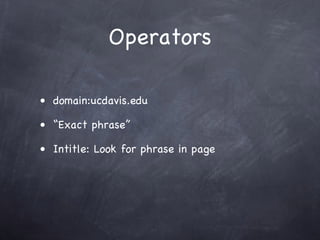
Operators

• domain:ucdavis.edu

• “Exact phrase”

• Intitle: Look for phrase in page
Types of information


• Personal information

• Technical information
Let’s look for some
personal information
Does anyone from UCD
     know person?
  or My Gosh - Look
    at the SSN!!!
Sensitive information
deleted from this slide
Is anyone from UCSF?
Or this probably should
not be broadcast to the
         world
Sensitive information
deleted from this slide
Text


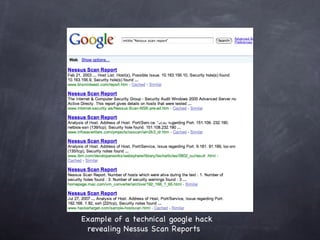
Example of a technical google hack
 revealing Nessus Scan Reports
Summary of Google
       Hacking
• Use Google to peruse your servers for
  sensitive information

• Clean up your mess like old scan reports

• Educate users about the danger of
  broadcasting information
The Pros of Google
         Hacking

• Find information you didn’t know was being
  broadcast

• It’s cheap and works
The Cons of Google
         Hacking

• Someone may have found the information
  already

• You may not find everything

• Fear the Google cache!!!!!
References for Google
        Hacking


• See Johnny Long’s book - Google Hacking for
  Penetration Testers - ISBN-10 1597491764

• Any questions - just send me an email
Web 2.0
• Example: Twitter

• Technical

  • Exploitation of code

• Passive enumeration

  • Users careless of information being
    broadcast
Solution
• Identify types of data not be broadcast

• Educate

  • Users need to be made aware there are
     people “watching.”
“Free” Tools


• Many released under GNU/GPL

• Range from simple to complex

• Many have great support and documentation
Kismet
• Detects presence of 802.11 APs

• Sniffs traffic

• IDS

• kismewireless.net
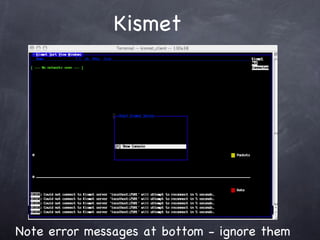
Kismet


Note error messages at bottom - ignore them
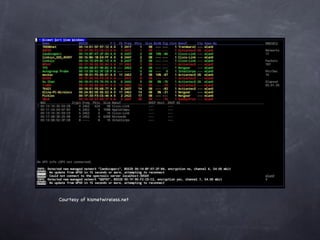
Courtesy of kismetwireless.net
Why use Kismet?

• Pen testing of APs

• Seek out rogue APs

• Survey and map 802.11 installation

• Distributed IDS
Kismet Advantages

• Initial cost is free

• Very powerful

• Customizable

  • plugins
Cons of Kismet
• Interface

• May require significant configuration

• Incompatibilities

• Long term cost could be high due to time
  spent configuring and tweaking apps
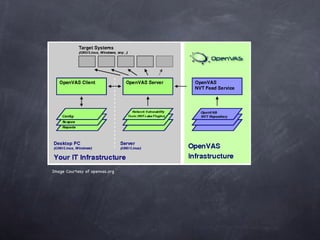
OpenVAS
  Vulnerability Assessment

• Based upon Nessus 2.2

• Released under GNU/GPL

• openvas.org
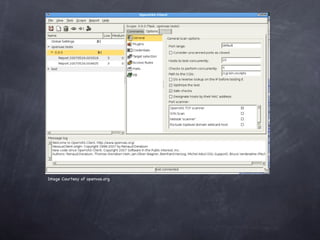
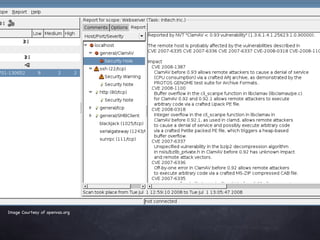
Image Courtesy of openvas.org
OpenVAS


• Runs well on Linux

• Financially - free VA tool

• Growing support for project
Disadvantages


  Problems with some NVTs

• Some difficulty non-linux platform
Metasploit


• Security Framework identifies vulnerabilities
  and exploits them

• Intended for penetration testing and
  research

• Customizable

• metasploit.org
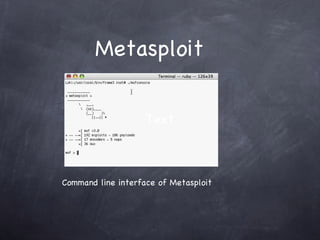
Metasploit


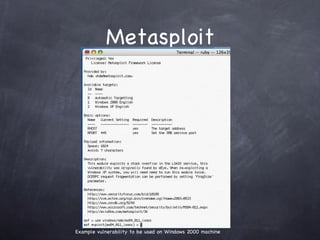
                    Text


Command line interface of Metasploit
Metasploit


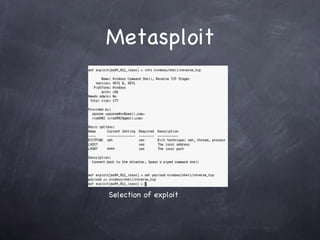
Example vulnerability to be used on Windows 2000 machine
Metasploit


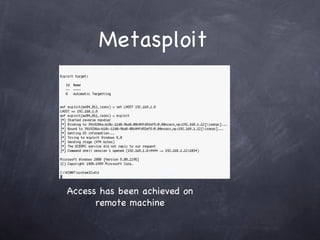
Selection of exploit
Metasploit


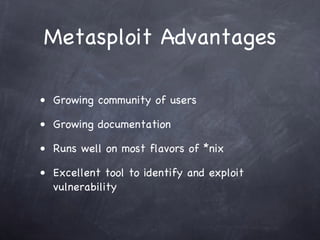
Access has been achieved on
      remote machine
Metasploit Advantages

• Growing community of users

• Growing documentation

• Runs well on most flavors of *nix

• Excellent tool to identify and exploit
  vulnerability
Metasploit
         Disadvantages
• Do not expect all exploits nor may be up to
  date with latest exploits

• Lack of logging or reports

• Machine running Metasploit can be
  compromised

• This is a very dangerous tool and may violate
  policy at your institution. Use on test
  network
NMap - Network Mapper

• Sends raw IP packets to specific host, or a
  range of hosts

• Determines OS, version, open ports, identifies
  potential vulnerability

• nmap.org
NMap


• Network administrators and other IT folk
  responsible for network based assets

• Pen testers and other security folk
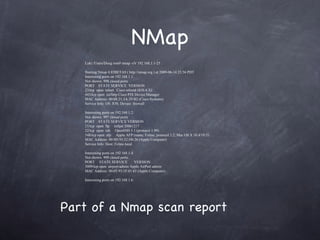
NMap
   Loki:/Users/Doug root# nmap -sV 192.168.1.1-25

   Starting Nmap 4.85BETA9 ( http://nmap.org ) at 2009-06-14 23:56 PDT
   Interesting ports on 192.168.1.1:
   Not shown: 998 closed ports
   PORT STATE SERVICE VERSION
   23/tcp open telnet Cisco telnetd (IOS 6.X)
   443/tcp open ssl/http Cisco PIX Device Manager
   MAC Address: 00:08:21:3A:29:B2 (Cisco Systems)
   Service Info: OS: IOS; Device: firewall

   Interesting ports on 192.168.1.2:
   Not shown: 997 closed ports
   PORT STATE SERVICE VERSION
   21/tcp open ftp tnftpd 20061217
   22/tcp open ssh OpenSSH 5.1 (protocol 1.99)
   548/tcp open afp Apple AFP (name: Feline; protocol 3.2; Mac OS X 10.4/10.5)
   MAC Address: 00:0D:93:32:D0:26 (Apple Computer)
   Service Info: Host: Feline.local

   Interesting ports on 192.168.1.4:
   Not shown: 999 closed ports
   PORT STATE SERVICE                VERSION
   5009/tcp open airport-admin Apple AirPort admin
   MAC Address: 00:03:93:1F:01:65 (Apple Computer)

   Interesting ports on 192.168.1.6:


Part of a Nmap scan report
Strengths of NMap

• Large base of support from user and
  developer community

• Mature product

• Fast and versatile scanner

• Extremely stable. Install and go!
Weaknesses of NMap


• Some scans seem to be intrusive

• Some scans have crashed hosts being scanned
Web Vulnerability
        Scanners
• GNU/GPL World

• Singular in purpose

  • Paros

• Stagnant

  • Nikto
Web Vulnerability
     Scanners

Singular purpose tools usually check for a
single type of vulnerability (i.e. XSS, SQL
injection). You would have to have a lot of
different GNU/GPL tools to encompass all
possible vulnerabilities
Web Vulnerability
     Scanners


Some projects become stagnant or die due to
core developers ability to devote time to
project
Advantages of the
        “free” apps
• Initial cost is low

• Some projects have a community of support

• Documentation

• A potentially powerful tool rivaling
  commercial tools
Advantages of “free”
       apps


Use older hardware

• Great for that older machine collecting
  dust
Disadvantages
• Project stability

• UI issues

• Application stability

• Speed of development

• Upgrades may be challenging

• Geek Factor
Geek Factor

    100
 Geek
Factor

     0    “cost”   100
What to do?

• Define your needs

• Determine stability and viability of project

• Be willing to invest time

• Be diligent
The future


  Greater and easier exploitation of Web 2.0

  • You must educate your users about the
     dangers

• Handhelds will be both targets and attackers
The End
Further questions? Drop
     me an email.
    doug.nomura@gmail.com

Nomura UCCSC 2009

  • 1.
    UCCSC 2009 -Focus on Security An Overview of Non-Commercial Software for Network Administrators Doug Nomura doug.nomura@gmail.com June 16 2009
  • 2.
    Disclaimer Don’t blame meif your workstation breaks or something bad happens to your network
  • 3.
    Scientist Gone Bad- this is me!
  • 4.
    Expectations • General overview- Only have 60 minutes! • Focus will be on tools to help detect problems with your network • Two Hat Perspective • If you can use the tool, think how it can be used against you!
  • 5.
    Approach Toolwill be described • What the tool does • How can you use it • Advantages/disadvantages
  • 6.
    Topics to becovered Data Mining 1A • Web 2.0 • Kismet • OpenVAS • Metasploit
  • 7.
    More Topics • NMap •Web Vulnerability Scanners • Pros and Cons of the free stuff • The Future
  • 8.
  • 9.
    Data Mining 1A •Every network leaks or broadcasts information • What is allowable or acceptable by your organization? • This section will give examples of types of information being broadcast - allowable and sensitive
  • 10.
    Classic Sources ofData Leaks • DNS & MX records • Technical forums • Job sites
  • 12.
    Google’s Advanced Operators • Reducenoise • Help to refine search • Operator:search term • Tutorial to advanced operators http://www.googletutor.com/google-manual/web-se
  • 13.
    Operators • domain:ucdavis.edu • “Exactphrase” • Intitle: Look for phrase in page
  • 14.
    Types of information •Personal information • Technical information
  • 15.
    Let’s look forsome personal information
  • 16.
    Does anyone fromUCD know person? or My Gosh - Look at the SSN!!!
  • 17.
  • 18.
    Is anyone fromUCSF? Or this probably should not be broadcast to the world
  • 19.
  • 20.
    Text Example of atechnical google hack revealing Nessus Scan Reports
  • 21.
    Summary of Google Hacking • Use Google to peruse your servers for sensitive information • Clean up your mess like old scan reports • Educate users about the danger of broadcasting information
  • 22.
    The Pros ofGoogle Hacking • Find information you didn’t know was being broadcast • It’s cheap and works
  • 23.
    The Cons ofGoogle Hacking • Someone may have found the information already • You may not find everything • Fear the Google cache!!!!!
  • 24.
    References for Google Hacking • See Johnny Long’s book - Google Hacking for Penetration Testers - ISBN-10 1597491764 • Any questions - just send me an email
  • 25.
    Web 2.0 • Example:Twitter • Technical • Exploitation of code • Passive enumeration • Users careless of information being broadcast
  • 26.
    Solution • Identify typesof data not be broadcast • Educate • Users need to be made aware there are people “watching.”
  • 27.
    “Free” Tools • Manyreleased under GNU/GPL • Range from simple to complex • Many have great support and documentation
  • 28.
    Kismet • Detects presenceof 802.11 APs • Sniffs traffic • IDS • kismewireless.net
  • 29.
    Kismet Note error messagesat bottom - ignore them
  • 30.
  • 31.
    Why use Kismet? •Pen testing of APs • Seek out rogue APs • Survey and map 802.11 installation • Distributed IDS
  • 32.
    Kismet Advantages • Initialcost is free • Very powerful • Customizable • plugins
  • 33.
    Cons of Kismet •Interface • May require significant configuration • Incompatibilities • Long term cost could be high due to time spent configuring and tweaking apps
  • 34.
    OpenVAS VulnerabilityAssessment • Based upon Nessus 2.2 • Released under GNU/GPL • openvas.org
  • 35.
    Image Courtesy ofopenvas.org
  • 36.
    Image Courtesy ofopenvas.org
  • 37.
    Image Courtesy ofopenvas.org
  • 38.
    OpenVAS • Runs wellon Linux • Financially - free VA tool • Growing support for project
  • 39.
    Disadvantages Problemswith some NVTs • Some difficulty non-linux platform
  • 40.
    Metasploit • Security Frameworkidentifies vulnerabilities and exploits them • Intended for penetration testing and research • Customizable • metasploit.org
  • 41.
    Metasploit Text Command line interface of Metasploit
  • 42.
    Metasploit Example vulnerability tobe used on Windows 2000 machine
  • 43.
  • 44.
    Metasploit Access has beenachieved on remote machine
  • 45.
    Metasploit Advantages • Growingcommunity of users • Growing documentation • Runs well on most flavors of *nix • Excellent tool to identify and exploit vulnerability
  • 46.
    Metasploit Disadvantages • Do not expect all exploits nor may be up to date with latest exploits • Lack of logging or reports • Machine running Metasploit can be compromised • This is a very dangerous tool and may violate policy at your institution. Use on test network
  • 47.
    NMap - NetworkMapper • Sends raw IP packets to specific host, or a range of hosts • Determines OS, version, open ports, identifies potential vulnerability • nmap.org
  • 48.
    NMap • Network administratorsand other IT folk responsible for network based assets • Pen testers and other security folk
  • 49.
    NMap Loki:/Users/Doug root# nmap -sV 192.168.1.1-25 Starting Nmap 4.85BETA9 ( http://nmap.org ) at 2009-06-14 23:56 PDT Interesting ports on 192.168.1.1: Not shown: 998 closed ports PORT STATE SERVICE VERSION 23/tcp open telnet Cisco telnetd (IOS 6.X) 443/tcp open ssl/http Cisco PIX Device Manager MAC Address: 00:08:21:3A:29:B2 (Cisco Systems) Service Info: OS: IOS; Device: firewall Interesting ports on 192.168.1.2: Not shown: 997 closed ports PORT STATE SERVICE VERSION 21/tcp open ftp tnftpd 20061217 22/tcp open ssh OpenSSH 5.1 (protocol 1.99) 548/tcp open afp Apple AFP (name: Feline; protocol 3.2; Mac OS X 10.4/10.5) MAC Address: 00:0D:93:32:D0:26 (Apple Computer) Service Info: Host: Feline.local Interesting ports on 192.168.1.4: Not shown: 999 closed ports PORT STATE SERVICE VERSION 5009/tcp open airport-admin Apple AirPort admin MAC Address: 00:03:93:1F:01:65 (Apple Computer) Interesting ports on 192.168.1.6: Part of a Nmap scan report
  • 50.
    Strengths of NMap •Large base of support from user and developer community • Mature product • Fast and versatile scanner • Extremely stable. Install and go!
  • 51.
    Weaknesses of NMap •Some scans seem to be intrusive • Some scans have crashed hosts being scanned
  • 52.
    Web Vulnerability Scanners • GNU/GPL World • Singular in purpose • Paros • Stagnant • Nikto
  • 53.
    Web Vulnerability Scanners Singular purpose tools usually check for a single type of vulnerability (i.e. XSS, SQL injection). You would have to have a lot of different GNU/GPL tools to encompass all possible vulnerabilities
  • 54.
    Web Vulnerability Scanners Some projects become stagnant or die due to core developers ability to devote time to project
  • 55.
    Advantages of the “free” apps • Initial cost is low • Some projects have a community of support • Documentation • A potentially powerful tool rivaling commercial tools
  • 56.
    Advantages of “free” apps Use older hardware • Great for that older machine collecting dust
  • 57.
    Disadvantages • Project stability •UI issues • Application stability • Speed of development • Upgrades may be challenging • Geek Factor
  • 58.
    Geek Factor 100 Geek Factor 0 “cost” 100
  • 59.
    What to do? •Define your needs • Determine stability and viability of project • Be willing to invest time • Be diligent
  • 60.
    The future Greater and easier exploitation of Web 2.0 • You must educate your users about the dangers • Handhelds will be both targets and attackers
  • 61.
  • 62.
    Further questions? Drop me an email. doug.nomura@gmail.com