New methods to think
about design
Gráinne Conole,
The Open University, UK
Online Educa, Berlin, 1/12/10
cloudworks.ac.uk/cloudscape/view/2227
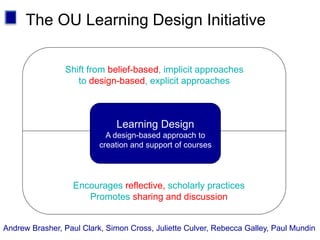
The OU Learning Design Initiative
Shift from belief-based, implicit approaches
to design-based, explicit approaches
Encourages reflective, scholarly practices
Promotes sharing and discussion
Learning Design
A design-based approach to
creation and support of courses
Andrew Brasher, Paul Clark, Simon Cross, Juliette Culver, Rebecca Galley, Paul Mundin
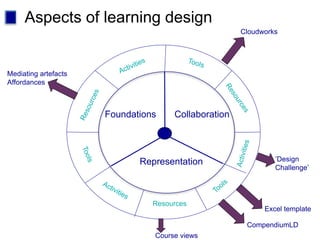
Aspects of learning design
Resources
Foundations
Representation
Collaboration
Mediating artefacts
Affordances
Excel template
CompendiumLD
Course views
Cloudworks
’Design
Challenge’
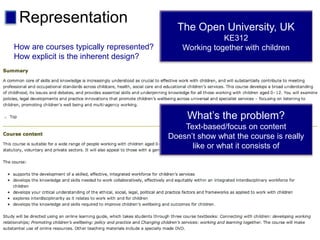
Representation The Open University, UK
KE312
Working together with children
What’s the problem?
Text-based/focus on content
Doesn’t show what the course is really
like or what it consists of
How are courses typically represented?
How explicit is the inherent design?
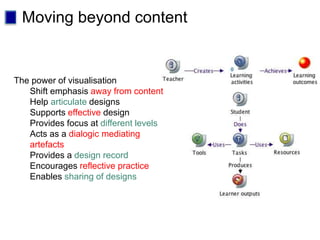
Moving beyond content
The power of visualisation
Shift emphasis away from content
Help articulate designs
Supports effective design
Provides focus at different levels
Acts as a dialogic mediating
artefacts
Provides a design record
Encourages reflective practice
Enables sharing of designs
Now you!
How to ruin a course
Tools in use
Course views
 Course map
 Learning activities
 Course dimensions
 Pedagogy profile
 Learning outcomes map
How to ruin a course
 Issues and strategies important for the success of a
course
 Check list for design and evaluation of a course
 Activity:
 List 10 ways that technologies can make your course fail
 Compare and discuss
 Look at other examples:
http://cloudworks.ac.uk/cloud/view/2597
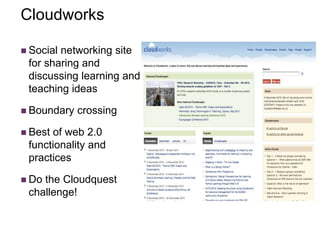
Cloudworks
 Social networking site
for sharing and
discussing learning and
teaching ideas
 Boundary crossing
 Best of web 2.0
functionality and
practices
 Do the Cloudquest
challenge!
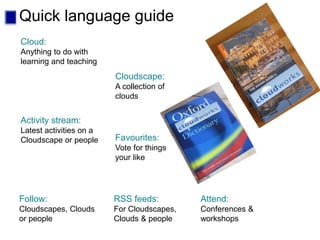
Quick language guide
Cloud:
Anything to do with
learning and teaching
Cloudscape:
A collection of
clouds
Activity stream:
Latest activities on a
Cloudscape or people Favourites:
Vote for things
your like
RSS feeds:
For Cloudscapes,
Clouds & people
Follow:
Cloudscapes, Clouds
or people
Attend:
Conferences &
workshops
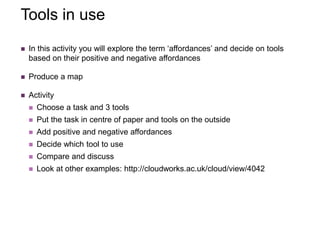
Tools in use
 In this activity you will explore the term ‘affordances’ and decide on tools
based on their positive and negative affordances
 Produce a map
 Activity
 Choose a task and 3 tools
 Put the task in centre of paper and tools on the outside
 Add positive and negative affordances
 Decide which tool to use
 Compare and discuss
 Look at other examples: http://cloudworks.ac.uk/cloud/view/4042
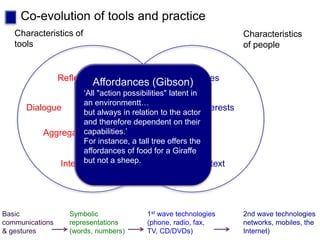
Co-evolution of tools and practice
Evolving
practices
Characteristics
of people
Preferences
Skills
Interests
Context
Characteristics of
tools
Reflection
Dialogue
Aggregation
Interactivity
Affordances (Gibson)
‘All "action possibilities" latent in
an environmentt…
but always in relation to the actor
and therefore dependent on their
capabilities.’
For instance, a tall tree offers the
affordances of food for a Giraffe
but not a sheep.
Basic
communications
& gestures
Symbolic
representations
(words, numbers)
1st wave technologies
(phone, radio, fax,
TV, CD/DVDs)
2nd wave technologies
networks, mobiles, the
Internet)
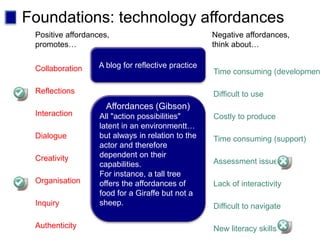
Foundations: technology affordances
Positive affordances,
promotes…
Interaction
Collaboration
Reflections
Dialogue
Creativity
Organisation
Inquiry
Authenticity
Costly to produce
Time consuming (developmen
Difficult to use
Time consuming (support)
Assessment issues
Lack of interactivity
Difficult to navigate
New literacy skills
Negative affordances,
think about…
A blog for reflective practice
Affordances (Gibson)
All "action possibilities"
latent in an environmentt…
but always in relation to the
actor and therefore
dependent on their
capabilities.
For instance, a tall tree
offers the affordances of
food for a Giraffe but not a
sheep.
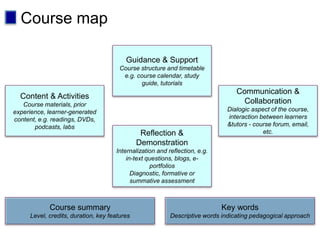
Course map
 This activity produces an ‘at a glance’ view of a course
 Produces a map of a course
 Activity:
 Use the course map guide, fill in the six boxes for your course
 Compare and discuss
 Look at other examples: http://cloudworks.ac.uk/cloud/view/3422
Guidance & Support
Course structure and timetable
e.g. course calendar, study
guide, tutorials
Reflection &
Demonstration
Internalization and reflection, e.g.
in-text questions, blogs, e-
portfolios
Diagnostic, formative or
summative assessment
Content & Activities
Course materials, prior
experience, learner-generated
content, e.g. readings, DVDs,
podcasts, labs
Communication &
Collaboration
Dialogic aspect of the course,
interaction between learners
&tutors - course forum, email,
etc.
Course summary
Level, credits, duration, key features
Key words
Descriptive words indicating pedagogical approach
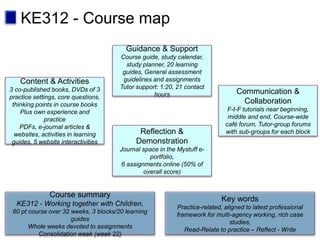
Course map
Guidance & Support
Course guide, study calendar,
study planner, 20 learning
guides, General assessment
guidelines and assignments
Tutor support: 1:20, 21 contact
hours
Reflection &
Demonstration
Journal space in the Mystuff e-
portfolio,
6 assignments online (50% of
overall score)
Content & Activities
3 co-published books, DVDs of 3
practice settings, core questions,
thinking points in course books
Plus own experience and
practice
PDFs, e-journal articles &
websites, activities in learning
guides, 5 website interactivities
Communication &
Collaboration
F-t-F tutorials near beginning,
middle and end, Course-wide
café forum, Tutor-group forums
with sub-groups for each block
Course summary
KE312 - Working together with Children,
60 pt course over 32 weeks, 3 blocks/20 learning
guides
Whole weeks devoted to assignments
Consolidation week (week 22)
Key words
Practice-related, aligned to latest professional
framework for multi-agency working, rich case
studies,
Read-Relate to practice – Reflect - Write
KE312 - Course map
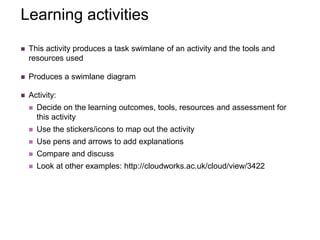
Learning activities
 This activity produces a task swimlane of an activity and the tools and
resources used
 Produces a swimlane diagram
 Activity:
 Decide on the learning outcomes, tools, resources and assessment for
this activity
 Use the stickers/icons to map out the activity
 Use pens and arrows to add explanations
 Compare and discuss
 Look at other examples: http://cloudworks.ac.uk/cloud/view/3422
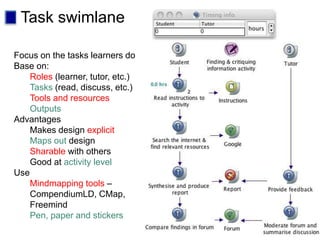
Task swimlane
Focus on the tasks learners do
Base on:
Roles (learner, tutor, etc.)
Tasks (read, discuss, etc.)
Tools and resources
Outputs
Advantages
Makes design explicit
Maps out design
Sharable with others
Good at activity level
Use
Mindmapping tools –
CompendiumLD, CMap,
Freemind
Pen, paper and stickers
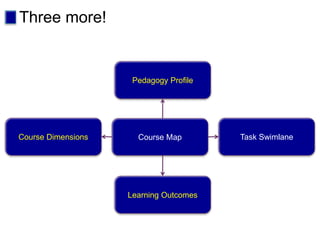
Three more!
Course Map
Pedagogy Profile
Learning Outcomes
Course Dimensions Task Swimlane
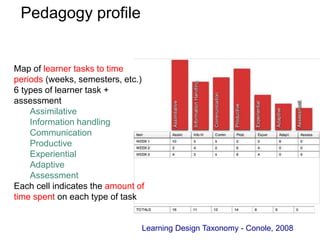
Pedagogy profile
Learning Design Taxonomy - Conole, 2008
Map of learner tasks to time
periods (weeks, semesters, etc.)
6 types of learner task +
assessment
Assimilative
Information handling
Communication
Productive
Experiential
Adaptive
Assessment
Each cell indicates the amount of
time spent on each type of task
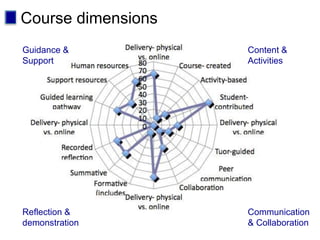
Course dimensions
Guidance &
Support
Content &
Activities
Reflection &
demonstration
Communication
& Collaboration
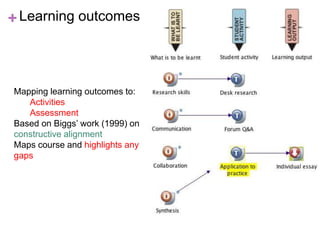
+Learning outcomes
Mapping learning outcomes to:
Activities
Assessment
Based on Biggs’ work (1999) on
constructive alignment
Maps course and highlights any
gaps
Reflection
 What three words would you use to describe
this workshop?
 What did you like about this workshop?
 What could have been better?
 What three words would you use to describe
Cloudworks?
 What three words would you use to describe
the course views?
 What action points will you do as a result?
References
Workshop material: http://prezi.com/ffbp3lwn-
m7m/ouldi-toolbox/
Cloudworks: http://cloudworks.ac.uk
My blog: http://www.e4innovation.com
Learning design paper:
http://cloudworks.ac.uk/cloud/view/4001
Papers and presentations:
http://www.slideshare.net/grainne
Book: contemporary perspectives on e-learning
(Conole and Oliver, 2007)

Conole workshop

  • 1.
    New methods tothink about design Gráinne Conole, The Open University, UK Online Educa, Berlin, 1/12/10 cloudworks.ac.uk/cloudscape/view/2227
  • 2.
    The OU LearningDesign Initiative Shift from belief-based, implicit approaches to design-based, explicit approaches Encourages reflective, scholarly practices Promotes sharing and discussion Learning Design A design-based approach to creation and support of courses Andrew Brasher, Paul Clark, Simon Cross, Juliette Culver, Rebecca Galley, Paul Mundin
  • 3.
    Aspects of learningdesign Resources Foundations Representation Collaboration Mediating artefacts Affordances Excel template CompendiumLD Course views Cloudworks ’Design Challenge’
  • 4.
    Representation The OpenUniversity, UK KE312 Working together with children What’s the problem? Text-based/focus on content Doesn’t show what the course is really like or what it consists of How are courses typically represented? How explicit is the inherent design?
  • 5.
    Moving beyond content Thepower of visualisation Shift emphasis away from content Help articulate designs Supports effective design Provides focus at different levels Acts as a dialogic mediating artefacts Provides a design record Encourages reflective practice Enables sharing of designs
  • 6.
    Now you! How toruin a course Tools in use Course views  Course map  Learning activities  Course dimensions  Pedagogy profile  Learning outcomes map
  • 7.
    How to ruina course  Issues and strategies important for the success of a course  Check list for design and evaluation of a course  Activity:  List 10 ways that technologies can make your course fail  Compare and discuss  Look at other examples: http://cloudworks.ac.uk/cloud/view/2597
  • 8.
    Cloudworks  Social networkingsite for sharing and discussing learning and teaching ideas  Boundary crossing  Best of web 2.0 functionality and practices  Do the Cloudquest challenge!
  • 9.
    Quick language guide Cloud: Anythingto do with learning and teaching Cloudscape: A collection of clouds Activity stream: Latest activities on a Cloudscape or people Favourites: Vote for things your like RSS feeds: For Cloudscapes, Clouds & people Follow: Cloudscapes, Clouds or people Attend: Conferences & workshops
  • 10.
    Tools in use In this activity you will explore the term ‘affordances’ and decide on tools based on their positive and negative affordances  Produce a map  Activity  Choose a task and 3 tools  Put the task in centre of paper and tools on the outside  Add positive and negative affordances  Decide which tool to use  Compare and discuss  Look at other examples: http://cloudworks.ac.uk/cloud/view/4042
  • 11.
    Co-evolution of toolsand practice Evolving practices Characteristics of people Preferences Skills Interests Context Characteristics of tools Reflection Dialogue Aggregation Interactivity Affordances (Gibson) ‘All "action possibilities" latent in an environmentt… but always in relation to the actor and therefore dependent on their capabilities.’ For instance, a tall tree offers the affordances of food for a Giraffe but not a sheep. Basic communications & gestures Symbolic representations (words, numbers) 1st wave technologies (phone, radio, fax, TV, CD/DVDs) 2nd wave technologies networks, mobiles, the Internet)
  • 12.
    Foundations: technology affordances Positiveaffordances, promotes… Interaction Collaboration Reflections Dialogue Creativity Organisation Inquiry Authenticity Costly to produce Time consuming (developmen Difficult to use Time consuming (support) Assessment issues Lack of interactivity Difficult to navigate New literacy skills Negative affordances, think about… A blog for reflective practice Affordances (Gibson) All "action possibilities" latent in an environmentt… but always in relation to the actor and therefore dependent on their capabilities. For instance, a tall tree offers the affordances of food for a Giraffe but not a sheep.
  • 13.
    Course map  Thisactivity produces an ‘at a glance’ view of a course  Produces a map of a course  Activity:  Use the course map guide, fill in the six boxes for your course  Compare and discuss  Look at other examples: http://cloudworks.ac.uk/cloud/view/3422
  • 14.
    Guidance & Support Coursestructure and timetable e.g. course calendar, study guide, tutorials Reflection & Demonstration Internalization and reflection, e.g. in-text questions, blogs, e- portfolios Diagnostic, formative or summative assessment Content & Activities Course materials, prior experience, learner-generated content, e.g. readings, DVDs, podcasts, labs Communication & Collaboration Dialogic aspect of the course, interaction between learners &tutors - course forum, email, etc. Course summary Level, credits, duration, key features Key words Descriptive words indicating pedagogical approach Course map
  • 15.
    Guidance & Support Courseguide, study calendar, study planner, 20 learning guides, General assessment guidelines and assignments Tutor support: 1:20, 21 contact hours Reflection & Demonstration Journal space in the Mystuff e- portfolio, 6 assignments online (50% of overall score) Content & Activities 3 co-published books, DVDs of 3 practice settings, core questions, thinking points in course books Plus own experience and practice PDFs, e-journal articles & websites, activities in learning guides, 5 website interactivities Communication & Collaboration F-t-F tutorials near beginning, middle and end, Course-wide café forum, Tutor-group forums with sub-groups for each block Course summary KE312 - Working together with Children, 60 pt course over 32 weeks, 3 blocks/20 learning guides Whole weeks devoted to assignments Consolidation week (week 22) Key words Practice-related, aligned to latest professional framework for multi-agency working, rich case studies, Read-Relate to practice – Reflect - Write KE312 - Course map
  • 16.
    Learning activities  Thisactivity produces a task swimlane of an activity and the tools and resources used  Produces a swimlane diagram  Activity:  Decide on the learning outcomes, tools, resources and assessment for this activity  Use the stickers/icons to map out the activity  Use pens and arrows to add explanations  Compare and discuss  Look at other examples: http://cloudworks.ac.uk/cloud/view/3422
  • 17.
    Task swimlane Focus onthe tasks learners do Base on: Roles (learner, tutor, etc.) Tasks (read, discuss, etc.) Tools and resources Outputs Advantages Makes design explicit Maps out design Sharable with others Good at activity level Use Mindmapping tools – CompendiumLD, CMap, Freemind Pen, paper and stickers
  • 18.
    Three more! Course Map PedagogyProfile Learning Outcomes Course Dimensions Task Swimlane
  • 19.
    Pedagogy profile Learning DesignTaxonomy - Conole, 2008 Map of learner tasks to time periods (weeks, semesters, etc.) 6 types of learner task + assessment Assimilative Information handling Communication Productive Experiential Adaptive Assessment Each cell indicates the amount of time spent on each type of task
  • 20.
    Course dimensions Guidance & Support Content& Activities Reflection & demonstration Communication & Collaboration
  • 21.
    +Learning outcomes Mapping learningoutcomes to: Activities Assessment Based on Biggs’ work (1999) on constructive alignment Maps course and highlights any gaps
  • 22.
    Reflection  What threewords would you use to describe this workshop?  What did you like about this workshop?  What could have been better?  What three words would you use to describe Cloudworks?  What three words would you use to describe the course views?  What action points will you do as a result?
  • 23.
    References Workshop material: http://prezi.com/ffbp3lwn- m7m/ouldi-toolbox/ Cloudworks:http://cloudworks.ac.uk My blog: http://www.e4innovation.com Learning design paper: http://cloudworks.ac.uk/cloud/view/4001 Papers and presentations: http://www.slideshare.net/grainne Book: contemporary perspectives on e-learning (Conole and Oliver, 2007)