A holistic approach to design for learning: a student-centered approach Gráinne Conole, Open University, UK Annual International CODE Symposium,  Chiba, Japan, 18 th  February 2010 Slides and links: http://cloudworks.ac.uk/cloud/view/2695
My context… My background: Irish PhD  Chemistry Professor of  e-learning Open University, UK: 1 st  ‘Open University’ More than  200, 000 students 570 courses  in 70 subjects Supported Open Learning: (Materials+Tutor+Assessment) 7,000 tutors 20  partnerships  in 30 countries Expertise in e-learning Learning innovation Learning environment: Moodle+ YouTube channel iTunes OpenLearn SecondLife
Towards student-centered learning Teacher Student Teaching Learning Content Activities New technologies: Opportunities and challenges New tools and resources: To help teachers design
Locating educational approaches Formal, ‘traditional’  courses Problem-based learning Contract-based  learning Informal web-based learning Teacher-centred Student- centred Activity-based Content-based A lecture Why is a river polluted? Amateur photography Professional development
Blurring boundaries Teacher-centred Student- centred Activity-based Content-based Teaching Learning How do we deal with this new complexity? Learning Design as a conceptual framework
Outline Education in an increasingly technology context Changing technologies The learner voice Examples of technology innovation Converging practice Paradoxes  The gap between promise and reality Work at the OUUK  OU Learning Design Initiative OLnet The landscape of the web 2.0 world…. Exploring new digital territories
Technologies: changing, evolving… Abundance of online resources Ubiquitous, just-in-time, learning Mobile technologies IT services decentralised  (Cloud computing)
The learner voice Technologically immersed Learning processes Task orientated,  experiential, cummulative Attitudes and approaches group orientated, experiential, able to multi-task, just in time mindset, comfortable with multiple representations Disconnect between student & institutional approaches Caution re: net gen claims, importance of taking account of student differences Do seem to be age related  changes taking place and these are strongly linked to social networking and the use of a range of new  Netgeneration, Digital Natives.... (Oblinger, Prensky, etc.),  Ecar reports, Kennedy survey, Chris Jones, Mary Thorpe, JISC LEX projects, Sharpe and Beetham (forthcoming)
Content defined… Open University UK: From broadcast TV  to multi-channel
Personalised and mobile New learning opportunities Individualised personal environments Synchronising across devices Location and context aware The i-phone:  a transformative technology But what next?
Reflection: e-portfolios
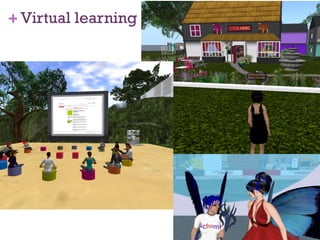
Virtual learning
New learning spaces Combining the affordances of new technologies with good pedagogy Taking account of context, location and time Blurring of real and virtual  New spaces, new metaphors, new ways of working SKG: Learning Spaces project, Australia JISC Designing spaces for effective learning
Converging practices Modern technologies Modern pedagogy Web 2.0  practices Location  aware technologies Adaptation  & customisation Second life/ immersive  worlds Google  it! “ Expert badges” , World of warcraft  User- generated content Blogging, peer  critiquing Cloud  computing From individual to  social Contextualised and  situated  learning Personalised  learning Experiential  learning Inquiry  learning Peer  learning Open  Educational Resources Reflection Distributed  cognition
Paradoxes created by the digital Expansive  knowledge  domain Hierarchy  & control less meaningful Increasingly  complex  digital landscape Content  distributed,  everything is miscellaneous Collective intelligence Free  content & tools, open APIs and mash ups Technology aspect Generic impact Educational impact Death of expertise / everyone an expert Multiple pathways / lost in cyberspace Beyond ‘digital space’/ New  metaphors  Multiple (co-)locations / loss of content integrity Social  collective/digital  individualism Issues re:  ownership , value, business models Challenges the role of the teacher Need for new learner pathways Widening skills gap from ‘tech savy’ Need to rethink the design process Potential for new forms of learning Lack of uptake
Digital literacies Jenkins twelve skills for participatory culture Play  – experimentation/problem solving Performance  – alternative identities Simulation  – construct models of real-world processes Appropriation  – sample and remix of media content Multitasking  – scanning and then focusing on salient details Distributed cognition  – interaction to expand mental capacities Collective intelligence  - to pool knowledge with others Judgment  – evaluation reliability of different information Transmedia navigation  – follow the flow of stories across modalities Networking  – search for,  synthesize and dissemination information Negotiation  – travel diverse communities, multiple perspectives Visualisation  – different data representations for ideas, patterns, trends
The gap between promise & reality Common  reactions:   “ I haven’t got  time ” “ My  research  is more important” “ What’s in it for  me ?” “ Where is my  reward ?” “ I don’t have the  skills  to do this” “ I  don’t believe  in this, it won’t work” Common  resistance strategies: I’ll say yes (and  do nothing ) Undermine  the initiative Undermine  the person involved Do it  badly Classic  mistakes : Emphasis on the  technologies , not the  people and processes Funding for technology developments but not  use and support Free resources Little reuse Array of  technologies Not fully  exploited
Designing  for Learning  Representing pedagogy Guiding design Sharing ideas Empirical  evidence  base OULDI Open University Learning Design Initiative OLnet Supporting researchers and users of Open Educational Resources
OULDI…. Design methods: schema & patterns Visualisation:   CompendiumLD Support and guidance: Events   Sharing and discussing: Cloudworks
Visualisation Helps articulate and share designs Supports effective design Highlights key requirements at different levels Integrates design advice and support at key points in the process
CompendiumLD Tool for visualising designs Based on: Roles  – student, tutor, etc. Tasks  – read, discuss, etc. Tools and resources Outputs Advantages Makes design  explicit Maps  out design Sharable  with others Good at  activity level
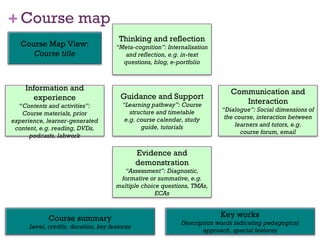
Course map & Pedagogy profile Course map Gives an  ‘at a glance’  view Based on the 5 key aspects of a course Pedagogy profile Maps to the  types of student  activities  Can look at different timeframes Advantages of these ‘views’ Provide  pedagogical overviews Can  compare  with other courses
Guidance and Support “ Learning pathway”:  Course structure and timetable e.g. course calendar, study guide, tutorials Thinking and reflection “ Meta-cognition” : Internalization and reflection, e.g. in-text questions, blogs, e-portfolios Evidence and demonstration “ Assessment” : Diagnostic, formative or summative, e.g. multiple choice questions, assignments, exams Information and experience “ Contents and activities” : Course materials, prior experience, learner-generated content, e.g. readings, DVDs, podcasts, labs Communication and Interaction “ Dialogue” : Social dimensions of the course, interaction between learners and tutors, e.g. course forum, email Course Map View:  Course title Course summary Level, credits, duration, key features Key works Description words indicating pedagogical approach, special features
Pedagogy profile Map of student tasks to time periods (weeks, semesters, etc) Six types of student tasks + assessment: Assimilative  Information handling Communication Productive Experiential Adaptive Assessment Each cell indicates the amount of time spent in that period on each type of task Web-based interactive version available
Teaching is a ‘craft’ practice: Developing Discussing  Adapting  Improving Key aspects to support Sharing best practice Ideas, support and advice Enhancing professional knowledge Communication
Cloudworks: sharing teaching practice A space for sharing and discussing learning and teaching ideas and designs Application of the best of web 2.0 practice to a teaching context Iterative development and evaluation – based on use Part of OU Learning Design Initiative Juliette Culver – developer Rebecca Galley – cloudworks facilitators Growing international ‘cloudworks champions’
Why was it developed? Aim To  bridge the gap  between technologies and use Issues Lack of uptake  of technologies in education Teachers say they want  examples /want to  share/discuss New skills  needed for engaging with new technologies
Key concepts Clouds:  core objects in Cloudworks Cloudscapes:  collections of clouds Activity streams:  dynamic filters of new activity Follow and be followed: Personal activity stream and peer recognition
Homepage Active clouds New Cloudscapes Orientation Search Browse Login User panel Cloudstream
Clouds Clouds:  Ideas Design or case studies Tools or resources Questions or problems
Active clouds Current topics Hot issues Questions Flash debates Presentations
Cloudscapes “ Learn about” Cloudscape: Presentations 24 Clouds Twitter stream Recent activities Space to Discuss Add  Follow Collate Archive
Individuals, collectives, communities Views from 158 countries Users:  Teachers (from K-12, tertiary, independent)  Researchers  Educational technologists/support staff  Policy makers  Researchers  Learners Characteristics Boundary crossing Multi-purpose, different motivations Lurking through active participation
Uses and benefits Events: conferences and workshops ETUG workshop , 20 th- 21 st  October 2009 http://cloudworks.ac.uk/index.php/cloudscape/view/1903 Discussions: Flash debates The changing nature of conferences http://cloudworks.ac.uk/cloud/view/2577 Eliciting expertise and open reviews Literature review  of Web 2.0 use in Higher Education http://cloudworks.ac.uk/index.php/cloudscape/view/1895 Aggregating resources Personalising formal learning with technology  http://cloudworks.ac.uk/index.php/cloudscape/view/1871
LD Toolbox A ‘pick and mix’ of learning design tools and  resources Supporting advice and guidance Trialled across a range of teaching and learning environments http://cloudworks.ac.uk/cloudscape/view/1882
Using the toolbox Activities graded: introductory Intermediate advanced 4 interventions offered: Independent, Community peer support Tailored events Side-by-side mentoring Co-creative approach to ensure relevance
 
Olnet - Design, use, reuse Designer OER Design Creates Deposits Deposits Learner A OER Design Learner B Tutor  Chooses Uses Quiz + beginners route Uses Quiz + advanced route Repurposes  & deposits
A holistic approach to design for learning – a vision for the future Gráinne Conole, Open University, UK Annual International CODE Symposium,  Chiba, Japan, 18 th  February 2010 More info, slides and references: http://cloudworks.ac.uk/cloud/view/2695
Flickr images Treasure island 1  http://www.flickr.com/photos/tontoncopt/2075310775/   Web 2.0 city  http://www.flickr.com/photos/4everyoung/313308360/ Grand challenges  http://www.kamaelia.org/GrandChallengesCover.png Flexible Open Space InQbate CETL in Creativity University of Sussex  http://www.flickr.com/photos/jiscinfonet/403331689/ Secondlife image http://www.flickr.com/photos/ramona538/ / CC BY 2.0

Conole Japan

  • 1.
    A holistic approachto design for learning: a student-centered approach Gráinne Conole, Open University, UK Annual International CODE Symposium, Chiba, Japan, 18 th February 2010 Slides and links: http://cloudworks.ac.uk/cloud/view/2695
  • 2.
    My context… Mybackground: Irish PhD Chemistry Professor of e-learning Open University, UK: 1 st ‘Open University’ More than 200, 000 students 570 courses in 70 subjects Supported Open Learning: (Materials+Tutor+Assessment) 7,000 tutors 20 partnerships in 30 countries Expertise in e-learning Learning innovation Learning environment: Moodle+ YouTube channel iTunes OpenLearn SecondLife
  • 3.
    Towards student-centered learningTeacher Student Teaching Learning Content Activities New technologies: Opportunities and challenges New tools and resources: To help teachers design
  • 4.
    Locating educational approachesFormal, ‘traditional’ courses Problem-based learning Contract-based learning Informal web-based learning Teacher-centred Student- centred Activity-based Content-based A lecture Why is a river polluted? Amateur photography Professional development
  • 5.
    Blurring boundaries Teacher-centredStudent- centred Activity-based Content-based Teaching Learning How do we deal with this new complexity? Learning Design as a conceptual framework
  • 6.
    Outline Education inan increasingly technology context Changing technologies The learner voice Examples of technology innovation Converging practice Paradoxes The gap between promise and reality Work at the OUUK OU Learning Design Initiative OLnet The landscape of the web 2.0 world…. Exploring new digital territories
  • 7.
    Technologies: changing, evolving…Abundance of online resources Ubiquitous, just-in-time, learning Mobile technologies IT services decentralised (Cloud computing)
  • 8.
    The learner voiceTechnologically immersed Learning processes Task orientated, experiential, cummulative Attitudes and approaches group orientated, experiential, able to multi-task, just in time mindset, comfortable with multiple representations Disconnect between student & institutional approaches Caution re: net gen claims, importance of taking account of student differences Do seem to be age related changes taking place and these are strongly linked to social networking and the use of a range of new Netgeneration, Digital Natives.... (Oblinger, Prensky, etc.), Ecar reports, Kennedy survey, Chris Jones, Mary Thorpe, JISC LEX projects, Sharpe and Beetham (forthcoming)
  • 9.
    Content defined… OpenUniversity UK: From broadcast TV to multi-channel
  • 10.
    Personalised and mobileNew learning opportunities Individualised personal environments Synchronising across devices Location and context aware The i-phone: a transformative technology But what next?
  • 11.
  • 12.
  • 13.
    New learning spacesCombining the affordances of new technologies with good pedagogy Taking account of context, location and time Blurring of real and virtual New spaces, new metaphors, new ways of working SKG: Learning Spaces project, Australia JISC Designing spaces for effective learning
  • 14.
    Converging practices Moderntechnologies Modern pedagogy Web 2.0 practices Location aware technologies Adaptation & customisation Second life/ immersive worlds Google it! “ Expert badges” , World of warcraft User- generated content Blogging, peer critiquing Cloud computing From individual to social Contextualised and situated learning Personalised learning Experiential learning Inquiry learning Peer learning Open Educational Resources Reflection Distributed cognition
  • 15.
    Paradoxes created bythe digital Expansive knowledge domain Hierarchy & control less meaningful Increasingly complex digital landscape Content distributed, everything is miscellaneous Collective intelligence Free content & tools, open APIs and mash ups Technology aspect Generic impact Educational impact Death of expertise / everyone an expert Multiple pathways / lost in cyberspace Beyond ‘digital space’/ New metaphors Multiple (co-)locations / loss of content integrity Social collective/digital individualism Issues re: ownership , value, business models Challenges the role of the teacher Need for new learner pathways Widening skills gap from ‘tech savy’ Need to rethink the design process Potential for new forms of learning Lack of uptake
  • 16.
    Digital literacies Jenkinstwelve skills for participatory culture Play – experimentation/problem solving Performance – alternative identities Simulation – construct models of real-world processes Appropriation – sample and remix of media content Multitasking – scanning and then focusing on salient details Distributed cognition – interaction to expand mental capacities Collective intelligence - to pool knowledge with others Judgment – evaluation reliability of different information Transmedia navigation – follow the flow of stories across modalities Networking – search for, synthesize and dissemination information Negotiation – travel diverse communities, multiple perspectives Visualisation – different data representations for ideas, patterns, trends
  • 17.
    The gap betweenpromise & reality Common reactions: “ I haven’t got time ” “ My research is more important” “ What’s in it for me ?” “ Where is my reward ?” “ I don’t have the skills to do this” “ I don’t believe in this, it won’t work” Common resistance strategies: I’ll say yes (and do nothing ) Undermine the initiative Undermine the person involved Do it badly Classic mistakes : Emphasis on the technologies , not the people and processes Funding for technology developments but not use and support Free resources Little reuse Array of technologies Not fully exploited
  • 18.
    Designing forLearning Representing pedagogy Guiding design Sharing ideas Empirical evidence base OULDI Open University Learning Design Initiative OLnet Supporting researchers and users of Open Educational Resources
  • 19.
    OULDI…. Design methods:schema & patterns Visualisation: CompendiumLD Support and guidance: Events Sharing and discussing: Cloudworks
  • 20.
    Visualisation Helps articulateand share designs Supports effective design Highlights key requirements at different levels Integrates design advice and support at key points in the process
  • 21.
    CompendiumLD Tool forvisualising designs Based on: Roles – student, tutor, etc. Tasks – read, discuss, etc. Tools and resources Outputs Advantages Makes design explicit Maps out design Sharable with others Good at activity level
  • 22.
    Course map &Pedagogy profile Course map Gives an ‘at a glance’ view Based on the 5 key aspects of a course Pedagogy profile Maps to the types of student activities Can look at different timeframes Advantages of these ‘views’ Provide pedagogical overviews Can compare with other courses
  • 23.
    Guidance and Support“ Learning pathway”: Course structure and timetable e.g. course calendar, study guide, tutorials Thinking and reflection “ Meta-cognition” : Internalization and reflection, e.g. in-text questions, blogs, e-portfolios Evidence and demonstration “ Assessment” : Diagnostic, formative or summative, e.g. multiple choice questions, assignments, exams Information and experience “ Contents and activities” : Course materials, prior experience, learner-generated content, e.g. readings, DVDs, podcasts, labs Communication and Interaction “ Dialogue” : Social dimensions of the course, interaction between learners and tutors, e.g. course forum, email Course Map View: Course title Course summary Level, credits, duration, key features Key works Description words indicating pedagogical approach, special features
  • 24.
    Pedagogy profile Mapof student tasks to time periods (weeks, semesters, etc) Six types of student tasks + assessment: Assimilative Information handling Communication Productive Experiential Adaptive Assessment Each cell indicates the amount of time spent in that period on each type of task Web-based interactive version available
  • 25.
    Teaching is a‘craft’ practice: Developing Discussing Adapting Improving Key aspects to support Sharing best practice Ideas, support and advice Enhancing professional knowledge Communication
  • 26.
    Cloudworks: sharing teachingpractice A space for sharing and discussing learning and teaching ideas and designs Application of the best of web 2.0 practice to a teaching context Iterative development and evaluation – based on use Part of OU Learning Design Initiative Juliette Culver – developer Rebecca Galley – cloudworks facilitators Growing international ‘cloudworks champions’
  • 27.
    Why was itdeveloped? Aim To bridge the gap between technologies and use Issues Lack of uptake of technologies in education Teachers say they want examples /want to share/discuss New skills needed for engaging with new technologies
  • 28.
    Key concepts Clouds: core objects in Cloudworks Cloudscapes: collections of clouds Activity streams: dynamic filters of new activity Follow and be followed: Personal activity stream and peer recognition
  • 29.
    Homepage Active cloudsNew Cloudscapes Orientation Search Browse Login User panel Cloudstream
  • 30.
    Clouds Clouds: Ideas Design or case studies Tools or resources Questions or problems
  • 31.
    Active clouds Currenttopics Hot issues Questions Flash debates Presentations
  • 32.
    Cloudscapes “ Learnabout” Cloudscape: Presentations 24 Clouds Twitter stream Recent activities Space to Discuss Add Follow Collate Archive
  • 33.
    Individuals, collectives, communitiesViews from 158 countries Users: Teachers (from K-12, tertiary, independent) Researchers Educational technologists/support staff Policy makers Researchers Learners Characteristics Boundary crossing Multi-purpose, different motivations Lurking through active participation
  • 34.
    Uses and benefitsEvents: conferences and workshops ETUG workshop , 20 th- 21 st October 2009 http://cloudworks.ac.uk/index.php/cloudscape/view/1903 Discussions: Flash debates The changing nature of conferences http://cloudworks.ac.uk/cloud/view/2577 Eliciting expertise and open reviews Literature review of Web 2.0 use in Higher Education http://cloudworks.ac.uk/index.php/cloudscape/view/1895 Aggregating resources Personalising formal learning with technology http://cloudworks.ac.uk/index.php/cloudscape/view/1871
  • 35.
    LD Toolbox A‘pick and mix’ of learning design tools and resources Supporting advice and guidance Trialled across a range of teaching and learning environments http://cloudworks.ac.uk/cloudscape/view/1882
  • 36.
    Using the toolboxActivities graded: introductory Intermediate advanced 4 interventions offered: Independent, Community peer support Tailored events Side-by-side mentoring Co-creative approach to ensure relevance
  • 37.
  • 38.
    Olnet - Design,use, reuse Designer OER Design Creates Deposits Deposits Learner A OER Design Learner B Tutor Chooses Uses Quiz + beginners route Uses Quiz + advanced route Repurposes & deposits
  • 39.
    A holistic approachto design for learning – a vision for the future Gráinne Conole, Open University, UK Annual International CODE Symposium, Chiba, Japan, 18 th February 2010 More info, slides and references: http://cloudworks.ac.uk/cloud/view/2695
  • 40.
    Flickr images Treasureisland 1 http://www.flickr.com/photos/tontoncopt/2075310775/ Web 2.0 city http://www.flickr.com/photos/4everyoung/313308360/ Grand challenges http://www.kamaelia.org/GrandChallengesCover.png Flexible Open Space InQbate CETL in Creativity University of Sussex http://www.flickr.com/photos/jiscinfonet/403331689/ Secondlife image http://www.flickr.com/photos/ramona538/ / CC BY 2.0