Web Accessibility 101
What it is, why it matters,
and how you can get started
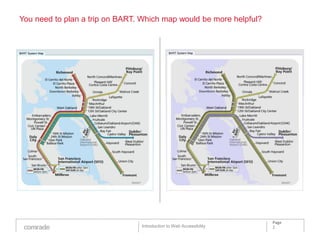
You need to plan a trip on BART. Which map would be more helpful?


                                                                    Page
                                Introduction to Web Accessibility   2
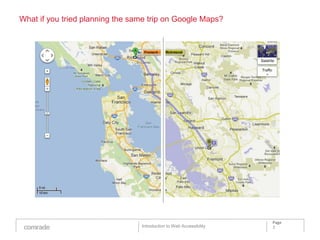
What if you tried planning the same trip on Google Maps?


                                                                     Page
                                 Introduction to Web Accessibility   3
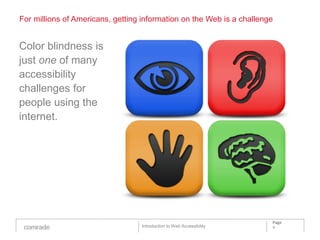
For millions of Americans, getting information on the Web is a challenge


Color blindness is
just one of many
accessibility
challenges for
people using the
internet.


                                                                       Page
                                  Introduction to Web Accessibility    4
What is Web accessibility?


In the World Wide Web, accessibility means having
equal access to web-based information and services
regardless of physical or developmental abilities or
impairments.


Source: Johns Hopkins University

                                                                       Page
                                   Introduction to Web Accessibility   5
Why accessibility?


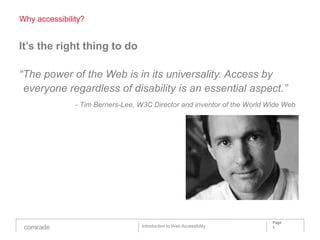
It’s the right thing to do

“The power of the Web is in its universality. Access by
 everyone regardless of disability is an essential aspect.”
               - Tim Berners-Lee, W3C Director and inventor of the World Wide Web


                                                                          Page
                                  Introduction to Web Accessibility       6
Accessibility benefits everyone


It’s the law
Accessibility is mandated by the federal government*, as well as many states,
international governing bodies, educational institutions and nonprofits.

It can help you reach a wider audience
49.7 million Americans have disabilities.** As with most other Americans, they
depend more and more on the internet for information and transactions.

It can improve overall usability and SEO
Because accessible websites are more intuitive, navigable and search engine
friendly, everyone wins—not just people with accessibility challenges.

It's future-friendly
Accessible sites leverage the latest tech innovations across multiple platforms,
and decouple content from formatting.

*Section 508 of the U.S. Rehabilitation Act
**Source: U.S. Census Bureau, Disability Status: 2000 - Census 2000 Brief

                                                                                      Page
                                                  Introduction to Web Accessibility   7
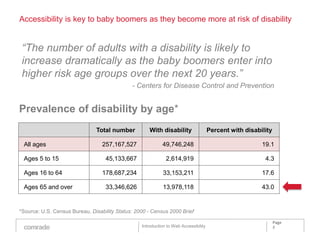
Accessibility is key to baby boomers as they become more at risk of disability


 “The number of adults with a disability is likely to
 increase dramatically as the baby boomers enter into
 higher risk age groups over the next 20 years.”
                                              - Centers for Disease Control and Prevention


Prevalence of disability by age*
                               Total number           With disability                 Percent with disability

 All ages                         257,167,527               49,746,248                                   19.1

 Ages 5 to 15                      45,133,667                 2,614,919                                   4.3

 Ages 16 to 64                    178,687,234               33,153,211                                   17.6

 Ages 65 and over                  33,346,626               13,978,118                                   43.0


*Source: U.S. Census Bureau, Disability Status: 2000 - Census 2000 Brief

                                                                                                                Page
                                                  Introduction to Web Accessibility                             8
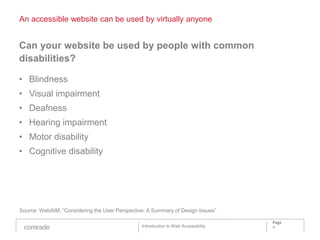
An accessible website can be used by virtually anyone


Can your website be used by people with common
disabilities?

• Blindness
• Visual impairment
• Deafness
• Hearing impairment
• Motor disability
• Cognitive disability


Source: WebAIM, “Considering the User Perspective: A Summary of Design Issues”

                                                                                    Page
                                                Introduction to Web Accessibility   9
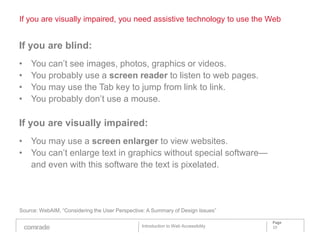
If you are visually impaired, you need assistive technology to use the Web


If you are blind:
•   You can’t see images, photos, graphics or videos.
•   You probably use a screen reader to listen to web pages.
•   You may use the Tab key to jump from link to link.
•   You probably don’t use a mouse.

If you are visually impaired:
• You may use a screen enlarger to view websites.
• You can’t enlarge text in graphics without special software—
  and even with this software the text is pixelated.


Source: WebAIM, “Considering the User Perspective: A Summary of Design Issues”

                                                                                    Page
                                                Introduction to Web Accessibility   10
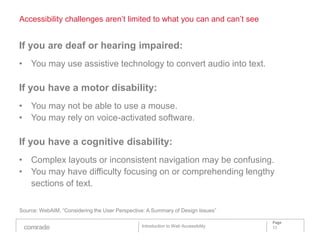
Accessibility challenges aren’t limited to what you can and can’t see


If you are deaf or hearing impaired:
• You may use assistive technology to convert audio into text.

If you have a motor disability:
• You may not be able to use a mouse.
• You may rely on voice-activated software.

If you have a cognitive disability:
• Complex layouts or inconsistent navigation may be confusing.
• You may have difficulty focusing on or comprehending lengthy
  sections of text.

Source: WebAIM, “Considering the User Perspective: A Summary of Design Issues”

                                                                                    Page
                                                Introduction to Web Accessibility   11
The World Wide Web Consortium is setting the standard for accessibility


Web Content Accessibility Guidelines (WCAG) are
guidelines for making content accessible, primarily for
disabled users, but also for all user agents, including
highly limited devices, such as mobile phones.

WCAG are published by the World Wide Web
Consortium’s Web Accessibility Initiative. The current
version is 2.0, published on December 11, 2008.


Source: Wikipedia

                                                                      Page
                                  Introduction to Web Accessibility   12
Is your website perceivable, operable, understandable and robust?


The POUR principles of Web accessibility:
Perceivable
As a minimum requirement for accessibility people need to be able to see,
hear, or touch Web content.
Operable
Users should be able to find, navigate, and interact with Web content such as
forms and menus using a range of input methods and assistive technologies.
Understandable
All Web content should make sense and its behavior should be predictable.
In addition any feedback provided about errors should be clear and helpful.
Robust
Content must be robust enough that it can be interpreted reliably by a wide
variety of user agents, including assistive technologies.

Sources: Paul Wallas, “POUR Principles of Accessibility,” W3C, “Introduction to Understanding WCAG 2.0”

                                                                                                          Page
                                                  Introduction to Web Accessibility                       13
Perceivable


Perceivable:

• Provide text alternatives for any non-text content so that it can be
  changed into other forms people need, such as large print, braille,
  speech, symbols, or simpler language.
• Provide alternatives for time-based media.
• Create content that can be presented in different ways (for
  example, simpler layout) without losing information or structure.
• Make it easier for users to see and hear content including
  separating foreground from background.


Source: W3C, “Introduction to Understanding WCAG 2.0”

                                                                                    Page
                                                Introduction to Web Accessibility   14
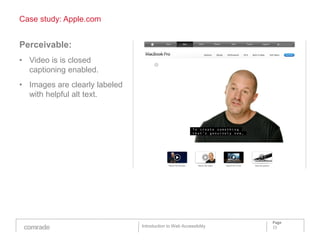
Case study: Apple.com


Perceivable:
• Video is is closed
  captioning enabled.
• Images are clearly labeled
  with helpful alt text.


                                                                   Page
                               Introduction to Web Accessibility   15
Operable


Operable:

• Make all functionality available from a keyboard.
• Provide users enough time to read and use content.
• Do not design content in a way that is known to cause seizures.
• Provide ways to help users navigate, find content, and determine
  where they are.


Source: W3C, “Introduction to Understanding WCAG 2.0”

                                                                                    Page
                                                Introduction to Web Accessibility   16
Case study: Couchsurfing.org


Operable:
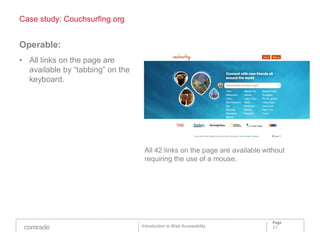
• All links on the page are
  available by “tabbing” on the
  keyboard.


                                   All 42 links on the page are available without
                                   requiring the use of a mouse.


                                                                             Page
                                  Introduction to Web Accessibility          17
Understandable


Understandable:

• Make text content readable and understandable.
• Make Web pages appear and operate in predictable ways.
• Help users avoid and correct mistakes.


Source: W3C, “Introduction to Understanding WCAG 2.0”

                                                                                    Page
                                                Introduction to Web Accessibility   18
Case Study: Screen Reader


Understandable:
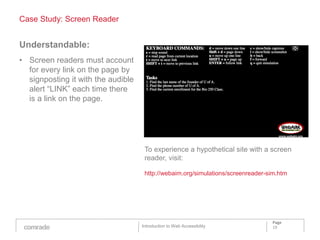
• Screen readers must account
  for every link on the page by
  signposting it with the audible
  alert “LINK” each time there
  is a link on the page.


                                     To experience a hypothetical site with a screen
                                     reader, visit:

                                     http://webaim.org/simulations/screenreader-sim.htm


                                                                                 Page
                                    Introduction to Web Accessibility            19
Robust


Robust:

• Maximize compatibility with current and future user agents,
  including assistive technologies.


Source: W3C, “Introduction to Understanding WCAG 2.0”

                                                                                    Page
                                                Introduction to Web Accessibility   20
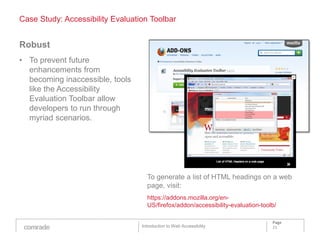
Case Study: Accessibility Evaluation Toolbar


Robust
• To prevent future
  enhancements from
  becoming inaccessible, tools
  like the Accessibility
  Evaluation Toolbar allow
  developers to run through
  myriad scenarios.


                                    To generate a list of HTML headings on a web
                                    page, visit:
                                    https://addons.mozilla.org/en-
                                    US/firefox/addon/accessibility-evaluation-toolb/

                                                                                  Page
                                  Introduction to Web Accessibility               21
Next steps


What you can do to address Web accessibility:

• Create accessibility awareness and expertise within your
  organization.
• Evaluate your current Web properties for accessibility gaps.
• Create a prioritized action plan to make your Web properties
  compliant with current accessibility standards.
• Get started, tackling one project at a time. (We recommend
  starting with your home page.)
• Support an ongoing effort to learn and evolve your Web properties
  as accessibility standards change.


                                                                   Page
                               Introduction to Web Accessibility   22
Sources and further reading

Section 508 of the U.S. Rehabilitation Act
http://www.section508.gov/

Johns Hopkins University, Web accessibility microsite
http://webaccessibility.jhu.edu/

U.S. Census Bureau, Disability Status: 2000 - Census 2000 Brief
http://www.census.gov/hhes/www/disability/disabstat2k.html

WebAIM, “Considering the User Perspective: A Summary of Design Issues”
http://webaim.org/articles/userperspective/

Wikipedia, “Web Content Accessibility Guidelines”
http://en.wikipedia.org/wiki/Web_Content_Accessibility_Guidelines

W3C, “Understanding WCAG 2.0”
http://www.w3.org/TR/UNDERSTANDING-WCAG20/Overview.html

Centers for Disease Control and Prevention
http://www.cdc.gov/Features/dsAdultDisabilityCauses/

Paul Wallas, “POUR Principles of Accessibility”
http://www.paulwallas.com/anything-web/pour-principles-of-web-accessibility/


                                                                                       Page
                                                   Introduction to Web Accessibility   23
Brand Development
Research and Analytics
Digital Marketing
User Experience Design
Technology


Comrade Inc.
Oakland, CA
New York, NY
www.comradeagency.com


                                                             Page
                         Introduction to Web Accessibility   24

Comrade Web Accessibility 101

  • 1.
    Web Accessibility 101 Whatit is, why it matters, and how you can get started
  • 2.
    You need toplan a trip on BART. Which map would be more helpful? Page Introduction to Web Accessibility 2
  • 3.
    What if youtried planning the same trip on Google Maps? Page Introduction to Web Accessibility 3
  • 4.
    For millions ofAmericans, getting information on the Web is a challenge Color blindness is just one of many accessibility challenges for people using the internet. Page Introduction to Web Accessibility 4
  • 5.
    What is Webaccessibility? In the World Wide Web, accessibility means having equal access to web-based information and services regardless of physical or developmental abilities or impairments. Source: Johns Hopkins University Page Introduction to Web Accessibility 5
  • 6.
    Why accessibility? It’s theright thing to do “The power of the Web is in its universality. Access by everyone regardless of disability is an essential aspect.” - Tim Berners-Lee, W3C Director and inventor of the World Wide Web Page Introduction to Web Accessibility 6
  • 7.
    Accessibility benefits everyone It’sthe law Accessibility is mandated by the federal government*, as well as many states, international governing bodies, educational institutions and nonprofits. It can help you reach a wider audience 49.7 million Americans have disabilities.** As with most other Americans, they depend more and more on the internet for information and transactions. It can improve overall usability and SEO Because accessible websites are more intuitive, navigable and search engine friendly, everyone wins—not just people with accessibility challenges. It's future-friendly Accessible sites leverage the latest tech innovations across multiple platforms, and decouple content from formatting. *Section 508 of the U.S. Rehabilitation Act **Source: U.S. Census Bureau, Disability Status: 2000 - Census 2000 Brief Page Introduction to Web Accessibility 7
  • 8.
    Accessibility is keyto baby boomers as they become more at risk of disability “The number of adults with a disability is likely to increase dramatically as the baby boomers enter into higher risk age groups over the next 20 years.” - Centers for Disease Control and Prevention Prevalence of disability by age* Total number With disability Percent with disability All ages 257,167,527 49,746,248 19.1 Ages 5 to 15 45,133,667 2,614,919 4.3 Ages 16 to 64 178,687,234 33,153,211 17.6 Ages 65 and over 33,346,626 13,978,118 43.0 *Source: U.S. Census Bureau, Disability Status: 2000 - Census 2000 Brief Page Introduction to Web Accessibility 8
  • 9.
    An accessible websitecan be used by virtually anyone Can your website be used by people with common disabilities? • Blindness • Visual impairment • Deafness • Hearing impairment • Motor disability • Cognitive disability Source: WebAIM, “Considering the User Perspective: A Summary of Design Issues” Page Introduction to Web Accessibility 9
  • 10.
    If you arevisually impaired, you need assistive technology to use the Web If you are blind: • You can’t see images, photos, graphics or videos. • You probably use a screen reader to listen to web pages. • You may use the Tab key to jump from link to link. • You probably don’t use a mouse. If you are visually impaired: • You may use a screen enlarger to view websites. • You can’t enlarge text in graphics without special software— and even with this software the text is pixelated. Source: WebAIM, “Considering the User Perspective: A Summary of Design Issues” Page Introduction to Web Accessibility 10
  • 11.
    Accessibility challenges aren’tlimited to what you can and can’t see If you are deaf or hearing impaired: • You may use assistive technology to convert audio into text. If you have a motor disability: • You may not be able to use a mouse. • You may rely on voice-activated software. If you have a cognitive disability: • Complex layouts or inconsistent navigation may be confusing. • You may have difficulty focusing on or comprehending lengthy sections of text. Source: WebAIM, “Considering the User Perspective: A Summary of Design Issues” Page Introduction to Web Accessibility 11
  • 12.
    The World WideWeb Consortium is setting the standard for accessibility Web Content Accessibility Guidelines (WCAG) are guidelines for making content accessible, primarily for disabled users, but also for all user agents, including highly limited devices, such as mobile phones. WCAG are published by the World Wide Web Consortium’s Web Accessibility Initiative. The current version is 2.0, published on December 11, 2008. Source: Wikipedia Page Introduction to Web Accessibility 12
  • 13.
    Is your websiteperceivable, operable, understandable and robust? The POUR principles of Web accessibility: Perceivable As a minimum requirement for accessibility people need to be able to see, hear, or touch Web content. Operable Users should be able to find, navigate, and interact with Web content such as forms and menus using a range of input methods and assistive technologies. Understandable All Web content should make sense and its behavior should be predictable. In addition any feedback provided about errors should be clear and helpful. Robust Content must be robust enough that it can be interpreted reliably by a wide variety of user agents, including assistive technologies. Sources: Paul Wallas, “POUR Principles of Accessibility,” W3C, “Introduction to Understanding WCAG 2.0” Page Introduction to Web Accessibility 13
  • 14.
    Perceivable Perceivable: • Provide textalternatives for any non-text content so that it can be changed into other forms people need, such as large print, braille, speech, symbols, or simpler language. • Provide alternatives for time-based media. • Create content that can be presented in different ways (for example, simpler layout) without losing information or structure. • Make it easier for users to see and hear content including separating foreground from background. Source: W3C, “Introduction to Understanding WCAG 2.0” Page Introduction to Web Accessibility 14
  • 15.
    Case study: Apple.com Perceivable: •Video is is closed captioning enabled. • Images are clearly labeled with helpful alt text. Page Introduction to Web Accessibility 15
  • 16.
    Operable Operable: • Make allfunctionality available from a keyboard. • Provide users enough time to read and use content. • Do not design content in a way that is known to cause seizures. • Provide ways to help users navigate, find content, and determine where they are. Source: W3C, “Introduction to Understanding WCAG 2.0” Page Introduction to Web Accessibility 16
  • 17.
    Case study: Couchsurfing.org Operable: •All links on the page are available by “tabbing” on the keyboard. All 42 links on the page are available without requiring the use of a mouse. Page Introduction to Web Accessibility 17
  • 18.
    Understandable Understandable: • Make textcontent readable and understandable. • Make Web pages appear and operate in predictable ways. • Help users avoid and correct mistakes. Source: W3C, “Introduction to Understanding WCAG 2.0” Page Introduction to Web Accessibility 18
  • 19.
    Case Study: ScreenReader Understandable: • Screen readers must account for every link on the page by signposting it with the audible alert “LINK” each time there is a link on the page. To experience a hypothetical site with a screen reader, visit: http://webaim.org/simulations/screenreader-sim.htm Page Introduction to Web Accessibility 19
  • 20.
    Robust Robust: • Maximize compatibilitywith current and future user agents, including assistive technologies. Source: W3C, “Introduction to Understanding WCAG 2.0” Page Introduction to Web Accessibility 20
  • 21.
    Case Study: AccessibilityEvaluation Toolbar Robust • To prevent future enhancements from becoming inaccessible, tools like the Accessibility Evaluation Toolbar allow developers to run through myriad scenarios. To generate a list of HTML headings on a web page, visit: https://addons.mozilla.org/en- US/firefox/addon/accessibility-evaluation-toolb/ Page Introduction to Web Accessibility 21
  • 22.
    Next steps What youcan do to address Web accessibility: • Create accessibility awareness and expertise within your organization. • Evaluate your current Web properties for accessibility gaps. • Create a prioritized action plan to make your Web properties compliant with current accessibility standards. • Get started, tackling one project at a time. (We recommend starting with your home page.) • Support an ongoing effort to learn and evolve your Web properties as accessibility standards change. Page Introduction to Web Accessibility 22
  • 23.
    Sources and furtherreading Section 508 of the U.S. Rehabilitation Act http://www.section508.gov/ Johns Hopkins University, Web accessibility microsite http://webaccessibility.jhu.edu/ U.S. Census Bureau, Disability Status: 2000 - Census 2000 Brief http://www.census.gov/hhes/www/disability/disabstat2k.html WebAIM, “Considering the User Perspective: A Summary of Design Issues” http://webaim.org/articles/userperspective/ Wikipedia, “Web Content Accessibility Guidelines” http://en.wikipedia.org/wiki/Web_Content_Accessibility_Guidelines W3C, “Understanding WCAG 2.0” http://www.w3.org/TR/UNDERSTANDING-WCAG20/Overview.html Centers for Disease Control and Prevention http://www.cdc.gov/Features/dsAdultDisabilityCauses/ Paul Wallas, “POUR Principles of Accessibility” http://www.paulwallas.com/anything-web/pour-principles-of-web-accessibility/ Page Introduction to Web Accessibility 23
  • 24.
    Brand Development Research andAnalytics Digital Marketing User Experience Design Technology Comrade Inc. Oakland, CA New York, NY www.comradeagency.com Page Introduction to Web Accessibility 24