Table of Content
• What is web accessibility?
• Why is it important?
• Who is affected by poor accessibility?
• How can accessibility be improved?
• When to think about accessibility?
What is Web Accessibility?
• Differently abled person can use the web equally.
What is Web Accessibility?
• Differently abled person can use the web equally.
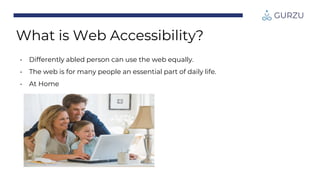
• The web is for many people an essential part of daily life.
What is Web Accessibility?
• Differently abled person can use the web equally.
• The web is for many people an essential part of daily life.
• At work
What is Web Accessibility?
• Differently abled person can use the web equally.
• The web is for many people an essential part of daily life.
• At Home
What is Web Accessibility?
• Differently abled person can use the web equally.
• The web is for many people an essential part of daily life.
• And on the road.
What is Web Accessibility?
• Differently abled person can use the web equally.
• The web is for many people an essential part of daily life.
• It refers to the inclusive practice of removing barriers that
prevent interaction with, or access to, website by people with
limited abilities.
What is Web Accessibility?
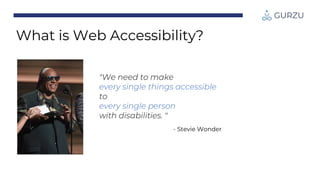
"We need to make
every single things accessible
to
every single person
with disabilities. "
- Stevie Wonder
What is Web Accessibility?
Why is Accessibility Important?
What’s accessibility all about?
• The web is the world's preferred channel for:
• Knowledge
• Social Interaction
• Commerce
• But it's not always easy for:
• Differently-abled persons
• Those who are getting older
• And for everyone ...
• Accessibility can increase the profitability of a website.
• Accessibility is a legal requirement. [CDDO UK 2018]
Why is Accessibility Important?
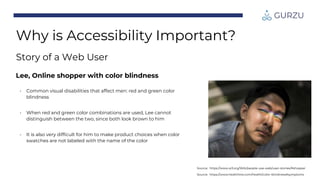
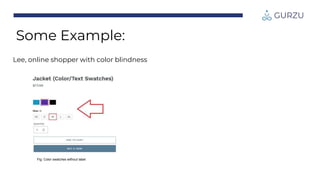
Lee, Online shopper with color blindness
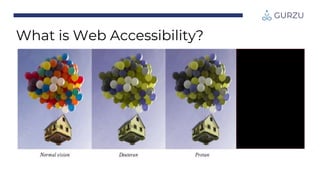
• Common visual disabilities that affect men: red and green color
blindness
• When red and green color combinations are used, Lee cannot
distinguish between the two, since both look brown to him
• It is also very difficult for him to make product choices when color
swatches are not labeled with the name of the color
Source: https://www.healthline.com/health/color-blindness#symptoms
Source: https://www.w3.org/WAI/people-use-web/user-stories/#shopper
Why is Accessibility Important?
Story of a Web User
Source: https://www.globaldownsyndrome.org/about-down-syndrome/misconceptions-vs-reality/
Why is Accessibility Important?
Story of a Web User
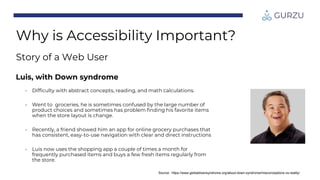
Luis, with Down syndrome
• Difficulty with abstract concepts, reading, and math calculations.
• Went to groceries, he is sometimes confused by the large number of
product choices and sometimes has problem finding his favorite items
when the store layout is change.
• Recently, a friend showed him an app for online grocery purchases that
has consistent, easy-to-use navigation with clear and direct instructions
• Luis now uses the shopping app a couple of times a month for
frequently purchased items and buys a few fresh items regularly from
the store.
Who is Affected by Poor
Accessibility?
More People than you think.
Can your website be used by people
with common disabilities?
• Blindness
• Visual impairments
• Deafness
• Hearing impairments
• Motor impairment
• Cognitive disability
How different people can access web?
A person with complete visual impairment:
• You can't see images, photos, graphics or videos
• You probably use a screen reader to listen to web pages
• You may use the Tab key to jump from link to link
• You probably don't use mouse
A person with partial visual impairment:
• You may use a screen enlarger to view website
How different people can access web?
A person with complete/partial hearing impairment:
• You may use assistive technology to convert audio into text
A person with motor disabilities:
• You may not be able to use a mouse
• You may rely on voice activated software
Myth – 1: Only a small percentage of the
global population has disability.
It's just for a minority of people !?
• CDC estimates that 26% of US adults are living with a certain disability.
• 12 million people in UK have a recognized disability.
• 1 in 5 Americans have difficulty performing functional or participatory
activities (US Census)
• 15% of the global population report challenges in dealing with basic daily tasks
and interactions (WHO)
• > 30% of us will have some form of disabilities by the time we retire (StatsCan)
Myth – 2: It's too expensive – not
enough ROI(Return on Investment)
• PWD(People with disabilities) represent a market worth £80bn per year in the
UK approx. £320bn across EU(European Union).
• Google increased 30% of traffic after they introduce translation feature.
• 83% of disabled people will not return to a business that does not meet their
access needs.
• If a company’s website is harder to use , people will visit a competitor's site which
is easier to use.
• Tesco – In 2001 an accessible version of their shopping site was launched at a
cost £35K and yielded £13M turnover a year.
Source: https://www.slideshare.net/coolfields/beginners-guidetowebaccessibilitywpuk2013v1
Myth – 3: Yes, but my site is not meant for
the blind/deaf/motor impaired
• People don't always browse/buy just for themselves
• You can't make assumption about people
• Studies in US show that friends and family of PWD will also
avoid inaccessible sites
• Think about your site's reputation amongst friends and family of
PWD(People with disabilities)
Source: https://www.slideshare.net/coolfields/beginners-guidetowebaccessibilitywpuk2013v1
Myth – 4: If I ignore it, it'll go away
• We are all getting older
• One in four will be over 65 by 2061
• How are you going to use webapps that you build now after
30/40/50 years back?
Source: https://www.slideshare.net/coolfields/beginners-guidetowebaccessibilitywpuk2013v1
How Can Accessibility be
Improved?
It's not rocket science.
Some Example:
Remember lee,
Source: https://www.healthline.com/health/color-blindness#symptoms
Lee, online shopper with color blindness
Fig: Color swatches without label
Some Example:
Fig: Color swatches without label Fig: Color swatches with label
Some Example:
Lee, online shopper with color blindness
Simple things we can do
Few websites are totally impossible for those with impairments to use.
Images –correct use of alternate text
(alt attribute)
• Describe what image shows or what it represents.
• If a link, describe destination.
• If decorative, leave blank (alt = "").
Links -
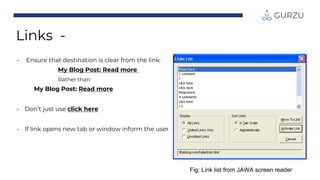
Fig: Link list from JAWA screen reader
• Ensure that destination is clear from the link:
My Blog Post: Read more
Rather than
My Blog Post: Read more
• Don’t just use click here
• If link opens new tab or window inform the user.
Use heading properly
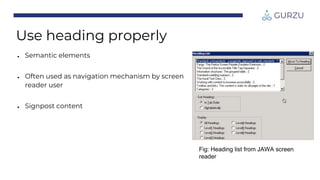
● Semantic elements
● Often used as navigation mechanism by screen
reader user
● Signpost content
Fig: Heading list from JAWA screen
reader
Keyboard focus and operation
• Focus should be easily visible
• Tab order should make sense
• Ensure all functionality accessible by
keystrokes
• Good color contrast
• Should allow itself to be resized without
breaking layout(initially)
• Use of color alone to convey meaning
Text
Markup forms correctly
• Use labels for input fields
• Field set for grouping controls
• Clear display of errors and use text
• Don't use harder CAPTCHAs
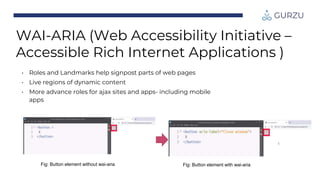
WAI-ARIA (Web Accessibility Initiative –
Accessible Rich Internet Applications )
• Roles and Landmarks help signpost parts of web
pages
• Live regions of dynamic content
• More advance roles for ajax sites and apps- including
mobile apps.
Fig: Button element without wai-aria
• Roles and Landmarks help signpost parts of web pages
• Live regions of dynamic content
• More advance roles for ajax sites and apps- including mobile
apps
Fig: Button element without wai-aria Fig: Button element with wai-aria
WAI-ARIA (Web Accessibility Initiative –
Accessible Rich Internet Applications )
When Should I Think About
Accessibility?
Think of it as another requirements – one which may not be explicitly
asked for.
Implementing accessibility
"Our small step leads to big changes in someone's life."

Web Accessibility & It's Guidelines.pptx

  • 2.
    Table of Content •What is web accessibility? • Why is it important? • Who is affected by poor accessibility? • How can accessibility be improved? • When to think about accessibility?
  • 3.
    What is WebAccessibility?
  • 4.
    What is WebAccessibility?
  • 5.
    • Differently abledperson can use the web equally. What is Web Accessibility?
  • 6.
    • Differently abledperson can use the web equally. • The web is for many people an essential part of daily life. What is Web Accessibility?
  • 7.
    • Differently abledperson can use the web equally. • The web is for many people an essential part of daily life. • At work What is Web Accessibility?
  • 8.
    • Differently abledperson can use the web equally. • The web is for many people an essential part of daily life. • At Home What is Web Accessibility?
  • 9.
    • Differently abledperson can use the web equally. • The web is for many people an essential part of daily life. • And on the road. What is Web Accessibility?
  • 10.
    • Differently abledperson can use the web equally. • The web is for many people an essential part of daily life. • It refers to the inclusive practice of removing barriers that prevent interaction with, or access to, website by people with limited abilities. What is Web Accessibility?
  • 11.
    "We need tomake every single things accessible to every single person with disabilities. " - Stevie Wonder What is Web Accessibility?
  • 12.
    Why is AccessibilityImportant? What’s accessibility all about?
  • 13.
    • The webis the world's preferred channel for: • Knowledge • Social Interaction • Commerce • But it's not always easy for: • Differently-abled persons • Those who are getting older • And for everyone ... • Accessibility can increase the profitability of a website. • Accessibility is a legal requirement. [CDDO UK 2018] Why is Accessibility Important?
  • 14.
    Lee, Online shopperwith color blindness • Common visual disabilities that affect men: red and green color blindness • When red and green color combinations are used, Lee cannot distinguish between the two, since both look brown to him • It is also very difficult for him to make product choices when color swatches are not labeled with the name of the color Source: https://www.healthline.com/health/color-blindness#symptoms Source: https://www.w3.org/WAI/people-use-web/user-stories/#shopper Why is Accessibility Important? Story of a Web User
  • 15.
    Source: https://www.globaldownsyndrome.org/about-down-syndrome/misconceptions-vs-reality/ Why isAccessibility Important? Story of a Web User Luis, with Down syndrome • Difficulty with abstract concepts, reading, and math calculations. • Went to groceries, he is sometimes confused by the large number of product choices and sometimes has problem finding his favorite items when the store layout is change. • Recently, a friend showed him an app for online grocery purchases that has consistent, easy-to-use navigation with clear and direct instructions • Luis now uses the shopping app a couple of times a month for frequently purchased items and buys a few fresh items regularly from the store.
  • 16.
    Who is Affectedby Poor Accessibility? More People than you think.
  • 17.
    Can your websitebe used by people with common disabilities? • Blindness • Visual impairments • Deafness • Hearing impairments • Motor impairment • Cognitive disability
  • 18.
    How different peoplecan access web? A person with complete visual impairment: • You can't see images, photos, graphics or videos • You probably use a screen reader to listen to web pages • You may use the Tab key to jump from link to link • You probably don't use mouse A person with partial visual impairment: • You may use a screen enlarger to view website
  • 19.
    How different peoplecan access web? A person with complete/partial hearing impairment: • You may use assistive technology to convert audio into text A person with motor disabilities: • You may not be able to use a mouse • You may rely on voice activated software
  • 20.
    Myth – 1:Only a small percentage of the global population has disability. It's just for a minority of people !? • CDC estimates that 26% of US adults are living with a certain disability. • 12 million people in UK have a recognized disability. • 1 in 5 Americans have difficulty performing functional or participatory activities (US Census) • 15% of the global population report challenges in dealing with basic daily tasks and interactions (WHO) • > 30% of us will have some form of disabilities by the time we retire (StatsCan)
  • 21.
    Myth – 2:It's too expensive – not enough ROI(Return on Investment) • PWD(People with disabilities) represent a market worth £80bn per year in the UK approx. £320bn across EU(European Union). • Google increased 30% of traffic after they introduce translation feature. • 83% of disabled people will not return to a business that does not meet their access needs. • If a company’s website is harder to use , people will visit a competitor's site which is easier to use. • Tesco – In 2001 an accessible version of their shopping site was launched at a cost £35K and yielded £13M turnover a year. Source: https://www.slideshare.net/coolfields/beginners-guidetowebaccessibilitywpuk2013v1
  • 22.
    Myth – 3:Yes, but my site is not meant for the blind/deaf/motor impaired • People don't always browse/buy just for themselves • You can't make assumption about people • Studies in US show that friends and family of PWD will also avoid inaccessible sites • Think about your site's reputation amongst friends and family of PWD(People with disabilities) Source: https://www.slideshare.net/coolfields/beginners-guidetowebaccessibilitywpuk2013v1
  • 23.
    Myth – 4:If I ignore it, it'll go away • We are all getting older • One in four will be over 65 by 2061 • How are you going to use webapps that you build now after 30/40/50 years back? Source: https://www.slideshare.net/coolfields/beginners-guidetowebaccessibilitywpuk2013v1
  • 24.
    How Can Accessibilitybe Improved? It's not rocket science.
  • 25.
    Some Example: Remember lee, Source:https://www.healthline.com/health/color-blindness#symptoms
  • 26.
    Lee, online shopperwith color blindness Fig: Color swatches without label Some Example:
  • 27.
    Fig: Color swatcheswithout label Fig: Color swatches with label Some Example: Lee, online shopper with color blindness
  • 28.
    Simple things wecan do Few websites are totally impossible for those with impairments to use.
  • 29.
    Images –correct useof alternate text (alt attribute) • Describe what image shows or what it represents. • If a link, describe destination. • If decorative, leave blank (alt = "").
  • 30.
    Links - Fig: Linklist from JAWA screen reader • Ensure that destination is clear from the link: My Blog Post: Read more Rather than My Blog Post: Read more • Don’t just use click here • If link opens new tab or window inform the user.
  • 31.
    Use heading properly ●Semantic elements ● Often used as navigation mechanism by screen reader user ● Signpost content Fig: Heading list from JAWA screen reader
  • 32.
    Keyboard focus andoperation • Focus should be easily visible • Tab order should make sense • Ensure all functionality accessible by keystrokes
  • 33.
    • Good colorcontrast • Should allow itself to be resized without breaking layout(initially) • Use of color alone to convey meaning Text
  • 34.
    Markup forms correctly •Use labels for input fields • Field set for grouping controls • Clear display of errors and use text • Don't use harder CAPTCHAs
  • 35.
    WAI-ARIA (Web AccessibilityInitiative – Accessible Rich Internet Applications ) • Roles and Landmarks help signpost parts of web pages • Live regions of dynamic content • More advance roles for ajax sites and apps- including mobile apps. Fig: Button element without wai-aria
  • 36.
    • Roles andLandmarks help signpost parts of web pages • Live regions of dynamic content • More advance roles for ajax sites and apps- including mobile apps Fig: Button element without wai-aria Fig: Button element with wai-aria WAI-ARIA (Web Accessibility Initiative – Accessible Rich Internet Applications )
  • 37.
    When Should IThink About Accessibility? Think of it as another requirements – one which may not be explicitly asked for.
  • 38.
    Implementing accessibility "Our smallstep leads to big changes in someone's life."