Computer Networks
Introduction to Computer Networks

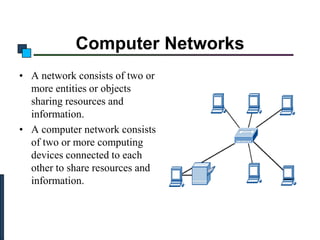
Computer Networks
• A network consists of two or
more entities or objects
sharing resources and
information.
• A computer network consists
of two or more computing
devices connected to each
other to share resources and
information.
Communication Model
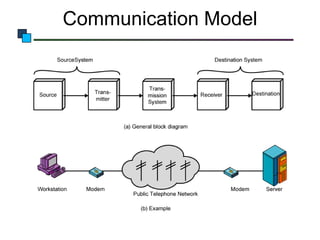
Communication Model
• Source
– generates data to be transmitted

• Transmitter
– Converts data into transmittable signals

• Transmission System
– Carries data

• Receiver
– Converts received signal into data

• Destination
– Takes incoming data
Communication Model
– To transfer data from one computer to another requires
some type of link through which the data can be
transmitted. This link is known as the communications
channel.
– To send data through the channel requires some type of
transmission media, which may be either physical or
wireless.
Physical Media
• Twisted-pair cable – consists of two independently insulated wires
twisted around each other (least expensive type of cable—the kind
that is used in many telephone systems)
• Coaxial cable – consists of an insulated center wire grounded by a
shield of braided wire (the primary type of cabling used by the cable
television industry; it is more expensive than twisted pair)
• Fiber-optic cable – contains hundreds of clear fiberglass or plastic
fibers (threads) (made from thin, flexible glass tubing; bandwidth is
greater, so it can carry more data; it is lighter than metal wires and is
less susceptible to interference; it is fragile and expensive)
• ISDN line – a special digital telephone line that transmits and
receives information at very high speeds
Twisted-Pair Cables
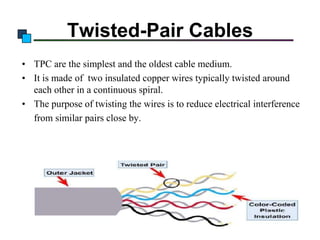
• TPC are the simplest and the oldest cable medium.
• It is made of two insulated copper wires typically twisted around
each other in a continuous spiral.
• The purpose of twisting the wires is to reduce electrical interference
from similar pairs close by.
Coaxial Cable
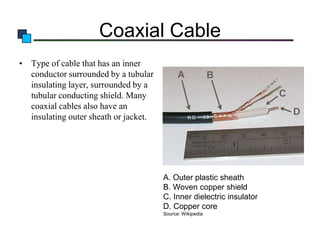
• Type of cable that has an inner
conductor surrounded by a tubular
insulating layer, surrounded by a
tubular conducting shield. Many
coaxial cables also have an
insulating outer sheath or jacket.

A. Outer plastic sheath
B. Woven copper shield
C. Inner dielectric insulator
D. Copper core
Source: Wikipedia
Fiber Optics
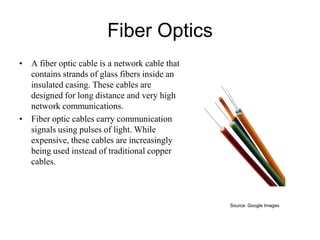
• A fiber optic cable is a network cable that
contains strands of glass fibers inside an
insulated casing. These cables are
designed for long distance and very high
network communications.
• Fiber optic cables carry communication
signals using pulses of light. While
expensive, these cables are increasingly
being used instead of traditional copper
cables.

Source: Google Images
Wireless Media
• Microwave Technology
• Satellite system
• Cellular technology
• Infrared technology
Microwave
•

Microwave
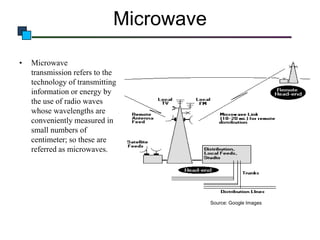
transmission refers to the
technology of transmitting
information or energy by
the use of radio waves
whose wavelengths are
conveniently measured in
small numbers of
centimeter; so these are
referred as microwaves.

Source: Google Images
Microwave Technology
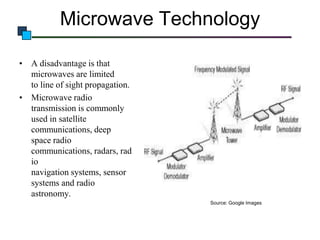
• A disadvantage is that
microwaves are limited
to line of sight propagation.
• Microwave radio
transmission is commonly
used in satellite
communications, deep
space radio
communications, radars, rad
io
navigation systems, sensor
systems and radio
astronomy.
Source: Google Images
Radio Frequency
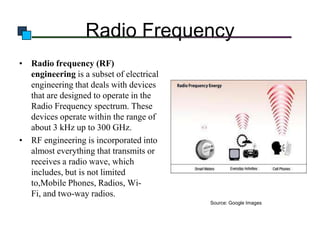
• Radio frequency (RF)
engineering is a subset of electrical
engineering that deals with devices
that are designed to operate in the
Radio Frequency spectrum. These
devices operate within the range of
about 3 kHz up to 300 GHz.
• RF engineering is incorporated into
almost everything that transmits or
receives a radio wave, which
includes, but is not limited
to,Mobile Phones, Radios, WiFi, and two-way radios.
Source: Google Images
Satellite Communication
•

•

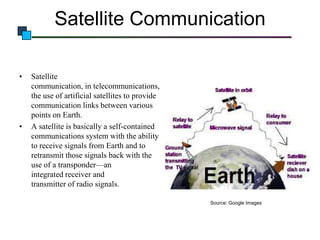
Satellite
communication, in telecommunications,
the use of artificial satellites to provide
communication links between various
points on Earth.
A satellite is basically a self-contained
communications system with the ability
to receive signals from Earth and to
retransmit those signals back with the
use of a transponder—an
integrated receiver and
transmitter of radio signals.
Source: Google Images
• Satellite communication has two main components: the ground
segment, which consists of fixed or mobile transmission and the
space segment, which primarily is the satellite itself. A typical
satellite link involves the transmission of a signal from an Earth
station to a satellite. The satellite then receives and amplifies the
signal and retransmits it back to Earth, where it is received and
reamplified by Earth stations and terminals.
• Satellite receivers on the ground include direct-to-home (DTH)
satellite equipment, mobile reception equipment in aircraft, satellite
telephones.
Networking Hardware and Software
• Hub – electronic device used in a LAN to link groups of computers
• Routers - devices used to ensure messages are sent to their intended
destinations
• Repeaters – electronic devices that receive signals and amplify and
send them along the network
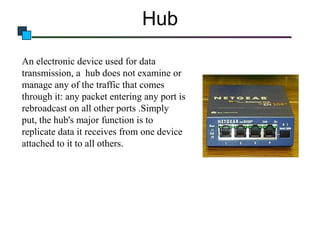
Hub
An electronic device used for data
transmission, a hub does not examine or
manage any of the traffic that comes
through it: any packet entering any port is
rebroadcast on all other ports .Simply
put, the hub's major function is to
replicate data it receives from one device
attached to it to all others.
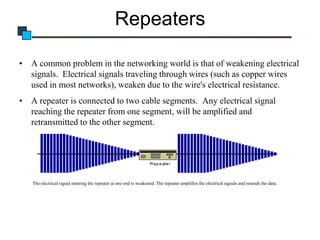
Repeaters
• A common problem in the networking world is that of weakening electrical
signals. Electrical signals traveling through wires (such as copper wires
used in most networks), weaken due to the wire's electrical resistance.
• A repeater is connected to two cable segments. Any electrical signal
reaching the repeater from one segment, will be amplified and
retransmitted to the other segment.

The electrical signal entering the repeater at one end is weakened. The repeater amplifies the electrical signals and resends the data.
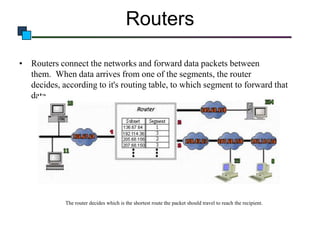
Routers
• Routers connect the networks and forward data packets between
them. When data arrives from one of the segments, the router
decides, according to it's routing table, to which segment to forward that
data.

The router decides which is the shortest route the packet should travel to reach the recipient.
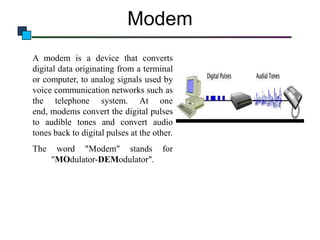
Modem
A modem is a device that converts
digital data originating from a terminal
or computer, to analog signals used by
voice communication networks such as
the telephone system. At one
end, modems convert the digital pulses
to audible tones and convert audio
tones back to digital pulses at the other.
The

word "Modem" stands for
"MOdulator-DEModulator".
Network Category
• Networks are usually classified using three properties:
• Topology
• Protocol
• Architecture
Network/Communication Protocols
• A protocol is simply an agreed-on set of rules and procedures for
transmitting data between two or more devices or the information
exchanged between devices—through a network, or other media—is
governed by rules and conventions that can be set out in technical
specifications called communication protocol standards.
• The best known frameworks, to implement a networking protocol
are the TCP/IP model and the OSI model.
Introduction to Computer Networks

Network Topology
• The network topology defines
the
way
in
which
computers, printers, and other
devices are connected. A
network topology describes
the layout of the wire and
devices as well as the paths
used by data transmissions.
Introduction to Computer Networks

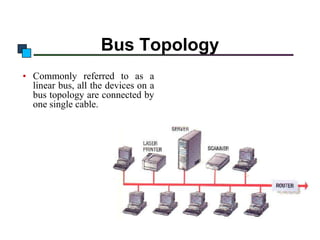
Bus Topology
• Commonly referred to as a
linear bus, all the devices on a
bus topology are connected by
one single cable.
Introduction o Computer Networks

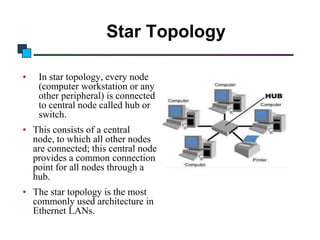
Star Topology
•

In star topology, every node
(computer workstation or any
other peripheral) is connected
to central node called hub or
switch.

• This consists of a central
node, to which all other nodes
are connected; this central node
provides a common connection
point for all nodes through a
hub.

• The star topology is the most
commonly used architecture in
Ethernet LANs.
Introduction to Computer Networks

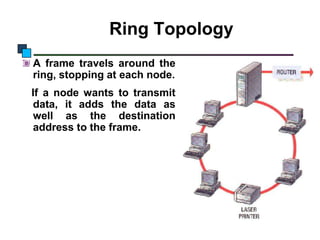
Ring Topology
A frame travels around the
ring, stopping at each node.
If a node wants to transmit
data, it adds the data as
well as the destination
address to the frame.
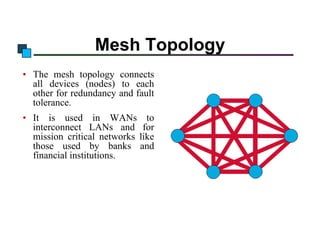
Mesh Topology
• The mesh topology connects
all devices (nodes) to each
other for redundancy and fault
tolerance.
• It is used in WANs to
interconnect LANs and for
mission critical networks like
those used by banks and
financial institutions.
Network Architecture
• Network architecture – refers to the way a
network is designed and built. The two major
types are:
– Peer-to-peer architecture – Computers connect with
each other in a workgroup to share files, printers, and
Internet access. This is used to connect a small
number of computers.
– Client/server architecture – sends information from a
client computer to a server, which then relays the
information back to the client computer, or to other
computers on the network
Hub/Switch/Router
• To connect multiple segments of networks into a larger one
• Hub
– A multiport repeater to enhance signal within the same LAN
• Switch
– Like hub but with intelligent
– Better performance
• Router
– Forward packets from one LAN to another
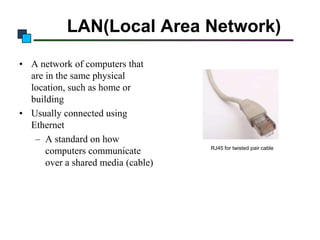
LAN(Local Area Network)
• A network of computers that
are in the same physical
location, such as home or
building
• Usually connected using
Ethernet
– A standard on how
computers communicate
over a shared media (cable)

RJ45 for twisted pair cable
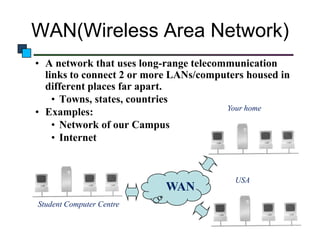
WAN(Wireless Area Network)
• A network that uses long-range telecommunication
links to connect 2 or more LANs/computers housed in
different places far apart.
• Towns, states, countries
Your home
• Examples:
• Network of our Campus
• Internet

WAN
Student Computer Centre

USA
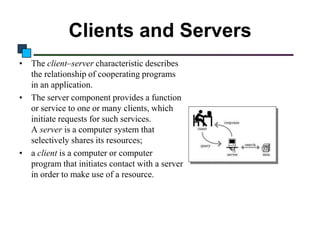
Clients and Servers
• The client–server characteristic describes
the relationship of cooperating programs
in an application.
• The server component provides a function
or service to one or many clients, which
initiate requests for such services.
A server is a computer system that
selectively shares its resources;
• a client is a computer or computer
program that initiates contact with a server
in order to make use of a resource.
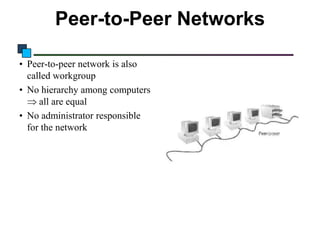
Peer-to-Peer Networks
• Peer-to-peer network is also
called workgroup
• No hierarchy among computers
all are equal
• No administrator responsible
for the network
Applications of Networks
• Resource Sharing
– Hardware (computing resources, disks, printers)
– Software (application software)
• Information Sharing
– Easy accessibility from anywhere (files, databases)
– Search Capability (WWW)
• Communication
– Email
– Message broadcast
• Remote computing
Enhance Communication
• Computer networks use electronic mail (e-mail) as the choice for
most of the communication.
• By using networks, information can be sent to a larger audience in
an extremely fast and efficient manner.
Share Resources
• Peripheral devices include faxes, modems, scanners, plotters, and
any other device that connects to the computers.
• Equipments having common requirements can be shared in order to
reduce maintenance cost.
• Important data can also be stored centrally to make it accessible to
users, thereby saving storage space on individual computers.
• Computer applications, which take up a considerable amount of
storage space, can be installed centrally on the network, saving
storage space.
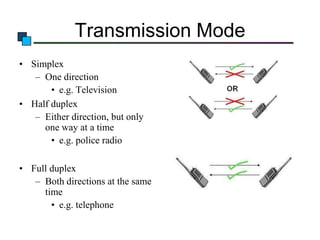
Transmission Mode
• Simplex
– One direction
• e.g. Television
• Half duplex
– Either direction, but only
one way at a time
• e.g. police radio
• Full duplex
– Both directions at the same
time
• e.g. telephone

Computer networks

  • 1.
  • 2.
    Introduction to ComputerNetworks Computer Networks • A network consists of two or more entities or objects sharing resources and information. • A computer network consists of two or more computing devices connected to each other to share resources and information.
  • 3.
  • 4.
    Communication Model • Source –generates data to be transmitted • Transmitter – Converts data into transmittable signals • Transmission System – Carries data • Receiver – Converts received signal into data • Destination – Takes incoming data
  • 5.
    Communication Model – Totransfer data from one computer to another requires some type of link through which the data can be transmitted. This link is known as the communications channel. – To send data through the channel requires some type of transmission media, which may be either physical or wireless.
  • 6.
    Physical Media • Twisted-paircable – consists of two independently insulated wires twisted around each other (least expensive type of cable—the kind that is used in many telephone systems) • Coaxial cable – consists of an insulated center wire grounded by a shield of braided wire (the primary type of cabling used by the cable television industry; it is more expensive than twisted pair) • Fiber-optic cable – contains hundreds of clear fiberglass or plastic fibers (threads) (made from thin, flexible glass tubing; bandwidth is greater, so it can carry more data; it is lighter than metal wires and is less susceptible to interference; it is fragile and expensive) • ISDN line – a special digital telephone line that transmits and receives information at very high speeds
  • 7.
    Twisted-Pair Cables • TPCare the simplest and the oldest cable medium. • It is made of two insulated copper wires typically twisted around each other in a continuous spiral. • The purpose of twisting the wires is to reduce electrical interference from similar pairs close by.
  • 8.
    Coaxial Cable • Typeof cable that has an inner conductor surrounded by a tubular insulating layer, surrounded by a tubular conducting shield. Many coaxial cables also have an insulating outer sheath or jacket. A. Outer plastic sheath B. Woven copper shield C. Inner dielectric insulator D. Copper core Source: Wikipedia
  • 9.
    Fiber Optics • Afiber optic cable is a network cable that contains strands of glass fibers inside an insulated casing. These cables are designed for long distance and very high network communications. • Fiber optic cables carry communication signals using pulses of light. While expensive, these cables are increasingly being used instead of traditional copper cables. Source: Google Images
  • 10.
    Wireless Media • MicrowaveTechnology • Satellite system • Cellular technology • Infrared technology
  • 11.
    Microwave • Microwave transmission refers tothe technology of transmitting information or energy by the use of radio waves whose wavelengths are conveniently measured in small numbers of centimeter; so these are referred as microwaves. Source: Google Images
  • 12.
    Microwave Technology • Adisadvantage is that microwaves are limited to line of sight propagation. • Microwave radio transmission is commonly used in satellite communications, deep space radio communications, radars, rad io navigation systems, sensor systems and radio astronomy. Source: Google Images
  • 13.
    Radio Frequency • Radiofrequency (RF) engineering is a subset of electrical engineering that deals with devices that are designed to operate in the Radio Frequency spectrum. These devices operate within the range of about 3 kHz up to 300 GHz. • RF engineering is incorporated into almost everything that transmits or receives a radio wave, which includes, but is not limited to,Mobile Phones, Radios, WiFi, and two-way radios. Source: Google Images
  • 14.
    Satellite Communication • • Satellite communication, intelecommunications, the use of artificial satellites to provide communication links between various points on Earth. A satellite is basically a self-contained communications system with the ability to receive signals from Earth and to retransmit those signals back with the use of a transponder—an integrated receiver and transmitter of radio signals. Source: Google Images
  • 15.
    • Satellite communicationhas two main components: the ground segment, which consists of fixed or mobile transmission and the space segment, which primarily is the satellite itself. A typical satellite link involves the transmission of a signal from an Earth station to a satellite. The satellite then receives and amplifies the signal and retransmits it back to Earth, where it is received and reamplified by Earth stations and terminals. • Satellite receivers on the ground include direct-to-home (DTH) satellite equipment, mobile reception equipment in aircraft, satellite telephones.
  • 16.
    Networking Hardware andSoftware • Hub – electronic device used in a LAN to link groups of computers • Routers - devices used to ensure messages are sent to their intended destinations • Repeaters – electronic devices that receive signals and amplify and send them along the network
  • 17.
    Hub An electronic deviceused for data transmission, a hub does not examine or manage any of the traffic that comes through it: any packet entering any port is rebroadcast on all other ports .Simply put, the hub's major function is to replicate data it receives from one device attached to it to all others.
  • 18.
    Repeaters • A commonproblem in the networking world is that of weakening electrical signals. Electrical signals traveling through wires (such as copper wires used in most networks), weaken due to the wire's electrical resistance. • A repeater is connected to two cable segments. Any electrical signal reaching the repeater from one segment, will be amplified and retransmitted to the other segment. The electrical signal entering the repeater at one end is weakened. The repeater amplifies the electrical signals and resends the data.
  • 19.
    Routers • Routers connectthe networks and forward data packets between them. When data arrives from one of the segments, the router decides, according to it's routing table, to which segment to forward that data. The router decides which is the shortest route the packet should travel to reach the recipient.
  • 20.
    Modem A modem isa device that converts digital data originating from a terminal or computer, to analog signals used by voice communication networks such as the telephone system. At one end, modems convert the digital pulses to audible tones and convert audio tones back to digital pulses at the other. The word "Modem" stands for "MOdulator-DEModulator".
  • 21.
    Network Category • Networksare usually classified using three properties: • Topology • Protocol • Architecture
  • 22.
    Network/Communication Protocols • Aprotocol is simply an agreed-on set of rules and procedures for transmitting data between two or more devices or the information exchanged between devices—through a network, or other media—is governed by rules and conventions that can be set out in technical specifications called communication protocol standards. • The best known frameworks, to implement a networking protocol are the TCP/IP model and the OSI model.
  • 23.
    Introduction to ComputerNetworks Network Topology • The network topology defines the way in which computers, printers, and other devices are connected. A network topology describes the layout of the wire and devices as well as the paths used by data transmissions.
  • 24.
    Introduction to ComputerNetworks Bus Topology • Commonly referred to as a linear bus, all the devices on a bus topology are connected by one single cable.
  • 25.
    Introduction o ComputerNetworks Star Topology • In star topology, every node (computer workstation or any other peripheral) is connected to central node called hub or switch. • This consists of a central node, to which all other nodes are connected; this central node provides a common connection point for all nodes through a hub. • The star topology is the most commonly used architecture in Ethernet LANs.
  • 26.
    Introduction to ComputerNetworks Ring Topology A frame travels around the ring, stopping at each node. If a node wants to transmit data, it adds the data as well as the destination address to the frame.
  • 27.
    Mesh Topology • Themesh topology connects all devices (nodes) to each other for redundancy and fault tolerance. • It is used in WANs to interconnect LANs and for mission critical networks like those used by banks and financial institutions.
  • 28.
    Network Architecture • Networkarchitecture – refers to the way a network is designed and built. The two major types are: – Peer-to-peer architecture – Computers connect with each other in a workgroup to share files, printers, and Internet access. This is used to connect a small number of computers. – Client/server architecture – sends information from a client computer to a server, which then relays the information back to the client computer, or to other computers on the network
  • 29.
    Hub/Switch/Router • To connectmultiple segments of networks into a larger one • Hub – A multiport repeater to enhance signal within the same LAN • Switch – Like hub but with intelligent – Better performance • Router – Forward packets from one LAN to another
  • 30.
    LAN(Local Area Network) •A network of computers that are in the same physical location, such as home or building • Usually connected using Ethernet – A standard on how computers communicate over a shared media (cable) RJ45 for twisted pair cable
  • 31.
    WAN(Wireless Area Network) •A network that uses long-range telecommunication links to connect 2 or more LANs/computers housed in different places far apart. • Towns, states, countries Your home • Examples: • Network of our Campus • Internet WAN Student Computer Centre USA
  • 32.
    Clients and Servers •The client–server characteristic describes the relationship of cooperating programs in an application. • The server component provides a function or service to one or many clients, which initiate requests for such services. A server is a computer system that selectively shares its resources; • a client is a computer or computer program that initiates contact with a server in order to make use of a resource.
  • 33.
    Peer-to-Peer Networks • Peer-to-peernetwork is also called workgroup • No hierarchy among computers all are equal • No administrator responsible for the network
  • 34.
    Applications of Networks •Resource Sharing – Hardware (computing resources, disks, printers) – Software (application software) • Information Sharing – Easy accessibility from anywhere (files, databases) – Search Capability (WWW) • Communication – Email – Message broadcast • Remote computing
  • 35.
    Enhance Communication • Computernetworks use electronic mail (e-mail) as the choice for most of the communication. • By using networks, information can be sent to a larger audience in an extremely fast and efficient manner.
  • 36.
    Share Resources • Peripheraldevices include faxes, modems, scanners, plotters, and any other device that connects to the computers. • Equipments having common requirements can be shared in order to reduce maintenance cost. • Important data can also be stored centrally to make it accessible to users, thereby saving storage space on individual computers. • Computer applications, which take up a considerable amount of storage space, can be installed centrally on the network, saving storage space.
  • 37.
    Transmission Mode • Simplex –One direction • e.g. Television • Half duplex – Either direction, but only one way at a time • e.g. police radio • Full duplex – Both directions at the same time • e.g. telephone