What is
COMPUTER?


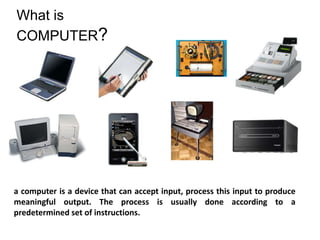
a computer is a device that can accept input, process this input to produce
meaningful output. The process is usually done according to a
predetermined set of instructions.
Classification of Computers


I.   ACCORDING TO FUNCTION OR PURPOSE

II. ACCORDING TO THE TYPE OF DATA HANDLED

III. ACCORDING TO SIZE & PROCESSING POWERS
I.        ACCORDING TO FUNCTION OR PURPOSE
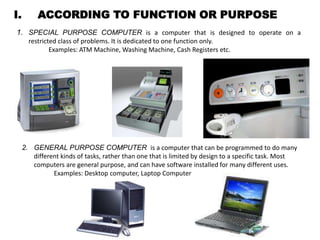
1. SPECIAL PURPOSE COMPUTER is a computer that is designed to operate on a
       restricted class of problems. It is dedicated to one function only.
               Examples: ATM Machine, Washing Machine, Cash Registers etc.


     2. GENERAL PURPOSE COMPUTER is a computer that can be programmed to do many
        different kinds of tasks, rather than one that is limited by design to a specific task. Most
        computers are general purpose, and can have software installed for many different uses.
               Examples: Desktop computer, Laptop Computer
II. ACCORDING TO THE TYPE OF DATA HANDLED

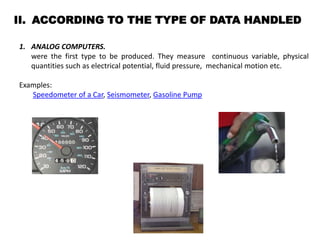
1. ANALOG COMPUTERS.
   were the first type to be produced. They measure continuous variable, physical
   quantities such as electrical potential, fluid pressure, mechanical motion etc.

Examples:
   Speedometer of a Car, Seismometer, Gasoline Pump
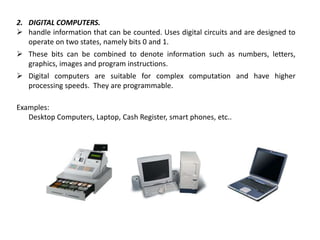
2. DIGITAL COMPUTERS.
 handle information that can be counted. Uses digital circuits and are designed to
   operate on two states, namely bits 0 and 1.
 These bits can be combined to denote information such as numbers, letters,
  graphics, images and program instructions.
 Digital computers are suitable for complex computation and have higher
  processing speeds. They are programmable.

Examples:
   Desktop Computers, Laptop, Cash Register, smart phones, etc..
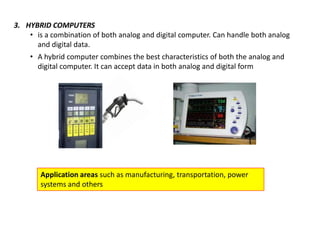
3. HYBRID COMPUTERS
    • is a combination of both analog and digital computer. Can handle both analog
      and digital data.
    • A hybrid computer combines the best characteristics of both the analog and
      digital computer. It can accept data in both analog and digital form


       Application areas such as manufacturing, transportation, power
       systems and others
III. ACCORDING TO SIZE & PROCESSING POWERS
1.     SUPERCOMPUTERS
      Fastest. Generally operate at 4 to 10 times faster than the mainframe.
      a computer at the frontline of current processing capacity, particularly speed of calculation.
      designed to work on a single problem at a time.
      Supercomputers are used for highly calculation-intensive tasks such as problems
       including quantum physics, weather forecasting, climate research, molecular modeling ,
       physical simulations, aircraft and spacecraft designing, encrypting & decoding sensitive
       intelligence information


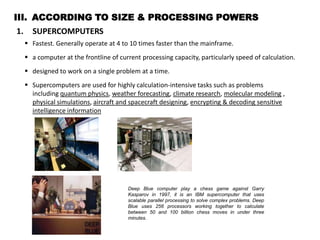
                                         Deep Blue computer play a chess game against Garry
                                         Kasparov in 1997, it is an IBM supercomputer that uses
                                         scalable parallel processing to solve complex problems. Deep
                                         Blue uses 256 processors working together to calculate
                                         between 50 and 100 billion chess moves in under three
                                         minutes.
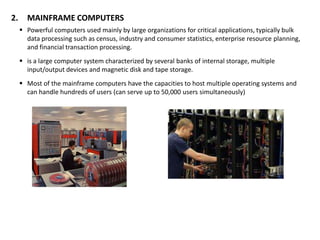
2.     MAINFRAME COMPUTERS
      Powerful computers used mainly by large organizations for critical applications, typically bulk
       data processing such as census, industry and consumer statistics, enterprise resource planning,
       and financial transaction processing.
      is a large computer system characterized by several banks of internal storage, multiple
       input/output devices and magnetic disk and tape storage.
      Most of the mainframe computers have the capacities to host multiple operating systems and
       can handle hundreds of users (can serve up to 50,000 users simultaneously)
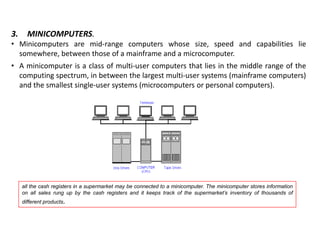
3.     MINICOMPUTERS.
• Minicomputers are mid-range computers whose size, speed and capabilities lie
  somewhere, between those of a mainframe and a microcomputer.
• A minicomputer is a class of multi-user computers that lies in the middle range of the
  computing spectrum, in between the largest multi-user systems (mainframe computers)
  and the smallest single-user systems (microcomputers or personal computers).


     all the cash registers in a supermarket may be connected to a minicomputer. The minicomputer stores information
     on all sales rung up by the cash registers and it keeps track of the supermarket’s inventory of thousands of
     different products.
4.   MICROCOMPUTERS
     A microcomputer is a computer with a microprocessor as its central processing unit.
     They are physically small compared to mainframe and minicomputers. Many
     microcomputers (when equipped with a keyboard and screen for input and output)
     are also personal computers (in the generic sense).


          Classification within this category includes:
                Desktop
                Workstations
                Laptop
                Handheld
                Video game consoles
                Embedded computers
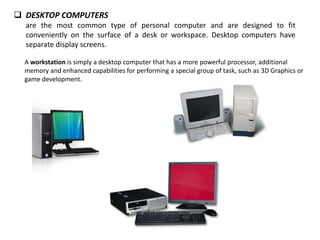
 DESKTOP COMPUTERS
  are the most common type of personal computer and are designed to fit
  conveniently on the surface of a desk or workspace. Desktop computers have
  separate display screens.

  A workstation is simply a desktop computer that has a more powerful processor, additional
  memory and enhanced capabilities for performing a special group of task, such as 3D Graphics or
  game development.
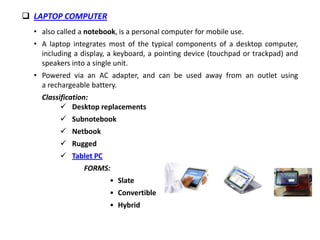
 LAPTOP COMPUTER
  • also called a notebook, is a personal computer for mobile use.
  • A laptop integrates most of the typical components of a desktop computer,
    including a display, a keyboard, a pointing device (touchpad or trackpad) and
    speakers into a single unit.
  • Powered via an AC adapter, and can be used away from an outlet using
    a rechargeable battery.
    Classification:
           Desktop replacements
           Subnotebook
           Netbook
           Rugged
           Tablet PC
                 FORMS:
                         • Slate
                         • Convertible
                         • Hybrid
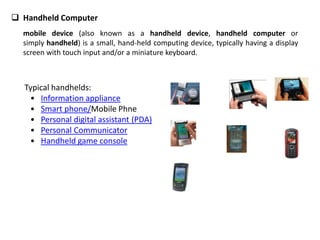
 Handheld Computer
  mobile device (also known as a handheld device, handheld computer or
  simply handheld) is a small, hand-held computing device, typically having a display
  screen with touch input and/or a miniature keyboard.


  Typical handhelds:
   • Information appliance
   • Smart phone/Mobile Phne
   • Personal digital assistant (PDA)
   • Personal Communicator
   • Handheld game console
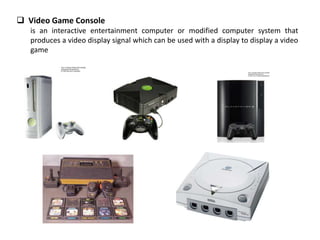
 Video Game Console
   is an interactive entertainment computer or modified computer system that
   produces a video display signal which can be used with a display to display a video
   game
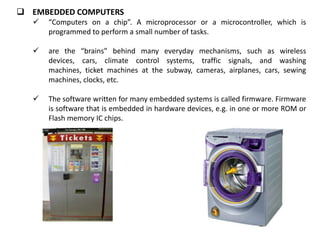
 EMBEDDED COMPUTERS
      “Computers on a chip”. A microprocessor or a microcontroller, which is
       programmed to perform a small number of tasks.

      are the “brains” behind many everyday mechanisms, such as wireless
       devices, cars, climate control systems, traffic signals, and washing
       machines, ticket machines at the subway, cameras, airplanes, cars, sewing
       machines, clocks, etc.

      The software written for many embedded systems is called firmware. Firmware
       is software that is embedded in hardware devices, e.g. in one or more ROM or
       Flash memory IC chips.
CAPABILITIES OF COMPUTERS
   SPEED
   RELIABILITY
   ACCURACY
   MEMORY CAPABILITY.


LIMITATIONS OF COMPUTERS
Computers are very good at what they do, but there are tasks that they can’t do. They can’t do anything unless
they are first programmed with specific instructions.

COMPUTERS:
     can’t think alone/independently
                act only as programmed
                cannot interpret the data it generate.
                cannot correct wrong instruction
                cannot derive meaning from object
     may subject to occasional breakdown/malfunction- Cannot depend on
      computers all the time.
     has no feelings

What is a computer?

  • 1.
    What is COMPUTER? a computeris a device that can accept input, process this input to produce meaningful output. The process is usually done according to a predetermined set of instructions.
  • 2.
    Classification of Computers I. ACCORDING TO FUNCTION OR PURPOSE II. ACCORDING TO THE TYPE OF DATA HANDLED III. ACCORDING TO SIZE & PROCESSING POWERS
  • 3.
    I. ACCORDING TO FUNCTION OR PURPOSE 1. SPECIAL PURPOSE COMPUTER is a computer that is designed to operate on a restricted class of problems. It is dedicated to one function only. Examples: ATM Machine, Washing Machine, Cash Registers etc. 2. GENERAL PURPOSE COMPUTER is a computer that can be programmed to do many different kinds of tasks, rather than one that is limited by design to a specific task. Most computers are general purpose, and can have software installed for many different uses. Examples: Desktop computer, Laptop Computer
  • 4.
    II. ACCORDING TOTHE TYPE OF DATA HANDLED 1. ANALOG COMPUTERS. were the first type to be produced. They measure continuous variable, physical quantities such as electrical potential, fluid pressure, mechanical motion etc. Examples: Speedometer of a Car, Seismometer, Gasoline Pump
  • 5.
    2. DIGITAL COMPUTERS. handle information that can be counted. Uses digital circuits and are designed to operate on two states, namely bits 0 and 1.  These bits can be combined to denote information such as numbers, letters, graphics, images and program instructions.  Digital computers are suitable for complex computation and have higher processing speeds. They are programmable. Examples: Desktop Computers, Laptop, Cash Register, smart phones, etc..
  • 6.
    3. HYBRID COMPUTERS • is a combination of both analog and digital computer. Can handle both analog and digital data. • A hybrid computer combines the best characteristics of both the analog and digital computer. It can accept data in both analog and digital form Application areas such as manufacturing, transportation, power systems and others
  • 7.
    III. ACCORDING TOSIZE & PROCESSING POWERS 1. SUPERCOMPUTERS  Fastest. Generally operate at 4 to 10 times faster than the mainframe.  a computer at the frontline of current processing capacity, particularly speed of calculation.  designed to work on a single problem at a time.  Supercomputers are used for highly calculation-intensive tasks such as problems including quantum physics, weather forecasting, climate research, molecular modeling , physical simulations, aircraft and spacecraft designing, encrypting & decoding sensitive intelligence information Deep Blue computer play a chess game against Garry Kasparov in 1997, it is an IBM supercomputer that uses scalable parallel processing to solve complex problems. Deep Blue uses 256 processors working together to calculate between 50 and 100 billion chess moves in under three minutes.
  • 8.
    2. MAINFRAME COMPUTERS  Powerful computers used mainly by large organizations for critical applications, typically bulk data processing such as census, industry and consumer statistics, enterprise resource planning, and financial transaction processing.  is a large computer system characterized by several banks of internal storage, multiple input/output devices and magnetic disk and tape storage.  Most of the mainframe computers have the capacities to host multiple operating systems and can handle hundreds of users (can serve up to 50,000 users simultaneously)
  • 9.
    3. MINICOMPUTERS. • Minicomputers are mid-range computers whose size, speed and capabilities lie somewhere, between those of a mainframe and a microcomputer. • A minicomputer is a class of multi-user computers that lies in the middle range of the computing spectrum, in between the largest multi-user systems (mainframe computers) and the smallest single-user systems (microcomputers or personal computers). all the cash registers in a supermarket may be connected to a minicomputer. The minicomputer stores information on all sales rung up by the cash registers and it keeps track of the supermarket’s inventory of thousands of different products.
  • 10.
    4. MICROCOMPUTERS A microcomputer is a computer with a microprocessor as its central processing unit. They are physically small compared to mainframe and minicomputers. Many microcomputers (when equipped with a keyboard and screen for input and output) are also personal computers (in the generic sense). Classification within this category includes:  Desktop  Workstations  Laptop  Handheld  Video game consoles  Embedded computers
  • 11.
     DESKTOP COMPUTERS are the most common type of personal computer and are designed to fit conveniently on the surface of a desk or workspace. Desktop computers have separate display screens. A workstation is simply a desktop computer that has a more powerful processor, additional memory and enhanced capabilities for performing a special group of task, such as 3D Graphics or game development.
  • 12.
     LAPTOP COMPUTER • also called a notebook, is a personal computer for mobile use. • A laptop integrates most of the typical components of a desktop computer, including a display, a keyboard, a pointing device (touchpad or trackpad) and speakers into a single unit. • Powered via an AC adapter, and can be used away from an outlet using a rechargeable battery. Classification:  Desktop replacements  Subnotebook  Netbook  Rugged  Tablet PC FORMS: • Slate • Convertible • Hybrid
  • 13.
     Handheld Computer mobile device (also known as a handheld device, handheld computer or simply handheld) is a small, hand-held computing device, typically having a display screen with touch input and/or a miniature keyboard. Typical handhelds: • Information appliance • Smart phone/Mobile Phne • Personal digital assistant (PDA) • Personal Communicator • Handheld game console
  • 14.
     Video GameConsole is an interactive entertainment computer or modified computer system that produces a video display signal which can be used with a display to display a video game
  • 15.
     EMBEDDED COMPUTERS  “Computers on a chip”. A microprocessor or a microcontroller, which is programmed to perform a small number of tasks.  are the “brains” behind many everyday mechanisms, such as wireless devices, cars, climate control systems, traffic signals, and washing machines, ticket machines at the subway, cameras, airplanes, cars, sewing machines, clocks, etc.  The software written for many embedded systems is called firmware. Firmware is software that is embedded in hardware devices, e.g. in one or more ROM or Flash memory IC chips.
  • 16.
    CAPABILITIES OF COMPUTERS  SPEED  RELIABILITY  ACCURACY  MEMORY CAPABILITY. LIMITATIONS OF COMPUTERS Computers are very good at what they do, but there are tasks that they can’t do. They can’t do anything unless they are first programmed with specific instructions. COMPUTERS:  can’t think alone/independently  act only as programmed  cannot interpret the data it generate.  cannot correct wrong instruction  cannot derive meaning from object  may subject to occasional breakdown/malfunction- Cannot depend on computers all the time.  has no feelings