INTERNET, DOMAIN
NAME, WORLDWIDEWEB
Saurabh Pandey
HTML & HYPERLINKS
 To surf internet, one types an address (URL) in the browser.
 The browser locates and displays the page on the PC
 The page will have text, images, videos etc.
 Each of these element perhaps is further linked to another page. (these links or
text are called as hyperlink or hypertext)
 Hyperlinks- text pointing to other pages. Clicking on these links take you to a
different page or a different location in the same page
 HTML- Hyper text mark up language. A language in which pages on the internet
can be written and displayed in a browser.
 Html invented by Tim Bernes Lee, scientist at CERN, Geneva
Web Server
 When you type an address in the browser
 Where does the page come from?
 How is it brought to your PC?
 The web-pages are stored/hosted on servers that are
connected to internet or web. These servers are called
Web-servers.
 Since you request several pages which may be hosted in
different parts of the world on different servers- all the web-
servers hence are also interlinked like a spider’s web.
 Thus the name world wide web.
Illustration
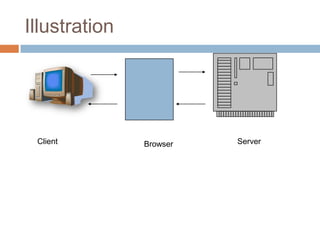
Client Browser Server
IP
 Millions of web servers. How does one know which
server to connect to for a webpage?
 All computers have a unique address (just like our
portal addresses)
 This address is a number like: 110.22.206.18
 4 numbers. Separated by ‘.’ Between 0 and 255
 This addressing scheme is known as IP Addressing
scheme or Internet protocol address (IP Address)
More on IP
 Every computer on internet has an IP address.
 This is how web servers locate the computers in
order to serve the desired page.
 These computers are called ‘hosts’
 We currently use IP Version 4 (IPV4) which can
allocate 4 billion IP addresses.
 We are moving towards IPV6 which can allocate
two hundred million million million million million
million addresses!
The DNS
 Domain Name System
 It’s difficult to remember the IP addresses for each
website, hence the need for domain names.
 For example: travel.atomthought.com refers to a
server called ‘travel’ which is located on a domain
‘.atomthought’ which in turn is located in a domain
‘.com’
 Analogy- saurabh.sector-49.faridabad.india tells you
the complete address of a particular ‘saurabh’
 This method of naming servers is called the DNS-
Domain name system
DNS Resolution
 If you type a domain name in your browser
 The browser tries to locate the domain name
in the closest domain name server.
 If not found the request is sent to other domain
name server in the next level domain
 This process of finding the IP address for a
given domain name is called Domian Name
Resolution
Top Level Domains
 Largest domains (the rightmost in a URL) in
any domain name are standardized
 There are two types of Top Level domains
 COUNTRY (.in, .cn, .uk etc.)
 CATEGORY (.com, .org. .edu etc.)
Understand With A Video
Traffic
 The number of visitors on your website
 We count them as Unique Visitors
 One visitor can come more than once (visits)
 Page-View- When any page is fully loaded in the
browser
 Relevant Traffic
 Visits that are single page only are also called as
bounced. This is bad traffic.
 If you target visitors well (age group, location, intent,
content preference etc.) you will get relevant traffic.
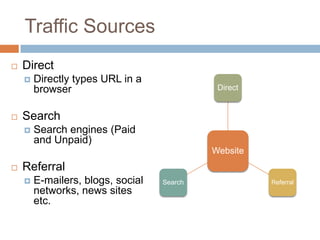
Traffic Sources
 Direct
 Directly types URL in a
browser
 Search
 Search engines (Paid
and Unpaid)
 Referral
 E-mailers, blogs, social
networks, news sites
etc.
Website
Direct
ReferralSearch
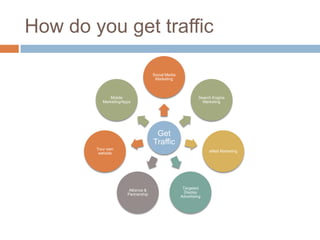
How do you get traffic
Get
Traffic
Social Media
Marketing
Search Engine
Marketing
eMail Marketing
Targeted
Display
Advertising
Alliance &
Partnership
Your own
website
Mobile
Marketing/Apps
Internet, domain name, worldwideweb

Internet, domain name, worldwideweb

  • 1.
  • 2.
    HTML & HYPERLINKS To surf internet, one types an address (URL) in the browser.  The browser locates and displays the page on the PC  The page will have text, images, videos etc.  Each of these element perhaps is further linked to another page. (these links or text are called as hyperlink or hypertext)  Hyperlinks- text pointing to other pages. Clicking on these links take you to a different page or a different location in the same page  HTML- Hyper text mark up language. A language in which pages on the internet can be written and displayed in a browser.  Html invented by Tim Bernes Lee, scientist at CERN, Geneva
  • 3.
    Web Server  Whenyou type an address in the browser  Where does the page come from?  How is it brought to your PC?  The web-pages are stored/hosted on servers that are connected to internet or web. These servers are called Web-servers.  Since you request several pages which may be hosted in different parts of the world on different servers- all the web- servers hence are also interlinked like a spider’s web.  Thus the name world wide web.
  • 4.
  • 5.
    IP  Millions ofweb servers. How does one know which server to connect to for a webpage?  All computers have a unique address (just like our portal addresses)  This address is a number like: 110.22.206.18  4 numbers. Separated by ‘.’ Between 0 and 255  This addressing scheme is known as IP Addressing scheme or Internet protocol address (IP Address)
  • 6.
    More on IP Every computer on internet has an IP address.  This is how web servers locate the computers in order to serve the desired page.  These computers are called ‘hosts’  We currently use IP Version 4 (IPV4) which can allocate 4 billion IP addresses.  We are moving towards IPV6 which can allocate two hundred million million million million million million addresses!
  • 7.
    The DNS  DomainName System  It’s difficult to remember the IP addresses for each website, hence the need for domain names.  For example: travel.atomthought.com refers to a server called ‘travel’ which is located on a domain ‘.atomthought’ which in turn is located in a domain ‘.com’  Analogy- saurabh.sector-49.faridabad.india tells you the complete address of a particular ‘saurabh’  This method of naming servers is called the DNS- Domain name system
  • 8.
    DNS Resolution  Ifyou type a domain name in your browser  The browser tries to locate the domain name in the closest domain name server.  If not found the request is sent to other domain name server in the next level domain  This process of finding the IP address for a given domain name is called Domian Name Resolution
  • 9.
    Top Level Domains Largest domains (the rightmost in a URL) in any domain name are standardized  There are two types of Top Level domains  COUNTRY (.in, .cn, .uk etc.)  CATEGORY (.com, .org. .edu etc.)
  • 10.
  • 11.
    Traffic  The numberof visitors on your website  We count them as Unique Visitors  One visitor can come more than once (visits)  Page-View- When any page is fully loaded in the browser  Relevant Traffic  Visits that are single page only are also called as bounced. This is bad traffic.  If you target visitors well (age group, location, intent, content preference etc.) you will get relevant traffic.
  • 12.
    Traffic Sources  Direct Directly types URL in a browser  Search  Search engines (Paid and Unpaid)  Referral  E-mailers, blogs, social networks, news sites etc. Website Direct ReferralSearch
  • 13.
    How do youget traffic Get Traffic Social Media Marketing Search Engine Marketing eMail Marketing Targeted Display Advertising Alliance & Partnership Your own website Mobile Marketing/Apps

Editor's Notes

  • #3 What is a website?How do u visit a website?U use a web brower. Type the URL in the address baar and visit a website.A website is a collection of webpages. Webpages r made of hypertext markup language.Its got links to other pages through text links and images. These links r called hyperlinks,.. Geeks never keep a easy name for anything. This emans that various websites r connected to each other. Websites r hosted on computers called web servers. This means webservers r connected to each other in a spider mesh. So called WWW.Now like evry house has a unqiueadress for posts to each it. Similary websites have IP adresses. Xxx.yyy.jjj.hhhUnique adress. Now the problem is its not easy to remebr IP adresses.. But names. Which one is easy to rember if u had to access yahoo mail.. Visitng mail.yahoo.com or 124.66.75.311?But each computer needs IP adress. So to resolved the same..DNSWhen urbrower goes to yahoo.com.. It goes to DNS server to ask its IP.. And then connectes to it.