
PRESENTED BY
SIMRAN KAUR
• A collection of computers (or computer like devices) that
are able to communicate with each other through some
medium, using hardware and software
• Two computers (or computer like devices) are said to be
connected, if they are able to exchange information or
able to communicate
• Simplex : Data transfer only in one direction. Example,
radio broadcasting
• Half duplex : Data transfer in both directions, but not
simultaneously, i.e., in one direction at a time. Example,
talk back radio, CB radio (citizen band)
• Full duplex : Data transfer in both directions,
simultaneously. Example, telephone
• Data source : Provides the data to transmit
• Sender/Transmitter : Converts data to signals for
transmission
• Data Transmission System : Transmits the data, i.e.,
converted in signals
• Receiver : Converts received signals to data
• Destination : Receives and uses incoming data
• Node : A device with independent communication ability
and unique network address
• Protocol : A formal description, comprising rules and
conventions defines the method of communication
between networking devices
• Unicast : One device sends message to the other to its
address
• Broadcast : One device sends message to all other
devices on the network. The message is sent to an
address reserved for this goal
• Multicast : One device sends message to a certain
group of devices on the network
• There are three types of networks:
1. Local Area Network (LAN)
2. Metropolitan Area Network (MAN)
3. Wide Area Network (WAN)
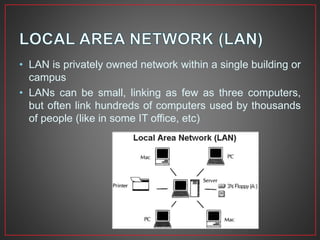
• LAN is privately owned network within a single building or
campus
• LANs can be small, linking as few as three computers,
but often link hundreds of computers used by thousands
of people (like in some IT office, etc)
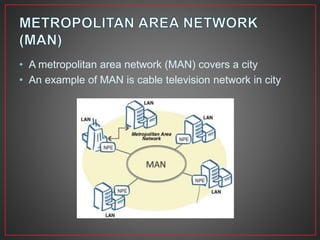
• A metropolitan area network (MAN) covers a city
• An example of MAN is cable television network in city
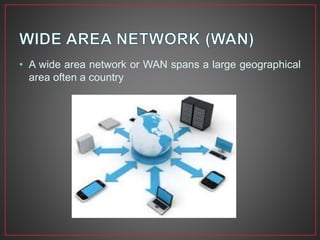
• A wide area network or WAN spans a large geographical
area often a country
• Internet is also known as network of networks
• It is a system of linked networks that are world wide in
scope and facilitate data communication services such as
remote login, file transfer, electronic mail, world wide web
and newsgroups, etc
• Network topology is the arrangement of the various
elements of a computer or biological network
• It is the topological structure of a network, and may be
depicted physically or logically
• Physical topology refers to the placement of the
network’s various components, inducing device location
and cable installation
• Logical topology shows how data flows within a network,
regardless of its physical design
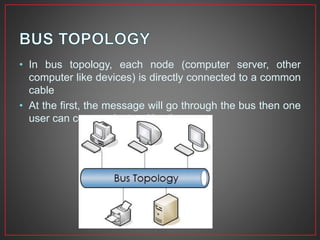
• In bus topology, each node (computer server, other
computer like devices) is directly connected to a common
cable
• At the first, the message will go through the bus then one
user can communicate with other
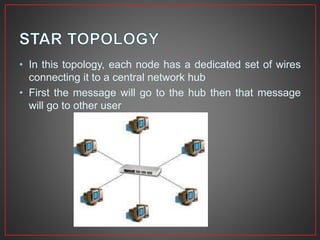
• In this topology, each node has a dedicated set of wires
connecting it to a central network hub
• First the message will go to the hub then that message
will go to other user
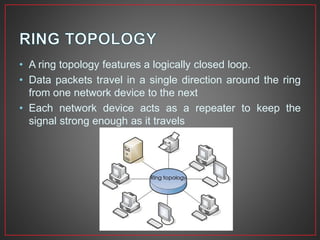
• A ring topology features a logically closed loop.
• Data packets travel in a single direction around the ring
from one network device to the next
• Each network device acts as a repeater to keep the
signal strong enough as it travels
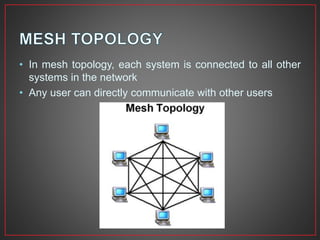
• In mesh topology, each system is connected to all other
systems in the network
• Any user can directly communicate with other users
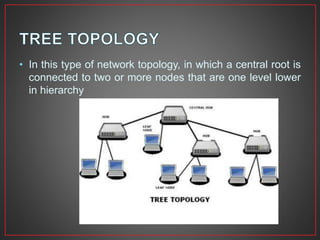
• In this type of network topology, in which a central root is
connected to two or more nodes that are one level lower
in hierarchy
• Networking hardware may also be known as network
equipment , computer networking devices
• Some of the important networking devices include
1. Network Interface Card (NIC)
2. Repeater
3. Bridge
4. Switch
5. Routers
6. Gateway
7. Ethernet
8. Fibre Distributed Data Interface (FDDI)
• NIC provides a physical connection between the
networking cable and the computer’s internal bus
• NICs comes in three basic varieties 8 bit, 16 bit and 32
bit
• The larger the number of bits that can be transferred to
NIC, the faster the NIC can transfer data to network cable
• Repeaters are used to connect together two Ethernet
segments of any media type.
• They provide the signal amplification required to allow a
segment (cable) to be extended a greater distance
• A typical repeater has just 2 ports
• Bridges map the addresses of the nodes residing on
each network segment and allow only necessary traffic to
pass through bridge
• The function of the bridge is to connect separate
networks together
• Bridges do not forward bad or misaligned packets
• Switches are an expansion of concept of bridging
• LAN switches can link 4, 6, 10 or more networks together
• Switches have 2 basic architectures : cut through and
store-and-forward
• It alleviates congestion in Ethernet LAN by reducing
traffic and increasing bandwidth
• Routers forward packets from one LAN (or WAN) network
to another
• It is used at the edges of the networks to connect to the
Internet
• Gateway acts like an entrance between two different
networks.
• It is the computer that routes the traffic from a workstation
to the outside network that is serving web pages.
• ISP (Internet Service Provider) is the gateway for Internet
service at homes.
• IEEE 802.2 : Logical Link Control (LLC)
• IEEE 802.3 : Ethernet
• IEEE 802.5 : Token Ring
• IEEE 802.11 : Wireless LAN
• IEEE 802.15 : Bluetooth
• IEEE 802.16 : Wireless MAN
• IEEE Standard 802.3 defines Ethernet, rules for
configuring Ethernet network as well as specify how
elements in an Ethernet network interact with each other
• It uses Carrier Sense Multiple Access/Collision Detect
(CSMA/CD) technology broadcasting each from onto the
physical medium (wire fibre and so on)
• All stations attached to Ethernet listen to the line for traffic
and the station with the matching destination MAC
address accepts the frame
• Token Ring is a form of network configuration in which all
messages are transferred in an unidirectional manner
along the ring at all the times
• Medium Access Control (MAC) is provided by a small
frame, the token that circulates around the ring when all
stations are idle. Only the station (node) possessing the
token is allowed to transmit at any given time
• It can connect upto 255 nodes in a physical star or ring
connection that can sustain 4 or 16 Mbps
• FDDI is a form of network configuration, uses ring
topology of multimedia or single mode optical fibre
transmission links
• It operates at 100 Mbps to span upto 200km and permits
upto 500 stations
• It employs dual counter rotating rings
• 16 and 48 bit addresses are allowed
• Token is absorbed by station and released as soon as it
completes the frame transmission
Computer network

Computer network

  • 1.
  • 2.
    • A collectionof computers (or computer like devices) that are able to communicate with each other through some medium, using hardware and software • Two computers (or computer like devices) are said to be connected, if they are able to exchange information or able to communicate
  • 3.
    • Simplex :Data transfer only in one direction. Example, radio broadcasting • Half duplex : Data transfer in both directions, but not simultaneously, i.e., in one direction at a time. Example, talk back radio, CB radio (citizen band) • Full duplex : Data transfer in both directions, simultaneously. Example, telephone
  • 4.
    • Data source: Provides the data to transmit • Sender/Transmitter : Converts data to signals for transmission • Data Transmission System : Transmits the data, i.e., converted in signals • Receiver : Converts received signals to data • Destination : Receives and uses incoming data • Node : A device with independent communication ability and unique network address • Protocol : A formal description, comprising rules and conventions defines the method of communication between networking devices
  • 5.
    • Unicast :One device sends message to the other to its address • Broadcast : One device sends message to all other devices on the network. The message is sent to an address reserved for this goal • Multicast : One device sends message to a certain group of devices on the network
  • 6.
    • There arethree types of networks: 1. Local Area Network (LAN) 2. Metropolitan Area Network (MAN) 3. Wide Area Network (WAN)
  • 7.
    • LAN isprivately owned network within a single building or campus • LANs can be small, linking as few as three computers, but often link hundreds of computers used by thousands of people (like in some IT office, etc)
  • 8.
    • A metropolitanarea network (MAN) covers a city • An example of MAN is cable television network in city
  • 9.
    • A widearea network or WAN spans a large geographical area often a country
  • 10.
    • Internet isalso known as network of networks • It is a system of linked networks that are world wide in scope and facilitate data communication services such as remote login, file transfer, electronic mail, world wide web and newsgroups, etc
  • 11.
    • Network topologyis the arrangement of the various elements of a computer or biological network • It is the topological structure of a network, and may be depicted physically or logically • Physical topology refers to the placement of the network’s various components, inducing device location and cable installation • Logical topology shows how data flows within a network, regardless of its physical design
  • 12.
    • In bustopology, each node (computer server, other computer like devices) is directly connected to a common cable • At the first, the message will go through the bus then one user can communicate with other
  • 13.
    • In thistopology, each node has a dedicated set of wires connecting it to a central network hub • First the message will go to the hub then that message will go to other user
  • 14.
    • A ringtopology features a logically closed loop. • Data packets travel in a single direction around the ring from one network device to the next • Each network device acts as a repeater to keep the signal strong enough as it travels
  • 15.
    • In meshtopology, each system is connected to all other systems in the network • Any user can directly communicate with other users
  • 16.
    • In thistype of network topology, in which a central root is connected to two or more nodes that are one level lower in hierarchy
  • 17.
    • Networking hardwaremay also be known as network equipment , computer networking devices • Some of the important networking devices include 1. Network Interface Card (NIC) 2. Repeater 3. Bridge 4. Switch 5. Routers 6. Gateway 7. Ethernet 8. Fibre Distributed Data Interface (FDDI)
  • 18.
    • NIC providesa physical connection between the networking cable and the computer’s internal bus • NICs comes in three basic varieties 8 bit, 16 bit and 32 bit • The larger the number of bits that can be transferred to NIC, the faster the NIC can transfer data to network cable
  • 19.
    • Repeaters areused to connect together two Ethernet segments of any media type. • They provide the signal amplification required to allow a segment (cable) to be extended a greater distance • A typical repeater has just 2 ports
  • 20.
    • Bridges mapthe addresses of the nodes residing on each network segment and allow only necessary traffic to pass through bridge • The function of the bridge is to connect separate networks together • Bridges do not forward bad or misaligned packets
  • 21.
    • Switches arean expansion of concept of bridging • LAN switches can link 4, 6, 10 or more networks together • Switches have 2 basic architectures : cut through and store-and-forward • It alleviates congestion in Ethernet LAN by reducing traffic and increasing bandwidth
  • 22.
    • Routers forwardpackets from one LAN (or WAN) network to another • It is used at the edges of the networks to connect to the Internet
  • 23.
    • Gateway actslike an entrance between two different networks. • It is the computer that routes the traffic from a workstation to the outside network that is serving web pages. • ISP (Internet Service Provider) is the gateway for Internet service at homes.
  • 24.
    • IEEE 802.2: Logical Link Control (LLC) • IEEE 802.3 : Ethernet • IEEE 802.5 : Token Ring • IEEE 802.11 : Wireless LAN • IEEE 802.15 : Bluetooth • IEEE 802.16 : Wireless MAN
  • 25.
    • IEEE Standard802.3 defines Ethernet, rules for configuring Ethernet network as well as specify how elements in an Ethernet network interact with each other • It uses Carrier Sense Multiple Access/Collision Detect (CSMA/CD) technology broadcasting each from onto the physical medium (wire fibre and so on) • All stations attached to Ethernet listen to the line for traffic and the station with the matching destination MAC address accepts the frame
  • 26.
    • Token Ringis a form of network configuration in which all messages are transferred in an unidirectional manner along the ring at all the times • Medium Access Control (MAC) is provided by a small frame, the token that circulates around the ring when all stations are idle. Only the station (node) possessing the token is allowed to transmit at any given time • It can connect upto 255 nodes in a physical star or ring connection that can sustain 4 or 16 Mbps
  • 27.
    • FDDI isa form of network configuration, uses ring topology of multimedia or single mode optical fibre transmission links • It operates at 100 Mbps to span upto 200km and permits upto 500 stations • It employs dual counter rotating rings • 16 and 48 bit addresses are allowed • Token is absorbed by station and released as soon as it completes the frame transmission