Networking Basics
Appendix
1
Ehsan UllahEhsan Ullah
Presented ByPresented By
�
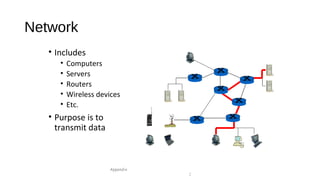
Network
• Includes
• Computers
• Servers
• Routers
• Wireless devices
• Etc.
• Purpose is to
transmit data
Appendix
2
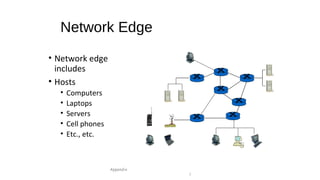
Network Edge
• Network edge
includes
• Hosts
• Computers
• Laptops
• Servers
• Cell phones
• Etc., etc.
Appendix
3
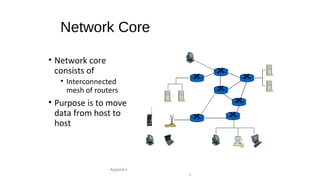
Network Core
• Network core
consists of
• Interconnected
mesh of routers
• Purpose is to move
data from host to
host
Appendix
4
Packet Switched Network
• Usual telephone network is circuit switched
• For each call, a dedicated circuit is established
• Dedicated bandwidth
• Modern data networks are packet switched
• Data is chopped up into discrete packets
• Packets are transmitted independently
• No real circuit is established
• More efficient bandwidth usage
• But more complex than circuit switched
Appendix
5
Network Protocols
• Study of networking focused on protocols
• Networking protocols precisely specify the
communication rules
• Details are given in RFCs
• RFC is effectively an Internet standard
• Stateless protocols don’t remember
• Stateful protocols do remember
• Many security problems related to state
• DoS easier against stateful protocols
Appendix
6
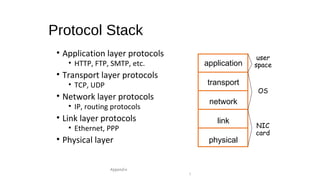
Protocol Stack
• Application layer protocols
• HTTP, FTP, SMTP, etc.
• Transport layer protocols
• TCP, UDP
• Network layer protocols
• IP, routing protocols
• Link layer protocols
• Ethernet, PPP
• Physical layer
Appendix
7
application
transport
network
link
physical
user
space
OS
NIC
card
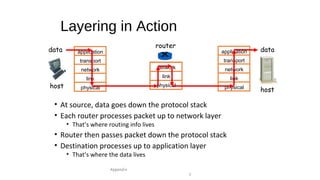
Layering in Action
• At source, data goes down the protocol stack
• Each router processes packet up to network layer
• That’s where routing info lives
• Router then passes packet down the protocol stack
• Destination processes up to application layer
• That’s where the data lives
Appendix
8
application
transport
network
link
physical
application
transport
network
link
physical
network
link
physical
data data
host
host
router
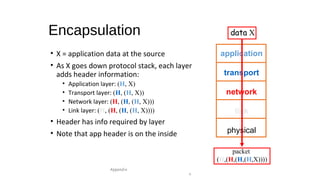
Encapsulation
• X = application data at the source
• As X goes down protocol stack, each layer
adds header information:
• Application layer: (H, X)
• Transport layer: (H, (H, X))
• Network layer: (H, (H, (H, X)))
• Link layer: (H, (H, (H, (H, X))))
• Header has info required by layer
• Note that app header is on the inside
Appendix
9
application
transport
network
link
physical
data X
packet
(H,(H,(H,(H,X))))
Application Layer
• Applications
• Web browsing, email, P2P, etc.
• Run on hosts
• Hosts want network to be transparent
• Application layer protocols
• HTTP, SMTP, IMAP, Gnutella, etc., etc.
• Protocol is one part of an application
• For example, HTTP only part of Web browsing
Appendix
10
Client-Server Model
• Client “speaks first”
• Server tries to respond to request
• Hosts are clients and/or servers
• Example: Web browsing
• You are the client (request web page)
• Web server is the server
Appendix
11
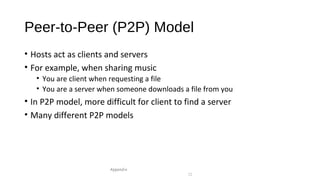
Peer-to-Peer (P2P) Model
• Hosts act as clients and servers
• For example, when sharing music
• You are client when requesting a file
• You are a server when someone downloads a file from you
• In P2P model, more difficult for client to find a server
• Many different P2P models
Appendix
12
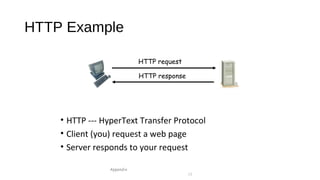
HTTP Example
• HTTP --- HyperText Transfer Protocol
• Client (you) request a web page
• Server responds to your request
Appendix
13
HTTP request
HTTP response
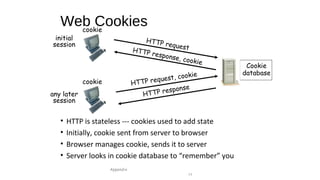
Web Cookies
• HTTP is stateless --- cookies used to add state
• Initially, cookie sent from server to browser
• Browser manages cookie, sends it to server
• Server looks in cookie database to “remember” you
Appendix
14
HTTP requestHTTP response, cookie
initial
session
any later
session
cookie
cookie HTTP request, cookie
HTTP response
Cookie
database
Web Cookies
• Web cookies can be used for
• Shopping carts
• Recommendations, etc.
• A weak form of authentication
• Privacy concerns
• Web site can learn a lot about you
• Multiple web sites could learn even more
Appendix
15
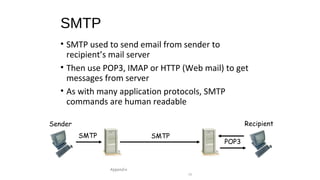
SMTP
• SMTP used to send email from sender to
recipient’s mail server
• Then use POP3, IMAP or HTTP (Web mail) to get
messages from server
• As with many application protocols, SMTP
commands are human readable
Appendix
16
SMTP
POP3
Sender Recipient
SMTP
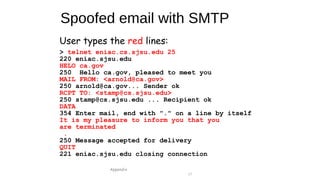
Spoofed email with SMTP
Appendix
17
User types the red lines:
> telnet eniac.cs.sjsu.edu 25
220 eniac.sjsu.edu
HELO ca.gov
250 Hello ca.gov, pleased to meet you
MAIL FROM: <arnold@ca.gov>
250 arnold@ca.gov... Sender ok
RCPT TO: <stamp@cs.sjsu.edu>
250 stamp@cs.sjsu.edu ... Recipient ok
DATA
354 Enter mail, end with "." on a line by itself
It is my pleasure to inform you that you
are terminated
.
250 Message accepted for delivery
QUIT
221 eniac.sjsu.edu closing connection
Application Layer
• DNS --- Domain Name Service
• Convert human-friendly names such as www.google.com
into 32-bit IP address
• A distributed hierarchical database
• Only 13 “root” DNS servers worldwide
• A single point of failure for Internet
• Attacks on root servers have succeeded
• Attacks have not lasted long enough (yet…)
Appendix
18
Transport Layer
• The network layer offers unreliable, “best effort” delivery of packets
• Any improved service must be provided by the hosts
• Transport layer has two protocols
• TCP  better service, more overhead
• UDP  minimal service, minimal overhead
• TCP and UDP run on hosts, not routers
Appendix
19
TCP
• TCP assures that packets
• Arrive at destination
• Are processed in order
• Are not sent too fast for receiver (flow control)
• TCP also provides
• Network-wide congestion control
• TCP is “connection-oriented”
• TCP contacts server before sending data
• Orderly setup and take down of “connection”
• But no true connection, only a logical connection
Appendix
20
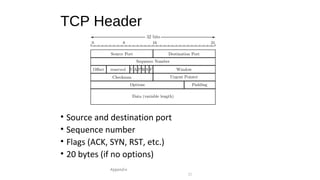
TCP Header
• Source and destination port
• Sequence number
• Flags (ACK, SYN, RST, etc.)
• 20 bytes (if no options)
Appendix
21
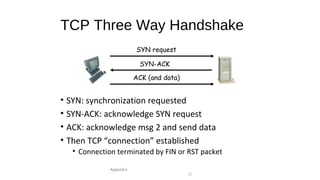
TCP Three Way Handshake
• SYN: synchronization requested
• SYN-ACK: acknowledge SYN request
• ACK: acknowledge msg 2 and send data
• Then TCP “connection” established
• Connection terminated by FIN or RST packet
Appendix
22
SYN request
SYN-ACK
ACK (and data)
Denial of Service Attack
• The TCP 3-way handshake makes denial of service (DoS) attacks
possible
• Whenever SYN packet is received, server must remember “half-open”
connection
• Remembering consumes resources
• Too many half-open connections and server resources will be exhausted
• Then server can’t respond to new connections
Appendix
23
UDP
• UDP is minimalist, “no frills” service
• No assurance that packets arrive
• No assurance packets are in order, etc., etc.
• Why does UDP exist?
• More efficient (smaller header)
• No flow control to slow down sender
• No congestion control to slow down sender
• Packets sent too fast, they will be dropped
• Either at intermediate router or at destination
• But in some apps this is OK (audio/video)
Appendix
24
Network Layer
• Core of network/Internet
• Interconnected mesh of routers
• Purpose of network layer
• Route packets through this mesh
• Network layer protocol is IP
• Follows a “best effort” approach
• IP runs in every host and every router
• Routers also run routing protocols
• Used to determine the path to send packets
• Routing protocols: RIP, OSPF, BGP, etc.
Appendix
25
IP Addresses
• IP address is 32 bits
• Every host has an IP address
• Not enough IP addresses!
• Lots of tricks to extend address space
• IP addresses given in dotted decimal notation
• For example: 195.72.180.27
• Each number is between 0 and 255
• Host’s IP address can change
Appendix
26
Socket
• Each host has a 32 bit IP address
• But many processes on one host
• You can browse web, send email at same time
• How to distinguish processes on a host?
• Each process has a 16 bit port number
• Port numbers < 1024 are “well-known” ports (HTTP port
80, POP3 port 110, etc.)
• Port numbers above 1024 are dynamic (as needed)
• IP address and port number define a socket
• Socket uniquely identifies a process
Appendix
27
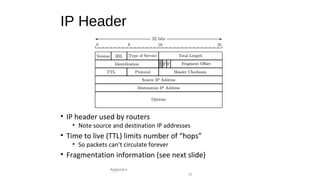
IP Header
• IP header used by routers
• Note source and destination IP addresses
• Time to live (TTL) limits number of “hops”
• So packets can’t circulate forever
• Fragmentation information (see next slide)
Appendix
28
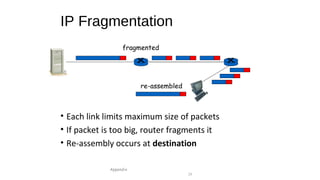
IP Fragmentation
• Each link limits maximum size of packets
• If packet is too big, router fragments it
• Re-assembly occurs at destination
Appendix
29
re-assembled
fragmented
IP Fragmentation
• One packet becomes multiple packets
• Packets reassembled at destination
• Prevents multiple fragmentation/re-assemble
• Fragmentation is a security issue!
• Fragments may obscure real purpose of packet
• “Fragments” can overlap when re-assembled
• Must re-assemble packet to fully understand it
• Lots of work for firewalls, for example
Appendix
30
IPv6
• Current version of IP is IPv4
• IPv6 is a new-and-improved version
• IPv6 provides
• Longer addresses: 128 bits
• Real security “built-in” (IPSec)
• But difficult to migrate from v4 to v6
• So IPv6 has not taken hold yet
Appendix
31
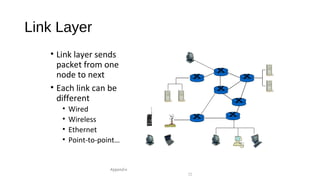
Link Layer
• Link layer sends
packet from one
node to next
• Each link can be
different
• Wired
• Wireless
• Ethernet
• Point-to-point…
Appendix
32
Link Layer
• Implemented in adapter known as network interface card (NIC)
• Ethernet card
• Wireless 802.11 card, etc.
• NIC is (mostly) out of host’s control
• Implements both link and physical layers
Appendix
33
Ethernet
• Ethernet is a multiple access protocol
• Many hosts access a shared media
• On a local area network, or LAN
• In ethernet, two packets can collide
• Then data is corrupted
• Packets must be resent
• How to be efficient in distributed environment?
• Many possibilities, ethernet is most popular
• We won’t discuss details here
Appendix
34
Link Layer Addressing
• IP addresses live at network layer
• Link layer also requires addresses
• MAC address (LAN address, physical address)
• MAC address
• 48 bits, globally unique
• Used to forward packets over one link
• Analogy
• IP address is like home address
• MAC address is like social security number
Appendix
35
ARP
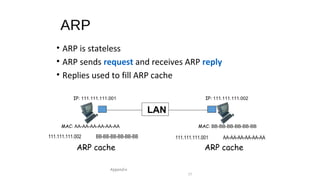
• Address resolution protocol, ARP
• Used at link layer to find MAC address of given IP address
• Each host has ARP table
• Generated automatically
• Entries expire after some time (20 min)
• ARP used to find ARP table entries
• ARP table also known as ARP cache
Appendix
36
ARP
• ARP is stateless
• ARP sends request and receives ARP reply
• Replies used to fill ARP cache
Appendix
37
IP: 111.111.111.001 IP: 111.111.111.002
MAC: AA-AA-AA-AA-AA-AA MAC: BB-BB-BB-BB-BB-BB
111.111.111.002 BB-BB-BB-BB-BB-BB 111.111.111.001 AA-AA-AA-AA-AA-AA
ARP cache ARP cache
LAN
ARP Cache Poisoning
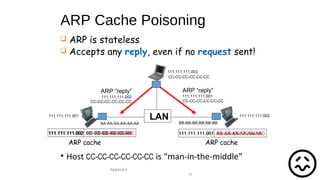
• Host CC-CC-CC-CC-CC-CC is “man-in-the-middle”
Appendix
38
111.111.111.003
111.111.111.002
AA-AA-AA-AA-AA-AA BB-BB-BB-BB-BB-BB
111.111.111.001
CC-CC-CC-CC-CC-CC
LAN
ARP “reply”
111.111.111.002
CC-CC-CC-CC-CC-CC
ARP “reply”
111.111.111.001
CC-CC-CC-CC-CC-CC
111.111.111.002 CC-CC-CC-CC-CC-CC111.111.111.002 BB-BB-BB-BB-BB-BB 111.111.111.001 AA-AA-AA-AA-AA-AA111.111.111.001 CC-CC-CC-CC-CC-CC
ARP cacheARP cache
 ARP is stateless
 Accepts any reply, even if no request sent!
�

Networking basics PPT

  • 1.
    Networking Basics Appendix 1 Ehsan UllahEhsanUllah Presented ByPresented By �
  • 2.
    Network • Includes • Computers •Servers • Routers • Wireless devices • Etc. • Purpose is to transmit data Appendix 2
  • 3.
    Network Edge • Networkedge includes • Hosts • Computers • Laptops • Servers • Cell phones • Etc., etc. Appendix 3
  • 4.
    Network Core • Networkcore consists of • Interconnected mesh of routers • Purpose is to move data from host to host Appendix 4
  • 5.
    Packet Switched Network •Usual telephone network is circuit switched • For each call, a dedicated circuit is established • Dedicated bandwidth • Modern data networks are packet switched • Data is chopped up into discrete packets • Packets are transmitted independently • No real circuit is established • More efficient bandwidth usage • But more complex than circuit switched Appendix 5
  • 6.
    Network Protocols • Studyof networking focused on protocols • Networking protocols precisely specify the communication rules • Details are given in RFCs • RFC is effectively an Internet standard • Stateless protocols don’t remember • Stateful protocols do remember • Many security problems related to state • DoS easier against stateful protocols Appendix 6
  • 7.
    Protocol Stack • Applicationlayer protocols • HTTP, FTP, SMTP, etc. • Transport layer protocols • TCP, UDP • Network layer protocols • IP, routing protocols • Link layer protocols • Ethernet, PPP • Physical layer Appendix 7 application transport network link physical user space OS NIC card
  • 8.
    Layering in Action •At source, data goes down the protocol stack • Each router processes packet up to network layer • That’s where routing info lives • Router then passes packet down the protocol stack • Destination processes up to application layer • That’s where the data lives Appendix 8 application transport network link physical application transport network link physical network link physical data data host host router
  • 9.
    Encapsulation • X =application data at the source • As X goes down protocol stack, each layer adds header information: • Application layer: (H, X) • Transport layer: (H, (H, X)) • Network layer: (H, (H, (H, X))) • Link layer: (H, (H, (H, (H, X)))) • Header has info required by layer • Note that app header is on the inside Appendix 9 application transport network link physical data X packet (H,(H,(H,(H,X))))
  • 10.
    Application Layer • Applications •Web browsing, email, P2P, etc. • Run on hosts • Hosts want network to be transparent • Application layer protocols • HTTP, SMTP, IMAP, Gnutella, etc., etc. • Protocol is one part of an application • For example, HTTP only part of Web browsing Appendix 10
  • 11.
    Client-Server Model • Client“speaks first” • Server tries to respond to request • Hosts are clients and/or servers • Example: Web browsing • You are the client (request web page) • Web server is the server Appendix 11
  • 12.
    Peer-to-Peer (P2P) Model •Hosts act as clients and servers • For example, when sharing music • You are client when requesting a file • You are a server when someone downloads a file from you • In P2P model, more difficult for client to find a server • Many different P2P models Appendix 12
  • 13.
    HTTP Example • HTTP--- HyperText Transfer Protocol • Client (you) request a web page • Server responds to your request Appendix 13 HTTP request HTTP response
  • 14.
    Web Cookies • HTTPis stateless --- cookies used to add state • Initially, cookie sent from server to browser • Browser manages cookie, sends it to server • Server looks in cookie database to “remember” you Appendix 14 HTTP requestHTTP response, cookie initial session any later session cookie cookie HTTP request, cookie HTTP response Cookie database
  • 15.
    Web Cookies • Webcookies can be used for • Shopping carts • Recommendations, etc. • A weak form of authentication • Privacy concerns • Web site can learn a lot about you • Multiple web sites could learn even more Appendix 15
  • 16.
    SMTP • SMTP usedto send email from sender to recipient’s mail server • Then use POP3, IMAP or HTTP (Web mail) to get messages from server • As with many application protocols, SMTP commands are human readable Appendix 16 SMTP POP3 Sender Recipient SMTP
  • 17.
    Spoofed email withSMTP Appendix 17 User types the red lines: > telnet eniac.cs.sjsu.edu 25 220 eniac.sjsu.edu HELO ca.gov 250 Hello ca.gov, pleased to meet you MAIL FROM: <arnold@ca.gov> 250 arnold@ca.gov... Sender ok RCPT TO: <stamp@cs.sjsu.edu> 250 stamp@cs.sjsu.edu ... Recipient ok DATA 354 Enter mail, end with "." on a line by itself It is my pleasure to inform you that you are terminated . 250 Message accepted for delivery QUIT 221 eniac.sjsu.edu closing connection
  • 18.
    Application Layer • DNS--- Domain Name Service • Convert human-friendly names such as www.google.com into 32-bit IP address • A distributed hierarchical database • Only 13 “root” DNS servers worldwide • A single point of failure for Internet • Attacks on root servers have succeeded • Attacks have not lasted long enough (yet…) Appendix 18
  • 19.
    Transport Layer • Thenetwork layer offers unreliable, “best effort” delivery of packets • Any improved service must be provided by the hosts • Transport layer has two protocols • TCP  better service, more overhead • UDP  minimal service, minimal overhead • TCP and UDP run on hosts, not routers Appendix 19
  • 20.
    TCP • TCP assuresthat packets • Arrive at destination • Are processed in order • Are not sent too fast for receiver (flow control) • TCP also provides • Network-wide congestion control • TCP is “connection-oriented” • TCP contacts server before sending data • Orderly setup and take down of “connection” • But no true connection, only a logical connection Appendix 20
  • 21.
    TCP Header • Sourceand destination port • Sequence number • Flags (ACK, SYN, RST, etc.) • 20 bytes (if no options) Appendix 21
  • 22.
    TCP Three WayHandshake • SYN: synchronization requested • SYN-ACK: acknowledge SYN request • ACK: acknowledge msg 2 and send data • Then TCP “connection” established • Connection terminated by FIN or RST packet Appendix 22 SYN request SYN-ACK ACK (and data)
  • 23.
    Denial of ServiceAttack • The TCP 3-way handshake makes denial of service (DoS) attacks possible • Whenever SYN packet is received, server must remember “half-open” connection • Remembering consumes resources • Too many half-open connections and server resources will be exhausted • Then server can’t respond to new connections Appendix 23
  • 24.
    UDP • UDP isminimalist, “no frills” service • No assurance that packets arrive • No assurance packets are in order, etc., etc. • Why does UDP exist? • More efficient (smaller header) • No flow control to slow down sender • No congestion control to slow down sender • Packets sent too fast, they will be dropped • Either at intermediate router or at destination • But in some apps this is OK (audio/video) Appendix 24
  • 25.
    Network Layer • Coreof network/Internet • Interconnected mesh of routers • Purpose of network layer • Route packets through this mesh • Network layer protocol is IP • Follows a “best effort” approach • IP runs in every host and every router • Routers also run routing protocols • Used to determine the path to send packets • Routing protocols: RIP, OSPF, BGP, etc. Appendix 25
  • 26.
    IP Addresses • IPaddress is 32 bits • Every host has an IP address • Not enough IP addresses! • Lots of tricks to extend address space • IP addresses given in dotted decimal notation • For example: 195.72.180.27 • Each number is between 0 and 255 • Host’s IP address can change Appendix 26
  • 27.
    Socket • Each hosthas a 32 bit IP address • But many processes on one host • You can browse web, send email at same time • How to distinguish processes on a host? • Each process has a 16 bit port number • Port numbers < 1024 are “well-known” ports (HTTP port 80, POP3 port 110, etc.) • Port numbers above 1024 are dynamic (as needed) • IP address and port number define a socket • Socket uniquely identifies a process Appendix 27
  • 28.
    IP Header • IPheader used by routers • Note source and destination IP addresses • Time to live (TTL) limits number of “hops” • So packets can’t circulate forever • Fragmentation information (see next slide) Appendix 28
  • 29.
    IP Fragmentation • Eachlink limits maximum size of packets • If packet is too big, router fragments it • Re-assembly occurs at destination Appendix 29 re-assembled fragmented
  • 30.
    IP Fragmentation • Onepacket becomes multiple packets • Packets reassembled at destination • Prevents multiple fragmentation/re-assemble • Fragmentation is a security issue! • Fragments may obscure real purpose of packet • “Fragments” can overlap when re-assembled • Must re-assemble packet to fully understand it • Lots of work for firewalls, for example Appendix 30
  • 31.
    IPv6 • Current versionof IP is IPv4 • IPv6 is a new-and-improved version • IPv6 provides • Longer addresses: 128 bits • Real security “built-in” (IPSec) • But difficult to migrate from v4 to v6 • So IPv6 has not taken hold yet Appendix 31
  • 32.
    Link Layer • Linklayer sends packet from one node to next • Each link can be different • Wired • Wireless • Ethernet • Point-to-point… Appendix 32
  • 33.
    Link Layer • Implementedin adapter known as network interface card (NIC) • Ethernet card • Wireless 802.11 card, etc. • NIC is (mostly) out of host’s control • Implements both link and physical layers Appendix 33
  • 34.
    Ethernet • Ethernet isa multiple access protocol • Many hosts access a shared media • On a local area network, or LAN • In ethernet, two packets can collide • Then data is corrupted • Packets must be resent • How to be efficient in distributed environment? • Many possibilities, ethernet is most popular • We won’t discuss details here Appendix 34
  • 35.
    Link Layer Addressing •IP addresses live at network layer • Link layer also requires addresses • MAC address (LAN address, physical address) • MAC address • 48 bits, globally unique • Used to forward packets over one link • Analogy • IP address is like home address • MAC address is like social security number Appendix 35
  • 36.
    ARP • Address resolutionprotocol, ARP • Used at link layer to find MAC address of given IP address • Each host has ARP table • Generated automatically • Entries expire after some time (20 min) • ARP used to find ARP table entries • ARP table also known as ARP cache Appendix 36
  • 37.
    ARP • ARP isstateless • ARP sends request and receives ARP reply • Replies used to fill ARP cache Appendix 37 IP: 111.111.111.001 IP: 111.111.111.002 MAC: AA-AA-AA-AA-AA-AA MAC: BB-BB-BB-BB-BB-BB 111.111.111.002 BB-BB-BB-BB-BB-BB 111.111.111.001 AA-AA-AA-AA-AA-AA ARP cache ARP cache LAN
  • 38.
    ARP Cache Poisoning •Host CC-CC-CC-CC-CC-CC is “man-in-the-middle” Appendix 38 111.111.111.003 111.111.111.002 AA-AA-AA-AA-AA-AA BB-BB-BB-BB-BB-BB 111.111.111.001 CC-CC-CC-CC-CC-CC LAN ARP “reply” 111.111.111.002 CC-CC-CC-CC-CC-CC ARP “reply” 111.111.111.001 CC-CC-CC-CC-CC-CC 111.111.111.002 CC-CC-CC-CC-CC-CC111.111.111.002 BB-BB-BB-BB-BB-BB 111.111.111.001 AA-AA-AA-AA-AA-AA111.111.111.001 CC-CC-CC-CC-CC-CC ARP cacheARP cache  ARP is stateless  Accepts any reply, even if no request sent! �