3.3) Transmitting and3.3) Transmitting and
ReceivingReceiving
• Different concepts covered include:
• transmission of data
• protocols
• handshaking
• networks and their topologies
• network access methods
• Transmission of data occurs in two ways:
• parallel transmission
• serial transmission
• Parallel transmission is the transmission of
data simultaneously using separate
channels.
• Serial transmission transmits the data one
bit after the other along one channel.
• Parallel is faster, but can only be used over
shorter distances.
• The direction of data flow can be:
• simplex
• half-duplex
• full-duplex
• Simplex mode allows transmission in one
direction only.
• Half-duplex allows transmission in either
direction, but only in one direction at a
time.
• Full duplex allows transmission in both
directions simultaneously.
• Serial transmission can be either
asynchronous or synchronous.
• Synchronous transmission requires that all
of the data is sent at the same transfer rate.
• The same number of bits is sent each
second.
• Both computers are synchronized through
the use of an internal clock.
• It is faster and more efficient, but quite
expensive as it requires very stable
connections.
• Asynchronous transmission is sent at
varying rates and the flow is regulated
through the use of start and stop bits.
• One of the protocols agreed upon during
handshaking is how many start and stop bits
will be used.
• [Diagram 3.10, p.88]
• Protocols are a set of rules that govern the
transfer of data between two computers.
• They define:
• how a link is established
• how data is transmitted
• how errors are detected and corrected
• Numerous protocols have been developed
for different technologies.
• [Table 3.1, p.89 – Do the following: IPX,
X.25, ATM, Kermit, TCP/IP, HTTP, FTP,
POP, MIME]
• A network is any number of computers and
their peripheral devices connected together
in some way.
• Each device in a network is called a node.
• Terminals are devices that send data to and
receive data from another computer.
• If the terminal has memory and processing
capabilities it is called an intelligent
terminal.
• Personal computers are often called
workstations on a network.
• Networks can be either LAN’s, WAN’s or
very rarely, GAN’s
• Local Area Networks (LAN’s) – are linked
computers at one physical location
• Wide Area Network (WAN’s) – connect
computers over several geographical
locations
• Global Area Networks (GAN’s) –
computers and devices connected all over
the world
• Network topology is the physical
arrangement of the devices in a network.
• Three common types of topologies are:
• bus
• star
• ring
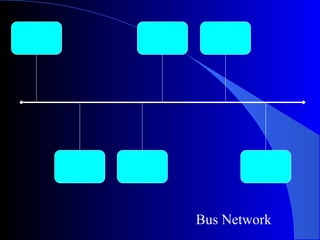
Bus Network
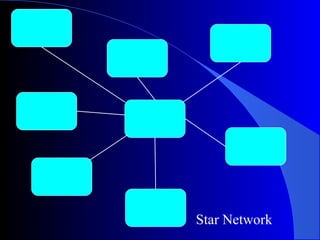
Star Network
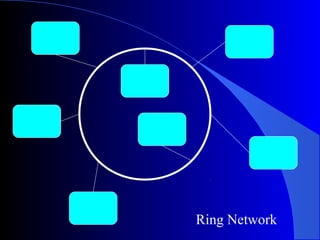
Ring Network
• The bus topology is where all devices are
attached to a direct line called a bus.
• Each devices checks that the line is free and
sends its signal.
• If there is a data collision then the sending
terminal waits a random time then attempts
resending.
• If one node fails the system will still work.
• A star topology has a central computer with
each device connected directly to it.
• The central computer receives messages
and sends them to the destination device.
• It requires extra cabling because each
device must be connected to the central
computer.
• If one devices fails, the network will still
function unless it is the central computer
that is broken.
• Its speed is determined by the processing
power of the central computer.
• A ring topology is an arrangement where all
devices are attached so that the connection
is a continuous loop.
• Data flow is one direction moving from
device to device.
• A ‘token’ is passed along the network and
data packets are attached to the token and
released when they reach the appropriate
node.
• There are a number of ways to deal with
multiple users wanting to access the
network.
• The two most common methods are:
• Ethernet
• token ring
• Ethernet is based upon a bus network.
• Ethernet allows data to be sent in both
directions simultaneously.
• This means there will be data collisions and
errors
• To overcome this problem, Ethernet uses a
system called Carrier Sense Multiple
Access and Collision Detection
(CSMA/CD)
• In CSMA/CD all nodes have the ability to
sense signals on a network.
• When a node wishes to transmit, it ‘listens’
for a signal on the bus.
• When no signals are detected, it transmits.
• If two nodes transmit at the same time then
a data collision can occur.
• When a collision is detected, each device
stops transmitting, waits a randomly
determined time, then transmits again.
• Token ring is a LAN access protocol based
upon ring topologies.
• Special data packets, called tokens, are
continually passed between nodes on the
network.
• Workstations with data to send attach it to a
free token and transmit it.
• A busy token cannot be used by other
nodes.
• When the data is received it is replaced with
an acknowledgement and sent back to the
original sending node.
• There are several special purpose hardware
devices used in a successful network.
• They include:
• a network interface card
• servers
• routers and switches
• bridges and gateways
• hubs
• A network interface card (NIC) is an
expansion card that links the network to the
computer motherboard.
• The type of NIC depends upon the type of
network.
• A server is a dedicated computer that
provides services to other computers.
• Workstations log on to the server to give
them access to files, applications or
peripheral devices.
• Types of servers include:
• file server
• print server
• mail server
• Internet server
• Networks are often linked to other networks
and this requires paths to be established and
signal strength to be boosted.
• Devices used to determine the path between
networks include routers and switches.
• Routers maintain a table of available routes
and their conditions.
• It uses this table to determine the best route
for any given data packet.
• Data packets often travel through several
networks and routers before they reach their
destination.
• A switch is similar, but it does not maintain
a table, therefore making it a simpler and
faster mechanism for passing the message
along.
• However, they do not always choose the
faster route for the packet to travel along.
• The actual connection between networks is
achieved through bridges and gateways.
• A bridge is a combination of hardware and
software used to link two similar networks.
• Bridges examine each data packet and
forward any that are addressed to a
connected LAN.
• Gateways are combinations of hardware
and software used to link two different
kinds of network.
• This usually involves converting different
protocols.
• A repeater may also be used to increase a
diminishing signal.
• Repeaters are less intelligent than bridges or
gateways.
• A hub is a central connecting device within
a network.
• A hub can be considered passive if it just
channels data or it can contain a router to
improve traffic flow.
• As well as the devices connected to a
network, we need to consider the
transmission medium.
• Data is transferred along a transmission
medium.
• The capacity of a transmission medium is
called the bandwidth.
• Bandwidth is generally measured in bps
• They can be categorised as wire or wireless.
• Wire transmission involves wires and
cables.
• Twisted pair cable consists of two insulated
copper wires twisted around each other to form
a spiral.
• There are two types:
• shielded twisted pair (STP)
• unshielded twisted pair (UTP)
• STP is more often used in ‘noisy’
environments.
• Twisted pair is the slowest medium with
transmission speeds up to 60 Kbps.
• Coaxial cable consists of a single copper wire
surrounded by insulation, shielding , then more
insulation.
• It allows transmission with little interference.
• Generally used for under 2kms.
• Bandwidth is around 10Mbps.
• Fibre-optic cables are made from glass fibres
the width of a human hair, that are often
bundled together.
• They are:
• free from interference
• very secure
• able to transmit at high speeds
(> 400 Mbps)
• Most LAN’s use twisted pair or coaxial cable
as fibre-optic is too expensive but this is
changing and fibre-optic is becoming much
more common.
• There are two types of transmission used:
• baseband
• broadband
• Baseband uses the entire capacity of the cable to
transmit one signal.
• Broadband networks divide the cable so that
several signals can be transmitted simultaneously.
• Most LAN’s are baseband.
• Wireless transmission moves data without a
physical connection.
• Wireless includes:
• microwaves
• radio frequencies (RF)
• infra-red (IR)
• satellites
• A microwave is a high frequency radio signal
that requires antennae no further than 50 km
apart.
• It is faster than coaxial or regular telephone
lines and relatively error-free.
• Radio frequencies are used for many home and
business wireless networks, usually in the 2.4
GHz range.
• Can have an access point (or hot-spot) or be
done in an ad-hoc manner.
• Satellites can transmit large amounts of data
over large distances.
• Used by major corporations, television
networks and telecommunications.
• IR is used by some devices in LAN’s
• Each computer in a network must have
appropriate network software.
• This software is usually organised by a
network administrator.
• Their responsibilities include:
• network security
• software installations and updates
• monitoring daily activity
• enforcing licensing agreements
• developing a storage solution
• performing routine backups
• A network operating system (NOS) is an
operating system designed to support
networked computers.
• One part resides on each node with another
part on the server.
• Tasks carried out by a network OS include:
• administration
• file management
• applications
• resource management
• security
• An intranet is a private network that uses a
similar interface to the Web.
• It consists of many interlinked LANs.
• It provides access similar to the Internet, but
only to a select group of users (e.g. employees,
students)
• Firewalls monitor the flow of data in both
directions to maintain the security of the
organisation.
• An extranet is an intranet that is accessible to
customers, suppliers or others outside the
organisation.
• It provides such information as product
descriptions, answers to frequently asked
questions, warranties and how to contact
customer service.
• Extranets are still limited to accessing select
computer paths and files.

12 ipt 0303 transmitting and receiving

  • 1.
    3.3) Transmitting and3.3)Transmitting and ReceivingReceiving
  • 2.
    • Different conceptscovered include: • transmission of data • protocols • handshaking • networks and their topologies • network access methods • Transmission of data occurs in two ways: • parallel transmission • serial transmission
  • 3.
    • Parallel transmissionis the transmission of data simultaneously using separate channels. • Serial transmission transmits the data one bit after the other along one channel. • Parallel is faster, but can only be used over shorter distances. • The direction of data flow can be: • simplex • half-duplex • full-duplex
  • 4.
    • Simplex modeallows transmission in one direction only. • Half-duplex allows transmission in either direction, but only in one direction at a time. • Full duplex allows transmission in both directions simultaneously.
  • 5.
    • Serial transmissioncan be either asynchronous or synchronous. • Synchronous transmission requires that all of the data is sent at the same transfer rate. • The same number of bits is sent each second. • Both computers are synchronized through the use of an internal clock. • It is faster and more efficient, but quite expensive as it requires very stable connections.
  • 6.
    • Asynchronous transmissionis sent at varying rates and the flow is regulated through the use of start and stop bits. • One of the protocols agreed upon during handshaking is how many start and stop bits will be used. • [Diagram 3.10, p.88] • Protocols are a set of rules that govern the transfer of data between two computers.
  • 7.
    • They define: •how a link is established • how data is transmitted • how errors are detected and corrected • Numerous protocols have been developed for different technologies. • [Table 3.1, p.89 – Do the following: IPX, X.25, ATM, Kermit, TCP/IP, HTTP, FTP, POP, MIME]
  • 8.
    • A networkis any number of computers and their peripheral devices connected together in some way. • Each device in a network is called a node. • Terminals are devices that send data to and receive data from another computer. • If the terminal has memory and processing capabilities it is called an intelligent terminal. • Personal computers are often called workstations on a network.
  • 9.
    • Networks canbe either LAN’s, WAN’s or very rarely, GAN’s • Local Area Networks (LAN’s) – are linked computers at one physical location • Wide Area Network (WAN’s) – connect computers over several geographical locations • Global Area Networks (GAN’s) – computers and devices connected all over the world
  • 10.
    • Network topologyis the physical arrangement of the devices in a network. • Three common types of topologies are: • bus • star • ring
  • 11.
  • 12.
  • 13.
  • 14.
    • The bustopology is where all devices are attached to a direct line called a bus. • Each devices checks that the line is free and sends its signal. • If there is a data collision then the sending terminal waits a random time then attempts resending. • If one node fails the system will still work. • A star topology has a central computer with each device connected directly to it.
  • 15.
    • The centralcomputer receives messages and sends them to the destination device. • It requires extra cabling because each device must be connected to the central computer. • If one devices fails, the network will still function unless it is the central computer that is broken. • Its speed is determined by the processing power of the central computer.
  • 16.
    • A ringtopology is an arrangement where all devices are attached so that the connection is a continuous loop. • Data flow is one direction moving from device to device. • A ‘token’ is passed along the network and data packets are attached to the token and released when they reach the appropriate node.
  • 17.
    • There area number of ways to deal with multiple users wanting to access the network. • The two most common methods are: • Ethernet • token ring • Ethernet is based upon a bus network. • Ethernet allows data to be sent in both directions simultaneously. • This means there will be data collisions and errors
  • 18.
    • To overcomethis problem, Ethernet uses a system called Carrier Sense Multiple Access and Collision Detection (CSMA/CD) • In CSMA/CD all nodes have the ability to sense signals on a network. • When a node wishes to transmit, it ‘listens’ for a signal on the bus. • When no signals are detected, it transmits. • If two nodes transmit at the same time then a data collision can occur.
  • 19.
    • When acollision is detected, each device stops transmitting, waits a randomly determined time, then transmits again. • Token ring is a LAN access protocol based upon ring topologies. • Special data packets, called tokens, are continually passed between nodes on the network. • Workstations with data to send attach it to a free token and transmit it. • A busy token cannot be used by other nodes.
  • 20.
    • When thedata is received it is replaced with an acknowledgement and sent back to the original sending node. • There are several special purpose hardware devices used in a successful network. • They include: • a network interface card • servers • routers and switches • bridges and gateways • hubs
  • 21.
    • A networkinterface card (NIC) is an expansion card that links the network to the computer motherboard. • The type of NIC depends upon the type of network. • A server is a dedicated computer that provides services to other computers. • Workstations log on to the server to give them access to files, applications or peripheral devices.
  • 22.
    • Types ofservers include: • file server • print server • mail server • Internet server • Networks are often linked to other networks and this requires paths to be established and signal strength to be boosted. • Devices used to determine the path between networks include routers and switches.
  • 23.
    • Routers maintaina table of available routes and their conditions. • It uses this table to determine the best route for any given data packet. • Data packets often travel through several networks and routers before they reach their destination. • A switch is similar, but it does not maintain a table, therefore making it a simpler and faster mechanism for passing the message along.
  • 24.
    • However, theydo not always choose the faster route for the packet to travel along. • The actual connection between networks is achieved through bridges and gateways. • A bridge is a combination of hardware and software used to link two similar networks. • Bridges examine each data packet and forward any that are addressed to a connected LAN. • Gateways are combinations of hardware and software used to link two different kinds of network.
  • 25.
    • This usuallyinvolves converting different protocols. • A repeater may also be used to increase a diminishing signal. • Repeaters are less intelligent than bridges or gateways. • A hub is a central connecting device within a network. • A hub can be considered passive if it just channels data or it can contain a router to improve traffic flow.
  • 26.
    • As wellas the devices connected to a network, we need to consider the transmission medium. • Data is transferred along a transmission medium. • The capacity of a transmission medium is called the bandwidth. • Bandwidth is generally measured in bps • They can be categorised as wire or wireless. • Wire transmission involves wires and cables.
  • 27.
    • Twisted paircable consists of two insulated copper wires twisted around each other to form a spiral. • There are two types: • shielded twisted pair (STP) • unshielded twisted pair (UTP) • STP is more often used in ‘noisy’ environments. • Twisted pair is the slowest medium with transmission speeds up to 60 Kbps.
  • 28.
    • Coaxial cableconsists of a single copper wire surrounded by insulation, shielding , then more insulation. • It allows transmission with little interference. • Generally used for under 2kms. • Bandwidth is around 10Mbps. • Fibre-optic cables are made from glass fibres the width of a human hair, that are often bundled together.
  • 29.
    • They are: •free from interference • very secure • able to transmit at high speeds (> 400 Mbps) • Most LAN’s use twisted pair or coaxial cable as fibre-optic is too expensive but this is changing and fibre-optic is becoming much more common.
  • 30.
    • There aretwo types of transmission used: • baseband • broadband • Baseband uses the entire capacity of the cable to transmit one signal. • Broadband networks divide the cable so that several signals can be transmitted simultaneously. • Most LAN’s are baseband. • Wireless transmission moves data without a physical connection.
  • 31.
    • Wireless includes: •microwaves • radio frequencies (RF) • infra-red (IR) • satellites • A microwave is a high frequency radio signal that requires antennae no further than 50 km apart. • It is faster than coaxial or regular telephone lines and relatively error-free.
  • 32.
    • Radio frequenciesare used for many home and business wireless networks, usually in the 2.4 GHz range. • Can have an access point (or hot-spot) or be done in an ad-hoc manner. • Satellites can transmit large amounts of data over large distances. • Used by major corporations, television networks and telecommunications. • IR is used by some devices in LAN’s
  • 33.
    • Each computerin a network must have appropriate network software. • This software is usually organised by a network administrator. • Their responsibilities include: • network security • software installations and updates • monitoring daily activity • enforcing licensing agreements • developing a storage solution • performing routine backups
  • 34.
    • A networkoperating system (NOS) is an operating system designed to support networked computers. • One part resides on each node with another part on the server. • Tasks carried out by a network OS include: • administration • file management • applications • resource management • security
  • 35.
    • An intranetis a private network that uses a similar interface to the Web. • It consists of many interlinked LANs. • It provides access similar to the Internet, but only to a select group of users (e.g. employees, students) • Firewalls monitor the flow of data in both directions to maintain the security of the organisation.
  • 36.
    • An extranetis an intranet that is accessible to customers, suppliers or others outside the organisation. • It provides such information as product descriptions, answers to frequently asked questions, warranties and how to contact customer service. • Extranets are still limited to accessing select computer paths and files.