Networking
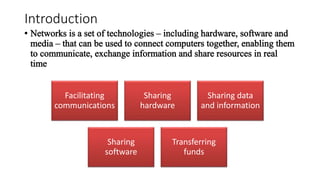
Introduction
Facilitating
communications
Sharing
hardware
Sharing data
and information
Sharing
software
Transferring
funds
Benefits
 Resource sharing (cost savings)
 Personal communication
 Data backups
 Reliability (reduced errors/inconsistencies)
 Greater performance (distributed computing)
 Personalized/ contextualized services
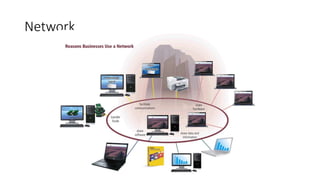
Network
Communications
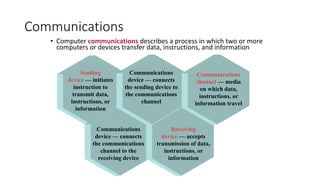
• Computer communications describes a process in which two or more
computers or devices transfer data, instructions, and information
Sending
device — initiates
instruction to
transmit data,
instructions, or
information
Communications
device — connects
the communications
channel to the
receiving device
Receiving
device — accepts
transmission of data,
instructions, or
information
Communications
device — connects
the sending device to
the communications
channel
Communications
channel — media
on which data,
instructions, or
information travel
Uses of Computer Communications
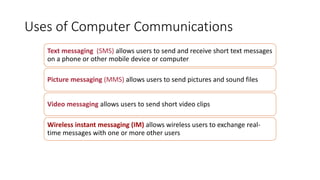
Text messaging (SMS) allows users to send and receive short text messages
on a phone or other mobile device or computer
Picture messaging (MMS) allows users to send pictures and sound files
Video messaging allows users to send short video clips
Wireless instant messaging (IM) allows wireless users to exchange real-
time messages with one or more other users
Common Network Types
• Local Area Network (LAN)
• Wide Area Network (WAN)
• Metropolitan Area Network (MAN)
• Home Area Network (HAN)
• Campus Area Network (CAN)
• Client-Server Network
• Peer-to-Peer Network
Network
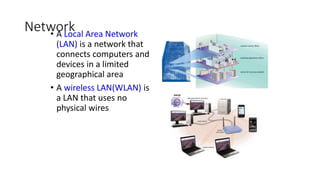
• A Local Area Network
(LAN) is a network that
connects computers and
devices in a limited
geographical area
• A wireless LAN(WLAN) is
a LAN that uses no
physical wires
Local Area Network (LAN)
• Each computer or device on the network is called a node
• nodes are connected via cables, infrared links, or wireless media
• Contains printers, servers and computers
• Systems are close to each other
• Contained in one office or building
• not a system that connects to the public environment (such as the
Internet) using phone or data lines.
• Organizations often have several LANS
Network
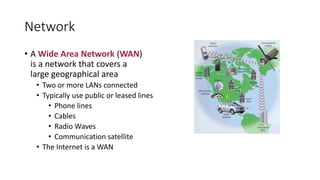
• A Wide Area Network (WAN)
is a network that covers a
large geographical area
• Two or more LANs connected
• Typically use public or leased lines
• Phone lines
• Cables
• Radio Waves
• Communication satellite
• The Internet is a WAN
Metropolitan Area Network (MAN)
• A high-speed network that connects LANs in a metropolitan area such
as a city or town and handles the bulk of communications activity
across that region.
• Typically includes one or more LANs, but covers a smaller geographic
area than a WAN.
• A MAN usually is managed by a consortium of users or by a single
network provider that sells the service to the users.
• Local and state governments, for example, regulate some MANs.
• Telephone companies, cable television operators, and other
organizations provide users with connections to the MAN
Home Area Network (HAN)
• Small scale network
• Found mainly in the home
• Connects computers and entertainment appliances
• connects a person’s digital devices, from multiple computers and their
peripheral devices, such as a printer to telephones, VCRs, DVDs, televisions,
video games, home security systems, “ smart” appliances, fax machines, and
other digital devices that are wired into the network
Campus Area Network (CAN)
• Follows the same principles as a LAN only on a larger and more
diversified scale
• A LAN in one large geographic area
• Resources related to the same organization
• Each department shares the LAN
• With a CAN, different campus offices and organizations can be linked
together
• Some university departments or organizations might be linked to the
CAN even though they already have their own separate LANs.
Personal Area Network (PAN)
• Very small scale network
• Range is less than 2 meters
• Cell phones, PDAs, MP3 players
• PANs can be used for communication among the personal devices
themselves (intrapersonal communication), or for connecting to a
higher level network and the Internet (an uplink)
• A PAN may also be carried over wired computer buses such as USB
and FireWire
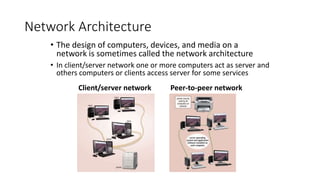
Network Architecture
• The design of computers, devices, and media on a
network is sometimes called the network architecture
• In client/server network one or more computers act as server and
others computers or clients access server for some services
Client/server network Peer-to-peer network
Server Based Network
• A node is a processing location that can be a PC or some
other device such as a networked printer
• Usually, server-based networks include many nodes and
one or more servers
• server control nodes access to the network's resources
• Users gain access by logging in
• Server is the most important computer
Client-Server Network
• Nodes and servers share data roles
• Nodes are called clients
• Servers are used to control access
• requires special software for the nodes and the server
• Database software
• Access to data controlled by server
• Server is the most important computer
• Require a person to serve as a network administrator because of the
large size of the network
Client-Server Network
• Some servers, called dedicated servers, perform a specific task and
can be placed with other dedicated servers to perform multiple tasks.
• For example, a file server stores and manages files.
• A print server manages printers and documents being printed.
• A database server stores and provides access to a database.
• A network server manages network traffic (activity).
• A Web server is a computer that delivers requested Web pages to your
computer
Network
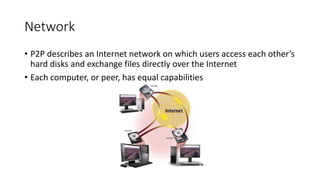
• P2P describes an Internet network on which users access each other’s
hard disks and exchange files directly over the Internet
• Each computer, or peer, has equal capabilities
Peer-to-Peer Network
• All nodes are equal
• Nodes access resources on other nodes
• Each node controls its own resources
• Most modern OS allow P2PN
• Distributing computing is a form
• Kazaa, Bit Torrent,
Network
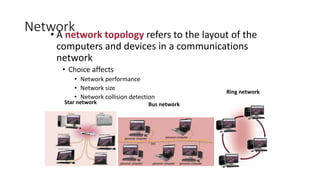
• A network topology refers to the layout of the
computers and devices in a communications
network
• Choice affects
• Network performance
• Network size
• Network collision detection
Star network Bus network
Ring network
Physical Transmission Media
• Twisted Pair is used for telephone systems and network cabling
• Coaxial cable is often used for cable television wiring
• Fiber optic cable is capable of carrying significantly more data at
faster speeds than wire cables.
• Less susceptible of interference (noise) and therefore more secure
• Smaller size (thinner and lighter)
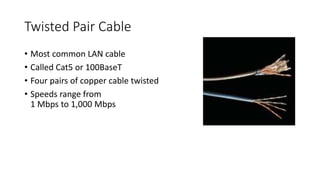
Twisted Pair Cable
• Most common LAN cable
• Called Cat5 or 100BaseT
• Four pairs of copper cable twisted
• Speeds range from
1 Mbps to 1,000 Mbps
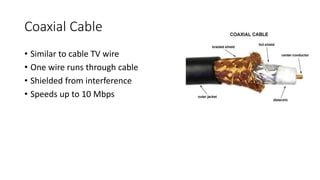
Coaxial Cable
• Similar to cable TV wire
• One wire runs through cable
• Shielded from interference
• Speeds up to 10 Mbps
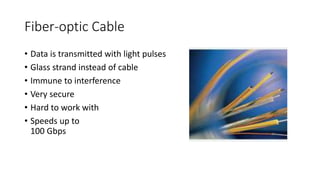
Fiber-optic Cable
• Data is transmitted with light pulses
• Glass strand instead of cable
• Immune to interference
• Very secure
• Hard to work with
• Speeds up to
100 Gbps
Wireless Media
• Data transmitted through the air
• LANs use radio waves
• WANs use microwave signals
• Easy to setup
• Difficult to secure
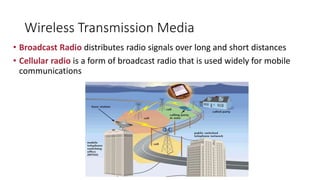
Wireless Transmission Media
• Broadcast Radio distributes radio signals over long and short distances
• Cellular radio is a form of broadcast radio that is used widely for mobile
communications
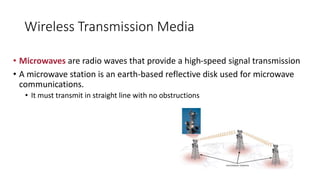
Wireless Transmission Media
• Microwaves are radio waves that provide a high-speed signal transmission
• A microwave station is an earth-based reflective disk used for microwave
communications.
• It must transmit in straight line with no obstructions
Wireless Transmission Media
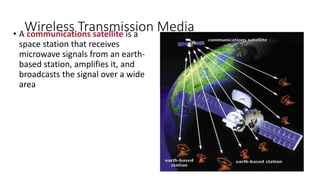
• A communications satellite is a
space station that receives
microwave signals from an earth-
based station, amplifies it, and
broadcasts the signal over a wide
area
Network Linking Devices
• Connect nodes in the network
• Cable runs from node to device
• Crossover cable connects two computers
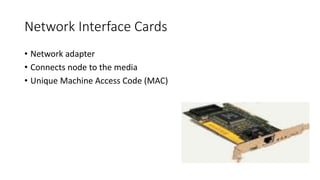
Network Interface Cards
• Network adapter
• Connects node to the media
• Unique Machine Access Code (MAC)
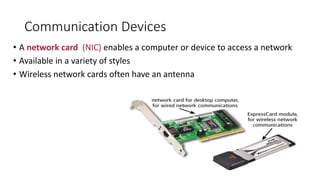
Communication Devices
• A network card (NIC) enables a computer or device to access a network
• Available in a variety of styles
• Wireless network cards often have an antenna
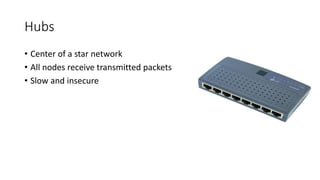
Hubs
• Center of a star network
• All nodes receive transmitted packets
• Slow and insecure
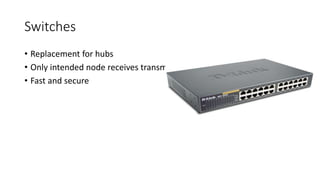
Switches
• Replacement for hubs
• Only intended node receives transmission
• Fast and secure
Bridge
• Connects two or more LANs together
• Packets sent to remote LAN cross
• Other packets do not cross
• Segments the network on MAC addresses
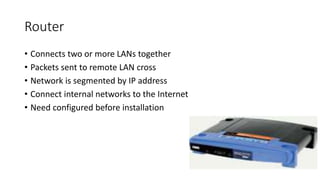
Router
• Connects two or more LANs together
• Packets sent to remote LAN cross
• Network is segmented by IP address
• Connect internal networks to the Internet
• Need configured before installation
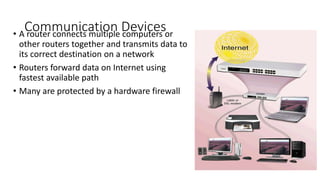
Communication Devices
• A router connects multiple computers or
other routers together and transmits data to
its correct destination on a network
• Routers forward data on Internet using
fastest available path
• Many are protected by a hardware firewall
Gateway
• Connects two dissimilar networks
• Connects coax to twisted pair
• Most gateways contained in other devices
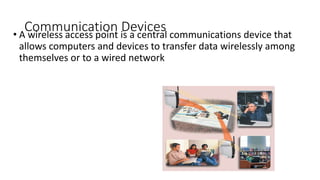
Communication Devices
• A wireless access point is a central communications device that
allows computers and devices to transfer data wirelessly among
themselves or to a wired network
Network Protocols
• Language of the network
• Rules of communication
• Error resolution
• Defines collision and collision recovery
• Size of packet
• Naming rules for computers
Network Communication Standards
Ethernet is a network standard that specifies no computer controls
when data can be transmitted
The token ring standard specifies that computers and devices on the
network share or pass a special signal (token)
TCP/IP is a network standard that defines how messages are routed
from one end of a network to another
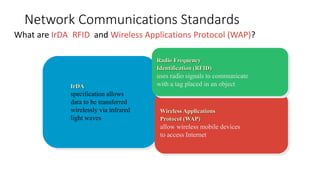
Network Communications Standards
What are IrDA, RFID, and Wireless Applications Protocol (WAP)?
IrDA
specification allows
data to be transferred
wirelessly via infrared
light waves
Wireless Applications
Protocol (WAP)
allow wireless mobile devices
to access Internet
Radio Frequency
Identification (RFID)
uses radio signals to communicate
with a tag placed in an object
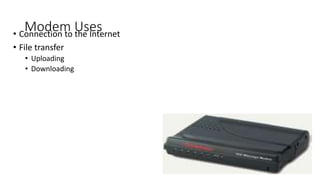
Modem Uses
• Connection to the Internet
• File transfer
• Uploading
• Downloading
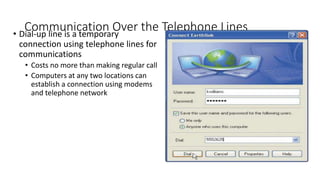
Communication Over the Telephone Lines
• Dial-up line is a temporary
connection using telephone lines for
communications
• Costs no more than making regular call
• Computers at any two locations can
establish a connection using modems
and telephone network
Network Topologies
• Packets
• Pieces of data transmitted over a network
• Packets are created by sending node
• Data is reassembled by receiving node
• Packet header
• Sending and receiving address
• Packet payload
• Number and size of data
• Actual data
• Packet error control
Bus Topology
• Also called linear bus
• One wire connects all nodes
• Terminator ends the wires
• Advantages
• Easy to setup
• Small amount of wire
• Disadvantages
• Slow
• Easy to crash
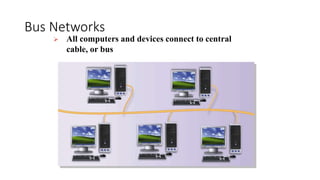
Bus Networks
 All computers and devices connect to central
cable, or bus
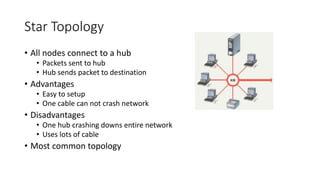
Star Topology
• All nodes connect to a hub
• Packets sent to hub
• Hub sends packet to destination
• Advantages
• Easy to setup
• One cable can not crash network
• Disadvantages
• One hub crashing downs entire network
• Uses lots of cable
• Most common topology
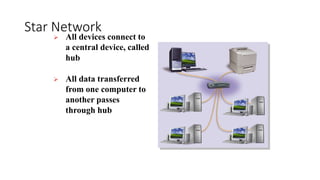
Star Network
 All devices connect to
a central device, called
hub
 All data transferred
from one computer to
another passes
through hub
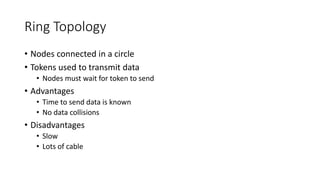
Ring Topology
• Nodes connected in a circle
• Tokens used to transmit data
• Nodes must wait for token to send
• Advantages
• Time to send data is known
• No data collisions
• Disadvantages
• Slow
• Lots of cable
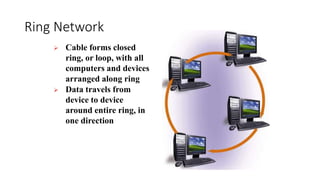
Ring Network
 Cable forms closed
ring, or loop, with all
computers and devices
arranged along ring
 Data travels from
device to device
around entire ring, in
one direction
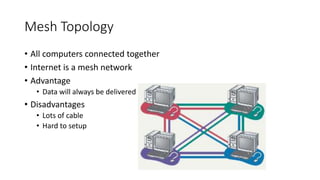
Mesh Topology
• All computers connected together
• Internet is a mesh network
• Advantage
• Data will always be delivered
• Disadvantages
• Lots of cable
• Hard to setup
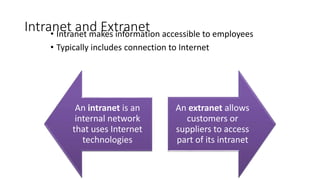
Intranet and Extranet
• Intranet makes information accessible to employees
• Typically includes connection to Internet
An intranet is an
internal network
that uses Internet
technologies
An extranet allows
customers or
suppliers to access
part of its intranet

Networking.pptx

  • 1.
  • 2.
  • 3.
    Benefits  Resource sharing(cost savings)  Personal communication  Data backups  Reliability (reduced errors/inconsistencies)  Greater performance (distributed computing)  Personalized/ contextualized services
  • 4.
  • 5.
    Communications • Computer communicationsdescribes a process in which two or more computers or devices transfer data, instructions, and information Sending device — initiates instruction to transmit data, instructions, or information Communications device — connects the communications channel to the receiving device Receiving device — accepts transmission of data, instructions, or information Communications device — connects the sending device to the communications channel Communications channel — media on which data, instructions, or information travel
  • 6.
    Uses of ComputerCommunications Text messaging (SMS) allows users to send and receive short text messages on a phone or other mobile device or computer Picture messaging (MMS) allows users to send pictures and sound files Video messaging allows users to send short video clips Wireless instant messaging (IM) allows wireless users to exchange real- time messages with one or more other users
  • 7.
    Common Network Types •Local Area Network (LAN) • Wide Area Network (WAN) • Metropolitan Area Network (MAN) • Home Area Network (HAN) • Campus Area Network (CAN) • Client-Server Network • Peer-to-Peer Network
  • 8.
    Network • A LocalArea Network (LAN) is a network that connects computers and devices in a limited geographical area • A wireless LAN(WLAN) is a LAN that uses no physical wires
  • 9.
    Local Area Network(LAN) • Each computer or device on the network is called a node • nodes are connected via cables, infrared links, or wireless media • Contains printers, servers and computers • Systems are close to each other • Contained in one office or building • not a system that connects to the public environment (such as the Internet) using phone or data lines. • Organizations often have several LANS
  • 10.
    Network • A WideArea Network (WAN) is a network that covers a large geographical area • Two or more LANs connected • Typically use public or leased lines • Phone lines • Cables • Radio Waves • Communication satellite • The Internet is a WAN
  • 11.
    Metropolitan Area Network(MAN) • A high-speed network that connects LANs in a metropolitan area such as a city or town and handles the bulk of communications activity across that region. • Typically includes one or more LANs, but covers a smaller geographic area than a WAN. • A MAN usually is managed by a consortium of users or by a single network provider that sells the service to the users. • Local and state governments, for example, regulate some MANs. • Telephone companies, cable television operators, and other organizations provide users with connections to the MAN
  • 12.
    Home Area Network(HAN) • Small scale network • Found mainly in the home • Connects computers and entertainment appliances • connects a person’s digital devices, from multiple computers and their peripheral devices, such as a printer to telephones, VCRs, DVDs, televisions, video games, home security systems, “ smart” appliances, fax machines, and other digital devices that are wired into the network
  • 13.
    Campus Area Network(CAN) • Follows the same principles as a LAN only on a larger and more diversified scale • A LAN in one large geographic area • Resources related to the same organization • Each department shares the LAN • With a CAN, different campus offices and organizations can be linked together • Some university departments or organizations might be linked to the CAN even though they already have their own separate LANs.
  • 14.
    Personal Area Network(PAN) • Very small scale network • Range is less than 2 meters • Cell phones, PDAs, MP3 players • PANs can be used for communication among the personal devices themselves (intrapersonal communication), or for connecting to a higher level network and the Internet (an uplink) • A PAN may also be carried over wired computer buses such as USB and FireWire
  • 15.
    Network Architecture • Thedesign of computers, devices, and media on a network is sometimes called the network architecture • In client/server network one or more computers act as server and others computers or clients access server for some services Client/server network Peer-to-peer network
  • 16.
    Server Based Network •A node is a processing location that can be a PC or some other device such as a networked printer • Usually, server-based networks include many nodes and one or more servers • server control nodes access to the network's resources • Users gain access by logging in • Server is the most important computer
  • 17.
    Client-Server Network • Nodesand servers share data roles • Nodes are called clients • Servers are used to control access • requires special software for the nodes and the server • Database software • Access to data controlled by server • Server is the most important computer • Require a person to serve as a network administrator because of the large size of the network
  • 18.
    Client-Server Network • Someservers, called dedicated servers, perform a specific task and can be placed with other dedicated servers to perform multiple tasks. • For example, a file server stores and manages files. • A print server manages printers and documents being printed. • A database server stores and provides access to a database. • A network server manages network traffic (activity). • A Web server is a computer that delivers requested Web pages to your computer
  • 19.
    Network • P2P describesan Internet network on which users access each other’s hard disks and exchange files directly over the Internet • Each computer, or peer, has equal capabilities
  • 20.
    Peer-to-Peer Network • Allnodes are equal • Nodes access resources on other nodes • Each node controls its own resources • Most modern OS allow P2PN • Distributing computing is a form • Kazaa, Bit Torrent,
  • 21.
    Network • A networktopology refers to the layout of the computers and devices in a communications network • Choice affects • Network performance • Network size • Network collision detection Star network Bus network Ring network
  • 22.
    Physical Transmission Media •Twisted Pair is used for telephone systems and network cabling • Coaxial cable is often used for cable television wiring • Fiber optic cable is capable of carrying significantly more data at faster speeds than wire cables. • Less susceptible of interference (noise) and therefore more secure • Smaller size (thinner and lighter)
  • 23.
    Twisted Pair Cable •Most common LAN cable • Called Cat5 or 100BaseT • Four pairs of copper cable twisted • Speeds range from 1 Mbps to 1,000 Mbps
  • 24.
    Coaxial Cable • Similarto cable TV wire • One wire runs through cable • Shielded from interference • Speeds up to 10 Mbps
  • 25.
    Fiber-optic Cable • Datais transmitted with light pulses • Glass strand instead of cable • Immune to interference • Very secure • Hard to work with • Speeds up to 100 Gbps
  • 26.
    Wireless Media • Datatransmitted through the air • LANs use radio waves • WANs use microwave signals • Easy to setup • Difficult to secure
  • 27.
    Wireless Transmission Media •Broadcast Radio distributes radio signals over long and short distances • Cellular radio is a form of broadcast radio that is used widely for mobile communications
  • 28.
    Wireless Transmission Media •Microwaves are radio waves that provide a high-speed signal transmission • A microwave station is an earth-based reflective disk used for microwave communications. • It must transmit in straight line with no obstructions
  • 29.
    Wireless Transmission Media •A communications satellite is a space station that receives microwave signals from an earth- based station, amplifies it, and broadcasts the signal over a wide area
  • 30.
    Network Linking Devices •Connect nodes in the network • Cable runs from node to device • Crossover cable connects two computers
  • 31.
    Network Interface Cards •Network adapter • Connects node to the media • Unique Machine Access Code (MAC)
  • 32.
    Communication Devices • Anetwork card (NIC) enables a computer or device to access a network • Available in a variety of styles • Wireless network cards often have an antenna
  • 33.
    Hubs • Center ofa star network • All nodes receive transmitted packets • Slow and insecure
  • 34.
    Switches • Replacement forhubs • Only intended node receives transmission • Fast and secure
  • 35.
    Bridge • Connects twoor more LANs together • Packets sent to remote LAN cross • Other packets do not cross • Segments the network on MAC addresses
  • 36.
    Router • Connects twoor more LANs together • Packets sent to remote LAN cross • Network is segmented by IP address • Connect internal networks to the Internet • Need configured before installation
  • 37.
    Communication Devices • Arouter connects multiple computers or other routers together and transmits data to its correct destination on a network • Routers forward data on Internet using fastest available path • Many are protected by a hardware firewall
  • 38.
    Gateway • Connects twodissimilar networks • Connects coax to twisted pair • Most gateways contained in other devices
  • 39.
    Communication Devices • Awireless access point is a central communications device that allows computers and devices to transfer data wirelessly among themselves or to a wired network
  • 40.
    Network Protocols • Languageof the network • Rules of communication • Error resolution • Defines collision and collision recovery • Size of packet • Naming rules for computers
  • 41.
    Network Communication Standards Ethernetis a network standard that specifies no computer controls when data can be transmitted The token ring standard specifies that computers and devices on the network share or pass a special signal (token) TCP/IP is a network standard that defines how messages are routed from one end of a network to another
  • 42.
    Network Communications Standards Whatare IrDA, RFID, and Wireless Applications Protocol (WAP)? IrDA specification allows data to be transferred wirelessly via infrared light waves Wireless Applications Protocol (WAP) allow wireless mobile devices to access Internet Radio Frequency Identification (RFID) uses radio signals to communicate with a tag placed in an object
  • 43.
    Modem Uses • Connectionto the Internet • File transfer • Uploading • Downloading
  • 44.
    Communication Over theTelephone Lines • Dial-up line is a temporary connection using telephone lines for communications • Costs no more than making regular call • Computers at any two locations can establish a connection using modems and telephone network
  • 45.
    Network Topologies • Packets •Pieces of data transmitted over a network • Packets are created by sending node • Data is reassembled by receiving node • Packet header • Sending and receiving address • Packet payload • Number and size of data • Actual data • Packet error control
  • 46.
    Bus Topology • Alsocalled linear bus • One wire connects all nodes • Terminator ends the wires • Advantages • Easy to setup • Small amount of wire • Disadvantages • Slow • Easy to crash
  • 47.
    Bus Networks  Allcomputers and devices connect to central cable, or bus
  • 48.
    Star Topology • Allnodes connect to a hub • Packets sent to hub • Hub sends packet to destination • Advantages • Easy to setup • One cable can not crash network • Disadvantages • One hub crashing downs entire network • Uses lots of cable • Most common topology
  • 49.
    Star Network  Alldevices connect to a central device, called hub  All data transferred from one computer to another passes through hub
  • 50.
    Ring Topology • Nodesconnected in a circle • Tokens used to transmit data • Nodes must wait for token to send • Advantages • Time to send data is known • No data collisions • Disadvantages • Slow • Lots of cable
  • 51.
    Ring Network  Cableforms closed ring, or loop, with all computers and devices arranged along ring  Data travels from device to device around entire ring, in one direction
  • 52.
    Mesh Topology • Allcomputers connected together • Internet is a mesh network • Advantage • Data will always be delivered • Disadvantages • Lots of cable • Hard to setup
  • 53.
    Intranet and Extranet •Intranet makes information accessible to employees • Typically includes connection to Internet An intranet is an internal network that uses Internet technologies An extranet allows customers or suppliers to access part of its intranet