1 
Lesson 24 
Network Fundamentals 
Computer Literacy 
BASICS: A 
Comprehensive Guide 
to IC3, 3rd Edition 
Morrison / Wells
Lesson 24 
Objectives 
 Describe a network. 
 Explain the benefits of a network. 
 Identify the risks of network computing. 
 Describe the roles of clients and servers on a network. 
 List and describe the types of networks. 
 List and describe communications media and 
hardware. 
 Describe network security. 
2 Morrison / Wells CLB: A Comp Guide to IC3 3E
Lesson 24 
Vocabulary 
 biometric security 
measures 
 cable modem 
 client 
 client/server network 
 communication 
channels 
 digital subscriber line 
(DSL) 
 extranet 
 firewall 
 hacker 
 hub 
 Internet 
 intranet 
 local area network (LAN) 
 modem 
Morrison / Wells CLB: A Comp Guide to IC3 3E 
3
Lesson 24 
Vocabulary (continued) 
 node 
 peer-to-peer network 
 proxy server 
 Public Switched 
Telephone Network 
(PSTN) 
 router 
 server 
 server operating system 
 T-1 line 
 wide area network (WAN) 
 WiMAX 
 wireless Internet service 
provider 
 (WISP) 
 wireless LAN (WLAN) 
Morrison / Wells CLB: A Comp Guide to IC3 3E 
4
Lesson 24 
Introduction 
 Connecting computers through a network, a 
group of two or more computers linked together, 
allows users to share software applications and 
to share hardware devices such as printers, 
scanners, and other hardware add-ons. 
 Companies and organizations use networks to 
connect employees and subsidiaries nationally 
and even internationally. 
Morrison / Wells CLB: A Comp Guide to IC3 3E 
5
Lesson 24 
Introducing Networks 
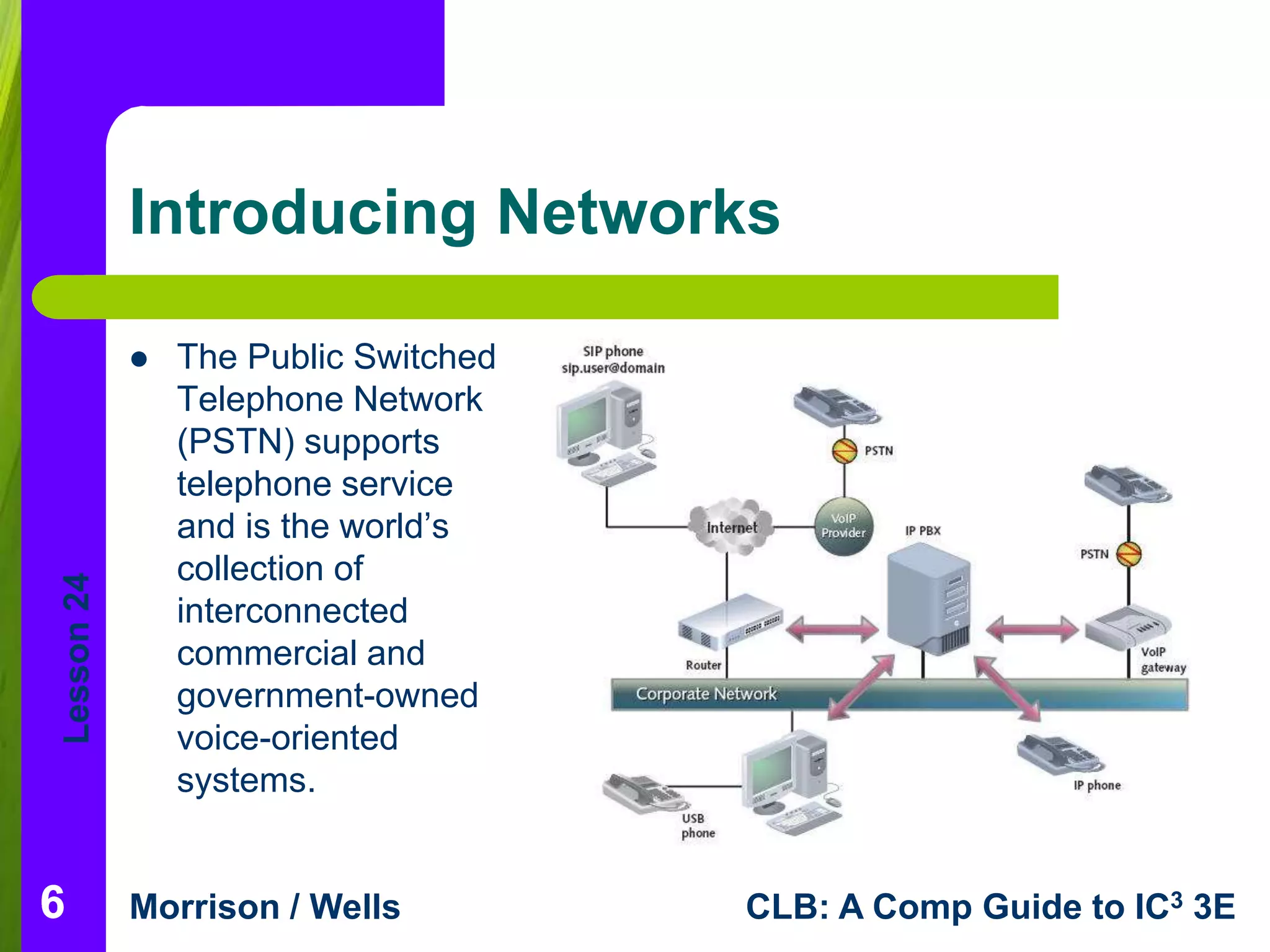
 The Public Switched 
Telephone Network 
(PSTN) supports 
telephone service 
and is the world’s 
collection of 
interconnected 
commercial and 
government-owned 
voice-oriented 
systems. 
Morrison / Wells CLB: A Comp Guide to IC3 3E 
6
Lesson 24 
Network Benefits 
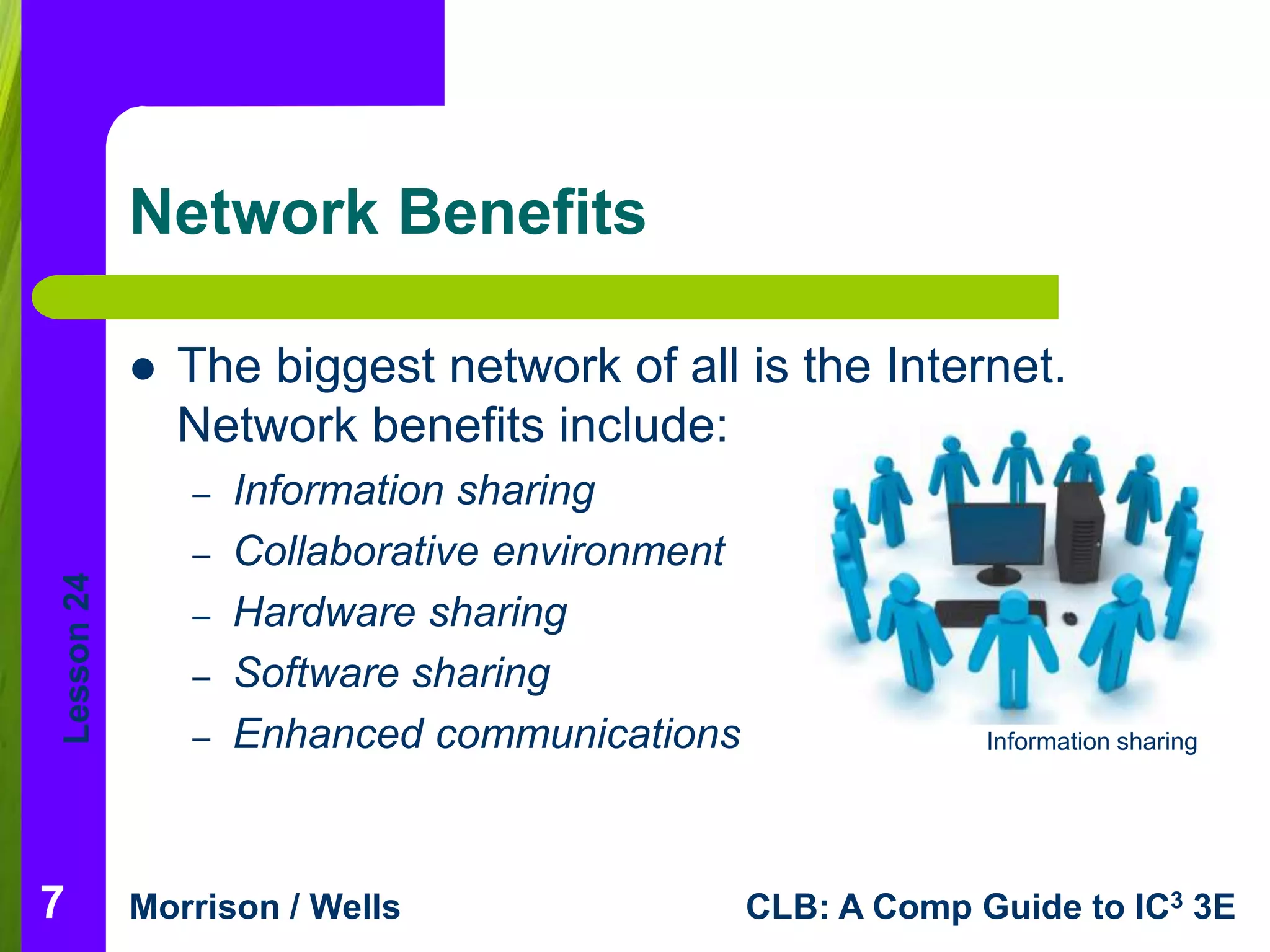
 The biggest network of all is the Internet. 
Network benefits include: 
– Information sharing 
– Collaborative environment 
– Hardware sharing 
– Software sharing 
– Enhanced communications 
Morrison / Wells CLB: A Comp Guide to IC3 3E 
7 
Information sharing
Lesson 24 
Risks of Networked Computing 
 As with any technology, disadvantages also 
exist. Disadvantages of networks include: 
– Individual loss of autonomy 
– Malicious code 
– Network faults 
– Setup and management costs 
– E-mail is not necessarily private 
Morrison / Wells CLB: A Comp Guide to IC3 3E 
8
Lesson 24 
Client/Server Networks 
 The term client/server network describes a software 
architectural model relationship. 
 In most instances, the client is a software program such 
as Internet Explorer. The server is hardware and can be 
one of many types of servers, such as a mail server, a 
database server, an FTP server, an application server, or 
a Web server. 
 Server operating systems are high-end programs 
designed to provide network control and include special 
functions for connecting computers and other devices into 
a network. 
Morrison / Wells CLB: A Comp Guide to IC3 3E 
9
Lesson 24 
Network Types 
 Networks are divided into two main types: 
local area networks (LANs) and wide area 
networks (WANs). 
Morrison / Wells CLB: A Comp Guide to IC3 3E 
10
Lesson 24 
Network Types (continued) 
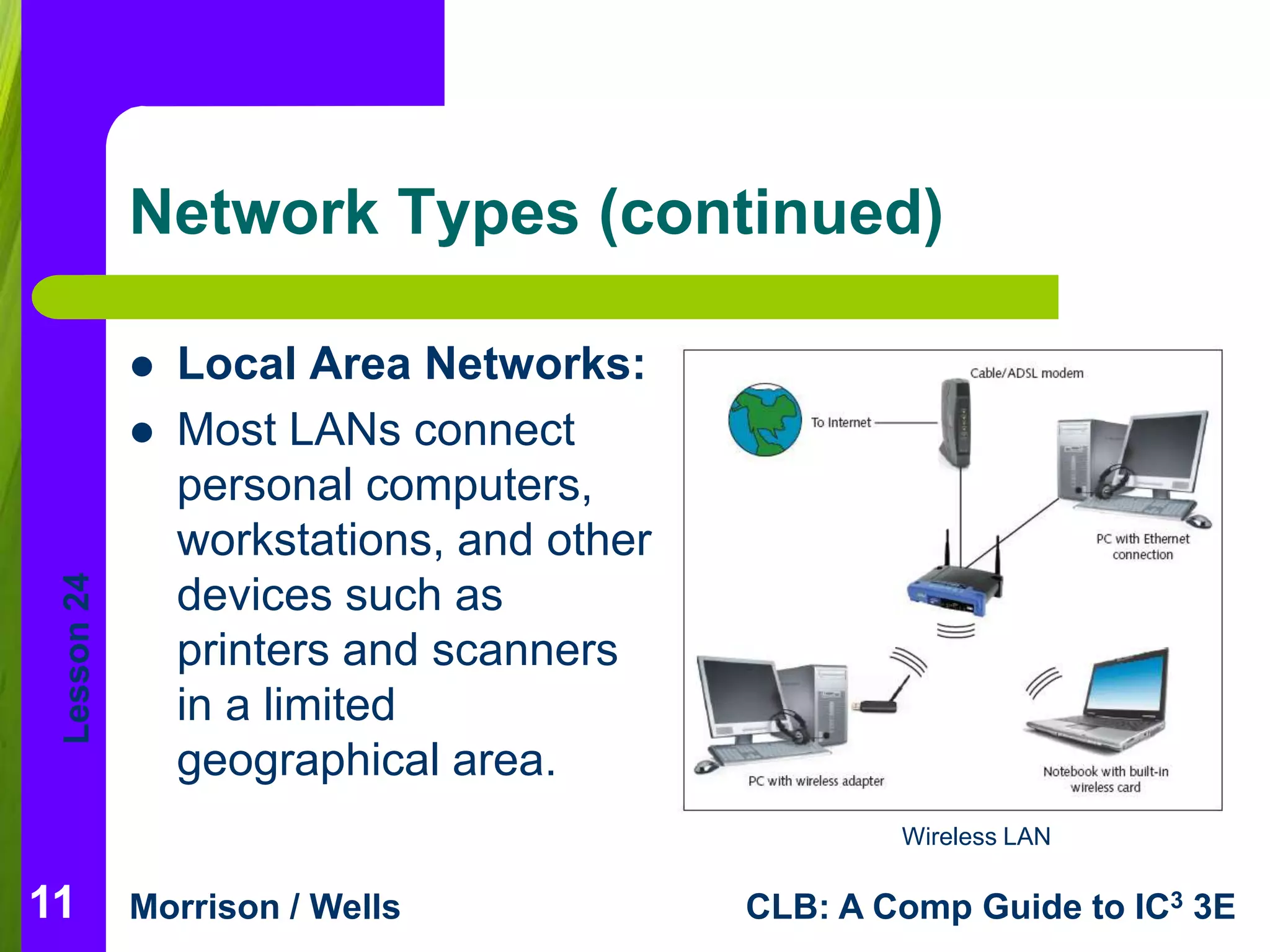
 Local Area Networks: 
 Most LANs connect 
personal computers, 
workstations, and other 
devices such as 
printers and scanners 
in a limited 
geographical area. 
Morrison / Wells CLB: A Comp Guide to IC3 3E 
11 
Wireless LAN
Lesson 24 
Network Types (continued) 
 Wide Area Networks: 
 A WAN covers a large geographical area and can contain 
communication links across metropolitan, regional, or national 
boundaries. 
 Network types include: 
– Client/server network: Server manages resources 
– Peer-to-peer network: All computers are equal 
– Intranet: Used within an organization 
– Extranet: Specific outside users can access 
– Internet: Global network allows worldwide connection 
Morrison / Wells CLB: A Comp Guide to IC3 3E 
12
Lesson 24 
Network Communications 
 Communication Hardware: 
 Communication hardware devices facilitate the 
transmitting and receiving of data. Examples are: 
– Modem: Converts analog signals to digital and vice 
versa 
– Cable modem: Uses coaxial cable 
– Digital subscriber line: Uses ordinary phone lines 
– T-1: Type of fiber-optic telephone line 
– Wireless: Delivers fast connection speeds 
Morrison / Wells CLB: A Comp Guide to IC3 3E 
13
Lesson 24 
Network Security Issues 
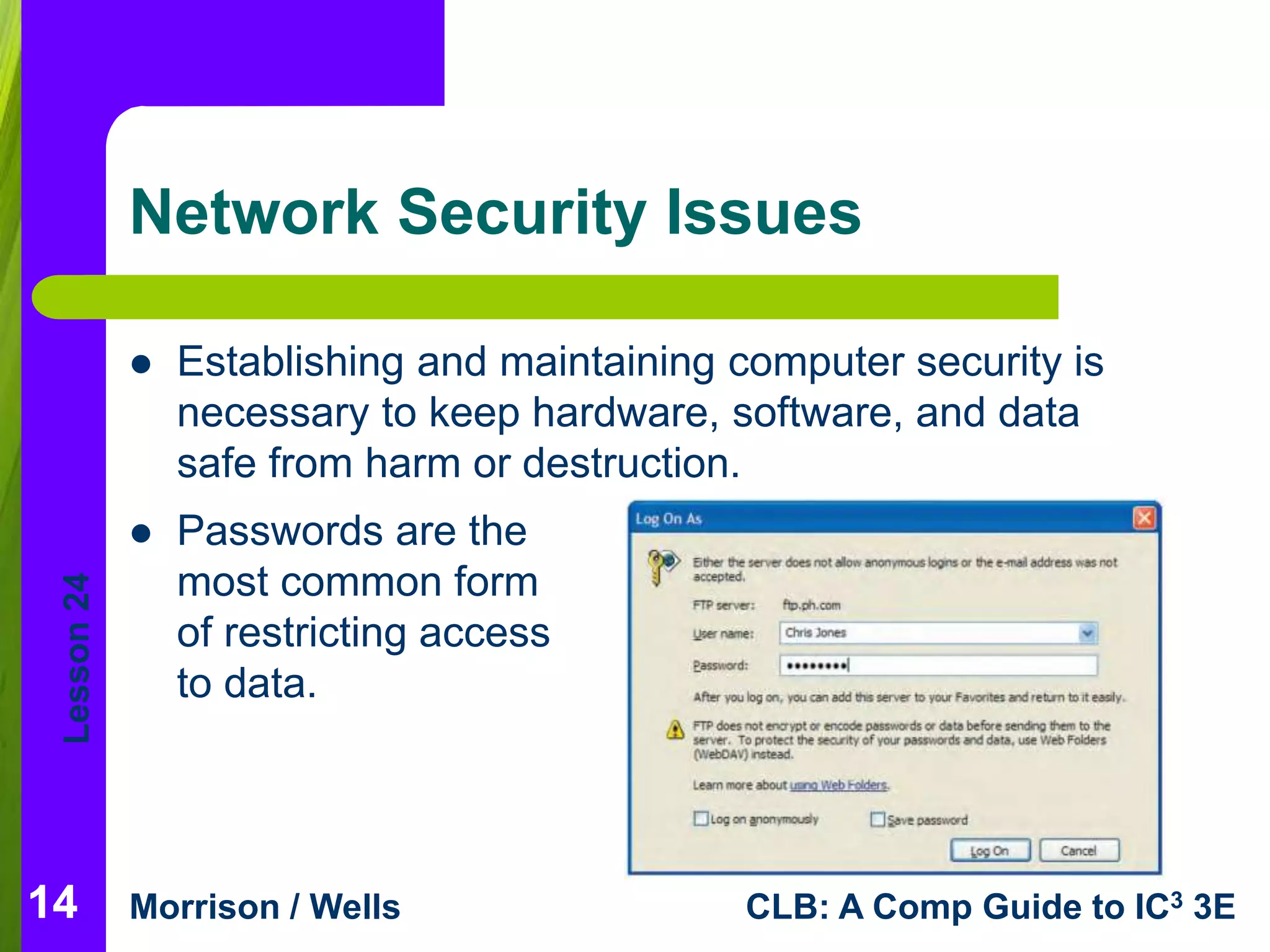
 Passwords are the 
most common form 
of restricting access 
to data. 
Morrison / Wells CLB: A Comp Guide to IC3 3E 
14 
 Establishing and maintaining computer security is 
necessary to keep hardware, software, and data 
safe from harm or destruction.
Lesson 24 
Network Security Issues 
(continued) 
 Other security measures include: 
– Electronic identification cards 
– Firewalls to protect companies’ networks from 
external networks 
– Antivirus software 
– A proxy server that acts as an intermediary 
between a user and the Internet. 
Morrison / Wells CLB: A Comp Guide to IC3 3E 
15
Lesson 24 
Network Security Issues 
(continued) 
 Planning for Security: 
 Companies must plan for security before it is 
needed 
– Institute a selective hiring process. 
– Regularly back up data and store it off site. 
– Employ biometric security measures. 
Morrison / Wells CLB: A Comp Guide to IC3 3E 
16
Lesson 24 
Network Security Issues 
(continued) 
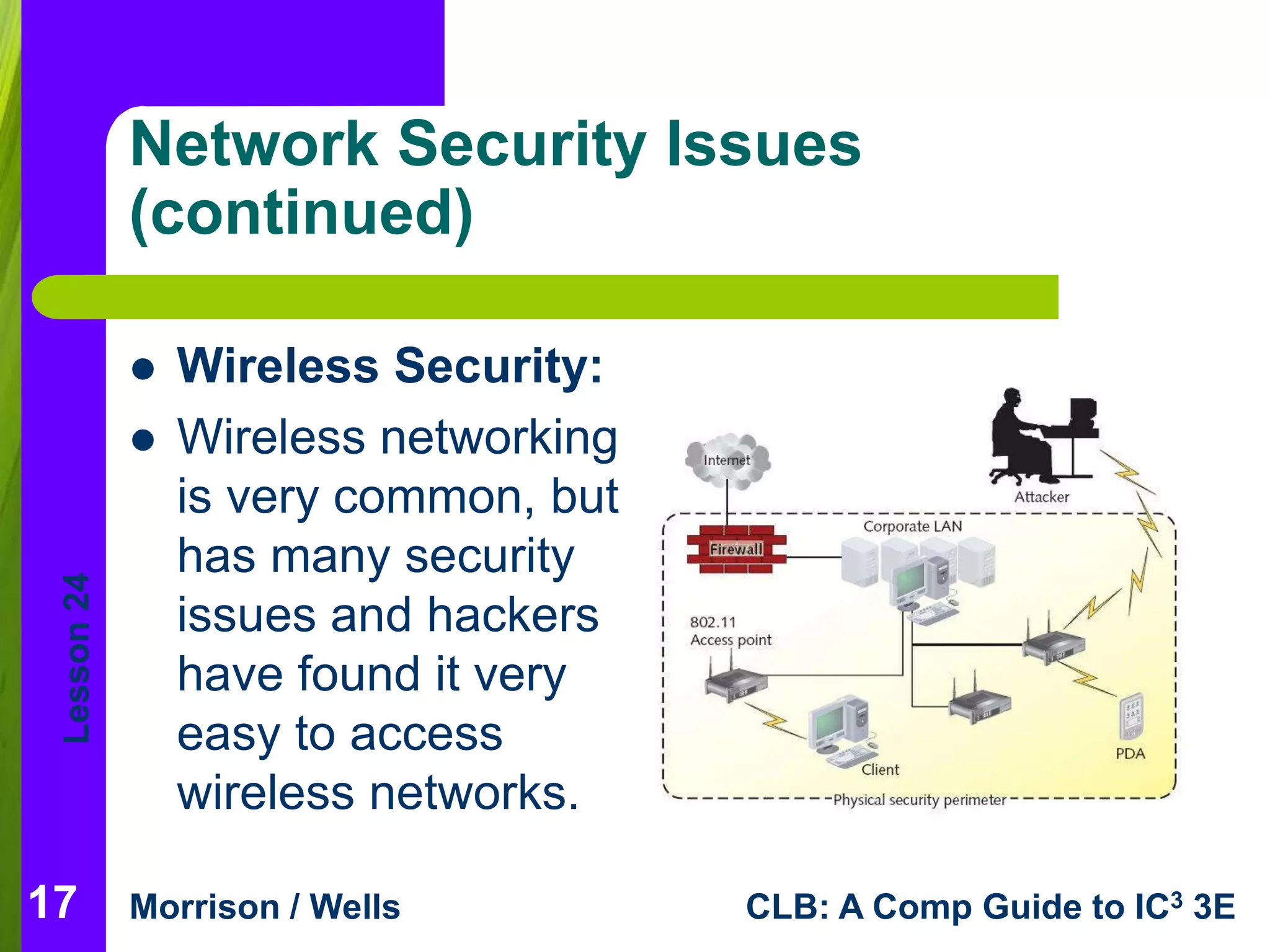
 Wireless Security: 
 Wireless networking 
is very common, but 
has many security 
issues and hackers 
have found it very 
easy to access 
wireless networks. 
Morrison / Wells CLB: A Comp Guide to IC3 3E 
17
Lesson 24 
Summary 
In this lesson, you learned: 
 A network is a group of two or more computers 
linked together. 
 A telephone network is similar in makeup to a 
computer network. The Public Switched 
Telephone Network (PSTN) supports telephone 
service, and it is the world’s largest collection of 
interconnected commercial and government-owned 
voice-oriented systems. 
18 
Morrison / Wells CLB: A Comp Guide to IC3 3E
Lesson 24 
Summary (continued) 
 You can use a network for information sharing, 
hardware sharing, software sharing, and as a 
collaborative environment. 
 Networks are divided into two main types: local area 
networks and wide area networks. 
 Local area networks (LANs) connect personal 
computers, workstations, and other devices such as 
printers and scanners in a limited geographical area, 
such as an office building, a school, or a home. 
19 
Morrison / Wells CLB: A Comp Guide to IC3 3E
Lesson 24 
Summary (continued) 
 A wide area network (WAN) is made up of several 
connected local area networks. 
 In a client/server network, one or more computers 
on the network act as a server. The server 
manages network resources. In a peer-to-peer 
network, all of the computers are equal. No 
computer is designated as the server. People on 
the network each determine what files on their 
computer they share with others on the network. 
20 
Morrison / Wells CLB: A Comp Guide to IC3 3E
Lesson 24 
Summary (continued) 
 Data security is a risk with many networks. Some 
risks to computers are natural causes, some are 
accidents, and others are intentional. 
 The best way to protect data is to effectively control 
the access to it. Generally, this protection is the 
responsibility of the network administrators and 
security personnel. If unauthorized persons gain 
access to data, they may obtain valuable information 
or trade secrets. Hackers are people who break into 
computer systems to steal services and information. 
21 
Morrison / Wells CLB: A Comp Guide to IC3 3E
Lesson 24 
Summary (continued) 
 Transmission media can be either physical or 
wireless. 
 A modem is a type of communication device. 
A hub is a device that controls the incoming 
and forwarding of data. A router directs traffic 
on the Internet or on multiple connected 
networks. 
22 
Morrison / Wells CLB: A Comp Guide to IC3 3E

Computer Literacy Lesson 24

  • 1.
    1 Lesson 24 Network Fundamentals Computer Literacy BASICS: A Comprehensive Guide to IC3, 3rd Edition Morrison / Wells
  • 2.
    Lesson 24 Objectives  Describe a network.  Explain the benefits of a network.  Identify the risks of network computing.  Describe the roles of clients and servers on a network.  List and describe the types of networks.  List and describe communications media and hardware.  Describe network security. 2 Morrison / Wells CLB: A Comp Guide to IC3 3E
  • 3.
    Lesson 24 Vocabulary  biometric security measures  cable modem  client  client/server network  communication channels  digital subscriber line (DSL)  extranet  firewall  hacker  hub  Internet  intranet  local area network (LAN)  modem Morrison / Wells CLB: A Comp Guide to IC3 3E 3
  • 4.
    Lesson 24 Vocabulary(continued)  node  peer-to-peer network  proxy server  Public Switched Telephone Network (PSTN)  router  server  server operating system  T-1 line  wide area network (WAN)  WiMAX  wireless Internet service provider  (WISP)  wireless LAN (WLAN) Morrison / Wells CLB: A Comp Guide to IC3 3E 4
  • 5.
    Lesson 24 Introduction  Connecting computers through a network, a group of two or more computers linked together, allows users to share software applications and to share hardware devices such as printers, scanners, and other hardware add-ons.  Companies and organizations use networks to connect employees and subsidiaries nationally and even internationally. Morrison / Wells CLB: A Comp Guide to IC3 3E 5
  • 6.
    Lesson 24 IntroducingNetworks  The Public Switched Telephone Network (PSTN) supports telephone service and is the world’s collection of interconnected commercial and government-owned voice-oriented systems. Morrison / Wells CLB: A Comp Guide to IC3 3E 6
  • 7.
    Lesson 24 NetworkBenefits  The biggest network of all is the Internet. Network benefits include: – Information sharing – Collaborative environment – Hardware sharing – Software sharing – Enhanced communications Morrison / Wells CLB: A Comp Guide to IC3 3E 7 Information sharing
  • 8.
    Lesson 24 Risksof Networked Computing  As with any technology, disadvantages also exist. Disadvantages of networks include: – Individual loss of autonomy – Malicious code – Network faults – Setup and management costs – E-mail is not necessarily private Morrison / Wells CLB: A Comp Guide to IC3 3E 8
  • 9.
    Lesson 24 Client/ServerNetworks  The term client/server network describes a software architectural model relationship.  In most instances, the client is a software program such as Internet Explorer. The server is hardware and can be one of many types of servers, such as a mail server, a database server, an FTP server, an application server, or a Web server.  Server operating systems are high-end programs designed to provide network control and include special functions for connecting computers and other devices into a network. Morrison / Wells CLB: A Comp Guide to IC3 3E 9
  • 10.
    Lesson 24 NetworkTypes  Networks are divided into two main types: local area networks (LANs) and wide area networks (WANs). Morrison / Wells CLB: A Comp Guide to IC3 3E 10
  • 11.
    Lesson 24 NetworkTypes (continued)  Local Area Networks:  Most LANs connect personal computers, workstations, and other devices such as printers and scanners in a limited geographical area. Morrison / Wells CLB: A Comp Guide to IC3 3E 11 Wireless LAN
  • 12.
    Lesson 24 NetworkTypes (continued)  Wide Area Networks:  A WAN covers a large geographical area and can contain communication links across metropolitan, regional, or national boundaries.  Network types include: – Client/server network: Server manages resources – Peer-to-peer network: All computers are equal – Intranet: Used within an organization – Extranet: Specific outside users can access – Internet: Global network allows worldwide connection Morrison / Wells CLB: A Comp Guide to IC3 3E 12
  • 13.
    Lesson 24 NetworkCommunications  Communication Hardware:  Communication hardware devices facilitate the transmitting and receiving of data. Examples are: – Modem: Converts analog signals to digital and vice versa – Cable modem: Uses coaxial cable – Digital subscriber line: Uses ordinary phone lines – T-1: Type of fiber-optic telephone line – Wireless: Delivers fast connection speeds Morrison / Wells CLB: A Comp Guide to IC3 3E 13
  • 14.
    Lesson 24 NetworkSecurity Issues  Passwords are the most common form of restricting access to data. Morrison / Wells CLB: A Comp Guide to IC3 3E 14  Establishing and maintaining computer security is necessary to keep hardware, software, and data safe from harm or destruction.
  • 15.
    Lesson 24 NetworkSecurity Issues (continued)  Other security measures include: – Electronic identification cards – Firewalls to protect companies’ networks from external networks – Antivirus software – A proxy server that acts as an intermediary between a user and the Internet. Morrison / Wells CLB: A Comp Guide to IC3 3E 15
  • 16.
    Lesson 24 NetworkSecurity Issues (continued)  Planning for Security:  Companies must plan for security before it is needed – Institute a selective hiring process. – Regularly back up data and store it off site. – Employ biometric security measures. Morrison / Wells CLB: A Comp Guide to IC3 3E 16
  • 17.
    Lesson 24 NetworkSecurity Issues (continued)  Wireless Security:  Wireless networking is very common, but has many security issues and hackers have found it very easy to access wireless networks. Morrison / Wells CLB: A Comp Guide to IC3 3E 17
  • 18.
    Lesson 24 Summary In this lesson, you learned:  A network is a group of two or more computers linked together.  A telephone network is similar in makeup to a computer network. The Public Switched Telephone Network (PSTN) supports telephone service, and it is the world’s largest collection of interconnected commercial and government-owned voice-oriented systems. 18 Morrison / Wells CLB: A Comp Guide to IC3 3E
  • 19.
    Lesson 24 Summary(continued)  You can use a network for information sharing, hardware sharing, software sharing, and as a collaborative environment.  Networks are divided into two main types: local area networks and wide area networks.  Local area networks (LANs) connect personal computers, workstations, and other devices such as printers and scanners in a limited geographical area, such as an office building, a school, or a home. 19 Morrison / Wells CLB: A Comp Guide to IC3 3E
  • 20.
    Lesson 24 Summary(continued)  A wide area network (WAN) is made up of several connected local area networks.  In a client/server network, one or more computers on the network act as a server. The server manages network resources. In a peer-to-peer network, all of the computers are equal. No computer is designated as the server. People on the network each determine what files on their computer they share with others on the network. 20 Morrison / Wells CLB: A Comp Guide to IC3 3E
  • 21.
    Lesson 24 Summary(continued)  Data security is a risk with many networks. Some risks to computers are natural causes, some are accidents, and others are intentional.  The best way to protect data is to effectively control the access to it. Generally, this protection is the responsibility of the network administrators and security personnel. If unauthorized persons gain access to data, they may obtain valuable information or trade secrets. Hackers are people who break into computer systems to steal services and information. 21 Morrison / Wells CLB: A Comp Guide to IC3 3E
  • 22.
    Lesson 24 Summary(continued)  Transmission media can be either physical or wireless.  A modem is a type of communication device. A hub is a device that controls the incoming and forwarding of data. A router directs traffic on the Internet or on multiple connected networks. 22 Morrison / Wells CLB: A Comp Guide to IC3 3E