Computer Literacy
BASICS: A
Comprehensive Guide
to IC3, 5th Edition
Lesson 25
Network Fundamentals
1 Morrison / Wells / Ruffolo
Lesson25
Morrison / Wells / Ruffolo CLB: A Comp Guide to IC3 5E
Objectives
 Define communication networks and identify the
differences between public and private networks.
 Describe common hardware and software
components in a computer network.
 Identify network types.
 Identify the benefits of a network.
 Evaluate the risks of network computing.
 Identify and resolve common networking
connection problems.
222
Lesson25
Morrison / Wells / Ruffolo CLB: A Comp Guide to IC3 5E
Words to Know
 Ethernet cable
 gateway
 hub
 IP address
 Media Access Control
(MAC)
 modem
 Network Interface
Card (NIC)
 address
 cable modem
 client
 communications
protocol
 digital subscriber
line (DSL)
 Domain Name
Server (DNS)
333
Lesson25
Morrison / Wells / Ruffolo CLB: A Comp Guide to IC3 5E
Words to Know (continued)
 T-1 line
 Virtual Private
Network (VPN)
 packet switching
 public switched
network (PSN)
 public switched
telephone network
(PSTN)
 router
 server
 switch
444
Lesson25
Morrison / Wells / Ruffolo CLB: A Comp Guide to IC3 5E
Communication Networks
 Networks are used to transmit voice, data,
video, and Internet traffic.
 Multi-service networks are capable of
transmitting a combination of these services
on the same system.
 Some communication networks support
public use, and some networks are designed
for private use.
5
Lesson25
Morrison / Wells / Ruffolo CLB: A Comp Guide to IC3 5E
Communication Networks
(continued)
 Comparing Public vs. Private Networks
 Public networks offer access to the public with a
connection to other networks.
 A public switched network (PSN) is a common
carrier network that provides connections among
public users.
 A public switched telephone network (PSTN)
is an international collection of interconnected
voice-based public telephone networks.
6
Lesson25
Morrison / Wells / Ruffolo CLB: A Comp Guide to IC3 5E
Communication Networks
(continued)
 Comparing Public vs. Private Networks
(continued)
 PSTN was originally created to support one-to-
one voice communications using analog
transmissions, but today it is largely digital and
includes services for both cellular and landline
phones.
 PSTN sets up a dedicated channel (or circuit)
between two points (locally, regionally, nationally,
or internationally) for the duration of a call.
7
Lesson25
Morrison / Wells / Ruffolo CLB: A Comp Guide to IC3 5E
Communication Networks
(continued)
 Comparing Public vs. Private Networks
(continued)
 Many local Internet Service Providers (ISPs) are
connected to the PSTN and employ a range of more
advanced technologies to enable consumers to
connect to a network.
 For example, Integrated Services Digital Network
(ISDN) can send voice, video, and data over digital or
analog telephone lines.
 Voice over Internet Protocol (VoIP) is a system that
converts your telephone signal into digital and uses
the Internet to deliver voice communications.
8
Lesson25
Morrison / Wells / Ruffolo CLB: A Comp Guide to IC3 5E
Communication Networks
(continued)
 Comparing Public vs. Private Networks
(continued)
 Private networks:
– Are owned by one or more establishments for their
exclusive use
– Are commonly used in offices and homes so that
multiple computers can share printers, files, data, and
programs
– Restrict access to authorized users
– Require user names and passwords to gain access to
the network
9
Lesson25
Morrison / Wells / Ruffolo CLB: A Comp Guide to IC3 5E
Communication Networks
(continued)
 Comparing Public vs. Private Networks
(continued)
 A Virtual Private Network (VPN) is a
network service that enables remote users to
use a public network to access their private
networks.
 VPN technology encrypts incoming and
outgoing data, and uses a secure connection
across a public network.
10
Lesson25
Morrison / Wells / Ruffolo CLB: A Comp Guide to IC3 5E
Understanding Types of Networks
 The design of a network is referred to as the
architecture.
 Networks can be categorized by their scope
and the design of their communication
methods.
 Networks can have wired or wireless
connections, or both.
11
Lesson25
Morrison / Wells / Ruffolo CLB: A Comp Guide to IC3 5E
Understanding Types of Networks
(continued)
 Network types include the following:
– Local area network (LAN): Connects computers,
workstations, and other devices that are relatively
close to each other within a confined space.
– Wireless local area (WLAN): A variation of the
LAN without physical wires to connect devices.
WLANs connect devices that are very close to
each other, such as homes and small offices.
12
Lesson25
Morrison / Wells / Ruffolo CLB: A Comp Guide to IC3 5E
Understanding Types of Networks
(continued)
13
Lesson25
Morrison / Wells / Ruffolo CLB: A Comp Guide to IC3 5E
Understanding Types of Networks
(continued)
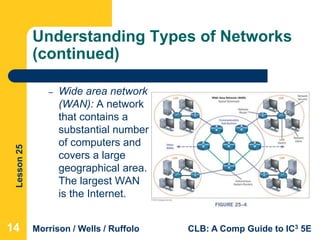
– Wide area network
(WAN): A network
that contains a
substantial number
of computers and
covers a large
geographical area.
The largest WAN
is the Internet.
14
Lesson25
Morrison / Wells / Ruffolo CLB: A Comp Guide to IC3 5E
Understanding Types of Networks
(continued)
– Client/server: One or more computers on the
network act as a server. The server manages
network resources. The client is the computer that
requests and uses services on the server.
– Peer-to-peer (P2P): All the computers are equal
and no computer is designated as the server.
Users determine which files on their computer
they share with others on the network.
15
Lesson25
Morrison / Wells / Ruffolo CLB: A Comp Guide to IC3 5E
Understanding Types of Networks
(continued)
– Internet: A worldwide system composed of thousands
of smaller networks. An Internet Service Provider
(ISP) provides a connection to the Internet.
– Intranet: A type of network used within a single
organization to share documents such as handbooks,
manuals, forms, and other company documents.
– Extranet: Similar to an intranet but allows specific
users outside of the organization to access internal
information systems.
16
Lesson25
Morrison / Wells / Ruffolo CLB: A Comp Guide to IC3 5E
Identifying Network Components
 A network can be as simple as two
computers linked together.
 As more devices are added, installing
devices and managing the network become
more technical.
 Networking concepts and terminology remain
basically the same, regardless of size or
type.
17
Lesson25
Morrison / Wells / Ruffolo CLB: A Comp Guide to IC3 5E
Identifying Network Components
(continued)
 A server computer provides a service to one
or many client computers.
– The server is usually a high-speed computer
with considerable storage space.
– A network may have several servers.
 A client accesses the shared resources,
services, and programs provided by the
server.
18
Lesson25
Morrison / Wells / Ruffolo CLB: A Comp Guide to IC3 5E
Identifying Network Components
(continued)
 Hardware Components
– Modems
 Modems enable a computer to transmit data over cable
or telephone lines.
 A traditional modem is often referred to as POTS (Plain
Old Telephone Service).
 A cable modem uses cable television lines to send and
receive data.
 A digital subscriber line (DSL) modem uses ordinary
copper telephone lines to transmit data.
19
Lesson25
Morrison / Wells / Ruffolo CLB: A Comp Guide to IC3 5E
Identifying Network Components
(continued)
 Hardware Components
(continued)
– Cable Media
 There are three types of cable
media: coaxial cable, twisted pair,
and fiber optic.
 An Ethernet cable is the most
common type of connection used in
a local area network (LAN).
 An Ethernet port looks like a regular
phone jack but is slightly wider.
20
Lesson25
Morrison / Wells / Ruffolo CLB: A Comp Guide to IC3 5E
Identifying Network Components
(continued)
 Hardware Components (continued)
– T-1 Line
 A T-1 line is a type of fiber-optic telephone line that
can transmit voice and data at the same time.
 It is ideal for businesses because the line is
dedicated, meaning it is not shared with other
businesses.
 The connection is more secure and doesn’t get
bogged down.
21
Lesson25
Morrison / Wells / Ruffolo CLB: A Comp Guide to IC3 5E
Identifying Network Components
(continued)
 Hardware Components (continued)
– Hub
 A hub is a device that joins all the devices of a
network together.
 Every network device connects directly to the hub
through a port.
 The hub forwards data frames from a connected
device to all other connected devices.
22
Lesson25
Morrison / Wells / Ruffolo CLB: A Comp Guide to IC3 5E
Identifying Network Components
(continued)
 Hardware Components (continued)
– Switch
 A switch performs the same tasks as a hub but
works much faster.
 A switch filters the target for a data frame and
forwards it only to a specific device in the LAN.
 Switches have replaced hubs in Ethernet networks
and can be a hardware or software component, or
a combination of both.
23
Lesson25
Morrison / Wells / Ruffolo CLB: A Comp Guide to IC3 5E
Identifying Network Components
(continued)
 Hardware Components
(continued)
– Router
 A router directs the flow of
data from a local area network
(LAN) to another network
connection.
 The router breaks down data
into packets and identifies the
best path for forwarding the
packet to a specific target.
24
Lesson25
Morrison / Wells / Ruffolo CLB: A Comp Guide to IC3 5E
Identifying Network Components
(continued)
 Hardware Components
(continued)
– Network Interface Card (NIC)
 A Network Interface Card (NIC)
makes the electrical and
electronic connections between a
computer and a network.
 NICs are built into the
motherboard or are installed as
an expansion card.
25
Lesson25
Morrison / Wells / Ruffolo CLB: A Comp Guide to IC3 5E
Identifying Network Components
(continued)
 Software Components
 Software is used to set up, manage, and
monitor communication networks.
 Applications or programs provide remote
access to networks and the tools needed to
transmit data in the required formats.
26
Lesson25
Morrison / Wells / Ruffolo CLB: A Comp Guide to IC3 5E
Identifying Network Components
(continued)
 Software Components (continued)
– Protocols
 A communications protocol is a description of
the rules computers follow to identify devices and
transmit data.
 The most common communications protocol is
Transmission Control Protocol/Internet Protocol
(TCP/IP), which is used for transporting data
between computers on the Internet.
27
Lesson25
Morrison / Wells / Ruffolo CLB: A Comp Guide to IC3 5E
Identifying Network Components
(continued)
 Software Components (continued)
– Operating Systems
 Operating systems contain built-in services that
support network protocols, and include functions
for connecting computers and other devices to a
network.
 Three of the most popular operating systems are
Microsoft Windows, Mac OS X, and Linux.
28
Lesson25
Morrison / Wells / Ruffolo CLB: A Comp Guide to IC3 5E
Identifying Network Components
(continued)
 Software Components (continued)
– Addressing
 An address is a unique identifier for each
computer or device on a network.
 Every NIC has a Media Access Control (MAC)
address for communications on the physical
network segment.
 The MAC address is assigned by the manufacturer
of the device.
29
Lesson25
Morrison / Wells / Ruffolo CLB: A Comp Guide to IC3 5E
Identifying Network Components
(continued)
 Software Components (continued)
– Addressing (continued)
 Devices connected to a TCP/IP network are
assigned an IP address, which identifies the host
device and the network to which it belongs.
 IP addresses are usually assigned by the network
administrator or the Internet Service Provider.
30
Lesson25
Morrison / Wells / Ruffolo CLB: A Comp Guide to IC3 5E
Identifying Network Components
(continued)
 Software Components (continued)
– Addressing (continued)
 Before a computer can access data on the Internet,
the computer address must be translated into an IP
address.
 Internet Service Providers access a Domain Name
Server (DNS), which maintains a directory of
domain names and their correlated IP addresses,
to perform the translation and direct a connection
to the correct address.
31
Lesson25
Morrison / Wells / Ruffolo CLB: A Comp Guide to IC3 5E
Identifying Network Components
(continued)
 Software Components (continued)
– Gateways
 A gateway connects networks using different
communications protocols so that information can
be passed from one network to the other.
 The gateway converts data to a form that is
compatible with the destination network and then
transmits the data.
32
Lesson25
Morrison / Wells / Ruffolo CLB: A Comp Guide to IC3 5E
Identifying Network Components
(continued)
 Software Components (continued)
– Packet Switching
 Packet switching splits data into manageable
packets (small pieces), allowing a more efficient
flow in the transmission of data.
 The NIC breaks down the data into packets before
transmitting it to the hub.
 After the data packets are transmitted to the
destination device, the NIC on the destination
device puts the packets back together.
33
Lesson25
Morrison / Wells / Ruffolo CLB: A Comp Guide to IC3 5E
Identifying the Benefits of a
Network
 Enhanced communications: E-mail, text
messages, social media, and other electronic
communications have changed the way the
world interacts.
 Information sharing: Users around the world
can connect to each other to access, share,
and exchange information.
34
Lesson25
Morrison / Wells / Ruffolo CLB: A Comp Guide to IC3 5E
Identifying the Benefits of a
Network (continued)
 Searching and researching: The Internet
provides an astronomical number of
resources for finding information.
 E-commerce: The Internet enables business
owners to run their businesses online from
desktop computers, laptops, tablets, or smart
phones.
35
Lesson25
Morrison / Wells / Ruffolo CLB: A Comp Guide to IC3 5E
Identifying the Benefits of a
Network (continued)
 Online training: Online courses are
convenient and offer flexibility. You can learn
at your own pace, on your own schedule
without taking time off from work or leaving
your home.
 Telecommuting: Working from home saves
travel time and transportation expenses.
36
Lesson25
Morrison / Wells / Ruffolo CLB: A Comp Guide to IC3 5E
Identifying the Benefits of a
Network (continued)
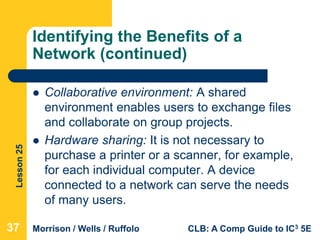
 Collaborative environment: A shared
environment enables users to exchange files
and collaborate on group projects.
 Hardware sharing: It is not necessary to
purchase a printer or a scanner, for example,
for each individual computer. A device
connected to a network can serve the needs
of many users.
37
Lesson25
Morrison / Wells / Ruffolo CLB: A Comp Guide to IC3 5E
Identifying the Benefits of a
Network (continued)
 Software sharing: Software installed on a
network server can be accessed by many
users. Sharing software saves money on
licensing and makes installing software
updates easier and more efficient.
 Entertainment: Networks facilitate many
types of games and entertainment, and the
Internet offers many sources of
entertainment.
38
Lesson25
Morrison / Wells / Ruffolo CLB: A Comp Guide to IC3 5E
Evaluating the Risks of Networked
Computing
 Privacy: Computer networks are vulnerable to
unauthorized access. Hackers steal services
and information.
 Malfunctions and system failures: Users can lose
access to network resources due to natural
disasters such as storms and fires.
 Malicious code: Networks are vulnerable to
viruses, worms, and Trojan horses, which can
cause equipment malfunctions and system
failures.
39
Lesson25
Morrison / Wells / Ruffolo CLB: A Comp Guide to IC3 5E
Evaluating the Risks of Networked
Computing (continued)
 Individual loss of autonomy: Networks can play a
part in taking away an individual’s autonomy by
controlling which software programs are
accessible, and keeping a record of how the
computer is used and what sites are accessed.
 Network faults: Network equipment problems
can result in loss of data and resources.
 Setup and management costs: Initial and
ongoing investments of money and labor are
required to set up and manage a network.
40
Lesson25
Morrison / Wells / Ruffolo CLB: A Comp Guide to IC3 5E
Solving Network Connection
Problems
 Some network connection problems are easy
to identify and fix:
– First, check the physical connections.
– If everything is connected correctly, power down
all the devices, and unplug the power to the router
and modem. Wait 10 to 15 seconds, and then
plug in the router and modem and turn on the
computer again.
– If that doesn’t solve the problem, try the Windows
troubleshooter wizards.
41
Lesson25
Morrison / Wells / Ruffolo CLB: A Comp Guide to IC3 5E
Solving Network Connection
Problems (continued)
42
Lesson25
Morrison / Wells / Ruffolo CLB: A Comp Guide to IC3 5E
Summary
In this lesson, you learned:
 Communication networks are used to transmit voice,
data, video, and Internet traffic. Communication
networks are created for both public and private use.
 A computer network is a group of two or more
computers linked together. As the size of a network
increases, the network becomes more technical, but
the networking concepts and terminology basically
remain the same.
434343
Lesson25
Morrison / Wells / Ruffolo CLB: A Comp Guide to IC3 5E
Summary (continued)
 There are several types of networks. Networks can
be categorized by the scope of the network and the
design of the communication method.
 Communication networks require hardware
components. Multiple devices can connect to a
network via wired or wireless connections.
 Software components provide remote access to
networks and the tools needed to transmit data in
the required formats.
444444
Lesson25
Morrison / Wells / Ruffolo CLB: A Comp Guide to IC3 5E
Summary (continued)
 Society has benefitted in many ways because of
developments in the Internet and network
capabilities in the last several years.
 Network connections also present challenges, and
we should evaluate the risks when we access
networks.
 Although some connection problems are complex
and require technical support, Windows provides
troubleshooter wizards to help diagnose and repair
network problems.
454545

Computer Literacy Lesson 25

  • 1.
    Computer Literacy BASICS: A ComprehensiveGuide to IC3, 5th Edition Lesson 25 Network Fundamentals 1 Morrison / Wells / Ruffolo
  • 2.
    Lesson25 Morrison / Wells/ Ruffolo CLB: A Comp Guide to IC3 5E Objectives  Define communication networks and identify the differences between public and private networks.  Describe common hardware and software components in a computer network.  Identify network types.  Identify the benefits of a network.  Evaluate the risks of network computing.  Identify and resolve common networking connection problems. 222
  • 3.
    Lesson25 Morrison / Wells/ Ruffolo CLB: A Comp Guide to IC3 5E Words to Know  Ethernet cable  gateway  hub  IP address  Media Access Control (MAC)  modem  Network Interface Card (NIC)  address  cable modem  client  communications protocol  digital subscriber line (DSL)  Domain Name Server (DNS) 333
  • 4.
    Lesson25 Morrison / Wells/ Ruffolo CLB: A Comp Guide to IC3 5E Words to Know (continued)  T-1 line  Virtual Private Network (VPN)  packet switching  public switched network (PSN)  public switched telephone network (PSTN)  router  server  switch 444
  • 5.
    Lesson25 Morrison / Wells/ Ruffolo CLB: A Comp Guide to IC3 5E Communication Networks  Networks are used to transmit voice, data, video, and Internet traffic.  Multi-service networks are capable of transmitting a combination of these services on the same system.  Some communication networks support public use, and some networks are designed for private use. 5
  • 6.
    Lesson25 Morrison / Wells/ Ruffolo CLB: A Comp Guide to IC3 5E Communication Networks (continued)  Comparing Public vs. Private Networks  Public networks offer access to the public with a connection to other networks.  A public switched network (PSN) is a common carrier network that provides connections among public users.  A public switched telephone network (PSTN) is an international collection of interconnected voice-based public telephone networks. 6
  • 7.
    Lesson25 Morrison / Wells/ Ruffolo CLB: A Comp Guide to IC3 5E Communication Networks (continued)  Comparing Public vs. Private Networks (continued)  PSTN was originally created to support one-to- one voice communications using analog transmissions, but today it is largely digital and includes services for both cellular and landline phones.  PSTN sets up a dedicated channel (or circuit) between two points (locally, regionally, nationally, or internationally) for the duration of a call. 7
  • 8.
    Lesson25 Morrison / Wells/ Ruffolo CLB: A Comp Guide to IC3 5E Communication Networks (continued)  Comparing Public vs. Private Networks (continued)  Many local Internet Service Providers (ISPs) are connected to the PSTN and employ a range of more advanced technologies to enable consumers to connect to a network.  For example, Integrated Services Digital Network (ISDN) can send voice, video, and data over digital or analog telephone lines.  Voice over Internet Protocol (VoIP) is a system that converts your telephone signal into digital and uses the Internet to deliver voice communications. 8
  • 9.
    Lesson25 Morrison / Wells/ Ruffolo CLB: A Comp Guide to IC3 5E Communication Networks (continued)  Comparing Public vs. Private Networks (continued)  Private networks: – Are owned by one or more establishments for their exclusive use – Are commonly used in offices and homes so that multiple computers can share printers, files, data, and programs – Restrict access to authorized users – Require user names and passwords to gain access to the network 9
  • 10.
    Lesson25 Morrison / Wells/ Ruffolo CLB: A Comp Guide to IC3 5E Communication Networks (continued)  Comparing Public vs. Private Networks (continued)  A Virtual Private Network (VPN) is a network service that enables remote users to use a public network to access their private networks.  VPN technology encrypts incoming and outgoing data, and uses a secure connection across a public network. 10
  • 11.
    Lesson25 Morrison / Wells/ Ruffolo CLB: A Comp Guide to IC3 5E Understanding Types of Networks  The design of a network is referred to as the architecture.  Networks can be categorized by their scope and the design of their communication methods.  Networks can have wired or wireless connections, or both. 11
  • 12.
    Lesson25 Morrison / Wells/ Ruffolo CLB: A Comp Guide to IC3 5E Understanding Types of Networks (continued)  Network types include the following: – Local area network (LAN): Connects computers, workstations, and other devices that are relatively close to each other within a confined space. – Wireless local area (WLAN): A variation of the LAN without physical wires to connect devices. WLANs connect devices that are very close to each other, such as homes and small offices. 12
  • 13.
    Lesson25 Morrison / Wells/ Ruffolo CLB: A Comp Guide to IC3 5E Understanding Types of Networks (continued) 13
  • 14.
    Lesson25 Morrison / Wells/ Ruffolo CLB: A Comp Guide to IC3 5E Understanding Types of Networks (continued) – Wide area network (WAN): A network that contains a substantial number of computers and covers a large geographical area. The largest WAN is the Internet. 14
  • 15.
    Lesson25 Morrison / Wells/ Ruffolo CLB: A Comp Guide to IC3 5E Understanding Types of Networks (continued) – Client/server: One or more computers on the network act as a server. The server manages network resources. The client is the computer that requests and uses services on the server. – Peer-to-peer (P2P): All the computers are equal and no computer is designated as the server. Users determine which files on their computer they share with others on the network. 15
  • 16.
    Lesson25 Morrison / Wells/ Ruffolo CLB: A Comp Guide to IC3 5E Understanding Types of Networks (continued) – Internet: A worldwide system composed of thousands of smaller networks. An Internet Service Provider (ISP) provides a connection to the Internet. – Intranet: A type of network used within a single organization to share documents such as handbooks, manuals, forms, and other company documents. – Extranet: Similar to an intranet but allows specific users outside of the organization to access internal information systems. 16
  • 17.
    Lesson25 Morrison / Wells/ Ruffolo CLB: A Comp Guide to IC3 5E Identifying Network Components  A network can be as simple as two computers linked together.  As more devices are added, installing devices and managing the network become more technical.  Networking concepts and terminology remain basically the same, regardless of size or type. 17
  • 18.
    Lesson25 Morrison / Wells/ Ruffolo CLB: A Comp Guide to IC3 5E Identifying Network Components (continued)  A server computer provides a service to one or many client computers. – The server is usually a high-speed computer with considerable storage space. – A network may have several servers.  A client accesses the shared resources, services, and programs provided by the server. 18
  • 19.
    Lesson25 Morrison / Wells/ Ruffolo CLB: A Comp Guide to IC3 5E Identifying Network Components (continued)  Hardware Components – Modems  Modems enable a computer to transmit data over cable or telephone lines.  A traditional modem is often referred to as POTS (Plain Old Telephone Service).  A cable modem uses cable television lines to send and receive data.  A digital subscriber line (DSL) modem uses ordinary copper telephone lines to transmit data. 19
  • 20.
    Lesson25 Morrison / Wells/ Ruffolo CLB: A Comp Guide to IC3 5E Identifying Network Components (continued)  Hardware Components (continued) – Cable Media  There are three types of cable media: coaxial cable, twisted pair, and fiber optic.  An Ethernet cable is the most common type of connection used in a local area network (LAN).  An Ethernet port looks like a regular phone jack but is slightly wider. 20
  • 21.
    Lesson25 Morrison / Wells/ Ruffolo CLB: A Comp Guide to IC3 5E Identifying Network Components (continued)  Hardware Components (continued) – T-1 Line  A T-1 line is a type of fiber-optic telephone line that can transmit voice and data at the same time.  It is ideal for businesses because the line is dedicated, meaning it is not shared with other businesses.  The connection is more secure and doesn’t get bogged down. 21
  • 22.
    Lesson25 Morrison / Wells/ Ruffolo CLB: A Comp Guide to IC3 5E Identifying Network Components (continued)  Hardware Components (continued) – Hub  A hub is a device that joins all the devices of a network together.  Every network device connects directly to the hub through a port.  The hub forwards data frames from a connected device to all other connected devices. 22
  • 23.
    Lesson25 Morrison / Wells/ Ruffolo CLB: A Comp Guide to IC3 5E Identifying Network Components (continued)  Hardware Components (continued) – Switch  A switch performs the same tasks as a hub but works much faster.  A switch filters the target for a data frame and forwards it only to a specific device in the LAN.  Switches have replaced hubs in Ethernet networks and can be a hardware or software component, or a combination of both. 23
  • 24.
    Lesson25 Morrison / Wells/ Ruffolo CLB: A Comp Guide to IC3 5E Identifying Network Components (continued)  Hardware Components (continued) – Router  A router directs the flow of data from a local area network (LAN) to another network connection.  The router breaks down data into packets and identifies the best path for forwarding the packet to a specific target. 24
  • 25.
    Lesson25 Morrison / Wells/ Ruffolo CLB: A Comp Guide to IC3 5E Identifying Network Components (continued)  Hardware Components (continued) – Network Interface Card (NIC)  A Network Interface Card (NIC) makes the electrical and electronic connections between a computer and a network.  NICs are built into the motherboard or are installed as an expansion card. 25
  • 26.
    Lesson25 Morrison / Wells/ Ruffolo CLB: A Comp Guide to IC3 5E Identifying Network Components (continued)  Software Components  Software is used to set up, manage, and monitor communication networks.  Applications or programs provide remote access to networks and the tools needed to transmit data in the required formats. 26
  • 27.
    Lesson25 Morrison / Wells/ Ruffolo CLB: A Comp Guide to IC3 5E Identifying Network Components (continued)  Software Components (continued) – Protocols  A communications protocol is a description of the rules computers follow to identify devices and transmit data.  The most common communications protocol is Transmission Control Protocol/Internet Protocol (TCP/IP), which is used for transporting data between computers on the Internet. 27
  • 28.
    Lesson25 Morrison / Wells/ Ruffolo CLB: A Comp Guide to IC3 5E Identifying Network Components (continued)  Software Components (continued) – Operating Systems  Operating systems contain built-in services that support network protocols, and include functions for connecting computers and other devices to a network.  Three of the most popular operating systems are Microsoft Windows, Mac OS X, and Linux. 28
  • 29.
    Lesson25 Morrison / Wells/ Ruffolo CLB: A Comp Guide to IC3 5E Identifying Network Components (continued)  Software Components (continued) – Addressing  An address is a unique identifier for each computer or device on a network.  Every NIC has a Media Access Control (MAC) address for communications on the physical network segment.  The MAC address is assigned by the manufacturer of the device. 29
  • 30.
    Lesson25 Morrison / Wells/ Ruffolo CLB: A Comp Guide to IC3 5E Identifying Network Components (continued)  Software Components (continued) – Addressing (continued)  Devices connected to a TCP/IP network are assigned an IP address, which identifies the host device and the network to which it belongs.  IP addresses are usually assigned by the network administrator or the Internet Service Provider. 30
  • 31.
    Lesson25 Morrison / Wells/ Ruffolo CLB: A Comp Guide to IC3 5E Identifying Network Components (continued)  Software Components (continued) – Addressing (continued)  Before a computer can access data on the Internet, the computer address must be translated into an IP address.  Internet Service Providers access a Domain Name Server (DNS), which maintains a directory of domain names and their correlated IP addresses, to perform the translation and direct a connection to the correct address. 31
  • 32.
    Lesson25 Morrison / Wells/ Ruffolo CLB: A Comp Guide to IC3 5E Identifying Network Components (continued)  Software Components (continued) – Gateways  A gateway connects networks using different communications protocols so that information can be passed from one network to the other.  The gateway converts data to a form that is compatible with the destination network and then transmits the data. 32
  • 33.
    Lesson25 Morrison / Wells/ Ruffolo CLB: A Comp Guide to IC3 5E Identifying Network Components (continued)  Software Components (continued) – Packet Switching  Packet switching splits data into manageable packets (small pieces), allowing a more efficient flow in the transmission of data.  The NIC breaks down the data into packets before transmitting it to the hub.  After the data packets are transmitted to the destination device, the NIC on the destination device puts the packets back together. 33
  • 34.
    Lesson25 Morrison / Wells/ Ruffolo CLB: A Comp Guide to IC3 5E Identifying the Benefits of a Network  Enhanced communications: E-mail, text messages, social media, and other electronic communications have changed the way the world interacts.  Information sharing: Users around the world can connect to each other to access, share, and exchange information. 34
  • 35.
    Lesson25 Morrison / Wells/ Ruffolo CLB: A Comp Guide to IC3 5E Identifying the Benefits of a Network (continued)  Searching and researching: The Internet provides an astronomical number of resources for finding information.  E-commerce: The Internet enables business owners to run their businesses online from desktop computers, laptops, tablets, or smart phones. 35
  • 36.
    Lesson25 Morrison / Wells/ Ruffolo CLB: A Comp Guide to IC3 5E Identifying the Benefits of a Network (continued)  Online training: Online courses are convenient and offer flexibility. You can learn at your own pace, on your own schedule without taking time off from work or leaving your home.  Telecommuting: Working from home saves travel time and transportation expenses. 36
  • 37.
    Lesson25 Morrison / Wells/ Ruffolo CLB: A Comp Guide to IC3 5E Identifying the Benefits of a Network (continued)  Collaborative environment: A shared environment enables users to exchange files and collaborate on group projects.  Hardware sharing: It is not necessary to purchase a printer or a scanner, for example, for each individual computer. A device connected to a network can serve the needs of many users. 37
  • 38.
    Lesson25 Morrison / Wells/ Ruffolo CLB: A Comp Guide to IC3 5E Identifying the Benefits of a Network (continued)  Software sharing: Software installed on a network server can be accessed by many users. Sharing software saves money on licensing and makes installing software updates easier and more efficient.  Entertainment: Networks facilitate many types of games and entertainment, and the Internet offers many sources of entertainment. 38
  • 39.
    Lesson25 Morrison / Wells/ Ruffolo CLB: A Comp Guide to IC3 5E Evaluating the Risks of Networked Computing  Privacy: Computer networks are vulnerable to unauthorized access. Hackers steal services and information.  Malfunctions and system failures: Users can lose access to network resources due to natural disasters such as storms and fires.  Malicious code: Networks are vulnerable to viruses, worms, and Trojan horses, which can cause equipment malfunctions and system failures. 39
  • 40.
    Lesson25 Morrison / Wells/ Ruffolo CLB: A Comp Guide to IC3 5E Evaluating the Risks of Networked Computing (continued)  Individual loss of autonomy: Networks can play a part in taking away an individual’s autonomy by controlling which software programs are accessible, and keeping a record of how the computer is used and what sites are accessed.  Network faults: Network equipment problems can result in loss of data and resources.  Setup and management costs: Initial and ongoing investments of money and labor are required to set up and manage a network. 40
  • 41.
    Lesson25 Morrison / Wells/ Ruffolo CLB: A Comp Guide to IC3 5E Solving Network Connection Problems  Some network connection problems are easy to identify and fix: – First, check the physical connections. – If everything is connected correctly, power down all the devices, and unplug the power to the router and modem. Wait 10 to 15 seconds, and then plug in the router and modem and turn on the computer again. – If that doesn’t solve the problem, try the Windows troubleshooter wizards. 41
  • 42.
    Lesson25 Morrison / Wells/ Ruffolo CLB: A Comp Guide to IC3 5E Solving Network Connection Problems (continued) 42
  • 43.
    Lesson25 Morrison / Wells/ Ruffolo CLB: A Comp Guide to IC3 5E Summary In this lesson, you learned:  Communication networks are used to transmit voice, data, video, and Internet traffic. Communication networks are created for both public and private use.  A computer network is a group of two or more computers linked together. As the size of a network increases, the network becomes more technical, but the networking concepts and terminology basically remain the same. 434343
  • 44.
    Lesson25 Morrison / Wells/ Ruffolo CLB: A Comp Guide to IC3 5E Summary (continued)  There are several types of networks. Networks can be categorized by the scope of the network and the design of the communication method.  Communication networks require hardware components. Multiple devices can connect to a network via wired or wireless connections.  Software components provide remote access to networks and the tools needed to transmit data in the required formats. 444444
  • 45.
    Lesson25 Morrison / Wells/ Ruffolo CLB: A Comp Guide to IC3 5E Summary (continued)  Society has benefitted in many ways because of developments in the Internet and network capabilities in the last several years.  Network connections also present challenges, and we should evaluate the risks when we access networks.  Although some connection problems are complex and require technical support, Windows provides troubleshooter wizards to help diagnose and repair network problems. 454545