Copyright © Terry Felke-Morris
WEB DEVELOPMENT & DESIGN
FOUNDATIONS WITH HTML5
7TH
EDITION
Chapter 3
Key Concepts
1Copyright © Terry Felke-Morris
Copyright © Terry Felke-Morris
LEARNING OUTCOMES
 In this chapter, you will learn how to . . .
 Describe the evolution of style sheets from print media to the Web
 List advantages of using Cascading Style Sheets
 Use color on web pages
 Create style sheets that configure common color and text properties
 Apply inline styles
 Use embedded style sheets
 Use external style sheets
 Configure element, class, id, and contextual selectors
 Utilize the “cascade” in CSS
 Validate CSS
2
Copyright © Terry Felke-Morris
OVERVIEW OF
CASCADING STYLE SHEETS (CSS)
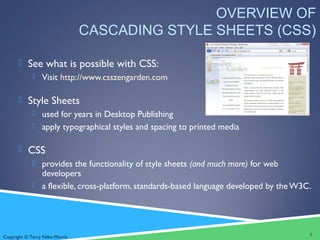
 See what is possible with CSS:
 Visit http://www.csszengarden.com
 Style Sheets
 used for years in Desktop Publishing
 apply typographical styles and spacing to printed media
 CSS
 provides the functionality of style sheets (and much more) for web
developers
 a flexible, cross-platform, standards-based language developed by theW3C.
3
Copyright © Terry Felke-Morris
CSS
ADVANTAGES
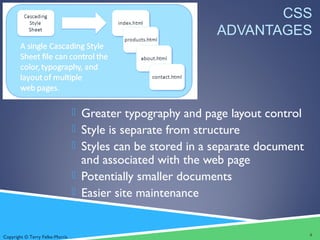
 Greater typography and page layout control
 Style is separate from structure
 Styles can be stored in a separate document
and associated with the web page
 Potentially smaller documents
 Easier site maintenance
4
Copyright © Terry Felke-Morris
TYPES OF CASCADING STYLE
SHEETS (1)
 Inline Styles
 Embedded Styles
 External Styles
 Imported Styles
5
Copyright © Terry Felke-Morris
CASCADING
STYLE SHEETS
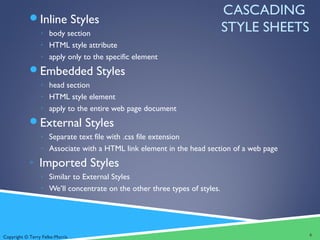
Inline Styles
◦ body section
◦ HTML style attribute
◦ apply only to the specific element
Embedded Styles
◦ head section
◦ HTML style element
◦ apply to the entire web page document
External Styles
◦ Separate text file with .css file extension
◦ Associate with a HTML link element in the head section of a web page
◦ Imported Styles
◦ Similar to External Styles
◦ We’ll concentrate on the other three types of styles.
6
Copyright © Terry Felke-Morris
CSS SYNTAX
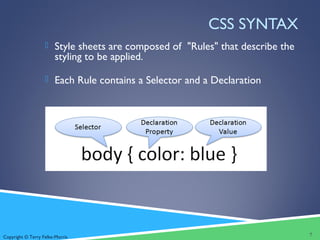
 Style sheets are composed of "Rules" that describe the
styling to be applied.
 Each Rule contains a Selector and a Declaration
7
Copyright © Terry Felke-Morris
CSS SYNTAX SAMPLE
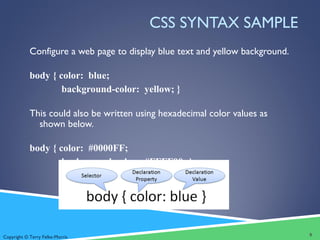
Configure a web page to display blue text and yellow background.
body { color: blue;
background-color: yellow; }
This could also be written using hexadecimal color values as
shown below.
body { color: #0000FF;
background-color: #FFFF00; }
8
Copyright © Terry Felke-Morris
COMMON FORMATTING
CSS PROPERTIES
 See Table 3.1 Common CSS Properties, including:
◦ background-color
◦ color
◦ font-family
◦ font-size
◦ font-style
◦ font-weight
◦ line-height
◦ margin
◦ text-align
◦ text-decoration
◦ width
9
Copyright © Terry Felke-Morris
USING COLOR ON WEB PAGES
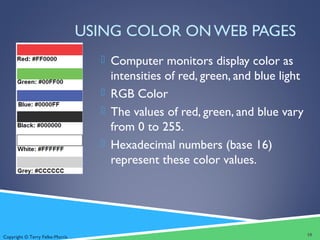
 Computer monitors display color as
intensities of red, green, and blue light
 RGB Color
 The values of red, green, and blue vary
from 0 to 255.
 Hexadecimal numbers (base 16)
represent these color values.
10
Copyright © Terry Felke-Morris
HEXADECIMAL
COLORVALUES
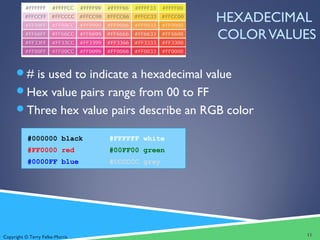
# is used to indicate a hexadecimal value
Hex value pairs range from 00 to FF
Three hex value pairs describe an RGB color
#000000 black #FFFFFF white
#FF0000 red #00FF00 green
#0000FF blue #CCCCCC grey
11
Copyright © Terry Felke-Morris
WEB COLOR PALETTE
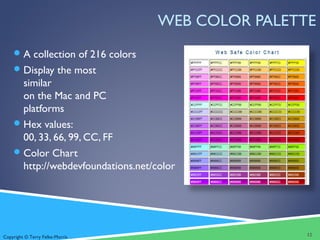
A collection of 216 colors
Display the most
similar
on the Mac and PC
platforms
Hex values:
00, 33, 66, 99, CC, FF
Color Chart
http://webdevfoundations.net/color
12
Copyright © Terry Felke-Morris
MAKING COLOR CHOICES
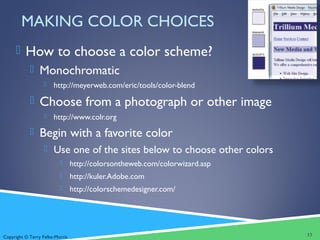
 How to choose a color scheme?
 Monochromatic
 http://meyerweb.com/eric/tools/color-blend
 Choose from a photograph or other image
 http://www.colr.org
 Begin with a favorite color
 Use one of the sites below to choose other colors
 http://colorsontheweb.com/colorwizard.asp
 http://kuler.Adobe.com
 http://colorschemedesigner.com/
13
Copyright © Terry Felke-Morris
VERIFY SUFFICIENT CONTRAST
 When you choose colors for text and background,
sufficient contrast is needed so that the text is easy
to read.
 Use one of the following online tools to verify
contrast:
 http://webaim.org/resources/contrastchecker/
 http://snook.ca/technical/colour_contrast/colour.html
 http://juicystudio.com/services/luminositycontrastratio.php
14
Copyright © Terry Felke-Morris
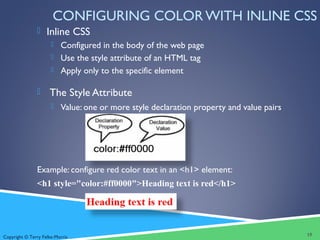
CONFIGURING COLOR WITH INLINE CSS
 Inline CSS
 Configured in the body of the web page
 Use the style attribute of an HTML tag
 Apply only to the specific element
 The Style Attribute
 Value: one or more style declaration property and value pairs
Example: configure red color text in an <h1> element:
<h1 style="color:#ff0000">Heading text is red</h1>
15
Copyright © Terry Felke-Morris
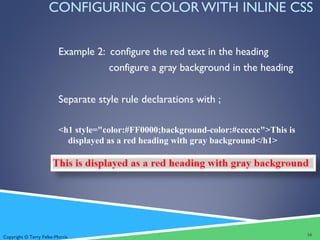
CONFIGURING COLOR WITH INLINE CSS
Example 2: configure the red text in the heading
configure a gray background in the heading
Separate style rule declarations with ;
<h1 style="color:#FF0000;background-color:#cccccc">This is
displayed as a red heading with gray background</h1>
16
Copyright © Terry Felke-Morris
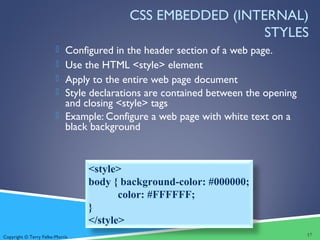
CSS EMBEDDED (INTERNAL)
STYLES
 Configured in the header section of a web page.
 Use the HTML <style> element
 Apply to the entire web page document
 Style declarations are contained between the opening
and closing <style> tags
 Example: Configure a web page with white text on a
black background
17
<style>
body { background-color: #000000;
color: #FFFFFF;
}
</style>
Copyright © Terry Felke-Morris
CSS EMBEDDED STYLES
<style>
body { background-color: #E6E6FA;
color: #191970;}
h1 { background-color: #191970;
color: #E6E6FA;}
h2 { background-color: #AEAED4;
color: #191970;}
</style>
• The body selector sets the
global style rules for the entire
page.
• These global rules are
overridden for <h1> and <h2>
elements by the h1 and h2 style
rules.
18
Copyright © Terry Felke-Morris
CHECKPOINT 3.1
1. List three reasons to use CSS on a web page.
2. When designing a page that uses colors other than the default
colors for text and background, explain why it is a good reason
to configure style rules for both text color and background color.
3. Describe one advantage to using embedded styles instead of
inline styles.
19
Copyright © Terry Felke-Morris
CONFIGURING TEXT WITH CSS
 CSS properties for configuring text:
 font-weight
 Configures the boldness of text
 font-style
 Configures text to an italic style
 font-size
 Configures the size of the text
 font-family
 Configures the font typeface of the text
20
Copyright © Terry Felke-Morris
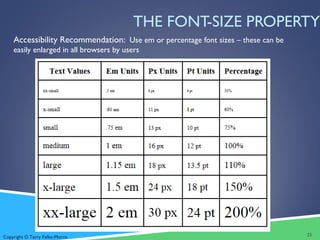
THE FONT-SIZE PROPERTY
Accessibility Recommendation: Use em or percentage font sizes – these can be
easily enlarged in all browsers by users
21
Copyright © Terry Felke-Morris
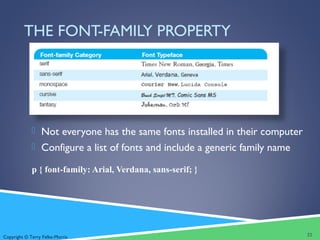
THE FONT-FAMILY PROPERTY
 Not everyone has the same fonts installed in their computer
 Configure a list of fonts and include a generic family name
p { font-family: Arial, Verdana, sans-serif; }
22
Copyright © Terry Felke-Morris
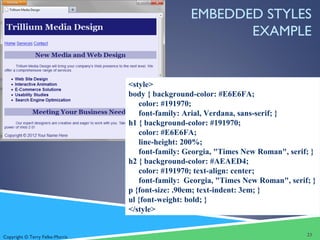
EMBEDDED STYLES
EXAMPLE
<style>
body { background-color: #E6E6FA;
color: #191970;
font-family: Arial, Verdana, sans-serif; }
h1 { background-color: #191970;
color: #E6E6FA;
line-height: 200%;
font-family: Georgia, "Times New Roman", serif; }
h2 { background-color: #AEAED4;
color: #191970; text-align: center;
font-family: Georgia, "Times New Roman", serif; }
p {font-size: .90em; text-indent: 3em; }
ul {font-weight: bold; }
</style>
23
Copyright © Terry Felke-Morris
MORE CSS TEXT
PROPERTIES
 line-height
 Configures the height of the line of text
(use the value 200% to appear double-spaced)
 text-align
 Configures alignment of text within a block display element
 text-indent
 Configures the indentation of the first line of text
 text-decoration
 Modifies the appearance of text with an underline, overline, or line-through
 text-transform
 Configures the capitalization of text
 text-shadow
 Configures a drop shadow on text
24
Copyright © Terry Felke-Morris
CSS SELECTORS
CSS style rules can be
configured for an:
 HTML element selector
 class selector
 id selector
 descendant selector
25
Copyright © Terry Felke-Morris
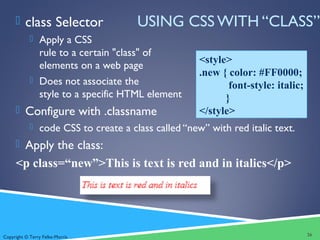
USING CSS WITH “CLASS” class Selector
 Apply a CSS
rule to a certain "class" of
elements on a web page
 Does not associate the
style to a specific HTML element
 Configure with .classname
 code CSS to create a class called “new” with red italic text.
 Apply the class:
<p class=“new”>This is text is red and in italics</p>
26
<style>
.new { color: #FF0000;
font-style: italic;
}
</style>
Copyright © Terry Felke-Morris
USING CSS WITH “ID”
 id Selector
 Apply a CSS
rule to ONE element
on a web page.
 Configure with #idname
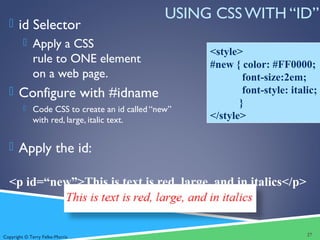
 Code CSS to create an id called “new”
with red, large, italic text.
 Apply the id:
<p id=“new”>This is text is red, large, and in italics</p>
27
<style>
#new { color: #FF0000;
font-size:2em;
font-style: italic;
}
</style>
Copyright © Terry Felke-Morris
CSS DESCENDANT SELECTOR
 Specify an element within the context of its
container (parent) element.
 AKA contextual selector
 The example configures a
green text color only for
p tags located within an element assigned to the id named
content
 Advantage of contextual selectors:
Reduces the number of classes and ids you need to apply
in the HTML
28
<style>
#content p {
color: #00ff00; }
</style>
Copyright © Terry Felke-Morris
SPAN ELEMENT
 Purpose:
 configure a specially formatted area displayed
in-line with other elements, such as within a
paragraph.
 There is no additional empty space
above or below a span – it is inline
display.
29
Copyright © Terry Felke-Morris
SPAN ELEMENT EXAMPLE
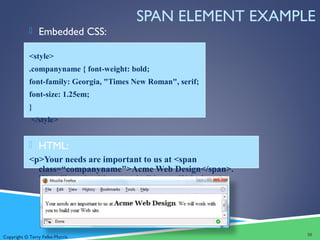
 Embedded CSS:
<style>
.companyname { font-weight: bold;
font-family: Georgia, "Times New Roman", serif;
font-size: 1.25em;
}
</style>
 HTML:
<p>Your needs are important to us at <span
class=“companyname">Acme Web Design</span>.
We will work with you to build your Web site.</p>
30
Copyright © Terry Felke-Morris
EXTERNAL STYLE SHEETS - 1
 CSS style rules are contained in a
text file separate from the HTML
documents.
 The External Style Sheet text file:
 extension ".css"
 contains only style rules
 does not contain any HTML tags
31
Copyright © Terry Felke-Morris
body {background-color:#E6E6FA;
color:#000000;
font-family:Arial, sans-serif;
font-size:90%; }
h2 { color: #003366; }
.nav { font-size: 16px;
font-weight: bold; }
body {background-color:#E6E6FA;
color:#000000;
font-family:Arial, sans-serif;
font-size:90%; }
h2 { color: #003366; }
.nav { font-size: 16px;
font-weight: bold; }
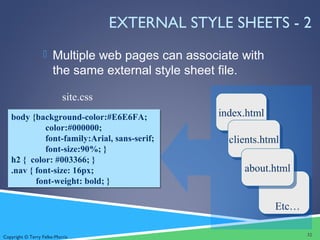
EXTERNAL STYLE SHEETS - 2
 Multiple web pages can associate with
the same external style sheet file.
32
site.css
index.htmlindex.html
clients.htmlclients.html
about.htmlabout.html
Etc…
Copyright © Terry Felke-Morris
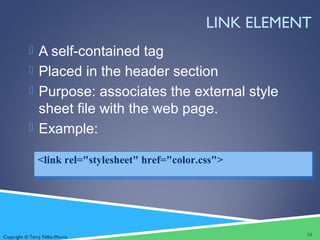
LINK ELEMENT
 A self-contained tag
 Placed in the header section
 Purpose: associates the external style
sheet file with the web page.
 Example:
33
<link rel="stylesheet" href="color.css">
Copyright © Terry Felke-Morris
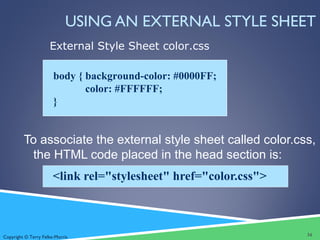
USING AN EXTERNAL STYLE SHEET
To associate the external style sheet called color.css,
the HTML code placed in the head section is:
<link rel="stylesheet" href="color.css">
body { background-color: #0000FF;
color: #FFFFFF;
}
External Style Sheet color.css
34
Copyright © Terry Felke-Morris
CHECKPOINT 3.2
1. Describe a reason to use embedded styles. Explain
where embedded styles are placed on a web page.
2. Describe a reason to use external styles. Explain
where external styles are placed and how web
pages indicate they are using external styles.
3. Write the code to configure a web page to use an
external style sheet called “mystyles.css”.
35
Copyright © Terry Felke-Morris
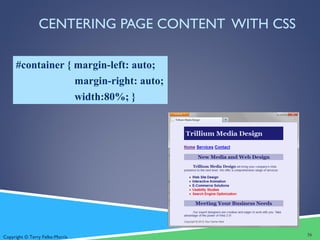
CENTERING PAGE CONTENT WITH CSS
#container { margin-left: auto;
margin-right: auto;
width:80%; }
36
Copyright © Terry Felke-Morris
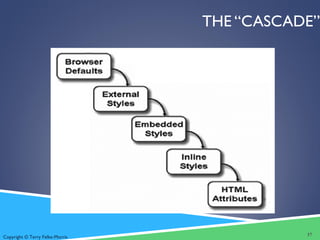
THE “CASCADE”
37
Copyright © Terry Felke-Morris
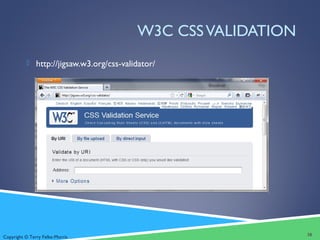
W3C CSSVALIDATION
 http://jigsaw.w3.org/css-validator/
38
Copyright © Terry Felke-Morris
SUMMARY
 This chapter introduced you to Cascading Style Sheet Rules
associated with color and text on web pages.
 You configured inline styles, embedded styles, and external styles.
 You applied CSS style rues to HTML, class, and id selectors.
 You are able to submit your CSS to the W3C CSSValidation test.
39

Chapter3

  • 1.
    Copyright © TerryFelke-Morris WEB DEVELOPMENT & DESIGN FOUNDATIONS WITH HTML5 7TH EDITION Chapter 3 Key Concepts 1Copyright © Terry Felke-Morris
  • 2.
    Copyright © TerryFelke-Morris LEARNING OUTCOMES  In this chapter, you will learn how to . . .  Describe the evolution of style sheets from print media to the Web  List advantages of using Cascading Style Sheets  Use color on web pages  Create style sheets that configure common color and text properties  Apply inline styles  Use embedded style sheets  Use external style sheets  Configure element, class, id, and contextual selectors  Utilize the “cascade” in CSS  Validate CSS 2
  • 3.
    Copyright © TerryFelke-Morris OVERVIEW OF CASCADING STYLE SHEETS (CSS)  See what is possible with CSS:  Visit http://www.csszengarden.com  Style Sheets  used for years in Desktop Publishing  apply typographical styles and spacing to printed media  CSS  provides the functionality of style sheets (and much more) for web developers  a flexible, cross-platform, standards-based language developed by theW3C. 3
  • 4.
    Copyright © TerryFelke-Morris CSS ADVANTAGES  Greater typography and page layout control  Style is separate from structure  Styles can be stored in a separate document and associated with the web page  Potentially smaller documents  Easier site maintenance 4
  • 5.
    Copyright © TerryFelke-Morris TYPES OF CASCADING STYLE SHEETS (1)  Inline Styles  Embedded Styles  External Styles  Imported Styles 5
  • 6.
    Copyright © TerryFelke-Morris CASCADING STYLE SHEETS Inline Styles ◦ body section ◦ HTML style attribute ◦ apply only to the specific element Embedded Styles ◦ head section ◦ HTML style element ◦ apply to the entire web page document External Styles ◦ Separate text file with .css file extension ◦ Associate with a HTML link element in the head section of a web page ◦ Imported Styles ◦ Similar to External Styles ◦ We’ll concentrate on the other three types of styles. 6
  • 7.
    Copyright © TerryFelke-Morris CSS SYNTAX  Style sheets are composed of "Rules" that describe the styling to be applied.  Each Rule contains a Selector and a Declaration 7
  • 8.
    Copyright © TerryFelke-Morris CSS SYNTAX SAMPLE Configure a web page to display blue text and yellow background. body { color: blue; background-color: yellow; } This could also be written using hexadecimal color values as shown below. body { color: #0000FF; background-color: #FFFF00; } 8
  • 9.
    Copyright © TerryFelke-Morris COMMON FORMATTING CSS PROPERTIES  See Table 3.1 Common CSS Properties, including: ◦ background-color ◦ color ◦ font-family ◦ font-size ◦ font-style ◦ font-weight ◦ line-height ◦ margin ◦ text-align ◦ text-decoration ◦ width 9
  • 10.
    Copyright © TerryFelke-Morris USING COLOR ON WEB PAGES  Computer monitors display color as intensities of red, green, and blue light  RGB Color  The values of red, green, and blue vary from 0 to 255.  Hexadecimal numbers (base 16) represent these color values. 10
  • 11.
    Copyright © TerryFelke-Morris HEXADECIMAL COLORVALUES # is used to indicate a hexadecimal value Hex value pairs range from 00 to FF Three hex value pairs describe an RGB color #000000 black #FFFFFF white #FF0000 red #00FF00 green #0000FF blue #CCCCCC grey 11
  • 12.
    Copyright © TerryFelke-Morris WEB COLOR PALETTE A collection of 216 colors Display the most similar on the Mac and PC platforms Hex values: 00, 33, 66, 99, CC, FF Color Chart http://webdevfoundations.net/color 12
  • 13.
    Copyright © TerryFelke-Morris MAKING COLOR CHOICES  How to choose a color scheme?  Monochromatic  http://meyerweb.com/eric/tools/color-blend  Choose from a photograph or other image  http://www.colr.org  Begin with a favorite color  Use one of the sites below to choose other colors  http://colorsontheweb.com/colorwizard.asp  http://kuler.Adobe.com  http://colorschemedesigner.com/ 13
  • 14.
    Copyright © TerryFelke-Morris VERIFY SUFFICIENT CONTRAST  When you choose colors for text and background, sufficient contrast is needed so that the text is easy to read.  Use one of the following online tools to verify contrast:  http://webaim.org/resources/contrastchecker/  http://snook.ca/technical/colour_contrast/colour.html  http://juicystudio.com/services/luminositycontrastratio.php 14
  • 15.
    Copyright © TerryFelke-Morris CONFIGURING COLOR WITH INLINE CSS  Inline CSS  Configured in the body of the web page  Use the style attribute of an HTML tag  Apply only to the specific element  The Style Attribute  Value: one or more style declaration property and value pairs Example: configure red color text in an <h1> element: <h1 style="color:#ff0000">Heading text is red</h1> 15
  • 16.
    Copyright © TerryFelke-Morris CONFIGURING COLOR WITH INLINE CSS Example 2: configure the red text in the heading configure a gray background in the heading Separate style rule declarations with ; <h1 style="color:#FF0000;background-color:#cccccc">This is displayed as a red heading with gray background</h1> 16
  • 17.
    Copyright © TerryFelke-Morris CSS EMBEDDED (INTERNAL) STYLES  Configured in the header section of a web page.  Use the HTML <style> element  Apply to the entire web page document  Style declarations are contained between the opening and closing <style> tags  Example: Configure a web page with white text on a black background 17 <style> body { background-color: #000000; color: #FFFFFF; } </style>
  • 18.
    Copyright © TerryFelke-Morris CSS EMBEDDED STYLES <style> body { background-color: #E6E6FA; color: #191970;} h1 { background-color: #191970; color: #E6E6FA;} h2 { background-color: #AEAED4; color: #191970;} </style> • The body selector sets the global style rules for the entire page. • These global rules are overridden for <h1> and <h2> elements by the h1 and h2 style rules. 18
  • 19.
    Copyright © TerryFelke-Morris CHECKPOINT 3.1 1. List three reasons to use CSS on a web page. 2. When designing a page that uses colors other than the default colors for text and background, explain why it is a good reason to configure style rules for both text color and background color. 3. Describe one advantage to using embedded styles instead of inline styles. 19
  • 20.
    Copyright © TerryFelke-Morris CONFIGURING TEXT WITH CSS  CSS properties for configuring text:  font-weight  Configures the boldness of text  font-style  Configures text to an italic style  font-size  Configures the size of the text  font-family  Configures the font typeface of the text 20
  • 21.
    Copyright © TerryFelke-Morris THE FONT-SIZE PROPERTY Accessibility Recommendation: Use em or percentage font sizes – these can be easily enlarged in all browsers by users 21
  • 22.
    Copyright © TerryFelke-Morris THE FONT-FAMILY PROPERTY  Not everyone has the same fonts installed in their computer  Configure a list of fonts and include a generic family name p { font-family: Arial, Verdana, sans-serif; } 22
  • 23.
    Copyright © TerryFelke-Morris EMBEDDED STYLES EXAMPLE <style> body { background-color: #E6E6FA; color: #191970; font-family: Arial, Verdana, sans-serif; } h1 { background-color: #191970; color: #E6E6FA; line-height: 200%; font-family: Georgia, "Times New Roman", serif; } h2 { background-color: #AEAED4; color: #191970; text-align: center; font-family: Georgia, "Times New Roman", serif; } p {font-size: .90em; text-indent: 3em; } ul {font-weight: bold; } </style> 23
  • 24.
    Copyright © TerryFelke-Morris MORE CSS TEXT PROPERTIES  line-height  Configures the height of the line of text (use the value 200% to appear double-spaced)  text-align  Configures alignment of text within a block display element  text-indent  Configures the indentation of the first line of text  text-decoration  Modifies the appearance of text with an underline, overline, or line-through  text-transform  Configures the capitalization of text  text-shadow  Configures a drop shadow on text 24
  • 25.
    Copyright © TerryFelke-Morris CSS SELECTORS CSS style rules can be configured for an:  HTML element selector  class selector  id selector  descendant selector 25
  • 26.
    Copyright © TerryFelke-Morris USING CSS WITH “CLASS” class Selector  Apply a CSS rule to a certain "class" of elements on a web page  Does not associate the style to a specific HTML element  Configure with .classname  code CSS to create a class called “new” with red italic text.  Apply the class: <p class=“new”>This is text is red and in italics</p> 26 <style> .new { color: #FF0000; font-style: italic; } </style>
  • 27.
    Copyright © TerryFelke-Morris USING CSS WITH “ID”  id Selector  Apply a CSS rule to ONE element on a web page.  Configure with #idname  Code CSS to create an id called “new” with red, large, italic text.  Apply the id: <p id=“new”>This is text is red, large, and in italics</p> 27 <style> #new { color: #FF0000; font-size:2em; font-style: italic; } </style>
  • 28.
    Copyright © TerryFelke-Morris CSS DESCENDANT SELECTOR  Specify an element within the context of its container (parent) element.  AKA contextual selector  The example configures a green text color only for p tags located within an element assigned to the id named content  Advantage of contextual selectors: Reduces the number of classes and ids you need to apply in the HTML 28 <style> #content p { color: #00ff00; } </style>
  • 29.
    Copyright © TerryFelke-Morris SPAN ELEMENT  Purpose:  configure a specially formatted area displayed in-line with other elements, such as within a paragraph.  There is no additional empty space above or below a span – it is inline display. 29
  • 30.
    Copyright © TerryFelke-Morris SPAN ELEMENT EXAMPLE  Embedded CSS: <style> .companyname { font-weight: bold; font-family: Georgia, "Times New Roman", serif; font-size: 1.25em; } </style>  HTML: <p>Your needs are important to us at <span class=“companyname">Acme Web Design</span>. We will work with you to build your Web site.</p> 30
  • 31.
    Copyright © TerryFelke-Morris EXTERNAL STYLE SHEETS - 1  CSS style rules are contained in a text file separate from the HTML documents.  The External Style Sheet text file:  extension ".css"  contains only style rules  does not contain any HTML tags 31
  • 32.
    Copyright © TerryFelke-Morris body {background-color:#E6E6FA; color:#000000; font-family:Arial, sans-serif; font-size:90%; } h2 { color: #003366; } .nav { font-size: 16px; font-weight: bold; } body {background-color:#E6E6FA; color:#000000; font-family:Arial, sans-serif; font-size:90%; } h2 { color: #003366; } .nav { font-size: 16px; font-weight: bold; } EXTERNAL STYLE SHEETS - 2  Multiple web pages can associate with the same external style sheet file. 32 site.css index.htmlindex.html clients.htmlclients.html about.htmlabout.html Etc…
  • 33.
    Copyright © TerryFelke-Morris LINK ELEMENT  A self-contained tag  Placed in the header section  Purpose: associates the external style sheet file with the web page.  Example: 33 <link rel="stylesheet" href="color.css">
  • 34.
    Copyright © TerryFelke-Morris USING AN EXTERNAL STYLE SHEET To associate the external style sheet called color.css, the HTML code placed in the head section is: <link rel="stylesheet" href="color.css"> body { background-color: #0000FF; color: #FFFFFF; } External Style Sheet color.css 34
  • 35.
    Copyright © TerryFelke-Morris CHECKPOINT 3.2 1. Describe a reason to use embedded styles. Explain where embedded styles are placed on a web page. 2. Describe a reason to use external styles. Explain where external styles are placed and how web pages indicate they are using external styles. 3. Write the code to configure a web page to use an external style sheet called “mystyles.css”. 35
  • 36.
    Copyright © TerryFelke-Morris CENTERING PAGE CONTENT WITH CSS #container { margin-left: auto; margin-right: auto; width:80%; } 36
  • 37.
    Copyright © TerryFelke-Morris THE “CASCADE” 37
  • 38.
    Copyright © TerryFelke-Morris W3C CSSVALIDATION  http://jigsaw.w3.org/css-validator/ 38
  • 39.
    Copyright © TerryFelke-Morris SUMMARY  This chapter introduced you to Cascading Style Sheet Rules associated with color and text on web pages.  You configured inline styles, embedded styles, and external styles.  You applied CSS style rues to HTML, class, and id selectors.  You are able to submit your CSS to the W3C CSSValidation test. 39