Chapter 5
Three-Dimensional Geometric
Transformations
Computer Graphics
C. P. Divate
Outline
⚫ 3DTranslation
⚫ 3D Rotation
⚫ 3D Scaling
⚫ Transformations between 3D Coordinate Systems
⚫ OpenGLGeometricTransformation Functions
⚫ OpenGL3D GeometricTransformation Programming Examples
2
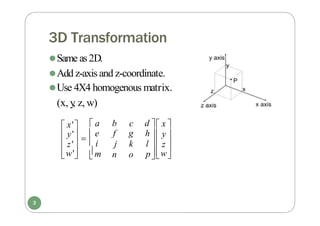
3D Transformation
⚫Same as2D.
⚫Add z-axis and z-coordinate.
⚫Use 4X4 homogenous matrix.
(x, y
, z, w)
p

w

m
l  z 
 i
d  x 
h  y 
 a b c
f g
j k
n o

w'

 z'
 y'   e
 x'
3
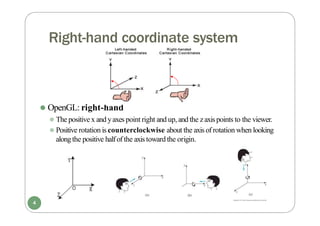
Right-hand coordinate system
⚫ OpenGL: right-hand
⚫ The positive x and yaxes point right and up, and the zaxispoints to the viewer.
⚫ Positive rotation is counterclockwise about the axis of rotation when looking
alongthe positive halfof the axis toward the origin.
4
3D Translation
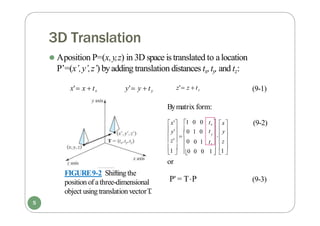
⚫ Aposition P=(x,y,z) in 3D space is translated to alocation
P’=(x’,y’,z’) byadding translation distances tx,ty, and tz:
z' z  tz
x' x  tx y' y  ty
FIGURE9-2 Shifting the
position of athree-dimensional
object using translationvectorT
.
  

  

1 
 1 
0 1
0 0 0
0
0 1 0
1 0 0
t  y
z'
 
y'
x'
tz
 z 
y   
tx  x
(9-1)
(9-2)
P' = TP (9-3)
Bymatrix form:
1 
or
5
3D Rotation
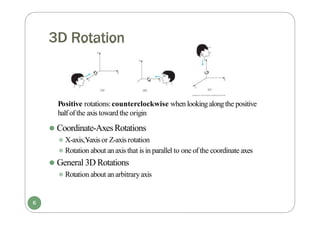
Positive rotations:counterclockwise when lookingalongthe positive
half of the axis toward the origin
⚫ Coordinate-AxesRotations
⚫ X-axis,Y
-axisor Z-axis rotation
⚫ Rotation about an axis that is in parallel to one of the coordinate axes
⚫ General 3D Rotations
⚫ Rotation about an arbitraryaxis
6
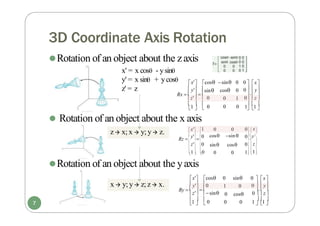
3D Coordinate Axis Rotation
⚫Rotation of an object about the yaxis
z' = z
⚫Rotation of an object about the zaxis
x' = x cos - ysin
y' = x sin + ycos
 
  
1 1 
 0
1 
⚫ Rotation of an object about the x axis
0 z 
  
0  y
0  x
z'  0
  
y'
Rx  
sin
x' cos sin 0
cos 0
0 1
0 0
 
  
1  1 
 0
1 
0  z 
  
0  y
0  x
y' 0
Ry  
z' sin
  
x' cos 0 sin
1 0
0 cos
0 0




 
  
 

  
  
 
1
 
1

1
1  0
0  z
0  y
0  x
 z' 0

y' 
0
 x' 0 0
  cos sin 
Rz 

    
 
sin cos
0 0
7
z x; x  y; y z.
x  y; y z;z x.
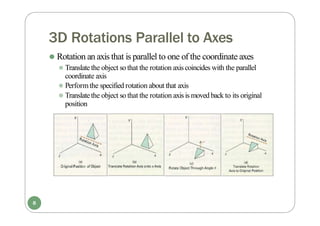
3D Rotations Parallel to Axes
⚫ Rotation an axis that is parallel to one of the coordinate axes
⚫ Translatethe object so that the rotation axis coincides with the parallel
coordinate axis
⚫ Performthe specified rotation about that axis
⚫ Translatethe object so that the rotation axisis moved back to its original
position
8
3D Rotations about Arbitrary Axis
⚫Rotate about the arbitraryaxis through P1 and P2:
1. Translate P1 to origin.
2.Rotate so that the rotation axis is alignedwith one of the
principle coordinate axes.
3. Perform the desired rotation about coordinate axis.
4. Rotate axis back (inverse rotation of 2).
5. Translate axis back(inverse translation of 1).
P1
x
y
z
Arbitraryaxis
P2
9
[T]
[R1]
[R-axis]
[R1]-1
[T]-1
3D Scaling
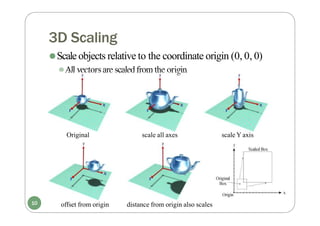
⚫Scaleobjects relative to the coordinate origin (0, 0, 0)
⚫All vectorsare scaledfrom the origin
Original scale all axes scale Y axis
offset from origin distance from origin also scales
10
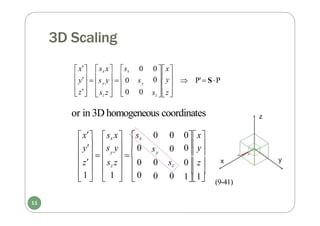
3D Scaling
0
      P' SP
0 y
0 x

z
 
 0
y  s y   0 s
x
 
sz 

z

y
sx 0

sz z

y
sx x
or in 3D homogeneous coordinates
 
      
     11
 1   1   0
 
0z
0y
0x
y s y  0
0 0
s 0
0 sz
0 0
y
z sz z  0
y
x sx x sx
(9-41)
11
3D Scaling
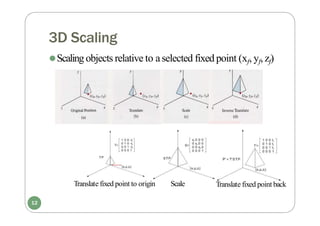
⚫Scaling objects relative to aselected fixed point (xf, yf, zf)
Translate fixed point to origin Scale Translate fixed point back
12
3D Scaling
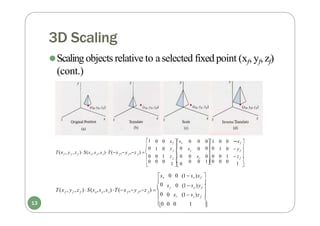
⚫Scaling objects relative to aselected fixed point (xf, yf, zf)
(cont.)

0 z f


y f 
y
f f f x y z f f f

0 sz (1 s )z
0 0 0 1
s 0 (1 s )y

sx 0 0 (1 sx )xf 

0
T(x , y , z )  S(s ,s ,s ) T(x ,y ,z )  


1
00
01
1  0
1
0
f

f 
z
y
f

f 
f f f x y z f f f
xf 
0 0 0 0 0 0
1 0 s 0  1 0  y 
0 0 1 z  0 0 s 00 0 1  z 
0 0 0 0 0 10 0 0

y  0
xf sx
T(x , y , z )S(s ,s ,s )T(x ,y ,z )  
13
Matrix Composition
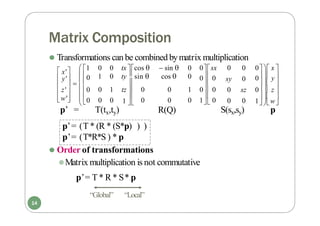
⚫ Transformations can be combined bymatrix multiplication


  
  


 
 
 

1 w
0  z 
0  y 
0 0 0  x 
sy 0
0 sz
0 0
0 0
0sx
1 
 0

w'
  0
 z' 
 0
 y'
 x'
p’ = T(tx,ty)
 1 0 0 tx cos   sin  0
1 0 ty sin  cos  0
 
0 1 tz  0 0 1 0 0
0 0 0 0 0 1 0
R(Q) S(sx,sy) p
p’= (T * (R * (S*p) ) )
p’= (T*R*S ) * p
⚫ Order of transformations
⚫Matrix multiplication is not commutative
p’= T * R* S* p
“Global” “Local”
14
Transformations Between 3D Coordinate Systems
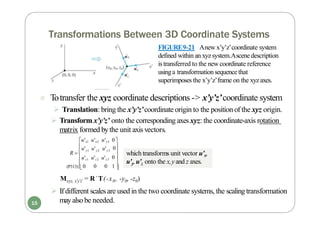
Mxyz, x'y'z' = R˙T(-x0, -y0, -z0)
 If different scalesare used in the two coordinate systems, the scalingtransformation
mayalso be needed.


(P313) 0 
0 
0
y1 y2 y3
u'z1 u'z2 u'z3

0 0 1
u' u' u'
u'x1 u'x2 u'x3 0
R  
FIGURE9-21 Anew x’y’z’coordinate system
defined within an xyzsystem.Ascene description
istransferred to the new coordinate reference
usinga transformationsequencethat
superimposes the x’y’z’frame on the xyzaxes.
 Totransfer the xyz coordinate descriptions -> x’y’z’coordinate system
 Translation: bring the x’y’z’coordinate origin to the position of the xyz origin.
 Transform x’y’z’ onto the corresponding axes xyz: the coordinate-axis rotation
matrix formed bythe unit axisvectors.
which transforms unit vector u’x,
u’y,u’z onto the x,yand z axes.
15
OpenGL Geometric Transformation Functions
⚫Becareful of manipulating the matrix in OpenGL
⚫OpenGLuses 4X4 matrix for transformation.
⚫The 16 elements are stored as1D in column-majororder
OpenGLtransformmatrix
⚫C and C++ store matrices in row-majororder
⚫Ifyou declare amatrix to be used in OpenGLas
GLfloat M[4][4];to accessthe element in row i and column j, you
need to refer to it byM[j][i];or, as
GLfloat M[16];and then you need to convert it to conventional row-
majororder.
16
OpenGL Transformations
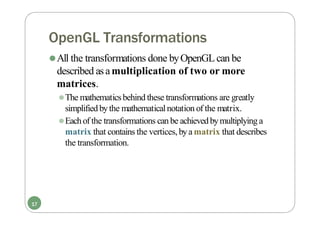
⚫All the transformations done byOpenGLcan be
described asamultiplication of two or more
matrices.
⚫The mathematicsbehind these transformations are greatly
simplifiedbythe mathematicalnotation of the matrix.
⚫Eachof the transformations can be achieved bymultiplying a
matrix that contains the vertices,bya matrix that describes
the transformation.
17
OpenGL Geometric Transformation Functions
⚫ BasicOpenGLgeometrictransformations on the matrix:
glT
ranslate* (tx, ty
, tz);
[ glTranslatef(25.0,-10.0,10.0);
- Post-multiplies the current matrix byamatrix that moves the object bythe given x-,
y-, and z-values
glScale* (sx, sy
, sz);
[glScalef (2.0, -3.0, 1.0); ]
- Post-multiplies the current matrix byamatrix that scalesan object about the origin.
None of sx, syor sziszero.
glRotate* (theta,vx, vy
, vz);
[ glRotatef (90.0, 0.0, 0.0, 1.0); ]
- Post-multiplies the current matrix byamatrix that rotates the object in a
counterclockwise direction. vector v=(vx, vy,vz) defines the orientation for the
rotation axis that passesthrough the coordinate origin.( the rotation center is (0, 0, 0) )
18
OpenGL: Order in Matrix Multiplication
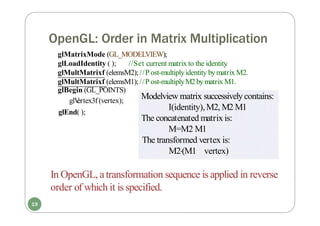
glMatrixMode (GL_MODELVIEW);
glLoadIdentity ( ); //Set current matrix to the identity
.
glMultMatrixf (elemsM2);//P ost-multiplyidentity bymatrix M2.
glMultMatrixf (elemsM1);//P ost-multiplyM2bymatrix M1.
glBegin (GL_POINTS)
glV
ertex3f (vertex);
glEnd( );
Modelview matrix successivelycontains:
I(identity),M2, M2 M1
The concatenated matrix is:
M=M2 M1
The transformed vertex is:
M2(M1 vertex)
In OpenGL, atransformation sequence is applied in reverse
order of which it isspecified.
19
OpenGL: Order in Matrix Multiplication
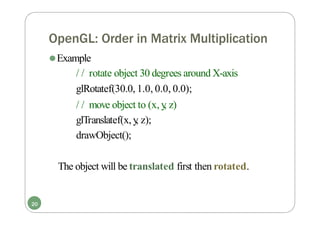
⚫Example
/ / rotate object 30 degrees around X-axis
glRotatef(30.0, 1.0, 0.0, 0.0);
/ / move object to (x, y
, z)
glTranslatef(x, y
, z);
drawObject();
The object will be translated first then rotated.
20
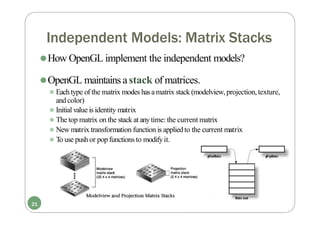
Independent Models: Matrix Stacks
⚫How OpenGL implement the independent models?
⚫OpenGL maintains astack of matrices.
⚫ Each type of the matrix modes hasamatrix stack (modelview,projection,texture,
and color)
⚫ Initial value is identity matrix
⚫ The top matrix on the stack at anytime: the current matrix
⚫ New matrix transformation function is appliedto the current matrix
⚫ To use push or pop functions to modifyit.
21
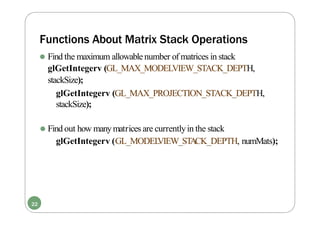
Functions About Matrix Stack Operations
⚫ Find the maximum allowablenumber of matrices in stack
glGetIntegerv (GL_MAX_MODELVIEW_STACK_DEPTH,
stackSize);
glGetIntegerv (GL_MAX_PROJECTION_STACK_DEPTH,
stackSize);
⚫ Find out how manymatrices are currentlyin the stack
glGetIntegerv (GL_MODEL
VIEW_ST
ACK_DEPTH, numMats);
22
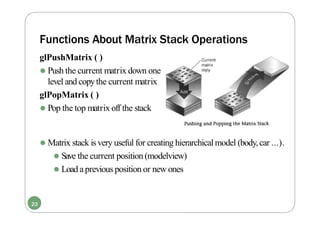
Functions About Matrix Stack Operations
glPushMatrix ( )
⚫ Push the current matrix down one
level and copythe current matrix
glPopMatrix ( )
⚫ Pop the top matrix off the stack
⚫ Matrix stack is very useful for creating hierarchical model (body,car ...).
⚫ Save the current position (modelview)
⚫ Load aprevious position or new ones
23
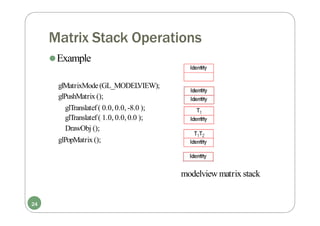
Matrix Stack Operations
⚫Example
glMatrixMode(GL_MODEL
VIEW);
glPushMatrix ();
glTranslatef( 0.0, 0.0, -8.0 );
glTranslatef( 1.0, 0.0, 0.0 );
DrawObj ();
glPopMatrix ();
modelview matrix stack
24
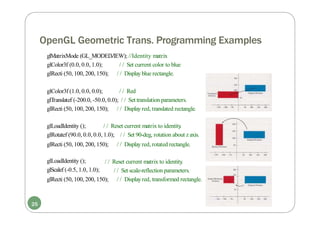
OpenGL Geometric Trans. Programming Examples
glMatrixMode (GL_MODEL
VIEW); //Identity matrix
glColor3f (0.0, 0.0, 1.0);
glRecti (50, 100, 200, 150);
/ / Set current color to blue
/ / Displayblue rectangle.
glColor3f (1.0, 0.0, 0.0); / / Red
glTranslatef (-200.0, -50.0, 0.0); / / Set translation parameters.
glRecti (50, 100, 200, 150); / / Displayred, translated rectangle.
glLoadIdentity (); / / Reset current matrix to identity
.
glRotatef (90.0, 0.0, 0.0, 1.0); / / Set 90-deg, rotation about zaxis.
glRecti (50, 100, 200, 150); / / Displayred, rotated rectangle.
glLoadIdentity ();
glScalef (-0.5, 1.0, 1.0);
/ / Reset current matrix to identity
.
/ / Set scale-reflection parameters.
glRecti (50, 100, 200, 150); / / Displayred, transformed rectangle.
25
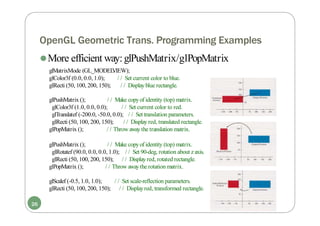
OpenGL Geometric Trans. Programming Examples
glColor3f (0.0, 0.0, 1.0);
glRecti (50, 100, 200, 150);
/ / Set current color to blue.
/ / Displayblue rectangle.
glPushMatrix (); / / Make copyof identity (top) matrix.
glColor3f (1.0, 0.0, 0.0); / / Set current color to red.
glTranslatef (-200.0, -50.0, 0.0); / / Set translation parameters.
glRecti (50, 100, 200, 150); / / Displayred, translated rectangle.
glPopMatrix (); / / Throw awaythe translation matrix.
glPushMatrix (); / / Make copyof identity (top) matrix.
glRotatef (90.0, 0.0, 0.0, 1.0); / / Set 90-deg, rotation about zaxis.
glRecti (50, 100, 200, 150); / / Displayred, rotated rectangle.
glPopMatrix (); / / Throw awaythe rotation matrix.
glScalef (-0.5, 1.0, 1.0);
glRecti (50, 100, 200, 150);
/ / Set scale-reflection parameters.
/ / Displayred, transformed rectangle.
⚫More efficient way:glPushMatrix/glPopMatrix
glMatrixMode (GL_MODEL
VIEW);
26
Example
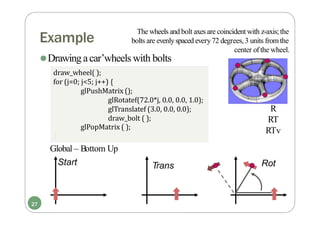
⚫Drawing acar’wheels with bolts
draw_wheel( );
for (j=0; j<5; j++) {
glPushMatrix ();
glRotatef(72.0*j, 0.0, 0.0, 1.0);
glTranslatef (3.0, 0.0, 0.0);
draw_bolt ( );
glPopMatrix ( );
}
R
RT
RTv
Global – Bottom Up
Start Rot
Trans
The wheels and bolt axes are coincident with z-axis;the
bolts are evenlyspaced every72 degrees,3 units fromthe
center of the wheel.
27
Summary
⚫ Basic3D geometrictransformations
⚫ Translation
⚫ Rotation
⚫ Scaling
⚫ Combination of these transformations
⚫ OpenGL3D geometric transformation functions
⚫ GL_MODEL
VIEWmatrix
⚫ Order in multiple matrix multiplication
⚫ Matrix stack
⚫ glPushMatrix ()
⚫ glPopMatrix ()
28

Computer Graphics Three-Dimensional Geometric Transformations

  • 1.
  • 2.
    Outline ⚫ 3DTranslation ⚫ 3DRotation ⚫ 3D Scaling ⚫ Transformations between 3D Coordinate Systems ⚫ OpenGLGeometricTransformation Functions ⚫ OpenGL3D GeometricTransformation Programming Examples 2
  • 3.
    3D Transformation ⚫Same as2D. ⚫Addz-axis and z-coordinate. ⚫Use 4X4 homogenous matrix. (x, y , z, w) p  w  m l  z   i d  x  h  y   a b c f g j k n o  w'   z'  y'   e  x' 3
  • 4.
    Right-hand coordinate system ⚫OpenGL: right-hand ⚫ The positive x and yaxes point right and up, and the zaxispoints to the viewer. ⚫ Positive rotation is counterclockwise about the axis of rotation when looking alongthe positive halfof the axis toward the origin. 4
  • 5.
    3D Translation ⚫ ApositionP=(x,y,z) in 3D space is translated to alocation P’=(x’,y’,z’) byadding translation distances tx,ty, and tz: z' z  tz x' x  tx y' y  ty FIGURE9-2 Shifting the position of athree-dimensional object using translationvectorT .         1   1  0 1 0 0 0 0 0 1 0 1 0 0 t  y z'   y' x' tz  z  y    tx  x (9-1) (9-2) P' = TP (9-3) Bymatrix form: 1  or 5
  • 6.
    3D Rotation Positive rotations:counterclockwisewhen lookingalongthe positive half of the axis toward the origin ⚫ Coordinate-AxesRotations ⚫ X-axis,Y -axisor Z-axis rotation ⚫ Rotation about an axis that is in parallel to one of the coordinate axes ⚫ General 3D Rotations ⚫ Rotation about an arbitraryaxis 6
  • 7.
    3D Coordinate AxisRotation ⚫Rotation of an object about the yaxis z' = z ⚫Rotation of an object about the zaxis x' = x cos - ysin y' = x sin + ycos      1 1   0 1  ⚫ Rotation of an object about the x axis 0 z     0  y 0  x z'  0    y' Rx   sin x' cos sin 0 cos 0 0 1 0 0      1  1   0 1  0  z     0  y 0  x y' 0 Ry   z' sin    x' cos 0 sin 1 0 0 cos 0 0                     1   1  1 1  0 0  z 0  y 0  x  z' 0  y'  0  x' 0 0   cos sin  Rz          sin cos 0 0 7 z x; x  y; y z. x  y; y z;z x.
  • 8.
    3D Rotations Parallelto Axes ⚫ Rotation an axis that is parallel to one of the coordinate axes ⚫ Translatethe object so that the rotation axis coincides with the parallel coordinate axis ⚫ Performthe specified rotation about that axis ⚫ Translatethe object so that the rotation axisis moved back to its original position 8
  • 9.
    3D Rotations aboutArbitrary Axis ⚫Rotate about the arbitraryaxis through P1 and P2: 1. Translate P1 to origin. 2.Rotate so that the rotation axis is alignedwith one of the principle coordinate axes. 3. Perform the desired rotation about coordinate axis. 4. Rotate axis back (inverse rotation of 2). 5. Translate axis back(inverse translation of 1). P1 x y z Arbitraryaxis P2 9 [T] [R1] [R-axis] [R1]-1 [T]-1
  • 10.
    3D Scaling ⚫Scaleobjects relativeto the coordinate origin (0, 0, 0) ⚫All vectorsare scaledfrom the origin Original scale all axes scale Y axis offset from origin distance from origin also scales 10
  • 11.
    3D Scaling 0      P' SP 0 y 0 x  z    0 y  s y   0 s x   sz   z  y sx 0  sz z  y sx x or in 3D homogeneous coordinates               11  1   1   0   0z 0y 0x y s y  0 0 0 s 0 0 sz 0 0 y z sz z  0 y x sx x sx (9-41) 11
  • 12.
    3D Scaling ⚫Scaling objectsrelative to aselected fixed point (xf, yf, zf) Translate fixed point to origin Scale Translate fixed point back 12
  • 13.
    3D Scaling ⚫Scaling objectsrelative to aselected fixed point (xf, yf, zf) (cont.)  0 z f   y f  y f f f x y z f f f  0 sz (1 s )z 0 0 0 1 s 0 (1 s )y  sx 0 0 (1 sx )xf   0 T(x , y , z )  S(s ,s ,s ) T(x ,y ,z )     1 00 01 1  0 1 0 f  f  z y f  f  f f f x y z f f f xf  0 0 0 0 0 0 1 0 s 0  1 0  y  0 0 1 z  0 0 s 00 0 1  z  0 0 0 0 0 10 0 0  y  0 xf sx T(x , y , z )S(s ,s ,s )T(x ,y ,z )   13
  • 14.
    Matrix Composition ⚫ Transformationscan be combined bymatrix multiplication                  1 w 0  z  0  y  0 0 0  x  sy 0 0 sz 0 0 0 0 0sx 1   0  w'   0  z'   0  y'  x' p’ = T(tx,ty)  1 0 0 tx cos   sin  0 1 0 ty sin  cos  0   0 1 tz  0 0 1 0 0 0 0 0 0 0 1 0 R(Q) S(sx,sy) p p’= (T * (R * (S*p) ) ) p’= (T*R*S ) * p ⚫ Order of transformations ⚫Matrix multiplication is not commutative p’= T * R* S* p “Global” “Local” 14
  • 15.
    Transformations Between 3DCoordinate Systems Mxyz, x'y'z' = R˙T(-x0, -y0, -z0)  If different scalesare used in the two coordinate systems, the scalingtransformation mayalso be needed.   (P313) 0  0  0 y1 y2 y3 u'z1 u'z2 u'z3  0 0 1 u' u' u' u'x1 u'x2 u'x3 0 R   FIGURE9-21 Anew x’y’z’coordinate system defined within an xyzsystem.Ascene description istransferred to the new coordinate reference usinga transformationsequencethat superimposes the x’y’z’frame on the xyzaxes.  Totransfer the xyz coordinate descriptions -> x’y’z’coordinate system  Translation: bring the x’y’z’coordinate origin to the position of the xyz origin.  Transform x’y’z’ onto the corresponding axes xyz: the coordinate-axis rotation matrix formed bythe unit axisvectors. which transforms unit vector u’x, u’y,u’z onto the x,yand z axes. 15
  • 16.
    OpenGL Geometric TransformationFunctions ⚫Becareful of manipulating the matrix in OpenGL ⚫OpenGLuses 4X4 matrix for transformation. ⚫The 16 elements are stored as1D in column-majororder OpenGLtransformmatrix ⚫C and C++ store matrices in row-majororder ⚫Ifyou declare amatrix to be used in OpenGLas GLfloat M[4][4];to accessthe element in row i and column j, you need to refer to it byM[j][i];or, as GLfloat M[16];and then you need to convert it to conventional row- majororder. 16
  • 17.
    OpenGL Transformations ⚫All thetransformations done byOpenGLcan be described asamultiplication of two or more matrices. ⚫The mathematicsbehind these transformations are greatly simplifiedbythe mathematicalnotation of the matrix. ⚫Eachof the transformations can be achieved bymultiplying a matrix that contains the vertices,bya matrix that describes the transformation. 17
  • 18.
    OpenGL Geometric TransformationFunctions ⚫ BasicOpenGLgeometrictransformations on the matrix: glT ranslate* (tx, ty , tz); [ glTranslatef(25.0,-10.0,10.0); - Post-multiplies the current matrix byamatrix that moves the object bythe given x-, y-, and z-values glScale* (sx, sy , sz); [glScalef (2.0, -3.0, 1.0); ] - Post-multiplies the current matrix byamatrix that scalesan object about the origin. None of sx, syor sziszero. glRotate* (theta,vx, vy , vz); [ glRotatef (90.0, 0.0, 0.0, 1.0); ] - Post-multiplies the current matrix byamatrix that rotates the object in a counterclockwise direction. vector v=(vx, vy,vz) defines the orientation for the rotation axis that passesthrough the coordinate origin.( the rotation center is (0, 0, 0) ) 18
  • 19.
    OpenGL: Order inMatrix Multiplication glMatrixMode (GL_MODELVIEW); glLoadIdentity ( ); //Set current matrix to the identity . glMultMatrixf (elemsM2);//P ost-multiplyidentity bymatrix M2. glMultMatrixf (elemsM1);//P ost-multiplyM2bymatrix M1. glBegin (GL_POINTS) glV ertex3f (vertex); glEnd( ); Modelview matrix successivelycontains: I(identity),M2, M2 M1 The concatenated matrix is: M=M2 M1 The transformed vertex is: M2(M1 vertex) In OpenGL, atransformation sequence is applied in reverse order of which it isspecified. 19
  • 20.
    OpenGL: Order inMatrix Multiplication ⚫Example / / rotate object 30 degrees around X-axis glRotatef(30.0, 1.0, 0.0, 0.0); / / move object to (x, y , z) glTranslatef(x, y , z); drawObject(); The object will be translated first then rotated. 20
  • 21.
    Independent Models: MatrixStacks ⚫How OpenGL implement the independent models? ⚫OpenGL maintains astack of matrices. ⚫ Each type of the matrix modes hasamatrix stack (modelview,projection,texture, and color) ⚫ Initial value is identity matrix ⚫ The top matrix on the stack at anytime: the current matrix ⚫ New matrix transformation function is appliedto the current matrix ⚫ To use push or pop functions to modifyit. 21
  • 22.
    Functions About MatrixStack Operations ⚫ Find the maximum allowablenumber of matrices in stack glGetIntegerv (GL_MAX_MODELVIEW_STACK_DEPTH, stackSize); glGetIntegerv (GL_MAX_PROJECTION_STACK_DEPTH, stackSize); ⚫ Find out how manymatrices are currentlyin the stack glGetIntegerv (GL_MODEL VIEW_ST ACK_DEPTH, numMats); 22
  • 23.
    Functions About MatrixStack Operations glPushMatrix ( ) ⚫ Push the current matrix down one level and copythe current matrix glPopMatrix ( ) ⚫ Pop the top matrix off the stack ⚫ Matrix stack is very useful for creating hierarchical model (body,car ...). ⚫ Save the current position (modelview) ⚫ Load aprevious position or new ones 23
  • 24.
    Matrix Stack Operations ⚫Example glMatrixMode(GL_MODEL VIEW); glPushMatrix(); glTranslatef( 0.0, 0.0, -8.0 ); glTranslatef( 1.0, 0.0, 0.0 ); DrawObj (); glPopMatrix (); modelview matrix stack 24
  • 25.
    OpenGL Geometric Trans.Programming Examples glMatrixMode (GL_MODEL VIEW); //Identity matrix glColor3f (0.0, 0.0, 1.0); glRecti (50, 100, 200, 150); / / Set current color to blue / / Displayblue rectangle. glColor3f (1.0, 0.0, 0.0); / / Red glTranslatef (-200.0, -50.0, 0.0); / / Set translation parameters. glRecti (50, 100, 200, 150); / / Displayred, translated rectangle. glLoadIdentity (); / / Reset current matrix to identity . glRotatef (90.0, 0.0, 0.0, 1.0); / / Set 90-deg, rotation about zaxis. glRecti (50, 100, 200, 150); / / Displayred, rotated rectangle. glLoadIdentity (); glScalef (-0.5, 1.0, 1.0); / / Reset current matrix to identity . / / Set scale-reflection parameters. glRecti (50, 100, 200, 150); / / Displayred, transformed rectangle. 25
  • 26.
    OpenGL Geometric Trans.Programming Examples glColor3f (0.0, 0.0, 1.0); glRecti (50, 100, 200, 150); / / Set current color to blue. / / Displayblue rectangle. glPushMatrix (); / / Make copyof identity (top) matrix. glColor3f (1.0, 0.0, 0.0); / / Set current color to red. glTranslatef (-200.0, -50.0, 0.0); / / Set translation parameters. glRecti (50, 100, 200, 150); / / Displayred, translated rectangle. glPopMatrix (); / / Throw awaythe translation matrix. glPushMatrix (); / / Make copyof identity (top) matrix. glRotatef (90.0, 0.0, 0.0, 1.0); / / Set 90-deg, rotation about zaxis. glRecti (50, 100, 200, 150); / / Displayred, rotated rectangle. glPopMatrix (); / / Throw awaythe rotation matrix. glScalef (-0.5, 1.0, 1.0); glRecti (50, 100, 200, 150); / / Set scale-reflection parameters. / / Displayred, transformed rectangle. ⚫More efficient way:glPushMatrix/glPopMatrix glMatrixMode (GL_MODEL VIEW); 26
  • 27.
    Example ⚫Drawing acar’wheels withbolts draw_wheel( ); for (j=0; j<5; j++) { glPushMatrix (); glRotatef(72.0*j, 0.0, 0.0, 1.0); glTranslatef (3.0, 0.0, 0.0); draw_bolt ( ); glPopMatrix ( ); } R RT RTv Global – Bottom Up Start Rot Trans The wheels and bolt axes are coincident with z-axis;the bolts are evenlyspaced every72 degrees,3 units fromthe center of the wheel. 27
  • 28.
    Summary ⚫ Basic3D geometrictransformations ⚫Translation ⚫ Rotation ⚫ Scaling ⚫ Combination of these transformations ⚫ OpenGL3D geometric transformation functions ⚫ GL_MODEL VIEWmatrix ⚫ Order in multiple matrix multiplication ⚫ Matrix stack ⚫ glPushMatrix () ⚫ glPopMatrix () 28