

Eduardo Kassner
Principal, Enterprise Strategy
Microsoft
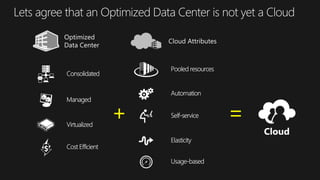
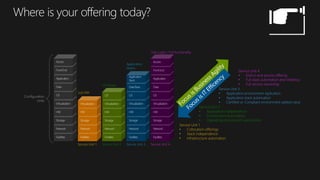
Lets agree that an Optimized Data Center is not yet a Cloud
+ =
Configuration
Units
Service Unit 1
• Collocation offerings
• Stack independence
• Infrastructure automation
Service Unit 2
• Application Independence
• Environment Automation
• Operating environment automation
Service Unit 3
• Application environment replication
• Application stack automation
• Certified or Compliant environment added value
Service Unit 4
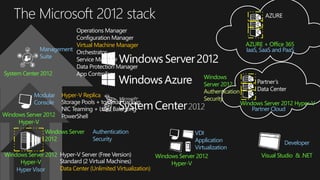
• End to end service offering
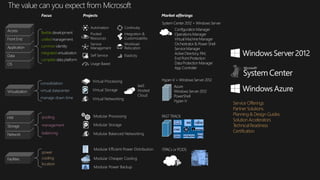
• Full stack automation and resiliency
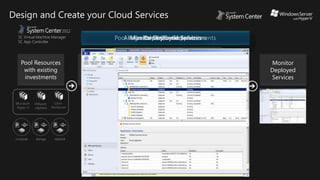
• Full service ownership
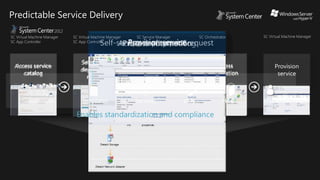
Service Unit 1
Just HW
Service Unit 2
OS Ready
Service Unit 3
Application
Stacks
User Login / Full functionality
Service Unit 4
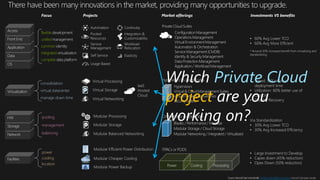
Via Standardization
• 30% Avg Lower TCO
• 30% Avg Increased Efficiency
management
pooling
balancing
2010MicrosoftSpotlightonCostStudy,MicrosoftOptimizationBenefits
• Speed: 50X or lower
deployment time
• Utilization: 80% better use of
capacity
• Disaster Recovery
virtual datacenter
consolidation
manage down time
• Large Investment to Develop
• Capex down (45% reduction)
• Opex Down (50% reduction)
cooling
power
location
• 60% Avg Lower TCO
• 60% Avg More Efficient
* Around 30% increased benefit from virtualizing and
standardizing
Usage Based
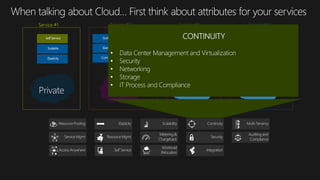
Continuity
Automation
Pooled
Resources
Integration &
Customizability
Workload
Relocation
Service
Management
Elasticity
Self Service
Private Cloud
project
Business Agility
Application Optimization
Costs
Facility Optimization
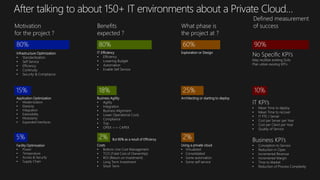
But 80% as a result of Efficiency
IT Efficiency
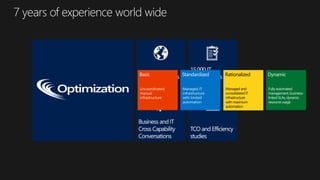
Infrastructure Optimization
Architecting or starting to deploy
Using a private cloud
Exploration or Design
Cloud
computing
Data
explosion
• Time to Market
• Reduction of Process Complexity
• Mean Time to deploy
• Cost per Server per Year
• Cost per Client per Year
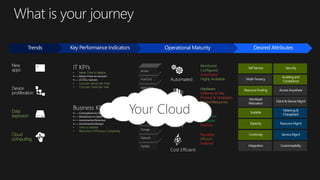
Monitored
Configured
Automated
Highly Available
Hardware
Software & Dev
Process & Templates
Pooled Resources
Secure
Compliant
Auditable
Resilient
Reusable
Efficient
Metered
Your Cloud
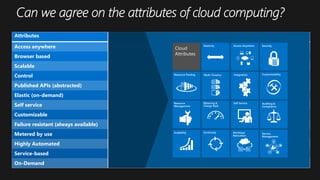
Attributes Analyst 1 Analyst 2 Analyst 3 Analyst 4 Vendor 1 Standard 1
Access anywhere  
Browser based 
Scalable   
Control Low Low
Published APIs (abstracted)   
Elastic (on-demand)     
Self service  
Customizable Low Low
Failure resistant (always available)
Metered by use     
Highly Automated 
Service-based 
On-Demand  
Continuity Workload
Relocation
Service
Management
Scalability
Resource Pooling
Resource
Management
Elasticity
Multi-Tenancy
Metering &
Charge Back
Access Anywhere
Integration
Self Service
Security
Customizability
Auditing &
Compliance
Cloud
Attributes
Hybrid Public
Service #1 Service #2 Service #3 Service #4
Uncoordinated,
manual
infrastructure
Managed IT
infrastructure
with limited
automation
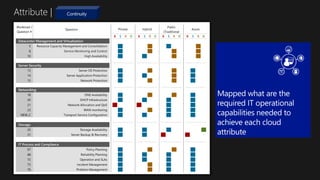
Attribute |
Workload /
Question #
Question
B S R D B S R D B S R D B S R D
Datacenter Management and Virtualization
5 Resource Capacity Management and Consolidation x x x x
8 Service Monitoring and Control x x x x
10 High Availability x x x x
Server Security
13 Server OS Protection x x x x
14 Server Application Protection x x x x
15 Network Protection x x x x
Networking
18 DNS Availability x x x x
20 DHCP Infrastructure x x x x
21 Network Allocation and QoS x x x x
23 WAN monitoring x x x x
NEW_C Transport Service Configuration x x x x
Storage
25 Storage Availability x x x x
31 Server Backup & Recovery x x x x
IT Process and Compliance
67 Policy Planning x x x x
68 Reliability Planning x x x x
72 Operation and SLAs x x x x
73 Incident Management x x x x
76 Problem Management x x x x
Private Hybrid
Public
(Traditional
Azure
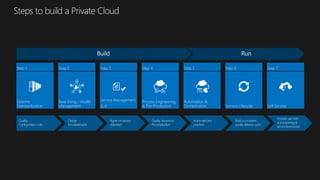
Extreme
Standardization
Step 1
Base lining / Health
Management
Step 2
Service Management
SLA
Step 3
Process Engineering
& Pre-Production
Step 4
Automation &
Orchestration
Step 5
Service Lifecycle
Step 6
Self Service
Step 7
Windows Server 2012
Hyper-V
Hyper Visor
Windows Server 2012
Hyper-V
Modular
Console
Hyper-V Replica
System Center 2012
Management
Suite
Windows Server 2012 Hyper-V
Partner Cloud
VDI
Application
Virtualization
Windows Server 2012
Hyper-V
Visual Studio & .NET
Developer
Windows Server
2012
Authentication
Security
Windows
Server 2012
Authentication
Security
AZURE + Office 365
IaaS, SaaS and PaaS
Data Center (Unlimited Virtualization)
Virtual Machine Manager
management
pooling
balancing
virtual datacenter
consolidation
manage down time
cooling
power
location
Usage Based
Continuity
Automation
Pooled
Resources
Integration &
Customizability
Workload
Relocation
Service
Management
Elasticity
Self Service
Service Offerings
Partner Solutions
Planning & Design Guides
Solution Accelerators
Technical Readiness
Certification
Pool Resources
with existing
investments
Design and Create your Cloud Services
Assign Roles,
Quotas &
Actions
Microsoft
Hyper-V
VMware
vSphere
Citrix
XenServer
Microsoft
Hyper-V
VMware
vSphere
Citrix
XenServer
compute storage network
Pool Resources & Existing investments
Assign Roles, Quotas & Actions
Delegated
Administrator
Administration
Read Only
Administrator
Operations
Administrator
Any Action
Self
Service
User
Revocable Actions
Quota Controlled
Create Service Template
Create a
Service
Template
Deploy
Services
Deploy Services
Monitor Deployed Services
Monitor
Deployed
Services
Approve
request
Process
automation
Self-service
deployment
request
Access service
catalog
Provision
service
Access service catalog
Self-service deployment request
Approve request
Process automation
Provision service
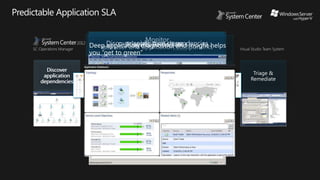
Predictable Service Delivery
Triage &
Remediate
Discover
application
dependencies
Monitor
end user and
application
components
Isolate root
cause
Discover
application
dependencies
Monitor
end user and
application
components
Isolate root
cause
Isolate root cause
Monitor
end user and application components
Discover application dependencies
Triage & Remediate
Deep application diagnostics and insight helps
you “get to green”
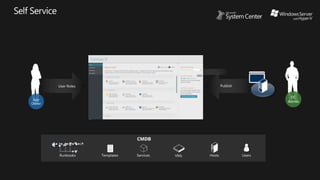
CMDB
Runbooks Templates Services VMs Users
Templates
VMM
Library
DC
Admin
User Roles Publish
Hosts
App
Owner
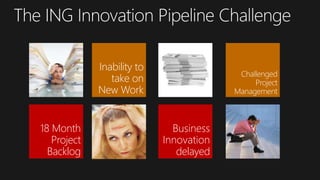
18 Month
Project
Backlog
Business
Innovation
delayed
Challenged
Project
Management
Inability to
take on
New Work
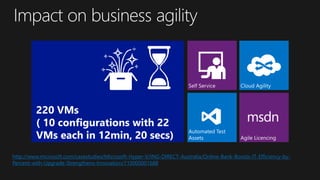
220 VMs
( 10 configurations with 22
VMs each in 12min, 20 secs)
http://www.microsoft.com/casestudies/Microsoft-Hyper-V/ING-DIRECT-Australia/Online-Bank-Boosts-IT-Efficiency-by-
Percent-with-Upgrade-Strengthens-Innovation/710000001688




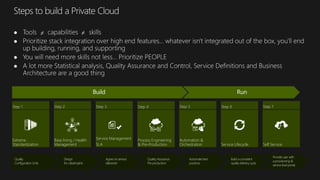
Extreme
Standardization
Step 1
Base lining / Health
Management
Step 2
Service Management
SLA
Step 3
Process Engineering
& Pre-Production
Step 4
Automation &
Orchestration
Step 5
Service Lifecycle
Step 6
Self Service
Step 7
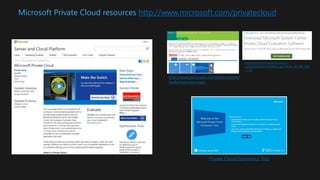
Microsoft Private Cloud resources http://www.microsoft.com/privatecloud
Private Cloud Economics Tool
http://technet.microsoft.com/en-
us/evalcenter/hh505660.aspx?wt.mc_id=TEC_103
_1_33
http://www.microsoft.com/optimization/
tools/overview.mspx
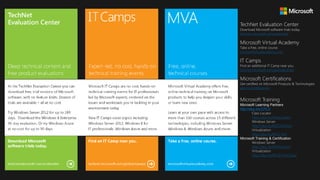
TechNet Evaluation Center
Download Microsoft software trials today.
technet.microsoft.com/evalcenter
Microsoft Virtual Academy
Take a free, online course.
microsoftvirtualacademy.com
IT Camps
Find an additional IT Camp near you.
technet.microsoft.com/globalitcamps
Microsoft Certifications
Get certified on Microsoft Products & Technologies.
aka.ms/certifications
Microsoft Training
Microsoft Learning Partners
http://aka.ms/CPLS
Class Locator
http://aka.ms/ClassLocator
Windows Server
http://aka.ms/MOCWinServ
Virtualization
http://aka.ms/MOC-Virt
Microsoft Training & Certification
Windows Server
http://aka.ms/WinServCert
Virtualization
http://aka.ms/MCSE-PrivCloud
Composing your Private Cloud

Composing your Private Cloud

  • 1.
  • 3.
    Lets agree thatan Optimized Data Center is not yet a Cloud + =
  • 4.
    Configuration Units Service Unit 1 •Collocation offerings • Stack independence • Infrastructure automation Service Unit 2 • Application Independence • Environment Automation • Operating environment automation Service Unit 3 • Application environment replication • Application stack automation • Certified or Compliant environment added value Service Unit 4 • End to end service offering • Full stack automation and resiliency • Full service ownership Service Unit 1 Just HW Service Unit 2 OS Ready Service Unit 3 Application Stacks User Login / Full functionality Service Unit 4
  • 7.
    Via Standardization • 30%Avg Lower TCO • 30% Avg Increased Efficiency management pooling balancing 2010MicrosoftSpotlightonCostStudy,MicrosoftOptimizationBenefits • Speed: 50X or lower deployment time • Utilization: 80% better use of capacity • Disaster Recovery virtual datacenter consolidation manage down time • Large Investment to Develop • Capex down (45% reduction) • Opex Down (50% reduction) cooling power location • 60% Avg Lower TCO • 60% Avg More Efficient * Around 30% increased benefit from virtualizing and standardizing Usage Based Continuity Automation Pooled Resources Integration & Customizability Workload Relocation Service Management Elasticity Self Service Private Cloud project
  • 8.
    Business Agility Application Optimization Costs FacilityOptimization But 80% as a result of Efficiency IT Efficiency Infrastructure Optimization Architecting or starting to deploy Using a private cloud Exploration or Design
  • 10.
    Cloud computing Data explosion • Time toMarket • Reduction of Process Complexity • Mean Time to deploy • Cost per Server per Year • Cost per Client per Year Monitored Configured Automated Highly Available Hardware Software & Dev Process & Templates Pooled Resources Secure Compliant Auditable Resilient Reusable Efficient Metered Your Cloud
  • 11.
    Attributes Analyst 1Analyst 2 Analyst 3 Analyst 4 Vendor 1 Standard 1 Access anywhere   Browser based  Scalable    Control Low Low Published APIs (abstracted)    Elastic (on-demand)      Self service   Customizable Low Low Failure resistant (always available) Metered by use      Highly Automated  Service-based  On-Demand   Continuity Workload Relocation Service Management Scalability Resource Pooling Resource Management Elasticity Multi-Tenancy Metering & Charge Back Access Anywhere Integration Self Service Security Customizability Auditing & Compliance Cloud Attributes
  • 12.
    Hybrid Public Service #1Service #2 Service #3 Service #4
  • 13.
  • 14.
    Attribute | Workload / Question# Question B S R D B S R D B S R D B S R D Datacenter Management and Virtualization 5 Resource Capacity Management and Consolidation x x x x 8 Service Monitoring and Control x x x x 10 High Availability x x x x Server Security 13 Server OS Protection x x x x 14 Server Application Protection x x x x 15 Network Protection x x x x Networking 18 DNS Availability x x x x 20 DHCP Infrastructure x x x x 21 Network Allocation and QoS x x x x 23 WAN monitoring x x x x NEW_C Transport Service Configuration x x x x Storage 25 Storage Availability x x x x 31 Server Backup & Recovery x x x x IT Process and Compliance 67 Policy Planning x x x x 68 Reliability Planning x x x x 72 Operation and SLAs x x x x 73 Incident Management x x x x 76 Problem Management x x x x Private Hybrid Public (Traditional Azure
  • 16.
    Extreme Standardization Step 1 Base lining/ Health Management Step 2 Service Management SLA Step 3 Process Engineering & Pre-Production Step 4 Automation & Orchestration Step 5 Service Lifecycle Step 6 Self Service Step 7
  • 20.
    Windows Server 2012 Hyper-V HyperVisor Windows Server 2012 Hyper-V Modular Console Hyper-V Replica System Center 2012 Management Suite Windows Server 2012 Hyper-V Partner Cloud VDI Application Virtualization Windows Server 2012 Hyper-V Visual Studio & .NET Developer Windows Server 2012 Authentication Security Windows Server 2012 Authentication Security AZURE + Office 365 IaaS, SaaS and PaaS Data Center (Unlimited Virtualization) Virtual Machine Manager
  • 21.
    management pooling balancing virtual datacenter consolidation manage downtime cooling power location Usage Based Continuity Automation Pooled Resources Integration & Customizability Workload Relocation Service Management Elasticity Self Service Service Offerings Partner Solutions Planning & Design Guides Solution Accelerators Technical Readiness Certification
  • 22.
    Pool Resources with existing investments Designand Create your Cloud Services Assign Roles, Quotas & Actions Microsoft Hyper-V VMware vSphere Citrix XenServer Microsoft Hyper-V VMware vSphere Citrix XenServer compute storage network Pool Resources & Existing investments Assign Roles, Quotas & Actions Delegated Administrator Administration Read Only Administrator Operations Administrator Any Action Self Service User Revocable Actions Quota Controlled Create Service Template Create a Service Template Deploy Services Deploy Services Monitor Deployed Services Monitor Deployed Services
  • 23.
    Approve request Process automation Self-service deployment request Access service catalog Provision service Access servicecatalog Self-service deployment request Approve request Process automation Provision service Predictable Service Delivery
  • 24.
    Triage & Remediate Discover application dependencies Monitor end userand application components Isolate root cause Discover application dependencies Monitor end user and application components Isolate root cause Isolate root cause Monitor end user and application components Discover application dependencies Triage & Remediate Deep application diagnostics and insight helps you “get to green”
  • 25.
    CMDB Runbooks Templates ServicesVMs Users Templates VMM Library DC Admin User Roles Publish Hosts App Owner
  • 28.
  • 30.
    220 VMs ( 10configurations with 22 VMs each in 12min, 20 secs) http://www.microsoft.com/casestudies/Microsoft-Hyper-V/ING-DIRECT-Australia/Online-Bank-Boosts-IT-Efficiency-by- Percent-with-Upgrade-Strengthens-Innovation/710000001688
  • 32.
        Extreme Standardization Step 1 Base lining/ Health Management Step 2 Service Management SLA Step 3 Process Engineering & Pre-Production Step 4 Automation & Orchestration Step 5 Service Lifecycle Step 6 Self Service Step 7
  • 34.
    Microsoft Private Cloudresources http://www.microsoft.com/privatecloud Private Cloud Economics Tool http://technet.microsoft.com/en- us/evalcenter/hh505660.aspx?wt.mc_id=TEC_103 _1_33 http://www.microsoft.com/optimization/ tools/overview.mspx
  • 35.
    TechNet Evaluation Center DownloadMicrosoft software trials today. technet.microsoft.com/evalcenter Microsoft Virtual Academy Take a free, online course. microsoftvirtualacademy.com IT Camps Find an additional IT Camp near you. technet.microsoft.com/globalitcamps Microsoft Certifications Get certified on Microsoft Products & Technologies. aka.ms/certifications Microsoft Training Microsoft Learning Partners http://aka.ms/CPLS Class Locator http://aka.ms/ClassLocator Windows Server http://aka.ms/MOCWinServ Virtualization http://aka.ms/MOC-Virt Microsoft Training & Certification Windows Server http://aka.ms/WinServCert Virtualization http://aka.ms/MCSE-PrivCloud

Editor's Notes

  • #12 “If you have a system that has shared resources being used in a ‘Cloud Way,’ but any particular one of these features is not implemented, is it a Cloud?” Sorry, that’s a trick question, because the features here don’t define Cloud, the ‘Cloud Way’ does. There are lots of conventional associations that get dropped into the definition. Almost no single capability or methodology, when it is omitted from an otherwise rich service offering will disqualify that service from being a Cloud. On this chart, every row is deemed ‘not required’ by SOMEBODY. And they are right.
  • #23 Goal of the slide Showcase how System Center 2012 enables predictable service delivery from the service consumer’s perspective. Talking points Do you know that a majority of application or infrastructure outages can be traced back to poorly defined and executed change management? What we’ll talk through now is an end-to-end scenario that enables you to deliver predictable data center services on-demand to your application owners (or end users). This scenario takes off at the point where IT publishes a list of standardized service offerings that can be consumed in a self-service mode. It walks you through the process by which System Center 2012 fulfills a service deployment request in a controlled manner. The service in question could be an application service or an infrastructure service. <click> The Configuration Management Database (CMDB) in System Center 2012 - Service Manager standardizes the capture of relationships across infrastructure and applications, thereby facilitating continued organizational compliance through any changes to these. If you are managing a private cloud, the CMDB can track various configuration items such as virtual machine templates, application service templates, virtual machines, hosts, and application services. The CMDB acts as the integration point across people, processes, and knowledge through this process. <click> The application owner or end user accesses the published service catalog and requests deployment of a pre-defined service offering. <click> The application owner requests the service offering in self-service mode, resulting in the creation of a service request. Additionally, the corresponding business process required to fulfill this request is triggered. <click> Now, it turns out that this service deployment request is a “complex” request that impacts changes to multiple application and infrastructure configuration items. So Service Manager triggers change/release management approvals with the corresponding functional approvers before kicking off actual deployment. You can use the example of a real-life service request that impacts business mission-critical systems, and hence needs these approvals. <click> Once all the required functional approvals are obtained, System Center 2012 – Orchestrator triggers automated execution of a preconfigured runbook for this service deployment request. <click> System Center 2012 – Virtual Machine Manager provisions the service (including all the underlying configuration items like hosts and virtual machines) following the specifications in the service request. All these activities are tracked back to the service request in the form of an audit trail to ensure the right level of control at each step.
  • #24 Goal of the slide Showcase how System Center 2012 enables predictable service delivery from the service consumer’s perspective. Talking points Do you know that a majority of application or infrastructure outages can be traced back to poorly defined and executed change management? What we’ll talk through now is an end-to-end scenario that enables you to deliver predictable data center services on-demand to your application owners (or end users). This scenario takes off at the point where IT publishes a list of standardized service offerings that can be consumed in a self-service mode. It walks you through the process by which System Center 2012 fulfills a service deployment request in a controlled manner. The service in question could be an application service or an infrastructure service. <click> The Configuration Management Database (CMDB) in System Center 2012 - Service Manager standardizes the capture of relationships across infrastructure and applications, thereby facilitating continued organizational compliance through any changes to these. If you are managing a private cloud, the CMDB can track various configuration items such as virtual machine templates, application service templates, virtual machines, hosts, and application services. The CMDB acts as the integration point across people, processes, and knowledge through this process. <click> The application owner or end user accesses the published service catalog and requests deployment of a pre-defined service offering. <click> The application owner requests the service offering in self-service mode, resulting in the creation of a service request. Additionally, the corresponding business process required to fulfill this request is triggered. <click> Now, it turns out that this service deployment request is a “complex” request that impacts changes to multiple application and infrastructure configuration items. So Service Manager triggers change/release management approvals with the corresponding functional approvers before kicking off actual deployment. You can use the example of a real-life service request that impacts business mission-critical systems, and hence needs these approvals. <click> Once all the required functional approvals are obtained, System Center 2012 – Orchestrator triggers automated execution of a preconfigured runbook for this service deployment request. <click> System Center 2012 – Virtual Machine Manager provisions the service (including all the underlying configuration items like hosts and virtual machines) following the specifications in the service request. All these activities are tracked back to the service request in the form of an audit trail to ensure the right level of control at each step.
  • #25 Goal of the slide Showcase how System Center 2012 delivers reliable and predictable application SLA to the business. Talking points As operations, one of my brighter days is when I showcase an “all green” application SLA scorecard during my monthly reviews with my business counterparts. Let us now see how System Center 2012 helps you get and stay green. We’ve invested heavily in application performance management capabilities in System Center 2012 – Operations Manager. What we’ll talk through now is an end-to-end scenario which uses deep application insight to enable you to deliver predictable application SLAs to your business stakeholders. <click> Your recently deployed application service is “discovered” by System Center 2012 through the Operations Manager–Virtual Machine Manager connector. You see a comprehensive view of application dependencies and relationships down to the infrastructure resources. <click> With some configuration of health threshold parameters, your application service can be set up for comprehensive monitoring across a variety of different perspectives, including: Application component monitoring—This is about deep-dive monitoring on the actual code executed by the application Synthetic monitoring—Prerecorded testing paths through the application that highlight availability, response times, and unexpected responses End-user monitoring—End-user experiences related to page load times and server and network latencies <click> It seems like your application health needs some fine-tuning. You can identify the symptoms of the issue using some of the granular diagnostic information presented by Operations Manager. <click> Using Operations Manager, you—App Ops—can isolate the root cause of the performance issue down to the offending line of code pretty efficiently, even when you have not written the application code yourself. This capability was originally offered by AVIcode (acquired by Microsoft in October 2010), and has since been integrated natively into Operations Manager. Now let’s step back for a moment. Without such rich application diagnostics and insight, how would this scenario have played out? Déjà vu? <click> System Center 2012 doesn’t stop there. You can send all the details about the failing code section to your application development counterpart pretty easily. In fact, we have a connector between Operations Manager and Visual Studio (currently in CTP) that creates a work item in the developer’s queue so it can be triaged as soon as possible. By creating a process/tool–driven approach, we mitigate the possibility of potential finger pointing and delays in addressing operational issues with your business-critical applications (which would ultimately impact application SLA negatively). <click> Now let’s go back to our original goal of “getting to green.” What you see is an application health dashboard, which is very easy to create and customize using Operations Manager. You can also share such application health reports easily with your manager and business counterparts by using SharePoint.
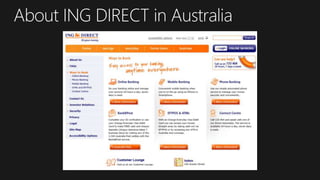
  • #28  Introduce the Bank, Their Core Business and the importance of their core Apps Not an Insignificant Bank in the Australian Landscape 5th largest mortgage lender in Australia with $38 billion in mortgages and $26 billion in deposits Over 1.4 million customers in Australia Low Cost Operating Model Branchless Bank launched in 1999 in Australia, ING DIRECT’s Australian Model is the blueprint for a global business and is now replicated in Canada, Spain, France, Italy, UK, Germany and Austria This model has been copied by the legacy banks in Australia setting up Online Only brands to compete such as UBank, by nab for example. ING Direct’s business model has been to focus on simplicity. By this I mean, only range solutions that are simple to offer, simple to maintain. Examples are: High Interest Savings Accounts Home Mortgages Transactional Banking Being a Branchless Bank Innovation had to manifest in products marketed both online and through call centers. Agility is key to success as the competition is Only a click away.
  • #29 18 Month Backlog in Projects The Bank was at an impass. They had adopted Agile Development however were struggling to complete projects. They had delays in getting access to the right Testing Environments Consistently re-configured for individual Test Requirements Had to book Test Assets Months Ahead Use or lose due to high demand No Ability to take on Additional Work The Pipeline was choked, they could not get what they had out let alone start anything new They also spent much of their time trying to figure out how to avoid doing something due to the bottlenecks Money Not An Issue – Time and Resources constrained Only Two Full Test Environments, and 4 partial test environments Preparing environments for specific projects took months wait for the Infrastructure teams to provision Developers spent as much as 50% of their time building Test Environments to attemp to bypass the bottlenecks rather than coding Not Coding In the end they Had to tell the Business NO to good projects. The Development Team had to say NO to good projects for the business because they knew they could not get them over the line The Innovation Pipeline was Paralysed
  • #31 What we (Microsoft, Netapp, Dimension Data and Cisco delivered) were Simple Self Service Portal for Developers and Testers Rapid Provisioning of Test Environments Automated Test Asset Generation High Availability Environment Simple, Flexible and Cost Effective Licensing