Building a Dynamic Infrastructure Implementing Private Clouds John Pritchard Open Group Distinguished Architect  Office of the CTO, US Federal
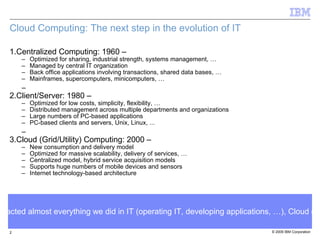
Cloud Computing: The next step in the evolution of IT Centralized Computing: 1960 – Optimized for sharing, industrial strength, systems management, … Managed by central IT organization Back office applications involving transactions, shared data bases, … Mainframes, supercomputers, minicomputers, … Client/Server: 1980 – Optimized for low costs, simplicity, flexibility, … Distributed management across multiple departments and organizations Large numbers of PC-based applications PC-based clients and servers, Unix, Linux, ... Cloud (Grid/Utility) Computing: 2000 – New consumption and delivery model Optimized for massive scalability, delivery of services, … Centralized model, hybrid service acquisition models Supports huge numbers of mobile devices and sensors Internet technology-based architecture Just like the introduction of the Client/Server model impacted almost everything we did in IT (operating IT, developing applications, …), Cloud computing is having significant impact on the IT industry
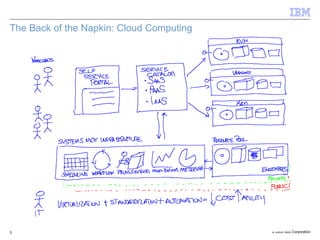
The Back of the Napkin: Cloud Computing
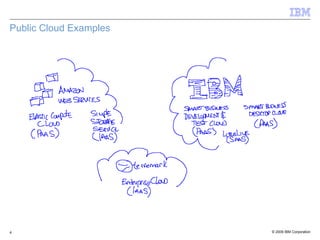
Public Cloud Examples
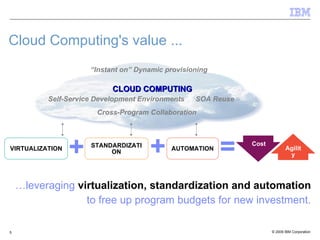
IBM Presentation Template Full Version … leveraging  virtualization, standardization and automation to free up program budgets for new investment. Cloud Computing's value ... CLOUD COMPUTING VIRTUALIZATION STANDARDIZATION AUTOMATION “ Instant on” Dynamic provisioning SOA Reuse Self-Service Development Environments Cross-Program Collaboration Cost   Agility
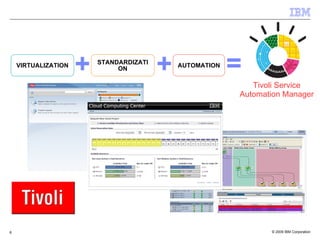
+ + Tivoli Service Automation Manager VIRTUALIZATION STANDARDIZATION AUTOMATION
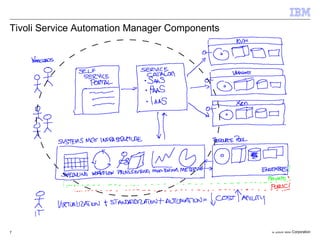
Tivoli Service Automation Manager Components
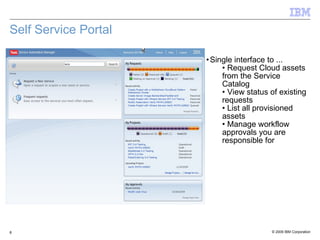
Self Service Portal Single interface to ... Request Cloud assets from the Service Catalog View status of existing requests List all provisioned assets Manage workflow approvals you are responsible for
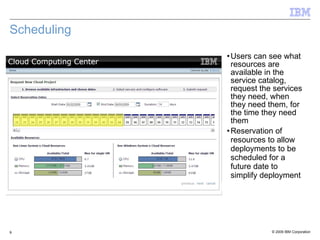
Scheduling Users can see what resources are available in the service catalog, request the services they need, when they need them, for the time they need them Reservation of resources to allow deployments to be scheduled for a future date to simplify deployment
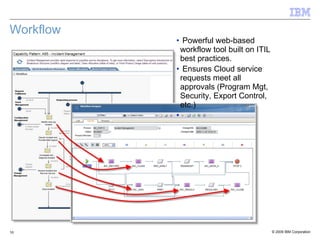
Workflow Powerful web-based workflow tool built on ITIL best practices. Ensures Cloud service requests meet all approvals (Program Mgt, Security, Export Control, etc.)
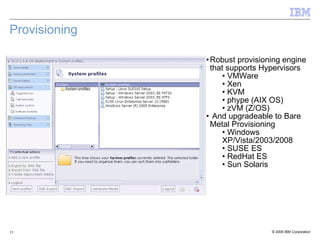
Provisioning Robust provisioning engine that supports Hypervisors VMWare Xen KVM phype (AIX OS) zVM (Z/OS) And upgradeable to Bare Metal Provisioning Windows XP/Vista/2003/2008 SUSE ES RedHat ES Sun Solaris
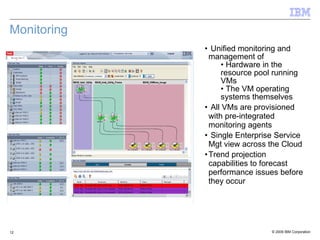
Monitoring Unified monitoring and management of Hardware in the resource pool running VMs The VM operating systems themselves All VMs are provisioned with pre-integrated monitoring agents  Single Enterprise Service Mgt view across the Cloud Trend projection capabilities to forecast performance issues before they occur
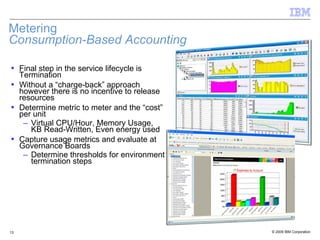
Metering Consumption-Based Accounting Final step in the service lifecycle is Termination Without a “charge-back” approach however there is no incentive to release resources Determine metric to meter and the “cost” per unit Virtual CPU/Hour, Memory Usage, KB Read-Written, Even energy used Capture usage metrics and evaluate at Governance Boards Determine thresholds for environment termination steps
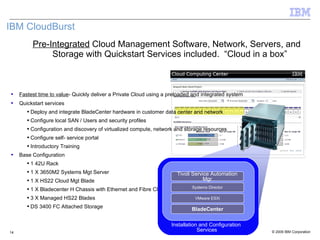
Pre-Integrated  Cloud Management Software, Network, Servers, and Storage with Quickstart Services included.  “Cloud in a box” IBM CloudBurst bch Fastest time to value - Quickly deliver a Private Cloud using a preloaded and integrated system  Quickstart services Deploy and integrate BladeCenter hardware in customer data center and network Configure local SAN / Users and security profiles Configuration and discovery of virtualized compute, network and storage resources Configure self- service portal  Introductory Training Base Configuration 1 42 U  Rack 1 X 3650M2 Systems Mgt Server 1 X HS22 Cloud Mgt Blade 1 X Bladecenter H Chassis with Ethernet and Fibre Channel Switch Modules 3 X Managed HS22 Blades DS 3400 FC Attached Storage BladeCenter VMware ESXi Systems Director Tivoli Service Automation Mgr
Security in Cloud Computing:  Applying all the lessons from the Data Center Model C:\Documents and Settings\Administrator\Local Settings\Temporary Internet Files\Content.IE5\1X7SZIUT\MCj04339410000[1].png C:\Documents and Settings\Administrator\Local Settings\Temporary Internet Files\Content.IE5\1X7SZIUT\MCj04339410000[1].png C:\Documents and Settings\Administrator\Local Settings\Temporary Internet Files\Content.IE5\1X7SZIUT\MCj04339410000[1].png C:\Documents and Settings\Administrator\Local Settings\Temporary Internet Files\Content.IE5\1X7SZIUT\MCj04339410000[1].png C:\Documents and Settings\Administrator\Local Settings\Temporary Internet Files\Content.IE5\1X7SZIUT\MCj04339410000[1].png Data Location (cloud data centers) Disaster Recovery (highly resilient clouds) Cloud Availability (multiple cloud centers) Server Security (trusted computing, auditing, access control) Network Security (Firewall, IPS, VLAN) Virtualization Security (VM Segmentation, Virtual Appliances, Integrated Hypervisor Security) Browser Security (ssl, memory protection, multi-level security, anti-malware) Patch Management (assessment, prioritization, scheduling, and application) Compliance and Auditing (audit policy creation, log generation and management) Investigative Support (audit retention, search, and correlation) Policy Management (unified security, governance, and policy enforcement) Secure Provisioning (image management, hardening, cohabitation policies) Application Testing (vulnerability asmnt., fuzzing, app scanning, automated code reviews) Data Segregation (encryption, network segmentation, Hardware / OS /  App / Database isolation) Data Recovery (centralized backups, remote storage) Data Redaction  and Termination (secure removal processes for customer data and metadata) Data Leakage Prevention (DLP technologies for data in motion and data at rest) Privileged User Access (centralized access and audit policies, directories) Federated Identity Management (single sign-on, identity provisioning technologies) Privileged Account Management  (change control processes for privileged users) People and Identity Data and Information Application and Process Network, Server, and Endpoint Physical Infrastructure
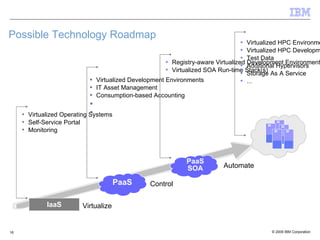
Possible Technology Roadmap IaaS PaaS SOA Virtualize Control Automate Virtualized Operating Systems Self-Service Portal Monitoring Virtualized Development Environments IT Asset Management Consumption-based Accounting Registry-aware Virtualized Development Environments Virtualized SOA Run-time Stack(s) PaaS Virtualized HPC Environments Virtualized HPC Development Tools Test Data Additional Hypervisors Storage As A Service ...

Implementing Private Clouds

  • 1.
    Building a DynamicInfrastructure Implementing Private Clouds John Pritchard Open Group Distinguished Architect Office of the CTO, US Federal
  • 2.
    Cloud Computing: Thenext step in the evolution of IT Centralized Computing: 1960 – Optimized for sharing, industrial strength, systems management, … Managed by central IT organization Back office applications involving transactions, shared data bases, … Mainframes, supercomputers, minicomputers, … Client/Server: 1980 – Optimized for low costs, simplicity, flexibility, … Distributed management across multiple departments and organizations Large numbers of PC-based applications PC-based clients and servers, Unix, Linux, ... Cloud (Grid/Utility) Computing: 2000 – New consumption and delivery model Optimized for massive scalability, delivery of services, … Centralized model, hybrid service acquisition models Supports huge numbers of mobile devices and sensors Internet technology-based architecture Just like the introduction of the Client/Server model impacted almost everything we did in IT (operating IT, developing applications, …), Cloud computing is having significant impact on the IT industry
  • 3.
    The Back ofthe Napkin: Cloud Computing
  • 4.
  • 5.
    IBM Presentation TemplateFull Version … leveraging virtualization, standardization and automation to free up program budgets for new investment. Cloud Computing's value ... CLOUD COMPUTING VIRTUALIZATION STANDARDIZATION AUTOMATION “ Instant on” Dynamic provisioning SOA Reuse Self-Service Development Environments Cross-Program Collaboration Cost Agility
  • 6.
    + + TivoliService Automation Manager VIRTUALIZATION STANDARDIZATION AUTOMATION
  • 7.
    Tivoli Service AutomationManager Components
  • 8.
    Self Service PortalSingle interface to ... Request Cloud assets from the Service Catalog View status of existing requests List all provisioned assets Manage workflow approvals you are responsible for
  • 9.
    Scheduling Users cansee what resources are available in the service catalog, request the services they need, when they need them, for the time they need them Reservation of resources to allow deployments to be scheduled for a future date to simplify deployment
  • 10.
    Workflow Powerful web-basedworkflow tool built on ITIL best practices. Ensures Cloud service requests meet all approvals (Program Mgt, Security, Export Control, etc.)
  • 11.
    Provisioning Robust provisioningengine that supports Hypervisors VMWare Xen KVM phype (AIX OS) zVM (Z/OS) And upgradeable to Bare Metal Provisioning Windows XP/Vista/2003/2008 SUSE ES RedHat ES Sun Solaris
  • 12.
    Monitoring Unified monitoringand management of Hardware in the resource pool running VMs The VM operating systems themselves All VMs are provisioned with pre-integrated monitoring agents Single Enterprise Service Mgt view across the Cloud Trend projection capabilities to forecast performance issues before they occur
  • 13.
    Metering Consumption-Based AccountingFinal step in the service lifecycle is Termination Without a “charge-back” approach however there is no incentive to release resources Determine metric to meter and the “cost” per unit Virtual CPU/Hour, Memory Usage, KB Read-Written, Even energy used Capture usage metrics and evaluate at Governance Boards Determine thresholds for environment termination steps
  • 14.
    Pre-Integrated CloudManagement Software, Network, Servers, and Storage with Quickstart Services included. “Cloud in a box” IBM CloudBurst bch Fastest time to value - Quickly deliver a Private Cloud using a preloaded and integrated system Quickstart services Deploy and integrate BladeCenter hardware in customer data center and network Configure local SAN / Users and security profiles Configuration and discovery of virtualized compute, network and storage resources Configure self- service portal Introductory Training Base Configuration 1 42 U Rack 1 X 3650M2 Systems Mgt Server 1 X HS22 Cloud Mgt Blade 1 X Bladecenter H Chassis with Ethernet and Fibre Channel Switch Modules 3 X Managed HS22 Blades DS 3400 FC Attached Storage BladeCenter VMware ESXi Systems Director Tivoli Service Automation Mgr
  • 15.
    Security in CloudComputing: Applying all the lessons from the Data Center Model C:\Documents and Settings\Administrator\Local Settings\Temporary Internet Files\Content.IE5\1X7SZIUT\MCj04339410000[1].png C:\Documents and Settings\Administrator\Local Settings\Temporary Internet Files\Content.IE5\1X7SZIUT\MCj04339410000[1].png C:\Documents and Settings\Administrator\Local Settings\Temporary Internet Files\Content.IE5\1X7SZIUT\MCj04339410000[1].png C:\Documents and Settings\Administrator\Local Settings\Temporary Internet Files\Content.IE5\1X7SZIUT\MCj04339410000[1].png C:\Documents and Settings\Administrator\Local Settings\Temporary Internet Files\Content.IE5\1X7SZIUT\MCj04339410000[1].png Data Location (cloud data centers) Disaster Recovery (highly resilient clouds) Cloud Availability (multiple cloud centers) Server Security (trusted computing, auditing, access control) Network Security (Firewall, IPS, VLAN) Virtualization Security (VM Segmentation, Virtual Appliances, Integrated Hypervisor Security) Browser Security (ssl, memory protection, multi-level security, anti-malware) Patch Management (assessment, prioritization, scheduling, and application) Compliance and Auditing (audit policy creation, log generation and management) Investigative Support (audit retention, search, and correlation) Policy Management (unified security, governance, and policy enforcement) Secure Provisioning (image management, hardening, cohabitation policies) Application Testing (vulnerability asmnt., fuzzing, app scanning, automated code reviews) Data Segregation (encryption, network segmentation, Hardware / OS / App / Database isolation) Data Recovery (centralized backups, remote storage) Data Redaction and Termination (secure removal processes for customer data and metadata) Data Leakage Prevention (DLP technologies for data in motion and data at rest) Privileged User Access (centralized access and audit policies, directories) Federated Identity Management (single sign-on, identity provisioning technologies) Privileged Account Management (change control processes for privileged users) People and Identity Data and Information Application and Process Network, Server, and Endpoint Physical Infrastructure
  • 16.
    Possible Technology RoadmapIaaS PaaS SOA Virtualize Control Automate Virtualized Operating Systems Self-Service Portal Monitoring Virtualized Development Environments IT Asset Management Consumption-based Accounting Registry-aware Virtualized Development Environments Virtualized SOA Run-time Stack(s) PaaS Virtualized HPC Environments Virtualized HPC Development Tools Test Data Additional Hypervisors Storage As A Service ...