Exploring Technology Trends
within Financial Services
Scott Key, VMware
Brian Martinez, VMware
OPT4980
#OPT4980
2
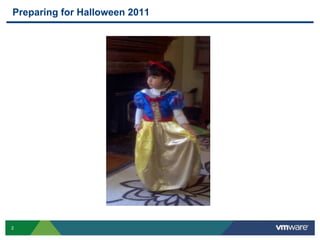
Preparing for Halloween 2011
3
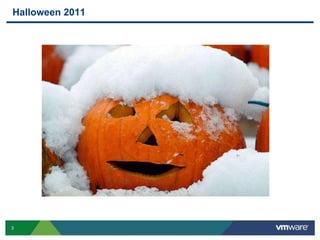
Halloween 2011
4
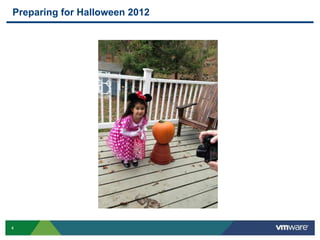
Preparing for Halloween 2012
5
Halloween 2012
6
VMware & Financial Services
(and how it relates to Halloween)
7
Business Issues Facing Financial Services
Time to Market too slow for new products/functionality/regulation
• Competition drives need to be first to market
• Unstable markets and economy leads to unplanned activity
• Managed Service that provides clarity around the offering
• Uncertainty around regulation & fear of not being able to scale to manage
Resiliency/Availability of Applications for Customers
• Majority of customers depend on applications for 100% of their interaction
• If applications are not available 24/7, customers will leave
• Applications must remain available even during disasters
Customer Retention/Attraction
• Generational gap – existing customers vs. new
• Need for multi-channel business
• Trust issues after financial crisis
Cost Reduction
• Margins continue to get smaller
• Regulatory changes decreasing fee revenue, adding reporting/retention cost
• Financial Services stocks still not strong after crisis
8
How Can IT Help with These Issues?
Biggest FS internal customer for Central IT is business aligned
development teams
What do they need?
 They need environments quickly for new functionality
 Apps need better QoS and reliability with real time 24/7 availability
 Agility to scale Apps up and out quickly at a low cost
At the end of the day…it is all about the App and getting functionality out
ahead of the competition
9
So How Does IT Show Value to the Business?
 Infrastructure is becoming a commodity…
Central IT Teams must focus on the Apps
 No more Infrastructure and OS, then throw it over the
wall to the business…you will be replaced
Central IT teams must understand and get involved with
the business and the applications…
Give the development teams ready to use environments
quickly, not just infrastructure…
IT as a Service
10
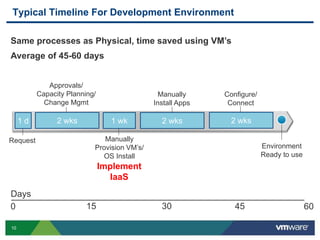
Typical Timeline For Development Environment
Request Manually
Provision VM’s/
OS Install
Configure/
Connect
Approvals/
Capacity Planning/
Change Mgmt
Manually
Install Apps
Environment
Ready to use
2 wks2 wks1 wk2 wks1 d
0 15 30 45 60
Days
Implement
IaaS
Same processes as Physical, time saved using VM’s
Average of 45-60 days
11
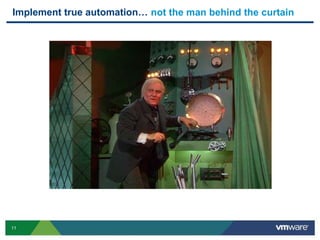
Implement true automation… not the man behind the curtain
IaaS
XaaS
12
Request Automatically
Provision VM’s/
OS Install
Configure/
Connect
Approvals/
Capacity Planning/
Change Mgmt
Manually
Install Apps
Environment
Ready to use
2 wks2 wks1 d2 wks1 d
0 15 30 45 60
Days
Implement
Service Catalog & Definition
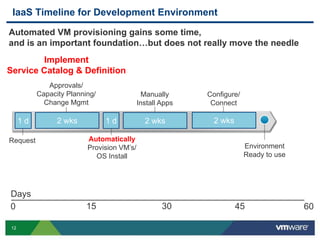
IaaS Timeline for Development Environment
Automated VM provisioning gains some time,
and is an important foundation…but does not really move the needle
13
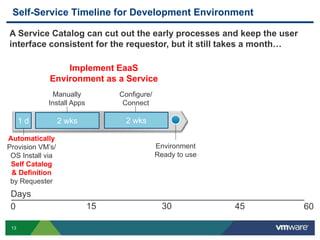
Self-Service Timeline for Development Environment
Automatically
Provision VM’s/
OS Install via
Self Catalog
& Definition
by Requester
Configure/
Connect
Manually
Install Apps
Environment
Ready to use
2 wks2 wks1 d
0 15 30 45 60
Days
Implement EaaS
Environment as a Service
A Service Catalog can cut out the early processes and keep the user
interface consistent for the requestor, but it still takes a month…
14
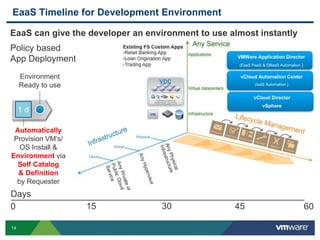
EaaS Timeline for Development Environment
Automatically
Provision VM’s/
OS Install &
Environment via
Self Catalog
& Definition
by Requester
Environment
Ready to use
1 d
0 15 30 45 60
Days
EaaS can give the developer an environment to use almost instantly
Policy based
App Deployment
vCloud Automation Center
(IaaS Automation )
VMWare Application Director
(EaaS PaaS & DBaaS Automation )
vCloud Director
vSphere
15
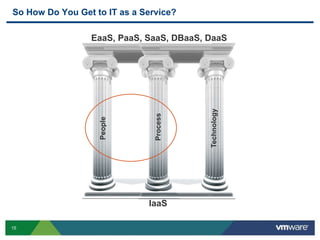
So How Do You Get to IT as a Service?
Technology
People
Process
IaaS
EaaS, PaaS, SaaS, DBaaS, DaaS
16
People
(There are plenty of sessions on the technology)
17
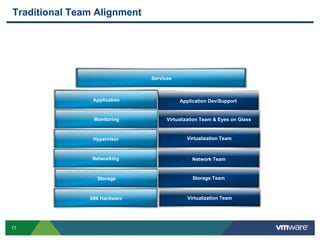
Traditional Team Alignment
Monitoring
Hypervisor
Networking
Storage
X86 Hardware
Services
Virtualization Team
Network Team
Storage Team
Application
Virtualization Team
Virtualization Team & Eyes on Glass
Application Dev/Support
18
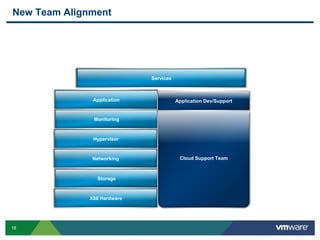
New Team Alignment
Monitoring
Hypervisor
Networking
Storage
X86 Hardware
Application
Cloud Support Team
Application Dev/Support
Services
19
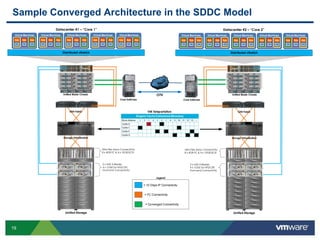
Sample Converged Architecture in the SDDC Model
Legend
= 10 Gbps IP Connectivity
= FC Connectivity
= Converged Connectivity
WAN
VM Teleportation
Datacenter #1 – Core 1
Virtual Machines
App
OS
App
OS
App
OS
ESX Server
Virtual Machines
App
OS
App
OS
App
OS
ESX Server
Virtual Machines
App
OS
App
OS
App
OS
ESX Server
Virtual Machines
App
OS
App
OS
App
OS
ESX Server
Virtual Machines
App
OS
App
OS
App
OS
ESX ServerDistributed vSwitch
SAN Fabric
Core Switches
Unified Storage
2 x NAS X-Blades
4 x 1GbE for NFS/CIFS
Front-end Connectivity
Ultra Flex Array Connectivity
8 x 4GB FC & 4 x 10GB ISCSI
Storage Virtualization
Unified Blade Chassis
`
Datacenter #2 – Core 2
Virtual Machines
App
OS
App
OS
App
OS
ESX Server
Virtual Machines
App
OS
App
OS
App
OS
ESX Server
Virtual Machines
App
OS
App
OS
App
OS
ESX Server
Virtual Machines
App
OS
App
OS
App
OS
ESX Server
Virtual Machines
App
OS
App
OS
App
OS
ESX Server Distributed vSwitch
SAN Fabric
Core Switches
Unified Storage
2 x NAS X-Blades
4 x 1GbE for NFS/CIFS
Front-end Connectivity
Ultra Flex Array Connectivity
8 x 4GB FC & 4 x 10GB ISCSI
Storage VIrtualization
Unified Blade ChassisOTV
20
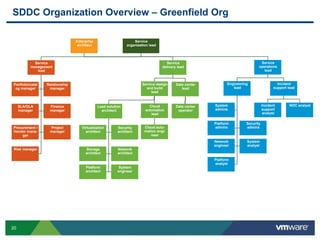
SDDC Organization Overview – Greenfield Org
Service design
and build
lead
Service
management
lead
Portfolio/catal
og manager
Relationship
manager
SLA/OLA
manager
Finance
manager
Procurement /
Vendor mana-
ger
Project
manager
Risk manager
Service
delivery lead
Enterprise
architect
Cloud
automation
lead
Cloud auto-
mation engi-
neer
Service
operations
lead
Lead solution
architect
Virtualization
architect
Security
architect
Storage
architect
Network
architect
Platform
architect
System
engineer
Incident
support lead
Incident
support
analyst
NOC analyst
Data center
lead
Data center
operator
Engineering
lead
System
admins
Platform
admins
Security
admins
Network
engineer
System
analyst
Platform
analyst
Service
organization lead
22
Process
(There are still plenty of sessions on the technology)
23
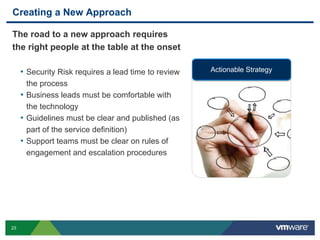
Creating a New Approach
The road to a new approach requires
the right people at the table at the onset
• Security Risk requires a lead time to review
the process
• Business leads must be comfortable with
the technology
• Guidelines must be clear and published (as
part of the service definition)
• Support teams must be clear on rules of
engagement and escalation procedures
Actionable Strategy
24
Service Definition
A service definition defines the contract between you and your
customer
• Define work windows
• Clarify notification process
• Ensure clearly defined SLEs (Service Level Expectation)
• List pricing and utilization costs (More on that shortly)
• Define available reporting
• Layout process for requesting a non-standard request
25
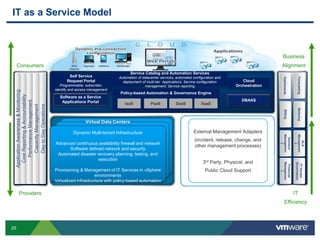
IT as a Service Model
Consumers
Providers
Business
Alignment
IT
Efficiency
Dynamic Multi-tenant Infrastructure
Built on Virtual
Virtual Infrastructure
Dynamic Multi-tenant Infrastructure
Built on Virtual
Virtual Infrastructure
Virtual Data Centers
Dynamic Multi-tenant Infrastructure
Advanced continuous availability firewall and network
Software defined network and security
Automated disaster recovery planning, testing, and
execution
Provisioning & Management of IT Services in vSphere
environments
Virtualized infrastructure with policy-based automation
External Management Adapters
(incident, release, change, and
other management processes)
3rd Party, Physical, and
Public Cloud Support
Service Catalog and Automation Services
Automation of datacenter services; automated configuration and
deployment of multi-tier Applications; Service configuration
management; Service reporting
Self Service
Request Portal
Programmable; subscriber,
identify and access management
Policy-based Automation & Governance Engine
IaaS PaaS XaaSDaaS
Cloud
Orchestration
Software as a Service
Applications Portal DBAAS
PerformanceManagement
DaytoDayOperations
CapacityManagement
CostReporting&Accountability
ApplicationAwareness&Monitoring
Metering
SLA
Managemen
t
ITVendor
Governance
Financial
Managemen
t
Billing
Forecasting
Demand
Managemen
t
Dashboards
26
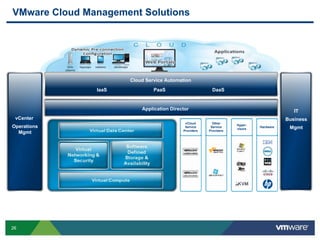
VMware Cloud Management Solutions
vCenter
Operations
Mgmt
IT
Business
Mgmt
Cloud Service Automation
IaaS PaaS DaaS
Application Director
vSphere SDDC Hardware
vCloud
Service
Providers
Hyper-
visors
Other
Service
Providers
27
Process – Financial Management
(Have we mentioned all the great sessions on the technology)
28
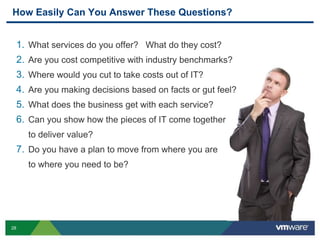
How Easily Can You Answer These Questions?
1. What services do you offer? What do they cost?
2. Are you cost competitive with industry benchmarks?
3. Where would you cut to take costs out of IT?
4. Are you making decisions based on facts or gut feel?
5. What does the business get with each service?
6. Can you show how the pieces of IT come together
to deliver value?
7. Do you have a plan to move from where you are
to where you need to be?
29
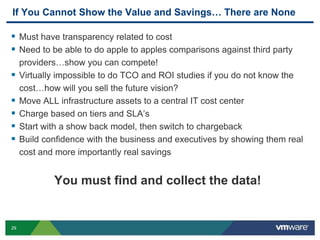
If You Cannot Show the Value and Savings… There are None
 Must have transparency related to cost
 Need to be able to do apple to apples comparisons against third party
providers…show you can compete!
 Virtually impossible to do TCO and ROI studies if you do not know the
cost…how will you sell the future vision?
 Move ALL infrastructure assets to a central IT cost center
 Charge based on tiers and SLA’s
 Start with a show back model, then switch to chargeback
 Build confidence with the business and executives by showing them real
cost and more importantly real savings
You must find and collect the data!
30
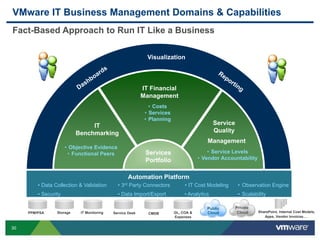
Visualization
• Service Levels
• Vendor Accountability
Service
Quality
Management
VMware IT Business Management Domains & Capabilities
PPM/PSA Storage IT Monitoring Service Desk CMDB SharePoint, Internal Cost Models,
Apps, Vendor Invoices…
GL, COA &
Expenses
Private
Cloud
Public
Cloud
IT Financial
Management
• Costs
• Services
• Planning
IT
Benchmarking
• Objective Evidence
• Functional Peers Services
Portfolio
• Data Collection & Validation
• Security
• 3rd Party Connectors
• Data Import/Export
• Observation Engine
• Scalability
Automation Platform
• IT Cost Modeling
• Analytics
Fact-Based Approach to Run IT Like a Business
31
Questions?
32
Other VMware Activities Related to This Session
 HOL:
HOL-SDC-1314
vCloud Suite Use Cases - Application Provisioning (PaaS)
 Group Discussions:
OPT1004-GD
IT Financial Management for the Cloud with Khalid Hakim
THANK YOU
Exploring Technology Trends
within Financial Services
Scott Key, VMware
Brian Martinez, VMware
OPT4980
#OPT4980

VMworld 2013: Exploring Technology Trends within Financial Services

  • 1.
    Exploring Technology Trends withinFinancial Services Scott Key, VMware Brian Martinez, VMware OPT4980 #OPT4980
  • 2.
  • 3.
  • 4.
  • 5.
  • 6.
    6 VMware & FinancialServices (and how it relates to Halloween)
  • 7.
    7 Business Issues FacingFinancial Services Time to Market too slow for new products/functionality/regulation • Competition drives need to be first to market • Unstable markets and economy leads to unplanned activity • Managed Service that provides clarity around the offering • Uncertainty around regulation & fear of not being able to scale to manage Resiliency/Availability of Applications for Customers • Majority of customers depend on applications for 100% of their interaction • If applications are not available 24/7, customers will leave • Applications must remain available even during disasters Customer Retention/Attraction • Generational gap – existing customers vs. new • Need for multi-channel business • Trust issues after financial crisis Cost Reduction • Margins continue to get smaller • Regulatory changes decreasing fee revenue, adding reporting/retention cost • Financial Services stocks still not strong after crisis
  • 8.
    8 How Can ITHelp with These Issues? Biggest FS internal customer for Central IT is business aligned development teams What do they need?  They need environments quickly for new functionality  Apps need better QoS and reliability with real time 24/7 availability  Agility to scale Apps up and out quickly at a low cost At the end of the day…it is all about the App and getting functionality out ahead of the competition
  • 9.
    9 So How DoesIT Show Value to the Business?  Infrastructure is becoming a commodity… Central IT Teams must focus on the Apps  No more Infrastructure and OS, then throw it over the wall to the business…you will be replaced Central IT teams must understand and get involved with the business and the applications… Give the development teams ready to use environments quickly, not just infrastructure… IT as a Service
  • 10.
    10 Typical Timeline ForDevelopment Environment Request Manually Provision VM’s/ OS Install Configure/ Connect Approvals/ Capacity Planning/ Change Mgmt Manually Install Apps Environment Ready to use 2 wks2 wks1 wk2 wks1 d 0 15 30 45 60 Days Implement IaaS Same processes as Physical, time saved using VM’s Average of 45-60 days
  • 11.
    11 Implement true automation…not the man behind the curtain IaaS XaaS
  • 12.
    12 Request Automatically Provision VM’s/ OSInstall Configure/ Connect Approvals/ Capacity Planning/ Change Mgmt Manually Install Apps Environment Ready to use 2 wks2 wks1 d2 wks1 d 0 15 30 45 60 Days Implement Service Catalog & Definition IaaS Timeline for Development Environment Automated VM provisioning gains some time, and is an important foundation…but does not really move the needle
  • 13.
    13 Self-Service Timeline forDevelopment Environment Automatically Provision VM’s/ OS Install via Self Catalog & Definition by Requester Configure/ Connect Manually Install Apps Environment Ready to use 2 wks2 wks1 d 0 15 30 45 60 Days Implement EaaS Environment as a Service A Service Catalog can cut out the early processes and keep the user interface consistent for the requestor, but it still takes a month…
  • 14.
    14 EaaS Timeline forDevelopment Environment Automatically Provision VM’s/ OS Install & Environment via Self Catalog & Definition by Requester Environment Ready to use 1 d 0 15 30 45 60 Days EaaS can give the developer an environment to use almost instantly Policy based App Deployment vCloud Automation Center (IaaS Automation ) VMWare Application Director (EaaS PaaS & DBaaS Automation ) vCloud Director vSphere
  • 15.
    15 So How DoYou Get to IT as a Service? Technology People Process IaaS EaaS, PaaS, SaaS, DBaaS, DaaS
  • 16.
    16 People (There are plentyof sessions on the technology)
  • 17.
    17 Traditional Team Alignment Monitoring Hypervisor Networking Storage X86Hardware Services Virtualization Team Network Team Storage Team Application Virtualization Team Virtualization Team & Eyes on Glass Application Dev/Support
  • 18.
    18 New Team Alignment Monitoring Hypervisor Networking Storage X86Hardware Application Cloud Support Team Application Dev/Support Services
  • 19.
    19 Sample Converged Architecturein the SDDC Model Legend = 10 Gbps IP Connectivity = FC Connectivity = Converged Connectivity WAN VM Teleportation Datacenter #1 – Core 1 Virtual Machines App OS App OS App OS ESX Server Virtual Machines App OS App OS App OS ESX Server Virtual Machines App OS App OS App OS ESX Server Virtual Machines App OS App OS App OS ESX Server Virtual Machines App OS App OS App OS ESX ServerDistributed vSwitch SAN Fabric Core Switches Unified Storage 2 x NAS X-Blades 4 x 1GbE for NFS/CIFS Front-end Connectivity Ultra Flex Array Connectivity 8 x 4GB FC & 4 x 10GB ISCSI Storage Virtualization Unified Blade Chassis ` Datacenter #2 – Core 2 Virtual Machines App OS App OS App OS ESX Server Virtual Machines App OS App OS App OS ESX Server Virtual Machines App OS App OS App OS ESX Server Virtual Machines App OS App OS App OS ESX Server Virtual Machines App OS App OS App OS ESX Server Distributed vSwitch SAN Fabric Core Switches Unified Storage 2 x NAS X-Blades 4 x 1GbE for NFS/CIFS Front-end Connectivity Ultra Flex Array Connectivity 8 x 4GB FC & 4 x 10GB ISCSI Storage VIrtualization Unified Blade ChassisOTV
  • 20.
    20 SDDC Organization Overview– Greenfield Org Service design and build lead Service management lead Portfolio/catal og manager Relationship manager SLA/OLA manager Finance manager Procurement / Vendor mana- ger Project manager Risk manager Service delivery lead Enterprise architect Cloud automation lead Cloud auto- mation engi- neer Service operations lead Lead solution architect Virtualization architect Security architect Storage architect Network architect Platform architect System engineer Incident support lead Incident support analyst NOC analyst Data center lead Data center operator Engineering lead System admins Platform admins Security admins Network engineer System analyst Platform analyst Service organization lead
  • 21.
    22 Process (There are stillplenty of sessions on the technology)
  • 22.
    23 Creating a NewApproach The road to a new approach requires the right people at the table at the onset • Security Risk requires a lead time to review the process • Business leads must be comfortable with the technology • Guidelines must be clear and published (as part of the service definition) • Support teams must be clear on rules of engagement and escalation procedures Actionable Strategy
  • 23.
    24 Service Definition A servicedefinition defines the contract between you and your customer • Define work windows • Clarify notification process • Ensure clearly defined SLEs (Service Level Expectation) • List pricing and utilization costs (More on that shortly) • Define available reporting • Layout process for requesting a non-standard request
  • 24.
    25 IT as aService Model Consumers Providers Business Alignment IT Efficiency Dynamic Multi-tenant Infrastructure Built on Virtual Virtual Infrastructure Dynamic Multi-tenant Infrastructure Built on Virtual Virtual Infrastructure Virtual Data Centers Dynamic Multi-tenant Infrastructure Advanced continuous availability firewall and network Software defined network and security Automated disaster recovery planning, testing, and execution Provisioning & Management of IT Services in vSphere environments Virtualized infrastructure with policy-based automation External Management Adapters (incident, release, change, and other management processes) 3rd Party, Physical, and Public Cloud Support Service Catalog and Automation Services Automation of datacenter services; automated configuration and deployment of multi-tier Applications; Service configuration management; Service reporting Self Service Request Portal Programmable; subscriber, identify and access management Policy-based Automation & Governance Engine IaaS PaaS XaaSDaaS Cloud Orchestration Software as a Service Applications Portal DBAAS PerformanceManagement DaytoDayOperations CapacityManagement CostReporting&Accountability ApplicationAwareness&Monitoring Metering SLA Managemen t ITVendor Governance Financial Managemen t Billing Forecasting Demand Managemen t Dashboards
  • 25.
    26 VMware Cloud ManagementSolutions vCenter Operations Mgmt IT Business Mgmt Cloud Service Automation IaaS PaaS DaaS Application Director vSphere SDDC Hardware vCloud Service Providers Hyper- visors Other Service Providers
  • 26.
    27 Process – FinancialManagement (Have we mentioned all the great sessions on the technology)
  • 27.
    28 How Easily CanYou Answer These Questions? 1. What services do you offer? What do they cost? 2. Are you cost competitive with industry benchmarks? 3. Where would you cut to take costs out of IT? 4. Are you making decisions based on facts or gut feel? 5. What does the business get with each service? 6. Can you show how the pieces of IT come together to deliver value? 7. Do you have a plan to move from where you are to where you need to be?
  • 28.
    29 If You CannotShow the Value and Savings… There are None  Must have transparency related to cost  Need to be able to do apple to apples comparisons against third party providers…show you can compete!  Virtually impossible to do TCO and ROI studies if you do not know the cost…how will you sell the future vision?  Move ALL infrastructure assets to a central IT cost center  Charge based on tiers and SLA’s  Start with a show back model, then switch to chargeback  Build confidence with the business and executives by showing them real cost and more importantly real savings You must find and collect the data!
  • 29.
    30 Visualization • Service Levels •Vendor Accountability Service Quality Management VMware IT Business Management Domains & Capabilities PPM/PSA Storage IT Monitoring Service Desk CMDB SharePoint, Internal Cost Models, Apps, Vendor Invoices… GL, COA & Expenses Private Cloud Public Cloud IT Financial Management • Costs • Services • Planning IT Benchmarking • Objective Evidence • Functional Peers Services Portfolio • Data Collection & Validation • Security • 3rd Party Connectors • Data Import/Export • Observation Engine • Scalability Automation Platform • IT Cost Modeling • Analytics Fact-Based Approach to Run IT Like a Business
  • 30.
  • 31.
    32 Other VMware ActivitiesRelated to This Session  HOL: HOL-SDC-1314 vCloud Suite Use Cases - Application Provisioning (PaaS)  Group Discussions: OPT1004-GD IT Financial Management for the Cloud with Khalid Hakim
  • 32.
  • 34.
    Exploring Technology Trends withinFinancial Services Scott Key, VMware Brian Martinez, VMware OPT4980 #OPT4980