Enabling the vision of the Modern Datacenter 
System Center 2012 SP2 
Azure
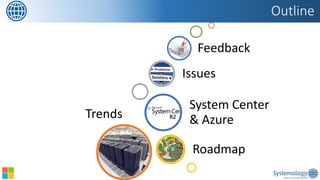
Trends 
Roadmap 
System Center & Azure 
Issues 
Feedback 
Outline
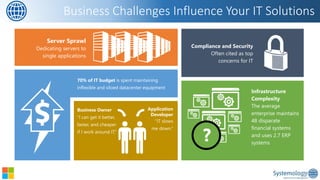
Business Challenges Influence Your IT Solutions 
70% of IT budget is spent maintaining inflexible and siloed datacenter equipment 
Infrastructure Complexity 
The average enterprise maintains 48disparate financial systems and uses 2.7 ERP systems 
Server Sprawl Dedicating servers to single applications 
Application Developer 
“IT slowsme down.” 
Business Owner “I can get it better, faster, and cheaper if I work around IT.” 
Compliance and Security 
Often cited as top concerns for IT
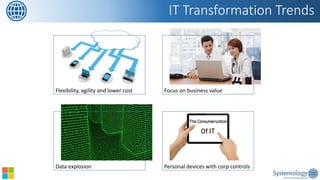
IT Transformation Trends 
Flexibility, agility and lower cost 
Focus on business value 
Data explosion 
Personal devices with corpcontrols
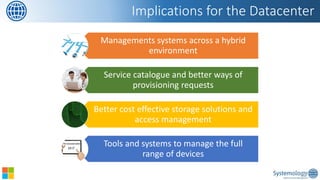
Managements systems across a hybrid environment 
Service catalogue and better ways of provisioning requests 
Better cost effective storage solutions and access management 
Tools and systems to manage the full range of devices 
Implications for the Datacenter
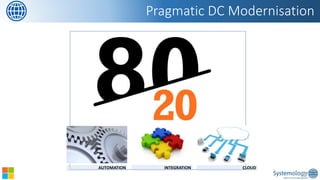
Pragmatic DC Modernisation 
AUTOMATION 
INTEGRATION 
CLOUD
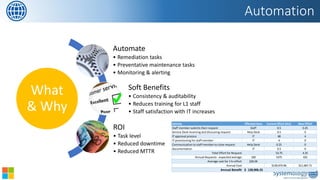
Automation 
What & Why 
Automate 
•Remediation tasks 
•Preventative maintenance tasks 
•Monitoring & alerting 
Soft Benefits 
•Consistency & auditability 
•Reduces training for L1 staff 
•Staff satisfaction with IT increases 
ROI 
•Task level 
•Reduced downtime 
•Reduced MTTR 
ActivityEffected AreaCurrent Effort (Hrs)New EffortStaff member submits their requestStaff0.50.25Service Desk receiving and discussing requestHelp Desk0.50IT approval processIT484IT provisioning for staff memberIT40Communication to staff member to close requestHelp Desk0.250DocumentationIT0.50Total Effort for Request53.754.25Annual Requests - expected average1005375425Average cost for 1 hr effort$26.04Annual Cost$139,973.96$11,067.71Annual Benefit128,906.25$
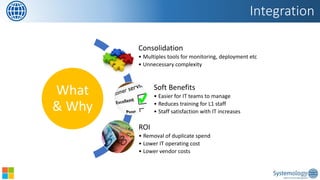
Integration 
What & Why 
Consolidation 
•Multiples tools for monitoring, deployment etc 
•Unnecessary complexity 
Soft Benefits 
•Easier for IT teams to manage 
•Reduces training for L1 staff 
•Staff satisfaction with IT increases 
ROI 
•Removal of duplicate spend 
•Lower IT operating cost 
•Lower vendor costs
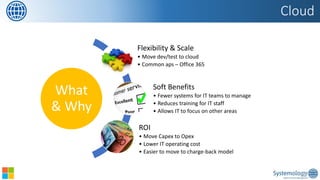
Cloud 
What & Why 
Flexibility & Scale 
•Move dev/test to cloud 
•Common aps –Office 365 
Soft Benefits 
•Fewer systems for IT teams to manage 
•Reduces training for IT staff 
•Allows IT to focus on other areas 
ROI 
•Move Capexto Opex 
•Lower IT operating cost 
•Easier to move to charge-back model
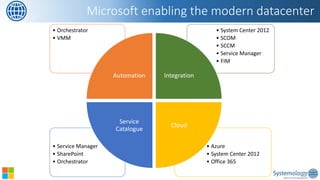
•Azure 
•System Center 2012 
•Office 365 
•Service Manager 
•SharePoint 
•Orchestrator 
•System Center 2012 
•SCOM 
•SCCM 
•Service Manager 
•FIM 
•Orchestrator 
•VMM 
Automation 
Integration 
Cloud 
Service Catalogue 
Microsoft enabling the modern datacenter
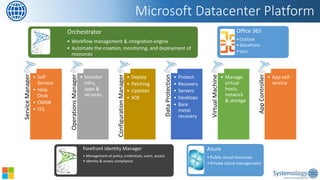
Service Manager 
•Self Service 
•Help Desk 
•CMDB 
•ITIL 
Operations Manager 
•Monitor infra, apps & services 
Configuration Manager 
•Deploy 
•Patching 
•Updates 
•SOE 
Data Protection Manager 
•Protect 
•Recovery 
•Servers 
•Desktops 
•Bare metal recovery 
Virtual Machine Manager 
•Manage virtual hosts, network & storage 
App Controller 
•App self service 
Microsoft Datacenter Platform 
Orchestrator 
•Workflow management & integration engine 
•Automate the creation, monitoring, and deployment of resources 
Forefront Identity Manager 
•Management of policy, credentials, users, access 
•Identity & access compliance 
Azure 
•Public cloud resources 
•Private cloud management 
Office 365 
•Outlook 
•SharePoint 
•Lync
Orchestration
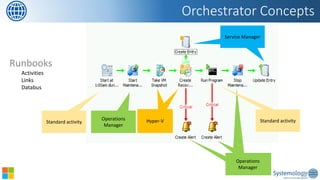
Runbooks 
Activities 
Links 
Databus 
Orchestrator Concepts 
Standard activity 
Operations Manager 
Operations Manager 
Operations Manager 
VMware 
Standard activity 
HP Service Manager 
Service Manager 
Hyper-V
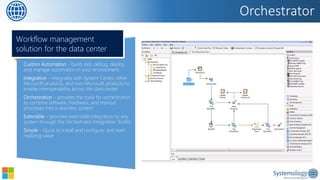
Orchestrator 
Custom Automation –build, test, debug, deploy, and manage automation in your environment. 
Integration–integrates with System Center, other Microsoft products, and non-Microsoft products to enable interoperability across the data center 
Orchestration–provides the tools for orchestration to combine software, hardware, and manual processes into a seamless system 
Extensible–provides extensible integration to any system through the Orchestrator Integration Toolkit 
Simple–Quick to install and configure, and start realizing value 
Workflow management solution for the data center
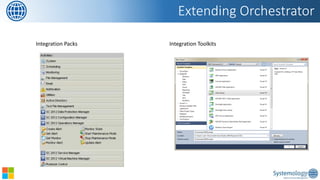
Extending Orchestrator 
Integration Packs 
Integration Toolkits
Virtual Machine Management 
Demo: Orchestrator
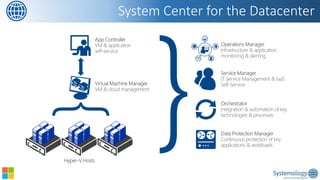
System Center for the Datacenter 
{
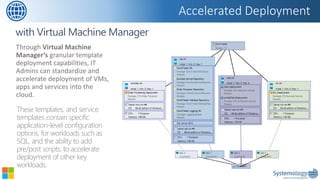
Through Virtual Machine Manager’sgranular template deployment capabilities, IT Admins can standardize and accelerate deployment of VMs, apps and services into the cloud. 
Accelerated Deployment 
These templates, and service templates contain specific application-level configuration options, for workloads such as SQL, and the ability to add pre/post scripts, to accelerate deployment of other key workloads.
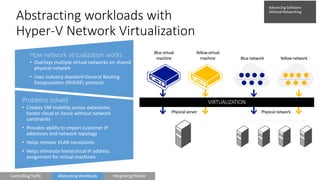
How network virtualization works 
•Overlays multiple virtual networks on shared physical network 
•Uses industry standard General Routing Encapsulation (NVGRE) protocol 
Problems solved 
•Creates VM mobility across datacenter, hoster cloud or Azure without network constraints 
•Provides ability to import customer IP addresses and network topology 
•Helps remove VLAN constraints 
•Helps eliminate hierarchical IP address assignment for virtual machines 
Abstracting workloads with Hyper-V Network Virtualization 
Physical server 
Physical network 
Blue virtual machine 
Yellow virtual machine 
Blue network 
Yellow network
Operations Manager 
Demo: VMM
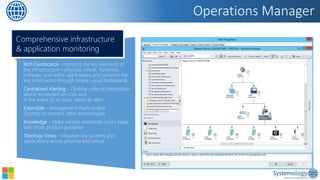
Operations Manager 
Rich Dashboards-monitors the key elements of the infrastructure–physical, virtual, hardware, software, and within applications and presents the key information through simple visual dashboards 
Centralized Alerting –OpsMgr collects information about monitored services andin the event of an issue, raises an alert 
Extensible–Management Packs enableOpsMgr to monitor other technologies 
Knowledge–Helps admins remediate issues faster with inbox product guidance 
Topology Views–Visualize key systems and applications across physical and virtual 
Comprehensive infrastructure & application monitoring
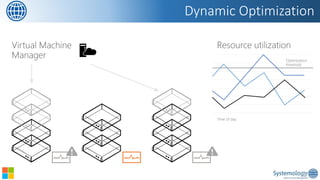
Dynamic Optimization
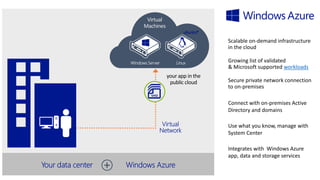
Windows Azure 
Demo: Operations Manager Service Manager
workloads
>_ 
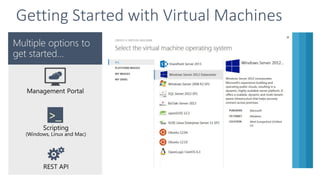
Getting Started with Virtual Machines
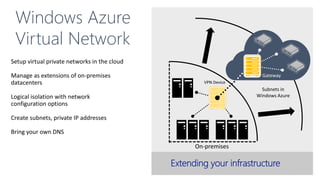
Gateway 
Windows Azure 
Virtual Network
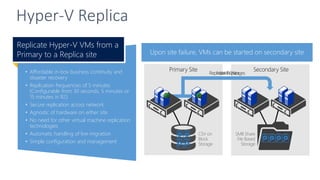
Once Hyper-V Replica is enabled, VMs begin replication 
•Affordable in-box business continuity and disaster recovery 
•Replication frequencies of 5 minutes (Configurable from 30 seconds, 5 minutes or 15 minutes in R2) 
•Secure replication across network 
•Agnostic of hardware on either site 
•No need for other virtual machine replication technologies 
•Automatic handling of live migration 
•Simple configuration and management 
Replicate Hyper-V VMs from a Primary to a Replica site 
Hyper-V Replica 
Once replicated, changes replicated every 5 minutes 
Upon site failure, VMs can be started on secondary site
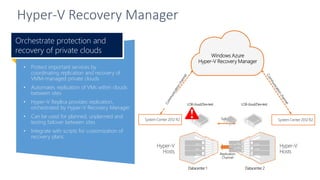
Hyper-V Recovery Manager 
•Protect important services bycoordinating replication and recovery of VMM-managed private clouds 
•Automates replication of VMs within clouds between sites 
•Hyper-V Replica provides replication, orchestrated by Hyper-V Recovery Manager 
•Can be used for planned, unplanned and testing failover between sites 
•Integrate with scripts for customization of recovery plans 
Orchestrate protection and recovery of private clouds
On Premise Portal Options
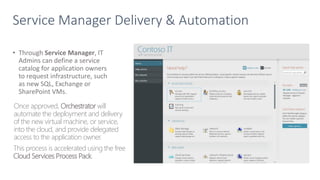
Service Manager Delivery & Automation 
•Through Service Manager, IT Admins can define a service catalog for application owners to request infrastructure, such as new SQL, Exchange or SharePoint VMs. 
Once approved, Orchestratorwill automate the deployment and delivery of the new virtual machine, or service, into the cloud, and provide delegated access to the application owner. 
This process is accelerated using the free Cloud Services Process Pack.
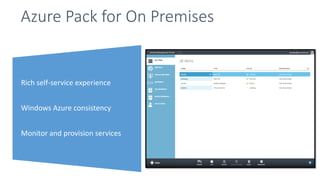
Azure Pack for On Premises 
Rich self-service experience 
Windows Azure consistency 
Monitor and provision services
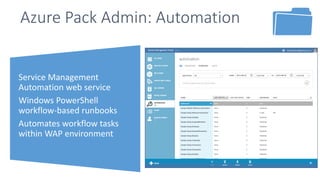
Service Management Automation web service 
Windows PowerShell workflow-based runbooks 
Automates workflow tasks within WAP environment 
Azure Pack Admin: Automation
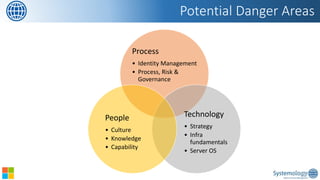
Potential Danger Areas 
Process 
•Identity Management 
•Process, Risk & Governance 
Technology 
•Strategy 
•Infra fundamentals 
•Server OS 
People 
•Culture 
•Knowledge 
•Capability
•IDM is about ensuring the right people can access the right information, when they need it, where they need it. 
•The problem: 
•IDM is often overlooked or not properly understood 
•AD is no longer sufficient 
•New staff, changes in roles and leaving staff 
•Moving workloads to the cloud, or accessing corporate data via mobile devices and automated zero-touch service requests 
Identity & Access Management
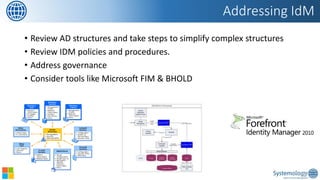
•Review AD structures and take steps to simplify complex structures 
•Review IDM policies and procedures. 
•Address governance 
•Consider tools like Microsoft FIM & BHOLD 
Addressing IdM
Governance, Risk & Compliance 
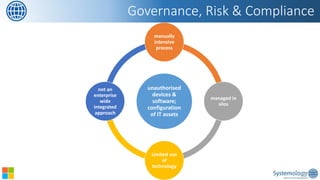
unauthorised devices & software; configuration of IT assets 
manually intensive process 
managed in silos 
Limited use of technology 
not an enterprise wide integrated approach
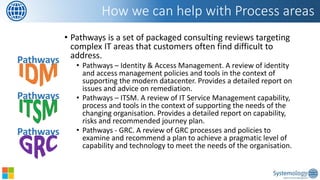
•Pathways is a set of packaged consulting reviews targeting complex IT areas that customers often find difficult to address. 
•Pathways –Identity & Access Management. A review of identity and access management policies and tools in the context of supporting the modern datacenter. Provides a detailed report on issues and advice on remediation. 
•Pathways –ITSM. A review of IT Service Management capability, process and tools in the context of supporting the needs of the changing organisation. Provides a detailed report on capability, risks and recommended journey plan. 
•Pathways -GRC. A review of GRC processes and policies to examine and recommend a plan to achieve a pragmatic level of capability and technology to meet the needs of the organisation. 
How we can help with Process areas 
Pathways 
Pathways 
Pathways
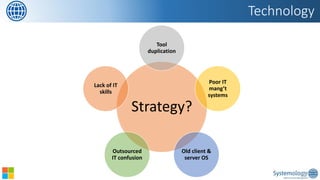
Strategy? 
Tool duplication 
Poor IT mang’tsystems 
Old client & server OS 
Outsourced IT confusion 
Lack of IT skills 
Technology
•Microsoft Private Cloud Immersion Experience 
•Knowledge & understanding of Microsoft Datacenter and Cloud technologies 
•Contributes to IT strategy 
•Pilot Microsoft technology 
•Use Deployment Planning Service benefits [for SA customers] 
•Pathways –Microsoft System Center 
•A review of the use of Microsoft System Center within an organisation. Provides a detailed report on opportunities for improved configuration, areas of under-utilisation, staff knowledge & capability, risks and recommended journey plan to maximise value to the organisation 
•Contributes to IT strategy and operational plans 
How we can help with Technology areas 
Pathways
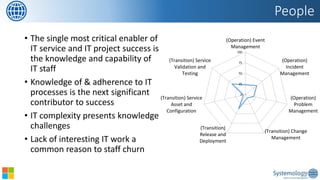
•The single most critical enabler of IT service and IT project success is the knowledge and capability of IT staff 
•Knowledge of & adherence to IT processes is the next significant contributor to success 
•IT complexity presents knowledge challenges 
•Lack of interesting IT work a common reason to staff churn 
People 
0 
25 
50 
75 
100 
(Operation) EventManagement 
(Operation) IncidentManagement 
(Operation) ProblemManagement 
(Transition) ChangeManagement 
(Transition) Release andDeployment 
(Transition) ServiceAsset andConfiguration 
(Transition) ServiceValidation andTesting
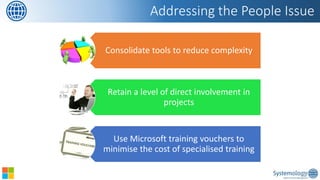
Consolidate tools to reduce complexity 
Retain a level of direct involvement in projects 
Use Microsoft training vouchers to minimise the cost of specialised training 
Addressing the People Issue
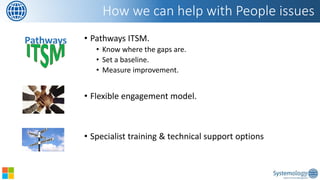
•Pathways ITSM. 
•Know where the gaps are. 
•Set a baseline. 
•Measure improvement. 
•Flexible engagement model. 
•Specialist training & technical support options 
How we can help with People issues 
Pathways
•Please complete feedback forms 
•To receive complimentary service offer 
•Questions 
•1 on 1 discussions 
Close + Q&A

Systemology presentation- System Center & the modern datacenter

  • 1.
    Enabling the visionof the Modern Datacenter System Center 2012 SP2 Azure
  • 2.
    Trends Roadmap SystemCenter & Azure Issues Feedback Outline
  • 3.
    Business Challenges InfluenceYour IT Solutions 70% of IT budget is spent maintaining inflexible and siloed datacenter equipment Infrastructure Complexity The average enterprise maintains 48disparate financial systems and uses 2.7 ERP systems Server Sprawl Dedicating servers to single applications Application Developer “IT slowsme down.” Business Owner “I can get it better, faster, and cheaper if I work around IT.” Compliance and Security Often cited as top concerns for IT
  • 4.
    IT Transformation Trends Flexibility, agility and lower cost Focus on business value Data explosion Personal devices with corpcontrols
  • 5.
    Managements systems acrossa hybrid environment Service catalogue and better ways of provisioning requests Better cost effective storage solutions and access management Tools and systems to manage the full range of devices Implications for the Datacenter
  • 6.
    Pragmatic DC Modernisation AUTOMATION INTEGRATION CLOUD
  • 7.
    Automation What &Why Automate •Remediation tasks •Preventative maintenance tasks •Monitoring & alerting Soft Benefits •Consistency & auditability •Reduces training for L1 staff •Staff satisfaction with IT increases ROI •Task level •Reduced downtime •Reduced MTTR ActivityEffected AreaCurrent Effort (Hrs)New EffortStaff member submits their requestStaff0.50.25Service Desk receiving and discussing requestHelp Desk0.50IT approval processIT484IT provisioning for staff memberIT40Communication to staff member to close requestHelp Desk0.250DocumentationIT0.50Total Effort for Request53.754.25Annual Requests - expected average1005375425Average cost for 1 hr effort$26.04Annual Cost$139,973.96$11,067.71Annual Benefit128,906.25$
  • 8.
    Integration What &Why Consolidation •Multiples tools for monitoring, deployment etc •Unnecessary complexity Soft Benefits •Easier for IT teams to manage •Reduces training for L1 staff •Staff satisfaction with IT increases ROI •Removal of duplicate spend •Lower IT operating cost •Lower vendor costs
  • 9.
    Cloud What &Why Flexibility & Scale •Move dev/test to cloud •Common aps –Office 365 Soft Benefits •Fewer systems for IT teams to manage •Reduces training for IT staff •Allows IT to focus on other areas ROI •Move Capexto Opex •Lower IT operating cost •Easier to move to charge-back model
  • 10.
    •Azure •System Center2012 •Office 365 •Service Manager •SharePoint •Orchestrator •System Center 2012 •SCOM •SCCM •Service Manager •FIM •Orchestrator •VMM Automation Integration Cloud Service Catalogue Microsoft enabling the modern datacenter
  • 11.
    Service Manager •SelfService •Help Desk •CMDB •ITIL Operations Manager •Monitor infra, apps & services Configuration Manager •Deploy •Patching •Updates •SOE Data Protection Manager •Protect •Recovery •Servers •Desktops •Bare metal recovery Virtual Machine Manager •Manage virtual hosts, network & storage App Controller •App self service Microsoft Datacenter Platform Orchestrator •Workflow management & integration engine •Automate the creation, monitoring, and deployment of resources Forefront Identity Manager •Management of policy, credentials, users, access •Identity & access compliance Azure •Public cloud resources •Private cloud management Office 365 •Outlook •SharePoint •Lync
  • 12.
  • 13.
    Runbooks Activities Links Databus Orchestrator Concepts Standard activity Operations Manager Operations Manager Operations Manager VMware Standard activity HP Service Manager Service Manager Hyper-V
  • 14.
    Orchestrator Custom Automation–build, test, debug, deploy, and manage automation in your environment. Integration–integrates with System Center, other Microsoft products, and non-Microsoft products to enable interoperability across the data center Orchestration–provides the tools for orchestration to combine software, hardware, and manual processes into a seamless system Extensible–provides extensible integration to any system through the Orchestrator Integration Toolkit Simple–Quick to install and configure, and start realizing value Workflow management solution for the data center
  • 15.
    Extending Orchestrator IntegrationPacks Integration Toolkits
  • 16.
    Virtual Machine Management Demo: Orchestrator
  • 17.
    System Center forthe Datacenter {
  • 18.
    Through Virtual MachineManager’sgranular template deployment capabilities, IT Admins can standardize and accelerate deployment of VMs, apps and services into the cloud. Accelerated Deployment These templates, and service templates contain specific application-level configuration options, for workloads such as SQL, and the ability to add pre/post scripts, to accelerate deployment of other key workloads.
  • 19.
    How network virtualizationworks •Overlays multiple virtual networks on shared physical network •Uses industry standard General Routing Encapsulation (NVGRE) protocol Problems solved •Creates VM mobility across datacenter, hoster cloud or Azure without network constraints •Provides ability to import customer IP addresses and network topology •Helps remove VLAN constraints •Helps eliminate hierarchical IP address assignment for virtual machines Abstracting workloads with Hyper-V Network Virtualization Physical server Physical network Blue virtual machine Yellow virtual machine Blue network Yellow network
  • 20.
  • 21.
    Operations Manager RichDashboards-monitors the key elements of the infrastructure–physical, virtual, hardware, software, and within applications and presents the key information through simple visual dashboards Centralized Alerting –OpsMgr collects information about monitored services andin the event of an issue, raises an alert Extensible–Management Packs enableOpsMgr to monitor other technologies Knowledge–Helps admins remediate issues faster with inbox product guidance Topology Views–Visualize key systems and applications across physical and virtual Comprehensive infrastructure & application monitoring
  • 22.
  • 23.
    Windows Azure Demo:Operations Manager Service Manager
  • 24.
  • 25.
    >_ Getting Startedwith Virtual Machines
  • 26.
    Gateway Windows Azure Virtual Network
  • 28.
    Once Hyper-V Replicais enabled, VMs begin replication •Affordable in-box business continuity and disaster recovery •Replication frequencies of 5 minutes (Configurable from 30 seconds, 5 minutes or 15 minutes in R2) •Secure replication across network •Agnostic of hardware on either site •No need for other virtual machine replication technologies •Automatic handling of live migration •Simple configuration and management Replicate Hyper-V VMs from a Primary to a Replica site Hyper-V Replica Once replicated, changes replicated every 5 minutes Upon site failure, VMs can be started on secondary site
  • 29.
    Hyper-V Recovery Manager •Protect important services bycoordinating replication and recovery of VMM-managed private clouds •Automates replication of VMs within clouds between sites •Hyper-V Replica provides replication, orchestrated by Hyper-V Recovery Manager •Can be used for planned, unplanned and testing failover between sites •Integrate with scripts for customization of recovery plans Orchestrate protection and recovery of private clouds
  • 30.
  • 31.
    Service Manager Delivery& Automation •Through Service Manager, IT Admins can define a service catalog for application owners to request infrastructure, such as new SQL, Exchange or SharePoint VMs. Once approved, Orchestratorwill automate the deployment and delivery of the new virtual machine, or service, into the cloud, and provide delegated access to the application owner. This process is accelerated using the free Cloud Services Process Pack.
  • 32.
    Azure Pack forOn Premises Rich self-service experience Windows Azure consistency Monitor and provision services
  • 33.
    Service Management Automationweb service Windows PowerShell workflow-based runbooks Automates workflow tasks within WAP environment Azure Pack Admin: Automation
  • 34.
    Potential Danger Areas Process •Identity Management •Process, Risk & Governance Technology •Strategy •Infra fundamentals •Server OS People •Culture •Knowledge •Capability
  • 35.
    •IDM is aboutensuring the right people can access the right information, when they need it, where they need it. •The problem: •IDM is often overlooked or not properly understood •AD is no longer sufficient •New staff, changes in roles and leaving staff •Moving workloads to the cloud, or accessing corporate data via mobile devices and automated zero-touch service requests Identity & Access Management
  • 36.
    •Review AD structuresand take steps to simplify complex structures •Review IDM policies and procedures. •Address governance •Consider tools like Microsoft FIM & BHOLD Addressing IdM
  • 37.
    Governance, Risk &Compliance unauthorised devices & software; configuration of IT assets manually intensive process managed in silos Limited use of technology not an enterprise wide integrated approach
  • 38.
    •Pathways is aset of packaged consulting reviews targeting complex IT areas that customers often find difficult to address. •Pathways –Identity & Access Management. A review of identity and access management policies and tools in the context of supporting the modern datacenter. Provides a detailed report on issues and advice on remediation. •Pathways –ITSM. A review of IT Service Management capability, process and tools in the context of supporting the needs of the changing organisation. Provides a detailed report on capability, risks and recommended journey plan. •Pathways -GRC. A review of GRC processes and policies to examine and recommend a plan to achieve a pragmatic level of capability and technology to meet the needs of the organisation. How we can help with Process areas Pathways Pathways Pathways
  • 39.
    Strategy? Tool duplication Poor IT mang’tsystems Old client & server OS Outsourced IT confusion Lack of IT skills Technology
  • 40.
    •Microsoft Private CloudImmersion Experience •Knowledge & understanding of Microsoft Datacenter and Cloud technologies •Contributes to IT strategy •Pilot Microsoft technology •Use Deployment Planning Service benefits [for SA customers] •Pathways –Microsoft System Center •A review of the use of Microsoft System Center within an organisation. Provides a detailed report on opportunities for improved configuration, areas of under-utilisation, staff knowledge & capability, risks and recommended journey plan to maximise value to the organisation •Contributes to IT strategy and operational plans How we can help with Technology areas Pathways
  • 41.
    •The single mostcritical enabler of IT service and IT project success is the knowledge and capability of IT staff •Knowledge of & adherence to IT processes is the next significant contributor to success •IT complexity presents knowledge challenges •Lack of interesting IT work a common reason to staff churn People 0 25 50 75 100 (Operation) EventManagement (Operation) IncidentManagement (Operation) ProblemManagement (Transition) ChangeManagement (Transition) Release andDeployment (Transition) ServiceAsset andConfiguration (Transition) ServiceValidation andTesting
  • 42.
    Consolidate tools toreduce complexity Retain a level of direct involvement in projects Use Microsoft training vouchers to minimise the cost of specialised training Addressing the People Issue
  • 43.
    •Pathways ITSM. •Knowwhere the gaps are. •Set a baseline. •Measure improvement. •Flexible engagement model. •Specialist training & technical support options How we can help with People issues Pathways
  • 44.
    •Please complete feedbackforms •To receive complimentary service offer •Questions •1 on 1 discussions Close + Q&A