Comparison Between
 ABAP & ABAP-HR
        By Mahender,
           Coke-HP HR Team
• Introduction to
  Human Resources Module


• Basic elements of HR


• Let’s recap the ABAP


• Features of ABAP-HR
  programming / Special
  Statements
Human Resources & sub modules

   Personnel Management
   Time Management
   Payroll
   Benefits
   Organizational Management
   Training & Event Management
   Travel Management
   Information System
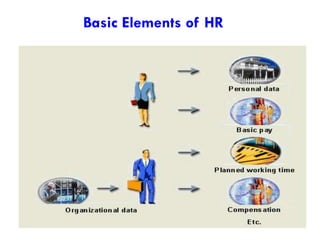
Basic Elements of HR
Some Important terms
5


    Company Code           Cost Center

    Personnel area         Payroll area

    Personnel Sub-area     Organizational unit

    Employee Group         Job

    Employee Subgroup      Position
ABAP RECAP

Generally in ABAP the following are done :

1) Table development via SE11
2) Data Processing through internal tables
3) Report development through SELECT statements
4) Data base updation through BDC / BAPI
5) SAP Queries
6) Scripts and smart forms
What is ABAP HR Specialization?
   Programming with Info types
   Logical Data Base
   Macros
   Dealing with the Repetitive structures
   Cluster Programming for Payroll / Time aspects
   Storage and access of data
   Special programming commands
   Authorization checks
   Ad-hoc queries
   HR Forms
   Interface Toolbox
Concepts of Infotypes
8


    What is an Infotype?

         A group of related data fields
         Appears as an entry screen for the user
         Time dependent storage.
         Identifiable through a four character numerical string
         Database table associated with it

       PAnnnn for transparent tables in Personnel Administration
       PBnnnn for transparent tables in Recruitment
       HRPnnnn for transparent tables in Personnel Planning
Number Ranges
9


       0000 – 0999    HR Master Data
       1000 – 1990    Personnel Planning
       2000 – 2999    Time Management
       4000 – 4999    Recruitment
       9000 – 9999    Customer Specific

          Examples
       Org Assignment – 0001, Personal Data – 0002
       Addresses – 0006, Family Member/Dependents - 0021
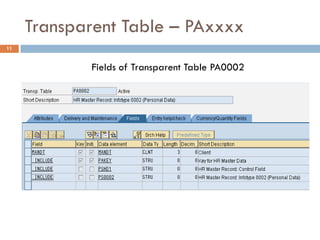
Transparent Table – PAxxxx
11


            Fields of Transparent Table PA0002
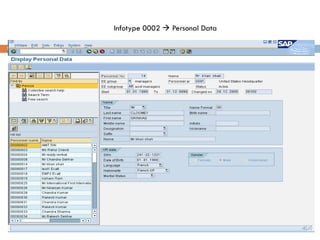
Infotype 0002  Personal Data

12
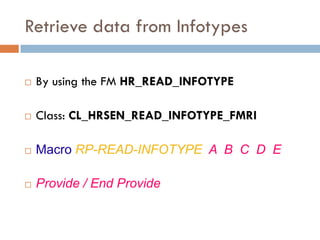
Retrieve data from Infotypes

   By using the FM HR_READ_INFOTYPE

   Class: CL_HRSEN_READ_INFOTYPE_FMRI

   Macro RP-READ-INFOTYPE A B C D E

   Provide / End Provide
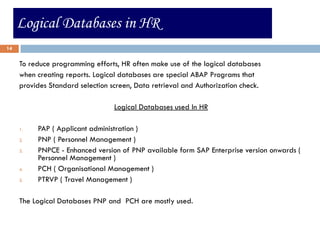
Logical Databases in HR
14


     To reduce programming efforts, HR often make use of the logical databases
     when creating reports. Logical databases are special ABAP Programs that
     provides Standard selection screen, Data retrieval and Authorization check.

                                  Logical Databases used In HR

     1.   PAP ( Applicant administration )
     2.   PNP ( Personnel Management )
     3.   PNPCE - Enhanced version of PNP available form SAP Enterprise version onwards (
          Personnel Management )
     4.   PCH ( Organisational Management )
     5.   PTRVP ( Travel Management )

     The Logical Databases PNP and PCH are mostly used.
Macros in HR
15


     •   Like subroutines and function modules, macro modules can be used to modularize
         programs. Macro modules are frequently used in HR.

     •   These macros are defined in program SAPDBPNP (include DBPNPMAC) with the
         keyword DEFINE. They can be used in any program that uses the logical database
         PNP.

     •   If you want to use these macros in reports that do not use the logical database
         PNP, you must include program DBPNPMAC with the keyword INCLUDE.

     •   You can also define your own macros. In accordance with the naming convention,
         the first two letters stand for the application.

     •   Some macros are also stored in the Macros in ABAP Programs table (TRMAC)
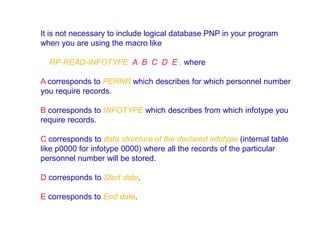
It is not necessary to include logical database PNP in your program
when you are using the macro like

  RP-READ-INFOTYPE A B C D E , where

A corresponds to PERNR which describes for which personnel number
you require records.

B corresponds to INFOTYPE which describes from which infotype you
require records.

C corresponds to data structure of the declared infotype (internal table
like p0000 for infotype 0000) where all the records of the particular
personnel number will be stored.

D corresponds to Start date.

E corresponds to End date.
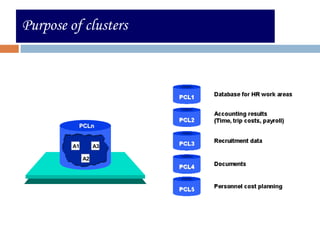
Purpose of clusters
    Clusters in HR


Database
       Tables PCLn


                      PCLn


                     A1        A3

                          A2


                                    17
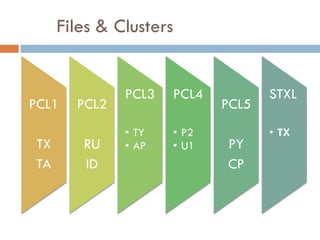
Files & Clusters


              PCL3   PCL4          STXL
PCL1   PCL2                 PCL5
              • TY   • P2          • TX
TX      RU    • AP   • U1   PY
TA      ID                  CP
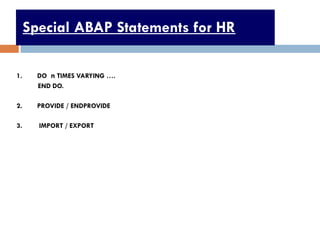
Special ABAP Statements for HR

1.     DO n TIMES VARYING ….
       END DO.

2.     PROVIDE / ENDPROVIDE

3.     IMPORT / EXPORT


                                      19
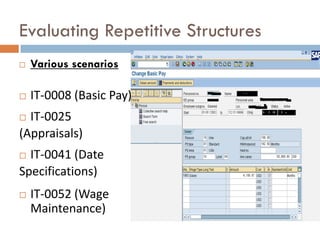
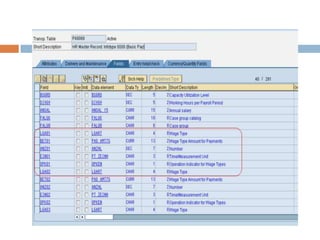
Evaluating Repetitive Structures
   Various scenarios

   IT-0008 (Basic Pay)
 IT-0025
(Appraisals)
 IT-0041 (Date
Specifications)
   IT-0052 (Wage
    Maintenance)
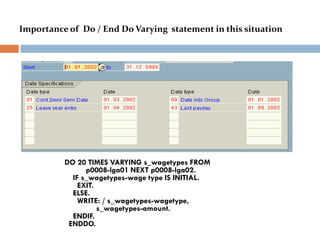
Importance of Do / End Do Varying statement in this situation


          DO 20 TIMES VARYING s_wagetypes FROM
                p0008-lga01 NEXT p0008-lga02.
            IF s_wagetypes-wage type IS INITIAL.
              EXIT.
            ELSE.
              WRITE: / s_wagetypes-wagetype,
                    s_wagetypes-amount.
            ENDIF.
           ENDDO.
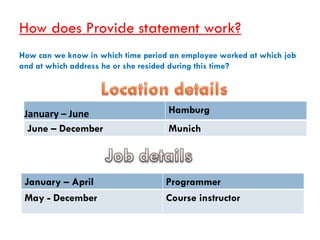
How does Provide statement work?
How can we know in which time period an employee worked at which job
and at which address he or she resided during this time?


 January – June                     Hamburg
  June – December                   Munich


 January – April                    Programmer
 May - December                     Course instructor
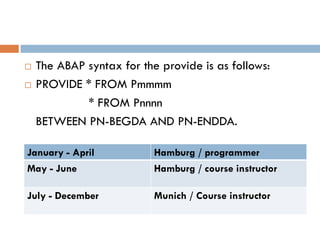
   The ABAP syntax for the provide is as follows:
   PROVIDE * FROM Pmmmm
             * FROM Pnnnn
    BETWEEN PN-BEGDA AND PN-ENDDA.

January - April            Hamburg / programmer
May - June                 Hamburg / course instructor

July - December            Munich / Course instructor
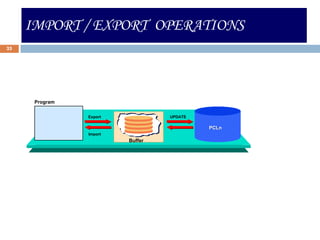
IMPORT / EXPORT OPERATIONS
25


     Importing    /   Exporting Using a Buffer


        Program

                             Export                  UPDATE

                                                              PCLn
                             Import
                                            Buffer
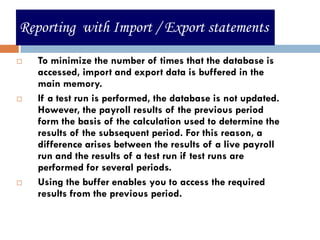
Reporting with Import / Export statements

   To minimize the number of times that the database is
    accessed, import and export data is buffered in the
    main memory.
   If a test run is performed, the database is not updated.
    However, the payroll results of the previous period
    form the basis of the calculation used to determine the
    results of the subsequent period. For this reason, a
    difference arises between the results of a live payroll
    run and the results of a test run if test runs are
    performed for several periods.
   Using the buffer enables you to access the required
    results from the previous period.


                                                        26
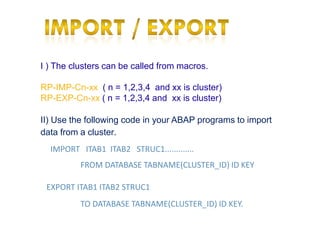
I ) The clusters can be called from macros.

RP-IMP-Cn-xx ( n = 1,2,3,4 and xx is cluster)
RP-EXP-Cn-xx ( n = 1,2,3,4 and xx is cluster)

II) Use the following code in your ABAP programs to import
data from a cluster.
  IMPORT ITAB1 ITAB2 STRUC1.............
          FROM DATABASE TABNAME(CLUSTER_ID) ID KEY

 EXPORT ITAB1 ITAB2 STRUC1
          TO DATABASE TABNAME(CLUSTER_ID) ID KEY.
HR Form editor
     •   HR form editor is a Customizing tool used for designing payroll
         related forms in HR.
     •   Transaction code is PE51.

     •   Forms are required for creating employee or enterprise-
         specific statements, for example:


     1. Remuneration Statement
     2. Payroll Account
     3. Wage Type Statement
     4. Other Statements


28
?
Questions
Thank You

Comparison between abap & abap hr

  • 1.
    Comparison Between ABAP& ABAP-HR By Mahender, Coke-HP HR Team
  • 2.
    • Introduction to Human Resources Module • Basic elements of HR • Let’s recap the ABAP • Features of ABAP-HR programming / Special Statements
  • 3.
    Human Resources &sub modules  Personnel Management  Time Management  Payroll  Benefits  Organizational Management  Training & Event Management  Travel Management  Information System
  • 4.
  • 5.
    Some Important terms 5 Company Code Cost Center Personnel area Payroll area Personnel Sub-area Organizational unit Employee Group Job Employee Subgroup Position
  • 6.
    ABAP RECAP Generally inABAP the following are done : 1) Table development via SE11 2) Data Processing through internal tables 3) Report development through SELECT statements 4) Data base updation through BDC / BAPI 5) SAP Queries 6) Scripts and smart forms
  • 7.
    What is ABAPHR Specialization?  Programming with Info types  Logical Data Base  Macros  Dealing with the Repetitive structures  Cluster Programming for Payroll / Time aspects  Storage and access of data  Special programming commands  Authorization checks  Ad-hoc queries  HR Forms  Interface Toolbox
  • 8.
    Concepts of Infotypes 8 What is an Infotype?  A group of related data fields  Appears as an entry screen for the user  Time dependent storage.  Identifiable through a four character numerical string  Database table associated with it  PAnnnn for transparent tables in Personnel Administration  PBnnnn for transparent tables in Recruitment  HRPnnnn for transparent tables in Personnel Planning
  • 9.
    Number Ranges 9  0000 – 0999 HR Master Data  1000 – 1990 Personnel Planning  2000 – 2999 Time Management  4000 – 4999 Recruitment  9000 – 9999 Customer Specific Examples  Org Assignment – 0001, Personal Data – 0002  Addresses – 0006, Family Member/Dependents - 0021
  • 11.
    Transparent Table –PAxxxx 11 Fields of Transparent Table PA0002
  • 12.
    Infotype 0002 Personal Data 12
  • 13.
    Retrieve data fromInfotypes  By using the FM HR_READ_INFOTYPE  Class: CL_HRSEN_READ_INFOTYPE_FMRI  Macro RP-READ-INFOTYPE A B C D E  Provide / End Provide
  • 14.
    Logical Databases inHR 14 To reduce programming efforts, HR often make use of the logical databases when creating reports. Logical databases are special ABAP Programs that provides Standard selection screen, Data retrieval and Authorization check. Logical Databases used In HR 1. PAP ( Applicant administration ) 2. PNP ( Personnel Management ) 3. PNPCE - Enhanced version of PNP available form SAP Enterprise version onwards ( Personnel Management ) 4. PCH ( Organisational Management ) 5. PTRVP ( Travel Management ) The Logical Databases PNP and PCH are mostly used.
  • 15.
    Macros in HR 15 • Like subroutines and function modules, macro modules can be used to modularize programs. Macro modules are frequently used in HR. • These macros are defined in program SAPDBPNP (include DBPNPMAC) with the keyword DEFINE. They can be used in any program that uses the logical database PNP. • If you want to use these macros in reports that do not use the logical database PNP, you must include program DBPNPMAC with the keyword INCLUDE. • You can also define your own macros. In accordance with the naming convention, the first two letters stand for the application. • Some macros are also stored in the Macros in ABAP Programs table (TRMAC)
  • 16.
    It is notnecessary to include logical database PNP in your program when you are using the macro like RP-READ-INFOTYPE A B C D E , where A corresponds to PERNR which describes for which personnel number you require records. B corresponds to INFOTYPE which describes from which infotype you require records. C corresponds to data structure of the declared infotype (internal table like p0000 for infotype 0000) where all the records of the particular personnel number will be stored. D corresponds to Start date. E corresponds to End date.
  • 17.
    Purpose of clusters Clusters in HR Database Tables PCLn PCLn A1 A3 A2 17
  • 18.
    Files & Clusters PCL3 PCL4 STXL PCL1 PCL2 PCL5 • TY • P2 • TX TX RU • AP • U1 PY TA ID CP
  • 19.
    Special ABAP Statementsfor HR 1. DO n TIMES VARYING …. END DO. 2. PROVIDE / ENDPROVIDE 3. IMPORT / EXPORT 19
  • 20.
    Evaluating Repetitive Structures  Various scenarios  IT-0008 (Basic Pay)  IT-0025 (Appraisals)  IT-0041 (Date Specifications)  IT-0052 (Wage Maintenance)
  • 22.
    Importance of Do/ End Do Varying statement in this situation DO 20 TIMES VARYING s_wagetypes FROM p0008-lga01 NEXT p0008-lga02. IF s_wagetypes-wage type IS INITIAL. EXIT. ELSE. WRITE: / s_wagetypes-wagetype, s_wagetypes-amount. ENDIF. ENDDO.
  • 23.
    How does Providestatement work? How can we know in which time period an employee worked at which job and at which address he or she resided during this time? January – June Hamburg June – December Munich January – April Programmer May - December Course instructor
  • 24.
    The ABAP syntax for the provide is as follows:  PROVIDE * FROM Pmmmm * FROM Pnnnn BETWEEN PN-BEGDA AND PN-ENDDA. January - April Hamburg / programmer May - June Hamburg / course instructor July - December Munich / Course instructor
  • 25.
    IMPORT / EXPORTOPERATIONS 25 Importing / Exporting Using a Buffer Program Export UPDATE PCLn Import Buffer
  • 26.
    Reporting with Import/ Export statements  To minimize the number of times that the database is accessed, import and export data is buffered in the main memory.  If a test run is performed, the database is not updated. However, the payroll results of the previous period form the basis of the calculation used to determine the results of the subsequent period. For this reason, a difference arises between the results of a live payroll run and the results of a test run if test runs are performed for several periods.  Using the buffer enables you to access the required results from the previous period. 26
  • 27.
    I ) Theclusters can be called from macros. RP-IMP-Cn-xx ( n = 1,2,3,4 and xx is cluster) RP-EXP-Cn-xx ( n = 1,2,3,4 and xx is cluster) II) Use the following code in your ABAP programs to import data from a cluster. IMPORT ITAB1 ITAB2 STRUC1............. FROM DATABASE TABNAME(CLUSTER_ID) ID KEY EXPORT ITAB1 ITAB2 STRUC1 TO DATABASE TABNAME(CLUSTER_ID) ID KEY.
  • 28.
    HR Form editor • HR form editor is a Customizing tool used for designing payroll related forms in HR. • Transaction code is PE51. • Forms are required for creating employee or enterprise- specific statements, for example: 1. Remuneration Statement 2. Payroll Account 3. Wage Type Statement 4. Other Statements 28
  • 29.
  • 30.