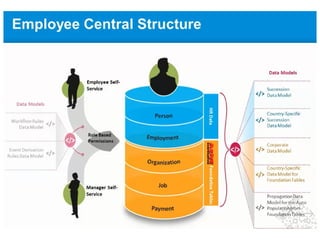
1. Define Corporate Data model
1. Foundation object - Table - Location
1. Structure
1. Name of fields with in the table
1. Location name etc
XML File
Import the XML file
Import the data into the table
When you are creating employee
data
Location
Geo Loc
1:1
1:M
M:1
Relationships
Associations
What are foundation objects?
With foundation objects you set up data that can be shared across the entire company, such as job
codes,
departments, or cost centers. You find more information about foundation objects in What are
foundation objects?
[page 78]
In the XML file for the Corporate Data Model, you can make changes to the standard setup that is
predelivered by
SuccessFactors. The following table lists all foundation objects that are included in the standard XML
file. The
columns define the following:
● HRIS-element ID: This is the ID that is used to identify the foundation object in the XML files.
● Standard label: This is the label for the HRIS element that appears on the UI. You can overwrite this
label. If
no label is included in the standard XML file, then the label that appears on the UI is pulled from the
backend
system. To overwrite the label, add the corresponding label tags in the XML file below the
corresponding HRIS
element and put the new label text inside the label tags.
● Subtype: Foundation objects can be logically divided into four main areas:
○ Organization structures
○ Job structures
○ Pay structures
○ Other objects, such as event reasons, workflow, and dynamic roles
What are associations?
Associations define relationships between foundation objects, or between a foundation object and
a generic object.
For example, a business unit consists of several departments, so you would create an association of
one business unit to many departments — a ONE_TO_MANY association. Whereas a location can
only have one geozone associated to it — this is a ONE_TO_ONE association. The type of
association restricts what the user can display or enter in Employee Central — for a ONE_TO_ONE
association from location to geozone, for example, the user can enter exactly one geozone for a
location on the UI.
The standard XML file for the Corporate Data Model already contains some associations. These are
listed in the table below. You can add more ONE_TO_MANY associations, or change the existing
associations in the XML file if needed.
Each association has a “driving object” that acts as the basis for the association.
What are propagation rules?
You define propagation rules to have the system automatically fill in fields in
employment data. For example, if the user selects a certain location in Job
Information, the time zone for that location can be filled automatically. Or if the user
selects a job code, the job title to it will automatically be displayed in the job title
field. This way, you reduce the amount of data the user has to enter manually, and it
improves the consistency of data, which is vital for accurate
reporting.
Propagation is only possible from certain foundation objects to certain employment
objects. Below under How do you set up propagation rules?, in step 2.2, you find a
table from which foundation objects you can propagate to which
employment objects.
What are country-specific data models?
Certain types of information need to be entered in a specific format depending on the
country the company is located in. For example, the format for national ID can vary
depending on the country – for USA, the social security number follows the format 999-
99-9999, in Great Britain the format is AA999999A. By setting up country-specific data
models, you reflect these country-specific differences by defining the following:
● Which fields are country-specific
For example, Fair Labor Standards Act (FLSA) is only valid for USA.
● Which different values a field can have that is used for all countries
For example, the local job title can vary depending on the country in which the employee
works. You can set up specific picklists for each country that contain country-specific
values.
● Which fields need a country-specific format
A field that is applicable to all countries, but that can be formatted differently in each
country, for example,
the address or national ID.
What is the Succession Data Model?
With the Succession Data Model, you set up data that is related to the people in a
company. This data can be divided into the following areas:
● Person data:
This includes information that is linked to the person and does not depend on the
job, such as the employee's
address and national ID.
● Employment data:
This includes job-related information about a person, such as compensation and
hire date
What are propagation rules?
You define propagation rules to have the system automatically fill in fields in
employment data. For example, if the user selects a certain location in Job
Information, the time zone for that location can be filled automatically. Or if the
user selects a job code, the job title to it will automatically be displayed in the job
title field. This way, you reduce the amount of data the user has to enter
manually, and it improves the consistency of data, which is vital for accurate
reporting.
Propagation is only possible from certain foundation objects to certain
employment objects. Below under How do you set up propagation rules?, in step
2.2, you find a table from which foundation objects you can propagate to which
employment objects.
What are event-reason derivation rules?
When the manager or Admin changes an employee’s data, for example, by
increasing the salary or changing the department information, the reason behind
this change is normally that an event has taken place in that employee’s
professional life. In our example, the event could be a promotion or a transfer to
another department. The information about which event lies behind this change
is stored in the system for reporting purposes. However, such a change might
also include a change to the employee’s status, for example, if the employee
leaves the company, the employee status would be changed accordingly to
reflect that the employee is no longer an active user in the system.
You can create rules that define the event reason according to what change is
done to an employee’s data, so that the system automatically selects the
appropriate event reason. Depending on the event reason, the employee status
is updated, if necessary.

Successfactors ec concepts

  • 4.
    1. Define CorporateData model 1. Foundation object - Table - Location 1. Structure 1. Name of fields with in the table 1. Location name etc XML File Import the XML file Import the data into the table When you are creating employee data Location Geo Loc 1:1 1:M M:1 Relationships Associations
  • 5.
    What are foundationobjects? With foundation objects you set up data that can be shared across the entire company, such as job codes, departments, or cost centers. You find more information about foundation objects in What are foundation objects? [page 78] In the XML file for the Corporate Data Model, you can make changes to the standard setup that is predelivered by SuccessFactors. The following table lists all foundation objects that are included in the standard XML file. The columns define the following: ● HRIS-element ID: This is the ID that is used to identify the foundation object in the XML files. ● Standard label: This is the label for the HRIS element that appears on the UI. You can overwrite this label. If no label is included in the standard XML file, then the label that appears on the UI is pulled from the backend system. To overwrite the label, add the corresponding label tags in the XML file below the corresponding HRIS element and put the new label text inside the label tags. ● Subtype: Foundation objects can be logically divided into four main areas: ○ Organization structures ○ Job structures ○ Pay structures ○ Other objects, such as event reasons, workflow, and dynamic roles
  • 6.
    What are associations? Associationsdefine relationships between foundation objects, or between a foundation object and a generic object. For example, a business unit consists of several departments, so you would create an association of one business unit to many departments — a ONE_TO_MANY association. Whereas a location can only have one geozone associated to it — this is a ONE_TO_ONE association. The type of association restricts what the user can display or enter in Employee Central — for a ONE_TO_ONE association from location to geozone, for example, the user can enter exactly one geozone for a location on the UI. The standard XML file for the Corporate Data Model already contains some associations. These are listed in the table below. You can add more ONE_TO_MANY associations, or change the existing associations in the XML file if needed. Each association has a “driving object” that acts as the basis for the association.
  • 7.
    What are propagationrules? You define propagation rules to have the system automatically fill in fields in employment data. For example, if the user selects a certain location in Job Information, the time zone for that location can be filled automatically. Or if the user selects a job code, the job title to it will automatically be displayed in the job title field. This way, you reduce the amount of data the user has to enter manually, and it improves the consistency of data, which is vital for accurate reporting. Propagation is only possible from certain foundation objects to certain employment objects. Below under How do you set up propagation rules?, in step 2.2, you find a table from which foundation objects you can propagate to which employment objects.
  • 8.
    What are country-specificdata models? Certain types of information need to be entered in a specific format depending on the country the company is located in. For example, the format for national ID can vary depending on the country – for USA, the social security number follows the format 999- 99-9999, in Great Britain the format is AA999999A. By setting up country-specific data models, you reflect these country-specific differences by defining the following: ● Which fields are country-specific For example, Fair Labor Standards Act (FLSA) is only valid for USA. ● Which different values a field can have that is used for all countries For example, the local job title can vary depending on the country in which the employee works. You can set up specific picklists for each country that contain country-specific values. ● Which fields need a country-specific format A field that is applicable to all countries, but that can be formatted differently in each country, for example, the address or national ID.
  • 9.
    What is theSuccession Data Model? With the Succession Data Model, you set up data that is related to the people in a company. This data can be divided into the following areas: ● Person data: This includes information that is linked to the person and does not depend on the job, such as the employee's address and national ID. ● Employment data: This includes job-related information about a person, such as compensation and hire date
  • 10.
    What are propagationrules? You define propagation rules to have the system automatically fill in fields in employment data. For example, if the user selects a certain location in Job Information, the time zone for that location can be filled automatically. Or if the user selects a job code, the job title to it will automatically be displayed in the job title field. This way, you reduce the amount of data the user has to enter manually, and it improves the consistency of data, which is vital for accurate reporting. Propagation is only possible from certain foundation objects to certain employment objects. Below under How do you set up propagation rules?, in step 2.2, you find a table from which foundation objects you can propagate to which employment objects.
  • 11.
    What are event-reasonderivation rules? When the manager or Admin changes an employee’s data, for example, by increasing the salary or changing the department information, the reason behind this change is normally that an event has taken place in that employee’s professional life. In our example, the event could be a promotion or a transfer to another department. The information about which event lies behind this change is stored in the system for reporting purposes. However, such a change might also include a change to the employee’s status, for example, if the employee leaves the company, the employee status would be changed accordingly to reflect that the employee is no longer an active user in the system. You can create rules that define the event reason according to what change is done to an employee’s data, so that the system automatically selects the appropriate event reason. Depending on the event reason, the employee status is updated, if necessary.