ABAP Chapter 6
   Message
   Debugging
   File Transfer
   Type Group
Message in ABAP
User Messages
   If user has entered inconsistent
    values,you output a dialog message with
    MESSAGE statement
   Dialog messages are stored in table T100
        report ztest.
    (Transaction : SE91)
         ….
       AT SELECTION-SCREEN.
       …
        message e000(38) with ‘----’ ‘---’ ‘---’ ‘---’.
       …
Message Type


Syntax
Message [ A<nnn> ](message class) with <field1> <field2> …


                       E, W, I, S
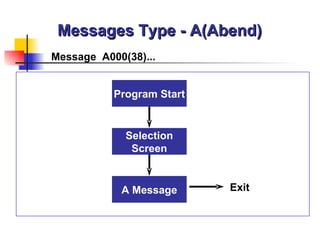
Messages Type - A(Abend)
Message A000(38)...


           Program Start


             Selection
              Screen


            A Message      Exit
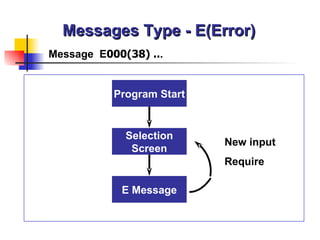
Messages Type - E(Error)
Message E000(38) ...


           Program Start


             Selection
                           New input
              Screen
                           Require

            E Message
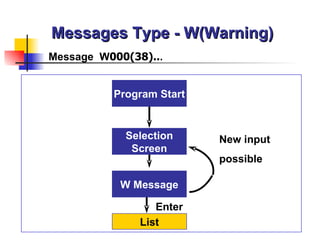
Messages Type - W(Warning)
Message W000(38)...


          Program Start


            Selection     New input
             Screen
                          possible

           W Message

                  Enter
               List
Messages Type - I(Information)
Message I000(38)...


            Program Start


              Selection
               Screen


             I Message

                   Enter
                List
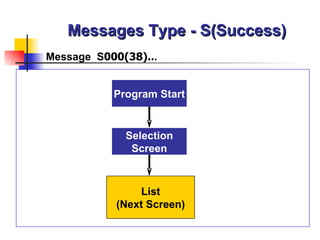
Messages Type - S(Success)
Message S000(38)...


           Program Start


             Selection
              Screen


                List
            (Next Screen)
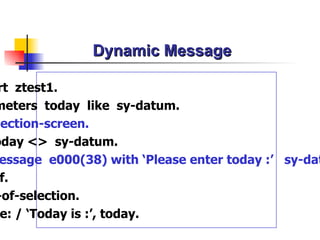
Dynamic Message

rt ztest1.
meters today like sy-datum.
lection-screen.
oday <> sy-datum.
 essage e000(38) with ‘Please enter today :’ sy-dat
 f.
-of-selection.
 e: / ‘Today is :’, today.
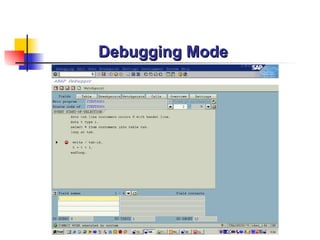
Debugging
Debugging Mode
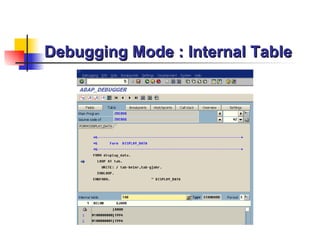
Debugging Mode : Internal Table
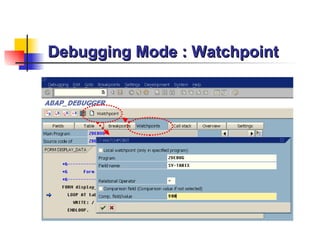
Debugging Mode : Watchpoint
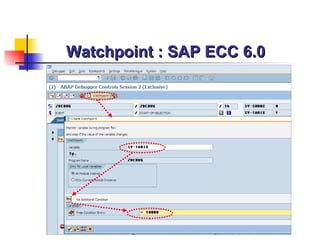
Watchpoint : SAP ECC 6.0
How to Set Debugging Mode
   If you want to test
    transaction,enter /h in the
    command field,press ENTER and
    execute the transaction
   Set breakpoints in the program
      Utilities->Breakpoints->Set
   Uses BREAK-POINT statement
ABAP Practice
File Transfer
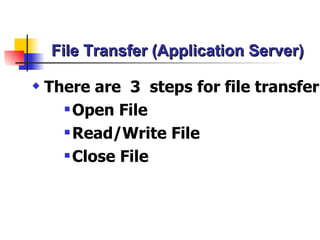
File Transfer (Application Server)

x   There are 3 steps for file transfer
       Open File

       Read/Write File

       Close File
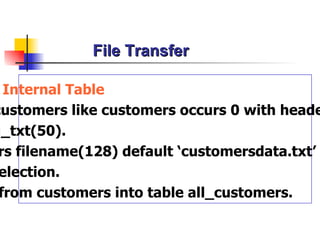
File Transfer

  Internal Table
customers like customers occurs 0 with heade
g_txt(50).
 rs filename(128) default ‘customersdata.txt’
 election.
 from customers into table all_customers.
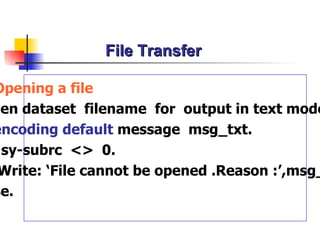
File Transfer

Opening a file
pen dataset filename for output in text mode
encoding default message msg_txt.
 sy-subrc <> 0.
 Write: ‘File cannot be opened .Reason :’,msg_
se.
File Transfer

* Transferring data to a file
Loop at all_customers.
 Transfer all_customers to filename.
Endloop.
* Closing a file
Close dataset filename.
Endif.
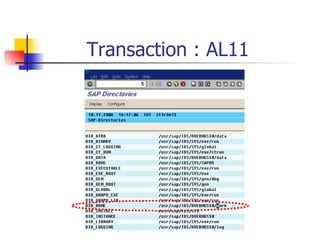
Transaction : AL11
File Transfer (Appending Data)

 pening a file
en dataset filename for appending in text m
 encoding default message msg_txt.
sy-subrc <> 0.
Write: ‘File cannot be opened .Reason :’,msg_t
e.
Reading Data from OS File
Reading data from a file
rameters filename(128) default ‘customersdata.txt’ lower ca
 ta msg_txt(50).
 ta all_customers like customers occurs 0 with header line.
art-of-selection.
pen dataset filename for input in text mode
   encoding default message msg_txt.
  sy-subrc <> 0.
Write: ‘File cannot be opened .Reason :’,msg_txt.
se.
Reading Data from OS File
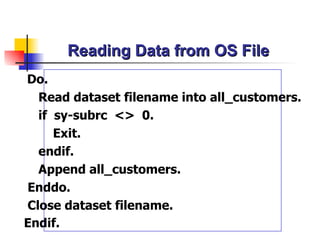
Do.
  Read dataset filename into all_customers.
  if sy-subrc <> 0.
     Exit.
  endif.
  Append all_customers.
Enddo.
Close dataset filename.
Endif.
Deleting OS File

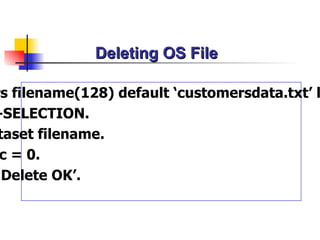
rs filename(128) default ‘customersdata.txt’ l
-SELECTION.
 taset filename.
 c = 0.
‘Delete OK’.
Working with File on Presentation Server
Download Data to PC
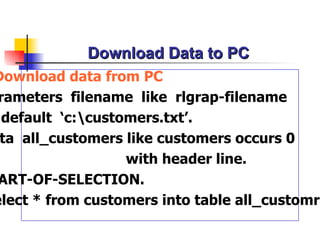
Download data from PC
 rameters filename like rlgrap-filename
  default ‘c:customers.txt’.
 ta all_customers like customers occurs 0
                   with header line.
 ART-OF-SELECTION.
elect * from customers into table all_customre
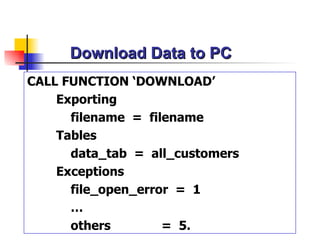
Download Data to PC
CALL FUNCTION ‘DOWNLOAD’
    Exporting
      filename = filename
    Tables
      data_tab = all_customers
    Exceptions
      file_open_error = 1
      …
      others        = 5.
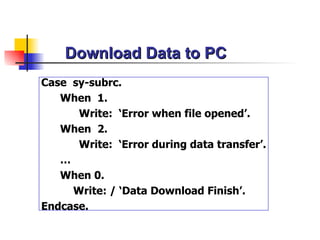
Download Data to PC
Case sy-subrc.
   When 1.
      Write: ‘Error when file opened’.
   When 2.
      Write: ‘Error during data transfer’.
   …
   When 0.
     Write: / ‘Data Download Finish’.
Endcase.
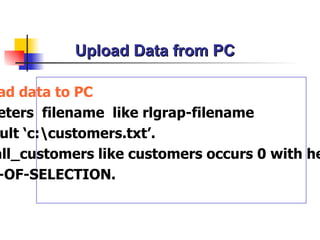
Upload Data from PC

ad data to PC
eters filename like rlgrap-filename
 ult ‘c:customers.txt’.
all_customers like customers occurs 0 with he
 -OF-SELECTION.
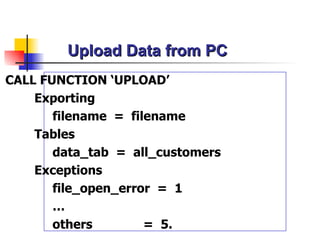
Upload Data from PC
CALL FUNCTION ‘UPLOAD’
    Exporting
       filename = filename
    Tables
       data_tab = all_customers
    Exceptions
       file_open_error = 1
       …
       others        = 5.
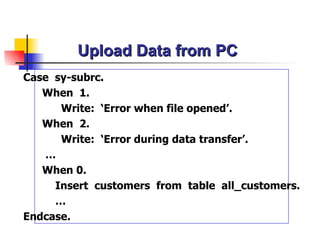
Upload Data from PC
Case sy-subrc.
   When 1.
      Write: ‘Error when file opened’.
   When 2.
      Write: ‘Error during data transfer’.
   …
   When 0.
     Insert customers from table all_customers.
     …
Endcase.
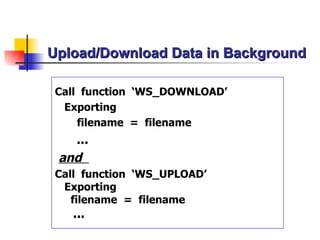
Upload/Download Data in Background

Call function ‘WS_DOWNLOAD’
 Exporting
    filename = filename
   ...
 and
Call function ‘WS_UPLOAD’
 Exporting
   filename = filename
   ...
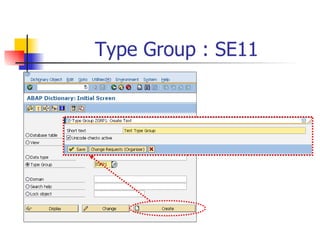
Type Group : SE11
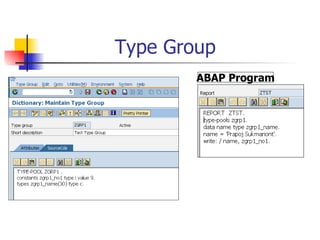
Type Group
        ABAP Program
Exercise IV
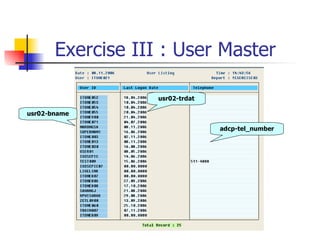
Exercise III : User Master

                   usr02-trdat

usr02-bname

                                 adcp-tel_number
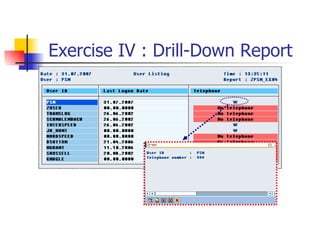
Exercise IV : Drill-Down Report

ABAP Message, Debugging, File Transfer and Type Group

  • 1.
    ABAP Chapter 6  Message  Debugging  File Transfer  Type Group
  • 2.
  • 3.
    User Messages  If user has entered inconsistent values,you output a dialog message with MESSAGE statement  Dialog messages are stored in table T100 report ztest. (Transaction : SE91) …. AT SELECTION-SCREEN. … message e000(38) with ‘----’ ‘---’ ‘---’ ‘---’. …
  • 4.
    Message Type Syntax Message [A<nnn> ](message class) with <field1> <field2> … E, W, I, S
  • 5.
    Messages Type -A(Abend) Message A000(38)... Program Start Selection Screen A Message Exit
  • 6.
    Messages Type -E(Error) Message E000(38) ... Program Start Selection New input Screen Require E Message
  • 7.
    Messages Type -W(Warning) Message W000(38)... Program Start Selection New input Screen possible W Message Enter List
  • 8.
    Messages Type -I(Information) Message I000(38)... Program Start Selection Screen I Message Enter List
  • 9.
    Messages Type -S(Success) Message S000(38)... Program Start Selection Screen List (Next Screen)
  • 10.
    Dynamic Message rt ztest1. meterstoday like sy-datum. lection-screen. oday <> sy-datum. essage e000(38) with ‘Please enter today :’ sy-dat f. -of-selection. e: / ‘Today is :’, today.
  • 11.
  • 12.
  • 13.
    Debugging Mode :Internal Table
  • 14.
    Debugging Mode :Internal Table
  • 15.
    Debugging Mode :Watchpoint
  • 16.
  • 17.
    How to SetDebugging Mode  If you want to test transaction,enter /h in the command field,press ENTER and execute the transaction  Set breakpoints in the program Utilities->Breakpoints->Set  Uses BREAK-POINT statement
  • 18.
  • 19.
  • 20.
    File Transfer (ApplicationServer) x There are 3 steps for file transfer  Open File  Read/Write File  Close File
  • 21.
    File Transfer Internal Table customers like customers occurs 0 with heade g_txt(50). rs filename(128) default ‘customersdata.txt’ election. from customers into table all_customers.
  • 22.
    File Transfer Opening afile pen dataset filename for output in text mode encoding default message msg_txt. sy-subrc <> 0. Write: ‘File cannot be opened .Reason :’,msg_ se.
  • 23.
    File Transfer * Transferringdata to a file Loop at all_customers. Transfer all_customers to filename. Endloop. * Closing a file Close dataset filename. Endif.
  • 24.
  • 25.
    File Transfer (AppendingData) pening a file en dataset filename for appending in text m encoding default message msg_txt. sy-subrc <> 0. Write: ‘File cannot be opened .Reason :’,msg_t e.
  • 26.
    Reading Data fromOS File Reading data from a file rameters filename(128) default ‘customersdata.txt’ lower ca ta msg_txt(50). ta all_customers like customers occurs 0 with header line. art-of-selection. pen dataset filename for input in text mode encoding default message msg_txt. sy-subrc <> 0. Write: ‘File cannot be opened .Reason :’,msg_txt. se.
  • 27.
    Reading Data fromOS File Do. Read dataset filename into all_customers. if sy-subrc <> 0. Exit. endif. Append all_customers. Enddo. Close dataset filename. Endif.
  • 28.
    Deleting OS File rsfilename(128) default ‘customersdata.txt’ l -SELECTION. taset filename. c = 0. ‘Delete OK’.
  • 29.
    Working with Fileon Presentation Server
  • 30.
    Download Data toPC Download data from PC rameters filename like rlgrap-filename default ‘c:customers.txt’. ta all_customers like customers occurs 0 with header line. ART-OF-SELECTION. elect * from customers into table all_customre
  • 31.
    Download Data toPC CALL FUNCTION ‘DOWNLOAD’ Exporting filename = filename Tables data_tab = all_customers Exceptions file_open_error = 1 … others = 5.
  • 32.
    Download Data toPC Case sy-subrc. When 1. Write: ‘Error when file opened’. When 2. Write: ‘Error during data transfer’. … When 0. Write: / ‘Data Download Finish’. Endcase.
  • 33.
    Upload Data fromPC ad data to PC eters filename like rlgrap-filename ult ‘c:customers.txt’. all_customers like customers occurs 0 with he -OF-SELECTION.
  • 34.
    Upload Data fromPC CALL FUNCTION ‘UPLOAD’ Exporting filename = filename Tables data_tab = all_customers Exceptions file_open_error = 1 … others = 5.
  • 35.
    Upload Data fromPC Case sy-subrc. When 1. Write: ‘Error when file opened’. When 2. Write: ‘Error during data transfer’. … When 0. Insert customers from table all_customers. … Endcase.
  • 36.
    Upload/Download Data inBackground Call function ‘WS_DOWNLOAD’ Exporting filename = filename ... and Call function ‘WS_UPLOAD’ Exporting filename = filename ...
  • 37.
  • 38.
    Type Group ABAP Program
  • 39.
  • 40.
    Exercise III :User Master usr02-trdat usr02-bname adcp-tel_number
  • 41.
    Exercise IV :Drill-Down Report