Overview of Database Management Systems Objectives & Role  Advantages & Disadvantages of DBMS  SQL Uses of Database for Integration across Functional Areas Database Applications
In most organizations the data files tend to grow independently Accounting, HR, Marketing, Manufacturing etc, all departments end-up developing their own independent systems and data files e.g.  HR dept may have a master file containing payroll file, employee insurance file, pension file At the same time Accounting dept may also have the same files Many files in organization Difficult to manage Wastage of resources
Many businesses often do not have -  timely - accurate - or relevant information - because of poorly organized data This is why the database management systems are so essential We will be discussing the roles/ benefits of Database Management Systems in the later sessions
Track information Keep consistent standards Allow higher productivity as a result of better information
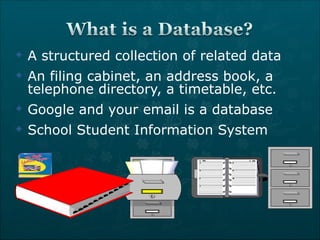
A structured collection of related data  An filing cabinet, an address book, a telephone directory, a timetable, etc. Google and your email is a database School Student Information System
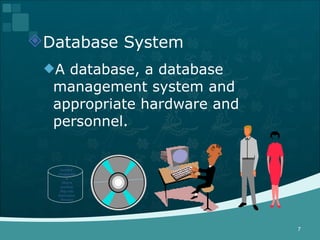
Database System A database, a database management system and appropriate hardware and personnel. number, Designation Hours worked, Pay rate Insurance, Pension
Database Management System Systems software that facilitates the management of a database. E.g. Oracle, Access, SQL Server
DBMS  An application software that organises data into records in one or more databases and allows organising, accessing and sorting of the data in a variety of formats.
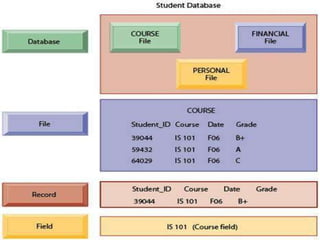
Bit Byte Field Smallest meaningful unit of data Group of one or more characters that has a specific meaning Record Set of fields containing all information known about one entity Each record contains the same fields in the same sequence File Collection of related records
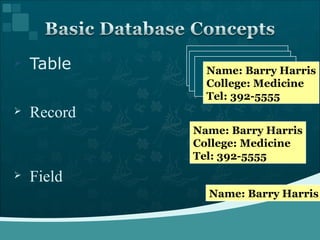
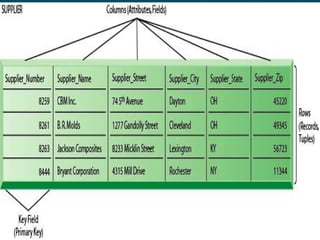
Table Name: Barry Harris College: Medicine Tel: 392-5555 Name: Barry Harris Field Record Name: Barry Harris College: Medicine Tel: 392-5555
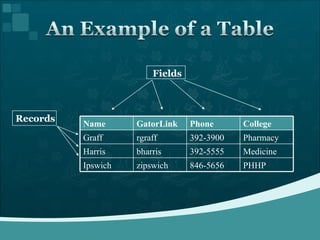
Records Fields Name GatorLink Phone College Graff rgraff 392-3900 Pharmacy Harris bharris 392-5555 Medicine Ipswich zipswich 846-5656 PHHP
 
Four components: People, H/W, S/W, Data Practitioners (analysts and database designers) in consultation with users identify data needs and design database structures to accommodate these needs. The database structures are specified to the DBMS through the data dictionary.
Users enter data into the system by following specified procedures.  The entered data are maintained on hardware media such as disks and tapes.  Application programmes that access the database are written by practitioners and users to be run on computers.
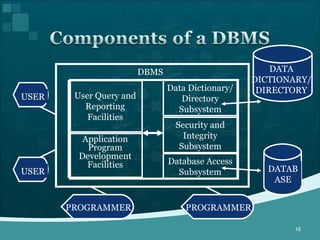
DATABASE DATA DICTIONARY/ DIRECTORY USER PROGRAMMER Data Dictionary/ Directory Subsystem Security and Integrity Subsystem Database Access Subsystem User Query and Reporting Facilities Application Program Development Facilities DBMS USER PROGRAMMER
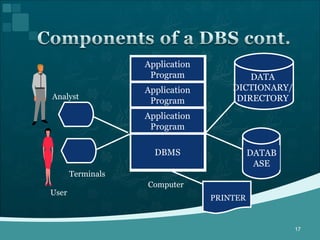
DATABASE DATA DICTIONARY/ DIRECTORY Application Program Application Program Application Program DBMS Computer Terminals PRINTER Analyst User
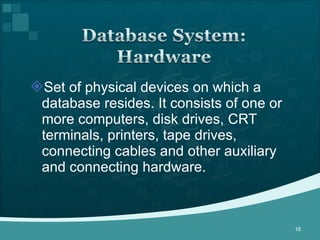
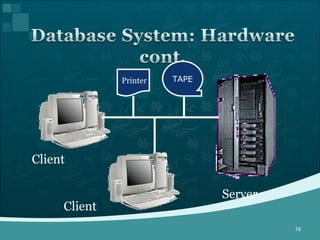
Set of physical devices on which a database resides. It consists of one or more computers, disk drives, CRT terminals, printers, tape drives, connecting cables and other auxiliary and connecting hardware.
Client Client Server TAPE Printer
A database software includes two types of software General-purpose database management software like operating system. Application software that uses DBMS facilities to manipulate the database to achieve a specific business function, such as providing reports or documents, which can be used by users.
Application software is generally written standard programming language such as C, or it may be written in a language (commonly called a fourth-generation language) supplied with the DBMS. These programs utilise the command language of the DBMS and make use of the information contained in the data dictionary.
User Interface Language, menus and other facilities by which users interact with various system components, such as application programs, the DBMS Computer-aided software engineering (CASE) tools Automated tools used to design databases and application programs.
A subsystem that keeps track of the definitions of all data items in the database.  relationships that exists between various data structures.  indexes that are used to access data quickly. screen and report format definitions that may be used by various application programs.
Definitions of data items in the database includes: Elementary-level data items (fields),  group and record-level data structures, and files or relational tables.
Data that describe the properties or characteristics of other data.  Some of these properties include data definitions, data structures and rules or constraints. Item name, the data type, length, minimum and maximum allowable values (where appropriate) and a brief description of each data item. Metadata allow database designers and users to understand what data exist, what the data mean.  Data without clear meaning can be confusing, misinterpreted or erroneous. Metadata
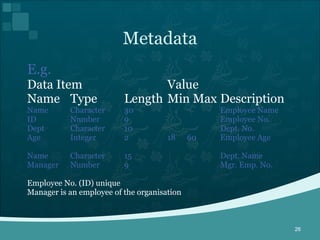
E.g.  Data Item Value Name Type Length Min Max Description Name Character 30 Employee Name ID Number 9 Employee No. Dept Character 10 Dept. No. Age Integer 2 18  60 Employee Age Name Character 15 Dept. Name Manager Number 9 Mgr. Emp. No. Employee No. (ID) unique Manager is an employee of the organisation Metadata
Two different types of people (users and practitioners) are concerned with the database. Users who need information from the database to carry out their primary business responsibility e.g. Executives, managers, staff, clerical personnel
Practitioners people responsible for the database system and its associated application software. e.g. Database administrators, analysts, programmers, database and system designers, information systems managers.
Database Applications: Banking: all transactions Airlines: reservations, schedules Universities:  registration, grades Sales: customers, products, purchases Manufacturing: production, inventory, orders, supply chain Human resources:  employee records, salaries, tax deductions Databases touch all aspects of our lives
 
The database is a valuable resource needing protection. The DBMS provides database security by limiting access to the database to authorised personnel. Authorised users will generally be restricted as to the particular data they can access and whether they can update it.
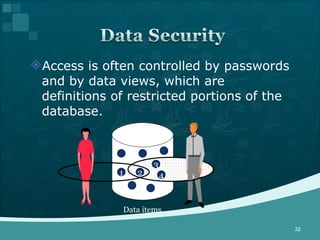
Access is often controlled by passwords and by data views, which are definitions of restricted portions of the database. 1 Data items 2 3 4
The integrity and consistency of the database are protected via constraints on values that data items can have and by backup and recovery capabilities provided within the DBMS. Data constraint definitions are maintained in the data dictionary.
Backup and recovery are supported by software that automatically logs changes to the database and provides for a means of recovering the current state of the database in case of system failure.
One of the chief functions of the DBMS is to support the access, retrieval and update of data in the database. The DBMS provides the physical mechanisms allowing multiple users to access a variety of related data quickly and efficiently.
DBMS provides user-oriented data manipulation tools. Easy-to-use query languages allow users to formulate queries and request one-time reports directly from the database. Often query languages will contain facilities to format the results of queries as reports.
Capabilities vary considerable, but basic operations are: Data definition Data entry Data manipulation Data display
Database Types Relational Object-oriented Hierarchical Each type structures, organizes and uses data differently
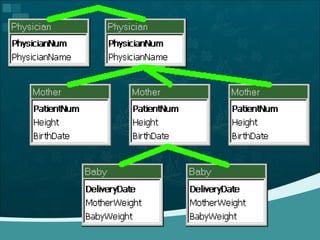
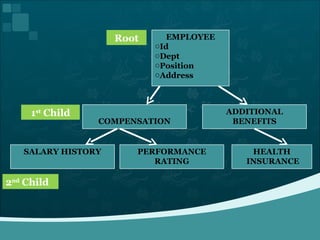
Hierarchical relationships among different types of data.  Can be very easy to answer some questions, but very difficult to answer others  If one-to-many relationship is violated (e.g., a patient can have more than one physician) then the hierarchy becomes a network
 
Root 1 st  Child 2 nd  Child EMPLOYEE Id Dept Position Address COMPENSATION ADDITIONAL BENEFITS HEALTH INSURANCE PERFORMANCE RATING SALARY HISTORY
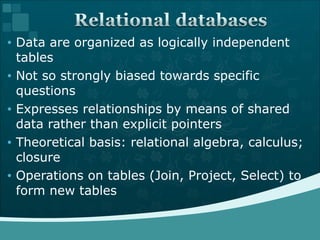
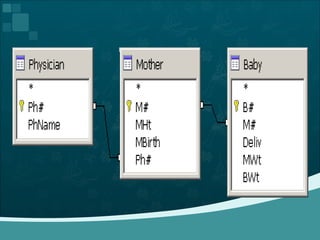
Data are organized as logically independent tables  Not so strongly biased towards specific questions  Expresses relationships by means of shared data rather than explicit pointers  Theoretical basis: relational algebra, calculus; closure  Operations on tables (Join, Project, Select) to form new tables
 
 
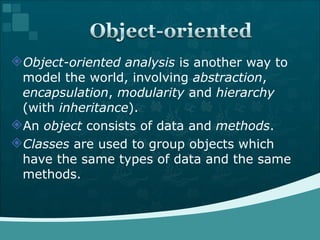
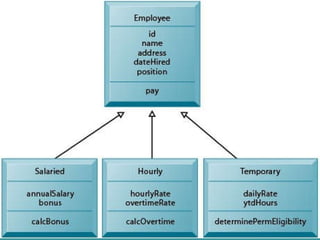
Object-oriented analysis  is another way to model the world, involving  abstraction ,  encapsulation ,  modularity  and  hierarchy  (with  inheritance ).  An  object  consists of data and  methods .  Classes  are used to group objects which have the same types of data and the same methods.
 
Data Warehouses Data Marts OLAP  (Online Analytical Processing)  Data Mining
Data Warehouses It is hard to gather data from different departments Data Warehouse stores the current and historical data throughout the company This data originates from different TPS such as Sales, Finance, HR etc Data Warehouse consolidates and standardize the information gathered from different operations databases This information is further used for management analysis and decision making
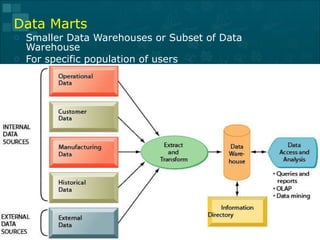
Data Marts Smaller Data Warehouses or Subset of Data Warehouse For specific population of users
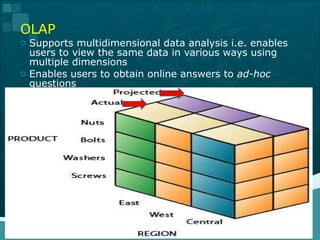
OLAP Supports multidimensional data analysis i.e. enables users to view the same data in various ways using multiple dimensions Enables users to obtain online answers to  ad-hoc  questions
Data Mining More discovery-driven i.e. provides insights into organization data that can not be obtained by OLAP Patterns and rules are used to guide decision making or forecasting the effects Example: A supermarket data tells that Coca-Cola is purchased 65% of the time, but whenever there is special sale on Coca-Cola, the figure goes to 85%. How to project or analyze the overall profitability from different types of special sale?  (what-if analysis) How can we analyze the group of items e.g. people buying Coca-Cola and Chips at the same time?
Data independence Application programs should not, ideally, be exposed to details of data representation and storage. Efficient Data access A DBMS uses several powerful functions to store and retrieve data efficiently Data Integrity and Security The DBMS enforces integrity constraints to get a kind of protection against prohibited access to data.
Data Administration When any users share the data, centralizing the administration of data can offer significant improvements. Concurrent Access and Crash Recovery A DBMS schedules concurrent access to the data in such manner that users can think of the data as being accessed by only one user at a time. DBMS also protects users from the effects of system failures.  Reduced Application Development Time DBMS includes several important functions that are common to many applications accessing data in the DBMS. In conjunction with the high-level interface to the data, facilitates quick application development.
Complexity Size Technical experts are required  Cost of DBMS development  Additional hardware costs Performance monitoring & maintenance  Higher impact of a failure Centralization: That is use of the same program at a time by many user sometimes lead to loss of some data Limited Statistical Capabilities: Can not perform sophisticated calculations  Security issues
Most of the times managers deal with the databases created by someone else, therefore, as a manager you must know how to retrieve the required data SQL:  is an international standard method for retrieving data from the DBMS
Standard Language:  supported by various types of database systems, so the commands will work same in various situations Readability:  easy to read just like ordinary English Reusability:  SQL consists of blocks of code which can be stored in the database and reused Error Handling:  contains error handles errors that track the errors or exceptions during execution. Once an error or exception is caught, specific actions can be taken depending upon the type of the exception or it can be displayed to the user with a message
Better Performance:  multiple SQL statements simultaneously as a single block, thereby reducing network traffic High speed:  SQL queries are designed to retrieve large amounts of records from a database quickly and efficiently. With the help of simple SQL queries, you can retrieve even highly complicated combination of data from the database Security:  With the SQL database storage, you get the security of all the data being in one place, which you can manage easier.
Coding:  SQL is moderately complex. There are only few commands but each command can have several interweaved components. Therefore, it is difficult to learn Incapable of performing sophisticated calculations:  Can only perform simple calculations Difficulty in interfacing :  Since an SQL database supports many advanced features, interfacing to an SQL database is more difficult than just adding a few lines of code

Dbms

  • 1.
  • 2.
    Overview of DatabaseManagement Systems Objectives & Role Advantages & Disadvantages of DBMS SQL Uses of Database for Integration across Functional Areas Database Applications
  • 3.
    In most organizationsthe data files tend to grow independently Accounting, HR, Marketing, Manufacturing etc, all departments end-up developing their own independent systems and data files e.g. HR dept may have a master file containing payroll file, employee insurance file, pension file At the same time Accounting dept may also have the same files Many files in organization Difficult to manage Wastage of resources
  • 4.
    Many businesses oftendo not have - timely - accurate - or relevant information - because of poorly organized data This is why the database management systems are so essential We will be discussing the roles/ benefits of Database Management Systems in the later sessions
  • 5.
    Track information Keepconsistent standards Allow higher productivity as a result of better information
  • 6.
    A structured collectionof related data An filing cabinet, an address book, a telephone directory, a timetable, etc. Google and your email is a database School Student Information System
  • 7.
    Database System Adatabase, a database management system and appropriate hardware and personnel. number, Designation Hours worked, Pay rate Insurance, Pension
  • 8.
    Database Management SystemSystems software that facilitates the management of a database. E.g. Oracle, Access, SQL Server
  • 9.
    DBMS Anapplication software that organises data into records in one or more databases and allows organising, accessing and sorting of the data in a variety of formats.
  • 10.
    Bit Byte FieldSmallest meaningful unit of data Group of one or more characters that has a specific meaning Record Set of fields containing all information known about one entity Each record contains the same fields in the same sequence File Collection of related records
  • 11.
    Table Name: BarryHarris College: Medicine Tel: 392-5555 Name: Barry Harris Field Record Name: Barry Harris College: Medicine Tel: 392-5555
  • 12.
    Records Fields NameGatorLink Phone College Graff rgraff 392-3900 Pharmacy Harris bharris 392-5555 Medicine Ipswich zipswich 846-5656 PHHP
  • 13.
  • 14.
    Four components: People,H/W, S/W, Data Practitioners (analysts and database designers) in consultation with users identify data needs and design database structures to accommodate these needs. The database structures are specified to the DBMS through the data dictionary.
  • 15.
    Users enter datainto the system by following specified procedures. The entered data are maintained on hardware media such as disks and tapes. Application programmes that access the database are written by practitioners and users to be run on computers.
  • 16.
    DATABASE DATA DICTIONARY/DIRECTORY USER PROGRAMMER Data Dictionary/ Directory Subsystem Security and Integrity Subsystem Database Access Subsystem User Query and Reporting Facilities Application Program Development Facilities DBMS USER PROGRAMMER
  • 17.
    DATABASE DATA DICTIONARY/DIRECTORY Application Program Application Program Application Program DBMS Computer Terminals PRINTER Analyst User
  • 18.
    Set of physicaldevices on which a database resides. It consists of one or more computers, disk drives, CRT terminals, printers, tape drives, connecting cables and other auxiliary and connecting hardware.
  • 19.
  • 20.
    A database softwareincludes two types of software General-purpose database management software like operating system. Application software that uses DBMS facilities to manipulate the database to achieve a specific business function, such as providing reports or documents, which can be used by users.
  • 21.
    Application software isgenerally written standard programming language such as C, or it may be written in a language (commonly called a fourth-generation language) supplied with the DBMS. These programs utilise the command language of the DBMS and make use of the information contained in the data dictionary.
  • 22.
    User Interface Language,menus and other facilities by which users interact with various system components, such as application programs, the DBMS Computer-aided software engineering (CASE) tools Automated tools used to design databases and application programs.
  • 23.
    A subsystem thatkeeps track of the definitions of all data items in the database. relationships that exists between various data structures. indexes that are used to access data quickly. screen and report format definitions that may be used by various application programs.
  • 24.
    Definitions of dataitems in the database includes: Elementary-level data items (fields), group and record-level data structures, and files or relational tables.
  • 25.
    Data that describethe properties or characteristics of other data. Some of these properties include data definitions, data structures and rules or constraints. Item name, the data type, length, minimum and maximum allowable values (where appropriate) and a brief description of each data item. Metadata allow database designers and users to understand what data exist, what the data mean. Data without clear meaning can be confusing, misinterpreted or erroneous. Metadata
  • 26.
    E.g. DataItem Value Name Type Length Min Max Description Name Character 30 Employee Name ID Number 9 Employee No. Dept Character 10 Dept. No. Age Integer 2 18 60 Employee Age Name Character 15 Dept. Name Manager Number 9 Mgr. Emp. No. Employee No. (ID) unique Manager is an employee of the organisation Metadata
  • 27.
    Two different typesof people (users and practitioners) are concerned with the database. Users who need information from the database to carry out their primary business responsibility e.g. Executives, managers, staff, clerical personnel
  • 28.
    Practitioners people responsiblefor the database system and its associated application software. e.g. Database administrators, analysts, programmers, database and system designers, information systems managers.
  • 29.
    Database Applications: Banking:all transactions Airlines: reservations, schedules Universities: registration, grades Sales: customers, products, purchases Manufacturing: production, inventory, orders, supply chain Human resources: employee records, salaries, tax deductions Databases touch all aspects of our lives
  • 30.
  • 31.
    The database isa valuable resource needing protection. The DBMS provides database security by limiting access to the database to authorised personnel. Authorised users will generally be restricted as to the particular data they can access and whether they can update it.
  • 32.
    Access is oftencontrolled by passwords and by data views, which are definitions of restricted portions of the database. 1 Data items 2 3 4
  • 33.
    The integrity andconsistency of the database are protected via constraints on values that data items can have and by backup and recovery capabilities provided within the DBMS. Data constraint definitions are maintained in the data dictionary.
  • 34.
    Backup and recoveryare supported by software that automatically logs changes to the database and provides for a means of recovering the current state of the database in case of system failure.
  • 35.
    One of thechief functions of the DBMS is to support the access, retrieval and update of data in the database. The DBMS provides the physical mechanisms allowing multiple users to access a variety of related data quickly and efficiently.
  • 36.
    DBMS provides user-orienteddata manipulation tools. Easy-to-use query languages allow users to formulate queries and request one-time reports directly from the database. Often query languages will contain facilities to format the results of queries as reports.
  • 37.
    Capabilities vary considerable,but basic operations are: Data definition Data entry Data manipulation Data display
  • 38.
    Database Types RelationalObject-oriented Hierarchical Each type structures, organizes and uses data differently
  • 39.
    Hierarchical relationships amongdifferent types of data. Can be very easy to answer some questions, but very difficult to answer others If one-to-many relationship is violated (e.g., a patient can have more than one physician) then the hierarchy becomes a network
  • 40.
  • 41.
    Root 1 st Child 2 nd Child EMPLOYEE Id Dept Position Address COMPENSATION ADDITIONAL BENEFITS HEALTH INSURANCE PERFORMANCE RATING SALARY HISTORY
  • 42.
    Data are organizedas logically independent tables Not so strongly biased towards specific questions Expresses relationships by means of shared data rather than explicit pointers Theoretical basis: relational algebra, calculus; closure Operations on tables (Join, Project, Select) to form new tables
  • 43.
  • 44.
  • 45.
    Object-oriented analysis is another way to model the world, involving abstraction , encapsulation , modularity and hierarchy (with inheritance ). An object consists of data and methods . Classes are used to group objects which have the same types of data and the same methods.
  • 46.
  • 47.
    Data Warehouses DataMarts OLAP (Online Analytical Processing) Data Mining
  • 48.
    Data Warehouses Itis hard to gather data from different departments Data Warehouse stores the current and historical data throughout the company This data originates from different TPS such as Sales, Finance, HR etc Data Warehouse consolidates and standardize the information gathered from different operations databases This information is further used for management analysis and decision making
  • 49.
    Data Marts SmallerData Warehouses or Subset of Data Warehouse For specific population of users
  • 50.
    OLAP Supports multidimensionaldata analysis i.e. enables users to view the same data in various ways using multiple dimensions Enables users to obtain online answers to ad-hoc questions
  • 51.
    Data Mining Morediscovery-driven i.e. provides insights into organization data that can not be obtained by OLAP Patterns and rules are used to guide decision making or forecasting the effects Example: A supermarket data tells that Coca-Cola is purchased 65% of the time, but whenever there is special sale on Coca-Cola, the figure goes to 85%. How to project or analyze the overall profitability from different types of special sale? (what-if analysis) How can we analyze the group of items e.g. people buying Coca-Cola and Chips at the same time?
  • 52.
    Data independence Applicationprograms should not, ideally, be exposed to details of data representation and storage. Efficient Data access A DBMS uses several powerful functions to store and retrieve data efficiently Data Integrity and Security The DBMS enforces integrity constraints to get a kind of protection against prohibited access to data.
  • 53.
    Data Administration Whenany users share the data, centralizing the administration of data can offer significant improvements. Concurrent Access and Crash Recovery A DBMS schedules concurrent access to the data in such manner that users can think of the data as being accessed by only one user at a time. DBMS also protects users from the effects of system failures. Reduced Application Development Time DBMS includes several important functions that are common to many applications accessing data in the DBMS. In conjunction with the high-level interface to the data, facilitates quick application development.
  • 54.
    Complexity Size Technicalexperts are required Cost of DBMS development Additional hardware costs Performance monitoring & maintenance Higher impact of a failure Centralization: That is use of the same program at a time by many user sometimes lead to loss of some data Limited Statistical Capabilities: Can not perform sophisticated calculations Security issues
  • 55.
    Most of thetimes managers deal with the databases created by someone else, therefore, as a manager you must know how to retrieve the required data SQL: is an international standard method for retrieving data from the DBMS
  • 56.
    Standard Language: supported by various types of database systems, so the commands will work same in various situations Readability: easy to read just like ordinary English Reusability: SQL consists of blocks of code which can be stored in the database and reused Error Handling: contains error handles errors that track the errors or exceptions during execution. Once an error or exception is caught, specific actions can be taken depending upon the type of the exception or it can be displayed to the user with a message
  • 57.
    Better Performance: multiple SQL statements simultaneously as a single block, thereby reducing network traffic High speed: SQL queries are designed to retrieve large amounts of records from a database quickly and efficiently. With the help of simple SQL queries, you can retrieve even highly complicated combination of data from the database Security: With the SQL database storage, you get the security of all the data being in one place, which you can manage easier.
  • 58.
    Coding: SQLis moderately complex. There are only few commands but each command can have several interweaved components. Therefore, it is difficult to learn Incapable of performing sophisticated calculations: Can only perform simple calculations Difficulty in interfacing : Since an SQL database supports many advanced features, interfacing to an SQL database is more difficult than just adding a few lines of code