+


    Communications and
    Networks
    Internet Resources
+
    Unit Objectives

       After completing this chapter you will be able to:
           Discuss the purpose of the components required for successful
            communications and identify various sending and receiving devices
           Describe various uses of computer communications
           List the advantages of using a network, and differentiate among
            LANs, MANs and WANs
           Differentiate between client/server and peer-to-peer networks, and
            describe how P2P networks work
+
    Unit Objectives

        Differentiate among a star, bus, and ring network
        Describe the various network communications standards
        Explain the purpose of communications software
        Describe commonly used communications devices
        Discuss different ways to set-up a home network
        Describe various physical and wireless transmission media
+
    Communications
    Communications and Networks
+
    Communications

       Computer communications describes a process in which two or
        more computers or devices transfer data, instructions, and
        information

       Today, even the smallest devices can communicate with each
        other – often via the Internet
+
    Communications

       For successful communications you need:
           A sending device that initiates an instruction to transmit data,
            instructions or information
           A communication channel or transmission media on which the data,
            instructions, or information travel
           A communication device that connects the communications channel
            to a receiving device that accepts the transmission
+
    Uses of Communications
    Communications and Networks
+
    Uses of Communications

       Computer communications are everywhere
           Many require that you subscribe to an Internet access provider
           With others, organizations such as a business or school provide the
            communications services
+
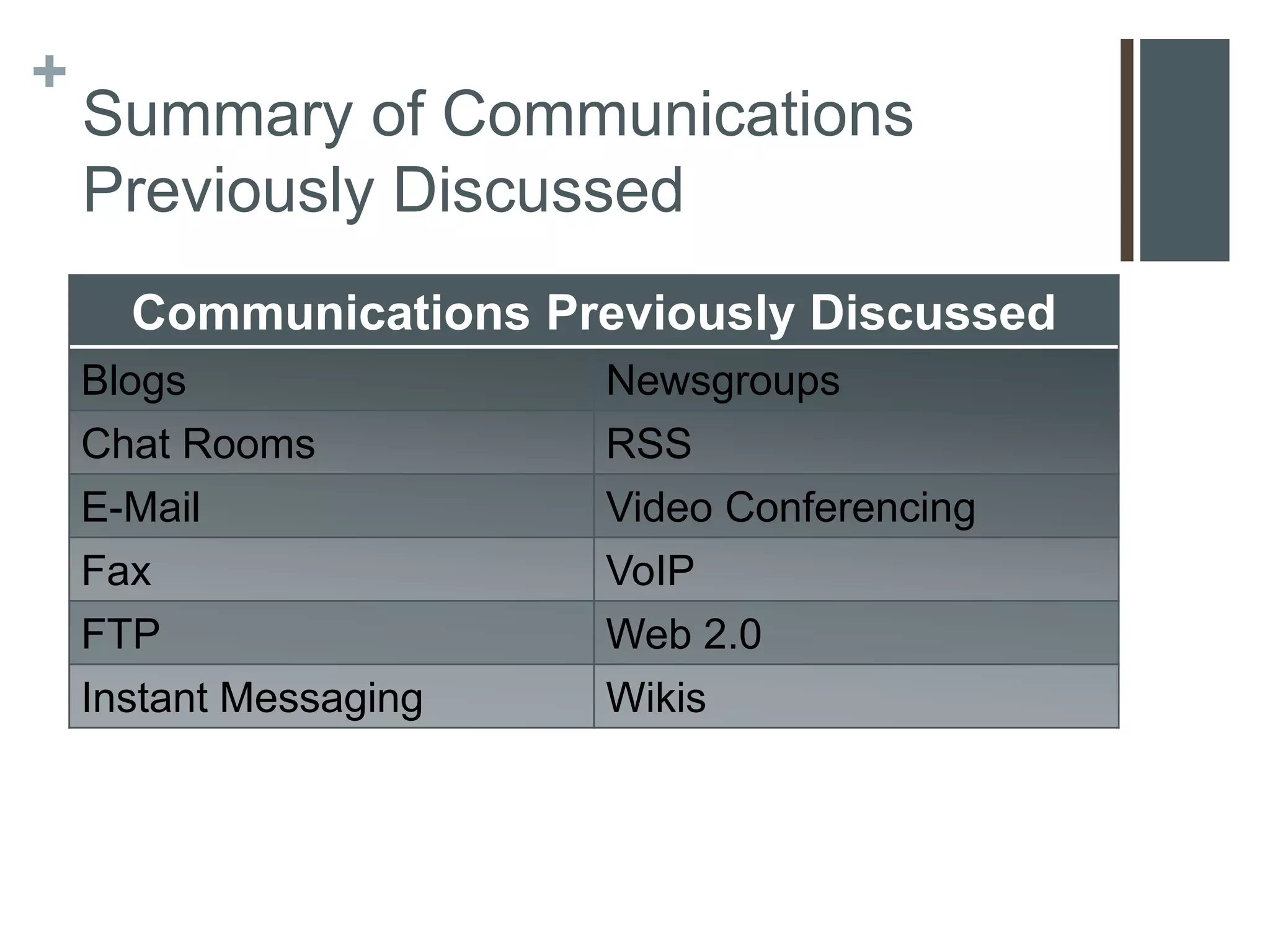
    Summary of Communications
    Previously Discussed
      Communications Previously Discussed
    Blogs               Newsgroups
    Chat Rooms          RSS
    E-Mail              Video Conferencing
    Fax                 VoIP
    FTP                 Web 2.0
    Instant Messaging   Wikis
+
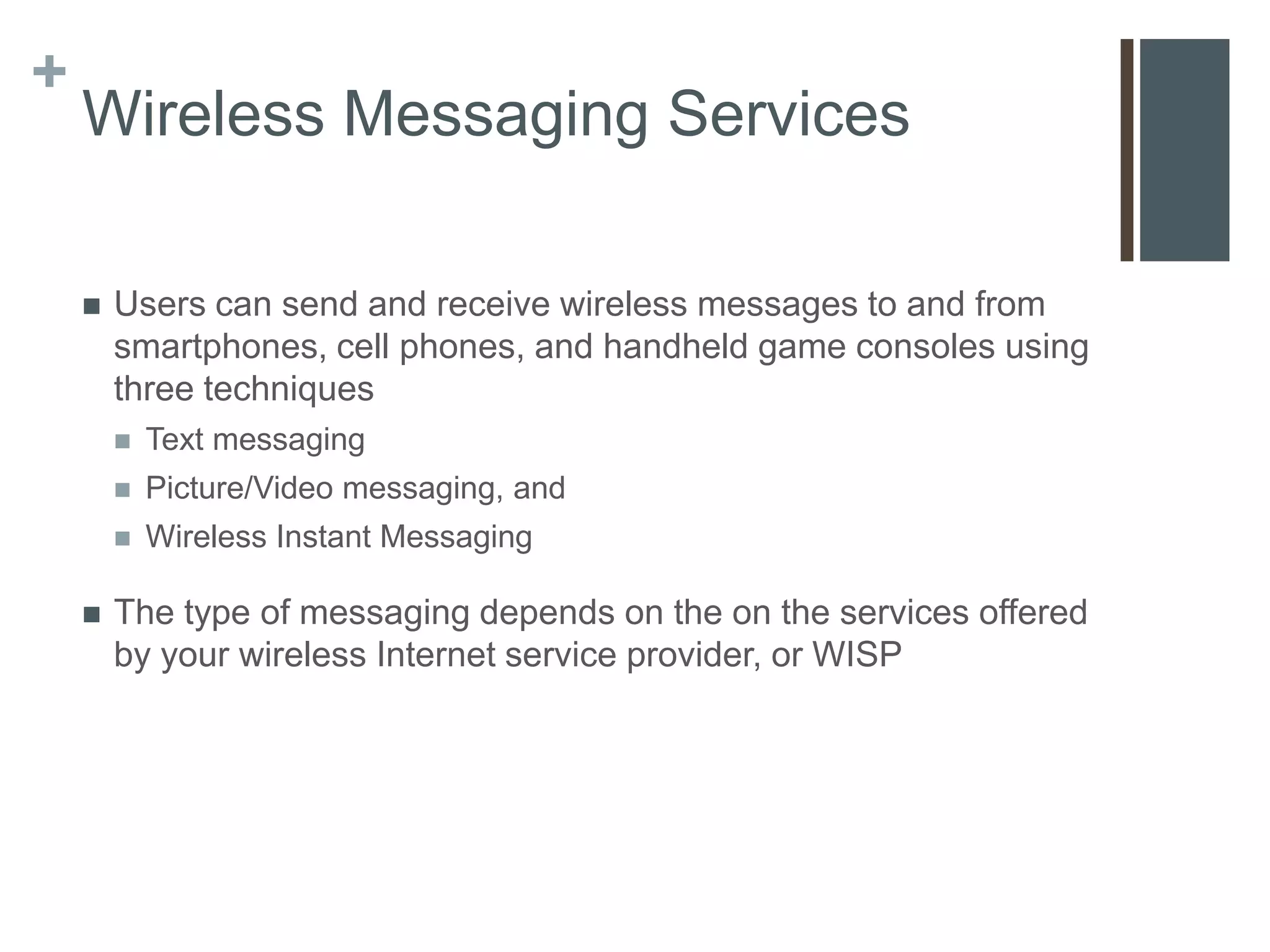
    Wireless Messaging Services

       Users can send and receive wireless messages to and from
        smartphones, cell phones, and handheld game consoles using
        three techniques
           Text messaging
           Picture/Video messaging, and
           Wireless Instant Messaging

       The type of messaging depends on the on the services offered
        by your wireless Internet service provider, or WISP
+
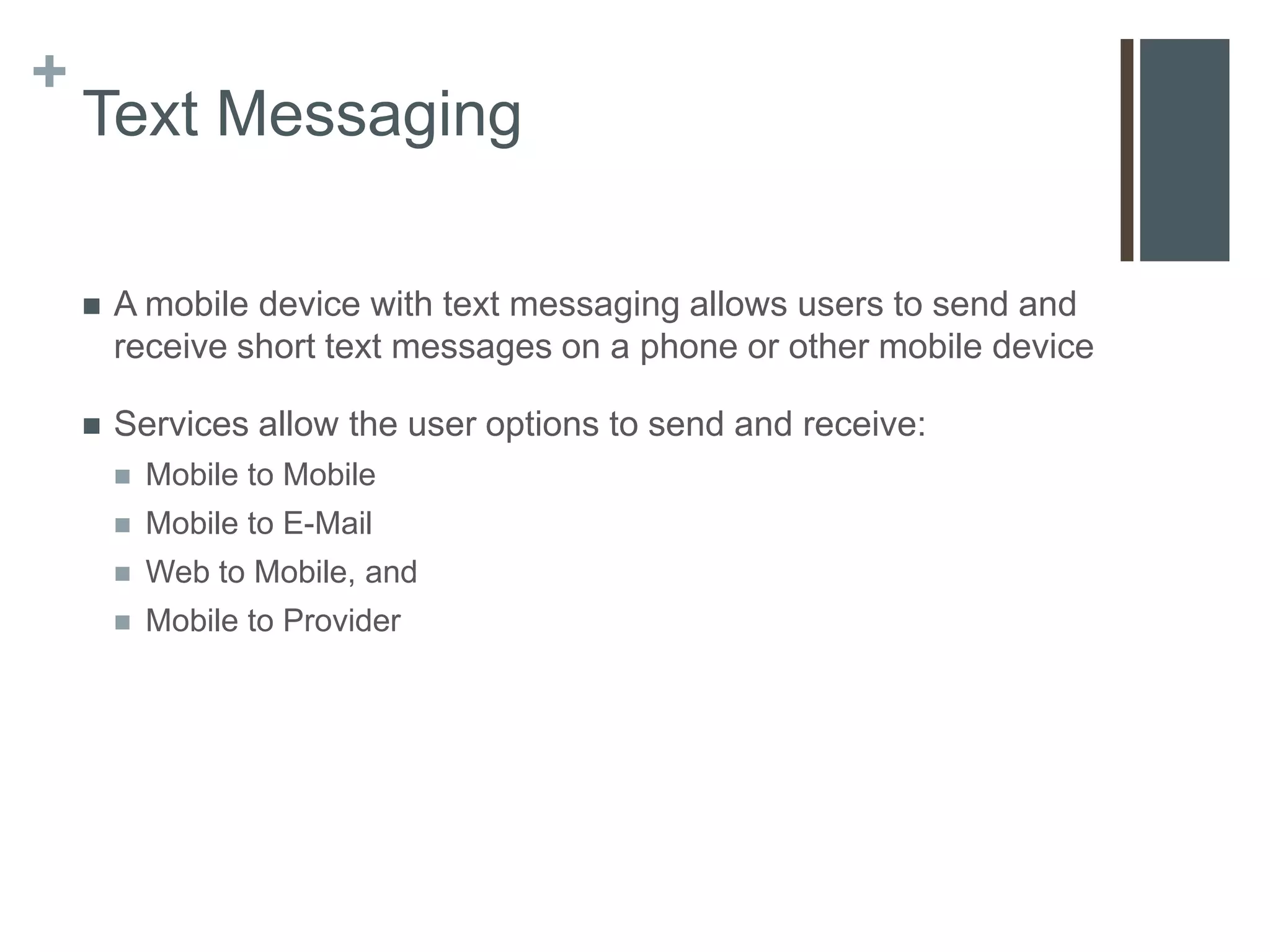
    Text Messaging

       A mobile device with text messaging allows users to send and
        receive short text messages on a phone or other mobile device

       Services allow the user options to send and receive:
           Mobile to Mobile
           Mobile to E-Mail
           Web to Mobile, and
           Mobile to Provider
+
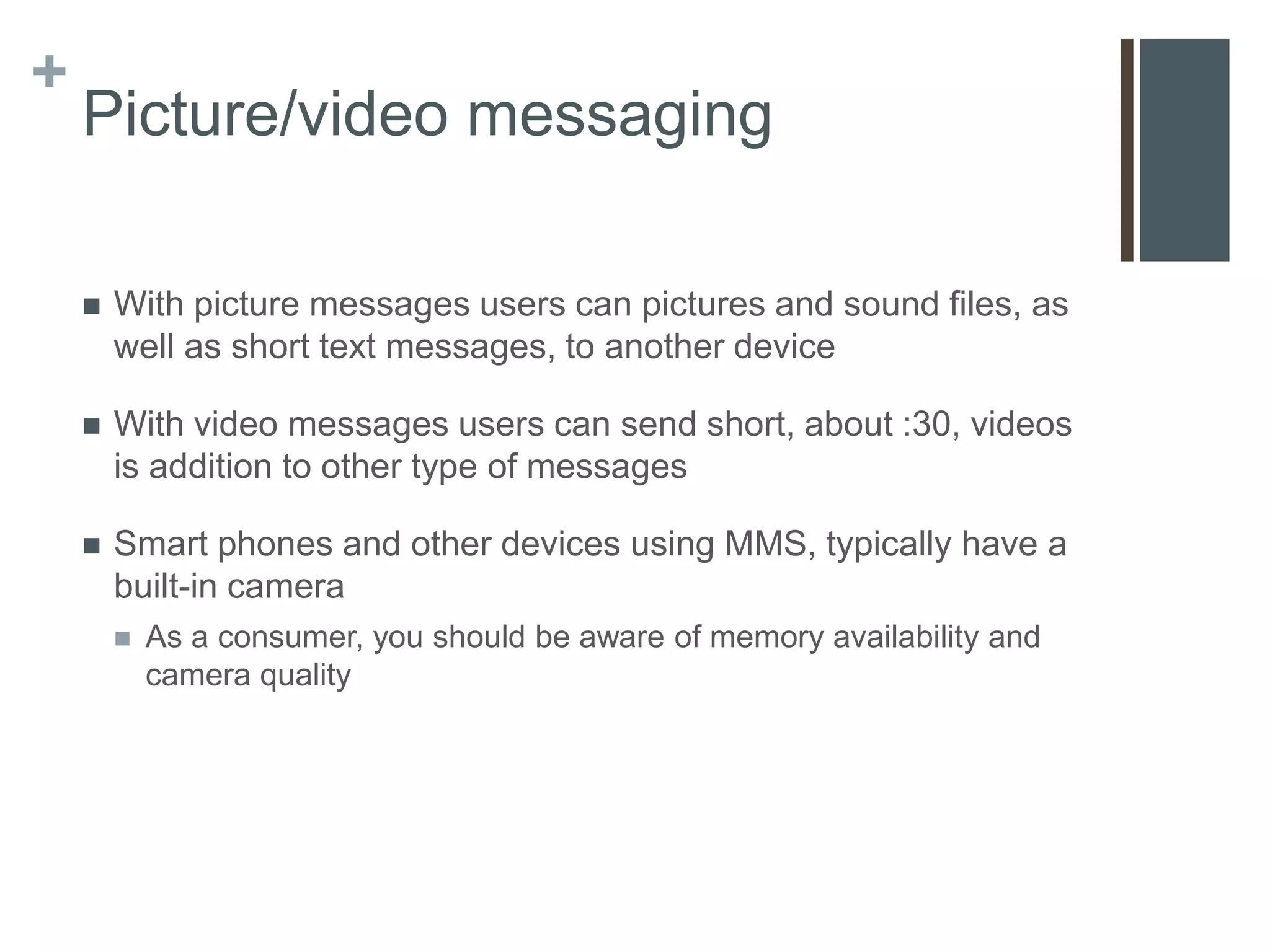
    Picture/video messaging

       With picture messages users can pictures and sound files, as
        well as short text messages, to another device

       With video messages users can send short, about :30, videos
        is addition to other type of messages

       Smart phones and other devices using MMS, typically have a
        built-in camera
           As a consumer, you should be aware of memory availability and
            camera quality
+
    Wireless Instant Messaging

       Wireless instant messaging (IM) is a real-time communications
        service that allows mobile devices to exchange messages with
        other online users

       Some WISPs partner with IM services
           AT&T allows communications through AIM, Windows Live
            Messenger, and Yahoo! Messenger
+
    Wireless Access Points

       People connect everyday to wireless access points using their
        mobile devices to access Internet-based services

       Two Types:
           Hot Spots, &
           Mobile Wireless Networks
+
    Hot Spots

       Is a network that provides wireless Internet connections to
        mobile devices

       Three technologies
           Wi-Fi (local, within a building or room)
           WiMax (regional, withing a community)
           Bluetooth (location-based hot spots)

       Some hot spots are free, schools & coffee shops, and some are
        subscription-based
+
    Mobile Wireless Network

       Provided by cell phone companies, for their devices to access
        their networks

       Coverage and speed depends on the carrier

       Most common speed is 3G
           “4G” networks are becoming available
+
    GPS

       Short for Global Positioning System

       Uses satellite triangulation to pinpoint a location usually within
        10-100 meters

       Examples
           Smart phones
           Car Navigation systems
           Handheld systems for hiking

       Access to additional features
+
    Geocaching

       Geocaching is a real-world outdoor treasure hunting game.

       Players try to locate hidden containers, called geocaches,
        using GPS-enabled devices and then share their experiences
        online.

       www.geocaching.com
+
    Collaboration

       People use the Internet to collaborate, or work together online

       Methods of collaboration
           E-mail
           Collaborative Software
           Document Management Systems
+
    E-mail

       Oldest form of collaboration

       Users send information and documents back and forth through
        their e-mail accounts

       Pros
           Quick and inexpensive

       Cons
           Creates multiple versions of a document
           Information can get lost in the mix
+
    Collaborative Software

       Tools that enable users to share documents via online
        meetings and communicate with other connected users

       Sometimes called a Web Conference or Web Meeting

       Examples
           Microsoft Groove or Office Live Meeting
           WebEx
           Google Apps
           GoToMeeting
+
    Document Management Systems

       Provides storage and management of a users documents

       Users can be granted access to each others documents
           Only one document exists, not multiple versions

       Examples
           Windows Live SkyDrive
           Google Docs
+
    Cybercafés

       Also know as an Internet Café, is a location, usually a
        coffeehouse or restaurant, that provides Internet access to its
        customers

       Examples
           Starbucks
           Burger King
           McDonalds
+
    Web Services

       A Web service is a method of communication between two
        electronic devices over the web.
           The service can be integrated into any web page so users can
            easily access it
           They do not require a specific programming language, operating
            system or web browser

       Examples
           Google Apps, Google Cloud Print, Office 365
+
    Networks
    LANs, MANs, and WANs
    Network Architectures
    Network Topologies
    Intranets
+
    Networks

       A network is a collection of computers and devices connected
        together via communications devices and transmission media

       A network can be internal to an organization or span the entire
        world

       Why network?
           Facilitating communications
           Sharing hardware
           Sharing data and information
           Sharing software
           Transferring funds
+
    LANs, MANs, & WANs

       Networks can be classified is three categories
        1.   Local Area Network
        2.   Metropolitan Area Network
        3.   Wide Area Network
+


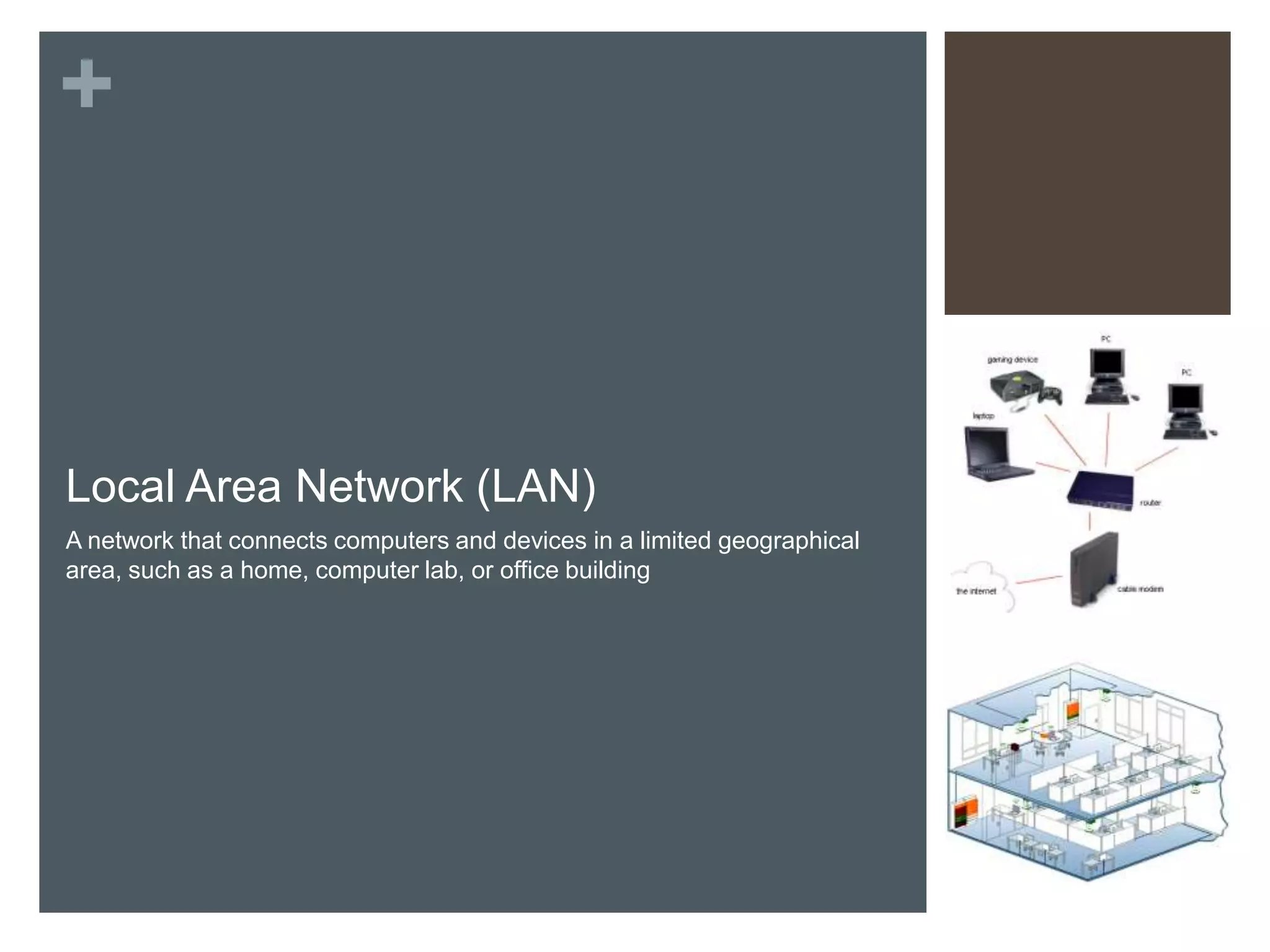
Local Area Network (LAN)
A network that connects computers and devices in a limited geographical
area, such as a home, computer lab, or office building
+
    WLAN

       A wireless LAN is a LAN that uses no physical wires

       Computers and devices that access a WLAN must have built-in
        wireless capability, or an appropriate adapter

       Very often WLANs are setup side-by-side with a traditional LAN
+
    Metropolitan Area Network (MAN)

       A high-speed network that connects local area networks in a
        metropolitan area such as a city or town

       A MAN typically includes one or more LANs but covers a
        smaller geographic area then a WAN

       Managed by a Network Provider such as a state government,
        telephone company, or cable provider
+
    Wide Area Network (WAN)

       Network that covers a large
        geographic area, such as a city,
        country or the world

       A WAN can be one large
        network or consist of two or
        more LANs

       The Internet is the worlds
        largest WAN
+
    Network Architectures
    The design of computers, devices, and media in a network,
    sometimes called network architecture, is categorized as either
    client/server or peer-to-peer
+
    Client/Server

       On a client/server network, one or more computers act as a
        server, and the other computers request services from the
        server

       A server, sometimes called a host computer, control access to
        the hardware, software, and other resources on the network

       The clients are other computers or mobile devices on the
        network that rely on the server for its resources
+
    Peer-to-Peer

       Simple, inexpensive network
        that typically connects fewer
        than 10 computers or other
        devices

       Each computer, or peer, has
        equal responsibilities and
        capabilities

       Each computer stores files on
        its own hard drives for sharing

       Ideal for very small businesses
        and home networks
+
    Internet Peer-to-Peer

       P2P describes an Internet network on which users access each
        other’s hard disks and exchange files

       Sometimes called a file-sharing network

       Examples:
           BitTorrent
           Gnutella
           Kazaa
           LimeWire

       Responsible for the majority of illegal file-sharing on the
        Interent
+
    Network Topologies
    Star
    Bus
    Ring
    Intranets
+
    Network Topologies

       A network topology refers to the layout of computers and
        devices in a communications network

       Three most common topologies:
        1.   Star
        2.   Ring, and
        3.   Bus

       Most networks, including the Internet, use a combination of the
        three
+
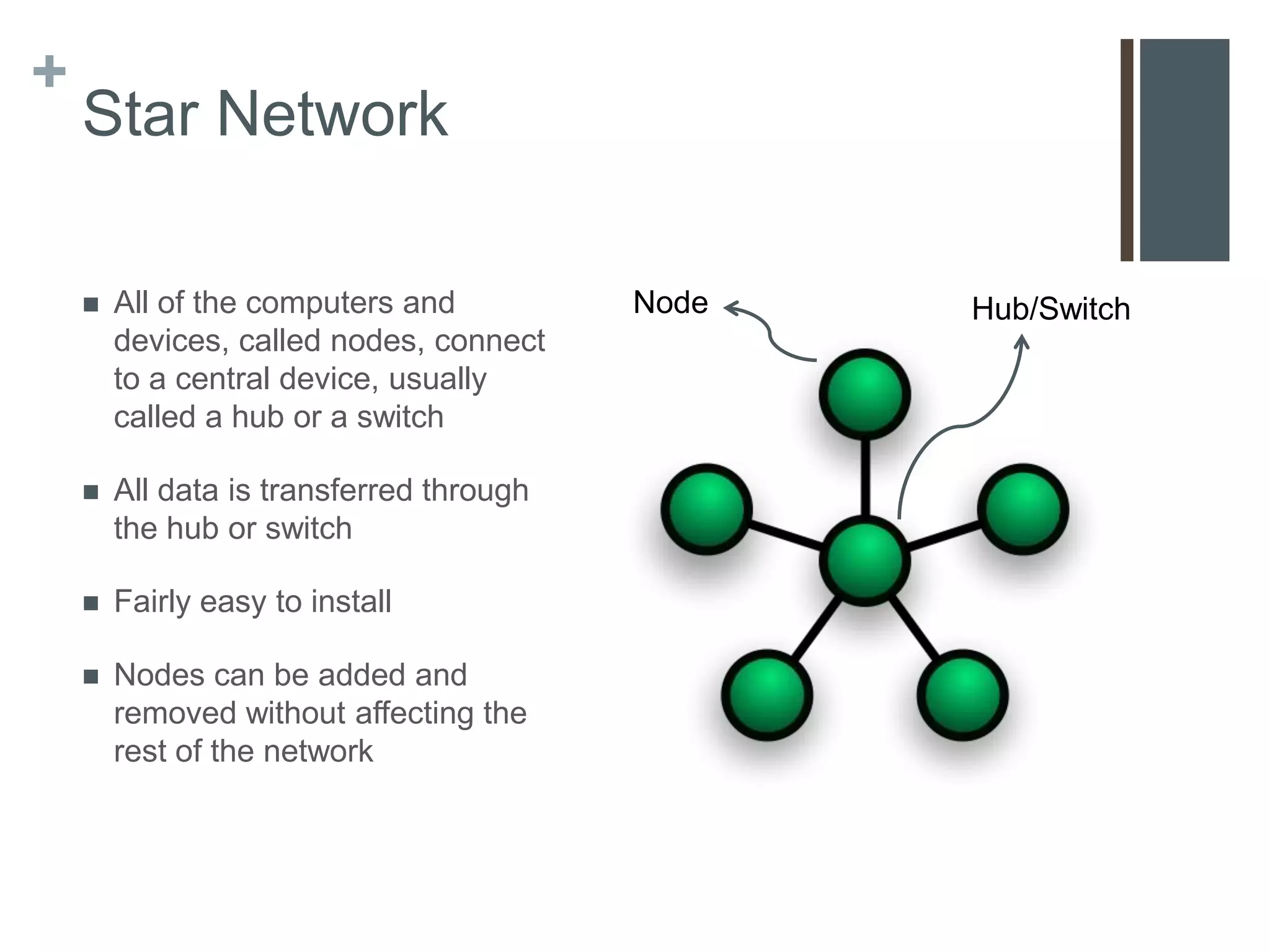
    Star Network

       All of the computers and          Node   Hub/Switch
        devices, called nodes, connect
        to a central device, usually
        called a hub or a switch

       All data is transferred through
        the hub or switch

       Fairly easy to install

       Nodes can be added and
        removed without affecting the
        rest of the network
+
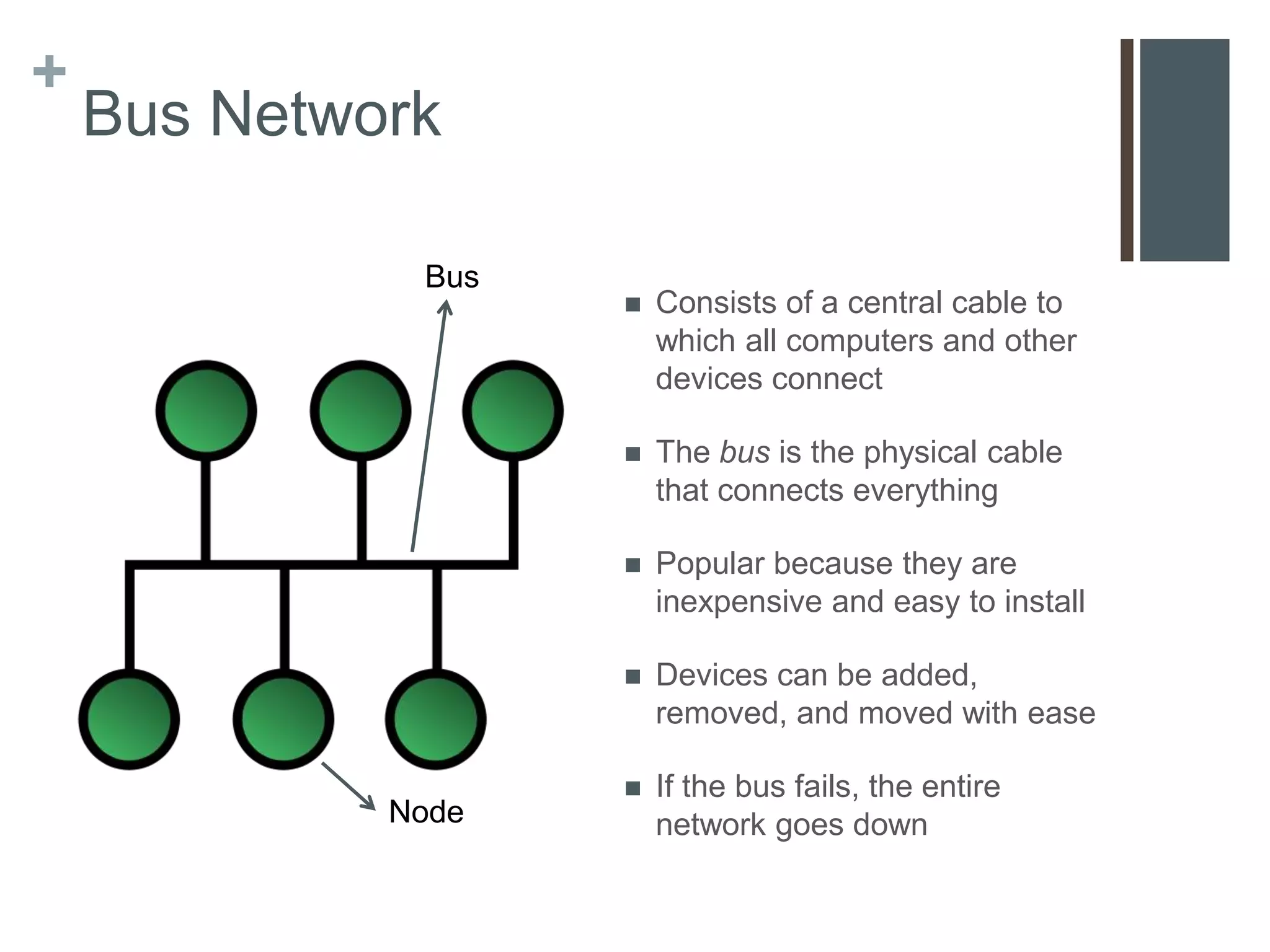
    Bus Network

              Bus
                       Consists of a central cable to
                        which all computers and other
                        devices connect

                       The bus is the physical cable
                        that connects everything

                       Popular because they are
                        inexpensive and easy to install

                       Devices can be added,
                        removed, and moved with ease

                       If the bus fails, the entire
             Node       network goes down
+
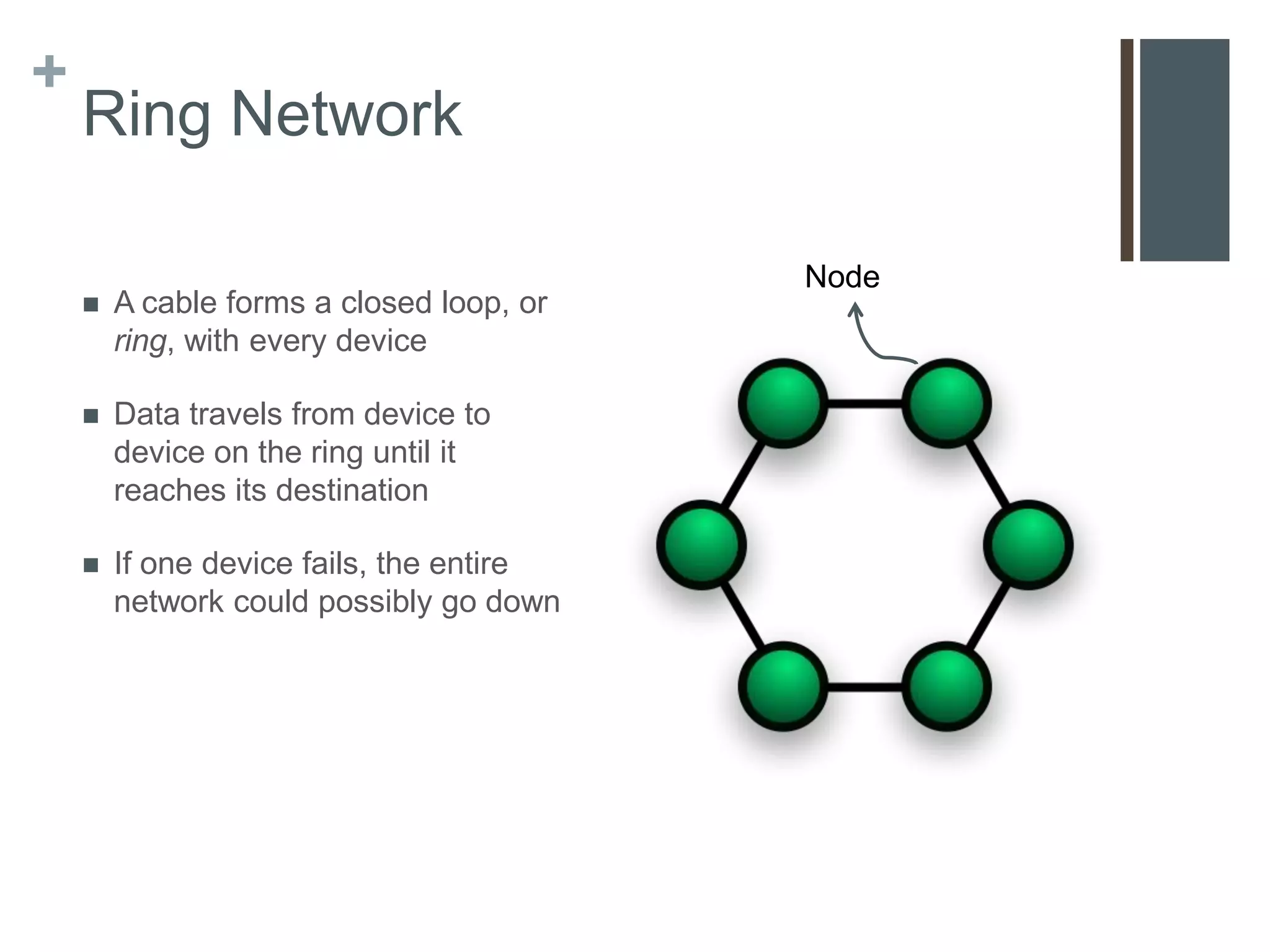
    Ring Network

                                          Node
       A cable forms a closed loop, or
        ring, with every device

       Data travels from device to
        device on the ring until it
        reaches its destination

       If one device fails, the entire
        network could possibly go down
+
    Intranets

       An intranet is an internal network that uses Internet
        technologies

       Intranets usually make company information accessible to
        employees

       Examples:
           Telephone directories
           Event calendars
           Job postings
           Video conferencing

       Accessed through a web browser where changes can be made
        by everyone
+
    Network Communication
    Standards
    Ethernet     UWB
    Token Ring   IrDA
    TCP/IP       RFID
    Wi-Fi        WiMAX
    Bluetooth    WAP
+
    Network Communication Standards

       Today’s networks connect a variety of devices across many
        different networks, such as wide area, local area and wireless.
       All networks must use similar techniques for connecting
        devices to ensure compatibility

       Two regulating organizations
        1.   ANSI
        2.   IEEE

       These organizations propose, develop, and approve network
        standards
+
    Network Communications
    Standards
       A network standard defines guidelines that specify:
           The way computers access the medium to which they are attached,
           The type(s) of medium used,
           The speeds used on different types of networks, and
           The type(s) of physical cable and/or the wireless technology used

       A that standard outlines characteristics of how two networks
        communicate is called a protocol
+
    Widely Used Standards & Protocols

       You are to choose a standard or protocol below to research on
        a and report to the class
        1.    Ethernet
        2.    Token Ring
        3.    TCP/IP
        4.    Wi-Fi
        5.    Bluetooth
        6.    UWB
        7.    IrDA
        8.    RFID
        9.    WiMAX
        10.   WAP

Communications & Networks

  • 1.
    + Communications and Networks Internet Resources
  • 2.
    + Unit Objectives  After completing this chapter you will be able to:  Discuss the purpose of the components required for successful communications and identify various sending and receiving devices  Describe various uses of computer communications  List the advantages of using a network, and differentiate among LANs, MANs and WANs  Differentiate between client/server and peer-to-peer networks, and describe how P2P networks work
  • 3.
    + Unit Objectives  Differentiate among a star, bus, and ring network  Describe the various network communications standards  Explain the purpose of communications software  Describe commonly used communications devices  Discuss different ways to set-up a home network  Describe various physical and wireless transmission media
  • 4.
    + Communications Communications and Networks
  • 5.
    + Communications  Computer communications describes a process in which two or more computers or devices transfer data, instructions, and information  Today, even the smallest devices can communicate with each other – often via the Internet
  • 6.
    + Communications  For successful communications you need:  A sending device that initiates an instruction to transmit data, instructions or information  A communication channel or transmission media on which the data, instructions, or information travel  A communication device that connects the communications channel to a receiving device that accepts the transmission
  • 7.
    + Uses of Communications Communications and Networks
  • 8.
    + Uses of Communications  Computer communications are everywhere  Many require that you subscribe to an Internet access provider  With others, organizations such as a business or school provide the communications services
  • 9.
    + Summary of Communications Previously Discussed Communications Previously Discussed Blogs Newsgroups Chat Rooms RSS E-Mail Video Conferencing Fax VoIP FTP Web 2.0 Instant Messaging Wikis
  • 10.
    + Wireless Messaging Services  Users can send and receive wireless messages to and from smartphones, cell phones, and handheld game consoles using three techniques  Text messaging  Picture/Video messaging, and  Wireless Instant Messaging  The type of messaging depends on the on the services offered by your wireless Internet service provider, or WISP
  • 11.
    + Text Messaging  A mobile device with text messaging allows users to send and receive short text messages on a phone or other mobile device  Services allow the user options to send and receive:  Mobile to Mobile  Mobile to E-Mail  Web to Mobile, and  Mobile to Provider
  • 12.
    + Picture/video messaging  With picture messages users can pictures and sound files, as well as short text messages, to another device  With video messages users can send short, about :30, videos is addition to other type of messages  Smart phones and other devices using MMS, typically have a built-in camera  As a consumer, you should be aware of memory availability and camera quality
  • 13.
    + Wireless Instant Messaging  Wireless instant messaging (IM) is a real-time communications service that allows mobile devices to exchange messages with other online users  Some WISPs partner with IM services  AT&T allows communications through AIM, Windows Live Messenger, and Yahoo! Messenger
  • 14.
    + Wireless Access Points  People connect everyday to wireless access points using their mobile devices to access Internet-based services  Two Types:  Hot Spots, &  Mobile Wireless Networks
  • 15.
    + Hot Spots  Is a network that provides wireless Internet connections to mobile devices  Three technologies  Wi-Fi (local, within a building or room)  WiMax (regional, withing a community)  Bluetooth (location-based hot spots)  Some hot spots are free, schools & coffee shops, and some are subscription-based
  • 16.
    + Mobile Wireless Network  Provided by cell phone companies, for their devices to access their networks  Coverage and speed depends on the carrier  Most common speed is 3G  “4G” networks are becoming available
  • 17.
    + GPS  Short for Global Positioning System  Uses satellite triangulation to pinpoint a location usually within 10-100 meters  Examples  Smart phones  Car Navigation systems  Handheld systems for hiking  Access to additional features
  • 18.
    + Geocaching  Geocaching is a real-world outdoor treasure hunting game.  Players try to locate hidden containers, called geocaches, using GPS-enabled devices and then share their experiences online.  www.geocaching.com
  • 19.
    + Collaboration  People use the Internet to collaborate, or work together online  Methods of collaboration  E-mail  Collaborative Software  Document Management Systems
  • 20.
    + E-mail  Oldest form of collaboration  Users send information and documents back and forth through their e-mail accounts  Pros  Quick and inexpensive  Cons  Creates multiple versions of a document  Information can get lost in the mix
  • 21.
    + Collaborative Software  Tools that enable users to share documents via online meetings and communicate with other connected users  Sometimes called a Web Conference or Web Meeting  Examples  Microsoft Groove or Office Live Meeting  WebEx  Google Apps  GoToMeeting
  • 22.
    + Document Management Systems  Provides storage and management of a users documents  Users can be granted access to each others documents  Only one document exists, not multiple versions  Examples  Windows Live SkyDrive  Google Docs
  • 23.
    + Cybercafés  Also know as an Internet Café, is a location, usually a coffeehouse or restaurant, that provides Internet access to its customers  Examples  Starbucks  Burger King  McDonalds
  • 24.
    + Web Services  A Web service is a method of communication between two electronic devices over the web.  The service can be integrated into any web page so users can easily access it  They do not require a specific programming language, operating system or web browser  Examples  Google Apps, Google Cloud Print, Office 365
  • 25.
    + Networks LANs, MANs, and WANs Network Architectures Network Topologies Intranets
  • 26.
    + Networks  A network is a collection of computers and devices connected together via communications devices and transmission media  A network can be internal to an organization or span the entire world  Why network?  Facilitating communications  Sharing hardware  Sharing data and information  Sharing software  Transferring funds
  • 27.
    + LANs, MANs, & WANs  Networks can be classified is three categories 1. Local Area Network 2. Metropolitan Area Network 3. Wide Area Network
  • 28.
    + Local Area Network(LAN) A network that connects computers and devices in a limited geographical area, such as a home, computer lab, or office building
  • 29.
    + WLAN  A wireless LAN is a LAN that uses no physical wires  Computers and devices that access a WLAN must have built-in wireless capability, or an appropriate adapter  Very often WLANs are setup side-by-side with a traditional LAN
  • 30.
    + Metropolitan Area Network (MAN)  A high-speed network that connects local area networks in a metropolitan area such as a city or town  A MAN typically includes one or more LANs but covers a smaller geographic area then a WAN  Managed by a Network Provider such as a state government, telephone company, or cable provider
  • 31.
    + Wide Area Network (WAN)  Network that covers a large geographic area, such as a city, country or the world  A WAN can be one large network or consist of two or more LANs  The Internet is the worlds largest WAN
  • 32.
    + Network Architectures The design of computers, devices, and media in a network, sometimes called network architecture, is categorized as either client/server or peer-to-peer
  • 33.
    + Client/Server  On a client/server network, one or more computers act as a server, and the other computers request services from the server  A server, sometimes called a host computer, control access to the hardware, software, and other resources on the network  The clients are other computers or mobile devices on the network that rely on the server for its resources
  • 34.
    + Peer-to-Peer  Simple, inexpensive network that typically connects fewer than 10 computers or other devices  Each computer, or peer, has equal responsibilities and capabilities  Each computer stores files on its own hard drives for sharing  Ideal for very small businesses and home networks
  • 35.
    + Internet Peer-to-Peer  P2P describes an Internet network on which users access each other’s hard disks and exchange files  Sometimes called a file-sharing network  Examples:  BitTorrent  Gnutella  Kazaa  LimeWire  Responsible for the majority of illegal file-sharing on the Interent
  • 36.
    + Network Topologies Star Bus Ring Intranets
  • 37.
    + Network Topologies  A network topology refers to the layout of computers and devices in a communications network  Three most common topologies: 1. Star 2. Ring, and 3. Bus  Most networks, including the Internet, use a combination of the three
  • 38.
    + Star Network  All of the computers and Node Hub/Switch devices, called nodes, connect to a central device, usually called a hub or a switch  All data is transferred through the hub or switch  Fairly easy to install  Nodes can be added and removed without affecting the rest of the network
  • 39.
    + Bus Network Bus  Consists of a central cable to which all computers and other devices connect  The bus is the physical cable that connects everything  Popular because they are inexpensive and easy to install  Devices can be added, removed, and moved with ease  If the bus fails, the entire Node network goes down
  • 40.
    + Ring Network Node  A cable forms a closed loop, or ring, with every device  Data travels from device to device on the ring until it reaches its destination  If one device fails, the entire network could possibly go down
  • 41.
    + Intranets  An intranet is an internal network that uses Internet technologies  Intranets usually make company information accessible to employees  Examples:  Telephone directories  Event calendars  Job postings  Video conferencing  Accessed through a web browser where changes can be made by everyone
  • 42.
    + Network Communication Standards Ethernet UWB Token Ring IrDA TCP/IP RFID Wi-Fi WiMAX Bluetooth WAP
  • 43.
    + Network Communication Standards  Today’s networks connect a variety of devices across many different networks, such as wide area, local area and wireless.  All networks must use similar techniques for connecting devices to ensure compatibility  Two regulating organizations 1. ANSI 2. IEEE  These organizations propose, develop, and approve network standards
  • 44.
    + Network Communications Standards  A network standard defines guidelines that specify:  The way computers access the medium to which they are attached,  The type(s) of medium used,  The speeds used on different types of networks, and  The type(s) of physical cable and/or the wireless technology used  A that standard outlines characteristics of how two networks communicate is called a protocol
  • 45.
    + Widely Used Standards & Protocols  You are to choose a standard or protocol below to research on a and report to the class 1. Ethernet 2. Token Ring 3. TCP/IP 4. Wi-Fi 5. Bluetooth 6. UWB 7. IrDA 8. RFID 9. WiMAX 10. WAP