






How did the internet develop?
What is Internet?
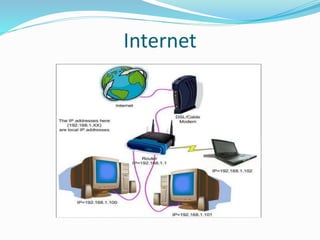
 The internet a is global interconnection of computer
networks linking government agencies, organisations,
educational institutions and individual all over the
world to share information .
 It is a very large wide area network (WAN)
connecting computers and networks around the
world.
 It makes it possible for millions of users to connect to
one another via telephone lines, cable lines and
satellites.
 The popular term for the Internet is the “information
highway”.
 Rather than moving through geographical space, it moves
your ideas and information through cyberspace – the space
of electronic movement of ideas and information.
 The Internet has enabled and accelerated new forms of human
interactions through instant messaging , Internet forums,
and social networking.
 The Internet carries an extensive range of information
resources and services, such as the inter
linked hypertext documents of the World Wide
Web (WWW) and the infrastructure to support email.
A global network connecting millions of computers.
More than 100 countries are linked into exchanges
of data, news and opinions. Unlike online services,
which are centrally controlled, the Internet is
decentralized by design.
The Internet is a communication system that has
brought a wealth of information to our fingertips and
organized it for our use.
The Internet is a structured, organized system.
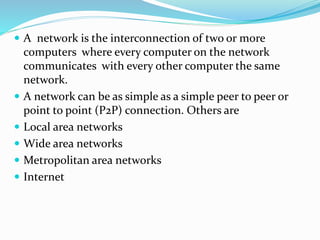
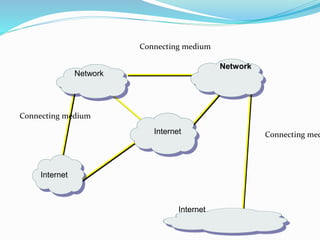
 A network is the interconnection of two or more
computers where every computer on the network
communicates with every other computer the same
network.
 A network can be as simple as a simple peer to peer or
point to point (P2P) connection. Others are
 Local area networks
 Wide area networks
 Metropolitan area networks
 Internet
Internet
Internet
Network
Internet
Internet
Network
Connecting medium
Connecting medium
Connecting med
HOW DID IT HAPPEN?
 The most notable internet is called the Internet, a collaboration
of more than hundreds of thousands of interconnected networks.
 In the mid-1960s, mainframe computers in research organizations
were stand alone devices. Computers from different
manufacturers were unable to communicate w/ one another. The
Advanced Research Projects Agency (ARPA) was interested in
finding a way to connect computers so that the researchers they
funded could share their findings.
 In 1967, at an Association for Computing Machinery (ACM)
meeting, ARPA presented its ideas for ARPANET, a small network
of connected computers.
 In 1972, Vint Cerf and Bob Kahn were part of the core ARPANET
group, collaborated on what they called the Internetting Project.
Cerf and Kahn’s landmark 1973 paper outlined the protocols to
achieved end-to-end delivery packets.
 This paper on Transmission Control Protocol (TCP) included
concepts such as encapsulation, the datagram, and the functions
of a gateway.
 Authorities made a decision to split TCP into two protocols:
Transmission Control Protocol (TCP) and Internetworking
Protocol (IP), IP would handle datagram routing while TCP
would be responsible for higher-level functions such as
segmentations, reassembly, and error detection. The
internetworking protocol became known as TCP/ IP.
 The father of internet is widely bestowed on
Vinton Gray “Vint Cerf” an American computer scientist.
 Tim Berners-Lee is also regarded as the father of the WWW
TERMINOLOGIES IN INTERNET USAGE
 Address
 Browser
 Chat
 Dial-up
 Domain
 Download
 DSL
 Home Page
 HTML
 Hypertext
 ISP
 Key Word
 Link (hyperlink)
 Modem
 Search Engine
 Server
 Toolbars
 URL
 Web
 Web Site
Resources needed for internet
Connection
 Hardware required
 Computer
 Modem
 path (phone line, cable, wireless)
 adequate speed/memory
 Routers
 Mobile phones
 Other resources
 ISP (Internet Service Provider)
 web browser
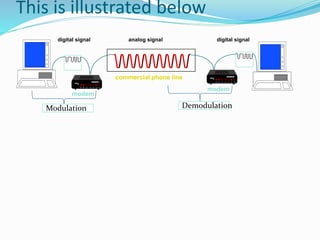
 The modem is an essential resource in internet access,
it enables the conversion of signals in transit. The
computer only understands the language of digits
known as the digital signals which are discrete whiles
the human world only deals with analog signals which
are continuous. The modem therefore converts signals
from digital to analog, a process known as modulation
and from analog to digital, a process known as
demodulation. The name MODEM is therefore
derived from the first two letters of MOdulation and
the first three letters of DEModulation.
Its operation is indicated below.
This is illustrated below
digital signal digital signalanalog signal
modem
modem
commercial phone line
Modulation Demodulation
 Another important resource is the Internet Service
provider(ISP). They are organisations with permanent
connection or access to the internet. They on the other
hand provides temporal access of the internet to other
organisations and individuals.
 Examples includes; vodafone, MTN, airtel, globacom,
tigo and of late surf line which are the predominant
telcos or companies providing internet access in
Ghana. Others are AT&T, America OnLine(AOL),
MSN and Compuserve.
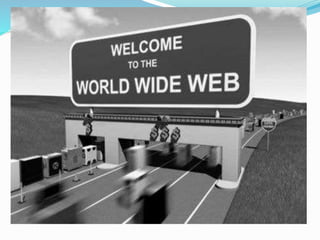
The World Wide Web (WWW)
 World Wide Web or W3 is the most popular and
promising method of organizing and accessing
information on the INTERNET. It is one of the basic
services of the internet
 The Web (World Wide Web) consists of information
organized into Web pages containing text and graphic
images.
 The www therefore is not the same as the internet
 Hypertext is a new way of information storage and
retrieval that enables authors to structure information
in novel ways.
 A properly designed hypertext document can help
users to locate desired type of information rapidly.
 Hypertext documents enable this by using a series of
links.
 A link is a special type of item in a hypertext
document connecting a document to other
documents. These document interconnections
constitute the world wide web(W3 or the WWW).
 A collection of linked Web pages that has a common theme
or focus is called a Web site.
 Hypertext documents on internet are known as Web
Pages, they are electronic documents displayed by web
browsers on the internet.
 The main page that all of the pages on a particular Web site
are organized around and link back to is called the site’s
home page.
Basic services of internet
 Electronic mail
 FTP
 Telnet
 Usenet news
 The World Wide Web
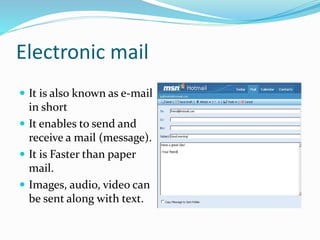
Electronic mail
 It is also known as e-mail
in short
 It enables to send and
receive a mail (message).
 It is Faster than paper
mail.
 Images, audio, video can
be sent along with text.
File transfer Protocol (FTP)
 It enables users to move a file from one computer to
another computer.
 A file may contain:
 Text document
 Image
 Artwork
 Movie
 Sound
 Software
Telnet
 Telnet service enables users to login to another
computer on internet from their local computer for
using:
 Computing power of remote computer
 Software on remote computer
 Database of remote computer
 This action is called ‘remote login’.
Usenet News
 Usenet news service enables a group of internet users
to exchange their views, ideas, information on some
common topic of internet.
 A newsgroup is like a large notice board accessible to
all members belonging to the group.
 2 types of newsgroups:
 Moderated
 Non-moderated
The World Wide Web
 It is a most popular method of accessing internet.
 It uses a concept called hypertext.
 Hypertext documents on internet are known as web
pages.
 Web pages are created by using a special language
called Hyper Text Markup Language (html)
Uses of the Internet ?
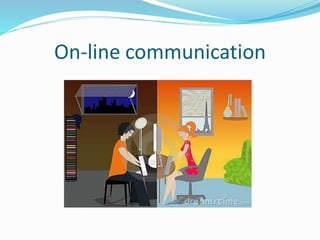
 On-line communication
 Software sharing
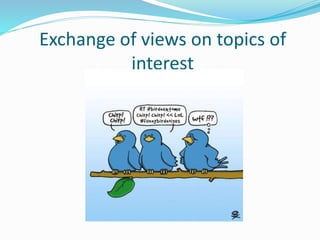
 Exchange of views on topics of common interest
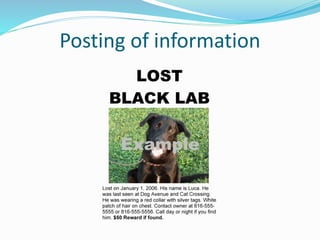
 Posting of information of general interest
 Product promotion
 Feedback about product
 Customer support service
 On-line journals and magazines
On-line communication
Software sharing
Exchange of views on topics of
interest
Posting of information
Product promotion
Feedback about products
Customer support services
Online journals and magazines
 ARPANET
Forefather of internet
 INTERNET
Network of computers
 Basic Services
e-mails, FTP, Telnet, Usenet news
 Uses of internet
Communication, sharing, exchanging, informing,
feedback and support.
The internet and www 2

The internet and www 2

  • 1.
    How did theinternet develop?
  • 2.
    What is Internet? The internet a is global interconnection of computer networks linking government agencies, organisations, educational institutions and individual all over the world to share information .  It is a very large wide area network (WAN) connecting computers and networks around the world.  It makes it possible for millions of users to connect to one another via telephone lines, cable lines and satellites.
  • 3.
     The popularterm for the Internet is the “information highway”.  Rather than moving through geographical space, it moves your ideas and information through cyberspace – the space of electronic movement of ideas and information.  The Internet has enabled and accelerated new forms of human interactions through instant messaging , Internet forums, and social networking.  The Internet carries an extensive range of information resources and services, such as the inter linked hypertext documents of the World Wide Web (WWW) and the infrastructure to support email.
  • 4.
    A global networkconnecting millions of computers. More than 100 countries are linked into exchanges of data, news and opinions. Unlike online services, which are centrally controlled, the Internet is decentralized by design. The Internet is a communication system that has brought a wealth of information to our fingertips and organized it for our use. The Internet is a structured, organized system.
  • 5.
     A networkis the interconnection of two or more computers where every computer on the network communicates with every other computer the same network.  A network can be as simple as a simple peer to peer or point to point (P2P) connection. Others are  Local area networks  Wide area networks  Metropolitan area networks  Internet
  • 6.
  • 7.
  • 8.
    HOW DID ITHAPPEN?
  • 9.
     The mostnotable internet is called the Internet, a collaboration of more than hundreds of thousands of interconnected networks.  In the mid-1960s, mainframe computers in research organizations were stand alone devices. Computers from different manufacturers were unable to communicate w/ one another. The Advanced Research Projects Agency (ARPA) was interested in finding a way to connect computers so that the researchers they funded could share their findings.  In 1967, at an Association for Computing Machinery (ACM) meeting, ARPA presented its ideas for ARPANET, a small network of connected computers.  In 1972, Vint Cerf and Bob Kahn were part of the core ARPANET group, collaborated on what they called the Internetting Project. Cerf and Kahn’s landmark 1973 paper outlined the protocols to achieved end-to-end delivery packets.
  • 10.
     This paperon Transmission Control Protocol (TCP) included concepts such as encapsulation, the datagram, and the functions of a gateway.  Authorities made a decision to split TCP into two protocols: Transmission Control Protocol (TCP) and Internetworking Protocol (IP), IP would handle datagram routing while TCP would be responsible for higher-level functions such as segmentations, reassembly, and error detection. The internetworking protocol became known as TCP/ IP.  The father of internet is widely bestowed on Vinton Gray “Vint Cerf” an American computer scientist.  Tim Berners-Lee is also regarded as the father of the WWW
  • 11.
    TERMINOLOGIES IN INTERNETUSAGE  Address  Browser  Chat  Dial-up  Domain  Download  DSL  Home Page  HTML  Hypertext  ISP  Key Word  Link (hyperlink)  Modem  Search Engine  Server  Toolbars  URL  Web  Web Site
  • 12.
    Resources needed forinternet Connection  Hardware required  Computer  Modem  path (phone line, cable, wireless)  adequate speed/memory  Routers  Mobile phones  Other resources  ISP (Internet Service Provider)  web browser
  • 13.
     The modemis an essential resource in internet access, it enables the conversion of signals in transit. The computer only understands the language of digits known as the digital signals which are discrete whiles the human world only deals with analog signals which are continuous. The modem therefore converts signals from digital to analog, a process known as modulation and from analog to digital, a process known as demodulation. The name MODEM is therefore derived from the first two letters of MOdulation and the first three letters of DEModulation. Its operation is indicated below.
  • 14.
    This is illustratedbelow digital signal digital signalanalog signal modem modem commercial phone line Modulation Demodulation
  • 15.
     Another importantresource is the Internet Service provider(ISP). They are organisations with permanent connection or access to the internet. They on the other hand provides temporal access of the internet to other organisations and individuals.  Examples includes; vodafone, MTN, airtel, globacom, tigo and of late surf line which are the predominant telcos or companies providing internet access in Ghana. Others are AT&T, America OnLine(AOL), MSN and Compuserve.
  • 17.
    The World WideWeb (WWW)  World Wide Web or W3 is the most popular and promising method of organizing and accessing information on the INTERNET. It is one of the basic services of the internet  The Web (World Wide Web) consists of information organized into Web pages containing text and graphic images.  The www therefore is not the same as the internet
  • 18.
     Hypertext isa new way of information storage and retrieval that enables authors to structure information in novel ways.  A properly designed hypertext document can help users to locate desired type of information rapidly.  Hypertext documents enable this by using a series of links.  A link is a special type of item in a hypertext document connecting a document to other documents. These document interconnections constitute the world wide web(W3 or the WWW).
  • 19.
     A collectionof linked Web pages that has a common theme or focus is called a Web site.  Hypertext documents on internet are known as Web Pages, they are electronic documents displayed by web browsers on the internet.  The main page that all of the pages on a particular Web site are organized around and link back to is called the site’s home page.
  • 20.
    Basic services ofinternet  Electronic mail  FTP  Telnet  Usenet news  The World Wide Web
  • 21.
    Electronic mail  Itis also known as e-mail in short  It enables to send and receive a mail (message).  It is Faster than paper mail.  Images, audio, video can be sent along with text.
  • 22.
    File transfer Protocol(FTP)  It enables users to move a file from one computer to another computer.  A file may contain:  Text document  Image  Artwork  Movie  Sound  Software
  • 23.
    Telnet  Telnet serviceenables users to login to another computer on internet from their local computer for using:  Computing power of remote computer  Software on remote computer  Database of remote computer  This action is called ‘remote login’.
  • 24.
    Usenet News  Usenetnews service enables a group of internet users to exchange their views, ideas, information on some common topic of internet.  A newsgroup is like a large notice board accessible to all members belonging to the group.  2 types of newsgroups:  Moderated  Non-moderated
  • 25.
    The World WideWeb  It is a most popular method of accessing internet.  It uses a concept called hypertext.  Hypertext documents on internet are known as web pages.  Web pages are created by using a special language called Hyper Text Markup Language (html)
  • 26.
    Uses of theInternet ?  On-line communication  Software sharing  Exchange of views on topics of common interest  Posting of information of general interest  Product promotion  Feedback about product  Customer support service  On-line journals and magazines
  • 27.
  • 28.
  • 29.
    Exchange of viewson topics of interest
  • 30.
  • 31.
  • 32.
  • 33.
  • 34.
  • 35.
     ARPANET Forefather ofinternet  INTERNET Network of computers  Basic Services e-mails, FTP, Telnet, Usenet news  Uses of internet Communication, sharing, exchanging, informing, feedback and support.