Cloud Based Rights
Management with Azure RMS
Morgan Simonsen
Morgan Simonsen
• Principal Consultant Cloud and Datacenter
Product Manager Microsoft Azure @Lumagate
• P-TSP@Microsoft
• MCSE, MCSA, MCT
• MVP (Directory Services)
• Twitter: @msimonsen
• Email: morgan.simonsen@lumagate.com
• Blog: morgansimonsen.wordpress.com
Agenda
• Why Rights Management? Next generation data protection
• Azure Active Directory
• Introduction to Azure RMS
• How Azure RMS works
• RMS Certificates
• Enabling Azure RMS
– How do I get RMS?
• Protecting content
• Consuming content
• Azure RMS cloud scenarios:
– SharePoint Online
– Exchange Online
• Azure RMS on-premises scenarios:
– File Services (File Classification Infrastructure)
– Exchange
– SharePoint
– RMS Connector
– RMS Hub
• Troubleshooting
Scenario
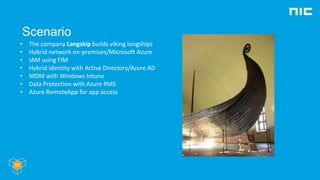
• The company Langskip builds viking longships
• Hybrid network on-premises/Microsoft Azure
• IAM using FIM
• Hybrid Identity with Active Directory/Azure AD
• MDM with Windows Intune
• Data Protection with Azure RMS
• Azure RemoteApp for app access
Why Rights Management?
- The problem today
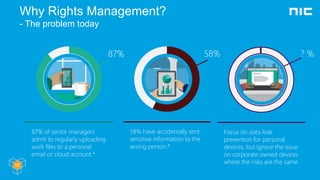
87% of senior managers
admit to regularly uploading
work files to a personal
email or cloud account.*
87%
58% have accidentally sent
sensitive information to the
wrong person.*
58%
Focus on data leak
prevention for personal
devices, but ignore the issue
on corporate owned devices
where the risks are the same
? %
Why Rights Management?
- Some questions you should ask yourself
• What is my sensitive information? (DLP, classification)
• How do I control access to these docs, wherever they go (cloud drives, email,
SAAS applications, or other companies)?
• How do I control how they are used, where and when?
• How do I track who has accessed them?
• How to I manage the entire lifecycle of my sensitive docs? I have to meet
compliance and governance requirements
Why Rights Management?
- The solution: Azure Rights Managment
• Protection that travels with the data
• Azure RMS is a complete end to end
information protection solution for
documents, email, and any unstructured
data that is sensitive for your organization
• Highly integrated into Office, O365,
Windows Server, and 3rd party applications
for broad reach and consistent user
experience
• Built on modern encryption and
authentication standards
(PKI, AES, OAuth, ….)
The evolution of RMS at Microsoft
• Windows RMS
Available with Windows Server 2003
Clients for Windows XP and Windows 2000
• Active Directory Rights Management Services
Available with Windows Server 2008 and 2012
Clients included in Windows Vista, and later
Downloads for Windows XP, Windows 2000 and
Windows Server 2003
• Azure Rights Management Services
Cloud service implemented in Microsoft Azure
Clients for Windows Vista and later
Terminology of Rights Management
• Encryption: rendering something unreadable without a key
– Symmetric encryption: same key used to encrypt and decrypt data
– Asymmetric encryption: one key to encrypt, another to decrypt
• Private/public key pair: the keys used in asymmetric encryption, public key
is derived from the private key
• PKI: Public Key Infrastructure, a system used to maintain public/private
keys and trust
• Signing: attesting something using your private key
• Encrypting: obfuscating something with a recipient’s public key
• License: specifies the users who can consume protected content and the
rights that can be made available to them
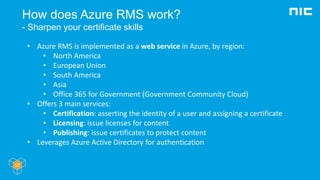
How does Azure RMS work?
- Sharpen your certificate skills
• Azure RMS is implemented as a web service in Azure, by region:
• North America
• European Union
• South America
• Asia
• Office 365 for Government (Government Community Cloud)
• Offers 3 main services:
• Certification: asserting the identity of a user and assigning a certificate
• Licensing: issue licenses for content
• Publishing: issue certificates to protect content
• Leverages Azure Active Directory for authentication
How does RMS work?
- Certificates
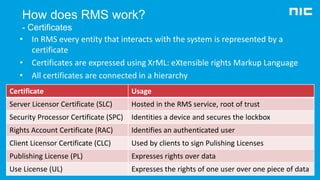
Certificate Usage
Server Licensor Certificate (SLC) Hosted in the RMS service, root of trust
Security Processor Certificate (SPC) Identities a device and secures the lockbox
Rights Account Certificate (RAC) Identifies an authenticated user
Client Licensor Certificate (CLC) Used by clients to sign Pulishing Licenses
Publishing License (PL) Expresses rights over data
Use License (UL) Expresses the rights of one user over one piece of data
• In RMS every entity that interacts with the system is represented by a
certificate
• Certificates are expressed using XrML: eXtensible rights Markup Language
• All certificates are connected in a hierarchy
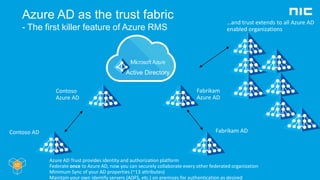
Azure AD as the trust fabric
- The first killer feature of Azure RMS
Contoso AD
Contoso
Azure AD
Fabrikam AD
Fabrikam
Azure AD
…and trust extends to all Azure AD
enabled organizations
Azure AD Trust provides identity and authorization platform
Federate once to Azure AD, now you can securely collaborate every other federated organization
Minimum Sync of your AD properties (~13 attributes)
Maintain your own identify servers (ADFS, etc.) on premises for authentication as desired
How does RMS work?
- Data flow between organizations/AAD tenants
• Authentication determines if you get a
RAC!
• Trusted User Domain (TUD)
Allows a licensing server to accept end-use
license requests made by a trusted
organization/tenant
Azure RMS treats all tenants as TUDs
• Trusted Partner Domain (TPD)
Allow an RMS service to issue end-use
licenses for content from a trusted
organization/tenant
All Azure AD tenants trust Azure RMS as a
TPD
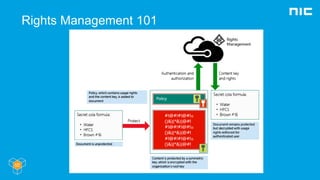
Rights Management 101
Deploy Azure RMS
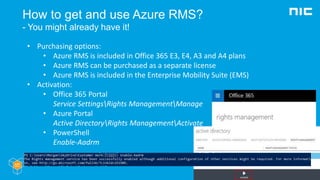
How to get and use Azure RMS?
- You might already have it!
• Purchasing options:
• Azure RMS is included in Office 365 E3, E4, A3 and A4 plans
• Azure RMS can be purchased as a separate license
• Azure RMS is included in the Enterprise Mobility Suite (EMS)
• Activation:
• Office 365 Portal
Service SettingsRights ManagementManage
• Azure Portal
Active DirectoryRights ManagementActivate
• PowerShell
Enable-Aadrm
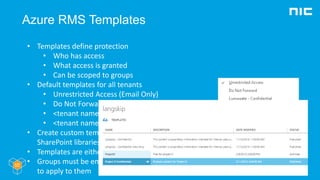
Azure RMS Templates
• Templates define protection
• Who has access
• What access is granted
• Can be scoped to groups
• Default templates for all tenants
• Unrestricted Access (Email Only)
• Do Not Forward (Email Only)
• <tenant name> - Confidential
• <tenant name> - Confidential View Only
• Create custom templates in Azure portal,
SharePoint libraries or PowerShell
• Templates are either Archvied or Public
• Groups must be email enabled for templates
to apply to them
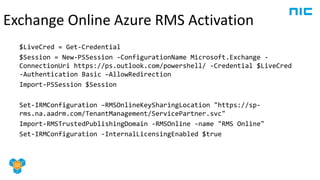
$LiveCred = Get-Credential
$Session = New-PSSession -ConfigurationName Microsoft.Exchange -
ConnectionUri https://ps.outlook.com/powershell/ -Credential $LiveCred
-Authentication Basic –AllowRedirection
Import-PSSession $Session
Set-IRMConfiguration –RMSOnlineKeySharingLocation "https://sp-
rms.na.aadrm.com/TenantManagement/ServicePartner.svc"
Import-RMSTrustedPublishingDomain -RMSOnline -name "RMS Online"
Set-IRMConfiguration -InternalLicensingEnabled $true
Exchange Online Azure RMS Activation
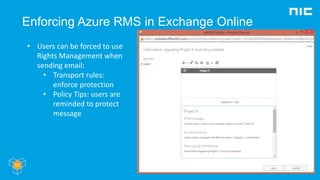
Enforcing Azure RMS in Exchange Online
• Users can be forced to use
Rights Management when
sending email:
• Transport rules:
enforce protection
• Policy Tips: users are
reminded to protect
message
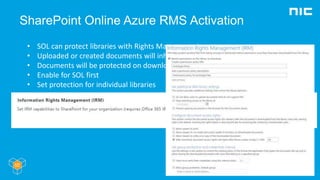
SharePoint Online Azure RMS Activation
• SOL can protect libraries with Rights Management
• Uploaded or created documents will inherit protection
• Documents will be protected on download
• Enable for SOL first
• Set protection for individual libraries
Azure RMS for Individuals
- The second killer feature of Azure RMS
• What if your organization does not have
RMS?
• Microsoft offers free consumption
licenses through the Azure RMS for
Individuals program
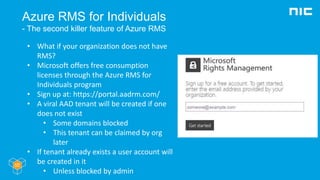
• Sign up at: https://portal.aadrm.com/
• A viral AAD tenant will be created if one
does not exist
• Some domains blocked
• This tenant can be claimed by org
later
• If tenant already exists a user account will
be created in it
• Unless blocked by admin
Application support
Azure RMS Applications
• Applications and file formats must support RMS protection
• These are called enlightened
• Azure RMS SDK let’s you build support into your app
• Applications must honor the licenses given for content
• Flaws, bugs or willful violation of licenses break the RMS trust
• If not app or file format exists…
The RMS Sharing app
• Free Microsoft application that can protect any
content
• Support for Office file formats
• Integrated support and viewer for common text
and image files
• Creates protected (p) version of files it
understands
• txt ptxt
• jpg pjpg
• Unknown files become .pfile
• Download from:
https://portal.aadrm.com/Home/Download
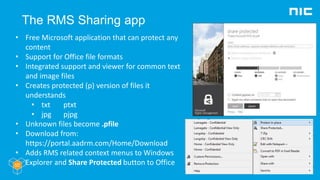
• Adds RMS related context menus to Windows
Explorer and Share Protected button to Office
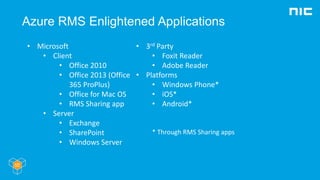
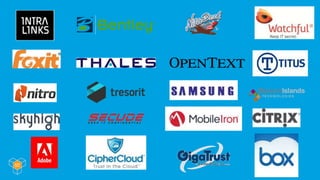
Azure RMS Enlightened Applications
• Microsoft
• Client
• Office 2010
• Office 2013 (Office
365 ProPlus)
• Office for Mac OS
• RMS Sharing app
• Server
• Exchange
• SharePoint
• Windows Server
• 3rd Party
• Foxit Reader
• Adobe Reader
• Platforms
• Windows Phone*
• iOS*
• Android*
* Through RMS Sharing apps
Administration
• Azure RMS is managed with:
• Azure Management Portal (manage.windowsazure.com)
• Azure RMS PowerShell Module
• Product dependent config is handled within product, either in
portal or through PowerShell (eg. Exchange)
Azure RMS deployment options
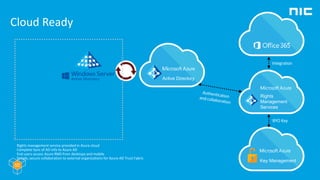
Cloud Ready
Integration
BYO Key
Sync
Rights management service provided in Azure cloud
Complete Sync of AD info to Azure AD
End users access Azure RMS from desktops and mobile
Simple, secure collaboration to external organizations for Azure AD Trust Fabric
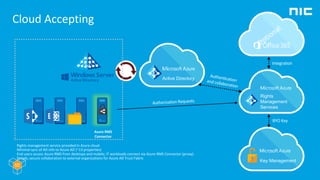
Cloud Accepting
Integration
BYO Key
Sync
Azure RMS
Connector
Rights management service provided in Azure cloud
Minimal sync of AD info to Azure AD (~13 properties)
End users access Azure RMS from desktops and mobile; IT workloads connect via Azure RMS Connector (proxy)
Simple, secure collaboration to external organizations for Azure AD Trust Fabric
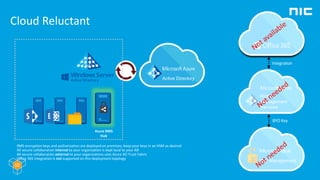
Cloud Reluctant
Integration
BYO Key
Sync
Azure RMS
Hub
RMS encryption keys and authorization are deployed on premises; keep your keys in an HSM as desired
All secure collaboration internal to your organization is kept local to your AD
All secure collaboration external to your organizations uses Azure AD Trust Fabric
Office 365 integration is not supported on this deployment topology
Azure RMS troubleshooting
Troubleshooting
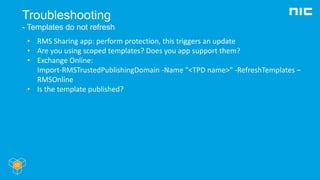
- Templates do not refresh
• RMS Sharing app: perform protection, this triggers an update
• Are you using scoped templates? Does you app support them?
• Exchange Online:
Import-RMSTrustedPublishingDomain -Name "<TPD name>" -RefreshTemplates –
RMSOnline
• Is the template published?
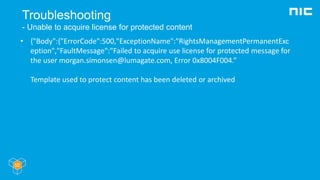
Troubleshooting
- Unable to acquire license for protected content
• {"Body":{"ErrorCode":500,"ExceptionName":"RightsManagementPermanentExc
eption","FaultMessage":"Failed to acquire use license for protected message for
the user morgan.simonsen@lumagate.com, Error 0x8004F004.“
Template used to protect content has been deleted or archived
Troubleshooting
- NDRs in Exchange Online
• Template defined in Transport policy is archived or deleted
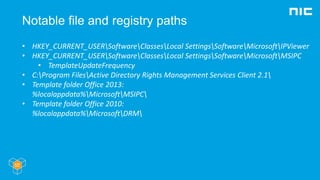
Notable file and registry paths
• HKEY_CURRENT_USERSoftwareClassesLocal SettingsSoftwareMicrosoftIPViewer
• HKEY_CURRENT_USERSoftwareClassesLocal SettingsSoftwareMicrosoftMSIPC
• TemplateUpdateFrequency
• C:Program FilesActive Directory Rights Management Services Client 2.1
• Template folder Office 2013:
%localappdata%MicrosoftMSIPC
• Template folder Office 2010:
%localappdata%MicrosoftDRM
More information
• Follow @ Twitter @TheRMSGuy
• Learn more @ http://www.Microsoft.com/rms
• Discover @ http://curah.microsoft.com/56313
• RMS blog @ http://blogs.msdn.com/b/rms
• Sign up @ http://portal.aadrm.com
• Download @ http://portal.aadrm.com/home/download

Cloud Based Rights Management with Azure RMS

  • 1.
    Cloud Based Rights Managementwith Azure RMS Morgan Simonsen
  • 2.
    Morgan Simonsen • PrincipalConsultant Cloud and Datacenter Product Manager Microsoft Azure @Lumagate • P-TSP@Microsoft • MCSE, MCSA, MCT • MVP (Directory Services) • Twitter: @msimonsen • Email: morgan.simonsen@lumagate.com • Blog: morgansimonsen.wordpress.com
  • 3.
    Agenda • Why RightsManagement? Next generation data protection • Azure Active Directory • Introduction to Azure RMS • How Azure RMS works • RMS Certificates • Enabling Azure RMS – How do I get RMS? • Protecting content • Consuming content • Azure RMS cloud scenarios: – SharePoint Online – Exchange Online • Azure RMS on-premises scenarios: – File Services (File Classification Infrastructure) – Exchange – SharePoint – RMS Connector – RMS Hub • Troubleshooting
  • 4.
    Scenario • The companyLangskip builds viking longships • Hybrid network on-premises/Microsoft Azure • IAM using FIM • Hybrid Identity with Active Directory/Azure AD • MDM with Windows Intune • Data Protection with Azure RMS • Azure RemoteApp for app access
  • 5.
    Why Rights Management? -The problem today 87% of senior managers admit to regularly uploading work files to a personal email or cloud account.* 87% 58% have accidentally sent sensitive information to the wrong person.* 58% Focus on data leak prevention for personal devices, but ignore the issue on corporate owned devices where the risks are the same ? %
  • 6.
    Why Rights Management? -Some questions you should ask yourself • What is my sensitive information? (DLP, classification) • How do I control access to these docs, wherever they go (cloud drives, email, SAAS applications, or other companies)? • How do I control how they are used, where and when? • How do I track who has accessed them? • How to I manage the entire lifecycle of my sensitive docs? I have to meet compliance and governance requirements
  • 7.
    Why Rights Management? -The solution: Azure Rights Managment • Protection that travels with the data • Azure RMS is a complete end to end information protection solution for documents, email, and any unstructured data that is sensitive for your organization • Highly integrated into Office, O365, Windows Server, and 3rd party applications for broad reach and consistent user experience • Built on modern encryption and authentication standards (PKI, AES, OAuth, ….)
  • 8.
    The evolution ofRMS at Microsoft • Windows RMS Available with Windows Server 2003 Clients for Windows XP and Windows 2000 • Active Directory Rights Management Services Available with Windows Server 2008 and 2012 Clients included in Windows Vista, and later Downloads for Windows XP, Windows 2000 and Windows Server 2003 • Azure Rights Management Services Cloud service implemented in Microsoft Azure Clients for Windows Vista and later
  • 9.
    Terminology of RightsManagement • Encryption: rendering something unreadable without a key – Symmetric encryption: same key used to encrypt and decrypt data – Asymmetric encryption: one key to encrypt, another to decrypt • Private/public key pair: the keys used in asymmetric encryption, public key is derived from the private key • PKI: Public Key Infrastructure, a system used to maintain public/private keys and trust • Signing: attesting something using your private key • Encrypting: obfuscating something with a recipient’s public key • License: specifies the users who can consume protected content and the rights that can be made available to them
  • 10.
    How does AzureRMS work? - Sharpen your certificate skills • Azure RMS is implemented as a web service in Azure, by region: • North America • European Union • South America • Asia • Office 365 for Government (Government Community Cloud) • Offers 3 main services: • Certification: asserting the identity of a user and assigning a certificate • Licensing: issue licenses for content • Publishing: issue certificates to protect content • Leverages Azure Active Directory for authentication
  • 11.
    How does RMSwork? - Certificates Certificate Usage Server Licensor Certificate (SLC) Hosted in the RMS service, root of trust Security Processor Certificate (SPC) Identities a device and secures the lockbox Rights Account Certificate (RAC) Identifies an authenticated user Client Licensor Certificate (CLC) Used by clients to sign Pulishing Licenses Publishing License (PL) Expresses rights over data Use License (UL) Expresses the rights of one user over one piece of data • In RMS every entity that interacts with the system is represented by a certificate • Certificates are expressed using XrML: eXtensible rights Markup Language • All certificates are connected in a hierarchy
  • 12.
    Azure AD asthe trust fabric - The first killer feature of Azure RMS Contoso AD Contoso Azure AD Fabrikam AD Fabrikam Azure AD …and trust extends to all Azure AD enabled organizations Azure AD Trust provides identity and authorization platform Federate once to Azure AD, now you can securely collaborate every other federated organization Minimum Sync of your AD properties (~13 attributes) Maintain your own identify servers (ADFS, etc.) on premises for authentication as desired
  • 13.
    How does RMSwork? - Data flow between organizations/AAD tenants • Authentication determines if you get a RAC! • Trusted User Domain (TUD) Allows a licensing server to accept end-use license requests made by a trusted organization/tenant Azure RMS treats all tenants as TUDs • Trusted Partner Domain (TPD) Allow an RMS service to issue end-use licenses for content from a trusted organization/tenant All Azure AD tenants trust Azure RMS as a TPD
  • 14.
  • 15.
  • 16.
    How to getand use Azure RMS? - You might already have it! • Purchasing options: • Azure RMS is included in Office 365 E3, E4, A3 and A4 plans • Azure RMS can be purchased as a separate license • Azure RMS is included in the Enterprise Mobility Suite (EMS) • Activation: • Office 365 Portal Service SettingsRights ManagementManage • Azure Portal Active DirectoryRights ManagementActivate • PowerShell Enable-Aadrm
  • 17.
    Azure RMS Templates •Templates define protection • Who has access • What access is granted • Can be scoped to groups • Default templates for all tenants • Unrestricted Access (Email Only) • Do Not Forward (Email Only) • <tenant name> - Confidential • <tenant name> - Confidential View Only • Create custom templates in Azure portal, SharePoint libraries or PowerShell • Templates are either Archvied or Public • Groups must be email enabled for templates to apply to them
  • 18.
    $LiveCred = Get-Credential $Session= New-PSSession -ConfigurationName Microsoft.Exchange - ConnectionUri https://ps.outlook.com/powershell/ -Credential $LiveCred -Authentication Basic –AllowRedirection Import-PSSession $Session Set-IRMConfiguration –RMSOnlineKeySharingLocation "https://sp- rms.na.aadrm.com/TenantManagement/ServicePartner.svc" Import-RMSTrustedPublishingDomain -RMSOnline -name "RMS Online" Set-IRMConfiguration -InternalLicensingEnabled $true Exchange Online Azure RMS Activation
  • 19.
    Enforcing Azure RMSin Exchange Online • Users can be forced to use Rights Management when sending email: • Transport rules: enforce protection • Policy Tips: users are reminded to protect message
  • 20.
    SharePoint Online AzureRMS Activation • SOL can protect libraries with Rights Management • Uploaded or created documents will inherit protection • Documents will be protected on download • Enable for SOL first • Set protection for individual libraries
  • 21.
    Azure RMS forIndividuals - The second killer feature of Azure RMS • What if your organization does not have RMS? • Microsoft offers free consumption licenses through the Azure RMS for Individuals program • Sign up at: https://portal.aadrm.com/ • A viral AAD tenant will be created if one does not exist • Some domains blocked • This tenant can be claimed by org later • If tenant already exists a user account will be created in it • Unless blocked by admin
  • 22.
  • 23.
    Azure RMS Applications •Applications and file formats must support RMS protection • These are called enlightened • Azure RMS SDK let’s you build support into your app • Applications must honor the licenses given for content • Flaws, bugs or willful violation of licenses break the RMS trust • If not app or file format exists…
  • 24.
    The RMS Sharingapp • Free Microsoft application that can protect any content • Support for Office file formats • Integrated support and viewer for common text and image files • Creates protected (p) version of files it understands • txt ptxt • jpg pjpg • Unknown files become .pfile • Download from: https://portal.aadrm.com/Home/Download • Adds RMS related context menus to Windows Explorer and Share Protected button to Office
  • 25.
    Azure RMS EnlightenedApplications • Microsoft • Client • Office 2010 • Office 2013 (Office 365 ProPlus) • Office for Mac OS • RMS Sharing app • Server • Exchange • SharePoint • Windows Server • 3rd Party • Foxit Reader • Adobe Reader • Platforms • Windows Phone* • iOS* • Android* * Through RMS Sharing apps
  • 27.
    Administration • Azure RMSis managed with: • Azure Management Portal (manage.windowsazure.com) • Azure RMS PowerShell Module • Product dependent config is handled within product, either in portal or through PowerShell (eg. Exchange)
  • 28.
  • 29.
    Cloud Ready Integration BYO Key Sync Rightsmanagement service provided in Azure cloud Complete Sync of AD info to Azure AD End users access Azure RMS from desktops and mobile Simple, secure collaboration to external organizations for Azure AD Trust Fabric
  • 30.
    Cloud Accepting Integration BYO Key Sync AzureRMS Connector Rights management service provided in Azure cloud Minimal sync of AD info to Azure AD (~13 properties) End users access Azure RMS from desktops and mobile; IT workloads connect via Azure RMS Connector (proxy) Simple, secure collaboration to external organizations for Azure AD Trust Fabric
  • 31.
    Cloud Reluctant Integration BYO Key Sync AzureRMS Hub RMS encryption keys and authorization are deployed on premises; keep your keys in an HSM as desired All secure collaboration internal to your organization is kept local to your AD All secure collaboration external to your organizations uses Azure AD Trust Fabric Office 365 integration is not supported on this deployment topology
  • 32.
  • 33.
    Troubleshooting - Templates donot refresh • RMS Sharing app: perform protection, this triggers an update • Are you using scoped templates? Does you app support them? • Exchange Online: Import-RMSTrustedPublishingDomain -Name "<TPD name>" -RefreshTemplates – RMSOnline • Is the template published?
  • 34.
    Troubleshooting - Unable toacquire license for protected content • {"Body":{"ErrorCode":500,"ExceptionName":"RightsManagementPermanentExc eption","FaultMessage":"Failed to acquire use license for protected message for the user morgan.simonsen@lumagate.com, Error 0x8004F004.“ Template used to protect content has been deleted or archived
  • 35.
    Troubleshooting - NDRs inExchange Online • Template defined in Transport policy is archived or deleted
  • 36.
    Notable file andregistry paths • HKEY_CURRENT_USERSoftwareClassesLocal SettingsSoftwareMicrosoftIPViewer • HKEY_CURRENT_USERSoftwareClassesLocal SettingsSoftwareMicrosoftMSIPC • TemplateUpdateFrequency • C:Program FilesActive Directory Rights Management Services Client 2.1 • Template folder Office 2013: %localappdata%MicrosoftMSIPC • Template folder Office 2010: %localappdata%MicrosoftDRM
  • 37.
    More information • Follow@ Twitter @TheRMSGuy • Learn more @ http://www.Microsoft.com/rms • Discover @ http://curah.microsoft.com/56313 • RMS blog @ http://blogs.msdn.com/b/rms • Sign up @ http://portal.aadrm.com • Download @ http://portal.aadrm.com/home/download