serhad@serhadmakbuloglu.com
smakbuloglu@gmail.com
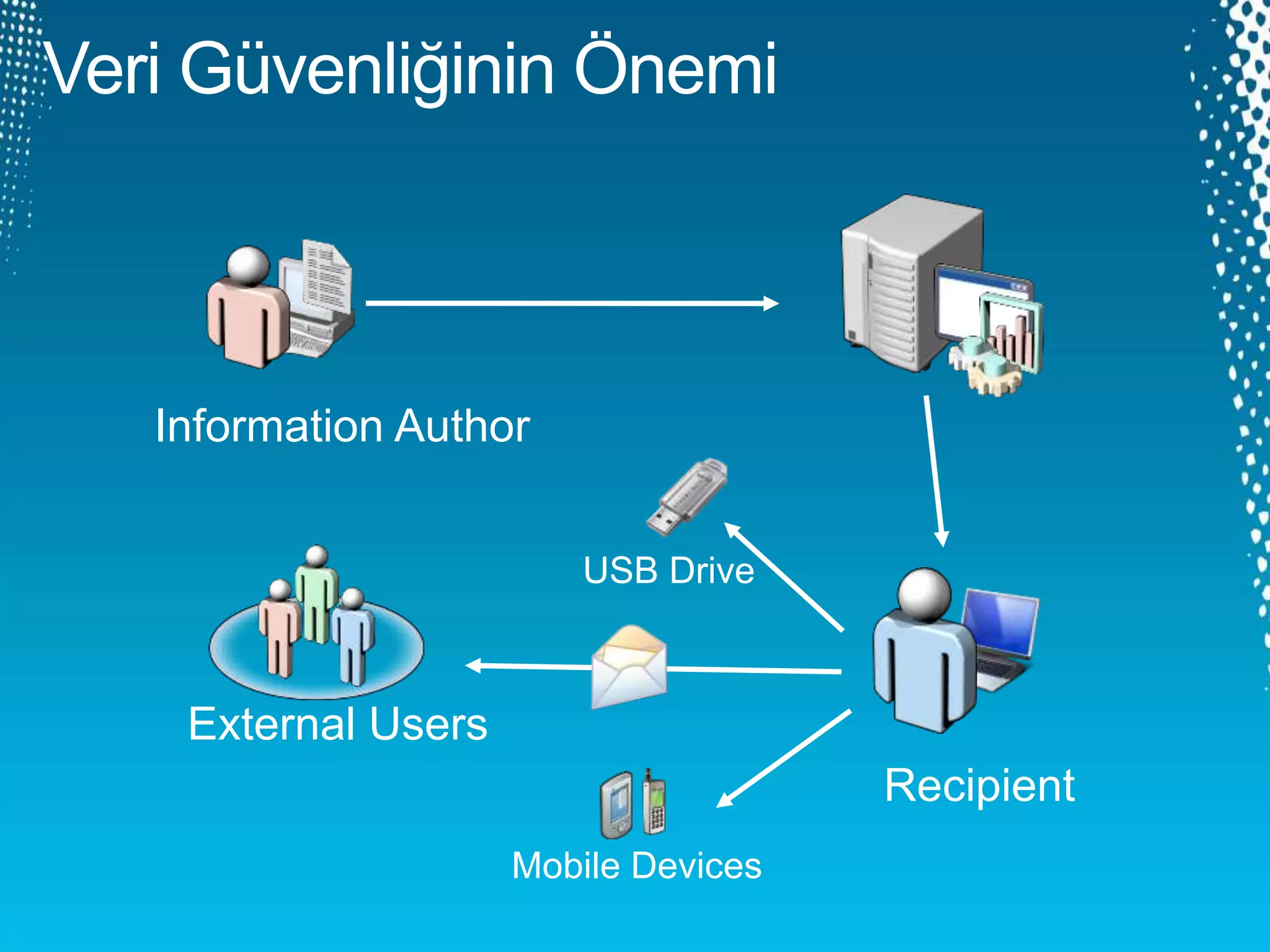
Information Author
Recipient
External Users
Mobile Devices
USB Drive
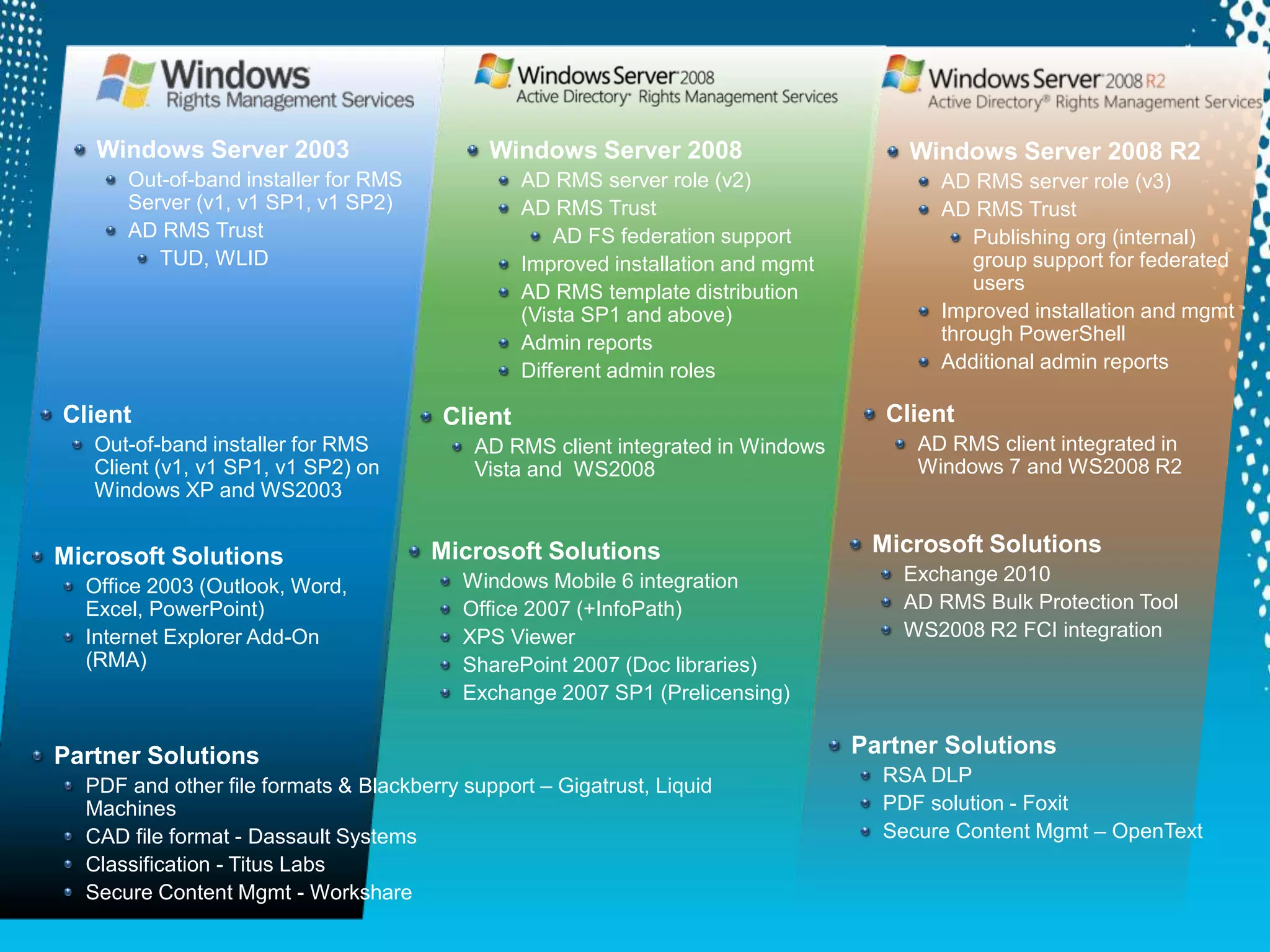
Windows Server 2008
AD RMS server role (v2)
AD RMS Trust
AD FS federation support
Improved installation and mgmt
AD RMS template distribution
(Vista SP1 and above)
Admin reports
Different admin roles
Client
AD RMS client integrated in Windows
Vista and WS2008
Windows Server 2003
Out-of-band installer for RMS
Server (v1, v1 SP1, v1 SP2)
AD RMS Trust
TUD, WLID
Client
Out-of-band installer for RMS
Client (v1, v1 SP1, v1 SP2) on
Windows XP and WS2003
Microsoft Solutions
Office 2003 (Outlook, Word,
Excel, PowerPoint)
Internet Explorer Add-On
(RMA)
Microsoft Solutions
Windows Mobile 6 integration
Office 2007 (+InfoPath)
XPS Viewer
SharePoint 2007 (Doc libraries)
Exchange 2007 SP1 (Prelicensing)
Windows Server 2008 R2
AD RMS server role (v3)
AD RMS Trust
Publishing org (internal)
group support for federated
users
Improved installation and mgmt
through PowerShell
Additional admin reports
Client
AD RMS client integrated in
Windows 7 and WS2008 R2
Microsoft Solutions
Exchange 2010
AD RMS Bulk Protection Tool
WS2008 R2 FCI integration
Partner Solutions
PDF and other file formats & Blackberry support – Gigatrust, Liquid
Machines
CAD file format - Dassault Systems
Classification - Titus Labs
Secure Content Mgmt - Workshare
Partner Solutions
RSA DLP
PDF solution - Foxit
Secure Content Mgmt – OpenText
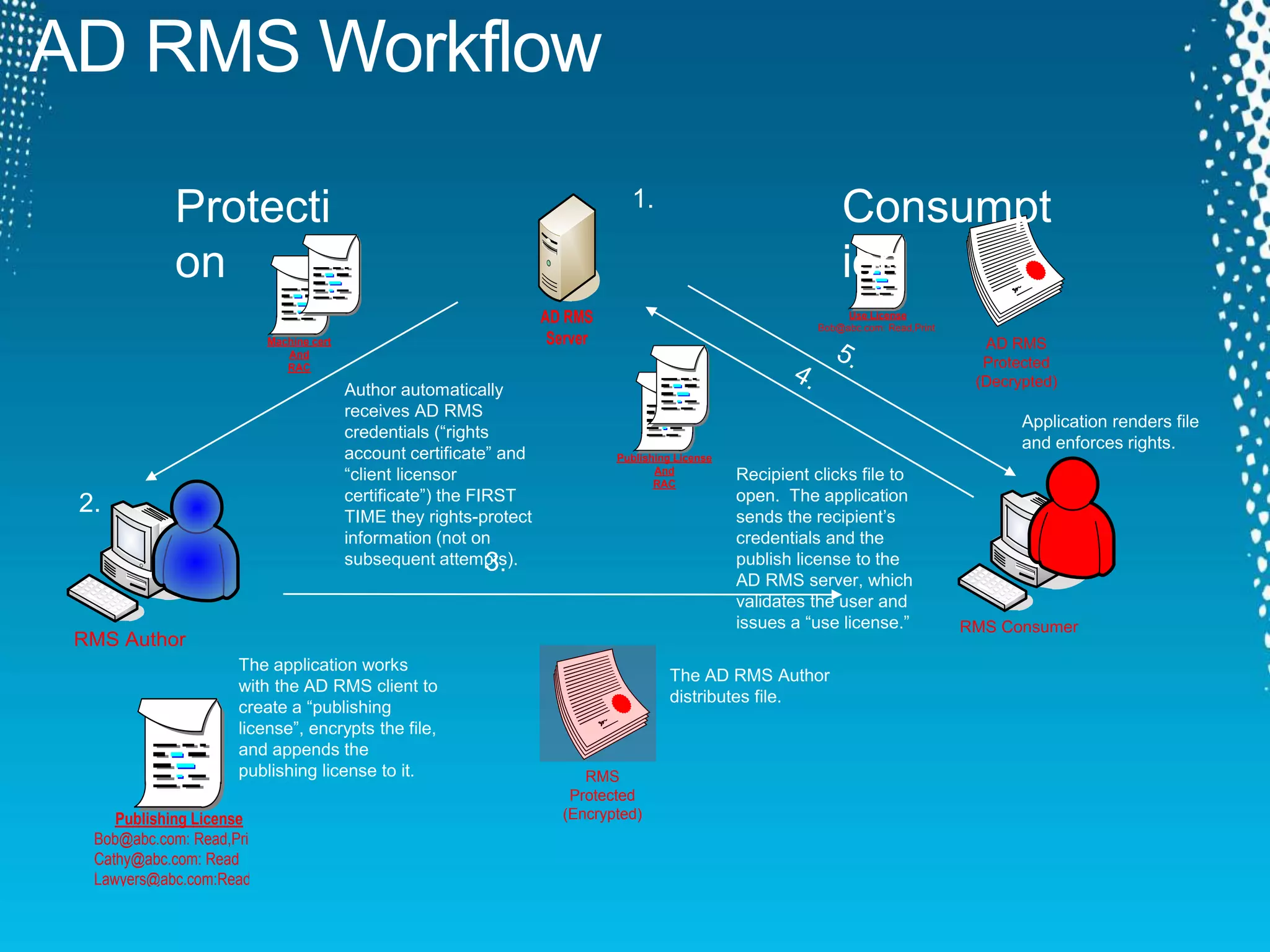
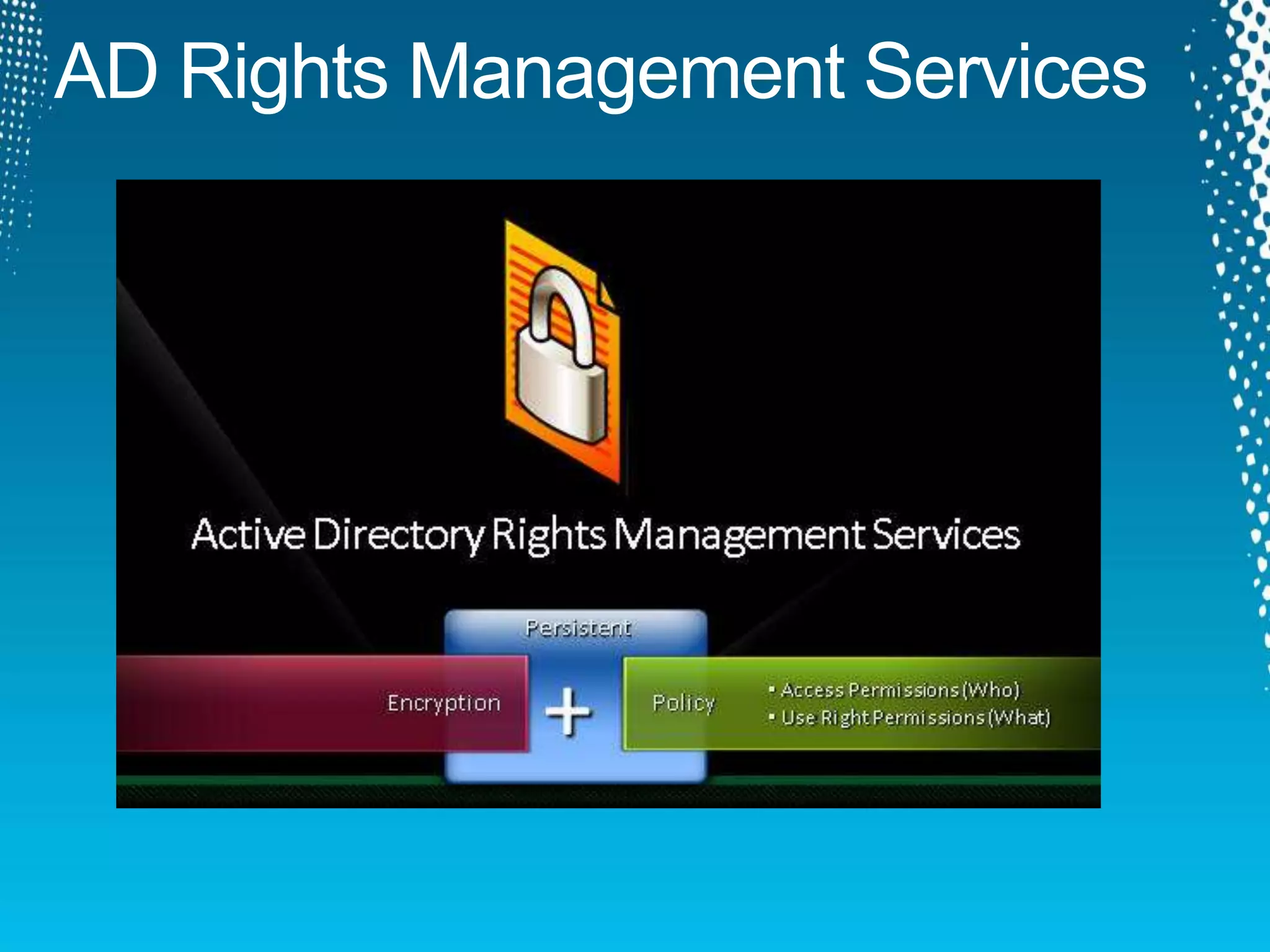
AD RMS Workflow
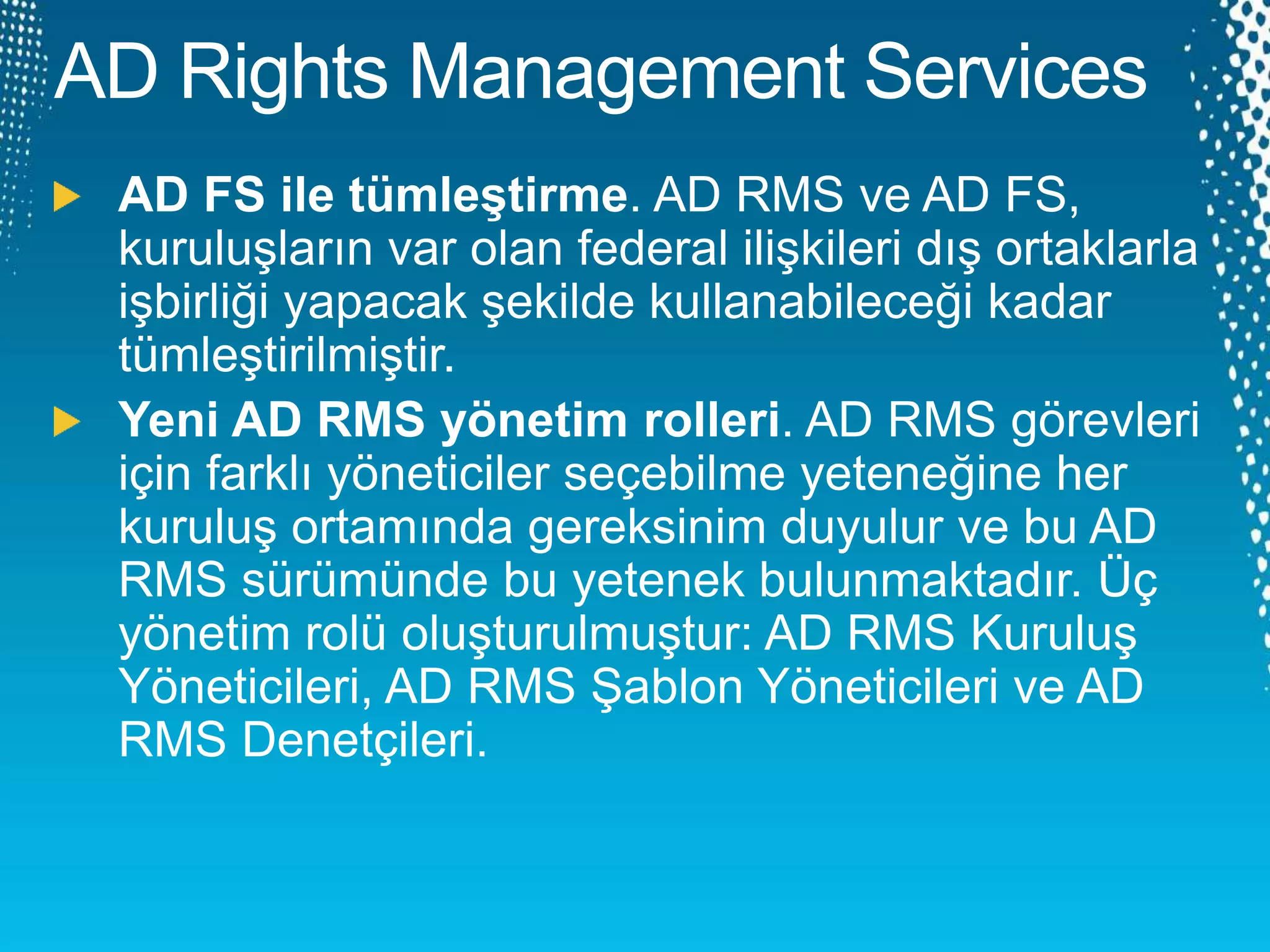
AD RMS
Server AD RMS
Protected
(Decrypted)
`
RMS Consumer
`
RMS Author
1.
Publishing License
Bob@abc.com: Read,Print
Cathy@abc.com: Read
Lawyers@abc.com:Read
Use License
Bob@abc.com: Read,Print
RMS
Protected
(Encrypted)
Consumpt
ion
Protecti
on
2.
Machine cert
And
RAC
Publishing License
And
RAC
Author automatically
receives AD RMS
credentials (“rights
account certificate” and
“client licensor
certificate”) the FIRST
TIME they rights-protect
information (not on
subsequent attempts).
The application works
with the AD RMS client to
create a “publishing
license”, encrypts the file,
and appends the
publishing license to it.
The AD RMS Author
distributes file.
Recipient clicks file to
open. The application
sends the recipient’s
credentials and the
publish license to the
AD RMS server, which
validates the user and
issues a “use license.”
Application renders file
and enforces rights.
SQL
OS Platform
Client Platform
Applications
MMC 3.0 Host
Admin Snap-in
Admin Platform
RMS Client RMS Server RMS
Administrat
ion
ADADFS
SOAP/HTTP SOAP/HTTP
Passive
Protocol
(HTTP)
WebSSO
Agent
System.Data.SqlClient
Native LDAP
WebSSO
Redirects
MOM pack
PowerShellOS Platform
Client Platform
Applications
MOM pack
PowerShell
Scenario
RMS EFS
BitLocke
r
Protect my information outside my direct
control
Set fine-grained usage policy on my
information
Collaborate with others on protected
information
Protect my information to my smartcard
Untrusted admin of a file share
Protect information from other users on
shared machine
Lost or stolen laptop
Physically insecure branch office server
Local single-user file & folder protection
Secure
Collaboration
Protect Yourself
Protect Against
Theft
DEMO
DEMO
Sorular?
Blog
http://www.serhadmakbuloglu.com
Windows Server 2012
http://www.microsoft.com/en-us/server-cloud/windows-
server/2012-default.aspx

Windows Server 2012 Active Directory Rights Management Services

  • 1.
  • 7.
  • 8.
    Windows Server 2008 ADRMS server role (v2) AD RMS Trust AD FS federation support Improved installation and mgmt AD RMS template distribution (Vista SP1 and above) Admin reports Different admin roles Client AD RMS client integrated in Windows Vista and WS2008 Windows Server 2003 Out-of-band installer for RMS Server (v1, v1 SP1, v1 SP2) AD RMS Trust TUD, WLID Client Out-of-band installer for RMS Client (v1, v1 SP1, v1 SP2) on Windows XP and WS2003 Microsoft Solutions Office 2003 (Outlook, Word, Excel, PowerPoint) Internet Explorer Add-On (RMA) Microsoft Solutions Windows Mobile 6 integration Office 2007 (+InfoPath) XPS Viewer SharePoint 2007 (Doc libraries) Exchange 2007 SP1 (Prelicensing) Windows Server 2008 R2 AD RMS server role (v3) AD RMS Trust Publishing org (internal) group support for federated users Improved installation and mgmt through PowerShell Additional admin reports Client AD RMS client integrated in Windows 7 and WS2008 R2 Microsoft Solutions Exchange 2010 AD RMS Bulk Protection Tool WS2008 R2 FCI integration Partner Solutions PDF and other file formats & Blackberry support – Gigatrust, Liquid Machines CAD file format - Dassault Systems Classification - Titus Labs Secure Content Mgmt - Workshare Partner Solutions RSA DLP PDF solution - Foxit Secure Content Mgmt – OpenText
  • 9.
    AD RMS Workflow ADRMS Server AD RMS Protected (Decrypted) ` RMS Consumer ` RMS Author 1. Publishing License Bob@abc.com: Read,Print Cathy@abc.com: Read Lawyers@abc.com:Read Use License Bob@abc.com: Read,Print RMS Protected (Encrypted) Consumpt ion Protecti on 2. Machine cert And RAC Publishing License And RAC Author automatically receives AD RMS credentials (“rights account certificate” and “client licensor certificate”) the FIRST TIME they rights-protect information (not on subsequent attempts). The application works with the AD RMS client to create a “publishing license”, encrypts the file, and appends the publishing license to it. The AD RMS Author distributes file. Recipient clicks file to open. The application sends the recipient’s credentials and the publish license to the AD RMS server, which validates the user and issues a “use license.” Application renders file and enforces rights.
  • 11.
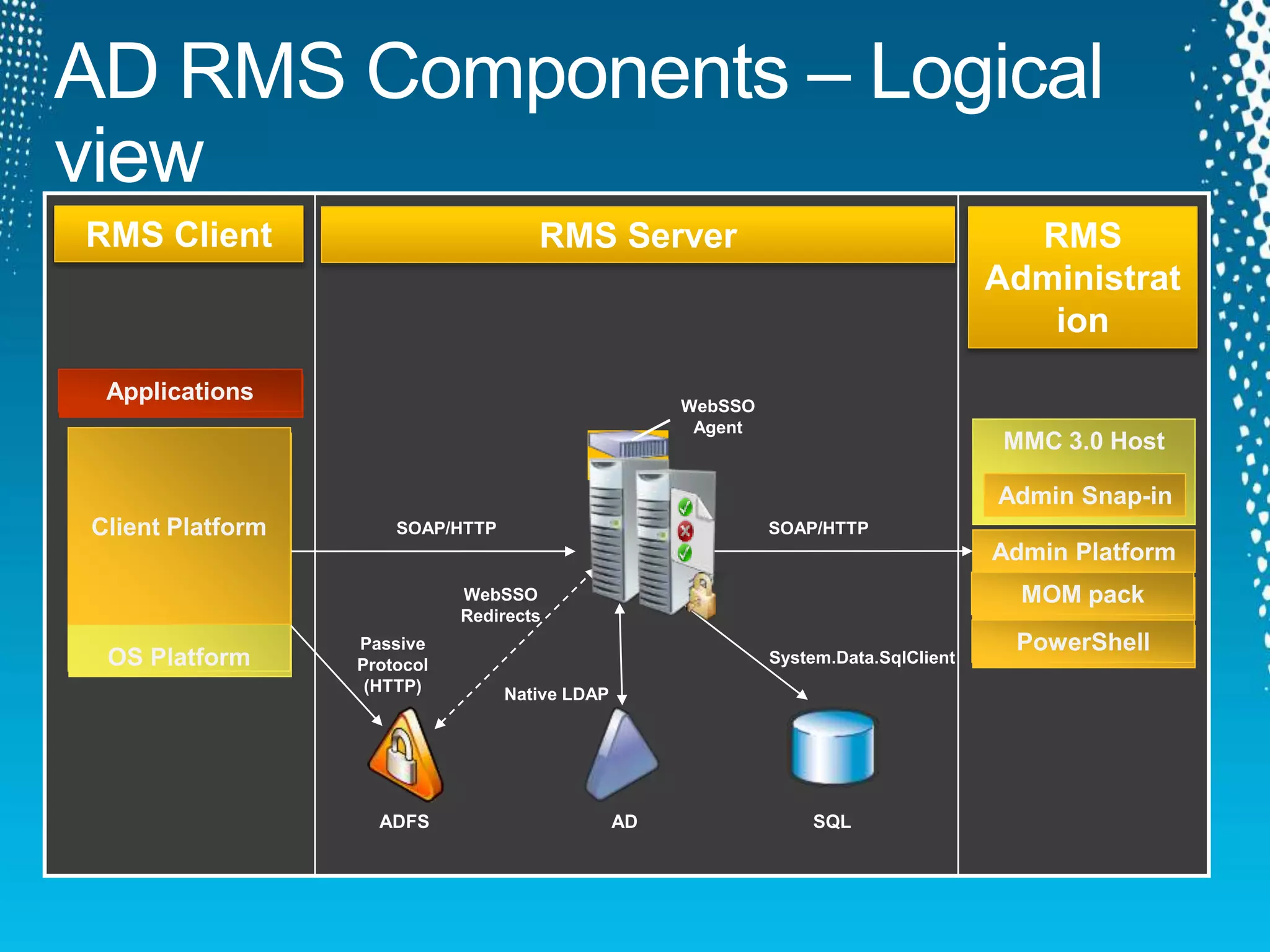
    SQL OS Platform Client Platform Applications MMC3.0 Host Admin Snap-in Admin Platform RMS Client RMS Server RMS Administrat ion ADADFS SOAP/HTTP SOAP/HTTP Passive Protocol (HTTP) WebSSO Agent System.Data.SqlClient Native LDAP WebSSO Redirects MOM pack PowerShellOS Platform Client Platform Applications MOM pack PowerShell
  • 12.
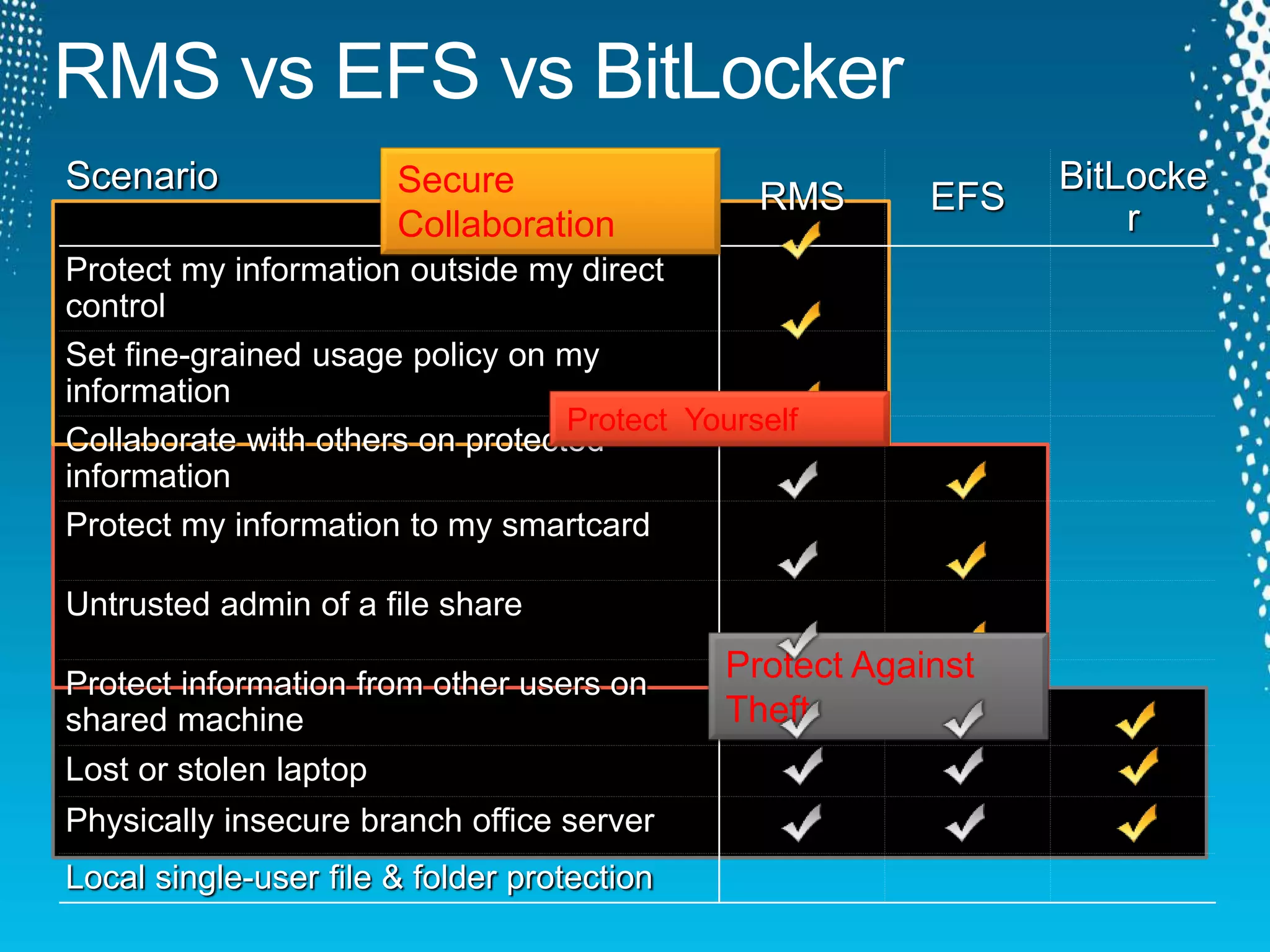
    Scenario RMS EFS BitLocke r Protect myinformation outside my direct control Set fine-grained usage policy on my information Collaborate with others on protected information Protect my information to my smartcard Untrusted admin of a file share Protect information from other users on shared machine Lost or stolen laptop Physically insecure branch office server Local single-user file & folder protection Secure Collaboration Protect Yourself Protect Against Theft
  • 18.
  • 19.
  • 20.
  • 21.