Public cloud steady 
state pricing 
Source: Microsoft 
SMB: >25x public 
cloud benefit 
Enterprise: ~10x 
public cloud benefit
Capacity Needed (Max + 20%) 
S M T W T F S 
Capacity Needed (Max + 20%) 
J F M A M J J A S O N D 
t 
Compute 
Inactivity 
Period 
On and Off Growing Fast 
Unpredictable 
Bursting 
Predictable Bursting 24x7 Steady 
Save 
20-30% 
Save 
60-80% 
On and Off 
(30%) 
Growing Fast 
(15%) 
Unpredictable Bursting 
(25%) 
Predictable Bursting 
(20%) 
24x7 Steady 
(10%)
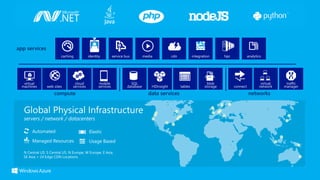
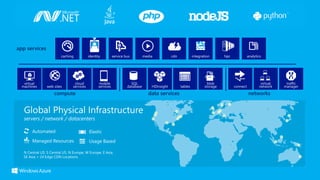
compute data services networks 
app services 
Automated 
Managed Resources 
Elastic 
Usage Based 
N Central US, S Central US, N Europe, W Europe, E Asia, 
SE Asia + 24 Edge CDN Locations
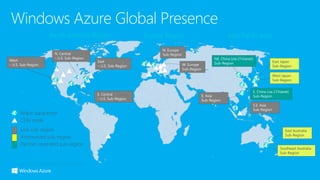
Major datacenter 
CDN node 
Live sub-region 
Announced sub-region 
Partner-operated sub-region
compute data services networks 
app services 
Automated 
Managed Resources 
Elastic 
Usage Based 
N Central US, S Central US, N Europe, W Europe, E Asia, 
SE Asia + 24 Edge CDN Locations
Microsoft Azure Introduction

Microsoft Azure Introduction

  • 2.
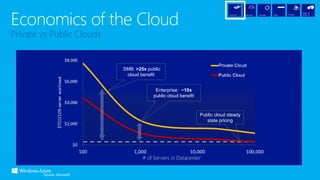
    Public cloud steady state pricing Source: Microsoft SMB: >25x public cloud benefit Enterprise: ~10x public cloud benefit
  • 3.
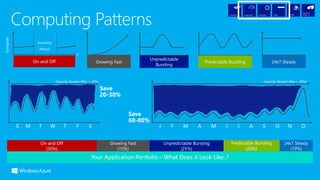
    Capacity Needed (Max+ 20%) S M T W T F S Capacity Needed (Max + 20%) J F M A M J J A S O N D t Compute Inactivity Period On and Off Growing Fast Unpredictable Bursting Predictable Bursting 24x7 Steady Save 20-30% Save 60-80% On and Off (30%) Growing Fast (15%) Unpredictable Bursting (25%) Predictable Bursting (20%) 24x7 Steady (10%)
  • 4.
    compute data servicesnetworks app services Automated Managed Resources Elastic Usage Based N Central US, S Central US, N Europe, W Europe, E Asia, SE Asia + 24 Edge CDN Locations
  • 6.
    Major datacenter CDNnode Live sub-region Announced sub-region Partner-operated sub-region
  • 17.
    compute data servicesnetworks app services Automated Managed Resources Elastic Usage Based N Central US, S Central US, N Europe, W Europe, E Asia, SE Asia + 24 Edge CDN Locations

Editor's Notes

  • #3 The first piece if the puzzle if Economics. As this chart indicates, the larger the data center, the cheaper the underling TCO is. This is primarily because if you walk to your local power company and say I need to buy a billion gigaflops of power, you get a cheaper price. If you walk across to HP or Dell and say I’d like to but a $billion worth of computers – you get a good deal. Not only that, but to run at this scale you have to automate almost everything and this automation makes the TCO cheaper because people are expensive. You can only afford to do this if you are very large – it is a big investment in software. The smaller you are of course the bigger the difference in the economics.
  • #4 One dimension of Cloud computing then is the aggregation of resources to share. One large pool at a cost it would be very hard for most even very large organizations to match. Another dimension of the economics equation made possible in the Cloud is to optimize the resources you consume. In traditional IT, resources like compute power, disk storage, database capacity are constained – it is hard to get them quickly and it is hard to change them. Because of the automation and software/programmable nature of everything we do in the Cloud – YOU have the ability to match the demand/supply of computing resources more closely than in the traditional model. Explain the 5 patterns – in 4 out of the 5 patterns – if you could match supply with demand more closely – you would save money. In the traditional model, we do a lot of work to establish what resources we need. Capacity planning, performance testing, scale testing etc so that we can make sure for a particular application, we always have enough of the resources we need. We go and buy the hardware and software and then implement all this technology and leave it there hoping we never need to change. Instead of the resource line being flat and all that waste – if we can get the resource line close to the demand line, we can save 20-30% in a given week for this sort of pattern… Imaging though a pattern, as many organization have, of an application that has this sort of demand curve spread over a year (click) Finally – you have to think about these potential savings across your whole application portfolio… The only group you won’t get much saving from is the steady state – but you will generally find this represents a small proportion of your portfolio Getting close to the demand line for an application is achieved in the Cloud because of the characteristics of the cloud being usage based, automated and elastic. This means that you only pay for the resources when they are being used, it is easy and quick and you can automate changing your usage at any time and even based on policy through capabilities such as auto-scaling, and of course you can do this both directions to easily add resources or remove them.
  • #5 So this picture, or at least the big blocks in here are how we think about the main capability buckets of the platform. Now you will start to get more specific about these buckets (Compute, data, networks and app services). Going deeper will depend on the needs of the customer. Sometimes customers will want to drill into specific things, sometimes they want a broad overview. Adapt these slides as needed. These buckets correspond to how they are laid out in the Windows Azure portal.
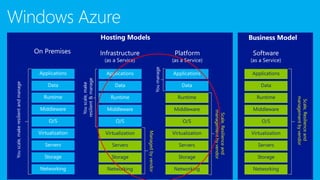
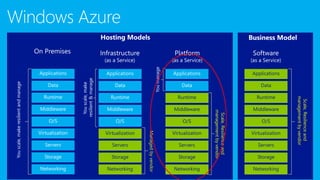
  • #6 Slide Objectives: Explain the differences and relationship between IaaS, PaaS, and SaaS in more detail. Speaking Points: Here’s another way to look at the cloud services taxonomy and how this taxonomy maps to the components in an IT infrastructure. Packaged Software With packaged software a customer would be responsible for managing the entire stack – ranging from the network connectivity to the applications. IaaS With Infrastructure as a Service, the lower levels of the stack are managed by a vendor. Some of these components can be provided by traditional hosters – in fact most of them have moved to having a virtualized offering. Very few actually provide an OS The customer is still responsible for managing the OS through the Applications. For the developer, an obvious benefit with IaaS is that it frees the developer from many concerns when provisioning physical or virtual machines. This was one of the earliest and primary use cases for Amazon Web Services Elastic Cloud Compute (EC2). Developers were able to readily provision virtual machines (AMIs) on EC2, develop and test solutions and, often, run the results ‘in production’. The only requirement was a credit card to pay for the services. PaaS With Platform as a Service, everything from the network connectivity through the runtime is provided and managed by the platform vendor. The Windows Azure best fits in this category today. In fact because we don’t provide access to the underlying virtualization or operating system today, we’re often referred to as not providing IaaS. PaaS offerings further reduce the developer burden by additionally supporting the platform runtime and related application services. With PaaS, the developer can, almost immediately, begin creating the business logic for an application. Potentially, the increases in productivity are considerable and, because the hardware and operational aspects of the cloud platform are also managed by the cloud platform provider, applications can quickly be taken from an idea to reality very quickly. SaaS Finally, with SaaS, a vendor provides the application and abstracts you from all of the underlying components.
  • #8 Slide Objectives: Explain the differences and relationship between IaaS, PaaS, and SaaS in more detail. Speaking Points: Here’s another way to look at the cloud services taxonomy and how this taxonomy maps to the components in an IT infrastructure. Packaged Software With packaged software a customer would be responsible for managing the entire stack – ranging from the network connectivity to the applications. IaaS With Infrastructure as a Service, the lower levels of the stack are managed by a vendor. Some of these components can be provided by traditional hosters – in fact most of them have moved to having a virtualized offering. Very few actually provide an OS The customer is still responsible for managing the OS through the Applications. For the developer, an obvious benefit with IaaS is that it frees the developer from many concerns when provisioning physical or virtual machines. This was one of the earliest and primary use cases for Amazon Web Services Elastic Cloud Compute (EC2). Developers were able to readily provision virtual machines (AMIs) on EC2, develop and test solutions and, often, run the results ‘in production’. The only requirement was a credit card to pay for the services. PaaS With Platform as a Service, everything from the network connectivity through the runtime is provided and managed by the platform vendor. The Windows Azure best fits in this category today. In fact because we don’t provide access to the underlying virtualization or operating system today, we’re often referred to as not providing IaaS. PaaS offerings further reduce the developer burden by additionally supporting the platform runtime and related application services. With PaaS, the developer can, almost immediately, begin creating the business logic for an application. Potentially, the increases in productivity are considerable and, because the hardware and operational aspects of the cloud platform are also managed by the cloud platform provider, applications can quickly be taken from an idea to reality very quickly. SaaS Finally, with SaaS, a vendor provides the application and abstracts you from all of the underlying components.
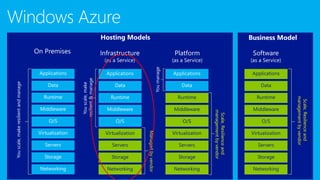
  • #17 Slide Objectives: Explain the differences and relationship between IaaS, PaaS, and SaaS in more detail. Speaking Points: Here’s another way to look at the cloud services taxonomy and how this taxonomy maps to the components in an IT infrastructure. Packaged Software With packaged software a customer would be responsible for managing the entire stack – ranging from the network connectivity to the applications. IaaS With Infrastructure as a Service, the lower levels of the stack are managed by a vendor. Some of these components can be provided by traditional hosters – in fact most of them have moved to having a virtualized offering. Very few actually provide an OS The customer is still responsible for managing the OS through the Applications. For the developer, an obvious benefit with IaaS is that it frees the developer from many concerns when provisioning physical or virtual machines. This was one of the earliest and primary use cases for Amazon Web Services Elastic Cloud Compute (EC2). Developers were able to readily provision virtual machines (AMIs) on EC2, develop and test solutions and, often, run the results ‘in production’. The only requirement was a credit card to pay for the services. PaaS With Platform as a Service, everything from the network connectivity through the runtime is provided and managed by the platform vendor. The Windows Azure best fits in this category today. In fact because we don’t provide access to the underlying virtualization or operating system today, we’re often referred to as not providing IaaS. PaaS offerings further reduce the developer burden by additionally supporting the platform runtime and related application services. With PaaS, the developer can, almost immediately, begin creating the business logic for an application. Potentially, the increases in productivity are considerable and, because the hardware and operational aspects of the cloud platform are also managed by the cloud platform provider, applications can quickly be taken from an idea to reality very quickly. SaaS Finally, with SaaS, a vendor provides the application and abstracts you from all of the underlying components.
  • #18 So this picture, or at least the big blocks in here are how we think about the main capability buckets of the platform. Now you will start to get more specific about these buckets (Compute, data, networks and app services). Going deeper will depend on the needs of the customer. Sometimes customers will want to drill into specific things, sometimes they want a broad overview. Adapt these slides as needed. These buckets correspond to how they are laid out in the Windows Azure portal.