






Kuala Lumpur, Malaysia
8 & 9 March 2016
Session Code:
Azure IAAS Best
Practices
Who am I
Alexandre Verkinderen
• CDM MVP
• @AlexVerkinderen
• alexandre@verkinderen.com
• http://mscloud.be
• http://cubesys.com.au
Agenda
• Azure Datacenter Architecture
• Azure Subscriptions Best Practices
• Availability Sets
• Effectively Using Temporary Drive
• Deploying 100s of VMs
• Azure Scale Units
Azure Datacenter Architecture
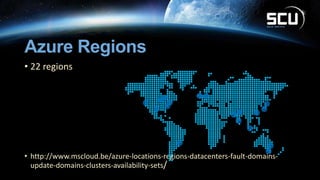
Azure Regions
• 22 regions
• http://www.mscloud.be/azure-locations-regions-datacenters-fault-domains-
update-domains-clusters-availability-sets/
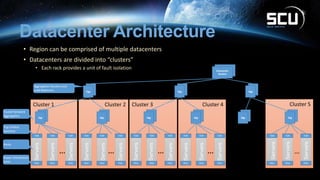
Datacenter Architecture
• Region can be comprised of multiple datacenters
• Datacenters are divided into “clusters”
• Each rack provides a unit of fault isolation
Cluster 5Cluster 4Cluster 3Cluster 2Cluster 1
TOR
Agg
PDU
Agg Agg Agg Agg Agg
Datacenter
Routers
TOR
PDU
TOR
PDU
TOR
PDU
TOR
PDU
TOR
PDU
TOR
PDU
TOR
PDU
TOR
PDU
TOR
PDU
TOR
PDU
TOR
PDU
TOR
PDU
TOR
PDU
TOR
PDU
……… … ……
Servers
Servers
Servers
Servers
Servers
Servers
Servers
Servers
Servers
Servers
Servers
Servers
Servers
Servers
Servers
Agg Agg Agg
Aggregation Routers and
Load Balancers
Cluster Network
Aggregation
Top of Rack
Switches
Racks
Power Distribution
Units
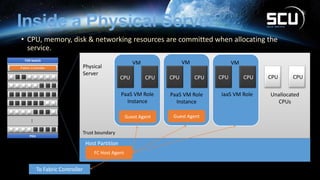
Inside a Physical Server
• CPU, memory, disk & networking resources are committed when allocating the
service.
Physical
Server
Host Partition
Trust boundary
PDU
TOR Switch
…
Unallocated
CPUs
VMVMVM
PaaS VM Role
Instance
PaaS VM Role
Instance
IaaS VM Role
CPU CPUCPU CPUCPU CPU CPU CPU
Azure datacenter Facts
• 3 times
• 1.5 million-plus
• 1 million-plus
• To the moon and back
• requests our networks process per
second
• Amount of physical servers
Azure Subsription Best
Practices
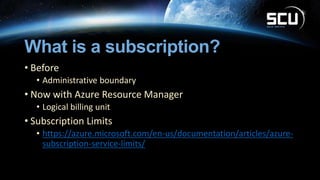
What is a subscription?
• Before
• Administrative boundary
• Now with Azure Resource Manager
• Logical billing unit
• Subscription Limits
• https://azure.microsoft.com/en-us/documentation/articles/azure-
subscription-service-limits/
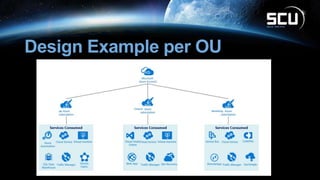
Key Design Principles
• Connectivity
• Administration
• Subscription Ownership
• Office 365 Azure Active Directory tenant
• Office 365 enrollment
• other Azure subscriptions in use
• Scale
• growth plans
• How will limited resources be allocated
• How will the model evolve over time
• http://www.mscloud.be/azure-subscriptions-best-practices/
Design Example per OU
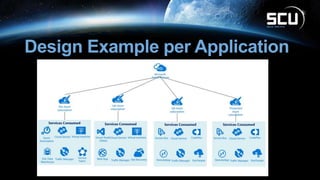
Design Example per Application
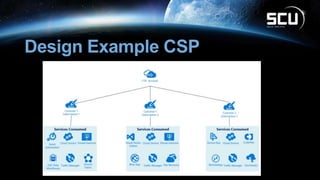
Design Example CSP
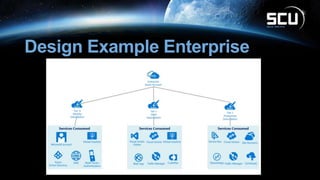
Design Example Enterprise
Availability Sets
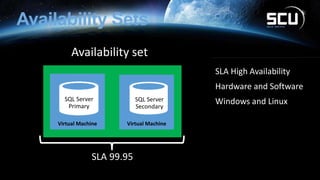
Availability Sets
SLA 99.95
SLA High Availability
Hardware and Software
Windows and Linux
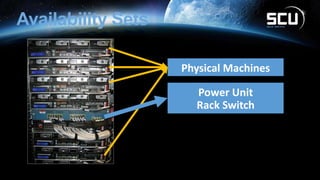
Availability Sets
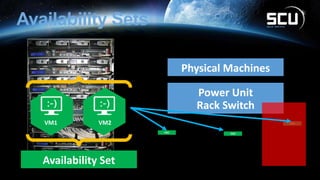
Availability Sets
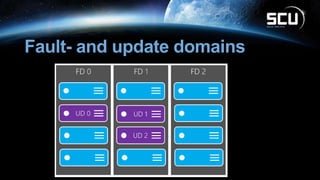
Fault- and update domains
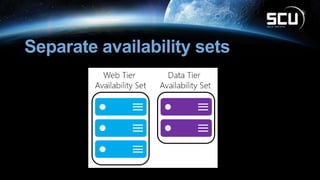
Separate availability sets
Availability Set Guidance
• VMs in Availability Set Must Be in Same Cloud Service
• Availability Set: 5 Update Domains, 2 Fault Domains
• Update Domain – Host Maintenance
• Fault Domain – Isolation from component failure in rack unit
• Maximum of 50 VMs in a Availability Set
• Avoid Availability Sets with Single VM
• This eliminates notification for host maintenance operations
Effectively using Temporary
Drive
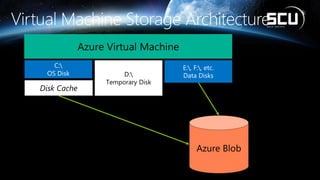
Azure Virtual Machine
C:
OS Disk
E:, F:, etc.
Data DisksD:
Temporary Disk
Disk Cache
Temporary Drive Guidance
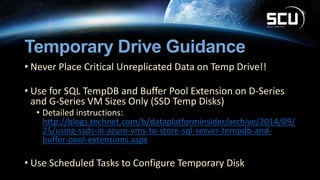
• Never Place Critical Unreplicated Data on Temp Drive!!
• Use for SQL TempDB and Buffer Pool Extension on D-Series
and G-Series VM Sizes Only (SSD Temp Disks)
• Detailed instructions:
http://blogs.technet.com/b/dataplatforminsider/archive/2014/09/
25/using-ssds-in-azure-vms-to-store-sql-server-tempdb-and-
buffer-pool-extensions.aspx
• Use Scheduled Tasks to Configure Temporary Disk
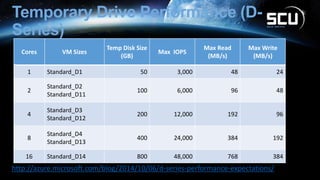
Temporary Drive Performance (D-
Series)
Cores VM Sizes
Temp Disk Size
(GB)
Max IOPS
Max Read
(MB/s)
Max Write
(MB/s)
1 Standard_D1 50 3,000 48 24
2
Standard_D2
Standard_D11
100 6,000 96 48
4
Standard_D3
Standard_D12
200 12,000 192 96
8
Standard_D4
Standard_D13
400 24,000 384 192
16 Standard_D14 800 48,000 768 384
http://azure.microsoft.com/blog/2014/10/06/d-series-performance-expectations/
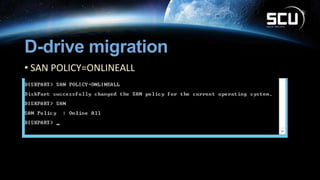
D-drive migration
• SAN POLICY=ONLINEALL
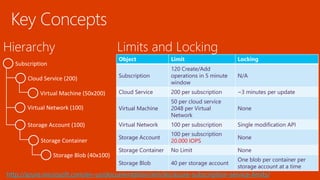
Deploying 100s of VMs
Subscription
Cloud Service (200)
Virtual Machine (50x200)
Virtual Network (100)
Storage Account (100)
Storage Container
Storage Blob (40x100)
Object Limit Locking
Subscription
120 Create/Add
operations in 5 minute
window
N/A
Cloud Service 200 per subscription ~3 minutes per update
Virtual Machine
50 per cloud service
2048 per Virtual
Network
None
Virtual Network 100 per subscription Single modification API
Storage Account
100 per subscription
20.000 IOPS
None
Storage Container No Limit None
Storage Blob 40 per storage account
One blob per container per
storage account at a time
http://azure.microsoft.com/en-us/documentation/articles/azure-subscription-service-limits/
Azure Scale Units
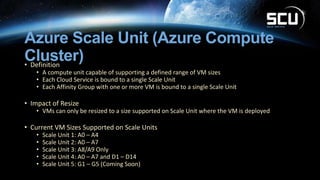
Azure Scale Unit (Azure Compute
Cluster)• Definition
• A compute unit capable of supporting a defined range of VM sizes
• Each Cloud Service is bound to a single Scale Unit
• Each Affinity Group with one or more VM is bound to a single Scale Unit
• Impact of Resize
• VMs can only be resized to a size supported on Scale Unit where the VM is deployed
• Current VM Sizes Supported on Scale Units
• Scale Unit 1: A0 – A4
• Scale Unit 2: A0 – A7
• Scale Unit 3: A8/A9 Only
• Scale Unit 4: A0 – A7 and D1 – D14
• Scale Unit 5: G1 – G5 (Coming Soon)
Scale unit Demo
PLEASE COMPLETE THE
SESSION EVALUATIONS
Feedback to us
+
Lucky draw prizes
http://aka.ms/mw113
www.systemcenteruniverse.asia
…for updated content and NEWS
THANK YOU

Scu2016 Azure Best practices

  • 1.
  • 2.
  • 3.
    Who am I AlexandreVerkinderen • CDM MVP • @AlexVerkinderen • alexandre@verkinderen.com • http://mscloud.be • http://cubesys.com.au
  • 4.
    Agenda • Azure DatacenterArchitecture • Azure Subscriptions Best Practices • Availability Sets • Effectively Using Temporary Drive • Deploying 100s of VMs • Azure Scale Units
  • 5.
  • 6.
    Azure Regions • 22regions • http://www.mscloud.be/azure-locations-regions-datacenters-fault-domains- update-domains-clusters-availability-sets/
  • 7.
    Datacenter Architecture • Regioncan be comprised of multiple datacenters • Datacenters are divided into “clusters” • Each rack provides a unit of fault isolation Cluster 5Cluster 4Cluster 3Cluster 2Cluster 1 TOR Agg PDU Agg Agg Agg Agg Agg Datacenter Routers TOR PDU TOR PDU TOR PDU TOR PDU TOR PDU TOR PDU TOR PDU TOR PDU TOR PDU TOR PDU TOR PDU TOR PDU TOR PDU TOR PDU ……… … …… Servers Servers Servers Servers Servers Servers Servers Servers Servers Servers Servers Servers Servers Servers Servers Agg Agg Agg Aggregation Routers and Load Balancers Cluster Network Aggregation Top of Rack Switches Racks Power Distribution Units
  • 8.
    Inside a PhysicalServer • CPU, memory, disk & networking resources are committed when allocating the service. Physical Server Host Partition Trust boundary PDU TOR Switch … Unallocated CPUs VMVMVM PaaS VM Role Instance PaaS VM Role Instance IaaS VM Role CPU CPUCPU CPUCPU CPU CPU CPU
  • 9.
    Azure datacenter Facts •3 times • 1.5 million-plus • 1 million-plus • To the moon and back • requests our networks process per second • Amount of physical servers
  • 10.
  • 11.
    What is asubscription? • Before • Administrative boundary • Now with Azure Resource Manager • Logical billing unit • Subscription Limits • https://azure.microsoft.com/en-us/documentation/articles/azure- subscription-service-limits/
  • 12.
    Key Design Principles •Connectivity • Administration • Subscription Ownership • Office 365 Azure Active Directory tenant • Office 365 enrollment • other Azure subscriptions in use • Scale • growth plans • How will limited resources be allocated • How will the model evolve over time • http://www.mscloud.be/azure-subscriptions-best-practices/
  • 13.
  • 14.
    Design Example perApplication
  • 15.
  • 16.
  • 17.
  • 18.
    Availability Sets SLA 99.95 SLAHigh Availability Hardware and Software Windows and Linux
  • 19.
  • 20.
  • 21.
  • 22.
  • 23.
    Availability Set Guidance •VMs in Availability Set Must Be in Same Cloud Service • Availability Set: 5 Update Domains, 2 Fault Domains • Update Domain – Host Maintenance • Fault Domain – Isolation from component failure in rack unit • Maximum of 50 VMs in a Availability Set • Avoid Availability Sets with Single VM • This eliminates notification for host maintenance operations
  • 25.
  • 26.
    Azure Virtual Machine C: OSDisk E:, F:, etc. Data DisksD: Temporary Disk Disk Cache
  • 27.
    Temporary Drive Guidance •Never Place Critical Unreplicated Data on Temp Drive!! • Use for SQL TempDB and Buffer Pool Extension on D-Series and G-Series VM Sizes Only (SSD Temp Disks) • Detailed instructions: http://blogs.technet.com/b/dataplatforminsider/archive/2014/09/ 25/using-ssds-in-azure-vms-to-store-sql-server-tempdb-and- buffer-pool-extensions.aspx • Use Scheduled Tasks to Configure Temporary Disk
  • 28.
    Temporary Drive Performance(D- Series) Cores VM Sizes Temp Disk Size (GB) Max IOPS Max Read (MB/s) Max Write (MB/s) 1 Standard_D1 50 3,000 48 24 2 Standard_D2 Standard_D11 100 6,000 96 48 4 Standard_D3 Standard_D12 200 12,000 192 96 8 Standard_D4 Standard_D13 400 24,000 384 192 16 Standard_D14 800 48,000 768 384 http://azure.microsoft.com/blog/2014/10/06/d-series-performance-expectations/
  • 29.
    D-drive migration • SANPOLICY=ONLINEALL
  • 30.
  • 31.
    Subscription Cloud Service (200) VirtualMachine (50x200) Virtual Network (100) Storage Account (100) Storage Container Storage Blob (40x100) Object Limit Locking Subscription 120 Create/Add operations in 5 minute window N/A Cloud Service 200 per subscription ~3 minutes per update Virtual Machine 50 per cloud service 2048 per Virtual Network None Virtual Network 100 per subscription Single modification API Storage Account 100 per subscription 20.000 IOPS None Storage Container No Limit None Storage Blob 40 per storage account One blob per container per storage account at a time http://azure.microsoft.com/en-us/documentation/articles/azure-subscription-service-limits/
  • 32.
  • 33.
    Azure Scale Unit(Azure Compute Cluster)• Definition • A compute unit capable of supporting a defined range of VM sizes • Each Cloud Service is bound to a single Scale Unit • Each Affinity Group with one or more VM is bound to a single Scale Unit • Impact of Resize • VMs can only be resized to a size supported on Scale Unit where the VM is deployed • Current VM Sizes Supported on Scale Units • Scale Unit 1: A0 – A4 • Scale Unit 2: A0 – A7 • Scale Unit 3: A8/A9 Only • Scale Unit 4: A0 – A7 and D1 – D14 • Scale Unit 5: G1 – G5 (Coming Soon)
  • 34.
  • 35.
    PLEASE COMPLETE THE SESSIONEVALUATIONS Feedback to us + Lucky draw prizes http://aka.ms/mw113
  • 36.

Editor's Notes

  • #17 In this example we have multiple subscriptions, a tier 0 subscription for everything related to identity and authentication, a tier 1 for the Q&A environment and another tier 1 for the production environment. This will ensure that no change on the Q&A and production environment will have an impact on the identity and authentication environment and although the identity is in a separate subscription it will still be able to offer domain authentication services to the other subscriptions and virtual machines. This model will scale based on needs. If you ever need to add another Q&A ennvironment or another production environment in another Azure region it’s perfectly possible.