Dan Plastina
https://twitter.com/TheRMSGuy
https://linkedin.com/in/danpl
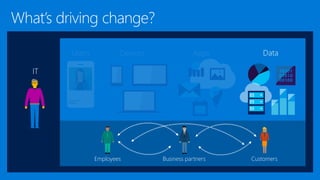
IT
Employees CustomersBusiness partners
Devices AppsUsers Data
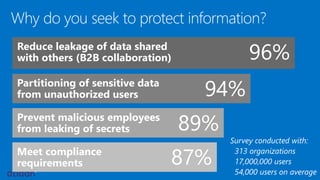
Why do you seek to protect information?
Survey conducted with:
313 organizations
17,000,000 users
54,000 users on average
Reduce leakage of data shared
with others (B2B collaboration)
Partitioning of sensitive data
from unauthorized users
Prevent malicious employees
from leaking of secrets
Meet compliance
requirements
96%
94%
89%
87%
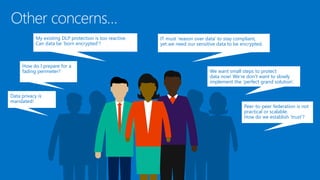
Data privacy is
mandated!
My existing DLP protection is too reactive.
Can data be ‘born encrypted’?
How do I prepare for a
fading perimeter?
Peer-to-peer federation is not
practical or scalable.
How do we establish ‘trust’?
IT must ‘reason over data’ to stay compliant,
yet we need our sensitive data to be encrypted.
We want small steps to protect
data now! We’re don’t want to slowly
implement the ‘perfect grand solution’.
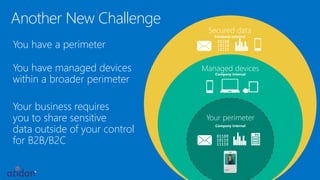
Another New Challenge
You have a perimeter
You have managed devices
within a broader perimeter
Your business requires
you to share sensitive
data outside of your control
for B2B/B2C
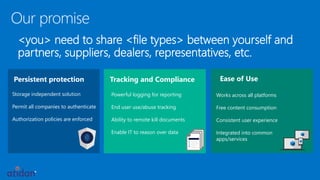
Persistent protection
Storage independent solution
Permit all companies to authenticate
Authorization policies are enforced
Our promise
<you> need to share <file types> between yourself and
partners, suppliers, dealers, representatives, etc.
Powerful logging for reporting
End user use/abuse tracking
Ability to remote kill documents
Enable IT to reason over data
Tracking and Compliance
Works across all platforms
Free content consumption
Consistent user experience
Integrated into common
apps/services
Ease of Use
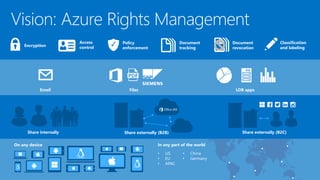
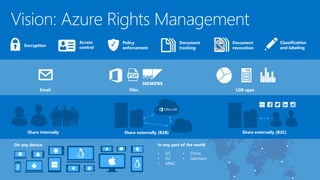
Vision: Azure Rights Management
On any device
Email LOB appsFiles
Share internally Share externally (B2C)Share externally (B2B)
Policy
enforcement
Document
revocation
Document
tracking
Access
controlEncryption
Classification
and labeling
In any part of the world
• US
• EU
• APAC
• China
• Germany
Disclaimer: Gartner does not endorse any vendor, product or service depicted in its research publications, and does not advise technology users to select only those vendors with
the highest ratings or other designation. Gartner research publications consist of the opinions of Gartner's research organization and should not be construed as statements of
fact. Gartner disclaims all warranties, expressed or implied, with respect to this research, including any warranties of merchantability or fitness for a particular purpose."
aEZQAR]ibr{qU
@M]BXNoHp9nMD
AtnBfrfC;jx+T
g@XL2,Jzu
()&(*7812(*:
Use Rights +
Rights management 101
Secret cola formula
Water
Sugar
Brown #16
Protect Unprotect
Usage rights and symmetric
key stored in file as ‘license’
Each file is protected by
a unique AES symmetric
License protected
by customer-owned
RSA key
Water
Sugar
Brown #16
Local processing on PCs/devices
Apps protected with
RMS enforce rights
SDK
Apps use the SDK to
communicate with the
RMS service/servers
File content is never sent
to the RMS server/service.
aEZQAR]ibr{q
U@M]BXNoHp9n
MDAtnBfrfC;j
x+Tg@XL2,Jzu
()&(*7812(*:
Use Rights
+
Use Rights
+
Azure RMS
never sees the
file content, only
the license.
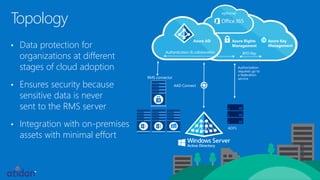
Authentication & collaboration BYO Key
RMS connector
Authorization
requests go to
a federation
service
Topology
• Data protection for
organizations at different
stages of cloud adoption
• Ensures security because
sensitive data is never
sent to the RMS server
• Integration with on-premises
assets with minimal effort
AAD Connect
ADFS
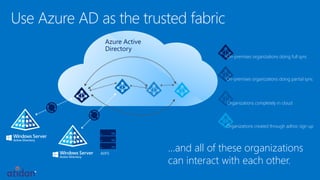
Use Azure AD as the trusted fabric
Azure Active
Directory
ADFS
On-premises organizations doing full sync
On-premises organizations doing partial sync
Organizations completely in cloud
…and all of these organizations
can interact with each other.
Organizations created through adhoc sign up
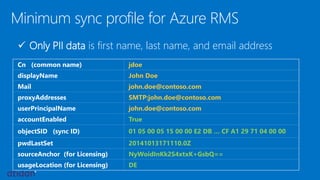
Minimum sync profile for Azure RMS
Cn (common name) jdoe
displayName John Doe
Mail john.doe@contoso.com
proxyAddresses SMTP:john.doe@contoso.com
userPrincipalName john.doe@contoso.com
accountEnabled True
objectSID (sync ID) 01 05 00 05 15 00 00 E2 DB … CF A1 29 71 04 00 00
pwdLastSet 20141013171110.0Z
sourceAnchor (for Licensing) NyWoidInKk2S4xtxK+GsbQ==
usageLocation (for Licensing) DE
 Only PII data is first name, last name, and email address
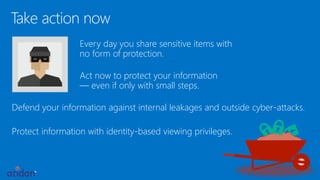
Take action now
Every day you share sensitive items with
no form of protection.
Act now to protect your information
— even if only with small steps.
Defend your information against internal leakages and outside cyber-attacks.
Protect information with identity-based viewing privileges.
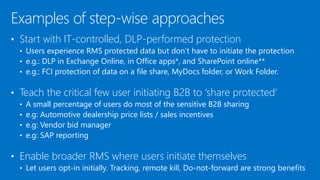
• Start with IT-controlled, DLP-performed protection
• Users experience RMS protected data but don’t have to initiate the protection
• e.g.: DLP in Exchange Online, in Office apps*, and SharePoint online**
• e.g.: FCI protection of data on a file share, MyDocs folder, or Work Folder.
• Teach the critical few user initiating B2B to ‘share protected’
• A small percentage of users do most of the sensitive B2B sharing
• e.g: Automotive dealership price lists / sales incentives
• e.g: Vendor bid manager
• e.g: SAP reporting
• Enable broader RMS where users initiate themselves
• Let users opt-in initially. Tracking, remote kill, Do-not-forward are strong benefits
Examples of step-wise approaches
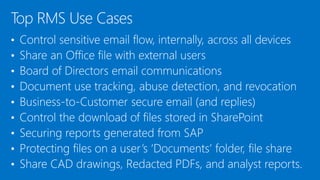
• Control sensitive email flow, internally, across all devices
• Share an Office file with external users
• Board of Directors email communications
• Document use tracking, abuse detection, and revocation
• Business-to-Customer secure email (and replies)
• Control the download of files stored in SharePoint
• Securing reports generated from SAP
• Protecting files on a user’s ‘Documents’ folder, file share
• Share CAD drawings, Redacted PDFs, and analyst reports.
Top RMS Use Cases
Vision: Azure Rights Management
On any device
Email LOB appsFiles
Share internally Share externally (B2C)Share externally (B2B)
Policy
enforcement
Document
revocation
Document
tracking
Access
controlEncryption
Classification
and labeling
In any part of the world
• US
• EU
• APAC
• China
• Germany
Follow @ https://twitter.com/TheRMSGuy
Learn more @ http://www.Microsoft.com/rms
Discover @ http://curah.microsoft.com/56313
For questions email AskIPteam@Microsoft.com
IT Pro blog @ http://blogs.technet.com/b/rms
Get involved @ https://www.yammer.com/AskIPteam
Sign up @ http://portal.aadrm.com
Download @ http://portal.aadrm.com/home/download
Next steps: office365@atidan.com
© 2015 Microsoft Corporation. All rights reserved. Microsoft, Windows, Windows Vista and other product names are or may be registered trademarks and/or trademarks in the U.S. and/or other countries.
The information herein is for informational purposes only and represents the current view of Microsoft Corporation as of the date of this presentation. Because Microsoft must respond to changing market conditions, it should not be
interpreted to be a commitment on the part of Microsoft, and Microsoft cannot guarantee the accuracy of any information provided after the date of this presentation. MICROSOFT MAKES NO WARRANTIES, EXPRESS, IMPLIED OR
STATUTORY, AS TO THE INFORMATION IN THIS PRESENTATION.
office365@atidan.com
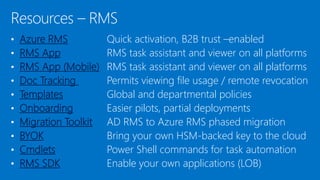
• Azure RMS Quick activation, B2B trust –enabled
• RMS App RMS task assistant and viewer on all platforms
• RMS App (Mobile) RMS task assistant and viewer on all platforms
• Doc Tracking Permits viewing file usage / remote revocation
• Templates Global and departmental policies
• Onboarding Easier pilots, partial deployments
• Migration Toolkit AD RMS to Azure RMS phased migration
• BYOK Bring your own HSM-backed key to the cloud
• Cmdlets Power Shell commands for task automation
• RMS SDK Enable your own applications (LOB)
Resources – RMS
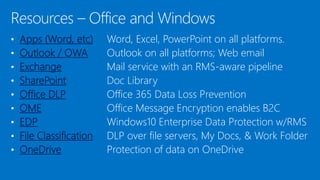
• Apps (Word, etc) Word, Excel, PowerPoint on all platforms.
• Outlook / OWA Outlook on all platforms; Web email
• Exchange Mail service with an RMS-aware pipeline
• SharePoint Doc Library
• Office DLP Office 365 Data Loss Prevention
• OME Office Message Encryption enables B2C
• EDP Windows10 Enterprise Data Protection w/RMS
• File Classification DLP over file servers, My Docs, & Work Folder
• OneDrive Protection of data on OneDrive
Resources – Office and Windows
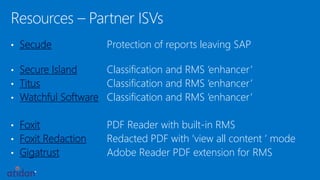
Resources – Partner ISVs
• Secude Protection of reports leaving SAP
• Secure Island Classification and RMS ‘enhancer’
• Titus Classification and RMS ‘enhancer’
• Watchful Software Classification and RMS ‘enhancer’
• Foxit PDF Reader with built-in RMS
• Foxit Redaction Redacted PDF with ‘view all content ’ mode
• Gigatrust Adobe Reader PDF extension for RMS

Microsoft Azure Rights Management

  • 1.
  • 2.
  • 3.
    Why do youseek to protect information? Survey conducted with: 313 organizations 17,000,000 users 54,000 users on average Reduce leakage of data shared with others (B2B collaboration) Partitioning of sensitive data from unauthorized users Prevent malicious employees from leaking of secrets Meet compliance requirements 96% 94% 89% 87%
  • 4.
    Data privacy is mandated! Myexisting DLP protection is too reactive. Can data be ‘born encrypted’? How do I prepare for a fading perimeter? Peer-to-peer federation is not practical or scalable. How do we establish ‘trust’? IT must ‘reason over data’ to stay compliant, yet we need our sensitive data to be encrypted. We want small steps to protect data now! We’re don’t want to slowly implement the ‘perfect grand solution’.
  • 5.
    Another New Challenge Youhave a perimeter You have managed devices within a broader perimeter Your business requires you to share sensitive data outside of your control for B2B/B2C
  • 6.
    Persistent protection Storage independentsolution Permit all companies to authenticate Authorization policies are enforced Our promise <you> need to share <file types> between yourself and partners, suppliers, dealers, representatives, etc. Powerful logging for reporting End user use/abuse tracking Ability to remote kill documents Enable IT to reason over data Tracking and Compliance Works across all platforms Free content consumption Consistent user experience Integrated into common apps/services Ease of Use
  • 8.
    Vision: Azure RightsManagement On any device Email LOB appsFiles Share internally Share externally (B2C)Share externally (B2B) Policy enforcement Document revocation Document tracking Access controlEncryption Classification and labeling In any part of the world • US • EU • APAC • China • Germany
  • 9.
    Disclaimer: Gartner doesnot endorse any vendor, product or service depicted in its research publications, and does not advise technology users to select only those vendors with the highest ratings or other designation. Gartner research publications consist of the opinions of Gartner's research organization and should not be construed as statements of fact. Gartner disclaims all warranties, expressed or implied, with respect to this research, including any warranties of merchantability or fitness for a particular purpose."
  • 13.
    aEZQAR]ibr{qU @M]BXNoHp9nMD AtnBfrfC;jx+T g@XL2,Jzu ()&(*7812(*: Use Rights + Rightsmanagement 101 Secret cola formula Water Sugar Brown #16 Protect Unprotect Usage rights and symmetric key stored in file as ‘license’ Each file is protected by a unique AES symmetric License protected by customer-owned RSA key Water Sugar Brown #16
  • 14.
    Local processing onPCs/devices Apps protected with RMS enforce rights SDK Apps use the SDK to communicate with the RMS service/servers File content is never sent to the RMS server/service. aEZQAR]ibr{q U@M]BXNoHp9n MDAtnBfrfC;j x+Tg@XL2,Jzu ()&(*7812(*: Use Rights + Use Rights + Azure RMS never sees the file content, only the license.
  • 15.
    Authentication & collaborationBYO Key RMS connector Authorization requests go to a federation service Topology • Data protection for organizations at different stages of cloud adoption • Ensures security because sensitive data is never sent to the RMS server • Integration with on-premises assets with minimal effort AAD Connect ADFS
  • 16.
    Use Azure ADas the trusted fabric Azure Active Directory ADFS On-premises organizations doing full sync On-premises organizations doing partial sync Organizations completely in cloud …and all of these organizations can interact with each other. Organizations created through adhoc sign up
  • 17.
    Minimum sync profilefor Azure RMS Cn (common name) jdoe displayName John Doe Mail john.doe@contoso.com proxyAddresses SMTP:john.doe@contoso.com userPrincipalName john.doe@contoso.com accountEnabled True objectSID (sync ID) 01 05 00 05 15 00 00 E2 DB … CF A1 29 71 04 00 00 pwdLastSet 20141013171110.0Z sourceAnchor (for Licensing) NyWoidInKk2S4xtxK+GsbQ== usageLocation (for Licensing) DE  Only PII data is first name, last name, and email address
  • 18.
    Take action now Everyday you share sensitive items with no form of protection. Act now to protect your information — even if only with small steps. Defend your information against internal leakages and outside cyber-attacks. Protect information with identity-based viewing privileges.
  • 19.
    • Start withIT-controlled, DLP-performed protection • Users experience RMS protected data but don’t have to initiate the protection • e.g.: DLP in Exchange Online, in Office apps*, and SharePoint online** • e.g.: FCI protection of data on a file share, MyDocs folder, or Work Folder. • Teach the critical few user initiating B2B to ‘share protected’ • A small percentage of users do most of the sensitive B2B sharing • e.g: Automotive dealership price lists / sales incentives • e.g: Vendor bid manager • e.g: SAP reporting • Enable broader RMS where users initiate themselves • Let users opt-in initially. Tracking, remote kill, Do-not-forward are strong benefits Examples of step-wise approaches
  • 20.
    • Control sensitiveemail flow, internally, across all devices • Share an Office file with external users • Board of Directors email communications • Document use tracking, abuse detection, and revocation • Business-to-Customer secure email (and replies) • Control the download of files stored in SharePoint • Securing reports generated from SAP • Protecting files on a user’s ‘Documents’ folder, file share • Share CAD drawings, Redacted PDFs, and analyst reports. Top RMS Use Cases
  • 21.
    Vision: Azure RightsManagement On any device Email LOB appsFiles Share internally Share externally (B2C)Share externally (B2B) Policy enforcement Document revocation Document tracking Access controlEncryption Classification and labeling In any part of the world • US • EU • APAC • China • Germany
  • 22.
    Follow @ https://twitter.com/TheRMSGuy Learnmore @ http://www.Microsoft.com/rms Discover @ http://curah.microsoft.com/56313 For questions email AskIPteam@Microsoft.com IT Pro blog @ http://blogs.technet.com/b/rms Get involved @ https://www.yammer.com/AskIPteam Sign up @ http://portal.aadrm.com Download @ http://portal.aadrm.com/home/download Next steps: office365@atidan.com
  • 23.
    © 2015 MicrosoftCorporation. All rights reserved. Microsoft, Windows, Windows Vista and other product names are or may be registered trademarks and/or trademarks in the U.S. and/or other countries. The information herein is for informational purposes only and represents the current view of Microsoft Corporation as of the date of this presentation. Because Microsoft must respond to changing market conditions, it should not be interpreted to be a commitment on the part of Microsoft, and Microsoft cannot guarantee the accuracy of any information provided after the date of this presentation. MICROSOFT MAKES NO WARRANTIES, EXPRESS, IMPLIED OR STATUTORY, AS TO THE INFORMATION IN THIS PRESENTATION. office365@atidan.com
  • 24.
    • Azure RMSQuick activation, B2B trust –enabled • RMS App RMS task assistant and viewer on all platforms • RMS App (Mobile) RMS task assistant and viewer on all platforms • Doc Tracking Permits viewing file usage / remote revocation • Templates Global and departmental policies • Onboarding Easier pilots, partial deployments • Migration Toolkit AD RMS to Azure RMS phased migration • BYOK Bring your own HSM-backed key to the cloud • Cmdlets Power Shell commands for task automation • RMS SDK Enable your own applications (LOB) Resources – RMS
  • 25.
    • Apps (Word,etc) Word, Excel, PowerPoint on all platforms. • Outlook / OWA Outlook on all platforms; Web email • Exchange Mail service with an RMS-aware pipeline • SharePoint Doc Library • Office DLP Office 365 Data Loss Prevention • OME Office Message Encryption enables B2C • EDP Windows10 Enterprise Data Protection w/RMS • File Classification DLP over file servers, My Docs, & Work Folder • OneDrive Protection of data on OneDrive Resources – Office and Windows
  • 26.
    Resources – PartnerISVs • Secude Protection of reports leaving SAP • Secure Island Classification and RMS ‘enhancer’ • Titus Classification and RMS ‘enhancer’ • Watchful Software Classification and RMS ‘enhancer’ • Foxit PDF Reader with built-in RMS • Foxit Redaction Redacted PDF with ‘view all content ’ mode • Gigatrust Adobe Reader PDF extension for RMS