




Deep dive in to Microsoft 365
I help companies move securely to the cloud.
Hey there, I’m Jussi!
@JussiRoine
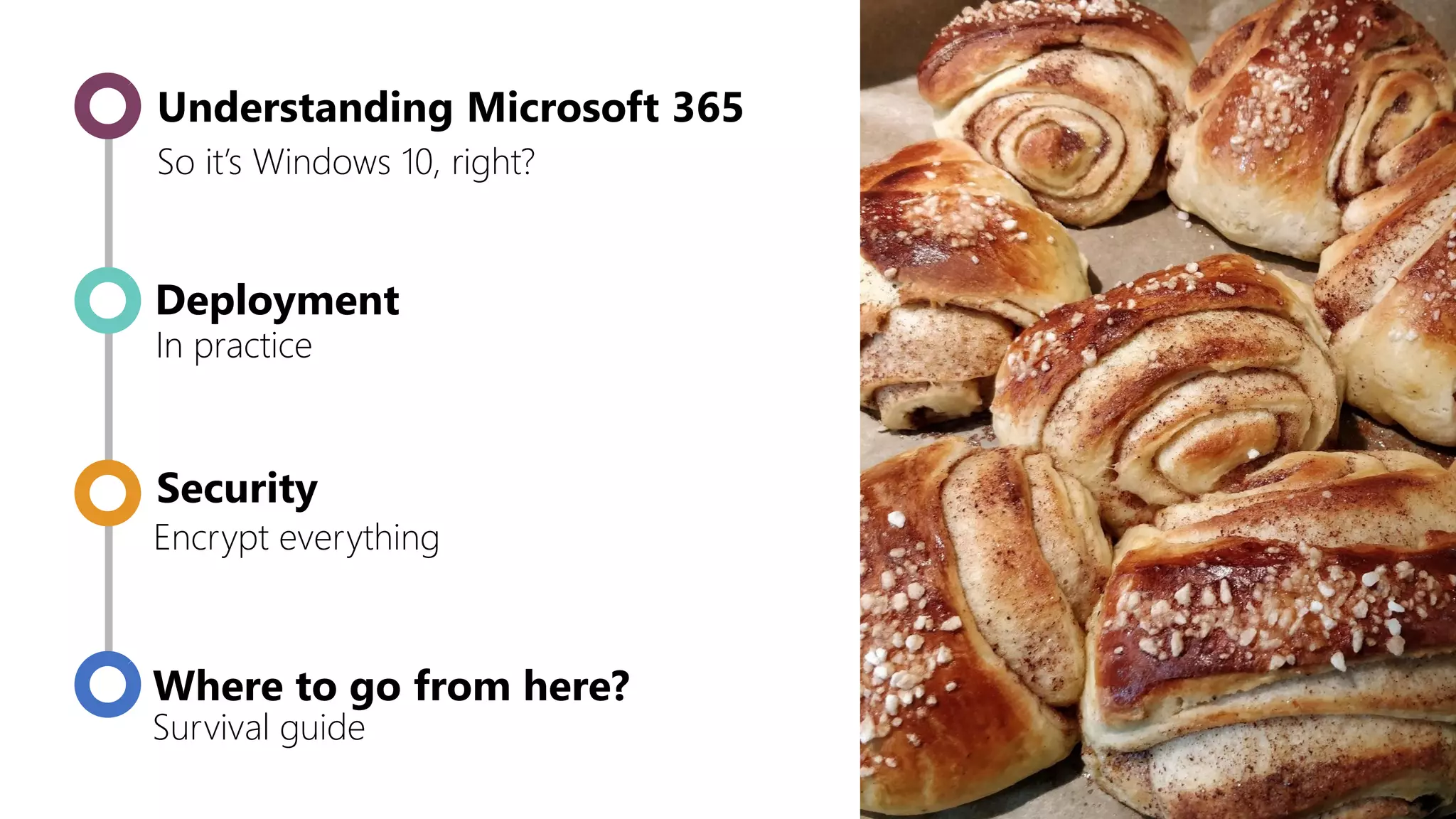
So it’s Windows 10, right?
Security
Where to go from here?
Encrypt everything
Survival guide
Deployment
In practice
Understanding Microsoft 365
Understanding
Microsoft 365
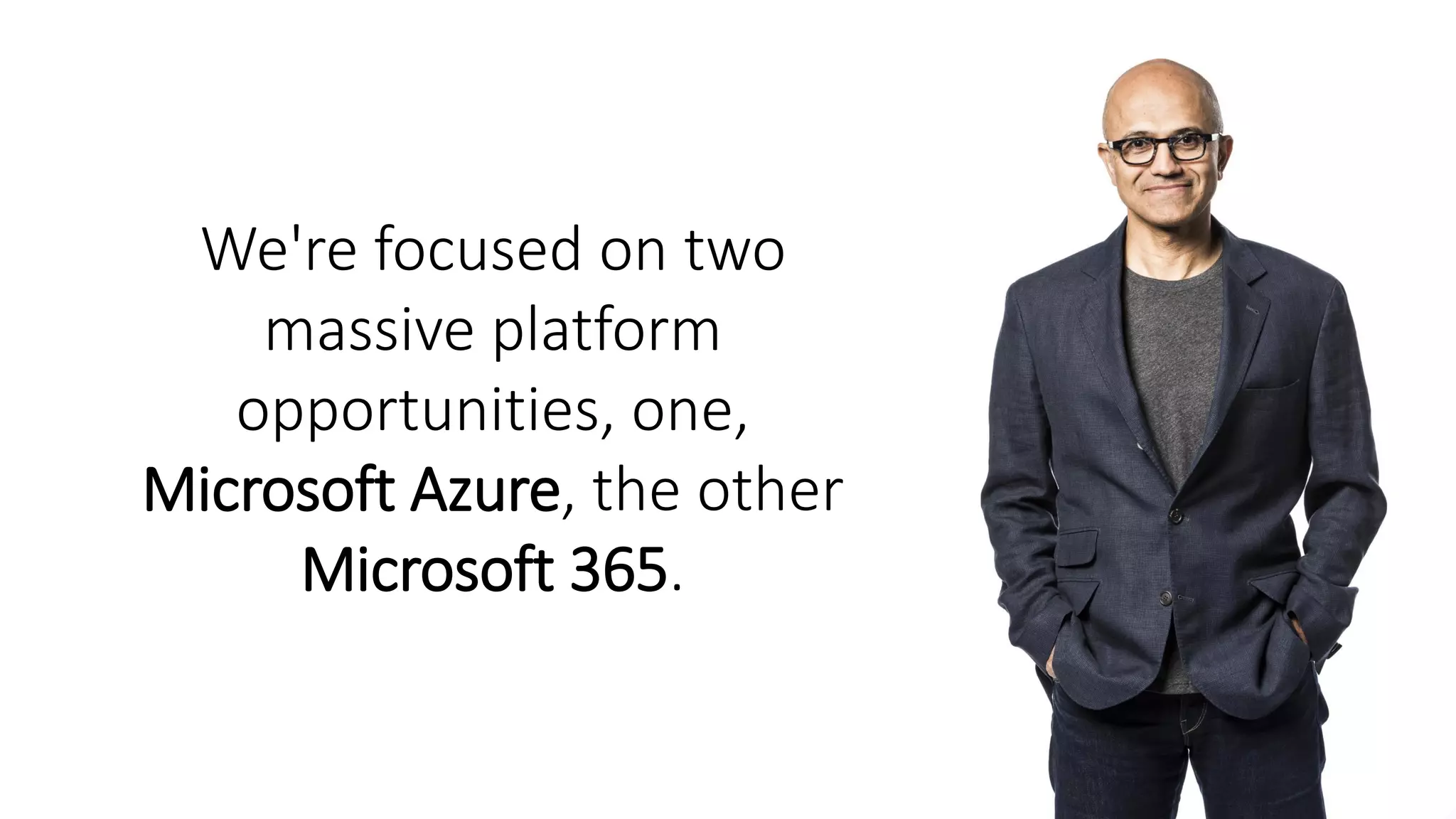
We're focused on two
massive platform
opportunities, one,
Microsoft Azure, the other
Microsoft 365.
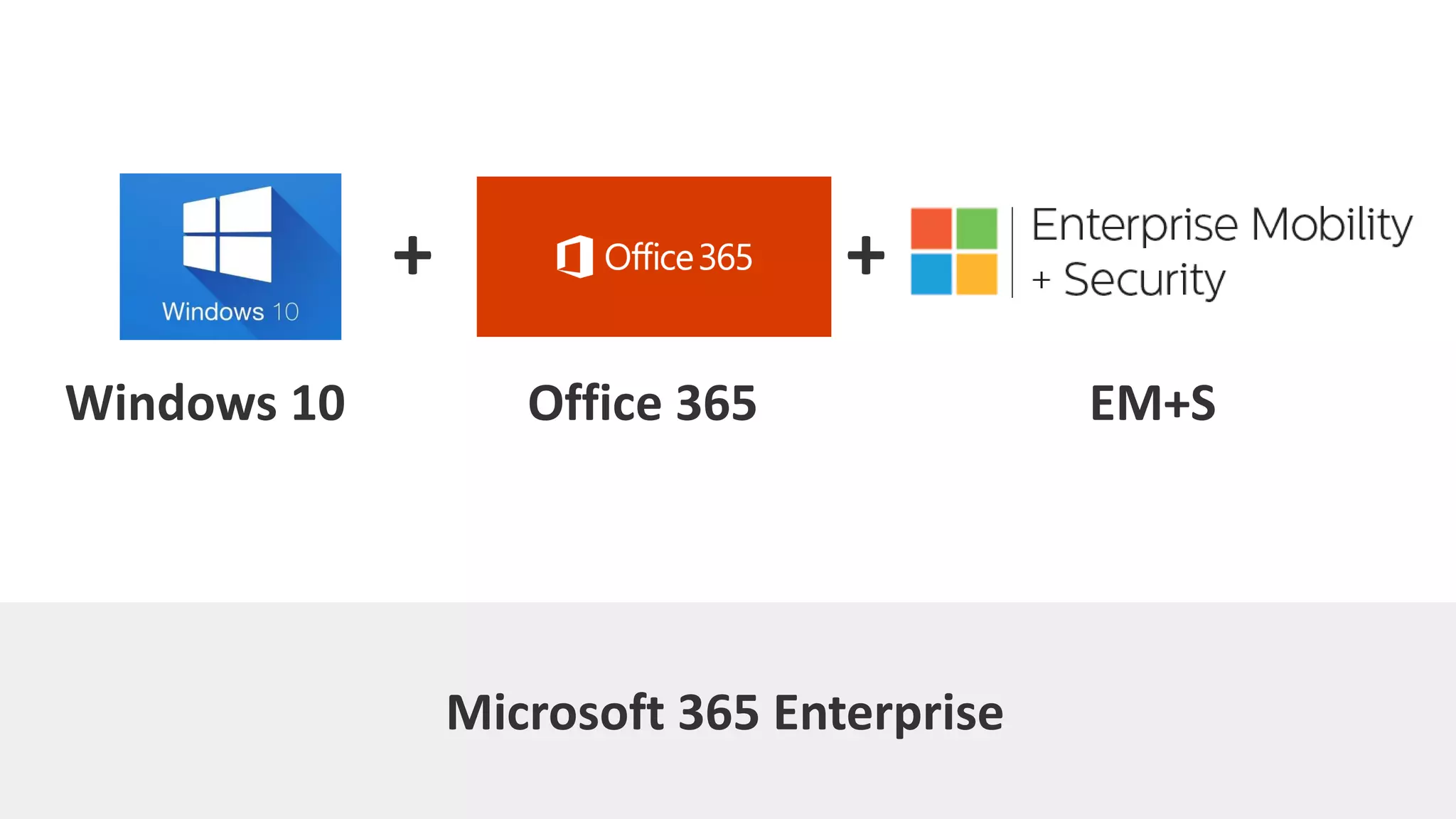
Windows 10 Office 365 EM+S
Microsoft 365 Enterprise
+ +
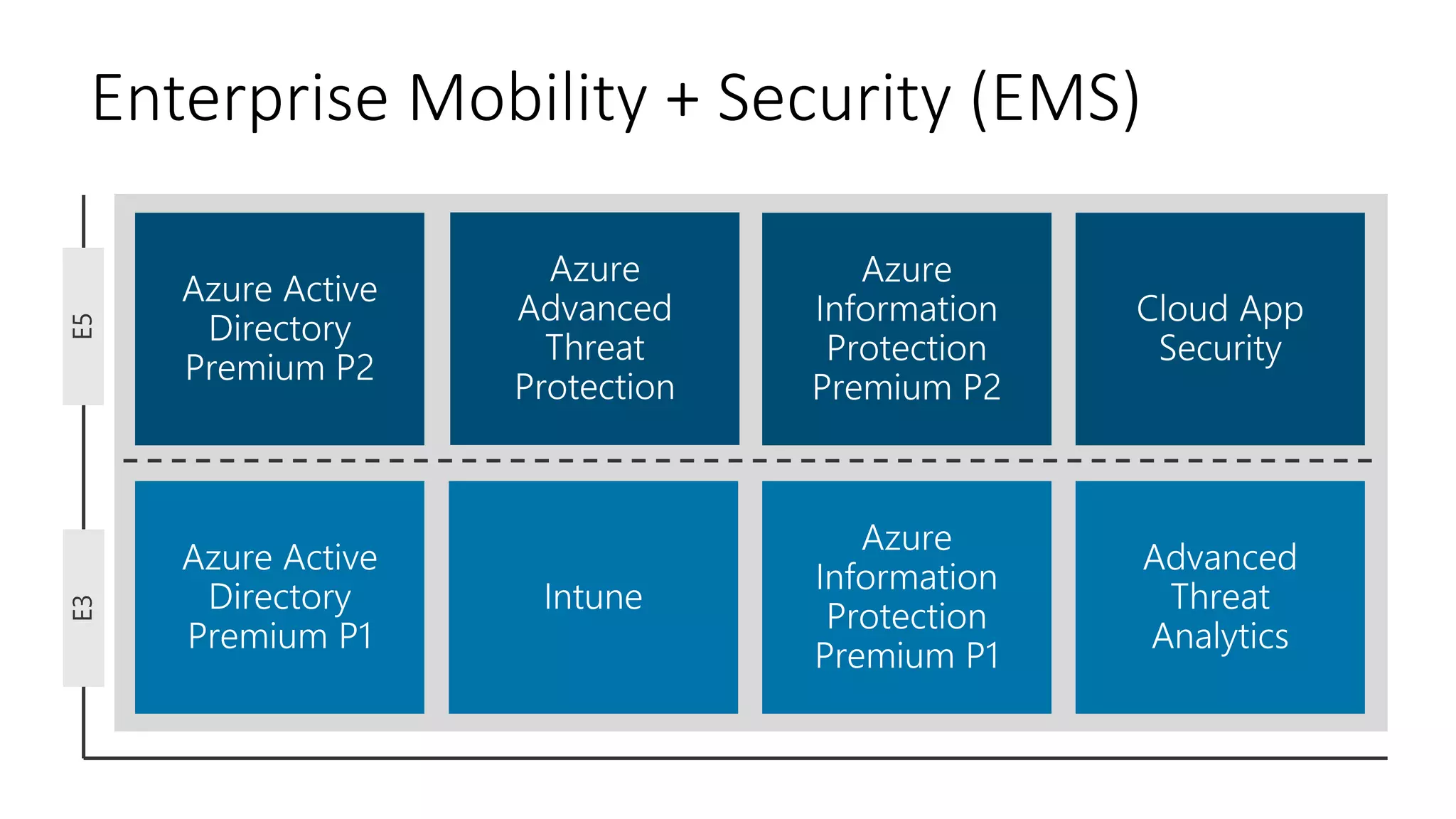
Enterprise Mobility + Security (EMS)E3E5
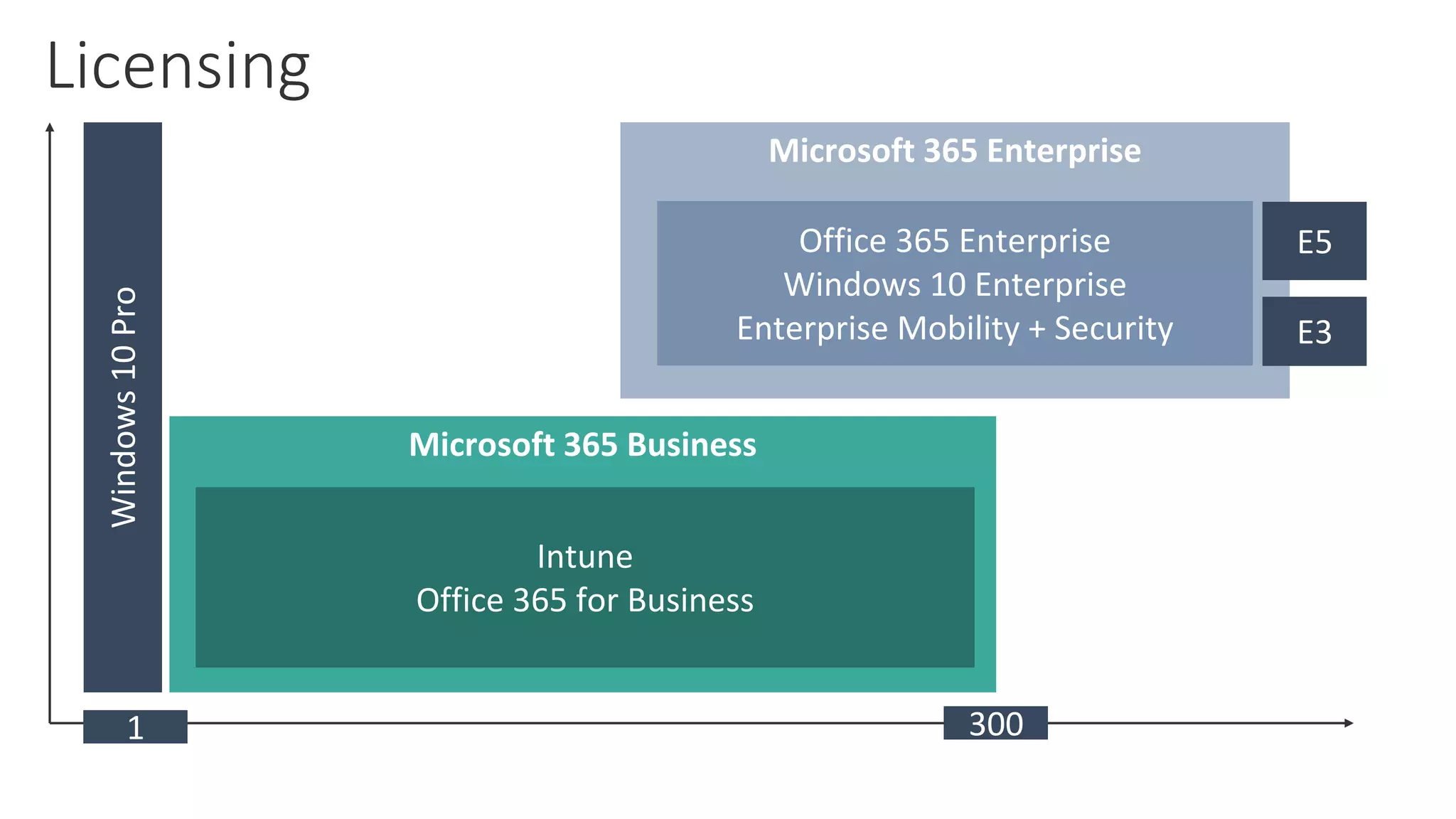
Microsoft 365 Enterprise
Microsoft 365 Business
Office 365 Enterprise
Windows 10 Enterprise
Enterprise Mobility + Security
Intune
Office 365 for Business
Windows10Pro
3001
E5
E3
Licensing
Microsoft 365 Enterprise
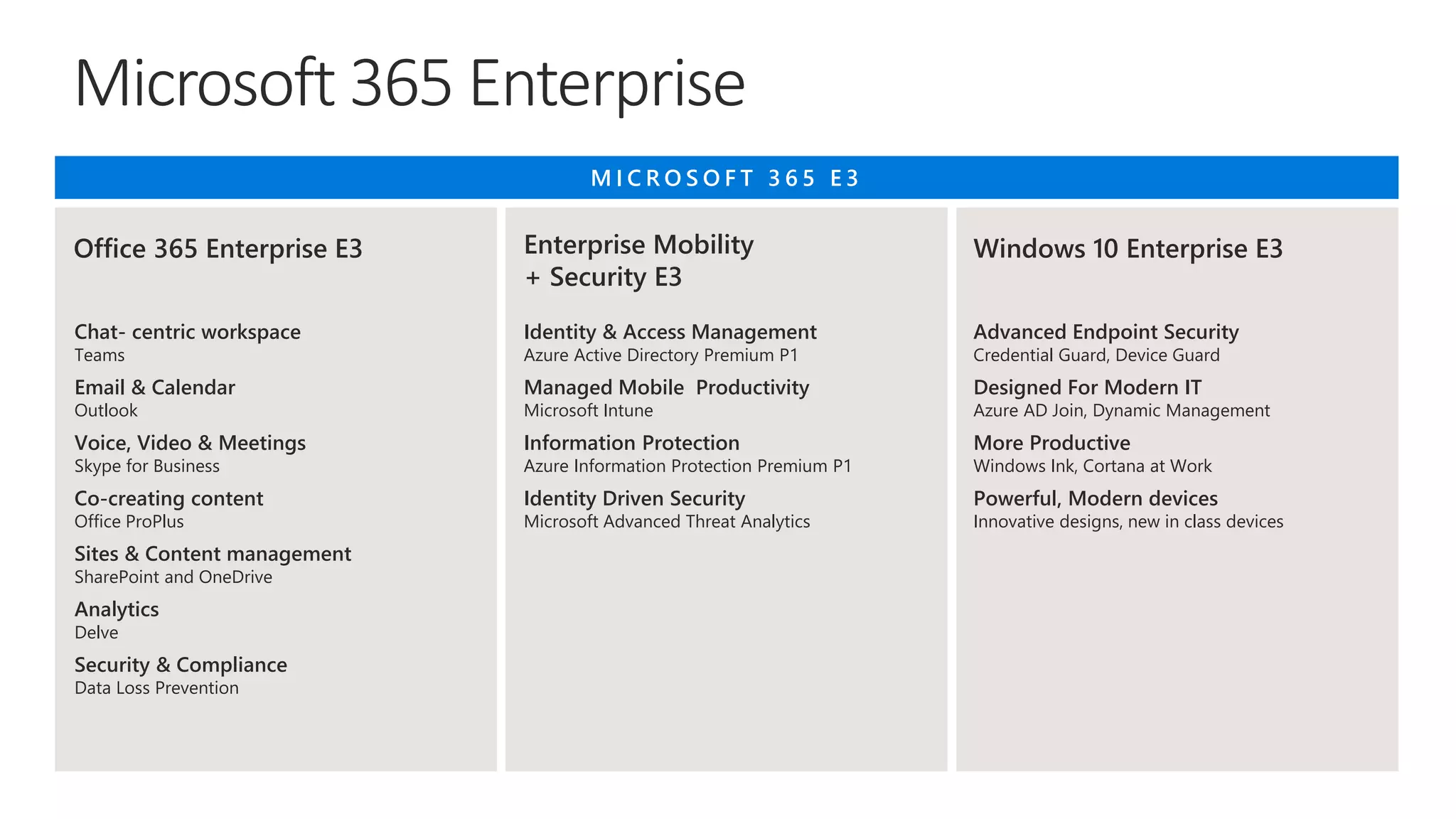
Chat- centric workspace
Teams
Email & Calendar
Outlook
Voice, Video & Meetings
Skype for Business
Co-creating content
Office ProPlus
Sites & Content management
SharePoint and OneDrive
Analytics
Delve
Security & Compliance
Data Loss Prevention
M I C R O S O F T 3 6 5 E 3
Office 365 Enterprise E3 Enterprise Mobility
+ Security E3
Windows 10 Enterprise E3
Identity & Access Management
Azure Active Directory Premium P1
Managed Mobile Productivity
Microsoft Intune
Information Protection
Azure Information Protection Premium P1
Identity Driven Security
Microsoft Advanced Threat Analytics
Advanced Endpoint Security
Credential Guard, Device Guard
Designed For Modern IT
Azure AD Join, Dynamic Management
More Productive
Windows Ink, Cortana at Work
Powerful, Modern devices
Innovative designs, new in class devices
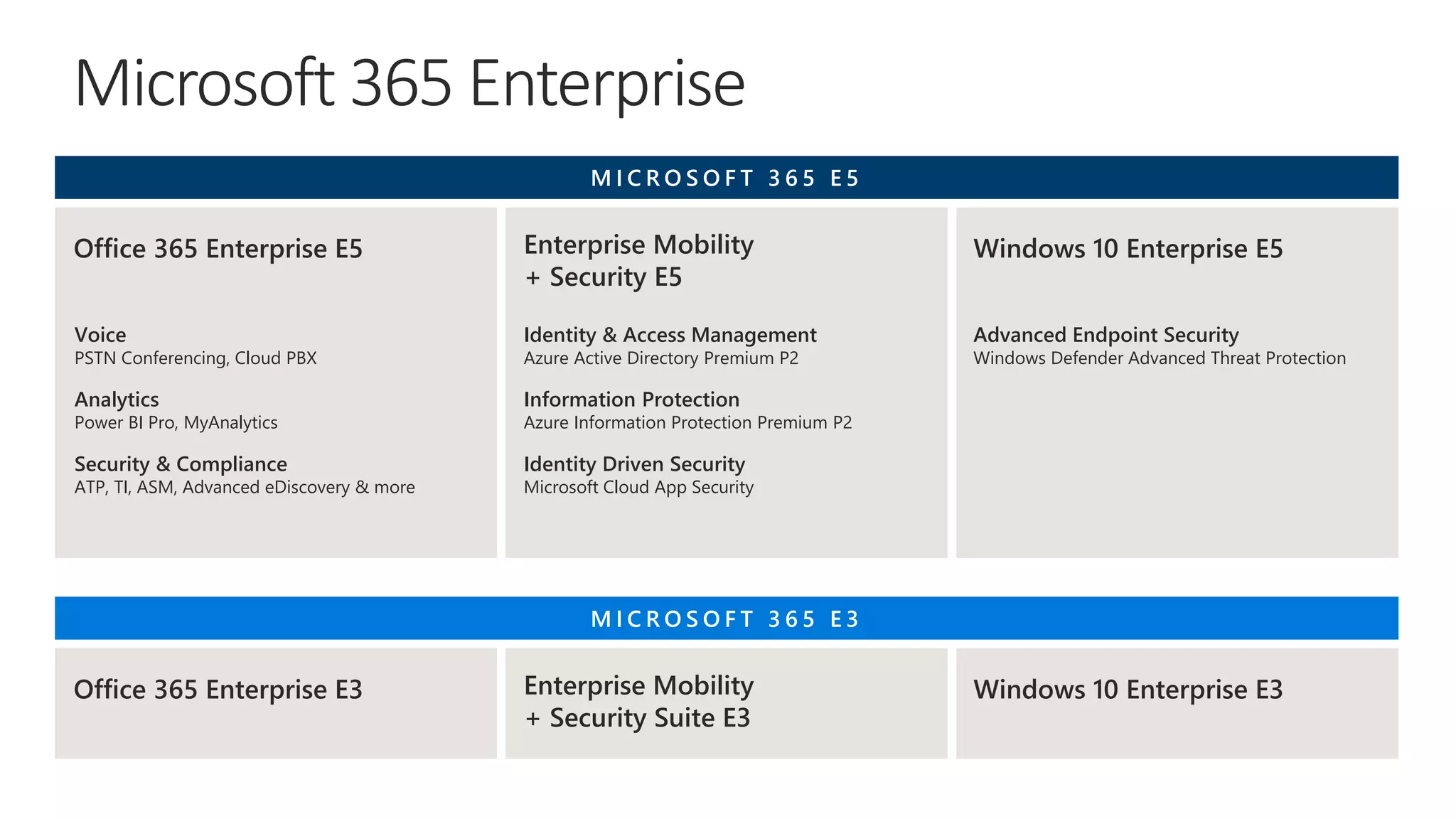
Microsoft 365 Enterprise
M I C R O S O F T 3 6 5 E 3
Office 365 Enterprise E3 Enterprise Mobility
+ Security Suite E3
Windows 10 Enterprise E3
Voice
PSTN Conferencing, Cloud PBX
Analytics
Power BI Pro, MyAnalytics
Security & Compliance
ATP, TI, ASM, Advanced eDiscovery & more
M I C R O S O F T 3 6 5 E 5
Office 365 Enterprise E5 Enterprise Mobility
+ Security E5
Windows 10 Enterprise E5
Identity & Access Management
Azure Active Directory Premium P2
Information Protection
Azure Information Protection Premium P2
Identity Driven Security
Microsoft Cloud App Security
Advanced Endpoint Security
Windows Defender Advanced Threat Protection
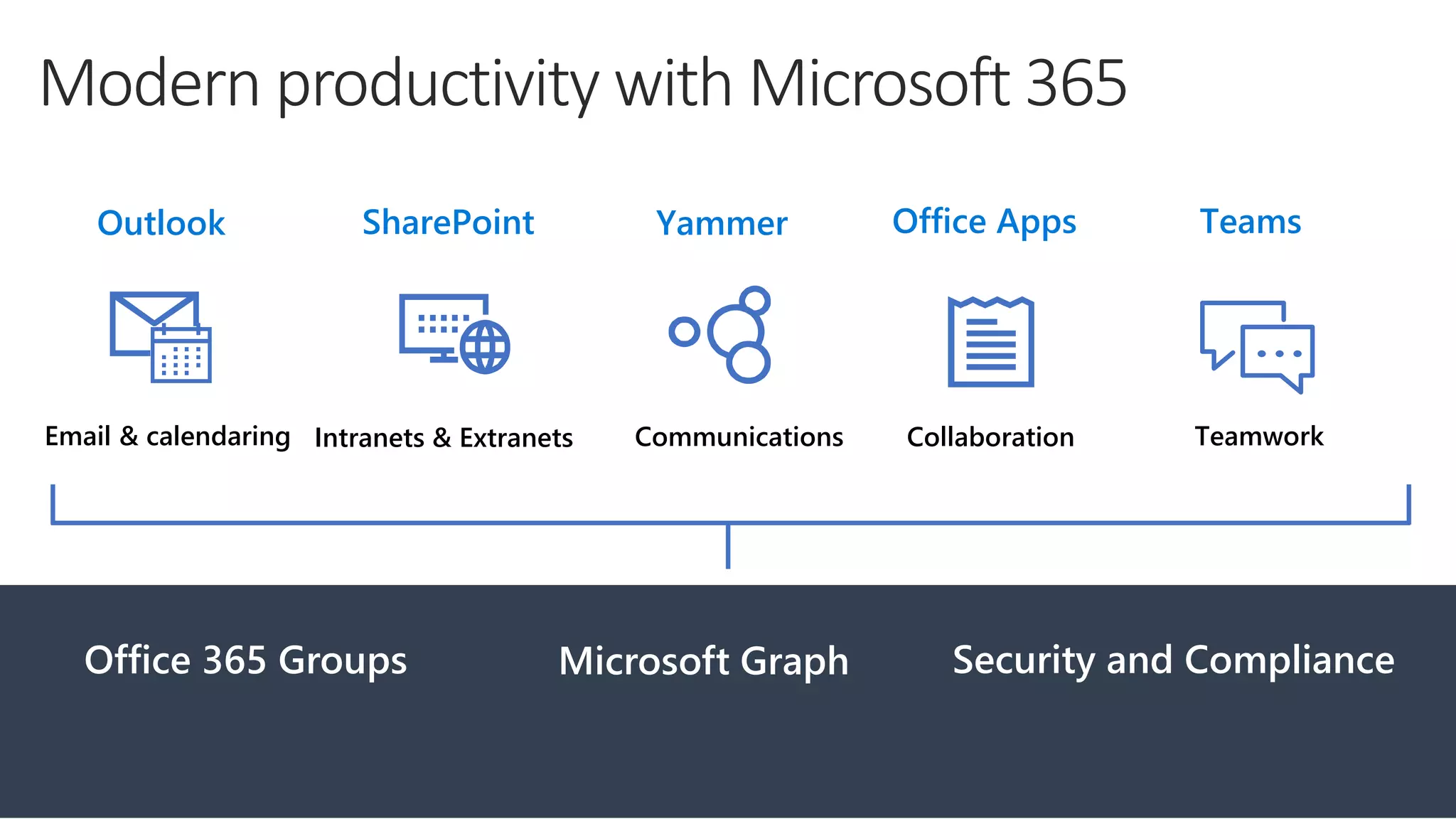
TeamworkCollaborationCommunicationsIntranets & ExtranetsEmail & calendaring
TeamsOffice AppsYammerSharePointOutlook
Office 365 Groups Microsoft Graph Security and Compliance
Modern productivity with Microsoft 365
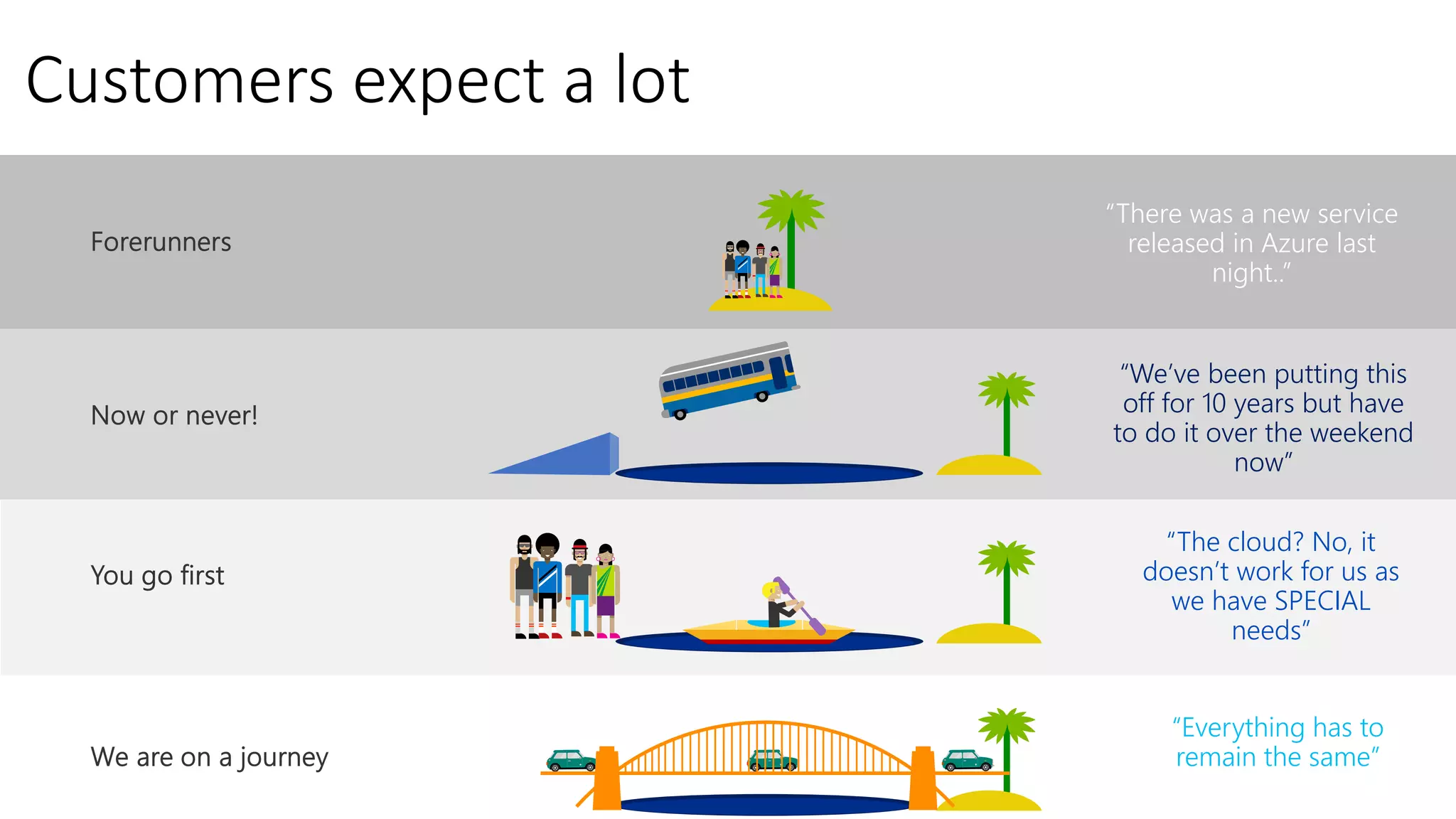
Customers expect a lot
“We’ve been putting this
off for 10 years but have
to do it over the weekend
now”
“The cloud? No, it
doesn’t work for us as
we have SPECIAL
needs”
“Everything has to
remain the same”
“There was a new service
released in Azure last
night..”
Deployment
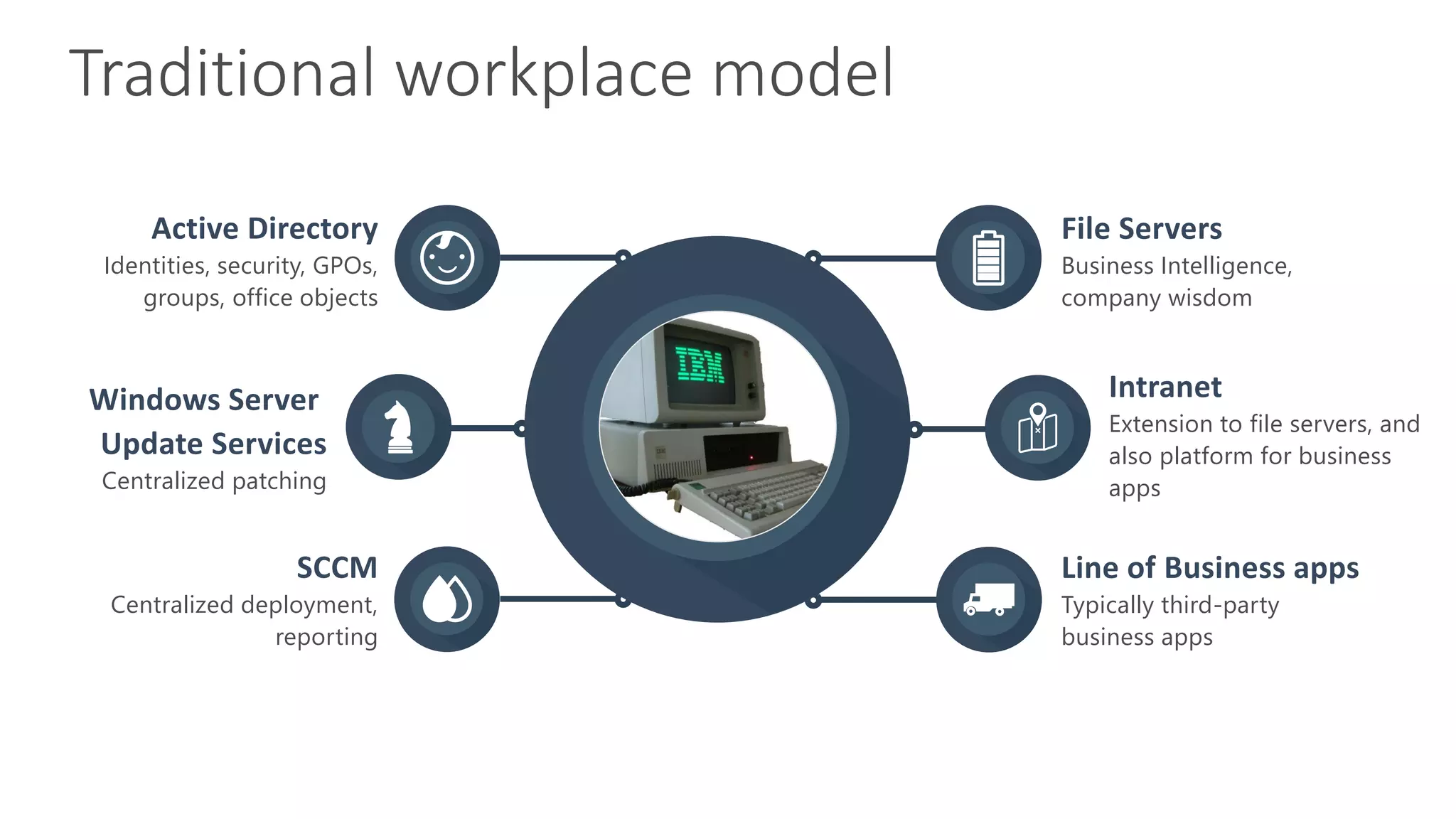
Identities, security, GPOs,
groups, office objects
Active Directory
Centralized patching
Windows Server
Update Services
Centralized deployment,
reporting
SCCM
Business Intelligence,
company wisdom
File Servers
Extension to file servers, and
also platform for business
apps
Intranet
Typically third-party
business apps
Line of Business apps
Traditional workplace model
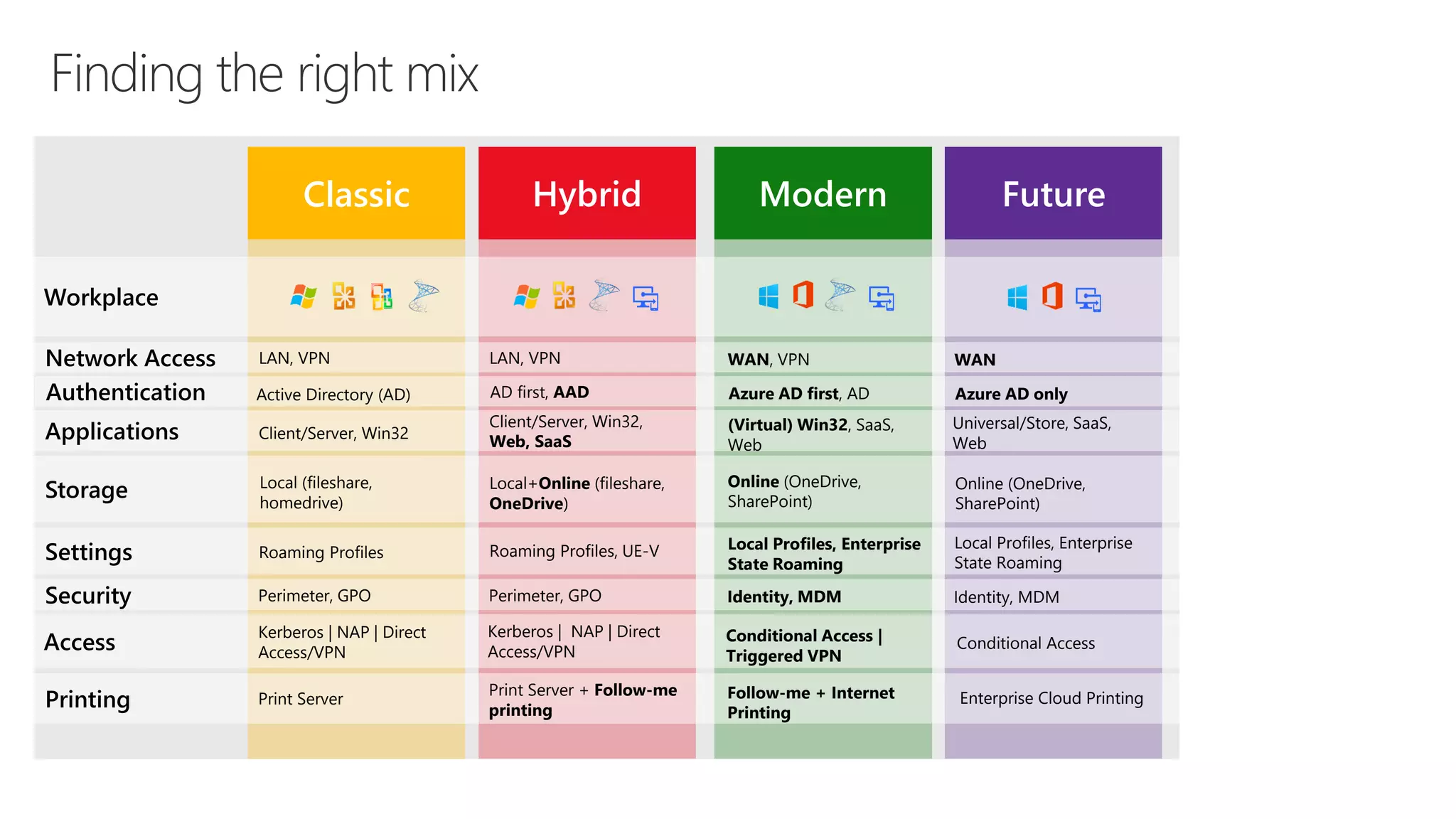
Classic Hybrid Modern Future
Applications
Storage
Settings
Security
Access
Printing
Network Access LAN, VPN
Client/Server, Win32
Local (fileshare,
homedrive)
Kerberos | NAP | Direct
Access/VPN
Roaming Profiles
Perimeter, GPO
Print Server
Workplace
LAN, VPN
Client/Server, Win32,
Web, SaaS
Local+Online (fileshare,
OneDrive)
Kerberos | NAP | Direct
Access/VPN
Roaming Profiles, UE-V
Perimeter, GPO
Print Server + Follow-me
printing
WAN, VPN
(Virtual) Win32, SaaS,
Web
Online (OneDrive,
SharePoint)
Conditional Access |
Triggered VPN
Local Profiles, Enterprise
State Roaming
Identity, MDM
Follow-me + Internet
Printing
WAN
Universal/Store, SaaS,
Web
Conditional Access
Local Profiles, Enterprise
State Roaming
Identity, MDM
Enterprise Cloud Printing
Online (OneDrive,
SharePoint)
Authentication Active Directory (AD) AD first, AAD Azure AD first, AD Azure AD only
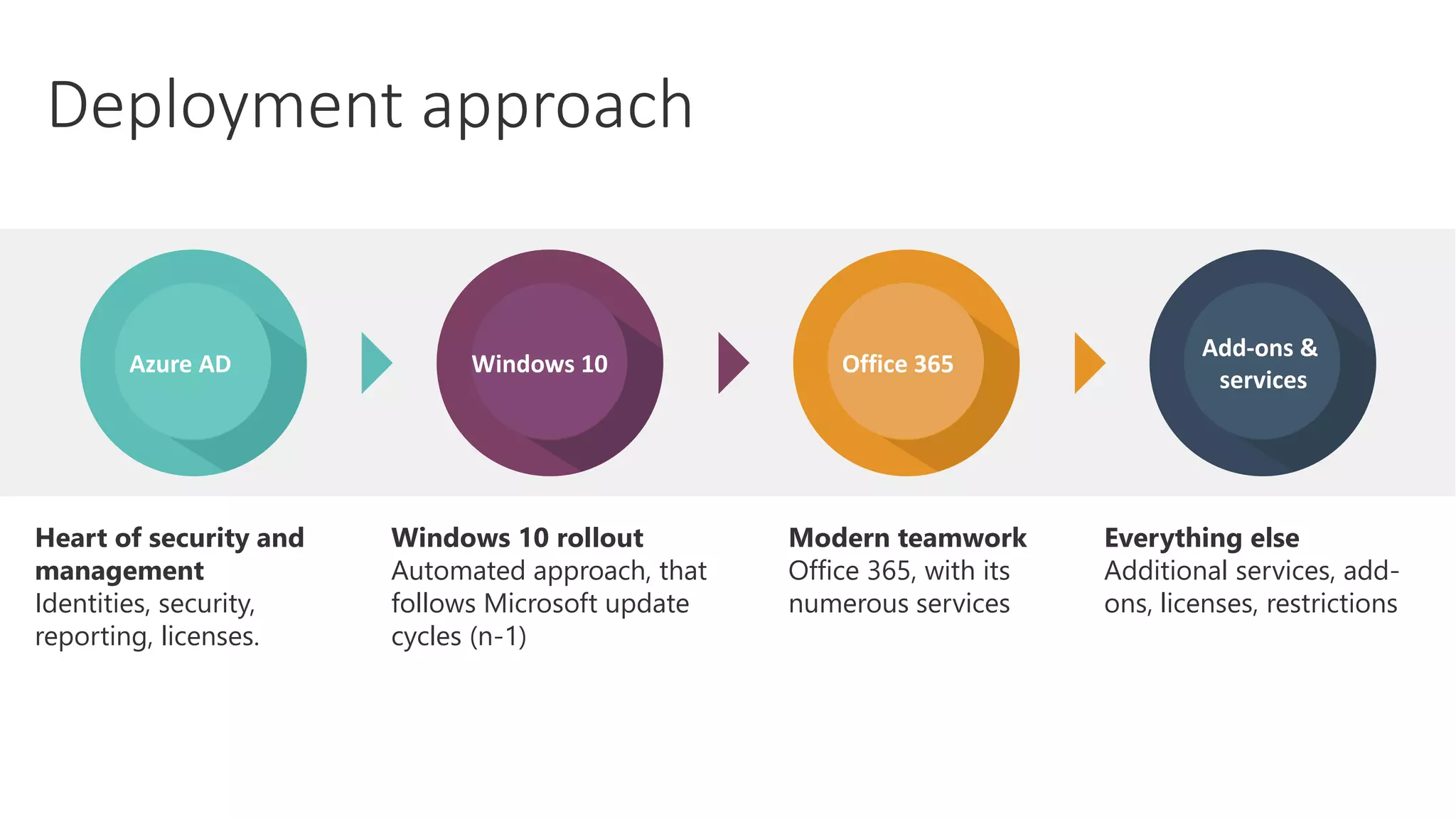
Everything else
Additional services, add-
ons, licenses, restrictions
Windows 10 rollout
Automated approach, that
follows Microsoft update
cycles (n-1)
Modern teamwork
Office 365, with its
numerous services
Heart of security and
management
Identities, security,
reporting, licenses.
Deployment approach
Add-ons &
services
Office 365Windows 10Azure AD
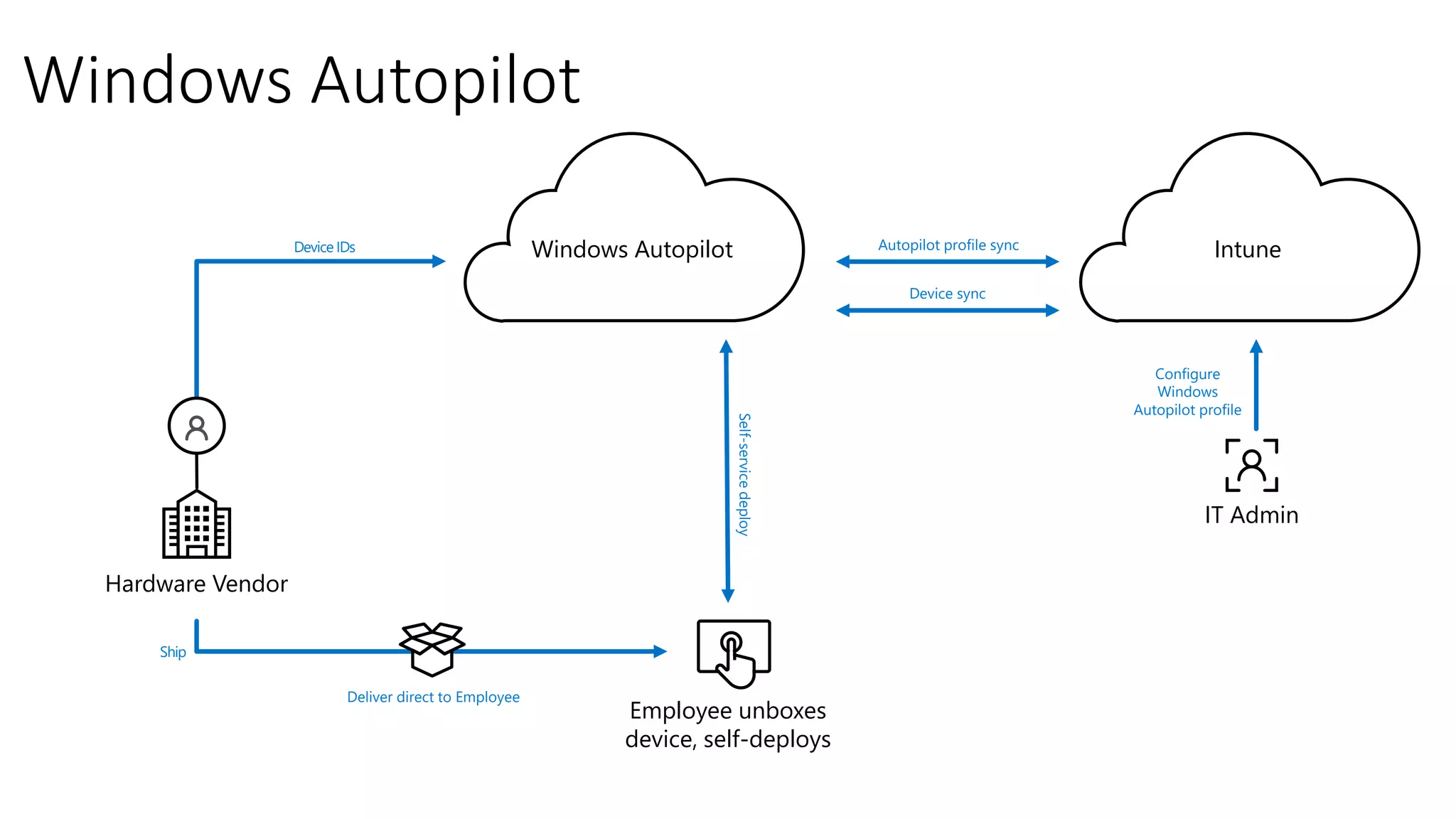
Windows Autopilot
Configure
Windows
Autopilot profile
Self-servicedeploy
Device IDs
Hardware Vendor
IT Admin
Ship
Deliver direct to Employee
Employee unboxes
device, self-deploys
IntuneWindows Autopilot
Device sync
Autopilot profile sync
Building the foundational infrastructure
Foundation infrastructure: Phases, steps, exit criteria
aka.ms/m365edeployfoundation
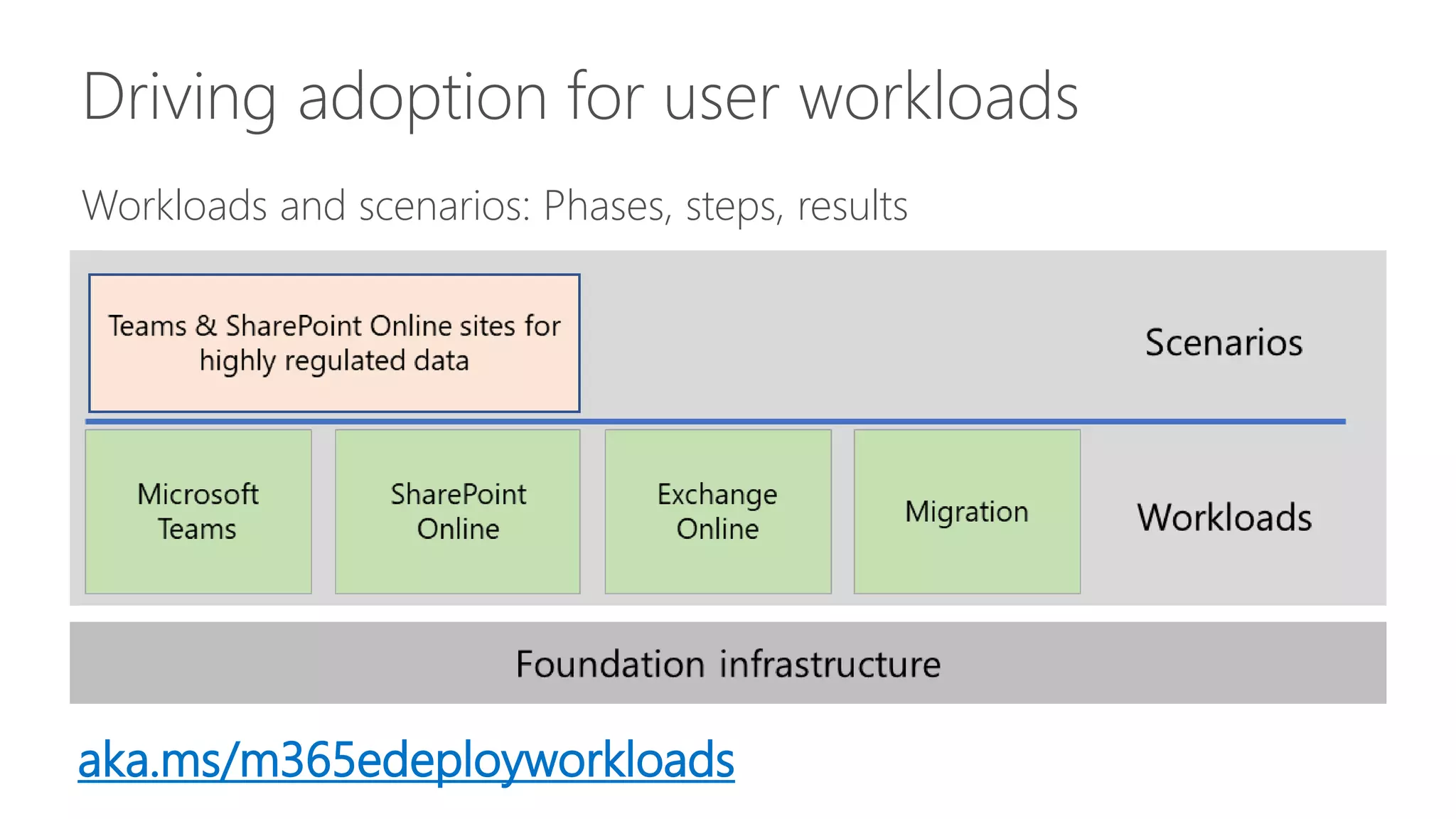
Driving adoption for user workloads
Workloads and scenarios: Phases, steps, results
aka.ms/m365edeployworkloads
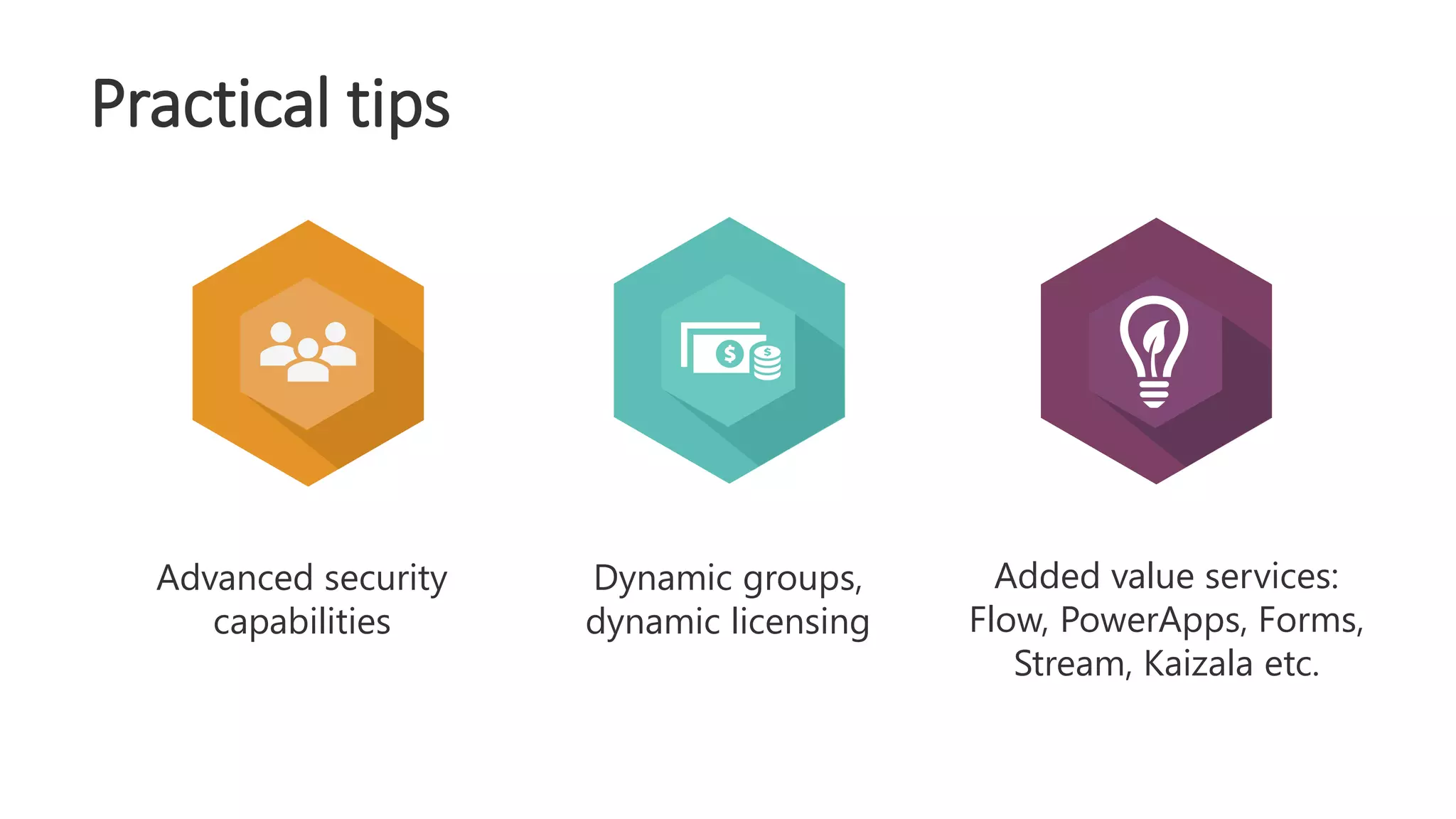
Dynamic groups,
dynamic licensing
Added value services:
Flow, PowerApps, Forms,
Stream, Kaizala etc.
Advanced security
capabilities
Practical tips
Demo
Dynamic groups and licensing
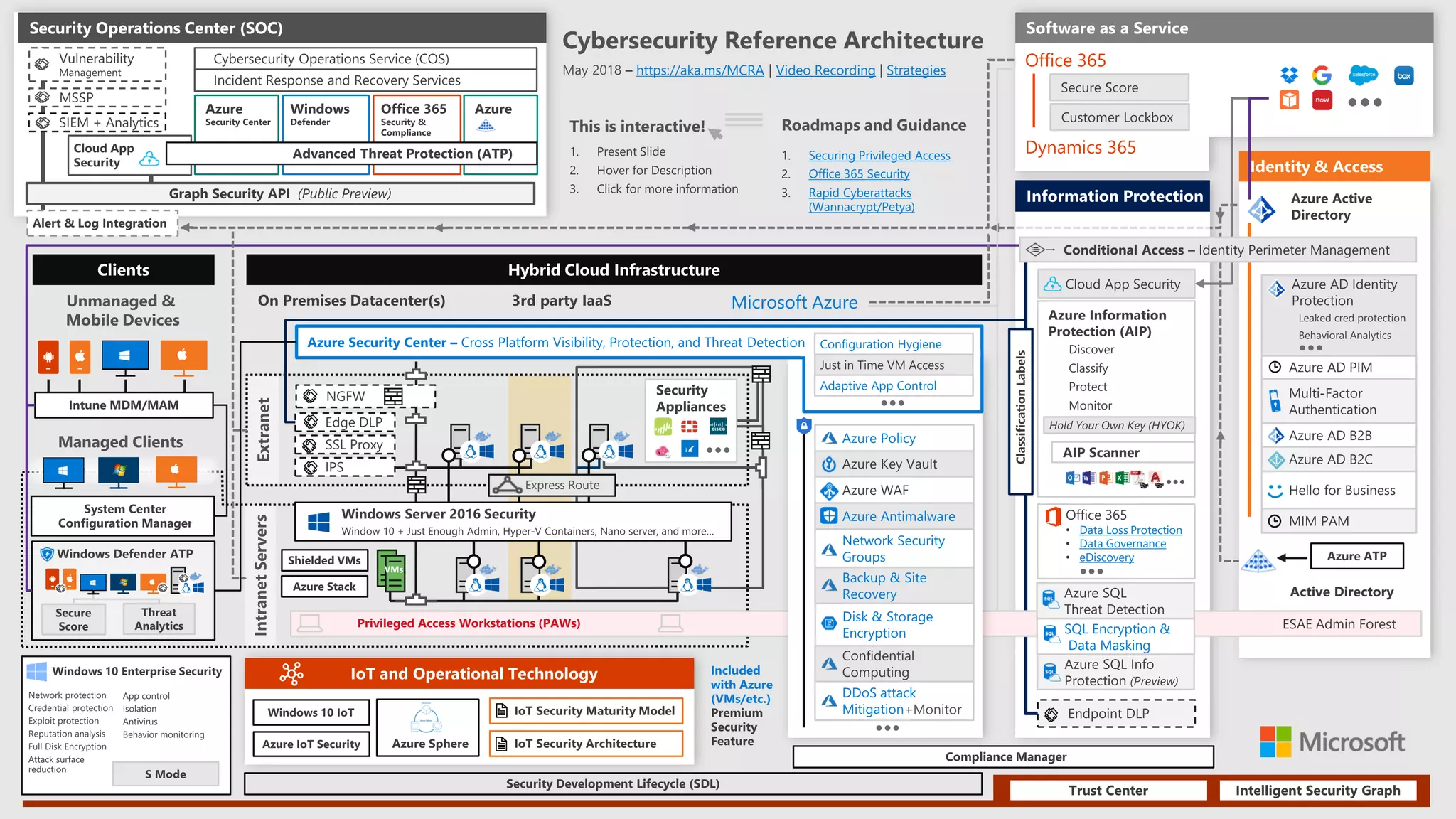
Security
Securing Privileged Access
Office 365 Security
Rapid Cyberattacks
(Wannacrypt/Petya)
https://aka.ms/MCRA Video Recording Strategies
SQL Encryption &
Data Masking
Office 365
Dynamics 365
+Monitor
Data Loss Protection
Data Governance
eDiscovery
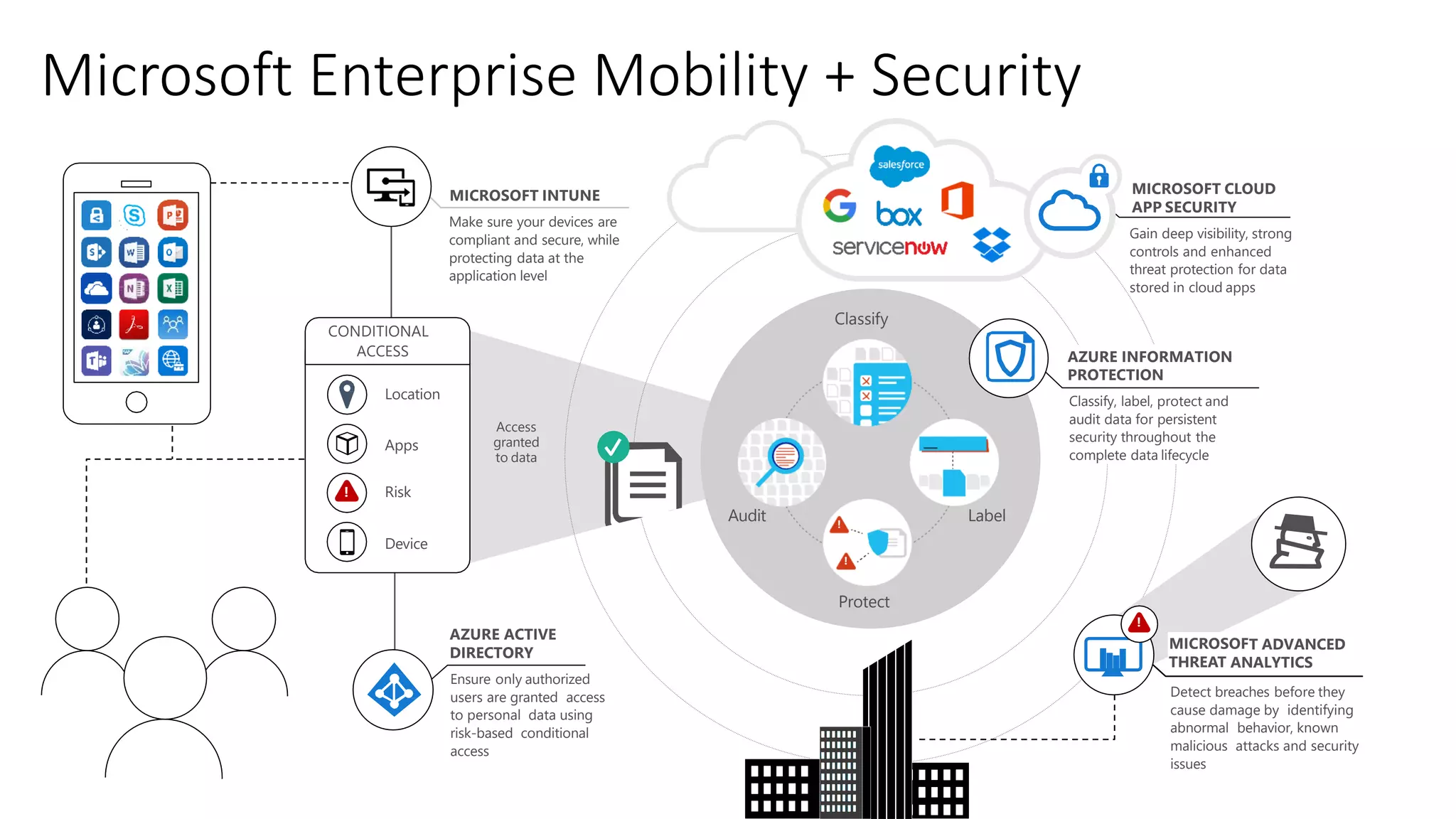
Microsoft Enterprise Mobility + Security
Apps
Risk
MICROSOFT INTUNE
Make sure your devices are
compliant and secure, while
protecting data at the
application level
AZURE ACTIVE
DIRECTORY
Ensure only authorized
users are granted access
to personal data using
risk-based conditional
access
MICROSOFT CLOUD
APP SECURITY
Gain deep visibility, strong
controls and enhanced
threat protection for data
stored in cloud apps
AZURE INFORMATION
PROTECTION
Classify, label, protect and
audit data for persistent
security throughout the
complete data lifecycle
MICROSOFT ADVANCED
THREAT ANALYTICS
Detect breaches before they
cause damage by identifying
abnormal behavior, known
malicious attacks and security
issues
!
Device
!
Access
granted
to data
CONDITIONAL
ACCESS
Classify
LabelAudit
Protect
!
!
Location
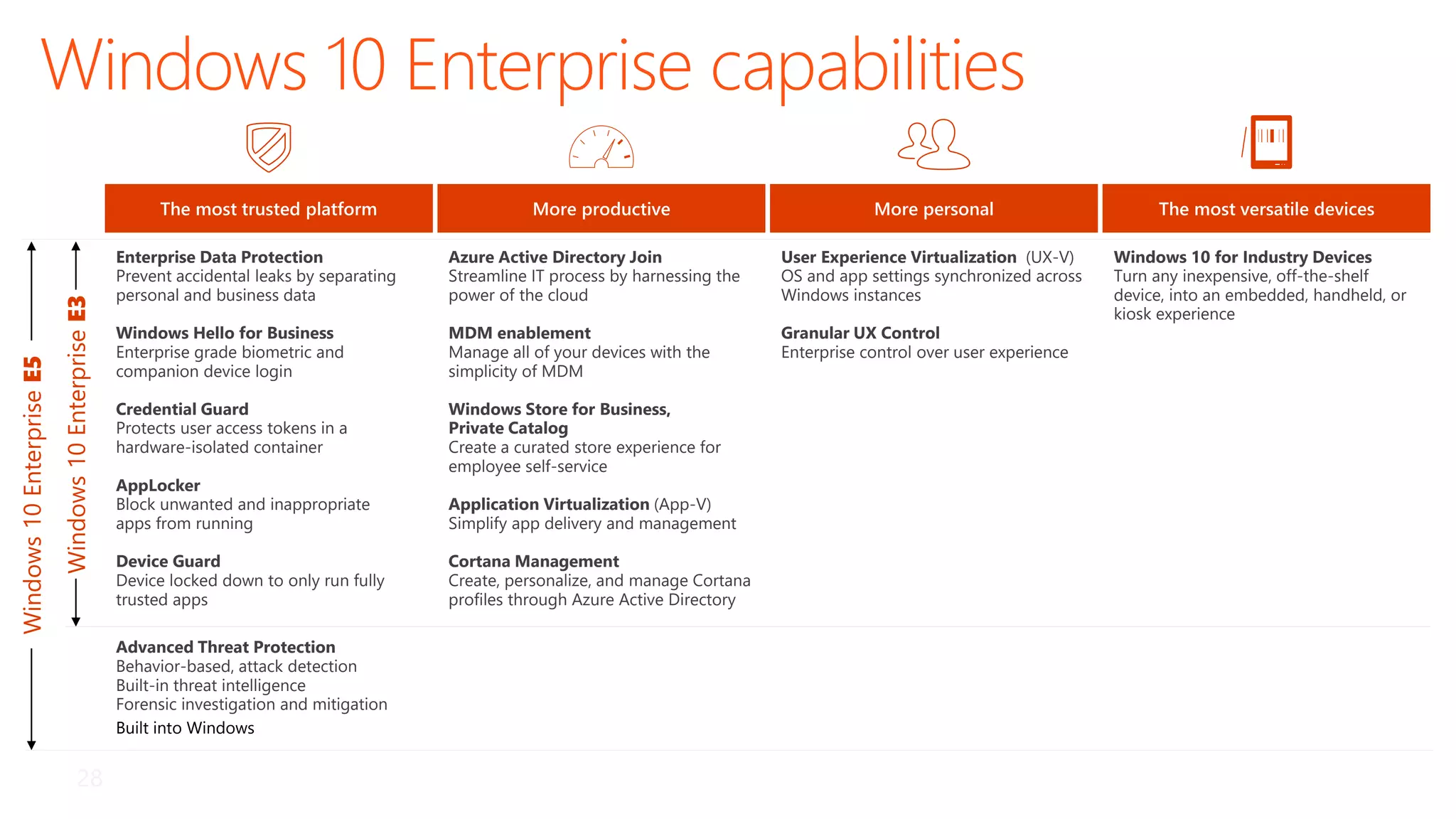
Windows 10 Enterprise capabilities
Windows10EnterpriseE5
Windows10EnterpriseE3
The most trusted platform
Enterprise Data Protection
Prevent accidental leaks by separating
personal and business data
Windows Hello for Business
Enterprise grade biometric and
companion device login
Credential Guard
Protects user access tokens in a
hardware-isolated container
AppLocker
Block unwanted and inappropriate
apps from running
Device Guard
Device locked down to only run fully
trusted apps
Advanced Threat Protection
Behavior-based, attack detection
Built-in threat intelligence
Forensic investigation and mitigation
Built into Windows
More personal
User Experience Virtualization (UX-V)
OS and app settings synchronized across
Windows instances
Granular UX Control
Enterprise control over user experience
More productive
Azure Active Directory Join
Streamline IT process by harnessing the
power of the cloud
MDM enablement
Manage all of your devices with the
simplicity of MDM
Windows Store for Business,
Private Catalog
Create a curated store experience for
employee self-service
Application Virtualization (App-V)
Simplify app delivery and management
Cortana Management
Create, personalize, and manage Cortana
profiles through Azure Active Directory
Windows 10 for Industry Devices
Turn any inexpensive, off-the-shelf
device, into an embedded, handheld, or
kiosk experience
The most versatile devices
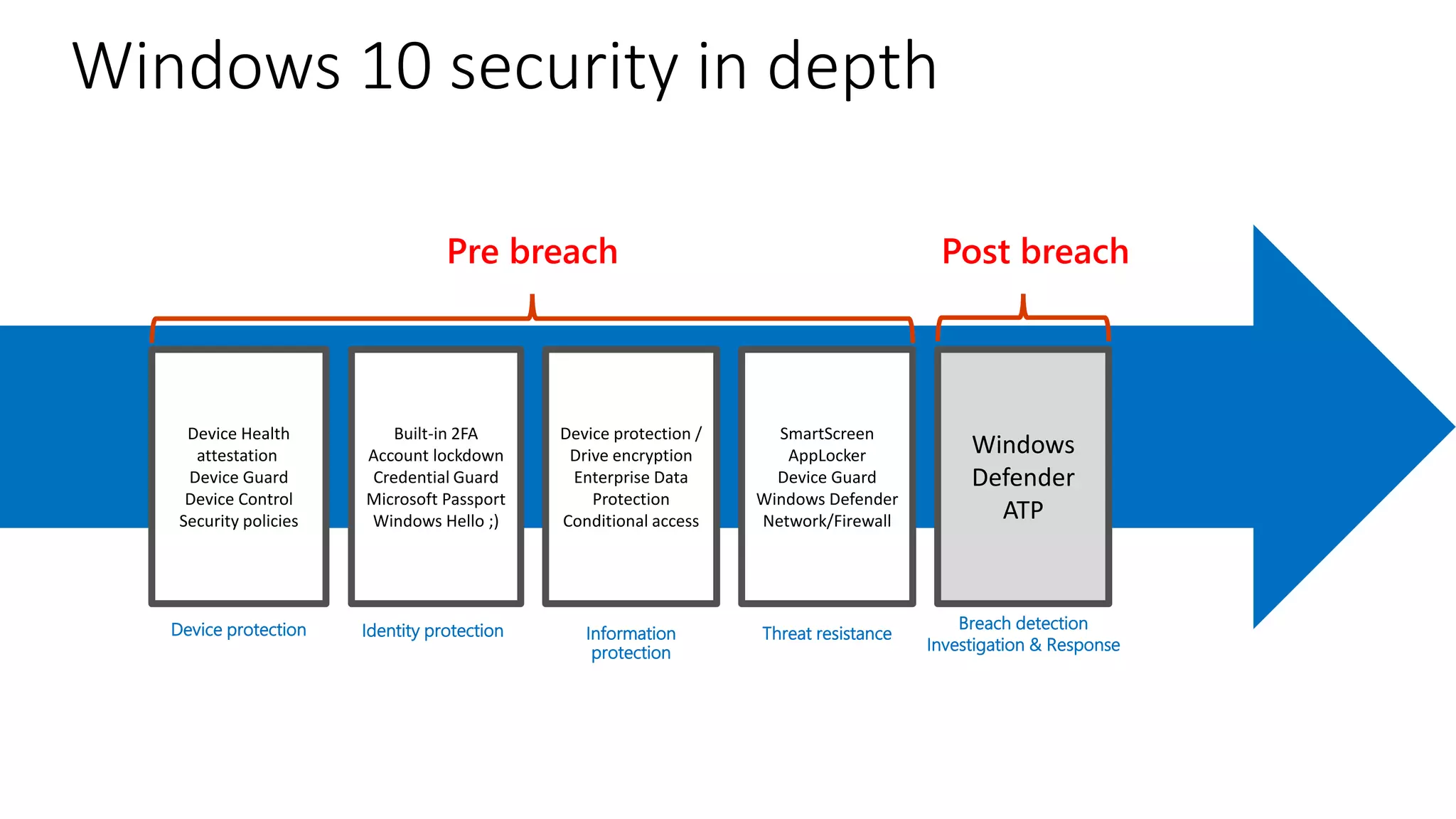
The Windows 10 Defense Stack
Device Health
attestation
Device Guard
Device Control
Security policies
Built-in 2FA
Account lockdown
Credential Guard
Microsoft Passport
Windows Hello ;)
Device protection /
Drive encryption
Enterprise Data
Protection
Conditional access
SmartScreen
AppLocker
Device Guard
Windows Defender
Network/Firewall
Windows
Defender
ATP
Device protection Information
protection
Threat resistance
Breach detection
Investigation & Response
Pre breach Post breach
Identity protection
Windows 10 security in depth
Management models
▪ ActiveSync
▪ Exchange only
▪ Only few security related settings (PIN, encryption)
▪ Full wipe
▪ O365 MDM
▪ All Office 365 services
▪ Security policy only
▪ Selective wipe, full wipe
▪ iOS, Android, Windows Phone
▪ Intune
▪ All applications
▪ Compliance and Configuration policies, WiFi, VPN and Email profiles
▪ Application deployment and management
▪ Various different management tasks, including selective/full wipe
▪ iOS, Android, MacOSX, Windows PC, Windows Phone
▪ Intune + SCCM
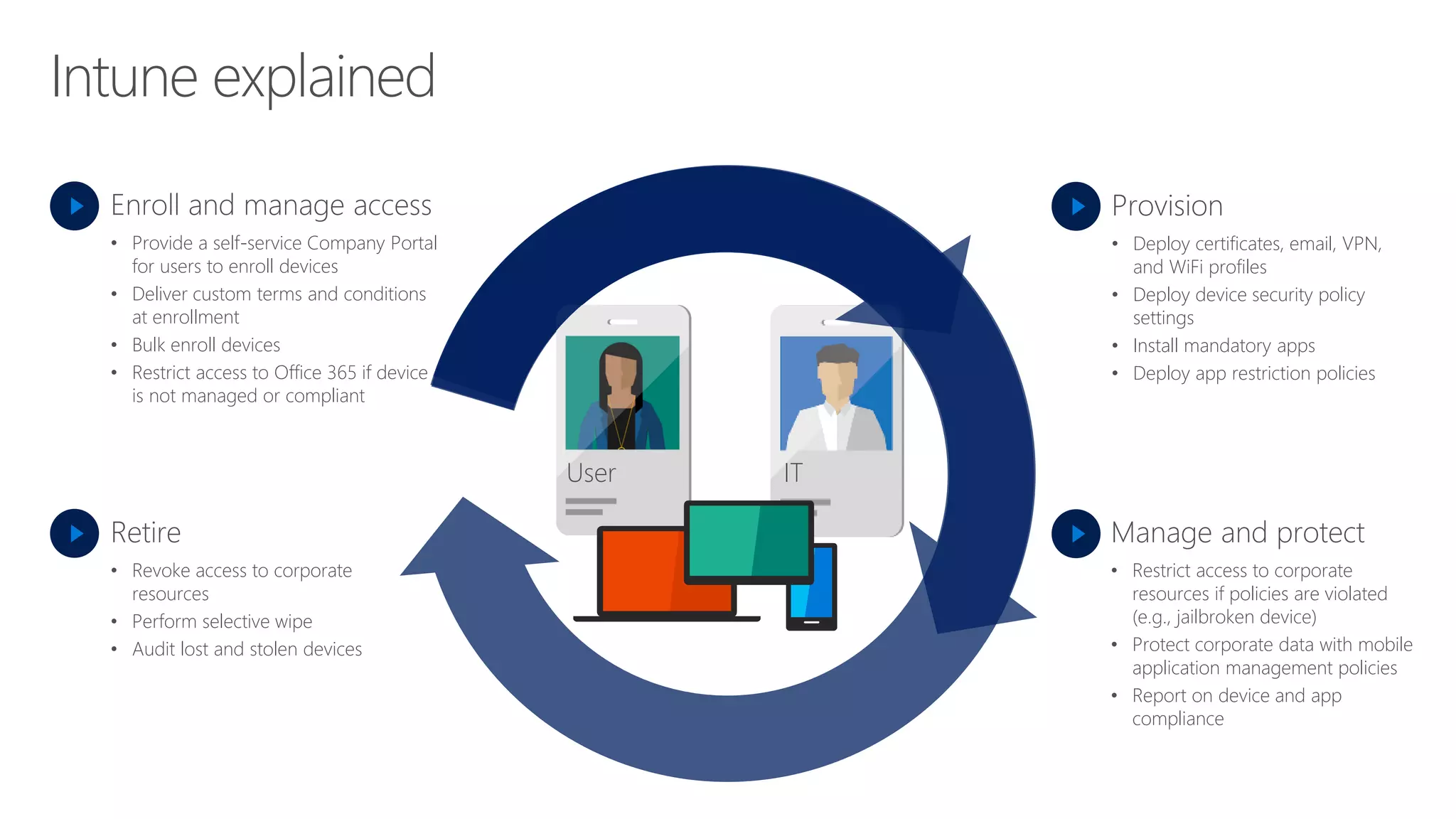
Intune explained
Enroll and manage access
• Provide a self-service Company Portal
for users to enroll devices
• Deliver custom terms and conditions
at enrollment
• Bulk enroll devices
• Restrict access to Office 365 if device
is not managed or compliant
Retire
• Revoke access to corporate
resources
• Perform selective wipe
• Audit lost and stolen devices
Provision
• Deploy certificates, email, VPN,
and WiFi profiles
• Deploy device security policy
settings
• Install mandatory apps
• Deploy app restriction policies
Manage and protect
• Restrict access to corporate
resources if policies are violated
(e.g., jailbroken device)
• Protect corporate data with mobile
application management policies
• Report on device and app
compliance
User IT
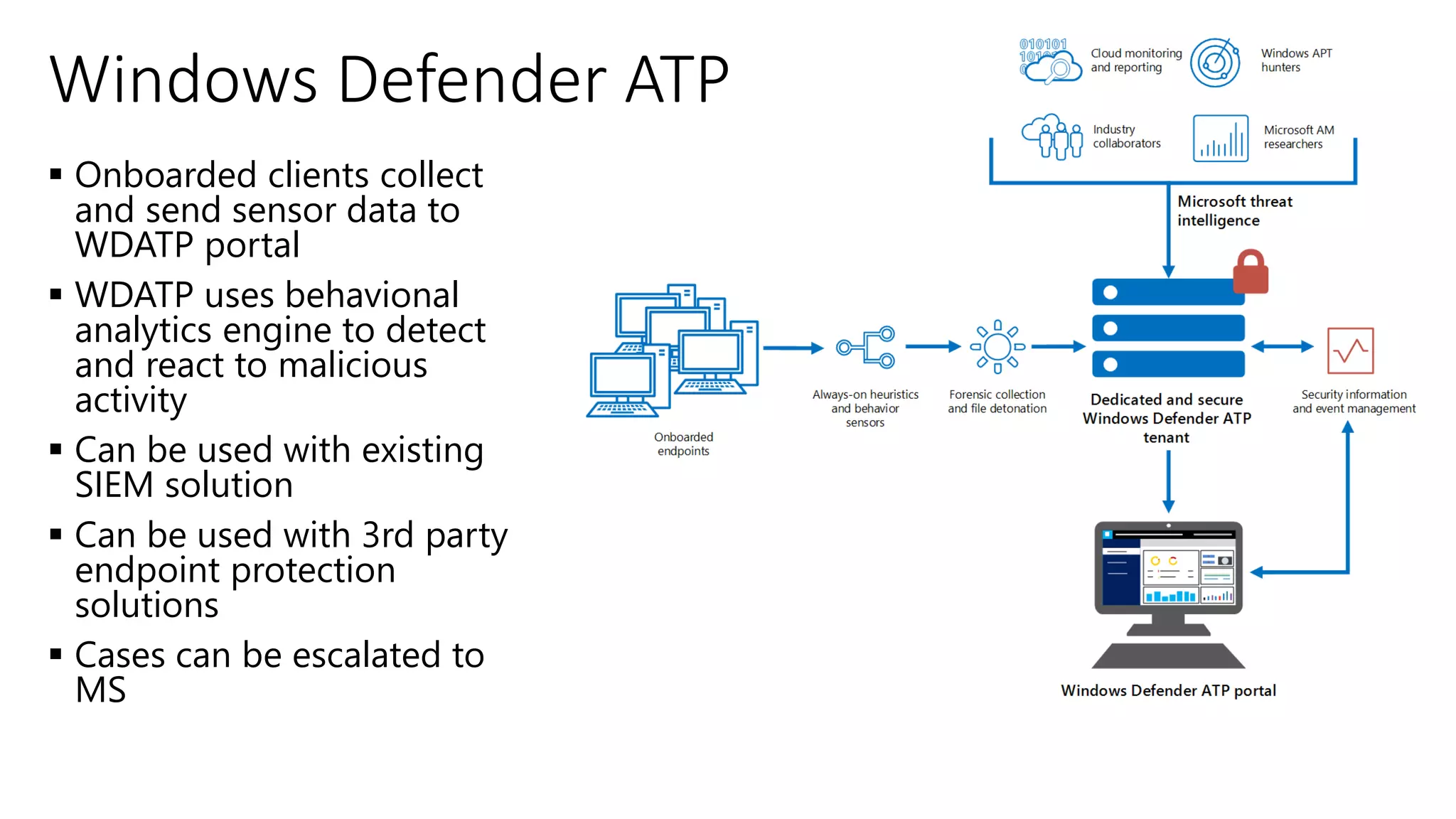
▪ Onboarded clients collect
and send sensor data to
WDATP portal
▪ WDATP uses behavional
analytics engine to detect
and react to malicious
activity
▪ Can be used with existing
SIEM solution
▪ Can be used with 3rd party
endpoint protection
solutions
▪ Cases can be escalated to
MS
Windows Defender ATP
Demo
Windows Defender ATP
Cloud App Security
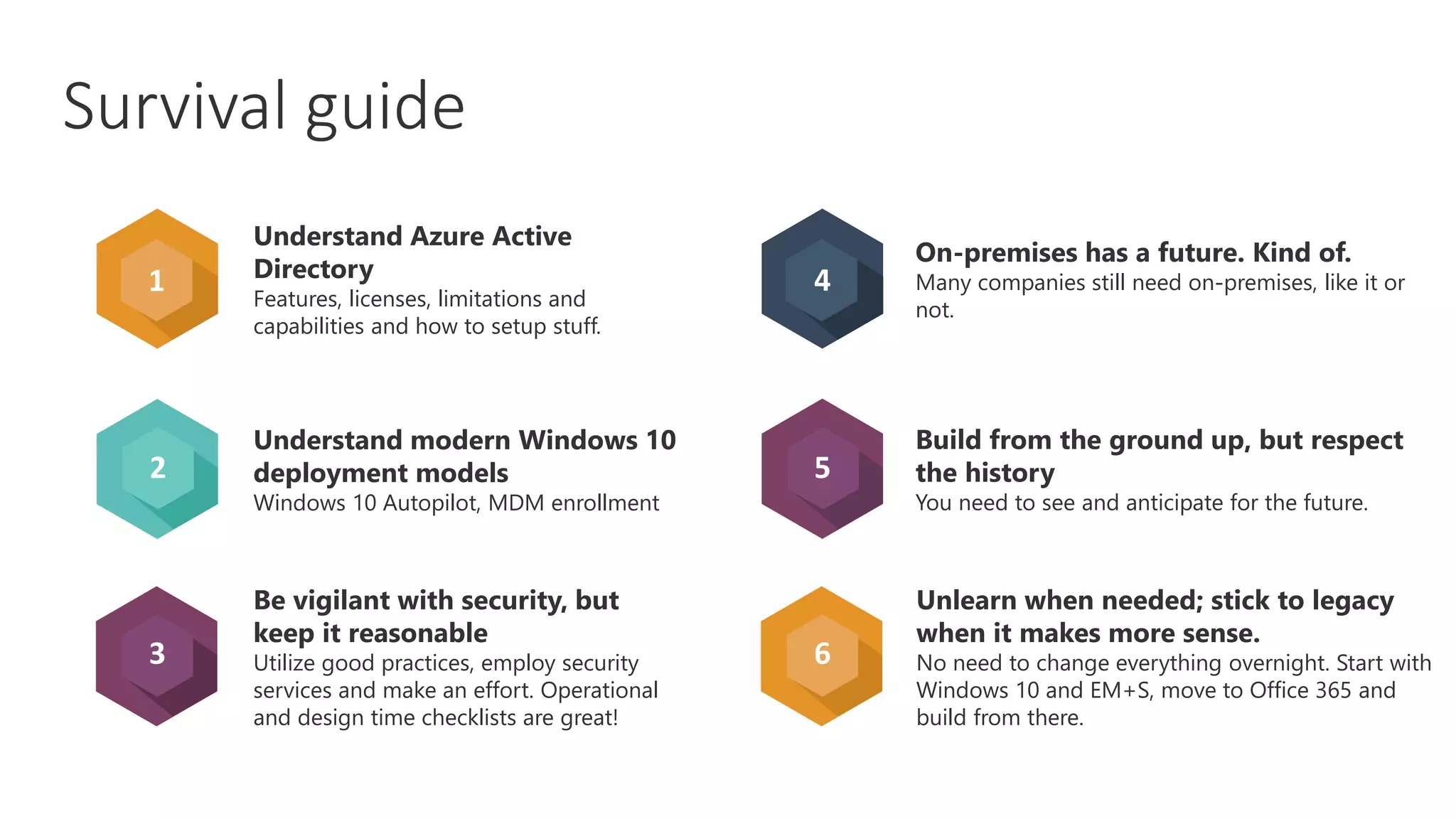
Where to go from here
2
3
4
5
6
Understand Azure Active
Directory
Features, licenses, limitations and
capabilities and how to setup stuff.
Understand modern Windows 10
deployment models
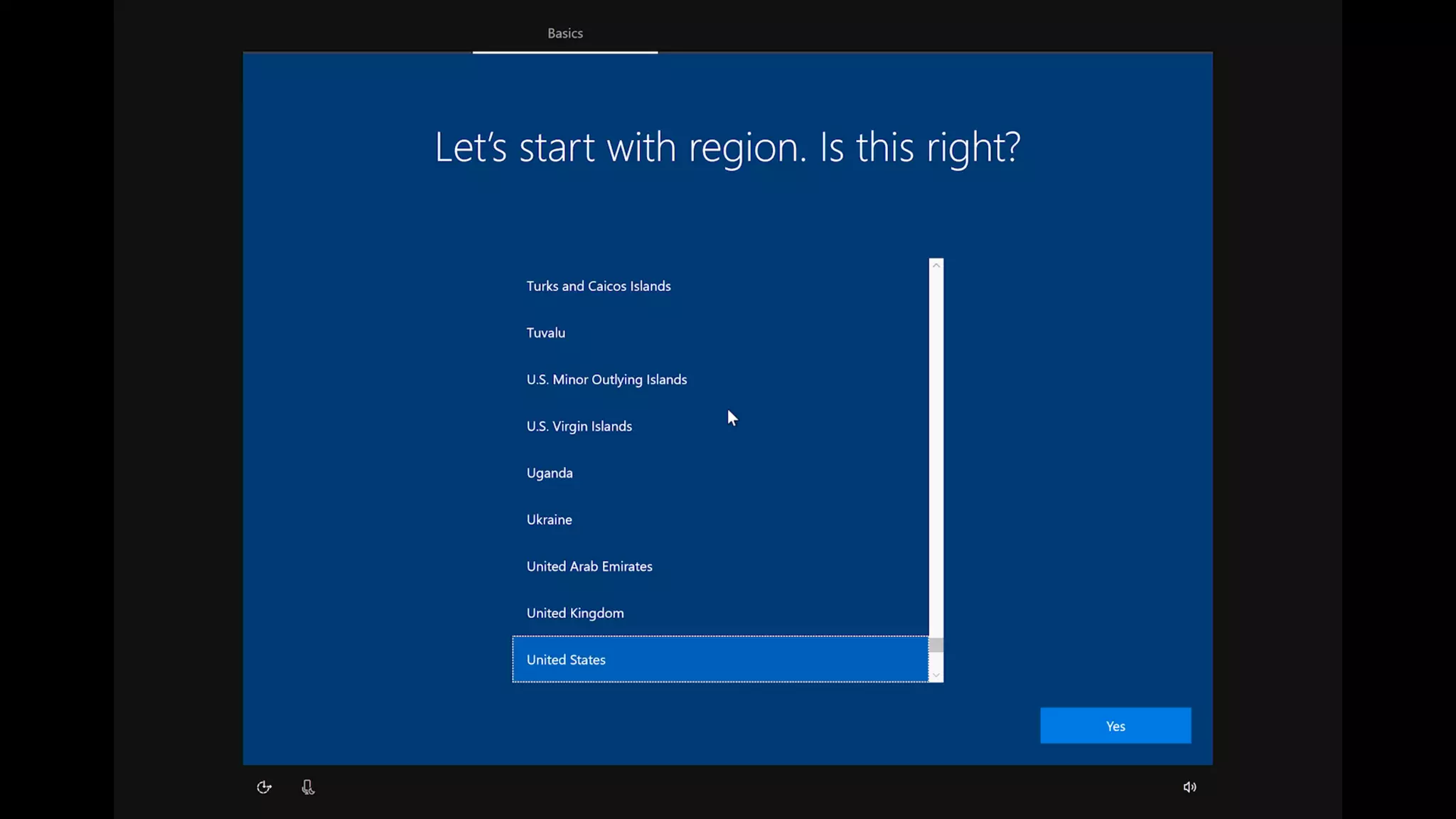
Windows 10 Autopilot, MDM enrollment
Be vigilant with security, but
keep it reasonable
Utilize good practices, employ security
services and make an effort. Operational
and design time checklists are great!
On-premises has a future. Kind of.
Many companies still need on-premises, like it or
not.
Build from the ground up, but respect
the history
You need to see and anticipate for the future.
Unlearn when needed; stick to legacy
when it makes more sense.
No need to change everything overnight. Start with
Windows 10 and EM+S, move to Office 365 and
build from there.
1
Survival guide
Deploy Microsoft 365 Enterprise
aka.ms/m365edeploy
Microsoft 365 architectures
aka.ms/m365eposter
Contoso reference implementation
aka.ms/m365econtoso
Test lab guides
aka.ms/m365etlgs
O365Con18 - Deep Dive into Microsoft 365 - Jussi Roine

O365Con18 - Deep Dive into Microsoft 365 - Jussi Roine

  • 1.
    Deep dive into Microsoft 365
  • 3.
    I help companiesmove securely to the cloud. Hey there, I’m Jussi! @JussiRoine
  • 4.
    So it’s Windows10, right? Security Where to go from here? Encrypt everything Survival guide Deployment In practice Understanding Microsoft 365
  • 5.
  • 6.
    We're focused ontwo massive platform opportunities, one, Microsoft Azure, the other Microsoft 365.
  • 7.
    Windows 10 Office365 EM+S Microsoft 365 Enterprise + +
  • 8.
    Enterprise Mobility +Security (EMS)E3E5
  • 9.
    Microsoft 365 Enterprise Microsoft365 Business Office 365 Enterprise Windows 10 Enterprise Enterprise Mobility + Security Intune Office 365 for Business Windows10Pro 3001 E5 E3 Licensing
  • 10.
    Microsoft 365 Enterprise Chat-centric workspace Teams Email & Calendar Outlook Voice, Video & Meetings Skype for Business Co-creating content Office ProPlus Sites & Content management SharePoint and OneDrive Analytics Delve Security & Compliance Data Loss Prevention M I C R O S O F T 3 6 5 E 3 Office 365 Enterprise E3 Enterprise Mobility + Security E3 Windows 10 Enterprise E3 Identity & Access Management Azure Active Directory Premium P1 Managed Mobile Productivity Microsoft Intune Information Protection Azure Information Protection Premium P1 Identity Driven Security Microsoft Advanced Threat Analytics Advanced Endpoint Security Credential Guard, Device Guard Designed For Modern IT Azure AD Join, Dynamic Management More Productive Windows Ink, Cortana at Work Powerful, Modern devices Innovative designs, new in class devices
  • 11.
    Microsoft 365 Enterprise MI C R O S O F T 3 6 5 E 3 Office 365 Enterprise E3 Enterprise Mobility + Security Suite E3 Windows 10 Enterprise E3 Voice PSTN Conferencing, Cloud PBX Analytics Power BI Pro, MyAnalytics Security & Compliance ATP, TI, ASM, Advanced eDiscovery & more M I C R O S O F T 3 6 5 E 5 Office 365 Enterprise E5 Enterprise Mobility + Security E5 Windows 10 Enterprise E5 Identity & Access Management Azure Active Directory Premium P2 Information Protection Azure Information Protection Premium P2 Identity Driven Security Microsoft Cloud App Security Advanced Endpoint Security Windows Defender Advanced Threat Protection
  • 12.
    TeamworkCollaborationCommunicationsIntranets & ExtranetsEmail& calendaring TeamsOffice AppsYammerSharePointOutlook Office 365 Groups Microsoft Graph Security and Compliance Modern productivity with Microsoft 365
  • 13.
    Customers expect alot “We’ve been putting this off for 10 years but have to do it over the weekend now” “The cloud? No, it doesn’t work for us as we have SPECIAL needs” “Everything has to remain the same” “There was a new service released in Azure last night..”
  • 14.
  • 16.
    Identities, security, GPOs, groups,office objects Active Directory Centralized patching Windows Server Update Services Centralized deployment, reporting SCCM Business Intelligence, company wisdom File Servers Extension to file servers, and also platform for business apps Intranet Typically third-party business apps Line of Business apps Traditional workplace model
  • 17.
    Classic Hybrid ModernFuture Applications Storage Settings Security Access Printing Network Access LAN, VPN Client/Server, Win32 Local (fileshare, homedrive) Kerberos | NAP | Direct Access/VPN Roaming Profiles Perimeter, GPO Print Server Workplace LAN, VPN Client/Server, Win32, Web, SaaS Local+Online (fileshare, OneDrive) Kerberos | NAP | Direct Access/VPN Roaming Profiles, UE-V Perimeter, GPO Print Server + Follow-me printing WAN, VPN (Virtual) Win32, SaaS, Web Online (OneDrive, SharePoint) Conditional Access | Triggered VPN Local Profiles, Enterprise State Roaming Identity, MDM Follow-me + Internet Printing WAN Universal/Store, SaaS, Web Conditional Access Local Profiles, Enterprise State Roaming Identity, MDM Enterprise Cloud Printing Online (OneDrive, SharePoint) Authentication Active Directory (AD) AD first, AAD Azure AD first, AD Azure AD only
  • 18.
    Everything else Additional services,add- ons, licenses, restrictions Windows 10 rollout Automated approach, that follows Microsoft update cycles (n-1) Modern teamwork Office 365, with its numerous services Heart of security and management Identities, security, reporting, licenses. Deployment approach Add-ons & services Office 365Windows 10Azure AD
  • 19.
    Windows Autopilot Configure Windows Autopilot profile Self-servicedeploy DeviceIDs Hardware Vendor IT Admin Ship Deliver direct to Employee Employee unboxes device, self-deploys IntuneWindows Autopilot Device sync Autopilot profile sync
  • 21.
    Building the foundationalinfrastructure Foundation infrastructure: Phases, steps, exit criteria aka.ms/m365edeployfoundation
  • 22.
    Driving adoption foruser workloads Workloads and scenarios: Phases, steps, results aka.ms/m365edeployworkloads
  • 23.
    Dynamic groups, dynamic licensing Addedvalue services: Flow, PowerApps, Forms, Stream, Kaizala etc. Advanced security capabilities Practical tips
  • 24.
  • 25.
  • 26.
    Securing Privileged Access Office365 Security Rapid Cyberattacks (Wannacrypt/Petya) https://aka.ms/MCRA Video Recording Strategies SQL Encryption & Data Masking Office 365 Dynamics 365 +Monitor Data Loss Protection Data Governance eDiscovery
  • 27.
    Microsoft Enterprise Mobility+ Security Apps Risk MICROSOFT INTUNE Make sure your devices are compliant and secure, while protecting data at the application level AZURE ACTIVE DIRECTORY Ensure only authorized users are granted access to personal data using risk-based conditional access MICROSOFT CLOUD APP SECURITY Gain deep visibility, strong controls and enhanced threat protection for data stored in cloud apps AZURE INFORMATION PROTECTION Classify, label, protect and audit data for persistent security throughout the complete data lifecycle MICROSOFT ADVANCED THREAT ANALYTICS Detect breaches before they cause damage by identifying abnormal behavior, known malicious attacks and security issues ! Device ! Access granted to data CONDITIONAL ACCESS Classify LabelAudit Protect ! ! Location
  • 28.
    Windows 10 Enterprisecapabilities Windows10EnterpriseE5 Windows10EnterpriseE3 The most trusted platform Enterprise Data Protection Prevent accidental leaks by separating personal and business data Windows Hello for Business Enterprise grade biometric and companion device login Credential Guard Protects user access tokens in a hardware-isolated container AppLocker Block unwanted and inappropriate apps from running Device Guard Device locked down to only run fully trusted apps Advanced Threat Protection Behavior-based, attack detection Built-in threat intelligence Forensic investigation and mitigation Built into Windows More personal User Experience Virtualization (UX-V) OS and app settings synchronized across Windows instances Granular UX Control Enterprise control over user experience More productive Azure Active Directory Join Streamline IT process by harnessing the power of the cloud MDM enablement Manage all of your devices with the simplicity of MDM Windows Store for Business, Private Catalog Create a curated store experience for employee self-service Application Virtualization (App-V) Simplify app delivery and management Cortana Management Create, personalize, and manage Cortana profiles through Azure Active Directory Windows 10 for Industry Devices Turn any inexpensive, off-the-shelf device, into an embedded, handheld, or kiosk experience The most versatile devices
  • 29.
    The Windows 10Defense Stack Device Health attestation Device Guard Device Control Security policies Built-in 2FA Account lockdown Credential Guard Microsoft Passport Windows Hello ;) Device protection / Drive encryption Enterprise Data Protection Conditional access SmartScreen AppLocker Device Guard Windows Defender Network/Firewall Windows Defender ATP Device protection Information protection Threat resistance Breach detection Investigation & Response Pre breach Post breach Identity protection Windows 10 security in depth
  • 30.
    Management models ▪ ActiveSync ▪Exchange only ▪ Only few security related settings (PIN, encryption) ▪ Full wipe ▪ O365 MDM ▪ All Office 365 services ▪ Security policy only ▪ Selective wipe, full wipe ▪ iOS, Android, Windows Phone ▪ Intune ▪ All applications ▪ Compliance and Configuration policies, WiFi, VPN and Email profiles ▪ Application deployment and management ▪ Various different management tasks, including selective/full wipe ▪ iOS, Android, MacOSX, Windows PC, Windows Phone ▪ Intune + SCCM
  • 31.
    Intune explained Enroll andmanage access • Provide a self-service Company Portal for users to enroll devices • Deliver custom terms and conditions at enrollment • Bulk enroll devices • Restrict access to Office 365 if device is not managed or compliant Retire • Revoke access to corporate resources • Perform selective wipe • Audit lost and stolen devices Provision • Deploy certificates, email, VPN, and WiFi profiles • Deploy device security policy settings • Install mandatory apps • Deploy app restriction policies Manage and protect • Restrict access to corporate resources if policies are violated (e.g., jailbroken device) • Protect corporate data with mobile application management policies • Report on device and app compliance User IT
  • 32.
    ▪ Onboarded clientscollect and send sensor data to WDATP portal ▪ WDATP uses behavional analytics engine to detect and react to malicious activity ▪ Can be used with existing SIEM solution ▪ Can be used with 3rd party endpoint protection solutions ▪ Cases can be escalated to MS Windows Defender ATP
  • 33.
  • 34.
    Where to gofrom here
  • 35.
    2 3 4 5 6 Understand Azure Active Directory Features,licenses, limitations and capabilities and how to setup stuff. Understand modern Windows 10 deployment models Windows 10 Autopilot, MDM enrollment Be vigilant with security, but keep it reasonable Utilize good practices, employ security services and make an effort. Operational and design time checklists are great! On-premises has a future. Kind of. Many companies still need on-premises, like it or not. Build from the ground up, but respect the history You need to see and anticipate for the future. Unlearn when needed; stick to legacy when it makes more sense. No need to change everything overnight. Start with Windows 10 and EM+S, move to Office 365 and build from there. 1 Survival guide
  • 36.
    Deploy Microsoft 365Enterprise aka.ms/m365edeploy Microsoft 365 architectures aka.ms/m365eposter Contoso reference implementation aka.ms/m365econtoso Test lab guides aka.ms/m365etlgs