Agenda
• What is:
• “The Tenant”
• Cloud Strategy. M365, Dynamics 365,
Azure, 3rd Party
• High Level - What is Microsoft 365
• Why:
• Business alignment/Priority
• Budget – Licensing and redundant spend
• How:
• Partner Ecosystem
• Fast Track
• Premier
• Not on the agenda:
• Technical Architecture
What is the tenant, really?
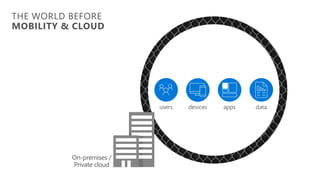
On-premises /
Private cloud
devices data
users apps
THE WORLD BEFORE
MOBILITY & CLOUD
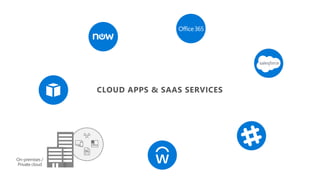
On-premises /
Private cloud
CLOUD APPS & SAAS SERVICES
On-premises /
Private cloud
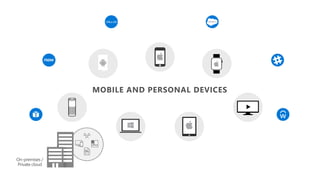
MOBILE AND PERSONAL DEVICES
On-premises /
Private cloud
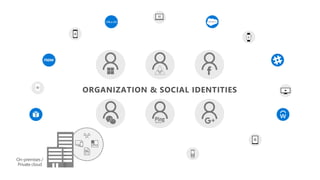
ORGANIZATION & SOCIAL IDENTITIES
On-premises /
Private cloud
On-premises /
Private cloud
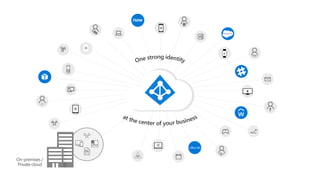
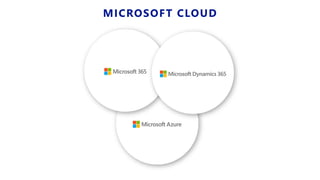
MICROSOFT CLOUD
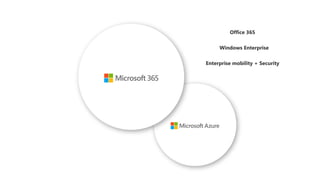
Microsoft 365 Licensing and Roadmap
Enterprise Mobility & Security
Windows 10 Enterprise
Microsoft Internal & Partner Use Only
14
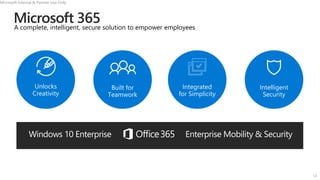
Integrated
for Simplicity
Unlocks
Creativity
Built for
Teamwork
Intelligent
Security
A complete, intelligent, secure solution to empower employees
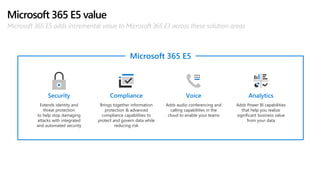
Microsoft 365 E5 value
Microsoft 365 E5 adds incremental value to Microsoft 365 E3 across these solution areas
Brings together information
protection & advanced
compliance capabilities to
protect and govern data while
reducing risk
Compliance
Adds audio conferencing and
calling capabilities in the
cloud to enable your teams
Voice
Adds Power BI capabilities
that help you realize
significant business value
from your data
Analytics
Extends identity and
threat protection
to help stop damaging
attacks with integrated
and automated security
Security
Microsoft 365 E5
16
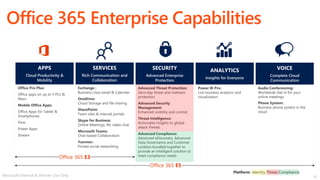
Office 365 Enterprise Capabilities
Audio Conferencing:
Worldwide dial-in for your
online meetings
Phone System:
Business phone system in the
cloud
Power BI Pro:
Live business analytics and
visualization
Advanced Threat Protection:
Zero-day threat and malware
protection
Advanced Security
Management:
Enhanced visibility and control
Threat Intelligence:
Actionable insights to global
attack threats
Advanced Compliance:
Advanced eDiscovery, Advanced
Data Governance and Customer
Lockbox bundled together to
provide an intelligent solution to
meet compliance needs
SECURITY
Advanced Enterprise
Protection
VOICE
Complete Cloud
Communication
ANALYTICS
Insights for Everyone
Exchange :
Business-class email & Calendar
OneDrive:
Cloud Storage and file sharing
SharePoint:
Team sites & internal portals
Skype for Business:
Online Meetings, IM, video chat
Microsoft Teams:
Chat-based Collaboration
Yammer:
Private social networking
Office Pro Plus:
Office apps on up to 5 PCs &
Macs
Mobile Office Apps:
Office Apps for Tablet &
Smartphones
Flow
Power Apps
Stream
APPS
Cloud Productivity &
Mobility
SERVICES
Rich Communication and
Collaboration
Office 365 E3
Office 365 E5
Microsoft Internal & Partner Use Only
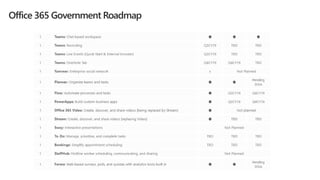
Office 365 Government Roadmap
18
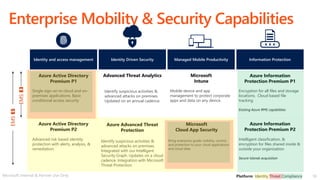
Enterprise Mobility & Security Capabilities
Microsoft
Intune
Mobile device and app
management to protect corporate
apps and data on any device.
Managed Mobile Productivity
Advanced Threat Analytics
Identify suspicious activities &
advanced attacks on premises.
Integrated with our Intelligent
Security Graph. Updates on a cloud
cadence. Integration with Microsoft
Threat Protection.
Microsoft
Cloud App Security
Bring enterprise-grade visibility, control,
and protection to your cloud applications
and cloud data.
Identity Driven Security
Identity and access management
Azure Active Directory
Premium P1
Single sign-on to cloud and on-
premises applications. Basic
conditional access security
Azure Active Directory
Premium P2
Advanced risk based identity
protection with alerts, analysis, &
remediation.
Azure Information
Protection Premium P1
Encryption for all files and storage
locations. Cloud based file
tracking
Existing Azure RMS capabilities
Information Protection
Azure Information
Protection Premium P2
Intelligent classification, &
encryption for files shared inside &
outside your organization
Secure Islands acquisition
EMS
E3
EMS
E5
Microsoft Internal & Partner Use Only
Azure Advanced Threat
Protection
Identify suspicious activities &
advanced attacks on premises.
Updated on an annual cadence.
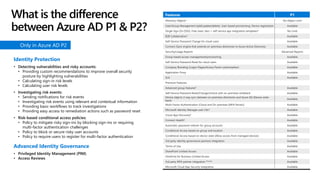
Features P1
Directory Objects1 No Object Limit
User/Group Management (add/update/delete). User-based provisioning, Device registration Available
Single Sign-On (SSO). Free, basic tiers + self-service app integration templates5 No Limit
B2B Collaboration7 Available
Self-Service Password Change for cloud users Available
Connect (Sync engine that extends on-premises directories to Azure Active Directory) Available
Security/Usage Reports Advanced Reports
Group-based access management/provisioning Available
Self-Service Password Reset for cloud users Available
Company Branding (Logon Pages/Access Panel customization) Available
Application Proxy Available
SLA Available
Premium Features
Advanced group features8 Available
Self-Service Password Reset/Change/Unlock with on-premises writeback Available
Device objects 2-way sync between on-premises directories and Azure AD (Device write-
back)
Available
Multi-Factor Authentication (Cloud and On-premises (MFA Server)) Available
Microsoft Identity Manager user CAL4 Available
Cloud App Discovery9 Available
Connect Health6 Available
Automatic password rollover for group accounts Available
Conditional Access based on group and location Available
Conditional Access based on device state (Allow access from managed devices) Available
3rd party identity governance partners integration Available
Terms of Use Available
SharePoint Limited Access Available
OneDrive for Business Limited Access Available
3rd party MFA partner integration Preview Available
Microsoft Cloud App Security integration Available
Identity Protection
• Detecting vulnerabilities and risky accounts:
• Providing custom recommendations to improve overall security
posture by highlighting vulnerabilities
• Calculating sign-in risk levels
• Calculating user risk levels
• Investigating risk events:
• Sending notifications for risk events
• Investigating risk events using relevant and contextual information
• Providing basic workflows to track investigations
• Providing easy access to remediation actions such as password reset
• Risk-based conditional access policies:
• Policy to mitigate risky sign-ins by blocking sign-ins or requiring
multi-factor authentication challenges
• Policy to block or secure risky user accounts
• Policy to require users to register for multi-factor authentication
Advanced Identity Governance
• Privileged Identity Management (PIM)
• Access Reviews
Only in Azure AD P2
What is the difference
between Azure AD P1 & P2?
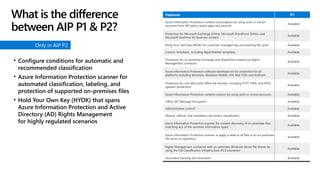
Features P1
Azure Information Protection content consumption by using work or school
accounts from AIP policy-aware apps and services
Available
Protection for Microsoft Exchange Online, Microsoft SharePoint Online, and
Microsoft OneDrive for Business content
Available
Bring Your Own Key (BYOK) for customer-managed key provisioning life cycle2 Available
Custom templates, including departmental templates Available
Protection for on-premises Exchange and SharePoint content via Rights
Management connector
Available
Azure Information Protection software developer kit for protection for all
platforms including Windows, Windows Mobile, iOS, Mac OSX, and Android
Available
Protection for non-Microsoft Office file formats, including PTXT, PJPG, and PFILE
(generic protection)
Available
Azure Information Protection content creation by using work or school accounts Available
Office 365 Message Encryption Available
Administrative control3 Available
Manual, default, and mandatory document classification Available
Azure Information Protection scanner for content discovery of on-premises files
matching any of the sensitive information types
Available
Azure Information Protection scanner to apply a label to all files in an on-premises
file server or repository
Available
Rights Management connector with on-premises Windows Server file shares by
using the File Classification Infrastructure (FCI) connector
Available
Document tracking and revocation Available
• Configure conditions for automatic and
recommended classification
• Azure Information Protection scanner for
automated classification, labeling, and
protection of supported on-premises files
• Hold Your Own Key (HYOK) that spans
Azure Information Protection and Active
Directory (AD) Rights Management
for highly regulated scenarios
Only in AIP P2
What is the difference
between AIP P1 & P2?
21
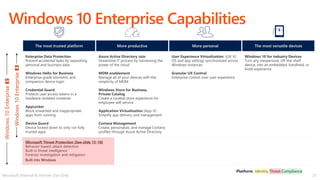
Windows 10 Enterprise Capabilities
Windows
10
Enterprise
E5
Windows
10
Enterprise
E3
The most trusted platform
Enterprise Data Protection
Prevent accidental leaks by separating
personal and business data
Windows Hello for Business
Enterprise grade biometric and
companion device login
Credential Guard
Protects user access tokens in a
hardware-isolated container
AppLocker
Block unwanted and inappropriate
apps from running
Device Guard
Device locked down to only run fully
trusted apps
Microsoft Threat Protection (See slide 15-18)
Behavior-based, attack detection
Built-in threat intelligence
Forensic investigation and mitigation
Built into Windows
More personal
User Experience Virtualization (UX-V)
OS and app settings synchronized across
Windows instances
Granular UX Control
Enterprise control over user experience
More productive
Azure Active Directory Join
Streamline IT process by harnessing the
power of the cloud
MDM enablement
Manage all of your devices with the
simplicity of MDM
Windows Store for Business,
Private Catalog
Create a curated store experience for
employee self-service
Application Virtualization (App-V)
Simplify app delivery and management
Cortana Management
Create, personalize, and manage Cortana
profiles through Azure Active Directory
Windows 10 for Industry Devices
Turn any inexpensive, off-the-shelf
device, into an embedded, handheld, or
kiosk experience
The most versatile devices
Microsoft Internal & Partner Use Only
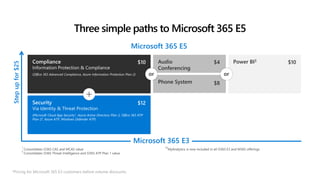
Three simple paths to Microsoft 365 E5
Microsoft 365 E3
Security
Via Identity & Threat Protection
(Microsoft Cloud App Security1, Azure Active Directory Plan 2, Office 365 ATP
Plan 22, Azure ATP, Windows Defender ATP)
Compliance
Information Protection & Compliance
(Office 365 Advanced Compliance, Azure Information Protection Plan 2)
Power BI3
Audio
Conferencing
Phone System
$10
$12
$4 $10
$8
or or
1
Consolidates O365 CAS and MCAS value
2
Consolidates O365 Threat Intelligence and O365 ATP Plan 1 value
43
MyAnalytics is now included in all O365 E3 and M365 offerings
Step
up
for
$25
Microsoft 365 E5
*Pricing for Microsoft 365 E3 customers before volume discounts.
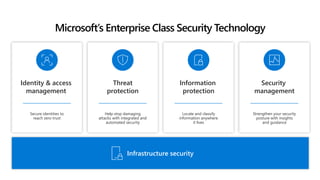
Secure identities to
reach zero trust
Identity & access
management
Security
management
Strengthen your security
posture with insights
and guidance
Threat
protection
Help stop damaging
attacks with integrated and
automated security
Locate and classify
information anywhere
it lives
Information
protection
Infrastructure security
Microsoft’s Enterprise Class Security Technology
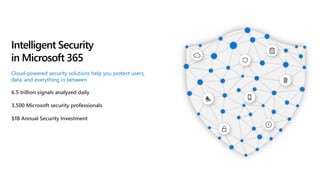
6.5 trillion signals analyzed daily
3,500 Microsoft security professionals
$1B Annual Security Investment
Intelligent Security
in Microsoft 365
Cloud-powered security solutions help you protect users,
data, and everything in between
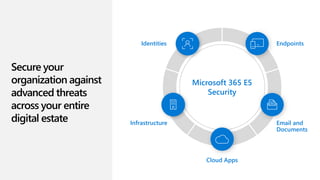
Secure your
organization against
advanced threats
across your entire
digital estate
Microsoft 365 E5
Security
Identities Endpoints
Email and
Documents
Cloud Apps
Infrastructure
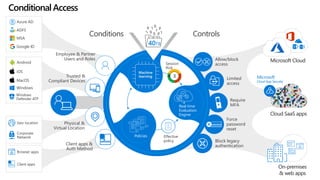
Corporate
Network
Geo-location
Microsoft
Cloud App Security
MacOS
Android
iOS
Windows
Windows
Defender ATP
Client apps
Browser apps
Google ID
MSA
Azure AD
ADFS
Require
MFA
Allow/block
access
Block legacy
authentication
Force
password
reset
******
Limited
access
Controls
Employee & Partner
Users and Roles
Trusted &
Compliant Devices
Physical &
Virtual Location
Client apps &
Auth Method
Conditions
Machine
learning
Policies
Real time
Evaluation
Engine
Session
Risk
3
40TB
Effective
policy
ConditionalAccess
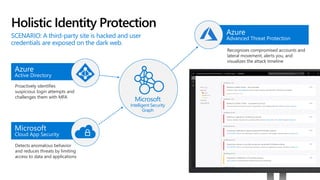
Holistic Identity Protection
Azure
Active Directory
Proactively identifies
suspicious login attempts and
challenges them with MFA
Microsoft
Cloud App Security
Detects anomalous behavior
and reduces threats by limiting
access to data and applications
Microsoft
Intelligent Security
Graph
Azure
Advanced Threat Protection
Recognizes compromised accounts and
lateral movement, alerts you, and
visualizes the attack timeline
SCENARIO: A third-party site is hacked and user
credentials are exposed on the dark web.
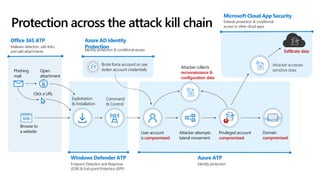
Browse to
a website
Phishing
mail
Open
attachment
Click a URL
Exploitation
& Installation
Command
& Control
User account
is compromised
Brute force account or use
stolen account credentials
Attacker attempts
lateral movement
Privileged account
compromised
Domain
compromised
Attacker accesses
sensitive data
Exfiltrate data
Azure AD Identity
Protection
Identity protection & conditional access
Microsoft Cloud App Security
Extends protection & conditional
access to other cloud apps
Protection across the attack kill chain
Office 365 ATP
Malware detection, safe links,
and safe attachments
Windows Defender ATP
Endpoint Detection and Response
(EDR) & End-point Protection (EPP)
Azure ATP
Identity protection
Attacker collects
reconnaissance &
configuration data
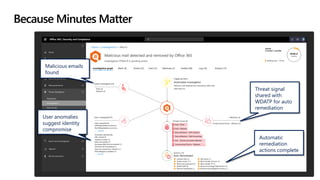
Malicious emails
found
User anomalies
suggest identity
compromise
Threat signal
shared with
WDATP for auto
remediation
Automatic
remediation
actions complete
Because Minutes Matter
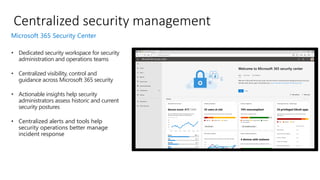
• Dedicated security workspace for security
administration and operations teams
• Centralized visibility, control and
guidance across Microsoft 365 security
• Actionable insights help security
administrators assess historic and current
security postures
• Centralized alerts and tools help
security operations better manage
incident response
Centralized security management
Microsoft 365 Security Center
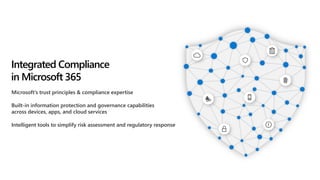
Microsoft’s trust principles & compliance expertise
Built-in information protection and governance capabilities
across devices, apps, and cloud services
Intelligent tools to simplify risk assessment and regulatory response
Integrated Compliance
in Microsoft 365
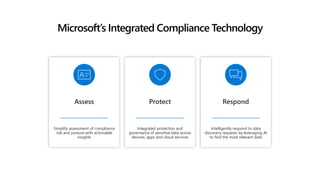
Simplify assessment of compliance
risk and posture with actionable
insights
Assess Protect
Integrated protection and
governance of sensitive data across
devices, apps and cloud services
Microsoft’s Integrated Compliance Technology
Intelligently respond to data
discovery requests by leveraging AI
to find the most relevant data
Respond
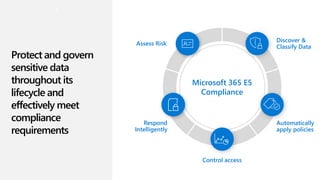
Protect and govern
sensitive data
throughout its
lifecycle and
effectively meet
compliance
requirements
Microsoft 365 E5
Compliance
Assess Risk
Discover &
Classify Data
Automatically
apply policies
Control access
Respond
Intelligently
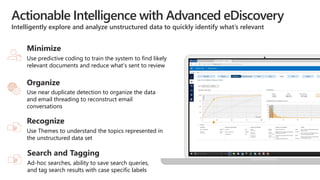
Actionable Intelligence with Advanced eDiscovery
Intelligently explore and analyze unstructured data to quickly identify what’s relevant
Use predictive coding to train the system to find likely
relevant documents and reduce what’s sent to review
Minimize
Use near duplicate detection to organize the data
and email threading to reconstruct email
conversations
Organize
Use Themes to understand the topics represented in
the unstructured data set
Recognize
Ad-hoc searches, ability to save search queries,
and tag search results with case specific labels
Search and Tagging
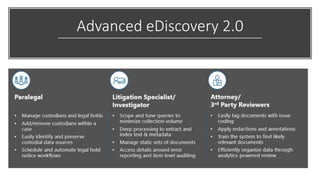
Advanced eDiscovery 2.0
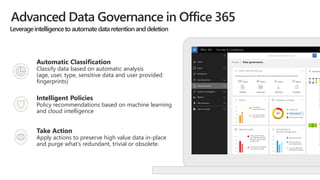
Advanced Data Governance in Office 365
Intelligent Policies
Policy recommendations based on machine learning
and cloud intelligence
Take Action
Apply actions to preserve high value data in-place
and purge what’s redundant, trivial or obsolete.
Automatic Classification
Classify data based on automatic analysis
(age, user, type, sensitive data and user provided
fingerprints)
Leverageintelligencetoautomatedataretentionanddeletion
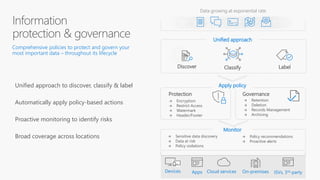
Label
Discover Classify
Protection Governance
Data growing at exponential rate
→ Encryption
→ Restrict Access
→ Watermark
→ Header/Footer
→ Retention
→ Deletion
→ Records Management
→ Archiving
→ Sensitive data discovery
→ Data at risk
→ Policy violations
→ Policy recommendations
→ Proactive alerts
Comprehensive policies to protect and govern your
most important data – throughout its lifecycle
Unified approach to discover, classify & label
Automatically apply policy-based actions
Proactive monitoring to identify risks
Broad coverage across locations
Apply policy
Unified approach
Monitor
Why move to Microsoft 365 now?
(Not later)
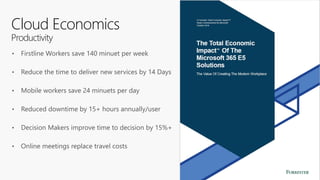
Cloud Economics
Productivity
• Firstline Workers save 140 minuet per week
• Reduce the time to deliver new services by 14 Days
• Mobile workers save 24 minuets per day
• Reduced downtime by 15+ hours annually/user
• Decision Makers improve time to decision by 15%+
• Online meetings replace travel costs
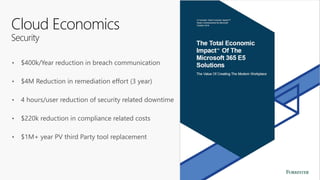
Cloud Economics
Security
• $400k/Year reduction in breach communication
• $4M Reduction in remediation effort (3 year)
• 4 hours/user reduction of security related downtime
• $220k reduction in compliance related costs
• $1M+ year PV third Party tool replacement
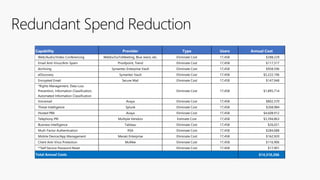
Redundant Spend Reduction
Capability Provider Type Users Annual Cost
Web/Audio/Video Conferencing WebEx/GoToMeeting, Blue Jeans, etc. Eliminate Cost 17,458 $288,229
Email Anti-Virus/Anti-Spam Proofpoint, Trend Eliminate Cost 17,458 $117,317
Archiving Symantec Enterprise Vault Eliminate Cost 17,458 $958,596
eDiscovery Symantec Vault Eliminate Cost 17,458 $5,222,196
Encrypted Email Secure Mail Eliminate Cost 17,458 $147,948
*Rights Management, Data Loss
Prevention, Information Classification,
Automated Information Classification
Eliminate Cost 17,458 $1,895,714
Voicemail Avaya Eliminate Cost 17,458 $802,370
Threat Intelligence Splunk Eliminate Cost 17,458 $268,984
Hosted PBX Avaya Eliminate Cost 17,458 $4,608,912
Telephony PRI Multiple Vendors Estimate Cost 17,458 $3,394,863
Business Intelligence Tableau Eliminate Cost 17,458 $26,021
Mutli-Factor Authentication RSA Eliminate Cost 17,458 $284,688
Mobile Device/App Management Meraki Enterprise Eliminate Cost 17,458 $162,920
Client Anti-Virus Protection McAfee Eliminate Cost 17,458 $116,906
**Self Service Password Reset Eliminate Cost 17,458 $17,901
$14,310,266
Total Annual Costs
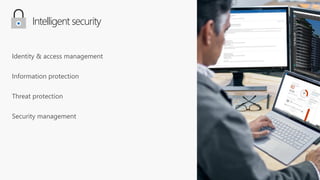
Intelligent security
Identity & access management
Information protection
Threat protection
Security management
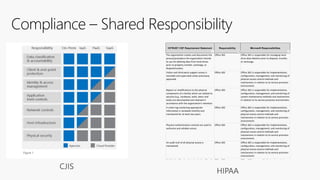
Compliance – Shared Responsibility
HITRUST CSF Requirement Statement Responsibility Microsoft Responsibilities
The organization creates and documents the
process/procedure the organization intends
to use for deleting data from hard-drives
prior to property transfer, exchange, or
disposal/surplus.
Office 365 Office 365 is responsible for managing hard-
drive data deletion prior to disposal, transfer,
or exchange.
Visitor and third-party support access is
recorded and supervised unless previously
approved.
Office 365 Office 365 is responsible for implementation,
configuration, management, and monitoring of
physical access control methods and
mechanisms in relation to its service provision
environment.
Repairs or modifications to the physical
components of a facility which are related to
security (e.g., hardware, walls, doors and
locks) are documented and retained in
accordance with the organization's retention
policy.
Office 365 Office 365 is responsible for implementation,
configuration, management, and monitoring of
system maintenance methods and mechanisms
in relation to its service provision environment.
A visitor log containing appropriate
information is reviewed monthly and
maintained for at least two years.
Office 365 Office 365 is responsible for implementation,
configuration, management, and monitoring of
physical access control methods and
mechanisms in relation to its service provision
environment.
Physical authentication controls are used to
authorize and validate access.
Office 365 Office 365 is responsible for implementation,
configuration, management, and monitoring of
physical access control methods and
mechanisms in relation to its service provision
environment.
An audit trail of all physical access is
maintained.
Office 365 Office 365 is responsible for implementation,
configuration, management, and monitoring of
physical access control methods and
mechanisms in relation to its service provision
environment.
Visible identification that clearly identifies the
individual is required to be worn by
employees, visitors, contractors and third
parties.
Office 365 Office 365 is responsible for implementation,
configuration, management, and monitoring of
physical access control methods and
mechanisms in relation to its service provision
environment.
Physical access rights are reviewed every Office 365 Office 365 is responsible for implementation,
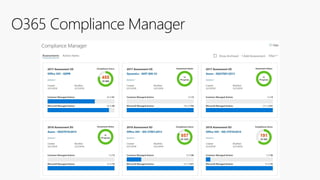
O365 Compliance Manager
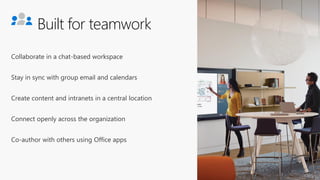
Built for teamwork
Collaborate in a chat-based workspace
Stay in sync with group email and calendars
Create content and intranets in a central location
Connect openly across the organization
Co-author with others using Office apps
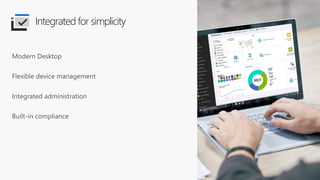
Modern Desktop
Flexible device management
Integrated administration
Built-in compliance
Integrated for simplicity
Unlocks creativity
Create compelling content with intelligent apps
Work naturally with ink, voice, and touch
Visualize insights from data sets
Find what you need with personalized search
Connected experiences across devices
“I think it is the golden age of being
able to build products for
everyone. And that's our mission.”
Satya Nadella
Microsoft Ability Summit
May 2018
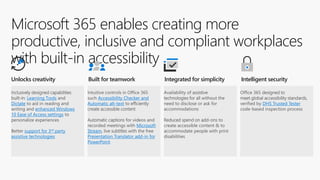
Microsoft 365 enables creating more
productive, inclusive and compliant workplaces
with built-in accessibility
Inclusively designed capabilities
built-in: Learning Tools and
Dictate to aid in reading and
writing and enhanced Windows
10 Ease of Access settings to
personalize experiences
Better support for 3rd party
assistive technologies
Intuitive controls in Office 365
such Accessibility Checker and
Automatic alt-text to efficiently
create accessible content
Automatic captions for videos and
recorded meetings with Microsoft
Stream, live subtitles with the free
Presentation Translator add-in for
PowerPoint
Availability of assistive
technologies for all without the
need to disclose or ask for
accommodations
Reduced spend on add-ons to
create accessible content & to
accommodate people with print
disabilities
Office 365 designed to
meet global accessibility standards,
verified by DHS Trusted Tester
code-based inspection process
Unlocks creativity Built for teamwork Integrated for simplicity Intelligent security
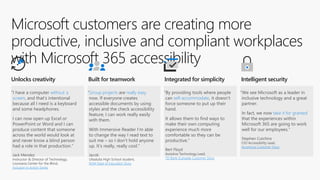
Microsoft customers are creating more
productive, inclusive and compliant workplaces
with Microsoft 365 accessibility
“I have a computer without a
screen, and that’s intentional
because all I need is a keyboard
and some headphones.
I can now open up Excel or
PowerPoint or Word and I can
produce content that someone
across the world would look at
and never know a blind person
had a role in that production.”
Jack Mendez
Instructor & Director of Technology,
Louisiana Center for the Blind,
Inclusion in Action Series
“Group projects are really easy
now. If everyone creates
accessible documents by using
styles and the check accessibility
feature, I can work really easily
with them.
With Immersive Reader I’m able
to change the way I read text to
suit me – so I don’t hold anyone
up. It’s really, really cool.”
Jacob
Ulladulla High School student,
NSW Dept of Education Story
“By providing tools where people
can self-accommodate, it doesn’t
force someone to put up their
hand.
It allows them to find ways to
make their own computing
experience much more
comfortable so they can be
productive.”
Bert Floyd
Assistive Technology Lead,
TD Bank (Canada) Customer Story
“We see Microsoft as a leader in
inclusive technology and a great
partner.
In fact, we now take it for granted
that the experiences within
Microsoft 365 are going to work
well for our employees.”
Stephen Cutchins
CIO Accessibility Lead,
Accenture Customer Story
Unlocks creativity Built for teamwork Integrated for simplicity Intelligent security
How do I begin the cloud journey?
Deployment
Resources
• Fast Track
• Premier
• Partners (SI)
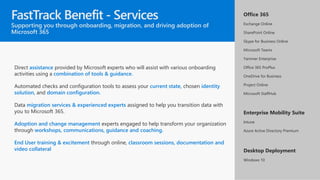
Direct assistance provided by Microsoft experts who will assist with various onboarding
activities using a combination of tools & guidance.
Automated checks and configuration tools to assess your current state, chosen identity
solution, and domain configuration.
Data migration services & experienced experts assigned to help you transition data with
you to Microsoft 365.
Adoption and change management experts engaged to help transform your organization
through workshops, communications, guidance and coaching.
End User training & excitement through online, classroom sessions, documentation and
video collateral
Office 365
Exchange Online
SharePoint Online
Skype for Business Online
Microsoft Teams
Yammer Enterprise
Office 365 ProPlus
OneDrive for Business
Project Online
Microsoft StaffHub
Enterprise Mobility Suite
Intune
Azure Active Directory Premium
Desktop Deployment
Windows 10
FastTrack Benefit - Services
Supporting you through onboarding, migration, and driving adoption of
Microsoft 365
Carson.Rynd@Microsoft.com
Steve.Kirchoff@Microsoft.com
Graham.Naeseth@Microsoft.com

CIO Forum June Microsoft.pdf

  • 1.
    Agenda • What is: •“The Tenant” • Cloud Strategy. M365, Dynamics 365, Azure, 3rd Party • High Level - What is Microsoft 365 • Why: • Business alignment/Priority • Budget – Licensing and redundant spend • How: • Partner Ecosystem • Fast Track • Premier • Not on the agenda: • Technical Architecture
  • 2.
    What is thetenant, really?
  • 3.
    On-premises / Private cloud devicesdata users apps THE WORLD BEFORE MOBILITY & CLOUD
  • 4.
  • 5.
  • 6.
  • 7.
  • 8.
  • 9.
  • 13.
  • 14.
    Enterprise Mobility &Security Windows 10 Enterprise Microsoft Internal & Partner Use Only 14 Integrated for Simplicity Unlocks Creativity Built for Teamwork Intelligent Security A complete, intelligent, secure solution to empower employees
  • 15.
    Microsoft 365 E5value Microsoft 365 E5 adds incremental value to Microsoft 365 E3 across these solution areas Brings together information protection & advanced compliance capabilities to protect and govern data while reducing risk Compliance Adds audio conferencing and calling capabilities in the cloud to enable your teams Voice Adds Power BI capabilities that help you realize significant business value from your data Analytics Extends identity and threat protection to help stop damaging attacks with integrated and automated security Security Microsoft 365 E5
  • 16.
    16 Office 365 EnterpriseCapabilities Audio Conferencing: Worldwide dial-in for your online meetings Phone System: Business phone system in the cloud Power BI Pro: Live business analytics and visualization Advanced Threat Protection: Zero-day threat and malware protection Advanced Security Management: Enhanced visibility and control Threat Intelligence: Actionable insights to global attack threats Advanced Compliance: Advanced eDiscovery, Advanced Data Governance and Customer Lockbox bundled together to provide an intelligent solution to meet compliance needs SECURITY Advanced Enterprise Protection VOICE Complete Cloud Communication ANALYTICS Insights for Everyone Exchange : Business-class email & Calendar OneDrive: Cloud Storage and file sharing SharePoint: Team sites & internal portals Skype for Business: Online Meetings, IM, video chat Microsoft Teams: Chat-based Collaboration Yammer: Private social networking Office Pro Plus: Office apps on up to 5 PCs & Macs Mobile Office Apps: Office Apps for Tablet & Smartphones Flow Power Apps Stream APPS Cloud Productivity & Mobility SERVICES Rich Communication and Collaboration Office 365 E3 Office 365 E5 Microsoft Internal & Partner Use Only
  • 17.
  • 18.
    18 Enterprise Mobility &Security Capabilities Microsoft Intune Mobile device and app management to protect corporate apps and data on any device. Managed Mobile Productivity Advanced Threat Analytics Identify suspicious activities & advanced attacks on premises. Integrated with our Intelligent Security Graph. Updates on a cloud cadence. Integration with Microsoft Threat Protection. Microsoft Cloud App Security Bring enterprise-grade visibility, control, and protection to your cloud applications and cloud data. Identity Driven Security Identity and access management Azure Active Directory Premium P1 Single sign-on to cloud and on- premises applications. Basic conditional access security Azure Active Directory Premium P2 Advanced risk based identity protection with alerts, analysis, & remediation. Azure Information Protection Premium P1 Encryption for all files and storage locations. Cloud based file tracking Existing Azure RMS capabilities Information Protection Azure Information Protection Premium P2 Intelligent classification, & encryption for files shared inside & outside your organization Secure Islands acquisition EMS E3 EMS E5 Microsoft Internal & Partner Use Only Azure Advanced Threat Protection Identify suspicious activities & advanced attacks on premises. Updated on an annual cadence.
  • 19.
    Features P1 Directory Objects1No Object Limit User/Group Management (add/update/delete). User-based provisioning, Device registration Available Single Sign-On (SSO). Free, basic tiers + self-service app integration templates5 No Limit B2B Collaboration7 Available Self-Service Password Change for cloud users Available Connect (Sync engine that extends on-premises directories to Azure Active Directory) Available Security/Usage Reports Advanced Reports Group-based access management/provisioning Available Self-Service Password Reset for cloud users Available Company Branding (Logon Pages/Access Panel customization) Available Application Proxy Available SLA Available Premium Features Advanced group features8 Available Self-Service Password Reset/Change/Unlock with on-premises writeback Available Device objects 2-way sync between on-premises directories and Azure AD (Device write- back) Available Multi-Factor Authentication (Cloud and On-premises (MFA Server)) Available Microsoft Identity Manager user CAL4 Available Cloud App Discovery9 Available Connect Health6 Available Automatic password rollover for group accounts Available Conditional Access based on group and location Available Conditional Access based on device state (Allow access from managed devices) Available 3rd party identity governance partners integration Available Terms of Use Available SharePoint Limited Access Available OneDrive for Business Limited Access Available 3rd party MFA partner integration Preview Available Microsoft Cloud App Security integration Available Identity Protection • Detecting vulnerabilities and risky accounts: • Providing custom recommendations to improve overall security posture by highlighting vulnerabilities • Calculating sign-in risk levels • Calculating user risk levels • Investigating risk events: • Sending notifications for risk events • Investigating risk events using relevant and contextual information • Providing basic workflows to track investigations • Providing easy access to remediation actions such as password reset • Risk-based conditional access policies: • Policy to mitigate risky sign-ins by blocking sign-ins or requiring multi-factor authentication challenges • Policy to block or secure risky user accounts • Policy to require users to register for multi-factor authentication Advanced Identity Governance • Privileged Identity Management (PIM) • Access Reviews Only in Azure AD P2 What is the difference between Azure AD P1 & P2?
  • 20.
    Features P1 Azure InformationProtection content consumption by using work or school accounts from AIP policy-aware apps and services Available Protection for Microsoft Exchange Online, Microsoft SharePoint Online, and Microsoft OneDrive for Business content Available Bring Your Own Key (BYOK) for customer-managed key provisioning life cycle2 Available Custom templates, including departmental templates Available Protection for on-premises Exchange and SharePoint content via Rights Management connector Available Azure Information Protection software developer kit for protection for all platforms including Windows, Windows Mobile, iOS, Mac OSX, and Android Available Protection for non-Microsoft Office file formats, including PTXT, PJPG, and PFILE (generic protection) Available Azure Information Protection content creation by using work or school accounts Available Office 365 Message Encryption Available Administrative control3 Available Manual, default, and mandatory document classification Available Azure Information Protection scanner for content discovery of on-premises files matching any of the sensitive information types Available Azure Information Protection scanner to apply a label to all files in an on-premises file server or repository Available Rights Management connector with on-premises Windows Server file shares by using the File Classification Infrastructure (FCI) connector Available Document tracking and revocation Available • Configure conditions for automatic and recommended classification • Azure Information Protection scanner for automated classification, labeling, and protection of supported on-premises files • Hold Your Own Key (HYOK) that spans Azure Information Protection and Active Directory (AD) Rights Management for highly regulated scenarios Only in AIP P2 What is the difference between AIP P1 & P2?
  • 21.
    21 Windows 10 EnterpriseCapabilities Windows 10 Enterprise E5 Windows 10 Enterprise E3 The most trusted platform Enterprise Data Protection Prevent accidental leaks by separating personal and business data Windows Hello for Business Enterprise grade biometric and companion device login Credential Guard Protects user access tokens in a hardware-isolated container AppLocker Block unwanted and inappropriate apps from running Device Guard Device locked down to only run fully trusted apps Microsoft Threat Protection (See slide 15-18) Behavior-based, attack detection Built-in threat intelligence Forensic investigation and mitigation Built into Windows More personal User Experience Virtualization (UX-V) OS and app settings synchronized across Windows instances Granular UX Control Enterprise control over user experience More productive Azure Active Directory Join Streamline IT process by harnessing the power of the cloud MDM enablement Manage all of your devices with the simplicity of MDM Windows Store for Business, Private Catalog Create a curated store experience for employee self-service Application Virtualization (App-V) Simplify app delivery and management Cortana Management Create, personalize, and manage Cortana profiles through Azure Active Directory Windows 10 for Industry Devices Turn any inexpensive, off-the-shelf device, into an embedded, handheld, or kiosk experience The most versatile devices Microsoft Internal & Partner Use Only
  • 22.
    Three simple pathsto Microsoft 365 E5 Microsoft 365 E3 Security Via Identity & Threat Protection (Microsoft Cloud App Security1, Azure Active Directory Plan 2, Office 365 ATP Plan 22, Azure ATP, Windows Defender ATP) Compliance Information Protection & Compliance (Office 365 Advanced Compliance, Azure Information Protection Plan 2) Power BI3 Audio Conferencing Phone System $10 $12 $4 $10 $8 or or 1 Consolidates O365 CAS and MCAS value 2 Consolidates O365 Threat Intelligence and O365 ATP Plan 1 value 43 MyAnalytics is now included in all O365 E3 and M365 offerings Step up for $25 Microsoft 365 E5 *Pricing for Microsoft 365 E3 customers before volume discounts.
  • 23.
    Secure identities to reachzero trust Identity & access management Security management Strengthen your security posture with insights and guidance Threat protection Help stop damaging attacks with integrated and automated security Locate and classify information anywhere it lives Information protection Infrastructure security Microsoft’s Enterprise Class Security Technology
  • 24.
    6.5 trillion signalsanalyzed daily 3,500 Microsoft security professionals $1B Annual Security Investment Intelligent Security in Microsoft 365 Cloud-powered security solutions help you protect users, data, and everything in between
  • 25.
    Secure your organization against advancedthreats across your entire digital estate Microsoft 365 E5 Security Identities Endpoints Email and Documents Cloud Apps Infrastructure
  • 26.
    Corporate Network Geo-location Microsoft Cloud App Security MacOS Android iOS Windows Windows DefenderATP Client apps Browser apps Google ID MSA Azure AD ADFS Require MFA Allow/block access Block legacy authentication Force password reset ****** Limited access Controls Employee & Partner Users and Roles Trusted & Compliant Devices Physical & Virtual Location Client apps & Auth Method Conditions Machine learning Policies Real time Evaluation Engine Session Risk 3 40TB Effective policy ConditionalAccess
  • 27.
    Holistic Identity Protection Azure ActiveDirectory Proactively identifies suspicious login attempts and challenges them with MFA Microsoft Cloud App Security Detects anomalous behavior and reduces threats by limiting access to data and applications Microsoft Intelligent Security Graph Azure Advanced Threat Protection Recognizes compromised accounts and lateral movement, alerts you, and visualizes the attack timeline SCENARIO: A third-party site is hacked and user credentials are exposed on the dark web.
  • 28.
    Browse to a website Phishing mail Open attachment Clicka URL Exploitation & Installation Command & Control User account is compromised Brute force account or use stolen account credentials Attacker attempts lateral movement Privileged account compromised Domain compromised Attacker accesses sensitive data Exfiltrate data Azure AD Identity Protection Identity protection & conditional access Microsoft Cloud App Security Extends protection & conditional access to other cloud apps Protection across the attack kill chain Office 365 ATP Malware detection, safe links, and safe attachments Windows Defender ATP Endpoint Detection and Response (EDR) & End-point Protection (EPP) Azure ATP Identity protection Attacker collects reconnaissance & configuration data
  • 29.
    Malicious emails found User anomalies suggestidentity compromise Threat signal shared with WDATP for auto remediation Automatic remediation actions complete Because Minutes Matter
  • 30.
    • Dedicated securityworkspace for security administration and operations teams • Centralized visibility, control and guidance across Microsoft 365 security • Actionable insights help security administrators assess historic and current security postures • Centralized alerts and tools help security operations better manage incident response Centralized security management Microsoft 365 Security Center
  • 32.
    Microsoft’s trust principles& compliance expertise Built-in information protection and governance capabilities across devices, apps, and cloud services Intelligent tools to simplify risk assessment and regulatory response Integrated Compliance in Microsoft 365
  • 33.
    Simplify assessment ofcompliance risk and posture with actionable insights Assess Protect Integrated protection and governance of sensitive data across devices, apps and cloud services Microsoft’s Integrated Compliance Technology Intelligently respond to data discovery requests by leveraging AI to find the most relevant data Respond
  • 34.
    Protect and govern sensitivedata throughout its lifecycle and effectively meet compliance requirements Microsoft 365 E5 Compliance Assess Risk Discover & Classify Data Automatically apply policies Control access Respond Intelligently
  • 35.
    Actionable Intelligence withAdvanced eDiscovery Intelligently explore and analyze unstructured data to quickly identify what’s relevant Use predictive coding to train the system to find likely relevant documents and reduce what’s sent to review Minimize Use near duplicate detection to organize the data and email threading to reconstruct email conversations Organize Use Themes to understand the topics represented in the unstructured data set Recognize Ad-hoc searches, ability to save search queries, and tag search results with case specific labels Search and Tagging
  • 36.
  • 37.
    Advanced Data Governancein Office 365 Intelligent Policies Policy recommendations based on machine learning and cloud intelligence Take Action Apply actions to preserve high value data in-place and purge what’s redundant, trivial or obsolete. Automatic Classification Classify data based on automatic analysis (age, user, type, sensitive data and user provided fingerprints) Leverageintelligencetoautomatedataretentionanddeletion
  • 38.
    Label Discover Classify Protection Governance Datagrowing at exponential rate → Encryption → Restrict Access → Watermark → Header/Footer → Retention → Deletion → Records Management → Archiving → Sensitive data discovery → Data at risk → Policy violations → Policy recommendations → Proactive alerts Comprehensive policies to protect and govern your most important data – throughout its lifecycle Unified approach to discover, classify & label Automatically apply policy-based actions Proactive monitoring to identify risks Broad coverage across locations Apply policy Unified approach Monitor
  • 39.
    Why move toMicrosoft 365 now? (Not later)
  • 40.
    Cloud Economics Productivity • FirstlineWorkers save 140 minuet per week • Reduce the time to deliver new services by 14 Days • Mobile workers save 24 minuets per day • Reduced downtime by 15+ hours annually/user • Decision Makers improve time to decision by 15%+ • Online meetings replace travel costs
  • 41.
    Cloud Economics Security • $400k/Yearreduction in breach communication • $4M Reduction in remediation effort (3 year) • 4 hours/user reduction of security related downtime • $220k reduction in compliance related costs • $1M+ year PV third Party tool replacement
  • 42.
    Redundant Spend Reduction CapabilityProvider Type Users Annual Cost Web/Audio/Video Conferencing WebEx/GoToMeeting, Blue Jeans, etc. Eliminate Cost 17,458 $288,229 Email Anti-Virus/Anti-Spam Proofpoint, Trend Eliminate Cost 17,458 $117,317 Archiving Symantec Enterprise Vault Eliminate Cost 17,458 $958,596 eDiscovery Symantec Vault Eliminate Cost 17,458 $5,222,196 Encrypted Email Secure Mail Eliminate Cost 17,458 $147,948 *Rights Management, Data Loss Prevention, Information Classification, Automated Information Classification Eliminate Cost 17,458 $1,895,714 Voicemail Avaya Eliminate Cost 17,458 $802,370 Threat Intelligence Splunk Eliminate Cost 17,458 $268,984 Hosted PBX Avaya Eliminate Cost 17,458 $4,608,912 Telephony PRI Multiple Vendors Estimate Cost 17,458 $3,394,863 Business Intelligence Tableau Eliminate Cost 17,458 $26,021 Mutli-Factor Authentication RSA Eliminate Cost 17,458 $284,688 Mobile Device/App Management Meraki Enterprise Eliminate Cost 17,458 $162,920 Client Anti-Virus Protection McAfee Eliminate Cost 17,458 $116,906 **Self Service Password Reset Eliminate Cost 17,458 $17,901 $14,310,266 Total Annual Costs
  • 43.
    Intelligent security Identity &access management Information protection Threat protection Security management
  • 44.
    Compliance – SharedResponsibility HITRUST CSF Requirement Statement Responsibility Microsoft Responsibilities The organization creates and documents the process/procedure the organization intends to use for deleting data from hard-drives prior to property transfer, exchange, or disposal/surplus. Office 365 Office 365 is responsible for managing hard- drive data deletion prior to disposal, transfer, or exchange. Visitor and third-party support access is recorded and supervised unless previously approved. Office 365 Office 365 is responsible for implementation, configuration, management, and monitoring of physical access control methods and mechanisms in relation to its service provision environment. Repairs or modifications to the physical components of a facility which are related to security (e.g., hardware, walls, doors and locks) are documented and retained in accordance with the organization's retention policy. Office 365 Office 365 is responsible for implementation, configuration, management, and monitoring of system maintenance methods and mechanisms in relation to its service provision environment. A visitor log containing appropriate information is reviewed monthly and maintained for at least two years. Office 365 Office 365 is responsible for implementation, configuration, management, and monitoring of physical access control methods and mechanisms in relation to its service provision environment. Physical authentication controls are used to authorize and validate access. Office 365 Office 365 is responsible for implementation, configuration, management, and monitoring of physical access control methods and mechanisms in relation to its service provision environment. An audit trail of all physical access is maintained. Office 365 Office 365 is responsible for implementation, configuration, management, and monitoring of physical access control methods and mechanisms in relation to its service provision environment. Visible identification that clearly identifies the individual is required to be worn by employees, visitors, contractors and third parties. Office 365 Office 365 is responsible for implementation, configuration, management, and monitoring of physical access control methods and mechanisms in relation to its service provision environment. Physical access rights are reviewed every Office 365 Office 365 is responsible for implementation,
  • 45.
  • 46.
    Built for teamwork Collaboratein a chat-based workspace Stay in sync with group email and calendars Create content and intranets in a central location Connect openly across the organization Co-author with others using Office apps
  • 47.
    Modern Desktop Flexible devicemanagement Integrated administration Built-in compliance Integrated for simplicity
  • 48.
    Unlocks creativity Create compellingcontent with intelligent apps Work naturally with ink, voice, and touch Visualize insights from data sets Find what you need with personalized search Connected experiences across devices
  • 49.
    “I think itis the golden age of being able to build products for everyone. And that's our mission.” Satya Nadella Microsoft Ability Summit May 2018
  • 50.
    Microsoft 365 enablescreating more productive, inclusive and compliant workplaces with built-in accessibility Inclusively designed capabilities built-in: Learning Tools and Dictate to aid in reading and writing and enhanced Windows 10 Ease of Access settings to personalize experiences Better support for 3rd party assistive technologies Intuitive controls in Office 365 such Accessibility Checker and Automatic alt-text to efficiently create accessible content Automatic captions for videos and recorded meetings with Microsoft Stream, live subtitles with the free Presentation Translator add-in for PowerPoint Availability of assistive technologies for all without the need to disclose or ask for accommodations Reduced spend on add-ons to create accessible content & to accommodate people with print disabilities Office 365 designed to meet global accessibility standards, verified by DHS Trusted Tester code-based inspection process Unlocks creativity Built for teamwork Integrated for simplicity Intelligent security
  • 51.
    Microsoft customers arecreating more productive, inclusive and compliant workplaces with Microsoft 365 accessibility “I have a computer without a screen, and that’s intentional because all I need is a keyboard and some headphones. I can now open up Excel or PowerPoint or Word and I can produce content that someone across the world would look at and never know a blind person had a role in that production.” Jack Mendez Instructor & Director of Technology, Louisiana Center for the Blind, Inclusion in Action Series “Group projects are really easy now. If everyone creates accessible documents by using styles and the check accessibility feature, I can work really easily with them. With Immersive Reader I’m able to change the way I read text to suit me – so I don’t hold anyone up. It’s really, really cool.” Jacob Ulladulla High School student, NSW Dept of Education Story “By providing tools where people can self-accommodate, it doesn’t force someone to put up their hand. It allows them to find ways to make their own computing experience much more comfortable so they can be productive.” Bert Floyd Assistive Technology Lead, TD Bank (Canada) Customer Story “We see Microsoft as a leader in inclusive technology and a great partner. In fact, we now take it for granted that the experiences within Microsoft 365 are going to work well for our employees.” Stephen Cutchins CIO Accessibility Lead, Accenture Customer Story Unlocks creativity Built for teamwork Integrated for simplicity Intelligent security
  • 52.
    How do Ibegin the cloud journey?
  • 53.
    Deployment Resources • Fast Track •Premier • Partners (SI)
  • 54.
    Direct assistance providedby Microsoft experts who will assist with various onboarding activities using a combination of tools & guidance. Automated checks and configuration tools to assess your current state, chosen identity solution, and domain configuration. Data migration services & experienced experts assigned to help you transition data with you to Microsoft 365. Adoption and change management experts engaged to help transform your organization through workshops, communications, guidance and coaching. End User training & excitement through online, classroom sessions, documentation and video collateral Office 365 Exchange Online SharePoint Online Skype for Business Online Microsoft Teams Yammer Enterprise Office 365 ProPlus OneDrive for Business Project Online Microsoft StaffHub Enterprise Mobility Suite Intune Azure Active Directory Premium Desktop Deployment Windows 10 FastTrack Benefit - Services Supporting you through onboarding, migration, and driving adoption of Microsoft 365
  • 55.