Global Azure Bootcamp 2018
Adelaide
Microsoft Azure 101
Balasubramanian (Bala) Murugesan
• Microsoft Cloud Architect
• 15 years’ across a broad range of
technologies and business sectors
• 7+ Years Experience in Azure and Office 365
• Azure and Office 365 Certified
How to pronounce my first name!
Find me on LinkedIn:
https://www.linkedin.com/in/balasmn/
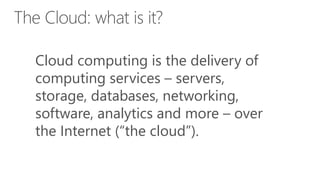
Cloud computing is the delivery of
computing services – servers,
storage, databases, networking,
software, analytics and more – over
the Internet (“the cloud”).
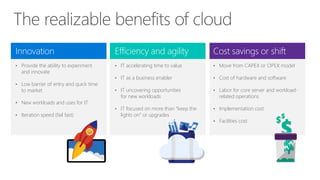
Innovation
• Provide the ability to experiment
and innovate
• Low barrier of entry and quick time
to market
• New workloads and uses for IT
• Iteration speed (fail fast)
Cost savings or shift
• Move from CAPEX or OPEX model
• Cost of hardware and software
• Labor for core server and workload-
related operations
• Implementation cost
• Facilities cost
Efficiency and agility
• IT accelerating time to value
• IT as a business enabler
• IT uncovering opportunities
for new workloads
• IT focused on more than “keep the
lights on” or upgrades
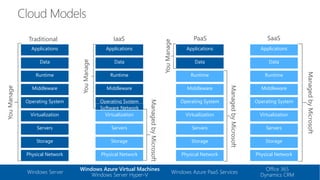
Traditional
Storage
Servers
Physical Network
Operating System
Middleware
Virtualization
Data
Applications
Runtime
YouManage
IaaS
Storage
Servers
Physical Network
Operating System
Middleware
Virtualization
Data
Applications
Runtime
ManagedbyMicrosoft
YouManage
PaaS
ManagedbyMicrosoft
YouManage
Storage
Servers
Physical Network
Operating System
Middleware
Virtualization
Applications
Runtime
Data
SaaS
ManagedbyMicrosoft
Storage
Servers
Physical Network
Operating System
Middleware
Virtualization
Applications
Runtime
Data
Windows Azure Virtual Machines
Windows Server Hyper-V
Windows Server Windows Azure PaaS Services
Office 365
Dynamics CRM
Software Network
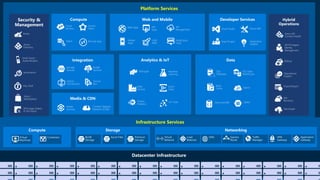
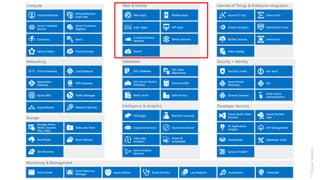
Platform Services
Security &
Management
Infrastructure Services
Web Apps
Mobile
Apps
API
Management
API
Apps
Logic
Apps
Notification
Hubs
Content Delivery
Network (CDN)
Media
Services
HDInsight Machine
Learning
Stream
Analytics
Data
Factory
Event
Hubs
Active
Directory
Multi-Factor
Authentication
Automation
Portal
Key Vault
Biztalk
Services
Hybrid
Connections
Service
Bus
Storage
Queues
Store /
Marketplace
Hybrid
Operations
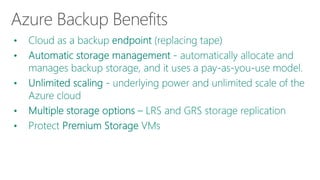
Backup
StorSimple
Site
Recovery
Import/Export
SQL
Database
DocumentDB
Redis
Cache Search
Tables
SQL Data
Warehouse
Azure AD
Connect Health
AD Privileged
Identity
Management
Operational
Insights
Cloud
Services
Batch Remote App
Service
Fabric Visual Studio
Application
Insights
Azure SDK
Team Project
VM Image Gallery
& VM Depot
IoT Hubs
Azure Management Portal and
Subscription
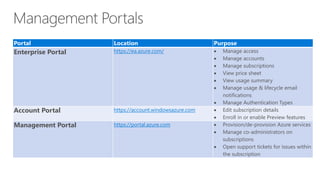
Portal Location Purpose
Enterprise Portal https://ea.azure.com/  Manage access
 Manage accounts
 Manage subscriptions
 View price sheet
 View usage summary
 Manage usage & lifecycle email
notifications
 Manage Authentication Types
Account Portal https://account.windowsazure.com  Edit subscription details
 Enroll in or enable Preview features
Management Portal https://portal.azure.com  Provision/de-provision Azure services
 Manage co-administrators on
subscriptions
 Open support tickets for issues within
the subscription
•
•
•
•
•
•
•
•
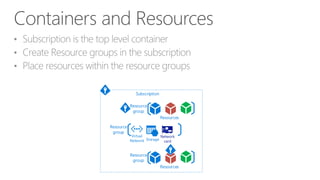
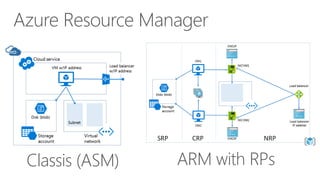
Resource
group
Resource
group
Resources
Resource
group
Resources
Subscription
Virtual
Network Storage
Network
card
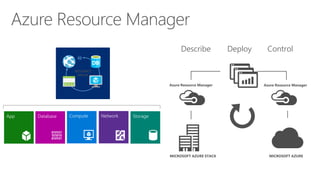
StorageNetworkComputeDatabaseApp
Azure Resource Manager Azure Resource Manager
MICROSOFT AZUREMICROSOFT AZURE STACK
Describe Deploy Control
Azure Resource Manager
RESOURCE
GROUP
Classis (ASM) ARM with RPs






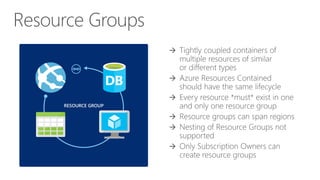
RESOURCE GROUP
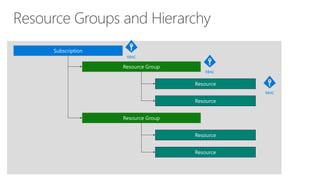
Subscription
Resource Group
Resource Group
Resource
Resource
Resource
Resource
RBAC
RBAC
RBAC
Demo: Azure Management Portal
https://bit.ly/2HensIf
Azure Storage Accounts
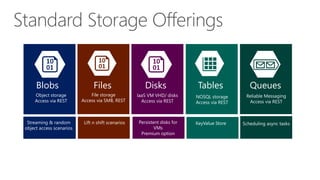
Blobs Files Disks Tables Queues
Object storage
Access via REST
File storage
Access via SMB, REST
IaaS VM VHD/ disks
Access via REST
NOSQL storage
Access via REST
Reliable Messaging
Access via REST
Streaming & random
object access scenarios
Lift n shift scenarios Persistent disks for
VMs
Premium option
KeyValue Store Scheduling async tasks
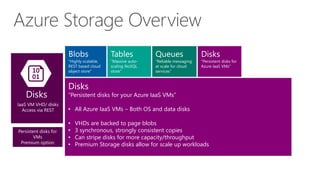
Disks
“Persistent disks for your Azure IaaS VMs”
• All Azure IaaS VMs – Both OS and data disks
• VHDs are backed to page blobs
• 3 synchronous, strongly consistent copies
• Can stripe disks for more capacity/throughput
• Premium Storage disks allow for scale up workloads
Queues
“Reliable messaging
at scale for cloud
services”
Disks
“Persistent disks for
Azure IaaS VMs”
Disks
IaaS VM VHD/ disks
Access via REST
Persistent disks for
VMs
Premium option
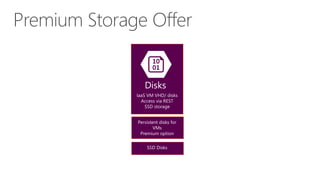
Disks
IaaS VM VHD/ disks
Access via REST
SSD storage
Persistent disks for
VMs
Premium option
SSD Disks
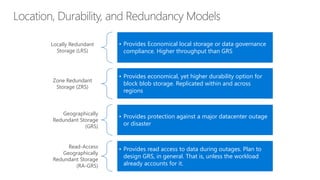
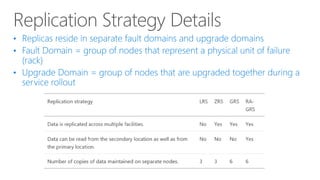
Locally Redundant
Storage (LRS)
• Provides Economical local storage or data governance
compliance. Higher throughput than GRS
Zone Redundant
Storage (ZRS)
• Provides economical, yet higher durability option for
block blob storage. Replicated within and across
regions
Geographically
Redundant Storage
(GRS)
• Provides protection against a major datacenter outage
or disaster
Read-Access
Geographically
Redundant Storage
(RA-GRS)
• Provides read access to data during outages. Plan to
design GRS, in general. That is, unless the workload
already accounts for it.
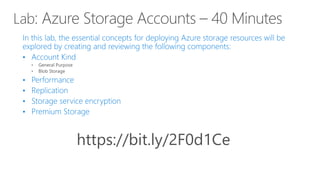
https://bit.ly/2F0d1Ce
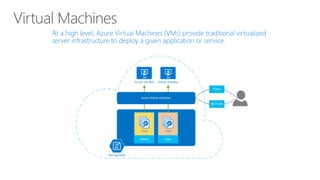
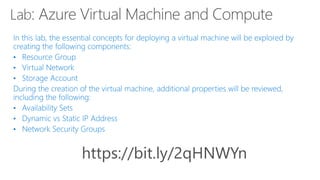
Azure Virtual Machine and Compute
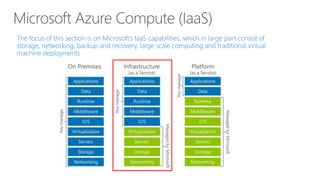
The focus of this section is on Microsoft’s IaaS capabilities, which in large part consist of
storage, networking, backup and recovery, large scale computing and traditional virtual
machine deployments
When deploying applications and solutions using Microsoft Azure Virtual
Machines, there are various sizing configurations that are available to
organizations. From a sizing perspective, each sizing series represents
various properties such as:
• Number of CPUs
• Memory allocated to each Virtual Machine
• Temporary Local Storage
• Allocated Bandwidth for the Virtual Machine
• Maximum Data Disks
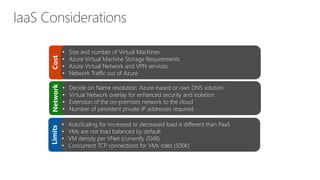
Cost
• Size and number of Virtual Machines
• Azure Virtual Machine Storage Requirements
• Azure Virtual Network and VPN services
• Network Traffic out of Azure
Network
• Decide on Name resolution: Azure-based or own DNS solution
• Virtual Network overlay for enhanced security and isolation
• Extension of the on-premises network to the cloud
• Number of persistent private IP addresses required
Limits
• AutoScaling for increased or decreased load is different than PaaS
• VMs are not load balanced by default
• VM density per VNet (currently 2048)
• Concurrent TCP connections for VMs roles (500K)
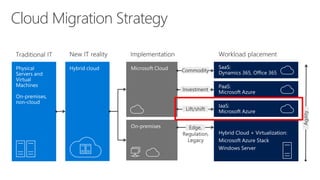
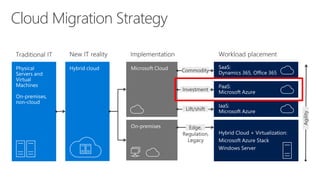
Cloud Migration Strategy
https://bit.ly/2qHNWYn
Azure Web App Services
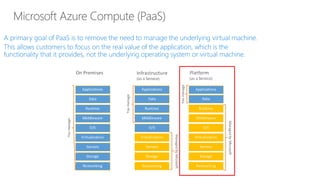
A primary goal of PaaS is to remove the need to manage the underlying virtual machine.
This allows customers to focus on the real value of the application, which is the
functionality that it provides, not the underlying operating system or virtual machine.
*PreviewServices
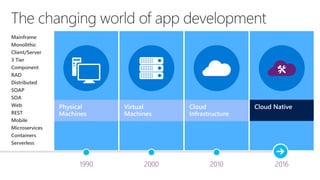
Physical
Machines
Virtual
Machines
Cloud
Infrastructure
201620001990 2010
Mainframe
Monolithic
Client/Server
3 Tier
Component
RAD
Distributed
SOAP
SOA
Web
REST
Mobile
Microservices
Containers
Serverless
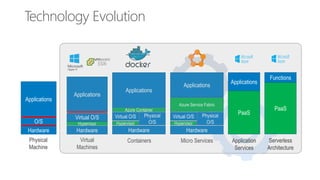
Technology Evolution
Applications
Hardware
O/S
Physical
Machine
Applications
Hardware
Virtual O/S
Hypervisor
Virtual
Machines
Applications
Hardware
Virtual O/S
Hypervisor
Azure Container
Physical
O/S
Containers
Applications
Hardware
Virtual O/S
Hypervisor
Azure Service Fabric
Physical
O/S
Micro Services
Applications
PaaS
Application
Services
Functions
PaaS
Serverless
Architecture
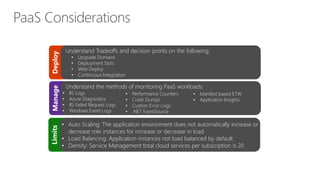
Deploy
Understand Tradeoffs and decision points on the following:
• Upgrade Domains
• Deployment Slots
• Web Deploy
• Continuous Integration
Manage
Understand the methods of monitoring PaaS workloads:
• IIS Logs
• Azure Diagnostics
• IIS Failed Request Logs
• Windows Event Logs
Limits
• Auto Scaling: The application environment does not automatically increase or
decrease role instances for increase or decrease in load
• Load Balancing: Application instances not load balanced by default
• Density: Service Management total cloud services per subscription is 20
• Performance Counters
• Crash Dumps
• Custom Error Logs
• .NET EventSource
• Manifest based ETW
• Application Insights
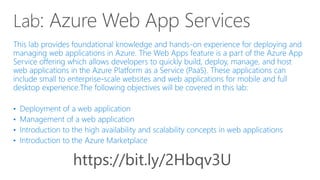
Cloud Migration Strategy
https://bit.ly/2Hbqv3U
Azure Identity
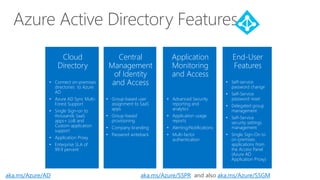
Azure Active Directory Features
Cloud
Directory
• Connect on-premises
directories to Azure
AD
• Azure AD Sync Multi-
Forest Support
• Single Sign-on to
thousands SaaS
apps+ LoB and
Custom application
support
• Application Proxy
• Enterprise SLA of
99.9 percent
End-User
Features
• Self-service
password change
• Self-Service
password reset
• Delegated group
management
• Self-Service
security settings
management
• Single Sign-On to
on-premises
applications from
the Access Panel
(Azure AD
Application Proxy)
Central
Management
of Identity
and Access
• Group-based user
assignment to SaaS
apps
• Group-based
provisioning
• Company branding
• Password writeback
Application
Monitoring
and Access
• Advanced Security
reporting and
analytics
• Application usage
reports
• Alerting/Notifications
• Multi-factor
authentication
aka.ms/Azure/AD aka.ms/Azure/SSPR and also aka.ms/Azure/SSGM
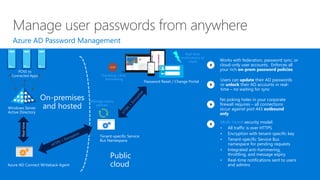
Manage user passwords from anywhere
Windows Server
Active Directory
Azure AD Connect Writeback Agent
Multi-tiered security model:
• All traffic is over HTTPS
• Encryption with tenant-specific key
• Tenant-specific Service Bus
namespace for pending requests
• Integrated anti-hammering,
throttling, and message expiry
• Real-time notifications sent to users
and admins
Works with federation, password sync, or
cloud-only user accounts. Enforces all
your rich on-prem password policies
Users can update their AD passwords
or unlock their AD accounts in real-
time – no waiting for sync
No poking holes in your corporate
firewall requires – all connections
occur against port 443 outbound
only
Azure AD Password Management
Tenant-specific Service
Bus Namespace
PCNS to
Connected Apps
Message expiry
policies
Password Reset / Change Portal
Throttling / Anti-
hammering
Real-time
notifications of
resets
Public
cloud
On-premises
and hosted
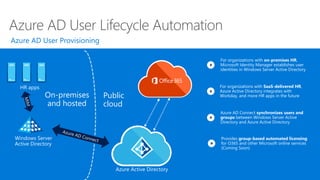
Azure AD User Lifecycle Automation
Windows Server
Active Directory
HR apps
Azure Active Directory
Public
cloud
Azure AD Connect synchronizes users and
groups between Windows Server Active
Directory and Azure Active Directory
For organizations with on-premises HR,
Microsoft Identity Manager establishes user
identities in Windows Server Active Directory
On-premises
and hosted
For organizations with SaaS-delivered HR,
Azure Active Directory integrates with
Workday, and more HR apps in the future
Provides group-based automated licensing
for O365 and other Microsoft online services
(Coming Soon)
Azure AD User Provisioning
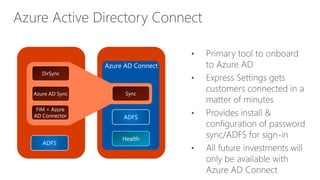
Azure Active Directory Connect
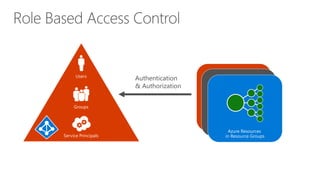
Authentication
& Authorization
Azure
Active Directory
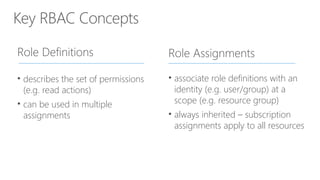
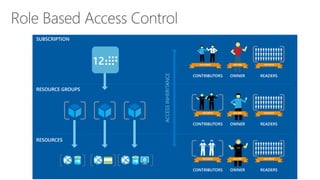
Key RBAC Concepts
Role Definitions
• describes the set of permissions
(e.g. read actions)
• can be used in multiple
assignments
Role Assignments
• associate role definitions with an
identity (e.g. user/group) at a
scope (e.g. resource group)
• always inherited – subscription
assignments apply to all resources
Azure Backup and Recovery
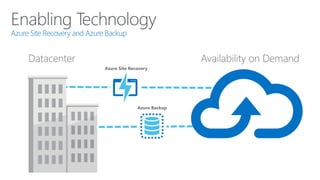
Azure Site Recovery and Azure Backup
Datacenter Availability on Demand
Azure Site Recovery
Azure Backup
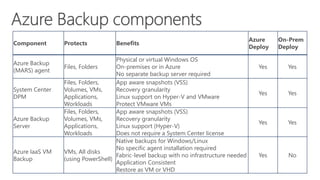
Component Protects Benefits
Azure
Deploy
On-Prem
Deploy
Azure Backup
(MARS) agent
Files, Folders
Physical or virtual Windows OS
On-premises or in Azure
No separate backup server required
Yes Yes
System Center
DPM
Files, Folders,
Volumes, VMs,
Applications,
Workloads
App aware snapshots (VSS)
Recovery granularity
Linux support on Hyper-V and VMware
Protect VMware VMs
Yes Yes
Azure Backup
Server
Files, Folders,
Volumes, VMs,
Applications,
Workloads
App aware snapshots (VSS)
Recovery granularity
Linux support (Hyper-V)
Does not require a System Center license
Yes Yes
Azure IaaS VM
Backup
VMs, All disks
(using PowerShell)
Native backups for Windows/Linux
No specific agent installation required
Fabric-level backup with no infrastructure needed
Application Consistent
Restore as VM or VHD
Yes No
Microsoft Azure
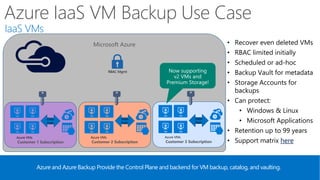
Azure IaaS VM Backup Use Case
Azure and Azure Backup Provide the Control Plane and backend for VM backup, catalog, and vaulting.
• Recover even deleted VMs
• RBAC limited initially
• Scheduled or ad-hoc
• Backup Vault for metadata
• Storage Accounts for
backups
• Can protect:
• Windows & Linux
• Microsoft Applications
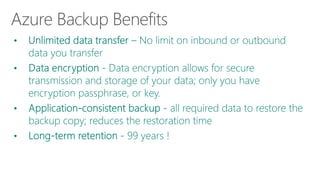
• Retention up to 99 years
• Support matrix here
RBAC Mgmt
IaaS VMs
Customer 1 Subscription
Azure VMs
Data
Path
Customer 2 Subscription
Azure VMs
Data
Path
Customer 3 Subscription
Azure VMs
Data
Path
Now supporting
v2 VMs and
Premium Storage!
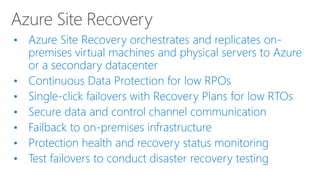
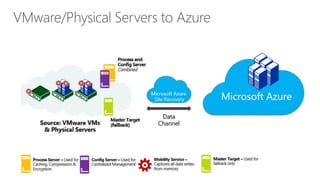
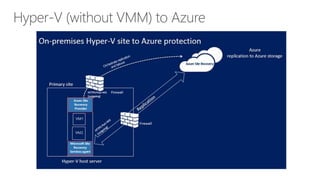
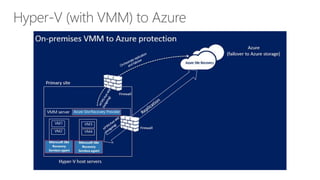
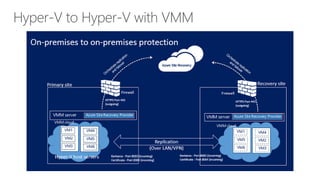
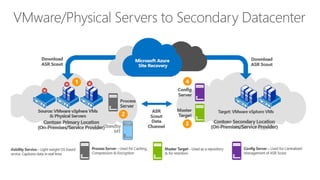
• Azure Site Recovery orchestrates and replicates on-
premises virtual machines and physical servers to Azure
or a secondary datacenter
• Continuous Data Protection for low RPOs
• Single-click failovers with Recovery Plans for low RTOs
• Secure data and control channel communication
• Failback to on-premises infrastructure
• Protection health and recovery status monitoring
• Test failovers to conduct disaster recovery testing
https://bit.ly/2qIjHQi
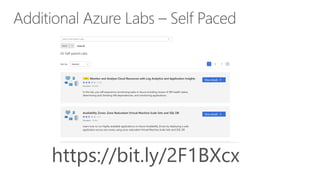
https://bit.ly/2F1BXcx
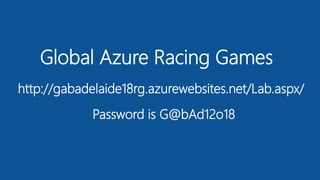
Global Azure Racing Games
http://gabadelaide18rg.azurewebsites.net/Lab.aspx/
Password is G@bAd12o18
Q & A
https://bit.ly/2F1jqNE
Post-Event Survey

Adelaide Global Azure Bootcamp 2018 - Azure 101

  • 1.
    Global Azure Bootcamp2018 Adelaide Microsoft Azure 101
  • 2.
    Balasubramanian (Bala) Murugesan •Microsoft Cloud Architect • 15 years’ across a broad range of technologies and business sectors • 7+ Years Experience in Azure and Office 365 • Azure and Office 365 Certified How to pronounce my first name! Find me on LinkedIn: https://www.linkedin.com/in/balasmn/
  • 8.
    Cloud computing isthe delivery of computing services – servers, storage, databases, networking, software, analytics and more – over the Internet (“the cloud”).
  • 10.
    Innovation • Provide theability to experiment and innovate • Low barrier of entry and quick time to market • New workloads and uses for IT • Iteration speed (fail fast) Cost savings or shift • Move from CAPEX or OPEX model • Cost of hardware and software • Labor for core server and workload- related operations • Implementation cost • Facilities cost Efficiency and agility • IT accelerating time to value • IT as a business enabler • IT uncovering opportunities for new workloads • IT focused on more than “keep the lights on” or upgrades
  • 12.
    Traditional Storage Servers Physical Network Operating System Middleware Virtualization Data Applications Runtime YouManage IaaS Storage Servers PhysicalNetwork Operating System Middleware Virtualization Data Applications Runtime ManagedbyMicrosoft YouManage PaaS ManagedbyMicrosoft YouManage Storage Servers Physical Network Operating System Middleware Virtualization Applications Runtime Data SaaS ManagedbyMicrosoft Storage Servers Physical Network Operating System Middleware Virtualization Applications Runtime Data Windows Azure Virtual Machines Windows Server Hyper-V Windows Server Windows Azure PaaS Services Office 365 Dynamics CRM Software Network
  • 15.
    Platform Services Security & Management InfrastructureServices Web Apps Mobile Apps API Management API Apps Logic Apps Notification Hubs Content Delivery Network (CDN) Media Services HDInsight Machine Learning Stream Analytics Data Factory Event Hubs Active Directory Multi-Factor Authentication Automation Portal Key Vault Biztalk Services Hybrid Connections Service Bus Storage Queues Store / Marketplace Hybrid Operations Backup StorSimple Site Recovery Import/Export SQL Database DocumentDB Redis Cache Search Tables SQL Data Warehouse Azure AD Connect Health AD Privileged Identity Management Operational Insights Cloud Services Batch Remote App Service Fabric Visual Studio Application Insights Azure SDK Team Project VM Image Gallery & VM Depot IoT Hubs
  • 16.
    Azure Management Portaland Subscription
  • 17.
    Portal Location Purpose EnterprisePortal https://ea.azure.com/  Manage access  Manage accounts  Manage subscriptions  View price sheet  View usage summary  Manage usage & lifecycle email notifications  Manage Authentication Types Account Portal https://account.windowsazure.com  Edit subscription details  Enroll in or enable Preview features Management Portal https://portal.azure.com  Provision/de-provision Azure services  Manage co-administrators on subscriptions  Open support tickets for issues within the subscription
  • 18.
  • 19.
  • 21.
    StorageNetworkComputeDatabaseApp Azure Resource ManagerAzure Resource Manager MICROSOFT AZUREMICROSOFT AZURE STACK Describe Deploy Control Azure Resource Manager RESOURCE GROUP
  • 22.
  • 23.
  • 24.
  • 26.
  • 27.
  • 28.
  • 29.
    Blobs Files DisksTables Queues Object storage Access via REST File storage Access via SMB, REST IaaS VM VHD/ disks Access via REST NOSQL storage Access via REST Reliable Messaging Access via REST Streaming & random object access scenarios Lift n shift scenarios Persistent disks for VMs Premium option KeyValue Store Scheduling async tasks
  • 30.
    Disks “Persistent disks foryour Azure IaaS VMs” • All Azure IaaS VMs – Both OS and data disks • VHDs are backed to page blobs • 3 synchronous, strongly consistent copies • Can stripe disks for more capacity/throughput • Premium Storage disks allow for scale up workloads Queues “Reliable messaging at scale for cloud services” Disks “Persistent disks for Azure IaaS VMs” Disks IaaS VM VHD/ disks Access via REST Persistent disks for VMs Premium option
  • 31.
    Disks IaaS VM VHD/disks Access via REST SSD storage Persistent disks for VMs Premium option SSD Disks
  • 34.
    Locally Redundant Storage (LRS) •Provides Economical local storage or data governance compliance. Higher throughput than GRS Zone Redundant Storage (ZRS) • Provides economical, yet higher durability option for block blob storage. Replicated within and across regions Geographically Redundant Storage (GRS) • Provides protection against a major datacenter outage or disaster Read-Access Geographically Redundant Storage (RA-GRS) • Provides read access to data during outages. Plan to design GRS, in general. That is, unless the workload already accounts for it.
  • 36.
  • 37.
  • 38.
    The focus ofthis section is on Microsoft’s IaaS capabilities, which in large part consist of storage, networking, backup and recovery, large scale computing and traditional virtual machine deployments
  • 40.
    When deploying applicationsand solutions using Microsoft Azure Virtual Machines, there are various sizing configurations that are available to organizations. From a sizing perspective, each sizing series represents various properties such as: • Number of CPUs • Memory allocated to each Virtual Machine • Temporary Local Storage • Allocated Bandwidth for the Virtual Machine • Maximum Data Disks
  • 42.
    Cost • Size andnumber of Virtual Machines • Azure Virtual Machine Storage Requirements • Azure Virtual Network and VPN services • Network Traffic out of Azure Network • Decide on Name resolution: Azure-based or own DNS solution • Virtual Network overlay for enhanced security and isolation • Extension of the on-premises network to the cloud • Number of persistent private IP addresses required Limits • AutoScaling for increased or decreased load is different than PaaS • VMs are not load balanced by default • VM density per VNet (currently 2048) • Concurrent TCP connections for VMs roles (500K)
  • 43.
  • 49.
  • 50.
    Azure Web AppServices
  • 51.
    A primary goalof PaaS is to remove the need to manage the underlying virtual machine. This allows customers to focus on the real value of the application, which is the functionality that it provides, not the underlying operating system or virtual machine.
  • 52.
  • 53.
  • 54.
    Technology Evolution Applications Hardware O/S Physical Machine Applications Hardware Virtual O/S Hypervisor Virtual Machines Applications Hardware VirtualO/S Hypervisor Azure Container Physical O/S Containers Applications Hardware Virtual O/S Hypervisor Azure Service Fabric Physical O/S Micro Services Applications PaaS Application Services Functions PaaS Serverless Architecture
  • 55.
    Deploy Understand Tradeoffs anddecision points on the following: • Upgrade Domains • Deployment Slots • Web Deploy • Continuous Integration Manage Understand the methods of monitoring PaaS workloads: • IIS Logs • Azure Diagnostics • IIS Failed Request Logs • Windows Event Logs Limits • Auto Scaling: The application environment does not automatically increase or decrease role instances for increase or decrease in load • Load Balancing: Application instances not load balanced by default • Density: Service Management total cloud services per subscription is 20 • Performance Counters • Crash Dumps • Custom Error Logs • .NET EventSource • Manifest based ETW • Application Insights
  • 56.
  • 57.
  • 58.
  • 62.
    Azure Active DirectoryFeatures Cloud Directory • Connect on-premises directories to Azure AD • Azure AD Sync Multi- Forest Support • Single Sign-on to thousands SaaS apps+ LoB and Custom application support • Application Proxy • Enterprise SLA of 99.9 percent End-User Features • Self-service password change • Self-Service password reset • Delegated group management • Self-Service security settings management • Single Sign-On to on-premises applications from the Access Panel (Azure AD Application Proxy) Central Management of Identity and Access • Group-based user assignment to SaaS apps • Group-based provisioning • Company branding • Password writeback Application Monitoring and Access • Advanced Security reporting and analytics • Application usage reports • Alerting/Notifications • Multi-factor authentication aka.ms/Azure/AD aka.ms/Azure/SSPR and also aka.ms/Azure/SSGM
  • 63.
    Manage user passwordsfrom anywhere Windows Server Active Directory Azure AD Connect Writeback Agent Multi-tiered security model: • All traffic is over HTTPS • Encryption with tenant-specific key • Tenant-specific Service Bus namespace for pending requests • Integrated anti-hammering, throttling, and message expiry • Real-time notifications sent to users and admins Works with federation, password sync, or cloud-only user accounts. Enforces all your rich on-prem password policies Users can update their AD passwords or unlock their AD accounts in real- time – no waiting for sync No poking holes in your corporate firewall requires – all connections occur against port 443 outbound only Azure AD Password Management Tenant-specific Service Bus Namespace PCNS to Connected Apps Message expiry policies Password Reset / Change Portal Throttling / Anti- hammering Real-time notifications of resets Public cloud On-premises and hosted
  • 64.
    Azure AD UserLifecycle Automation Windows Server Active Directory HR apps Azure Active Directory Public cloud Azure AD Connect synchronizes users and groups between Windows Server Active Directory and Azure Active Directory For organizations with on-premises HR, Microsoft Identity Manager establishes user identities in Windows Server Active Directory On-premises and hosted For organizations with SaaS-delivered HR, Azure Active Directory integrates with Workday, and more HR apps in the future Provides group-based automated licensing for O365 and other Microsoft online services (Coming Soon) Azure AD User Provisioning
  • 65.
  • 66.
  • 67.
    Key RBAC Concepts RoleDefinitions • describes the set of permissions (e.g. read actions) • can be used in multiple assignments Role Assignments • associate role definitions with an identity (e.g. user/group) at a scope (e.g. resource group) • always inherited – subscription assignments apply to all resources
  • 69.
  • 70.
    Azure Site Recoveryand Azure Backup Datacenter Availability on Demand Azure Site Recovery Azure Backup
  • 75.
    Component Protects Benefits Azure Deploy On-Prem Deploy AzureBackup (MARS) agent Files, Folders Physical or virtual Windows OS On-premises or in Azure No separate backup server required Yes Yes System Center DPM Files, Folders, Volumes, VMs, Applications, Workloads App aware snapshots (VSS) Recovery granularity Linux support on Hyper-V and VMware Protect VMware VMs Yes Yes Azure Backup Server Files, Folders, Volumes, VMs, Applications, Workloads App aware snapshots (VSS) Recovery granularity Linux support (Hyper-V) Does not require a System Center license Yes Yes Azure IaaS VM Backup VMs, All disks (using PowerShell) Native backups for Windows/Linux No specific agent installation required Fabric-level backup with no infrastructure needed Application Consistent Restore as VM or VHD Yes No
  • 76.
    Microsoft Azure Azure IaaSVM Backup Use Case Azure and Azure Backup Provide the Control Plane and backend for VM backup, catalog, and vaulting. • Recover even deleted VMs • RBAC limited initially • Scheduled or ad-hoc • Backup Vault for metadata • Storage Accounts for backups • Can protect: • Windows & Linux • Microsoft Applications • Retention up to 99 years • Support matrix here RBAC Mgmt IaaS VMs Customer 1 Subscription Azure VMs Data Path Customer 2 Subscription Azure VMs Data Path Customer 3 Subscription Azure VMs Data Path Now supporting v2 VMs and Premium Storage!
  • 77.
    • Azure SiteRecovery orchestrates and replicates on- premises virtual machines and physical servers to Azure or a secondary datacenter • Continuous Data Protection for low RPOs • Single-click failovers with Recovery Plans for low RTOs • Secure data and control channel communication • Failback to on-premises infrastructure • Protection health and recovery status monitoring • Test failovers to conduct disaster recovery testing
  • 83.
  • 84.
  • 85.
    Global Azure RacingGames http://gabadelaide18rg.azurewebsites.net/Lab.aspx/ Password is G@bAd12o18
  • 86.
  • 87.