Azure Overview
Mohammed Ali
Certified AZ-104
https://www.linkedin.com/in/muhammad-ali-50905897
Cloud
Computing
Types
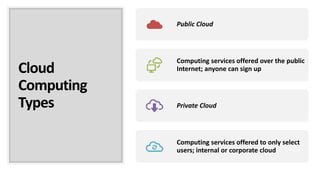
Public Cloud
Computing services offered over the public
Internet; anyone can sign up
Private Cloud
Computing services offered to only select
users; internal or corporate cloud
Deployment
patterns in Azure
• There are three different deployment
patterns that are available in Azure; they areas
follows:
• • IaaS
• • PaaS
• • SaaS
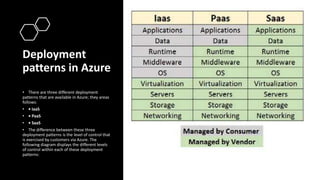
• The difference between these three
deployment patterns is the level of control that
is exercised by customers via Azure. The
following diagram displays the different levels
of control within each of these deployment
patterns:
ARM Architecture • It brings Azure's resource
providers, resources, and
resource groups together to
form a cohesive cloud platform.
It makes Azure Services
available to subscriptions, the
resource types available to
resource groups, the resource
and resource APIs accessible to
the portal and other clients,
and it authenticates access to
these resources. It also enables
features such as tagging,
authentication, RBAC
Azure
Physical
Host
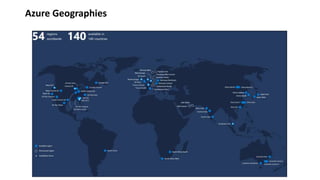
Azure Geographies
Regions and
Availability
Zones in Azure
Region A set of datacenters deployed
within a latency-defined
perimeter and connected through
a dedicated regional low-latency
network.
Availability Zone Unique physical locations within a
region. Each zone is made up of
one or more datacenters
equipped with independent
power, cooling, and networking.
Choose your
Region
Soure:Microsoft
Azure Health Service
Azure Subscription
Types
• Free Trial Provides free access to Azure resources for a limited
time. Only one free trial subscription is available per account,
and you cannot create a new free trial if a previous one has
expired.
• Pay-As-You-Go You pay only for those resources you use in
Azure. There’s no up-front cost, and you can cancel the
subscription at any time.
• Pay-As-You-Go Dev/Test A special subscription for subscribers
to Visual Studio that can be used for development and test.
• Enterprise Agreement designed for large companies that
have a large amount of usage in Azure. When you sign up for
an Enterprise Agreement, you work with Microsoft to come
up with a yearly financial commitment for Azure usage.
Azure Subscriptions
Resource Groups & Resources
Microsoft Azure Overview Class 1

Microsoft Azure Overview Class 1

  • 1.
    Azure Overview Mohammed Ali CertifiedAZ-104 https://www.linkedin.com/in/muhammad-ali-50905897
  • 2.
    Cloud Computing Types Public Cloud Computing servicesoffered over the public Internet; anyone can sign up Private Cloud Computing services offered to only select users; internal or corporate cloud
  • 3.
    Deployment patterns in Azure •There are three different deployment patterns that are available in Azure; they areas follows: • • IaaS • • PaaS • • SaaS • The difference between these three deployment patterns is the level of control that is exercised by customers via Azure. The following diagram displays the different levels of control within each of these deployment patterns:
  • 4.
    ARM Architecture •It brings Azure's resource providers, resources, and resource groups together to form a cohesive cloud platform. It makes Azure Services available to subscriptions, the resource types available to resource groups, the resource and resource APIs accessible to the portal and other clients, and it authenticates access to these resources. It also enables features such as tagging, authentication, RBAC
  • 5.
  • 6.
  • 7.
    Regions and Availability Zones inAzure Region A set of datacenters deployed within a latency-defined perimeter and connected through a dedicated regional low-latency network. Availability Zone Unique physical locations within a region. Each zone is made up of one or more datacenters equipped with independent power, cooling, and networking.
  • 8.
  • 9.
  • 10.
    Azure Subscription Types • FreeTrial Provides free access to Azure resources for a limited time. Only one free trial subscription is available per account, and you cannot create a new free trial if a previous one has expired. • Pay-As-You-Go You pay only for those resources you use in Azure. There’s no up-front cost, and you can cancel the subscription at any time. • Pay-As-You-Go Dev/Test A special subscription for subscribers to Visual Studio that can be used for development and test. • Enterprise Agreement designed for large companies that have a large amount of usage in Azure. When you sign up for an Enterprise Agreement, you work with Microsoft to come up with a yearly financial commitment for Azure usage.
  • 11.
  • 12.