Ground Rules
Agenda & Goals
• Overview of Azure AD
• Deployment lessons from the real world
• Outline items that can accelerate your deployment
• Avoid things that can slow you down
• Deep Dive on common technical challenges and how to
over come them
What is Azure AD?
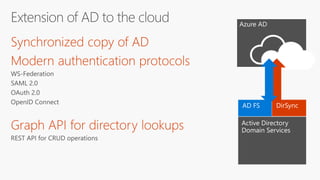
Azure AD
Active Directory
AD FS
Active Directory
Domain Services
DirSync
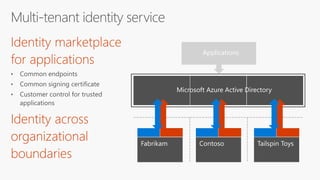
Fabrikam Contoso Tailspin Toys
Applications
Microsoft Azure Active Directory
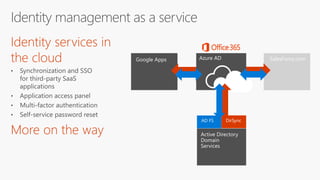
Azure AD
AD FS
Active Directory
Domain
Services
DirSync
Google Apps SalesForce.com
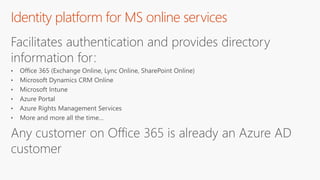
Identity platform for MS online services
Facilitates authentication and provides directory
information for:
Any customer on Office 365 is already an Azure AD
customer
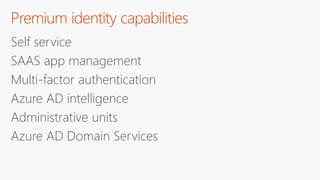
Premium identity capabilities
Self service
SAAS app management
Multi-factor authentication
Azure AD intelligence
Administrative units
Azure AD Domain Services
Azure AD
architecture
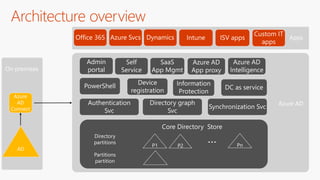
Architecture overview
P1 PnP2
…Directory
partitions
Partitions
partition
Core Directory Store
Authentication
Svc
Directory graph
Svc
Synchronization Svc
Admin
portal
Device
registration
Information
Protection
Self
Service
Office 365 Azure Svcs Dynamics
Custom IT
apps
AD
Azure
AD
Connect
DC as servicePowerShell
SaaS
App Mgmt
Intune Apps
Azure AD
ISV apps
On premises
Azure AD
Intelligence
Azure AD
App proxy
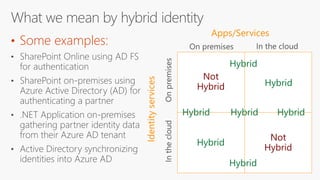
• Some examples:
Identityservices
Apps/Services
Not
Hybrid
Not
Hybrid
Hybrid
Hybrid
Hybrid Hybrid
Hybrid
Hybrid
Hybrid
• The cloud would be an awful user
experience
• Enterprises would have a tough time
controlling access to their data
• Application security practices would
be questionable, at best
• The API economy would fail
• I would be out of a job
If there were no hybrid identity solutions
Software assurance
SLA – 99.95
High availability and disaster recovery
Safeguards on operator access
Secure storage of hashes only
Azure AD architecture
Natively multi tenant
Multi tenancy is enforced in software
Built on open standards
High scale
Azure AD architecture (continued)
High availability across data centers
Support compliance standards
Very high operational reliability
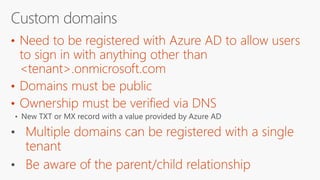
Azure AD domains
•
•
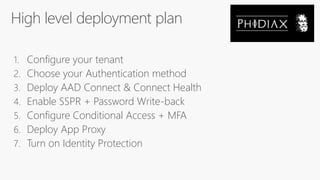
High level deployment plan
1. Configure your tenant
2. Choose your Authentication method
3. Deploy AAD Connect & Connect Health
4. Enable SSPR + Password Write-back
5. Configure Conditional Access + MFA
6. Deploy App Proxy
7. Turn on Identity Protection
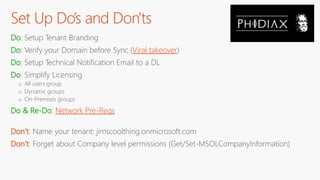
Set Up Do’s and Don'ts
Do: Setup Tenant Branding
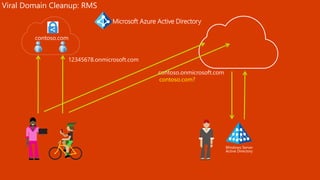
Do: Verify your Domain before Sync (Viral takeover)
Do: Setup Technical Notification Email to a DL
Do: Simplify Licensing
o All users group
o Dynamic groups
o On-Premises groups
Do & Re-Do: Network Pre-Reqs
Don’t: Name your tenant: jimscoolthing.onmicrosoft.com
Don’t: Forget about Company level permissions (Get/Set-MSOLCompanyInformation)
Windows Server
Active Directory
contoso.com?
Viral Domain Cleanup: RMS
Microsoft Azure Active Directory
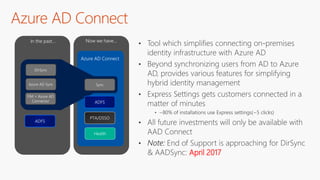
Azure AD Connect
April 2017
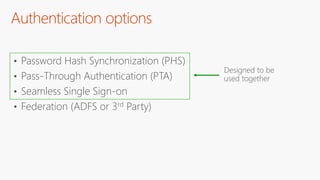
Authentication options
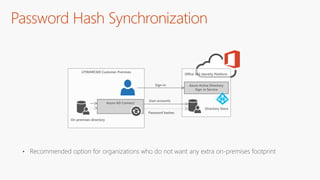
• Password Hash Synchronization (PHS)
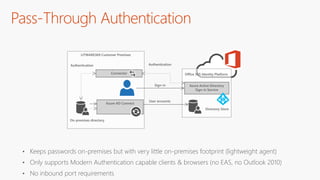
• Pass-Through Authentication (PTA)
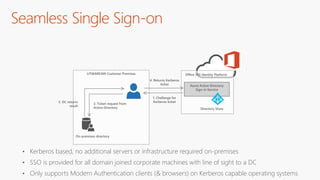
• Seamless Single Sign-on
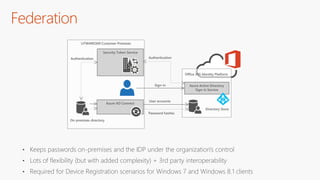
• Federation (ADFS or 3rd Party)
Password Hash Synchronization
• Recommended option for organizations who do not want any extra on-premises footprint
LITWARE369 Customer Premises
Office 365 Identity Platform
Azure Active Directory
Sign-in Service
Directory Store
On-premises directory
Sign-in
Azure AD Connect
User accounts
Password hashes
LITWARE369 Customer Premises
Office 365 Identity Platform
Azure Active Directory
Sign-in Service
Directory Store
On-premises directory
Sign-in
Azure AD Connect
User accounts
AuthenticationAuthentication
Connector
Pass-Through Authentication
• Keeps passwords on-premises but with very little on-premises footprint (lightweight agent)
• Only supports Modern Authentication capable clients & browsers (no EAS, no Outlook 2010)
• No inbound port requirements
Seamless Single Sign-on
• Kerberos based, no additional servers or infrastructure required on-premises
• SSO is provided for all domain joined corporate machines with line of sight to a DC
• Only supports Modern Authentication clients (& browsers) on Kerberos capable operating systems
LITWARE369 Customer Premises
On-premises directory
Office 365 Identity Platform
Azure Active Directory
Sign-in Service
Directory Store
4. Returns Kerberos
ticket
1. Challenge for
Kerberos ticket
2. Ticket request from
Active Directory
3. DC returns
result
LITWARE369 Customer Premises
Office 365 Identity Platform
Azure Active Directory
Sign-in Service
Directory Store
On-premises directory
Sign-in
Azure AD Connect
User accounts
Password hashes
Security Token Service
AuthenticationAuthentication
Federation
• Keeps passwords on-premises and the IDP under the organization's control
• Lots of flexibility (but with added complexity) + 3rd party interoperability
• Required for Device Registration scenarios for Windows 7 and Windows 8.1 clients
Auth Do’s and Don'ts
Do: Choose the simplest authN method for your needs
Do: Look at using Windows 10 if you want the best SSO experience possible
Do: Know which clients, scenarios & applications support which methods
Do: Understand the nuances between Single Sign-on vs Same Sign-on
Do: Enable Password Hash Sync even if you are federated (leaked credential report)
Do: Leave a global admin @onmicrosoft.com account when federated
Don’t: Default to deploying AD FS
Don’t: Forget about signing certificates rolling annually in AD FS
Sync Do’s and Don'ts
Do: Plan your Upgrade:
o Automatic in-place
o Manual in-place
o Parallel (staging) box
Do: Enable Azure AD Connect Health for Sync, ADFS, & ADDS
Do: Sync only what you need
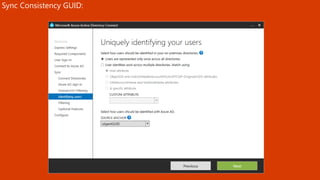
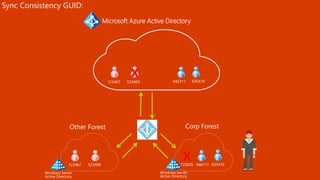
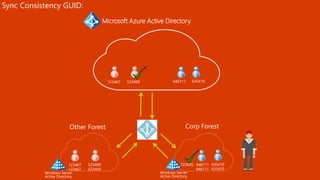
Do: Use a “Consistency GUID” if you are Multi-Forest
Do: Understand Password Hash Sync and Password Writeback
Don’t: Forget Directory Size:
o 50K by default
o 100K Sync Database object limit
o 300K if you verify a domain
o Support ticket to raise it beyond
Don’t: Force Weekly Full Sync
Don’t: Force full password hash sync
Don’t: Leave the Sync UI open
Microsoft Azure Active Directory
Windows Server
Active Directory
Sync Consistency GUID:
Windows Server
Active Directory
X
X
Sync Consistency GUID:
Microsoft Azure Active Directory
Windows Server
Active Directory
Sync Consistency GUID:
Windows Server
Active Directory
Connect Health
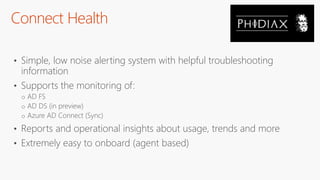
• Simple, low noise alerting system with helpful troubleshooting
information
• Supports the monitoring of:
o AD FS
o AD DS (in preview)
o Azure AD Connect (Sync)
• Reports and operational insights about usage, trends and more
• Extremely easy to onboard (agent based)
Connect Health Reporting & Alerting
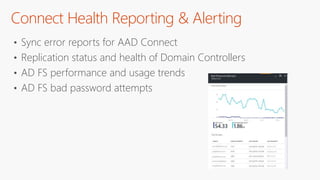
• Sync error reports for AAD Connect
• Replication status and health of Domain Controllers
• AD FS performance and usage trends
• AD FS bad password attempts
Connect Health Do’s and Don'ts
Do: Deploy all health agents
Do: Upgrade to latest and greatest AD Connect
Do: Delegate access to health portal
Do: Follow best practices suggested by health agents
Do: Enable agent auto update
Do: Install AD DS Health agent to see: Replication, Logins by type, DCs,
Domains Sites
Don’t: Not deploy the health agents
Gotcha: Password Writeback not monitored yet
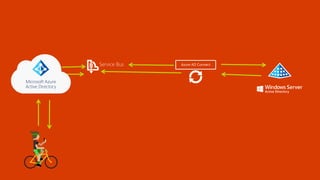
Microsoft Azure
Active Directory
Service Bus Azure AD Connect
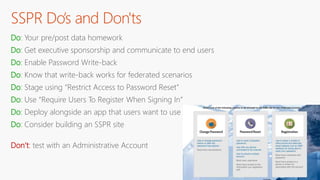
SSPR Do’s and Don'ts
Do: Your pre/post data homework
Do: Get executive sponsorship and communicate to end users
Do: Enable Password Write-back
Do: Know that write-back works for federated scenarios
Do: Stage using “Restrict Access to Password Reset”
Do: Use “Require Users To Register When Signing In”
Do: Deploy alongside an app that users want to use
Do: Consider building an SSPR site
Don’t: test with an Administrative Account
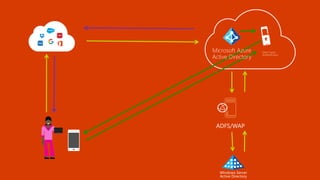
Windows Server
Active Directory
ADFS/WAP
Multi-Factor
Authentication
Microsoft Azure
Active Directory
MFA Do’s and Don'ts
Do: Use cloud-based Azure MFA over On-Prem MFA Server
Do: Know how to troubleshoot MFA authentications
Do: Know how to troubleshoot Modern Auth issues http://aka.ms/icesdptool
Do: Use the Mobile App over SMS
Do: Use Conditional Access
Do: Consider using Identity Protection
Don’t: Assume users / business units will understand why
Don’t: Forget about the last 5%
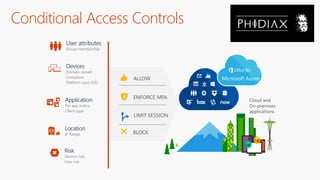
Conditional Access Controls
Application
Per app policy
Client type
User attributes
Group membership
Devices
Domain Joined
Compliant
Platform type (OS)
Location
IP Range
Risk
Session risk
User risk
ENFORCE MFA
ALLOW
LIMIT SESSION
BLOCK
Cloud and
On-premises
applications
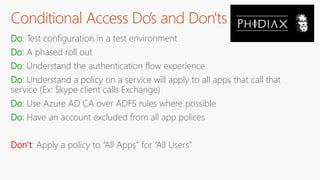
Conditional Access Do’s and Don'ts
Do: Test configuration in a test environment
Do: A phased roll out
Do: Understand the authentication flow experience
Do: Understand a policy on a service will apply to all apps that call that
service (Ex: Skype client calls Exchange)
Do: Use Azure AD CA over ADFS rules where possible
Do: Have an account excluded from all app polices
Don’t: Apply a policy to “All Apps” for “All Users”
Forefront UAG/TMG
Web Application Proxy
+
AD FS
Microsoft Azure
Active Directory
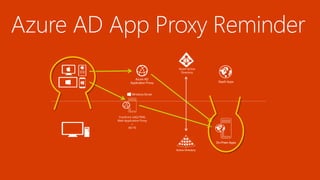
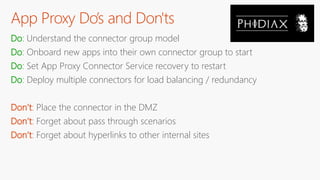
App Proxy Do’s and Don'ts
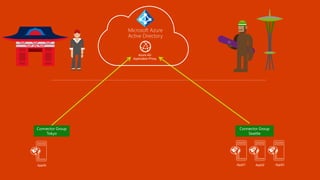
Do: Understand the connector group model
Do: Onboard new apps into their own connector group to start
Do: Set App Proxy Connector Service recovery to restart
Do: Deploy multiple connectors for load balancing / redundancy
Don’t: Place the connector in the DMZ
Don’t: Forget about pass through scenarios
Don’t: Forget about hyperlinks to other internal sites
Azure AD Identity Protection
• Gain real-time insights into threats and suspicious sign-in
activity
• Monitor your users patterns and expose obvious threats
• Protect against leaked or compromised credentials
• Enforce conditional access based on risk profile
• Use it as a method to pre-register users for MFA
Identity Protection Do’s and Don'ts
Do: Use group scope for rollout
Do: Use MFA Pre-Registration
Do: Enable Sign-in Risk Policy
Do: Attest/verify MFA registrations
Do: Delegate read only access to security team
Don’t: Enable before you understand User Risk and Sign-in
Risk. New Location = MFA challenge
Gotcha: Securing initial MFA registration

Azure Global Bootcamp 2017 Azure AD Deployment

  • 2.
  • 3.
    Agenda & Goals •Overview of Azure AD • Deployment lessons from the real world • Outline items that can accelerate your deployment • Avoid things that can slow you down • Deep Dive on common technical challenges and how to over come them
  • 4.
  • 5.
    Azure AD Active Directory ADFS Active Directory Domain Services DirSync
  • 6.
    Fabrikam Contoso TailspinToys Applications Microsoft Azure Active Directory
  • 7.
    Azure AD AD FS ActiveDirectory Domain Services DirSync Google Apps SalesForce.com
  • 8.
    Identity platform forMS online services Facilitates authentication and provides directory information for: Any customer on Office 365 is already an Azure AD customer
  • 9.
    Premium identity capabilities Selfservice SAAS app management Multi-factor authentication Azure AD intelligence Administrative units Azure AD Domain Services
  • 10.
  • 11.
    Architecture overview P1 PnP2 …Directory partitions Partitions partition CoreDirectory Store Authentication Svc Directory graph Svc Synchronization Svc Admin portal Device registration Information Protection Self Service Office 365 Azure Svcs Dynamics Custom IT apps AD Azure AD Connect DC as servicePowerShell SaaS App Mgmt Intune Apps Azure AD ISV apps On premises Azure AD Intelligence Azure AD App proxy
  • 12.
  • 13.
    • The cloudwould be an awful user experience • Enterprises would have a tough time controlling access to their data • Application security practices would be questionable, at best • The API economy would fail • I would be out of a job If there were no hybrid identity solutions
  • 16.
    Software assurance SLA –99.95 High availability and disaster recovery Safeguards on operator access Secure storage of hashes only
  • 17.
    Azure AD architecture Nativelymulti tenant Multi tenancy is enforced in software Built on open standards High scale
  • 18.
    Azure AD architecture(continued) High availability across data centers Support compliance standards Very high operational reliability
  • 19.
  • 22.
  • 23.
    High level deploymentplan 1. Configure your tenant 2. Choose your Authentication method 3. Deploy AAD Connect & Connect Health 4. Enable SSPR + Password Write-back 5. Configure Conditional Access + MFA 6. Deploy App Proxy 7. Turn on Identity Protection
  • 25.
    Set Up Do’sand Don'ts Do: Setup Tenant Branding Do: Verify your Domain before Sync (Viral takeover) Do: Setup Technical Notification Email to a DL Do: Simplify Licensing o All users group o Dynamic groups o On-Premises groups Do & Re-Do: Network Pre-Reqs Don’t: Name your tenant: jimscoolthing.onmicrosoft.com Don’t: Forget about Company level permissions (Get/Set-MSOLCompanyInformation)
  • 26.
    Windows Server Active Directory contoso.com? ViralDomain Cleanup: RMS Microsoft Azure Active Directory
  • 28.
  • 29.
    Authentication options • PasswordHash Synchronization (PHS) • Pass-Through Authentication (PTA) • Seamless Single Sign-on • Federation (ADFS or 3rd Party)
  • 30.
    Password Hash Synchronization •Recommended option for organizations who do not want any extra on-premises footprint LITWARE369 Customer Premises Office 365 Identity Platform Azure Active Directory Sign-in Service Directory Store On-premises directory Sign-in Azure AD Connect User accounts Password hashes
  • 31.
    LITWARE369 Customer Premises Office365 Identity Platform Azure Active Directory Sign-in Service Directory Store On-premises directory Sign-in Azure AD Connect User accounts AuthenticationAuthentication Connector Pass-Through Authentication • Keeps passwords on-premises but with very little on-premises footprint (lightweight agent) • Only supports Modern Authentication capable clients & browsers (no EAS, no Outlook 2010) • No inbound port requirements
  • 32.
    Seamless Single Sign-on •Kerberos based, no additional servers or infrastructure required on-premises • SSO is provided for all domain joined corporate machines with line of sight to a DC • Only supports Modern Authentication clients (& browsers) on Kerberos capable operating systems LITWARE369 Customer Premises On-premises directory Office 365 Identity Platform Azure Active Directory Sign-in Service Directory Store 4. Returns Kerberos ticket 1. Challenge for Kerberos ticket 2. Ticket request from Active Directory 3. DC returns result
  • 33.
    LITWARE369 Customer Premises Office365 Identity Platform Azure Active Directory Sign-in Service Directory Store On-premises directory Sign-in Azure AD Connect User accounts Password hashes Security Token Service AuthenticationAuthentication Federation • Keeps passwords on-premises and the IDP under the organization's control • Lots of flexibility (but with added complexity) + 3rd party interoperability • Required for Device Registration scenarios for Windows 7 and Windows 8.1 clients
  • 34.
    Auth Do’s andDon'ts Do: Choose the simplest authN method for your needs Do: Look at using Windows 10 if you want the best SSO experience possible Do: Know which clients, scenarios & applications support which methods Do: Understand the nuances between Single Sign-on vs Same Sign-on Do: Enable Password Hash Sync even if you are federated (leaked credential report) Do: Leave a global admin @onmicrosoft.com account when federated Don’t: Default to deploying AD FS Don’t: Forget about signing certificates rolling annually in AD FS
  • 35.
    Sync Do’s andDon'ts Do: Plan your Upgrade: o Automatic in-place o Manual in-place o Parallel (staging) box Do: Enable Azure AD Connect Health for Sync, ADFS, & ADDS Do: Sync only what you need Do: Use a “Consistency GUID” if you are Multi-Forest Do: Understand Password Hash Sync and Password Writeback Don’t: Forget Directory Size: o 50K by default o 100K Sync Database object limit o 300K if you verify a domain o Support ticket to raise it beyond Don’t: Force Weekly Full Sync Don’t: Force full password hash sync Don’t: Leave the Sync UI open
  • 36.
    Microsoft Azure ActiveDirectory Windows Server Active Directory Sync Consistency GUID: Windows Server Active Directory X X
  • 37.
  • 38.
    Microsoft Azure ActiveDirectory Windows Server Active Directory Sync Consistency GUID: Windows Server Active Directory
  • 40.
    Connect Health • Simple,low noise alerting system with helpful troubleshooting information • Supports the monitoring of: o AD FS o AD DS (in preview) o Azure AD Connect (Sync) • Reports and operational insights about usage, trends and more • Extremely easy to onboard (agent based)
  • 41.
    Connect Health Reporting& Alerting • Sync error reports for AAD Connect • Replication status and health of Domain Controllers • AD FS performance and usage trends • AD FS bad password attempts
  • 42.
    Connect Health Do’sand Don'ts Do: Deploy all health agents Do: Upgrade to latest and greatest AD Connect Do: Delegate access to health portal Do: Follow best practices suggested by health agents Do: Enable agent auto update Do: Install AD DS Health agent to see: Replication, Logins by type, DCs, Domains Sites Don’t: Not deploy the health agents Gotcha: Password Writeback not monitored yet
  • 44.
  • 45.
    SSPR Do’s andDon'ts Do: Your pre/post data homework Do: Get executive sponsorship and communicate to end users Do: Enable Password Write-back Do: Know that write-back works for federated scenarios Do: Stage using “Restrict Access to Password Reset” Do: Use “Require Users To Register When Signing In” Do: Deploy alongside an app that users want to use Do: Consider building an SSPR site Don’t: test with an Administrative Account
  • 47.
  • 48.
    MFA Do’s andDon'ts Do: Use cloud-based Azure MFA over On-Prem MFA Server Do: Know how to troubleshoot MFA authentications Do: Know how to troubleshoot Modern Auth issues http://aka.ms/icesdptool Do: Use the Mobile App over SMS Do: Use Conditional Access Do: Consider using Identity Protection Don’t: Assume users / business units will understand why Don’t: Forget about the last 5%
  • 50.
    Conditional Access Controls Application Perapp policy Client type User attributes Group membership Devices Domain Joined Compliant Platform type (OS) Location IP Range Risk Session risk User risk ENFORCE MFA ALLOW LIMIT SESSION BLOCK Cloud and On-premises applications
  • 51.
    Conditional Access Do’sand Don'ts Do: Test configuration in a test environment Do: A phased roll out Do: Understand the authentication flow experience Do: Understand a policy on a service will apply to all apps that call that service (Ex: Skype client calls Exchange) Do: Use Azure AD CA over ADFS rules where possible Do: Have an account excluded from all app polices Don’t: Apply a policy to “All Apps” for “All Users”
  • 53.
  • 54.
  • 55.
    App Proxy Do’sand Don'ts Do: Understand the connector group model Do: Onboard new apps into their own connector group to start Do: Set App Proxy Connector Service recovery to restart Do: Deploy multiple connectors for load balancing / redundancy Don’t: Place the connector in the DMZ Don’t: Forget about pass through scenarios Don’t: Forget about hyperlinks to other internal sites
  • 57.
    Azure AD IdentityProtection • Gain real-time insights into threats and suspicious sign-in activity • Monitor your users patterns and expose obvious threats • Protect against leaked or compromised credentials • Enforce conditional access based on risk profile • Use it as a method to pre-register users for MFA
  • 58.
    Identity Protection Do’sand Don'ts Do: Use group scope for rollout Do: Use MFA Pre-Registration Do: Enable Sign-in Risk Policy Do: Attest/verify MFA registrations Do: Delegate read only access to security team Don’t: Enable before you understand User Risk and Sign-in Risk. New Location = MFA challenge Gotcha: Securing initial MFA registration

Editor's Notes

  • #10 Resource: https://azure.microsoft.com/en-us/services/active-directory-ds/
  • #14 If we did not have hybrid identity solutions, the world would be in chaos. There would be several things that would be worse off: The cloud would be an awful experience. End users would have a separate user name and credential for every cloud service they access. Enterprises would have a tough time controlling access to their data. With the cloud, the identity becomes the control plane. The traditional boundaries of the firewall are erased, and the central thing keeping your data safe is the identity and access management layer. Application security practices would be questionable, at best. If there were no hybrid identity solutions, every cloud application would be implementing their own identity solution in a disjointed model. Basically that is what what we see all of our customers are doing with their legacy on-premises applications today—building silos that were never intended to integrate. The API economy would fail. Without a common identity layer, the API economy would suffer. There would be no good way to exchange API services that are user-centric, since there is single view of who the user is. We would be out of a job. This is a tough problem to tackle. Seriously. Customers need smart people to work on this. That is where we come in.
  • #25 2. More than just AD FS and pwd sync now. Defaulting to AD FS is no longer the standard. 5. Requires AAD prem. To prevent external users from allowing SP Online, MFA, Conditional Access 6. App proxy (reverse proxy) Azure service bus connects via connectors, no port 443 or 8080 opening. Add Conditional Access and MFA for extra security 7. P2 SKU. Insights into user behavior, using compromised creds, pwd hash sync checking for sold pwd. Free for 30 days.
  • #27 Do: Setup Tenant Branding Brand logon page so users feel safe Do: Verify your Domain before Sync (Viral takeover) viral takeover is an internal term referring to if a user signs up for PowerBI or RMS it spins up an Azure AD with that domain. Using the DNS verification will allow you to take ownership of the AD tenant from Azure RMS, not so much with PowerBI though. Verify your domain first. Users will end up with the wrong UPN if you sync users first before verifying your custom domain. Users will end up with contoso.onmicrosoft.com as their UPN instead of your custom domain This will get fixed once you sync your custom domain but can result in user confusion if it changes. Do: Setup Technical Notification Email to a DL Do: Simplify Licensing All users group Dynamic groups On-Premises groups Do & Re-Do: Network Pre-Reqs a health agent will surface data into the portal now instead of trying to view log files, make sure ports are open 443 and 80 required for object sync, other ports for sync health agent and pwd write back. Don’t: Name your tenant: jimscoolthing.onmicrosoft.com The tenant name will appear in other places like SP online. The only fix is to create a new tenant and move all services. Don’t: Forget about Company level permissions (Get/Set-MSOLCompanyInformation) You can see some of the toggle switches that are turned on by default that you may want to disable. Users can use PS to see all users by default, users can enable apps by default.
  • #28 User from contoso.com signs up for Azure RMS for free (onmicrosoft.com indicates Azure AD) The user is unaware of the AAD tenant because it is spun up under the covers for them. 2. Another user signs up for Azure RMS using contoso.com email address and gets put into the same AAD tenant Users will only see contoso.com in most cases. Admin buys O365 as contoso.onmicroosoft.com, but when they try to add contoso.com they run into an issue because it has already been added to another AAD tenant This is fixed by adding the TXT record to the public DNS and users are migrated from RMS to new tenant. PowerBI does not migrate the users over however. Delete PowerBI to migrate users.
  • #30 Multi forest support Custom install will not enable auto-update for tool Sync will stop In place upgrade or staging server for upgrade to AAD Connect
  • #31 PHS - Hash the hashed pwd from AD and then sync that to AAD These three together negate the need for AD FS in most cases
  • #32 Sync is every 30 min Pwd change is in batches of 50 and sync every ~30 sec shown in EV log Write back is every 2 mins No on premise downtime that can prevent users from signing. AD FS goes down, it will cause outage of sign on System and protected accounts do not sync automatically Known compromised pwd will not work without this
  • #33 Uses a connector Talks to service bus outbound SSO (Kerberos auth) only require line of sight to a DC No pwd is stored in Azure AD PTA works x-forest No EAS or Outlook 2010 – Requires Modern Auth
  • #34 https://youtu.be/Z2Xk1o-7qmw?t=35m59s all it is when you enable this box in AAD connect to turn it on it creates a computer account in the domain that computer account has an SPN or an SPN set up with a couple of urls referencing the single sign-on URL of the service and what happens is when a user tries to sign on so if i'm already logged onto my desktop on the corporate network i try and hit portal office com we get a 401 challenge to say please authenticate and because the urls return to resolve to a computer object with an spn sent on it we go off and basically get a Kerberos ticket from the computer account the computer account has its machine password synchronized to ad connect to azure ad so when it the Kerberos token is wrapped up in HTTPS and sent back to the service we can decrypt the token the password improved that the user performed kerberos authentication and let them in the door so basically they get a true it's today it's not really true SSO because it doesn't do home realm discovery you've still got to input the user principal name. soon as you do that it kicks off and you never prompted for a password they're looking at fixing that so you might just basically get a prompt or if you logged on to your desktop you've got this set up you'll just be true single signed on to the service so some pluses here is no extra hardware it's a computer account this is just leveraging your existing domain controller infrastructure an ad infrastructure to work because it's just Kerberos you have to have line of sight to a domain controller outside of that window that's where pass through or password hash think would kick in and again only supports modern auth and some browsers doesn't work for edge for example finally love and obviously Kerberos capable operating systems and lastly
  • #35 Can sync pwd hash under the cover 2 servers, 2 WAP servers IDP Indentity provider Crazy things with claims providers Conditional access with domain joined devices for W7 and 8.1 requires AD FS – for now
  • #36 You don’t have to stick with your chosen Auth, you can change later W10 Azure AD join SSO will never prompt for pwd after you sign in Legacy auth Outlook 2010 AD FS you don’t get SSO outside, keep me signed in If this account is not federated if AD FS goes down you will not be able to login to the portal
  • #37 Deploy sync health agent 100K Sync Database object limit – Requires full SQL for >100K (Use IDFix – Filter by domain or OU not attribute to reduce db size) Leave the Sync UI open – Kills upgrades manual and auto
  • #38 Object GUIDs When you migrate to another forest the object gets a new Object GUID, so the mapping from the OG GUID is lost If you migrate an object from one forest to another you will end up with duplicate objects so choose a secondary attribute that you have confidence in
  • #39 Change the default rules Source Anchor
  • #40 Duplicate the Object GUID to another attribute. Then when you migrate the user to another forest you will not end up with a duplicate account because the mapping still exists. Make this change from the start to avoid headaches later trying to change it. Such as a federated user has to be unfederated flip their UPN and then federate it again. For a single user it isn’t a big deal but for 100’s or 1000’s it can be a nightmare. Azure will throttle you if you try to change more than 50 at a time.
  • #42 Agent driven on premise agents Uses service bus, dumps data into a storage account Shown in the portal Requires outbound only
  • #47 Roll it out slowly
  • #49 https://youtu.be/Z2Xk1o-7qmw?t=1h2m19s Phone, SMS, Auth app. SMS is deprecated by NIST
  • #50 RADIUS VPN typical on prem server required Extension of RADIUS in preview 2016 also lessens the need for on premise MFA Understanding the flow of modern auth will help with TS MFA Use cond access to trigger MFA
  • #53 If you block access to a dependent app then you will block access to all apps – ALWAYS test apps Do: Use Azure AD CA over ADFS rules where possible – Provides better granular control
  • #55 Publish web apps from on premise Provides SaaS app like experience
  • #56 ++ Conditional Access policies
  • #57 More than one connector for resilience Putting them in the DMZ blocks talking to DC’s