Module 7
Implementing Active Directory
Rights Management Services
Module Overview
• AD RMS Overview
• Deploying and Managing an AD RMS
Infrastructure
• Configuring AD RMS Content Protection
• Configuring External Access to AD RMS
Lesson 1: AD RMS Overview
• What Is AD RMS?
• Usage Scenarios for AD RMS
• Overview of the AD RMS Components
• AD RMS Certificates and Licenses
• How AD RMS Works
What Is AD RMS?
• Information protection technology
• Designed to reduce information leakage
• Integrated with Windows operating systems, Microsoft
Office, Exchange Server, and SharePoint Server
• Based on Symmetric and Public Key Cryptography
• Protects data at rest, in transit, and in use
Usage Scenarios for AD RMS
• Prevent the transmission of sensitive information
• Comply with privacy regulations
• Can be used with encryption to protect data in transit
and at rest
Overview of the AD RMS Components
• AD RMS server
 Licenses AD RMS-protected content
 Certifies identity of trusted users and devices
• AD RMS client
 Built into Windows Vista, Windows 7, and Windows 8 operating
systems.
 Interacts with AD RMS-enabled applications
• AD RMS-enabled applications
 Allows publication and consumption of AD RMS protected
content
 Includes Microsoft Office, Exchange Server, and SharePoint
Server
 Can be created using AD RMS SDKs.
AD RMS Certificates and Licenses
• AD RMS certificate and licenses include:
• Server licensor certificate
• AD RMS machine certificate
• Rights Account Certificate
• Client licensor certificate
• Publishing license
• End-user license
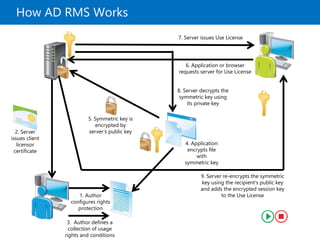
How AD RMS Works
1. Author
configures rights
protection
2. Server
issues client
licensor
certificate
3. Author defines a
collection of usage
rights and conditions
4. Application
encrypts file
with
symmetric key
5. Symmetric key is
encrypted by
server’s public key
6. Application or browser
requests server for Use License
7. Server issues Use License
8. Server decrypts the
symmetric key using
its private key
9. Server re-encrypts the symmetric
key using the recipient's public key
and adds the encrypted session key
to the Use License
Lesson 2: Deploying and Managing an AD RMS
Infrastructure
• AD RMS Deployment Scenarios
• Configuring the AD RMS Cluster
• Demonstration: Installing the First Server of an
AD RMS Cluster
• AD RMS Client Requirements
• Implementing an AD RMS Backup and Recovery
Strategy
• Decommissioning and Removing AD RMS
AD RMS Deployment Scenarios
•Deployment scenarios for AD RMS are:
• AD RMS in a single forest
• AD RMS in multiple forests
• AD RMS used on an extranet
• AD RMS integrated with AD FS
Configuring the AD RMS Cluster
AD RMS configuration includes configuring of following:
• New or join existing cluster
• Configuration database location
• Service account
• Cryptographic mode
• Cluster key storage
• Cluster key password
• Cluster website
• Cluster address
• Server certificate
• Licensor certificate
• SCP registration
Demonstration: Installing the First Server of an
AD RMS Cluster
In this demonstration, you will see how to:
• Configure Service Account
• Prepare DNS
• Install the AD RMS role
• Configure AD RMS
AD RMS Client Requirements
• Client included in Windows Vista and above operating
systems
• Client included in Windows Server 2008 and above
operating systems
• Client available for download for previous versions of
Windows operating systems, and Mac OS X
• AD RMS–enabled applications include Office 2007,
Office 2010, and Office 2013
• Exchange Server 2007, Exchange Server 2010 and
Exchange Server 2013 support AD RMS
• AD RMS client needs RMS CAL
Implementing an AD RMS Backup and Recovery
Strategy
• Back up private key and certificates
• Ensure that the AD RMS database is backed up
regularly
• Export templates to back them up
• Run AD RMS server as a virtual machine, and
perform full server backup
Decommissioning and Removing AD RMS
• Decommission an AD RMS cluster prior to
removing it
• Decommissioning provides a key that decrypts
previously published AD RMS content
• Leave server in decommissioned state until all
AD RMS–protected content is migrated
• Export the server licensor certificate prior to
uninstalling the AD RMS role
Lesson 3: Configuring AD RMS Content
Protection
• What Are Rights-Policy Templates?
• Demonstration: Creating a Rights-Policy Template
• Providing Rights-Policy Templates for Offline Use
• What Are Exclusion Policies?
• Demonstration: Creating an Exclusion Policy to
Exclude an Application
• AD RMS Super Users Group
• AD RMS Integration with DAC
What Are Rights-Policy Templates?
• Allow authors to apply standard forms of protection
across the organization
• Different applications allow different forms of rights
• Can configure rights related to viewing, editing and
printing documents
• Can configure content expiration rights
• Can configure content revocation
Demonstration: Creating a Rights-Policy
Template
In this demonstration, you will see how to create a
rights policy template that allows users to view a
document, but not perform other actions
Providing Rights-Policy Templates for Offline
Use
•Ensure that templates are published to a shared
folder
•Enable the AD RMS Rights Policy Template
Management (Automated) scheduled task
•Edit the registry key and specify the shared
folder location
What Are Exclusion Policies?
Allows you to:
• Block specific users from accessing AD
RMS–protected content by blocking their RAC
• Block specific applications from creating or
consuming AD RMS–protected content
• Block specific versions of the AD RMS client
Demonstration: Creating an Exclusion Policy to
Exclude an Application
In this demonstration, you will see how to exclude
the Office PowerPoint application from AD RMS
AD RMS Super Users Group
• Super users group members are granted full
owner rights in all use licenses that are issued by
the AD RMS cluster on which the super users
group is configured.
• Super users group:
• Is not configured by default
• Can be used as data recovery mechanism for
AD RMS–protected content
• Can recover content that has expired
• Can recover content if the template is deleted
• Can recover content without requiring author credentials
• Must be an Active Directory group with an assigned
email address.
AD RMS Integration with DAC
• DAC applies encryption by using AD RMS
• DAC protects documents even if inadvertently
saved, sent, or processed incorrectly
• DAC extends AD RMS to the file server
Lesson 4: Configuring External Access to AD RMS
• Options for Enabling External Users with AD RMS
Access
• Implementing TUD
• Implementing TPD
• Sharing AD RMS-Protected Documents by Using
Windows Live ID
• Considerations for Implementing External User
Access to AD RMS
• Windows Azure RMS
Options for Enabling External Users with AD RMS
Access
• Trusted User Domains
• Exchange protected content between two organizations
• Trusted Publishing Domains
• Consolidate AD RMS architecture
• Federation Trust
• One AD RMS infrastructure is accessible to AD FS
partners
• Windows Live ID
• Allow standalone users access to AD RMS content
• Microsoft Federation Gateway
• Allow an AD RMS cluster to work with Microsoft
Federation Gateway without requiring a direct
Federation Trust
Implementing TUD
• Allows AD RMS to service requests to users with
RACs from different AD RMS clusters
• TUDs:
• Support exclusions to individual users and groups
• Can be one-way or bi-directional
• Must export TUD from partner before importing
TUD locally
Implementing TPD
• Allows a local AD RMS deployment to issue EULs
to content protected by a partner AD RMS cluster
• Involves importing the SLC of the partner AD RMS
cluster
• No limit to the number of supported TPDs
Sharing AD RMS-Protected Documents by Using
Windows Live ID
• Provide RACs to users who are not part of an
organization
• Users with Windows Live ID accounts can
consume AD RMS–protected content
• Users with Windows Live ID accounts cannot
publish AD RMS–protected content
Considerations for Implementing External User
Access to AD RMS
• Use Windows Live ID to issue RACs to users who
are not part of organizations, and who need to
consume content
• Use TUD for RACs issued by a different AD RMS
cluster
• Use TPD to allow local RACs to access remotely
published AD RMS content
• Use Federation Trust between organizations that
have a federated relationship
• Use Microsoft Federation Gateway when no direct
federated relationship exists
Windows Azure RMS
• Windows Azure AD Rights Management is free
• Sign up as a free tenant in Windows Azure AD
• Use the Azure viewer app to send a message to an
organization with which you wish to employ
Rights Management
• Message will contain simple instructions to obtain
tenant status
• You can then use Rights Management across a B2B
partnership
• You could replace your AD RMS infrastructure with
Windows Azure AD Rights Management
Lab: Implementing AD RMS
• Exercise 1: Installing and Configuring AD RMS
• Exercise 2: Configuring AD RMS Templates
• Exercise 3: Implementing the AD RMS Trust
Policies
• Exercise 4: Verifying the AD RMS Deployment
Logon Information
Virtual Machines: 20412C-LON-DC1,
20412C-LON-SVR1,
20412C-LON-CL1,
20412C-TREY-DC1,
20412C-TREY-CL1
User Name: AdatumAdministrator
Password: Pa$$w0rd
Estimated Time: 60 minutes
Lab Scenario
Because of the highly confidential nature of the research that is
performed at A. Datum Corporation, the security team at A.
Datum wants to implement additional security for certain
documents that the Research department creates. The security
team is concerned that anyone with Read access to the
documents can modify and distribute the documents in any way
that they choose. The security team would like to provide an
extra level of protection that stays with the document even if it
is moved around the network or outside the network.
As one of the senior network administrators at A. Datum, you
need to plan and implement an AD RMS solution that will
provide the level of protection requested by the security team.
The AD RMS solution must provide many different options that
can be adapted for a wide variety of business and security
requirements.
Lab Review
• What steps can you take to ensure that you can
use Information Rights Management with the
AD RMS role?

MCSA 70-412 Chapter 07

  • 1.
    Module 7 Implementing ActiveDirectory Rights Management Services
  • 2.
    Module Overview • ADRMS Overview • Deploying and Managing an AD RMS Infrastructure • Configuring AD RMS Content Protection • Configuring External Access to AD RMS
  • 3.
    Lesson 1: ADRMS Overview • What Is AD RMS? • Usage Scenarios for AD RMS • Overview of the AD RMS Components • AD RMS Certificates and Licenses • How AD RMS Works
  • 4.
    What Is ADRMS? • Information protection technology • Designed to reduce information leakage • Integrated with Windows operating systems, Microsoft Office, Exchange Server, and SharePoint Server • Based on Symmetric and Public Key Cryptography • Protects data at rest, in transit, and in use
  • 5.
    Usage Scenarios forAD RMS • Prevent the transmission of sensitive information • Comply with privacy regulations • Can be used with encryption to protect data in transit and at rest
  • 6.
    Overview of theAD RMS Components • AD RMS server  Licenses AD RMS-protected content  Certifies identity of trusted users and devices • AD RMS client  Built into Windows Vista, Windows 7, and Windows 8 operating systems.  Interacts with AD RMS-enabled applications • AD RMS-enabled applications  Allows publication and consumption of AD RMS protected content  Includes Microsoft Office, Exchange Server, and SharePoint Server  Can be created using AD RMS SDKs.
  • 7.
    AD RMS Certificatesand Licenses • AD RMS certificate and licenses include: • Server licensor certificate • AD RMS machine certificate • Rights Account Certificate • Client licensor certificate • Publishing license • End-user license
  • 8.
    How AD RMSWorks 1. Author configures rights protection 2. Server issues client licensor certificate 3. Author defines a collection of usage rights and conditions 4. Application encrypts file with symmetric key 5. Symmetric key is encrypted by server’s public key 6. Application or browser requests server for Use License 7. Server issues Use License 8. Server decrypts the symmetric key using its private key 9. Server re-encrypts the symmetric key using the recipient's public key and adds the encrypted session key to the Use License
  • 9.
    Lesson 2: Deployingand Managing an AD RMS Infrastructure • AD RMS Deployment Scenarios • Configuring the AD RMS Cluster • Demonstration: Installing the First Server of an AD RMS Cluster • AD RMS Client Requirements • Implementing an AD RMS Backup and Recovery Strategy • Decommissioning and Removing AD RMS
  • 10.
    AD RMS DeploymentScenarios •Deployment scenarios for AD RMS are: • AD RMS in a single forest • AD RMS in multiple forests • AD RMS used on an extranet • AD RMS integrated with AD FS
  • 11.
    Configuring the ADRMS Cluster AD RMS configuration includes configuring of following: • New or join existing cluster • Configuration database location • Service account • Cryptographic mode • Cluster key storage • Cluster key password • Cluster website • Cluster address • Server certificate • Licensor certificate • SCP registration
  • 12.
    Demonstration: Installing theFirst Server of an AD RMS Cluster In this demonstration, you will see how to: • Configure Service Account • Prepare DNS • Install the AD RMS role • Configure AD RMS
  • 13.
    AD RMS ClientRequirements • Client included in Windows Vista and above operating systems • Client included in Windows Server 2008 and above operating systems • Client available for download for previous versions of Windows operating systems, and Mac OS X • AD RMS–enabled applications include Office 2007, Office 2010, and Office 2013 • Exchange Server 2007, Exchange Server 2010 and Exchange Server 2013 support AD RMS • AD RMS client needs RMS CAL
  • 14.
    Implementing an ADRMS Backup and Recovery Strategy • Back up private key and certificates • Ensure that the AD RMS database is backed up regularly • Export templates to back them up • Run AD RMS server as a virtual machine, and perform full server backup
  • 15.
    Decommissioning and RemovingAD RMS • Decommission an AD RMS cluster prior to removing it • Decommissioning provides a key that decrypts previously published AD RMS content • Leave server in decommissioned state until all AD RMS–protected content is migrated • Export the server licensor certificate prior to uninstalling the AD RMS role
  • 16.
    Lesson 3: ConfiguringAD RMS Content Protection • What Are Rights-Policy Templates? • Demonstration: Creating a Rights-Policy Template • Providing Rights-Policy Templates for Offline Use • What Are Exclusion Policies? • Demonstration: Creating an Exclusion Policy to Exclude an Application • AD RMS Super Users Group • AD RMS Integration with DAC
  • 17.
    What Are Rights-PolicyTemplates? • Allow authors to apply standard forms of protection across the organization • Different applications allow different forms of rights • Can configure rights related to viewing, editing and printing documents • Can configure content expiration rights • Can configure content revocation
  • 18.
    Demonstration: Creating aRights-Policy Template In this demonstration, you will see how to create a rights policy template that allows users to view a document, but not perform other actions
  • 19.
    Providing Rights-Policy Templatesfor Offline Use •Ensure that templates are published to a shared folder •Enable the AD RMS Rights Policy Template Management (Automated) scheduled task •Edit the registry key and specify the shared folder location
  • 20.
    What Are ExclusionPolicies? Allows you to: • Block specific users from accessing AD RMS–protected content by blocking their RAC • Block specific applications from creating or consuming AD RMS–protected content • Block specific versions of the AD RMS client
  • 21.
    Demonstration: Creating anExclusion Policy to Exclude an Application In this demonstration, you will see how to exclude the Office PowerPoint application from AD RMS
  • 22.
    AD RMS SuperUsers Group • Super users group members are granted full owner rights in all use licenses that are issued by the AD RMS cluster on which the super users group is configured. • Super users group: • Is not configured by default • Can be used as data recovery mechanism for AD RMS–protected content • Can recover content that has expired • Can recover content if the template is deleted • Can recover content without requiring author credentials • Must be an Active Directory group with an assigned email address.
  • 23.
    AD RMS Integrationwith DAC • DAC applies encryption by using AD RMS • DAC protects documents even if inadvertently saved, sent, or processed incorrectly • DAC extends AD RMS to the file server
  • 24.
    Lesson 4: ConfiguringExternal Access to AD RMS • Options for Enabling External Users with AD RMS Access • Implementing TUD • Implementing TPD • Sharing AD RMS-Protected Documents by Using Windows Live ID • Considerations for Implementing External User Access to AD RMS • Windows Azure RMS
  • 25.
    Options for EnablingExternal Users with AD RMS Access • Trusted User Domains • Exchange protected content between two organizations • Trusted Publishing Domains • Consolidate AD RMS architecture • Federation Trust • One AD RMS infrastructure is accessible to AD FS partners • Windows Live ID • Allow standalone users access to AD RMS content • Microsoft Federation Gateway • Allow an AD RMS cluster to work with Microsoft Federation Gateway without requiring a direct Federation Trust
  • 26.
    Implementing TUD • AllowsAD RMS to service requests to users with RACs from different AD RMS clusters • TUDs: • Support exclusions to individual users and groups • Can be one-way or bi-directional • Must export TUD from partner before importing TUD locally
  • 27.
    Implementing TPD • Allowsa local AD RMS deployment to issue EULs to content protected by a partner AD RMS cluster • Involves importing the SLC of the partner AD RMS cluster • No limit to the number of supported TPDs
  • 28.
    Sharing AD RMS-ProtectedDocuments by Using Windows Live ID • Provide RACs to users who are not part of an organization • Users with Windows Live ID accounts can consume AD RMS–protected content • Users with Windows Live ID accounts cannot publish AD RMS–protected content
  • 29.
    Considerations for ImplementingExternal User Access to AD RMS • Use Windows Live ID to issue RACs to users who are not part of organizations, and who need to consume content • Use TUD for RACs issued by a different AD RMS cluster • Use TPD to allow local RACs to access remotely published AD RMS content • Use Federation Trust between organizations that have a federated relationship • Use Microsoft Federation Gateway when no direct federated relationship exists
  • 30.
    Windows Azure RMS •Windows Azure AD Rights Management is free • Sign up as a free tenant in Windows Azure AD • Use the Azure viewer app to send a message to an organization with which you wish to employ Rights Management • Message will contain simple instructions to obtain tenant status • You can then use Rights Management across a B2B partnership • You could replace your AD RMS infrastructure with Windows Azure AD Rights Management
  • 31.
    Lab: Implementing ADRMS • Exercise 1: Installing and Configuring AD RMS • Exercise 2: Configuring AD RMS Templates • Exercise 3: Implementing the AD RMS Trust Policies • Exercise 4: Verifying the AD RMS Deployment Logon Information Virtual Machines: 20412C-LON-DC1, 20412C-LON-SVR1, 20412C-LON-CL1, 20412C-TREY-DC1, 20412C-TREY-CL1 User Name: AdatumAdministrator Password: Pa$$w0rd Estimated Time: 60 minutes
  • 32.
    Lab Scenario Because ofthe highly confidential nature of the research that is performed at A. Datum Corporation, the security team at A. Datum wants to implement additional security for certain documents that the Research department creates. The security team is concerned that anyone with Read access to the documents can modify and distribute the documents in any way that they choose. The security team would like to provide an extra level of protection that stays with the document even if it is moved around the network or outside the network. As one of the senior network administrators at A. Datum, you need to plan and implement an AD RMS solution that will provide the level of protection requested by the security team. The AD RMS solution must provide many different options that can be adapted for a wide variety of business and security requirements.
  • 33.
    Lab Review • Whatsteps can you take to ensure that you can use Information Rights Management with the AD RMS role?

Editor's Notes

  • #2 Presentation: 60 minutes Lab: 60 minutes After completing this module, the students will be able to: Describe Active Directory® Rights Management Services (AD RMS). Deploy and manage an AD RMS infrastructure. Configure AD RMS content protection. Configure external access to AD RMS. Required materials To teach this module, you need the Microsoft® Office PowerPoint® File 20412C_07.pptx. Important: We recommend that you use Office PowerPoint 2007 or a newer version to display the slides for this course. If you use PowerPoint Viewer or an earlier version of Office PowerPoint, all of the features of the slides may not display correctly. Preparation tasks To prepare for this module: Read all of the materials for this module. Practice performing the demonstrations. Practice performing the labs. Work through the Module Review and Takeaways section, and determine how you will use this section to reinforce student learning and promote knowledge transfer to on-the-job performance. As you prepare for this class, it is imperative that you complete the labs yourself so that you understand how they work and the concepts that are covered in each. This enables you to provide meaningful hints to students who may be stuck in a lab, and it also helps guide your lecture to ensure you cover the concepts that the labs cover.
  • #3 Provide a brief overview of the module content.
  • #4 Briefly describe the lesson content.
  • #5 Describe the basic functionality of AD RMS. In this slide you are setting up the use case for AD RMS. You will explore many of these details later in the module. Ask the students what steps they might take to stop unintentional recipients from accessing the content of an email message that was unintentionally sent to them. Also ask the students what steps they could take to ensure that data copied to a USB thumb drive could only be opened by authorized people. In conducting this discussion, you may become aware of misconceptions that the students have about technologies such as Encrypting File System (EFS) and Windows® BitLocker To Go®.
  • #6  Discuss with the students the need for AD RMS beyond what can be accomplished with file and folder permissions, Windows BitLocker, BitLocker To Go, and EFS. For example when AD RMS is configured properly, it is possible to revoke access to a document after it has been distributed. Provide the students with a hypothetical case where this might be desirable.
  • #7 Describe the various components AD RMS uses.
  • #8 Describe the different certificate types. When you first introduce the students to these different certificates and licenses, they are likely to be confused. It may be helpful to ask the students questions such as “Which certificate identifies a particular AD RMS user?” and “Which certificate allows the publication of AD RMS-protected content?”
  • #9 The following steps show how AD RMS works: First click: An author configures rights protection for information. Second click: The author receives a client licensor certificate from the AD RMS server. Third click: The author is able to define a collection of usage rights and conditions for the file. Fourth click: The application encrypts the file with a symmetric key. Fifth click: This symmetric key is encrypted to the public key of the AD RMS server that is used by the author. Sixth click: The application or browser transmits a request to the author's AD RMS server for a Use License. Seventh click: The AD RMS server determines if the recipient is authorized. If the recipient is authorized, then the AD RMS server issues a Use License. Eighth click: The AD RMS server uses its private key to decrypt the symmetric key that was encrypted in step 3. Ninth click: The AD RMS server re-encrypts the symmetric key using the recipient's public key, and then adds the encrypted session key to the Use License.
  • #10 Introduce the lesson content. Explain to the students that it is important to have a good understanding of your current infrastructure for AD RMS implementation. Also, emphasize that AD RMS strongly relies on Active Directory Domain Services (AD DS) and Public Key Infrastructure (PKI). You must make sure that these two services are fully functional before you implement AD RMS.
  • #11 Describe the different types of AD RMS deployment scenarios. Query the students to determine whether they have deployed AD RMS in their organizations. If they have, ask them how they have deployed AD RMS. You may choose to leave the discussion of AD FS and Microsoft Federation Gateway, and, in Windows Server® 2012 R2, the Web Application Proxy, until you teach Module 8: “Implementing Active Directory Federation Services.”
  • #12  Discuss in detail each aspect of configuration. Explain to the students that, except for cases of small deployments, the configuration database should be hosted on Microsoft SQL Server, rather than using the Windows Internal Database.
  • #13 When you are working through the demonstration, show the students all of the steps that you need to take prior to deploying AD RMS. You should discuss the requirements of the service account. Mention that in production environments, you should consider using a managed service account. Make clear to the students that the cluster address must be correct. If the cluster address is configured incorrectly, they will have to delete the service connection point AD DS object. Mention to the students that in a production environment, they would use an encrypted connection rather than an unencrypted connection when they configure the cluster address. Preparation Steps Ensure that 20412C-LON-DC1 and 20412C-LON-SVR1 are running. Sign in to LON-DC1 with the Adatum\Administrator account and the password Pa$$w0rd. Demonstration Steps Configure Service Account In the Server Manager, click Tools, and then click Active Directory Administrative Center. Select and then right-click Adatum (local), click New, and then click Organizational Unit. In the Create Organizational Unit dialog box, in the Name field, type Service Accounts, and then click OK. Right-click the Service Accounts organizational unit (OU), click New, and then click User. In the Create User dialog box, enter the following details, and then click OK: First name: ADRMSSVC User UPN logon: ADRMSSVC Password: Pa$$w0rd Confirm Password: Pa$$w0rd Password never expires: Enabled User cannot change password: Enabled
  • #14 Mention to the students that the client is available in these operating systems, but that the application also must be AD RMS-enabled before it is possible to produce and consume AD RMS-protected content. Discuss the AD RMS CALs licensing requirements.
  • #15 Discuss the important components of AD RMS that need to be backed up. There are few tools available to back up and restore the Windows Internal Database. If AD RMS is not deployed on a virtual machine, this might be a reason to use Microsoft SQL Server to host the configuration database. SQL Server has built-in backup and recovery tools.
  • #16 Reinforce to the students that they need to have the AD RMS cluster in a decommissioned state to ensure that protected content can be accessed before they remove the AD RMS role.
  • #17 Provide a brief overview of the lesson content.
  • #18 Describe to the students how AD RMS templates collect rights, and how applying a template applies those rights to content. Describe to the students the various rights that you can configure by using AD RMS. Explain the difference between content expiration (you will not be able to open this document after a certain time) with content revocation (stop people from accessing content that has not expired). Ask the students to describe the types of situations in which they would use content revocation. An example would be an important document is lost, and you want to revoke access to that document.
  • #19 When you create the rights-policy template, discuss the other options that are available, and why you would use them. For example, discuss why you would add multiple groups with different rights to the same template. Discuss the benefit of including revocation in templates that deal with sensitive information. Preparation Steps Ensure that 20412C-LON-DC1 and 20412C-LON-SVR1 are running. Before you perform this demonstration, you need to create a global security group named Executives, and associate the email address executives@adatum.com with this group. Sign in to LON-SVR1 as Adatum\Administrator with the password Pa$$w0rd. Demonstration Steps In the Server Manager, click Tools, and then click Active Directory Rights Management Services. In the Active Directory Rights Management Services console, click the LON-SVR1\Rights Policy Templates node. In the Actions pane, click Create Distributed Rights Policy Template. In the Create Distributed Rights Policy Template Wizard, on the Add Template Identification Information page, click Add. On the Add New Template Identification Information page, enter the following information, and then click Add, and then click Next: Language: English (United States) Name: ReadOnly Description: Read-only access. No copy or print. On the Add User Rights page, click Add. On the Add User or Group page, type executives@adatum.com, and then click OK.
  • #20 Discuss the configuration of the shared folder, and the settings that must be configured on the client to ensure that AD RMS templates are available to users who have computers that are not connected to the AD RMS cluster.
  • #21 Discuss with the students the scenarios in which they would implement exclusions. Remind the students that an exclusion only blocks the acquisition of new licenses, so an excluded user with an existing license will be able to consume content. It is only when that user attempts to acquire a new end-user license that he or she will be blocked.
  • #22 When you perform this demonstration, describe to the students the scenarios where they would want to exempt particular applications from AD RMS. In addition, reiterate that it is necessary to use the appropriate version notation. Preparation Steps Ensure that 20412C-LON-DC1 and 20412C-LON-SVR1 are running. Demonstration Steps On LON-SVR1, switch to the Active Directory Rights Management Services console. Click the Exclusion Policies node, and then click Manage application exclusion list. In the Actions pane, click Enable Application Exclusion. In the Actions pane, click Exclude Application. In the Exclude Application dialog box, enter the following information, and then click Finish: Application File name: Powerpnt.exe Minimum version: 14.0.0.0 Maximum version: 16.0.0.0
  • #23 When you discuss the super users group, remind the students of the security risks involved in using the super users group. Members of this group have access to any AD RMS-protected content. Access to this group needs to be strictly monitored because granting access to this group may violate organizational policies. There might also be concerns regarding compliance with legal obligations.
  • #24 Describe how AD RMS can be integrated with DAC to secure sensitive content. Stress that you can base DAC on keywords, and that the DAC process tags the identify files for encryption based on rules that you create.
  • #25 Provide a brief overview of the lesson content.
  • #26 This is an introductory topic for the lesson. The final topic for the lesson involves discussing scenarios where you would choose one implementation over another. When you are presenting this slide, the main aim is to introduce the three main methods: Trusted User Domains (TUD), Trusted Publishing Domains (TPD), and Windows Live ID. Federated Trust and Federated Gateway are more involved solutions. AD FS is covered in the next module.
  • #27 When you present this slide, provide scenarios under which you would implement TUDs. The key to understanding TUDs is that users will use RACs issued by partner organizations to access locally protected content.
  • #28 The key to TPDs is that the local AD RMS cluster can issue end-user licenses to content that is protected by partner AD RMS servers. Configuring a TPD is a more involved process than configuring a TUD, because server licensor certificates (SLCs) are protected by passwords.
  • #29 Windows Live ID has the benefit of being simple for external users to set up, but it has the drawback of not allowing external users to be able to publish AD RMS-protected content. When you discuss this topic, explain how to set up Windows Live ID integration, and the limitations you can place on it. Remind students that Windows Live ID accounts can be associated with any email address, and not just the Microsoft Hotmail® email domain.
  • #30 Discuss with the students the following scenarios and appropriate AD RMS external access solutions: Bring Your Own Device (BYOD) users need access to protected AD RMS content. Users at an organization that has no AD RMS infrastructure need to be able to consume and publish AD RMS-protected content at a partner organization. Users at an organization that has an AD RMS infrastructure need to make protected content available to users at a partner organization that has an AD RMS infrastructure.
  • #31 You may wish to open the link provided at the end of this topic and point out how Windows Azure AD Rights Management service incorporates free Windows Azure Tenant functionality for organizations.
  • #32 Exercise 1: Installing and Configuring AD RMS The first step in deploying AD RMS at A. Datum is to deploy a single server in an AD RMS cluster. You will begin by configuring the appropriate DNS records and the AD RMS service account. Then you will install and configure the first AD RMS server. You will also enable the AD RMS Super Users group. Exercise 2: Configuring AD RMS Templates After you deploy the AD RMS server, you must configure the rights-policy templates and exclusion policies for the organization. You will then deploy both components. Exercise 3: Implementing the AD RMS Trust Policies As part of the AD RMS deployment, you need to ensure that AD RMS functionality is extended to the Trey Research AD RMS deployment. You will configure the required trust policies, and then validate that you can share protected content between the two organizations. Exercise 4: Verifying the AD RMS Deployment As a final step in the deployment, you will validate that the configuration is working correctly.
  • #34 Question What steps can you take to ensure that you can use Information Rights Management with the AD RMS role? Answer You need to configure a server certificate for the AD RMS server before you deploy AD RMS.