Class 8 – Conditional Logic
Agenda Lateral Thinking Warm-up Review Pseudocode & Flowchart Basics Discuss Conditions for Decisions Develop Notation for Conditions Develop Algorithms Incorporating Conditions Write Code to Accommodate Conditions Project Work
Pseudocode Review Pseudo-code is structured English that states the steps to the problem solution Statements are written in simple English Each instruction/step is written on a separate line Keywords and indentation are used to signify particular control structures Each set of instructions is written from top to bottom, with only one entry and one exit
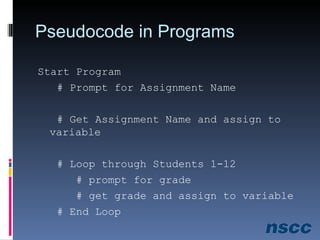
Pseudocode in Programs Start Program # Prompt for Assignment Name # Get Assignment Name and assign to variable # Loop through Students 1-12 # prompt for grade # get grade and assign to variable # End Loop
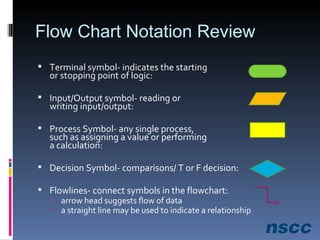
Flow Chart Notation Review Terminal symbol- indicates the starting  or stopping point of logic: Input/Output symbol- reading or writing input/output: Process Symbol- any single process,  such as assigning a value or performing a calculation: Decision Symbol- comparisons/ T or F decision:  Flowlines- connect symbols in the flowchart:  arrow head suggests flow of data a straight line may be used to indicate a relationship
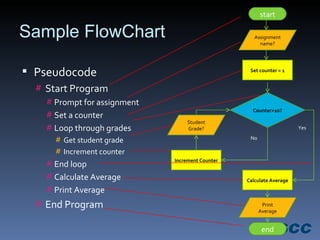
Sample FlowChart Pseudocode Start Program Prompt for assignment Set a counter Loop through grades Get student grade Increment counter End loop Calculate Average Print Average End Program start end Assignment name? Set counter = 1 Counter>10? Calculate Average Print Average Increment Counter Student Grade? Yes No
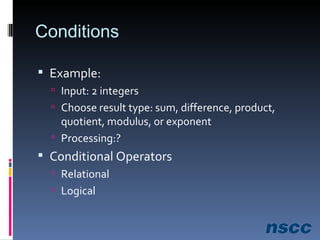
Conditions Example: Input: 2 integers Choose result type: sum, difference, product, quotient, modulus, or exponent Processing:? Conditional Operators Relational Logical
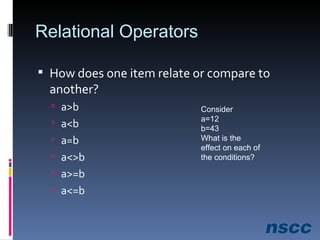
Relational Operators How does one item relate or compare to another? a>b a<b a=b a<>b a>=b a<=b Consider a=12 b=43 What is the effect on each of the conditions?
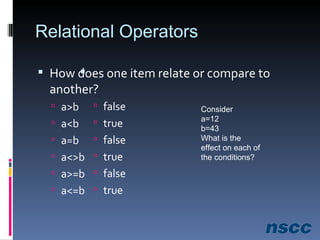
Relational Operators How does one item relate or compare to another? a>b a<b a=b a<>b a>=b a<=b Consider a=12 b=43 What is the effect on each of the conditions? false true false true false true
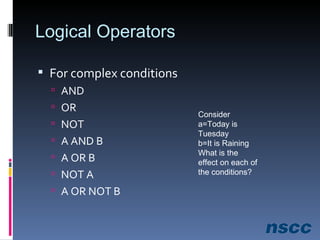
Logical Operators For complex conditions AND OR NOT A AND B A OR B NOT A A OR NOT B Consider a=Today is Tuesday b=It is Raining What is the effect on each of the conditions?
Exercise 8-1 Handout Evaluate Conditional Operators Excel solutions
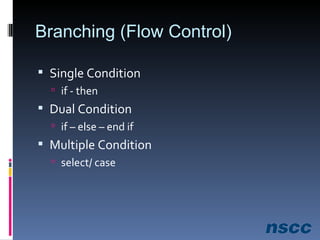
Branching (Flow Control) Single Condition if - then  Dual Condition if – else – end if Multiple Condition select/ case
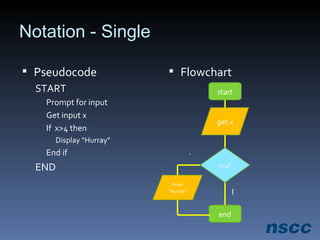
Notation - Single  Pseudocode START Prompt for input Get input x If  x>4 then Display “Hurray” End if END Flowchart start end x>4? get x Print “Hurray” T F
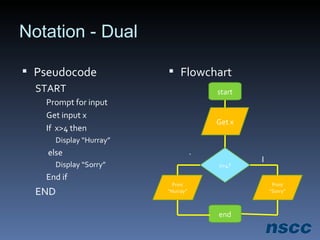
Notation - Dual Pseudocode START Prompt for input Get input x If  x>4 then Display “Hurray” else Display “Sorry” End if END Flowchart start end x>4? Get x Print “Hurray” Print “Sorry” T F
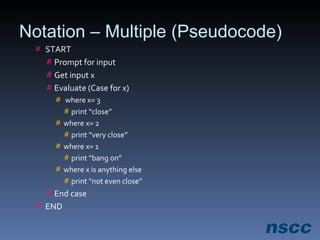
Notation – Multiple (Pseudocode) START Prompt for input Get input x Evaluate (Case for x) where x= 3 print “close” where x= 2 print “very close” where x= 1 print “bang on” where x is anything else print “not even close” End case END
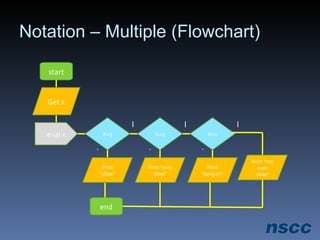
Notation – Multiple (Flowchart) start end X=3 Print “very close” T F eval x X=2 Get x X=1 Print “close” Print “bang on” Print “not even close” T T F F
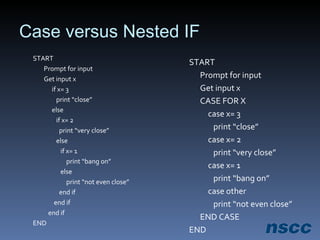
Case versus Nested IF START Prompt for input Get input x CASE FOR X case x= 3   print “close” case x= 2   print “very close” case x= 1   print “bang on” case other   print “not even close” END CASE END START Prompt for input Get input x if x= 3   print “close” else   if x= 2   print “very close”   else   if x= 1   print “bang on”   else   print “not even close”   end if end if end if END
Exercise 8-2 Handout Develop Pseudocode and Flowchart
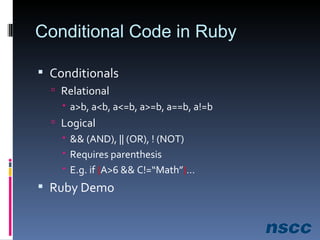
Conditional Code in Ruby Conditionals Relational a>b, a<b, a<=b, a>=b, a==b, a!=b Logical && (AND), || (OR), ! (NOT) Requires parenthesis E.g. if  ( A>6 && C!=“Math” ) … Ruby Demo
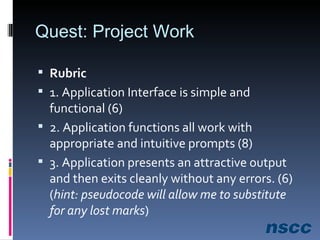
Quest: Project Work Rubric  1. Application Interface is simple and functional (6)  2. Application functions all work with appropriate and intuitive prompts (8)  3. Application presents an attractive output and then exits cleanly without any errors. (6)  ( hint: pseudocode will allow me to substitute for any lost marks )
Project Work Total value=20% Due by start of class next week Prefer you zip the file and email to me Otherwise I’ll copy it to my flash disk at start of class
Summary Review Notation Pseudocode and flowcharts Conditional logic Relational operators Logical operators Branching/ Flow Control Ruby language Project evaluation
Questions? Enjoy the holiday Lest we forget…

Class 8 Lecture Notes

  • 1.
    Class 8 –Conditional Logic
  • 2.
    Agenda Lateral ThinkingWarm-up Review Pseudocode & Flowchart Basics Discuss Conditions for Decisions Develop Notation for Conditions Develop Algorithms Incorporating Conditions Write Code to Accommodate Conditions Project Work
  • 3.
    Pseudocode Review Pseudo-codeis structured English that states the steps to the problem solution Statements are written in simple English Each instruction/step is written on a separate line Keywords and indentation are used to signify particular control structures Each set of instructions is written from top to bottom, with only one entry and one exit
  • 4.
    Pseudocode in ProgramsStart Program # Prompt for Assignment Name # Get Assignment Name and assign to variable # Loop through Students 1-12 # prompt for grade # get grade and assign to variable # End Loop
  • 5.
    Flow Chart NotationReview Terminal symbol- indicates the starting or stopping point of logic: Input/Output symbol- reading or writing input/output: Process Symbol- any single process, such as assigning a value or performing a calculation: Decision Symbol- comparisons/ T or F decision: Flowlines- connect symbols in the flowchart: arrow head suggests flow of data a straight line may be used to indicate a relationship
  • 6.
    Sample FlowChart PseudocodeStart Program Prompt for assignment Set a counter Loop through grades Get student grade Increment counter End loop Calculate Average Print Average End Program start end Assignment name? Set counter = 1 Counter>10? Calculate Average Print Average Increment Counter Student Grade? Yes No
  • 7.
    Conditions Example: Input:2 integers Choose result type: sum, difference, product, quotient, modulus, or exponent Processing:? Conditional Operators Relational Logical
  • 8.
    Relational Operators Howdoes one item relate or compare to another? a>b a<b a=b a<>b a>=b a<=b Consider a=12 b=43 What is the effect on each of the conditions?
  • 9.
    Relational Operators Howdoes one item relate or compare to another? a>b a<b a=b a<>b a>=b a<=b Consider a=12 b=43 What is the effect on each of the conditions? false true false true false true
  • 10.
    Logical Operators Forcomplex conditions AND OR NOT A AND B A OR B NOT A A OR NOT B Consider a=Today is Tuesday b=It is Raining What is the effect on each of the conditions?
  • 11.
    Exercise 8-1 HandoutEvaluate Conditional Operators Excel solutions
  • 12.
    Branching (Flow Control)Single Condition if - then Dual Condition if – else – end if Multiple Condition select/ case
  • 13.
    Notation - Single Pseudocode START Prompt for input Get input x If x>4 then Display “Hurray” End if END Flowchart start end x>4? get x Print “Hurray” T F
  • 14.
    Notation - DualPseudocode START Prompt for input Get input x If x>4 then Display “Hurray” else Display “Sorry” End if END Flowchart start end x>4? Get x Print “Hurray” Print “Sorry” T F
  • 15.
    Notation – Multiple(Pseudocode) START Prompt for input Get input x Evaluate (Case for x) where x= 3 print “close” where x= 2 print “very close” where x= 1 print “bang on” where x is anything else print “not even close” End case END
  • 16.
    Notation – Multiple(Flowchart) start end X=3 Print “very close” T F eval x X=2 Get x X=1 Print “close” Print “bang on” Print “not even close” T T F F
  • 17.
    Case versus NestedIF START Prompt for input Get input x CASE FOR X case x= 3 print “close” case x= 2 print “very close” case x= 1 print “bang on” case other print “not even close” END CASE END START Prompt for input Get input x if x= 3 print “close” else if x= 2 print “very close” else if x= 1 print “bang on” else print “not even close” end if end if end if END
  • 18.
    Exercise 8-2 HandoutDevelop Pseudocode and Flowchart
  • 19.
    Conditional Code inRuby Conditionals Relational a>b, a<b, a<=b, a>=b, a==b, a!=b Logical && (AND), || (OR), ! (NOT) Requires parenthesis E.g. if ( A>6 && C!=“Math” ) … Ruby Demo
  • 20.
    Quest: Project WorkRubric 1. Application Interface is simple and functional (6) 2. Application functions all work with appropriate and intuitive prompts (8) 3. Application presents an attractive output and then exits cleanly without any errors. (6) ( hint: pseudocode will allow me to substitute for any lost marks )
  • 21.
    Project Work Totalvalue=20% Due by start of class next week Prefer you zip the file and email to me Otherwise I’ll copy it to my flash disk at start of class
  • 22.
    Summary Review NotationPseudocode and flowcharts Conditional logic Relational operators Logical operators Branching/ Flow Control Ruby language Project evaluation
  • 23.
    Questions? Enjoy theholiday Lest we forget…

Editor's Notes

  • #4 Programmatic Algorithms will be interested in efficiency and effectiveness – elegance