C Programming - Lecture 1 1
Programming Fundamentals
CS-215/203
Engr. Qazi Shahzad Ali
Lecture # 1
C Programming - Lecture 1 2
C Programming language
• Developed in 1972 by Dennis Ritchie at AT & T Bell
Labs (American Telephone & Telegraph Company)
• Very widely used general purpose programming language
• Available on many machines and operating systems
• Design to be flexible and powerful
• Originally a replacement for assembly language (middle-
level)
• C requires extreme care in programming
• C++ is a superset of C
C Programming - Lecture 1 3
Outline and Objective
1-Program Development Cycle
2-Programming Tools
C Programming - Lecture 1 4
1-Program Development Cycle
• Software refers to a collection of
instructions for the computer
• The computer only knows what to do what
the programmer tells it to do
• Therefore, the programmer has to know
how to solve problems
C Programming - Lecture 1 5
Performing a Task on the Computer:
Input Processing Output
C Programming - Lecture 1 6
Program Planning
• A recipe is a good example of a plan
• Ingredients and amounts are determined by
what you want to bake
• Ingredients are input
• The way you combine them is the
processing
• What is baked is the output
C Programming - Lecture 1 7
1-Program Development Cycle:
1. Analyze Requirement: Define the problem,
review the requirements.
2. Design Solution: Plan the solution to the
problem (Solution algorithm or Program
Logic)
3. Validate Design: Check Program design for
accuracy.
C Programming - Lecture 1 8
C Programming - Lecture 1 9
1-Program Development Cycle:
4. Implement Design (Code): Translate the
algorithm into a programming language
(here, C).
5. Test Solution (Test and Debug): Locate and
remove any errors in the program.
6. Complete the Documentation: Organize all
the materials that describe the program.
C Programming - Lecture 1 10
2-Programming Tools:
1. Algorithms
2. Pseudo code
3. Flowchart
4. Hierarchy Chart (Structure chart)
C Programming - Lecture 1 11
1-Algorithm
C Programming - Lecture 1 12
• Step by step method of performing any task is
called as Algorithm.
• Breaking up a big task in to smaller steps to make
it easy to perform.
• Brushing teeth, making tea, getting ready for
school/office are examples of some sort of
algorithms
• Each step of the algorithm is called as Instruction
1-Algorithm
C Programming - Lecture 1 13
• A step by step series of instructions for
solving a problem (a recipe is an example of
an algorithm)
• Algorithms are key to solving many
problems efficiently
1-Algorithm
C Programming - Lecture 1 14
• Example of making tea :
Begin
1. Boil water
2. Put tea powder in the kettle
3. Pour boiled water in the kettle
4. Wait for three minutes
5. Boil milk
6. Put boiled milk in a cup
7. Add sugar to the cup
8. Empty the kettle in the cup
9. Stir the cup with a spoon
End
Algorithm Example
C Programming - Lecture 1 15
Unfortunately not every problem or
task has a "good" Algorithmic solution.
• Unsolvable problems - no algorithm can
exist to solve the problem (Halting
Problem)
• "hard" (intractable) problems - algorithm
takes too long to solve the problem
(Traveling Salesman Problem)
• Problems with no known algorithmic
solution
C Programming - Lecture 1 16
2-Pseudo code
C Programming - Lecture 1 17
2-Pseudocode?
• A program design technique that uses
English words.
• Has no formal syntactical rules.
• The idea is to represent the algorithm in a
form that is in between pure English and
actual Running code
• Actually it’s one of the way for expression
of Algorithm.
C Programming - Lecture 1 18
What is Pseudo code?
• Pseudo means “pretended” / “not real”
• Code refers to a computer programming
language
• It is a written statement of an algorithm
using a restricted and well-defined
vocabulary
C Programming - Lecture 1 19
Pseudo code - format
• Write only one statement per line
• Capitalize initial keyword
• Indent to show hierarchy
• End multi-line structures
• Keep statements language independent
C Programming - Lecture 1 20
Pseudocode - format
• It should not be paragraphs or free-flowing
sentences.
• It also should not contain any language-
specific syntax.
• it should reflect what’s in your final
program, not the ideas you scrapped along
the way
C Programming - Lecture 1 21
Pseudo code Vocabulary
1.1. Input/outputInput/output
2.2. IterationIteration
3.3. Selection/DecisionSelection/Decision
4.4. ProcessingProcessing
C Programming - Lecture 1 22
1-Input/output
• 1- Input
– INPUT, READ
– Used to get values from a data source, for example from a
keyboard
– INPUT age
• 2- Output
– DISPLAY, PRINT, WRITE
– Used to output values to a data sink, a screen or printer
– DISPLAY new_value
C Programming - Lecture 1 23
2-Iteration or Loop
• FOR <var> = <start value> to <stop value>
statement(s)
ENDFOR
• FOR count = 1 to 10
DISPLAY count
ENDFOR
C Programming - Lecture 1 24
3-Decision
• IF <condition> THEN
statement
END-IF
• IF <condition> THEN
statement
ELSE
statement
END-IF
C Programming - Lecture 1 25
4-Processing
• ADD
– ADD 3 TO count
• SUBTRACT
– SUBTRACT 5 FROM count
• COMPUTE
– COMPUTE 10 + count GIVING result
• SET
– SET count TO 12
C Programming - Lecture 1 26
Example
Original Program Specification
Write a program that obtains two numbers from the user. It will print out the
sum of those numbers.
Pseudo code
DISPLAY the message to enter the first integer
READ user’s first integer input
DISPLAY the message to enter the second integer
READ user’s second integer input
COMPUTE first integer + second integer GIVING sum
DISPLAY an output message that explains the answer as the sum
DISPLAY the sum
C Programming - Lecture 1 27
Exercise
• Write Pseudocode to calculate the area of a
circle
• Write Pseudocode to calculate sum of first
ten numbers
• Write Pseudocode to calculate sum of first
ten even numbers
C Programming - Lecture 1 28
Program Algorithm (stage 4)
(pseudocode)
• Set count and sum to 0
• DO WHILE there is more data
Get next number: value
Increment count
add value to sum
LOOP
• IF count > 0 THEN
Set average to sum/count
Display average
ELSE
Display ‘No data!’
END IF
C Programming - Lecture 1 29
Examples of Pseudocode:
• Fahrenheit to Celsius :
1. get a value for f-temp
2. set the value of c-temp to (5 / 9) * (f-temp - 32)
3. return the value of c-temp
• Math:
1. get a value for X, Y
2. if X <= Y then
1. return the value of X
3. else
1. return the value of Y
C Programming - Lecture 1 30
3-Flow Chart
C Programming - Lecture 1 31
3-Flow Chart
• Logic diagram to describe each step that the
program must perform to arrive at the
solution.
• A popular logic tool used for showing an
algorithm in graphics form.
C Programming - Lecture 1 32
Flowchart Symbol
• Programmer prepares flowchart before
coding.
• Most common flowchart symbols are:
Flow line Terminal Input/Ouput Decision Processing
C Programming - Lecture 1 33
Purpose of Flowcharting:
• An aid in developing the logic of a
program.
• Verification that all possible conditions
have been considered in a program.
• Provides means of communication with
others about the program.
• A guide in coding the program.
• Documentation for the program.
C Programming - Lecture 1 34
Flow Chart (using Boxes)
Example of making tea: Begin
Boil water
Put tea powder in kettle
Pour boiled water in kettleEmpty kettle in cup
Wait for three minutes
Put boiled milk in cup
Stir the cup with a spoon
Add sugar to the cup
Boil milkEnd
C Programming - Lecture 1 35
Example of Flowchart:
Ordering a Burger
Algorithm 1 (Standard Process):
1. Approach Counter
2. Order Burger
3. If You Want Fries Then
1. Order Fries
4. Else, Go To Next Step
5. If You Want Drink Then
1. Order Drink
6. Else, Go To Next Step
7. Pay cashier
Algorithm 2 (Improved Process):
1. Approach counter
2. Order Combo Meal
3. Pay cashier
Pseudocode
C Programming - Lecture 1 36
Want Fries
Cold Drink
Approach Counter
Pay Cashier
Yes
Yes
No
No
Flowchart
Order Burger
Order Fries
Order drinks
C Programming - Lecture 1 37
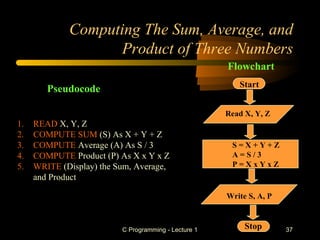
Computing The Sum, Average, and
Product of Three Numbers
Start
Read X, Y, Z
S = X + Y + Z
A = S / 3
P = X x Y x Z
Write S, A, P
Stop
Flowchart
1. READ X, Y, Z
2. COMPUTE SUM (S) As X + Y + Z
3. COMPUTE Average (A) As S / 3
4. COMPUTE Product (P) As X x Y x Z
5. WRITE (Display) the Sum, Average,
and Product
Pseudocode
C Programming - Lecture 1 38
1. READ A, B
2. IF A is less than B
1. BIG = B
2. SMALL = A
3. ELSE
1. BIG = A
2. SMALL = B
3. Write (Display) BIG, SMALL
Pseudocode
Example of Flowchart and Pseudocode:
Determine Large/Small
C Programming - Lecture 1 39
Example of Flowchart and Pseudocode:
Determine Large/Small
1. READ A, B
2. IF A is less than B
1. BIG = B
2. SMALL = A
3. ELSE
1. BIG = A
2. SMALL = B
3. Write (Display) BIG, SMALL
Pseudocode
Start
Read A, B
BIG = A
SMALL = B
Write BIG, SMALL
Stop
A < B?
No
BIG = B
SMALL = A
Yes
Flowchart
C Programming - Lecture 1 40
Example of Flowchart and Pseudocode:
Computing Interest on a Loan
Start
READ Name
Balance, Rate
COMPUTE
Interest = Balance X Rate
WRITE Name,
Interest
Stop
1. READ Name, Balance, Rate
2. COMPUTE Interest as
balance x Rate
3. WRITE (DISPLAY) Name And Interest
Pseudocode
Flowchart
C Programming - Lecture 1 41
4-Hierarchy Chart
C Programming - Lecture 1 42
4-Hierarchy Chart?
• Shows the overall program’s structure.
• Describes what each part, or Module, of the
program does.
• Also how each module relates to other
modules in the program.
• Main benefit: Provide help in the initial
planning of a program.
C Programming - Lecture 1 43
Example of Hierarchy Chart
Making of Tea
1-Boil Water 2-Boil Milk 3-Mix A & B
Add Tea
Powder
Add Sugar
“A”
Wait for
3 Minutes
“B”
Mix Sugar +
Boil Milk
Tea is Ready
C Programming - Lecture 1 44
Class Problem
Problem: calculate and report the
grade-point average for a class
C Programming - Lecture 1 45
General Steps
• Problem: calculate and report the grade-point
average for a class
• Discussion: the average grade equals the sum of
all grades divided by the number of students
• Output: Average grade
• Input: Student grades
• Processing: Find the sum of the grades; count the
number of students; calculate average
C Programming - Lecture 1 46
Flowchart:
Determine the Average Grade
Ex: Three grades: 50, 75, 100
Start
counter = 0; sum = 0
Get grade 50
counter = 1; sum = 50
Get grade 75
counter = 2; sum = 125
Get grade 100
counter = 3; sum = 225
No more data
Average = 225 / 3 = 75
Display 75
End
C Programming - Lecture 1 47
Pseudocode:
Determine the Average Grade
• Determine the average grade of a class:
Start
SET counter to zero
SET sum to zero
IF there are more data (grades)
– READ the next grade
– INCREMENT the counter by 1
– ADD the grade to the sum
ELSE
– COMPUTE average = sum / counter
DISPLAY average
End
C Programming - Lecture 1 48
Another Example of Hierarchy
Chart:
C Programming - Lecture 1 49

Programing Fundamental

  • 1.
    C Programming -Lecture 1 1 Programming Fundamentals CS-215/203 Engr. Qazi Shahzad Ali Lecture # 1
  • 2.
    C Programming -Lecture 1 2 C Programming language • Developed in 1972 by Dennis Ritchie at AT & T Bell Labs (American Telephone & Telegraph Company) • Very widely used general purpose programming language • Available on many machines and operating systems • Design to be flexible and powerful • Originally a replacement for assembly language (middle- level) • C requires extreme care in programming • C++ is a superset of C
  • 3.
    C Programming -Lecture 1 3 Outline and Objective 1-Program Development Cycle 2-Programming Tools
  • 4.
    C Programming -Lecture 1 4 1-Program Development Cycle • Software refers to a collection of instructions for the computer • The computer only knows what to do what the programmer tells it to do • Therefore, the programmer has to know how to solve problems
  • 5.
    C Programming -Lecture 1 5 Performing a Task on the Computer: Input Processing Output
  • 6.
    C Programming -Lecture 1 6 Program Planning • A recipe is a good example of a plan • Ingredients and amounts are determined by what you want to bake • Ingredients are input • The way you combine them is the processing • What is baked is the output
  • 7.
    C Programming -Lecture 1 7 1-Program Development Cycle: 1. Analyze Requirement: Define the problem, review the requirements. 2. Design Solution: Plan the solution to the problem (Solution algorithm or Program Logic) 3. Validate Design: Check Program design for accuracy.
  • 8.
    C Programming -Lecture 1 8
  • 9.
    C Programming -Lecture 1 9 1-Program Development Cycle: 4. Implement Design (Code): Translate the algorithm into a programming language (here, C). 5. Test Solution (Test and Debug): Locate and remove any errors in the program. 6. Complete the Documentation: Organize all the materials that describe the program.
  • 10.
    C Programming -Lecture 1 10 2-Programming Tools: 1. Algorithms 2. Pseudo code 3. Flowchart 4. Hierarchy Chart (Structure chart)
  • 11.
    C Programming -Lecture 1 11 1-Algorithm
  • 12.
    C Programming -Lecture 1 12 • Step by step method of performing any task is called as Algorithm. • Breaking up a big task in to smaller steps to make it easy to perform. • Brushing teeth, making tea, getting ready for school/office are examples of some sort of algorithms • Each step of the algorithm is called as Instruction 1-Algorithm
  • 13.
    C Programming -Lecture 1 13 • A step by step series of instructions for solving a problem (a recipe is an example of an algorithm) • Algorithms are key to solving many problems efficiently 1-Algorithm
  • 14.
    C Programming -Lecture 1 14 • Example of making tea : Begin 1. Boil water 2. Put tea powder in the kettle 3. Pour boiled water in the kettle 4. Wait for three minutes 5. Boil milk 6. Put boiled milk in a cup 7. Add sugar to the cup 8. Empty the kettle in the cup 9. Stir the cup with a spoon End Algorithm Example
  • 15.
    C Programming -Lecture 1 15 Unfortunately not every problem or task has a "good" Algorithmic solution. • Unsolvable problems - no algorithm can exist to solve the problem (Halting Problem) • "hard" (intractable) problems - algorithm takes too long to solve the problem (Traveling Salesman Problem) • Problems with no known algorithmic solution
  • 16.
    C Programming -Lecture 1 16 2-Pseudo code
  • 17.
    C Programming -Lecture 1 17 2-Pseudocode? • A program design technique that uses English words. • Has no formal syntactical rules. • The idea is to represent the algorithm in a form that is in between pure English and actual Running code • Actually it’s one of the way for expression of Algorithm.
  • 18.
    C Programming -Lecture 1 18 What is Pseudo code? • Pseudo means “pretended” / “not real” • Code refers to a computer programming language • It is a written statement of an algorithm using a restricted and well-defined vocabulary
  • 19.
    C Programming -Lecture 1 19 Pseudo code - format • Write only one statement per line • Capitalize initial keyword • Indent to show hierarchy • End multi-line structures • Keep statements language independent
  • 20.
    C Programming -Lecture 1 20 Pseudocode - format • It should not be paragraphs or free-flowing sentences. • It also should not contain any language- specific syntax. • it should reflect what’s in your final program, not the ideas you scrapped along the way
  • 21.
    C Programming -Lecture 1 21 Pseudo code Vocabulary 1.1. Input/outputInput/output 2.2. IterationIteration 3.3. Selection/DecisionSelection/Decision 4.4. ProcessingProcessing
  • 22.
    C Programming -Lecture 1 22 1-Input/output • 1- Input – INPUT, READ – Used to get values from a data source, for example from a keyboard – INPUT age • 2- Output – DISPLAY, PRINT, WRITE – Used to output values to a data sink, a screen or printer – DISPLAY new_value
  • 23.
    C Programming -Lecture 1 23 2-Iteration or Loop • FOR <var> = <start value> to <stop value> statement(s) ENDFOR • FOR count = 1 to 10 DISPLAY count ENDFOR
  • 24.
    C Programming -Lecture 1 24 3-Decision • IF <condition> THEN statement END-IF • IF <condition> THEN statement ELSE statement END-IF
  • 25.
    C Programming -Lecture 1 25 4-Processing • ADD – ADD 3 TO count • SUBTRACT – SUBTRACT 5 FROM count • COMPUTE – COMPUTE 10 + count GIVING result • SET – SET count TO 12
  • 26.
    C Programming -Lecture 1 26 Example Original Program Specification Write a program that obtains two numbers from the user. It will print out the sum of those numbers. Pseudo code DISPLAY the message to enter the first integer READ user’s first integer input DISPLAY the message to enter the second integer READ user’s second integer input COMPUTE first integer + second integer GIVING sum DISPLAY an output message that explains the answer as the sum DISPLAY the sum
  • 27.
    C Programming -Lecture 1 27 Exercise • Write Pseudocode to calculate the area of a circle • Write Pseudocode to calculate sum of first ten numbers • Write Pseudocode to calculate sum of first ten even numbers
  • 28.
    C Programming -Lecture 1 28 Program Algorithm (stage 4) (pseudocode) • Set count and sum to 0 • DO WHILE there is more data Get next number: value Increment count add value to sum LOOP • IF count > 0 THEN Set average to sum/count Display average ELSE Display ‘No data!’ END IF
  • 29.
    C Programming -Lecture 1 29 Examples of Pseudocode: • Fahrenheit to Celsius : 1. get a value for f-temp 2. set the value of c-temp to (5 / 9) * (f-temp - 32) 3. return the value of c-temp • Math: 1. get a value for X, Y 2. if X <= Y then 1. return the value of X 3. else 1. return the value of Y
  • 30.
    C Programming -Lecture 1 30 3-Flow Chart
  • 31.
    C Programming -Lecture 1 31 3-Flow Chart • Logic diagram to describe each step that the program must perform to arrive at the solution. • A popular logic tool used for showing an algorithm in graphics form.
  • 32.
    C Programming -Lecture 1 32 Flowchart Symbol • Programmer prepares flowchart before coding. • Most common flowchart symbols are: Flow line Terminal Input/Ouput Decision Processing
  • 33.
    C Programming -Lecture 1 33 Purpose of Flowcharting: • An aid in developing the logic of a program. • Verification that all possible conditions have been considered in a program. • Provides means of communication with others about the program. • A guide in coding the program. • Documentation for the program.
  • 34.
    C Programming -Lecture 1 34 Flow Chart (using Boxes) Example of making tea: Begin Boil water Put tea powder in kettle Pour boiled water in kettleEmpty kettle in cup Wait for three minutes Put boiled milk in cup Stir the cup with a spoon Add sugar to the cup Boil milkEnd
  • 35.
    C Programming -Lecture 1 35 Example of Flowchart: Ordering a Burger Algorithm 1 (Standard Process): 1. Approach Counter 2. Order Burger 3. If You Want Fries Then 1. Order Fries 4. Else, Go To Next Step 5. If You Want Drink Then 1. Order Drink 6. Else, Go To Next Step 7. Pay cashier Algorithm 2 (Improved Process): 1. Approach counter 2. Order Combo Meal 3. Pay cashier Pseudocode
  • 36.
    C Programming -Lecture 1 36 Want Fries Cold Drink Approach Counter Pay Cashier Yes Yes No No Flowchart Order Burger Order Fries Order drinks
  • 37.
    C Programming -Lecture 1 37 Computing The Sum, Average, and Product of Three Numbers Start Read X, Y, Z S = X + Y + Z A = S / 3 P = X x Y x Z Write S, A, P Stop Flowchart 1. READ X, Y, Z 2. COMPUTE SUM (S) As X + Y + Z 3. COMPUTE Average (A) As S / 3 4. COMPUTE Product (P) As X x Y x Z 5. WRITE (Display) the Sum, Average, and Product Pseudocode
  • 38.
    C Programming -Lecture 1 38 1. READ A, B 2. IF A is less than B 1. BIG = B 2. SMALL = A 3. ELSE 1. BIG = A 2. SMALL = B 3. Write (Display) BIG, SMALL Pseudocode Example of Flowchart and Pseudocode: Determine Large/Small
  • 39.
    C Programming -Lecture 1 39 Example of Flowchart and Pseudocode: Determine Large/Small 1. READ A, B 2. IF A is less than B 1. BIG = B 2. SMALL = A 3. ELSE 1. BIG = A 2. SMALL = B 3. Write (Display) BIG, SMALL Pseudocode Start Read A, B BIG = A SMALL = B Write BIG, SMALL Stop A < B? No BIG = B SMALL = A Yes Flowchart
  • 40.
    C Programming -Lecture 1 40 Example of Flowchart and Pseudocode: Computing Interest on a Loan Start READ Name Balance, Rate COMPUTE Interest = Balance X Rate WRITE Name, Interest Stop 1. READ Name, Balance, Rate 2. COMPUTE Interest as balance x Rate 3. WRITE (DISPLAY) Name And Interest Pseudocode Flowchart
  • 41.
    C Programming -Lecture 1 41 4-Hierarchy Chart
  • 42.
    C Programming -Lecture 1 42 4-Hierarchy Chart? • Shows the overall program’s structure. • Describes what each part, or Module, of the program does. • Also how each module relates to other modules in the program. • Main benefit: Provide help in the initial planning of a program.
  • 43.
    C Programming -Lecture 1 43 Example of Hierarchy Chart Making of Tea 1-Boil Water 2-Boil Milk 3-Mix A & B Add Tea Powder Add Sugar “A” Wait for 3 Minutes “B” Mix Sugar + Boil Milk Tea is Ready
  • 44.
    C Programming -Lecture 1 44 Class Problem Problem: calculate and report the grade-point average for a class
  • 45.
    C Programming -Lecture 1 45 General Steps • Problem: calculate and report the grade-point average for a class • Discussion: the average grade equals the sum of all grades divided by the number of students • Output: Average grade • Input: Student grades • Processing: Find the sum of the grades; count the number of students; calculate average
  • 46.
    C Programming -Lecture 1 46 Flowchart: Determine the Average Grade Ex: Three grades: 50, 75, 100 Start counter = 0; sum = 0 Get grade 50 counter = 1; sum = 50 Get grade 75 counter = 2; sum = 125 Get grade 100 counter = 3; sum = 225 No more data Average = 225 / 3 = 75 Display 75 End
  • 47.
    C Programming -Lecture 1 47 Pseudocode: Determine the Average Grade • Determine the average grade of a class: Start SET counter to zero SET sum to zero IF there are more data (grades) – READ the next grade – INCREMENT the counter by 1 – ADD the grade to the sum ELSE – COMPUTE average = sum / counter DISPLAY average End
  • 48.
    C Programming -Lecture 1 48 Another Example of Hierarchy Chart:
  • 49.
    C Programming -Lecture 1 49