UNIT - 3 PROBLEM SOLVING  AND  OFFICE AUTOMATION
Program Program is a collection of instructions that will perform some task.
Problem Solving Steps Analyse the problem. Identify the solution for the problem and divide it into small task. Algorithm has to be prepared. Based on the algorithm the program will  be created. Then it has to be executed.
Program Development Cycle Methodologies Program planning method Waterfall method etc,.
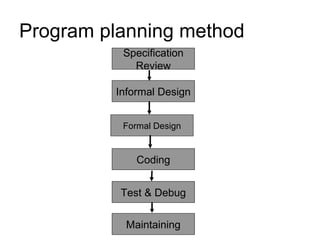
Program planning method Specification Review Informal Design Test & Debug Coding Formal Design Maintaining
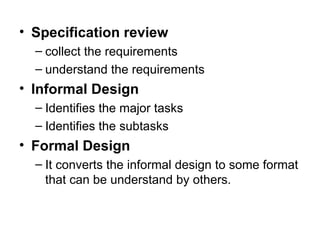
Specification review collect the requirements understand the requirements Informal Design Identifies the major tasks Identifies the subtasks Formal Design It converts the informal design to some format that can be understand by others.
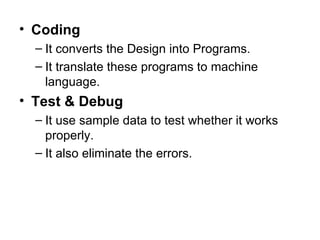
Coding It converts the Design into Programs. It translate these programs to machine language. Test &   Debug It use sample data to test whether it works properly. It also eliminate the errors.
Maintaining It Modifies the programs if necessary.
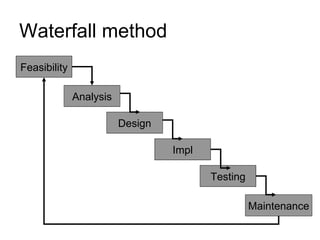
Waterfall method Feasibility Analysis Maintenance Testing Impl Design
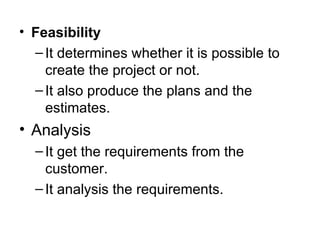
Feasibility It determines whether it is possible to create the project or not. It also produce the plans and the estimates. Analysis It get the requirements from the customer. It analysis the requirements.
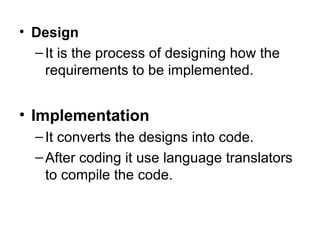
Design It is the process of designing how the requirements to be implemented. Implementation It converts the designs into code. After coding it use language translators to compile the code.
Testing Here the modules are integrated together. Then the project is tested and find whether it meets the customer/user requirements. Maintenance It make modifications based on the customer feedbacks.
Algorithm Algorithm is a finite sequence of instructions required for producing the desired result.
Characteristics The steps in the algorithm must be unambiguous . It  should be written in sequence. Ensure that the algorithm will terminate. It should conclude after a finite number of steps.
Factors used to judge the algorithm  Time Memory Accuracy Sequence etc,.
Representations Flowcharts Normal English Pseudo code etc,.
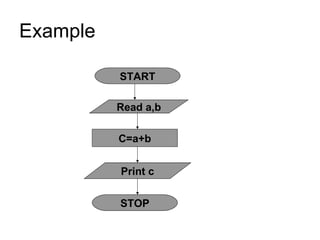
Example Addition of two numbers Step1:  Start Step2:  Read a, b Step3:  Add the value of  a  with  b  and     store the result in c. Step4:  Display the value of  c Step5:  Stop
Flowcharts It is the pictorial representation of the algorithm.
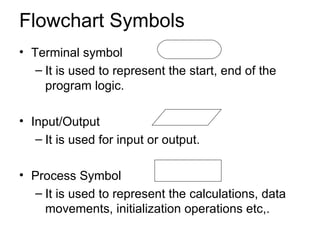
Flowchart Symbols Terminal symbol It is used to represent the start, end of the program logic. Input/Output It is used for input or output. Process Symbol It is used to represent the calculations, data movements, initialization operations etc,.
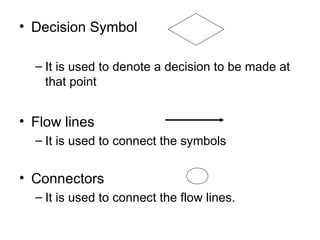
Decision Symbol It is used to denote a decision to be made at that point Flow lines It is used to connect the symbols Connectors It is used to connect the flow lines.
Guidelines for preparing flowcharts It should be simple. Standard symbols should be used. The flow lines should not intersect each others. In case of complex flowcharts use the connectors symbols.
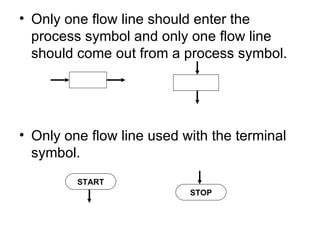
Only one flow line should enter the process symbol and only one flow line should come out from a process symbol. Only one flow line used with the terminal symbol. START STOP
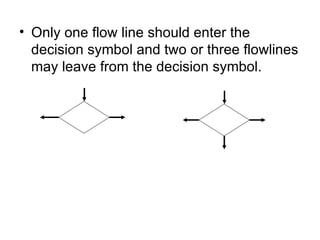
Only one flow line should enter the decision symbol and two or three flowlines may leave from the decision symbol.
Benefits of Flowcharts Makes Logic Clear Communication Effective Analysis Useful in coding  Useful in Testing etc,.
Limits of Flowcharts It is difficult to use flowcharts for large program Difficult to modify Cost etc,.
Pseudocode Pseudo  means  imitates  and   code  means  instruction. It is formal design tool. It is also called  Program Design Language.
Keywords READ,GET PRINT,DISPLAY COMPUTE,CALCULATE
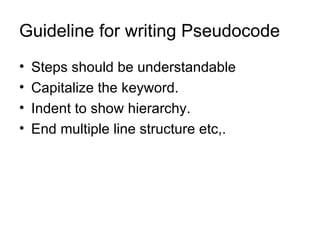
Guideline for writing Pseudocode Steps should be understandable Capitalize the keyword. Indent to show hierarchy. End multiple line structure etc,.
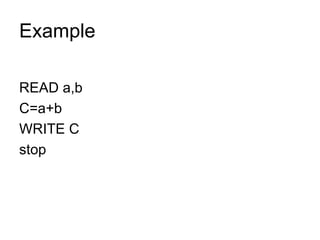
Example READ a,b C=a+b WRITE C stop
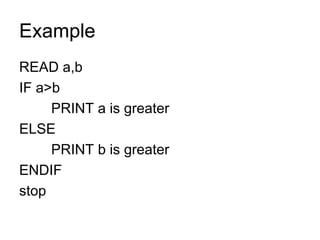
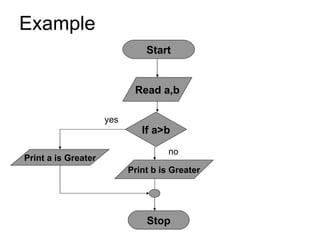
Example READ a,b IF a>b PRINT a is greater ELSE PRINT b is greater ENDIF stop
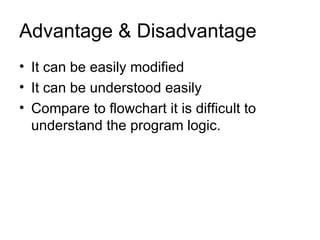
Advantage & Disadvantage It can be easily modified It can be understood easily Compare to flowchart it is difficult to understand the program logic.
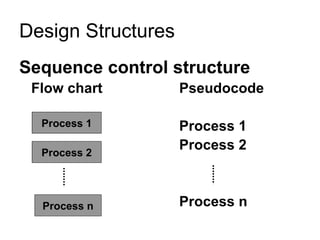
Sequence control structure Flow chart Pseudocode Process 1 Process 2 Process n Design Structures Process 2 Process n Process 1
Sequence control structure The instructions are computed in sequence i.e. it performs instruction one after another. It uses top-down approach. Design Structures
Example START C=a+b Print c Read a,b STOP
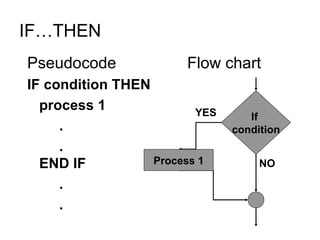
SELECTION CONTROL STRUCTURE It is used for making decisions. It allows the program to make a choice from alternative paths.  IF …THEN IF …THEN… ELSE CASE  etc.,
IF…THEN Pseudocode Flow chart IF condition THEN process 1 . . END IF . . If  condition NO YES Process 1
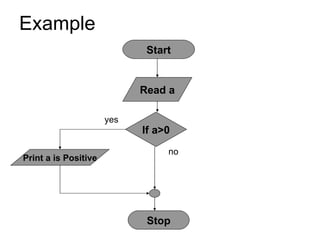
Example Start Read a If a>0 Print a is Positive Stop no yes
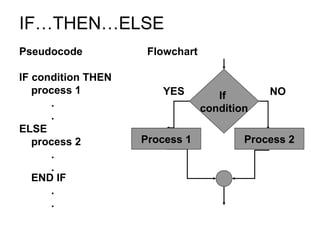
IF…THEN…ELSE Pseudocode Flowchart IF condition THEN process 1 . . ELSE process 2 . . END IF . . If  condition YES NO Process 1 Process 2
Example Start Read a,b If a>b Print a is Greater Print b is Greater Stop no yes
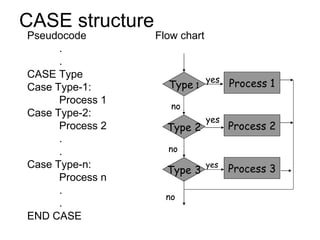
CASE structure Pseudocode Flow chart . . CASE Type Case Type-1: Process 1 Case Type-2: Process 2 . . Case Type-n: Process n . . END CASE Type  1 Type 2 Type 3 Process 1 Process 2 Process 3 no no no yes yes yes
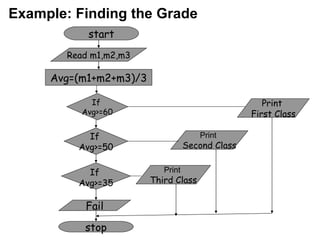
start stop Read m1,m2,m3 Avg=(m1+m2+m3)/3 If  Avg>=60 If  Avg>=50 If  Avg>=35 Fail Print  First Class Print  Second Class Print  Third Class Example: Finding the Grade
Looping control structure It is used to execute some instructions several time based on some condition. WHILE loop Do…WHILE loop etc.,
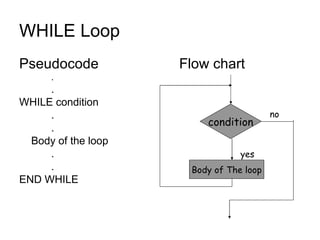
WHILE Loop  Pseudocode Flow chart . . WHILE condition . . Body of the loop . . END WHILE Body of The loop condition no yes
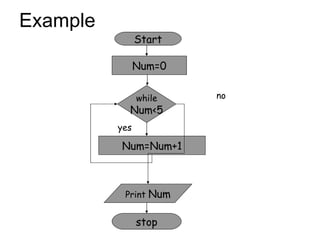
Example Start Num=0 Num=Num+1 Print  Num while Num<5 stop no yes
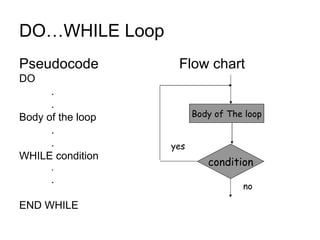
DO…WHILE Loop  Pseudocode Flow chart DO  . . Body of the loop . . WHILE condition . . END WHILE Body of The loop condition no yes
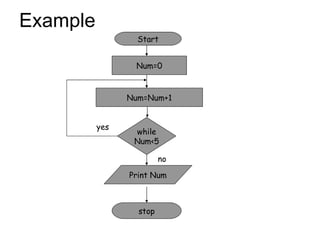
Example Start Num=0 Num=Num+1 Print Num while Num<5 stop no yes
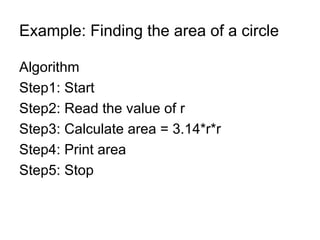
Example: Finding the area of a circle Algorithm  Step1: Start Step2: Read the value of r Step3: Calculate area = 3.14*r*r Step4: Print area Step5: Stop
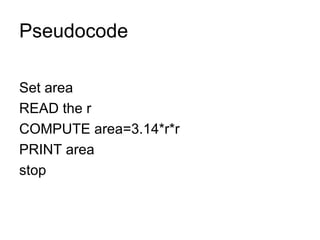
Pseudocode Set area READ the r COMPUTE area=3.14*r*r PRINT area stop
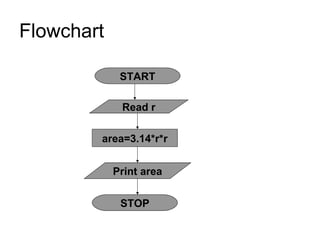
Flowchart START area=3.14*r*r Print area Read r STOP
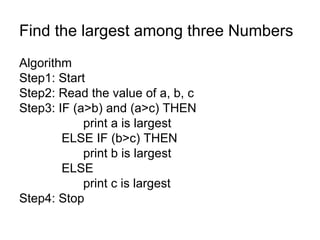
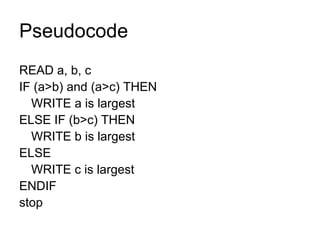
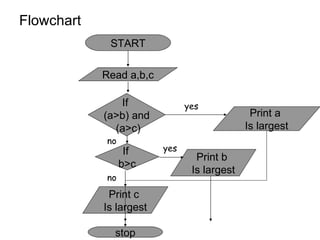
Find the largest among three Numbers Algorithm  Step1: Start Step2: Read the value of a, b, c Step3: IF (a>b) and (a>c) THEN   print a is largest   ELSE IF (b>c) THEN print b is largest   ELSE  print c is largest Step4: Stop
Pseudocode READ a, b, c IF (a>b) and (a>c) THEN WRITE a is largest ELSE IF (b>c) THEN WRITE b is largest ELSE  WRITE c is largest ENDIF stop
Flowchart START Print b  Is largest Read a,b,c stop If  (a>b) and (a>c) If  b>c Print a  Is largest Print c  Is largest no yes yes no
 
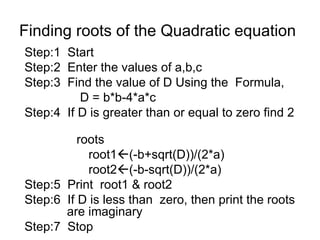
Finding roots of the Quadratic equation Step:1  Start Step:2  Enter the values of a,b,c Step:3  Find the value of D Using the  Formula, D = b*b-4*a*c Step:4  If D is greater than or equal to zero find 2  roots root1  (-b+sqrt(D))/(2*a) root2  (-b-sqrt(D))/(2*a) Step:5  Print  root1 & root2 Step:6  If D is less than  zero, then print the roots    are imaginary Step:7  Stop
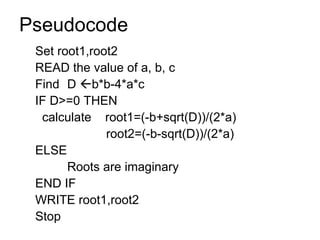
Pseudocode Set root1,root2 READ the value of a, b, c Find  D   b*b-4*a*c IF D>=0 THEN calculate  root1=(-b+sqrt(D))/(2*a)   root2=(-b-sqrt(D))/(2*a) ELSE Roots are imaginary END IF WRITE root1,root2 Stop
Flow chart Start Stop D=b*b-4*a*c Root1=[-b+sqrt(D)]/(2*a) Root2=[-b+sqrt(D)]/(2*a) Read a,b,c Print root1,root2 If D>=0 no yes Print roots are imaginary
 
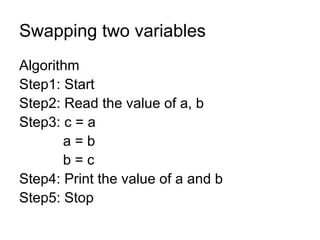
Swapping two variables Algorithm  Step1: Start Step2: Read the value of a, b Step3: c = a   a = b   b = c Step4: Print the value of a and b Step5: Stop
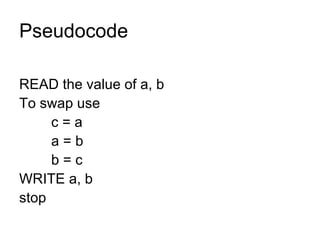
Pseudocode READ the value of a, b To swap use c = a a = b b = c WRITE a, b stop
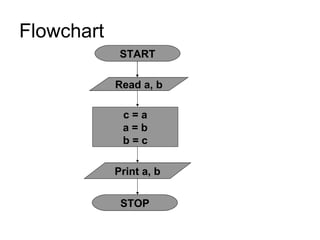
Flowchart START c = a a = b b = c Print a, b Read a, b STOP
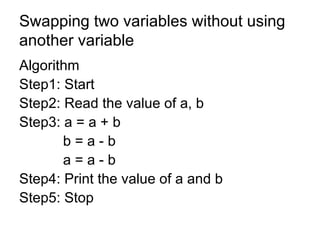
Swapping two variables without using another variable Algorithm  Step1: Start Step2: Read the value of a, b Step3: a = a + b   b = a - b   a = a - b  Step4: Print the value of a and b Step5: Stop
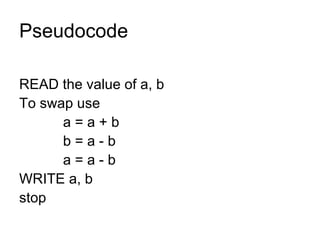
Pseudocode READ the value of a, b To swap use   a = a + b   b = a - b   a = a - b WRITE a, b stop
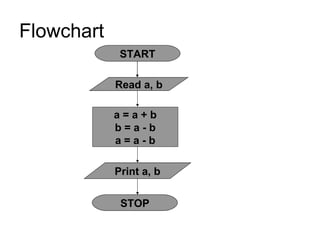
Flowchart START a = a + b b = a - b a = a - b Print a, b Read a, b STOP
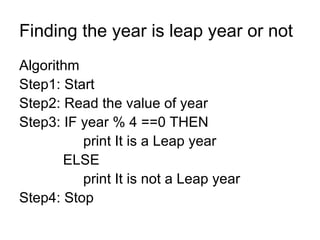
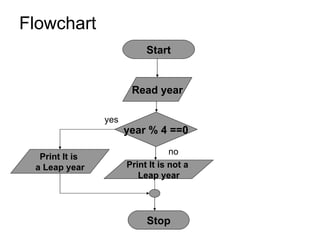
Finding the year is leap year or not Algorithm  Step1: Start Step2: Read the value of year Step3: IF year % 4 ==0 THEN   print It is a Leap year    ELSE  print It is not a Leap year  Step4: Stop
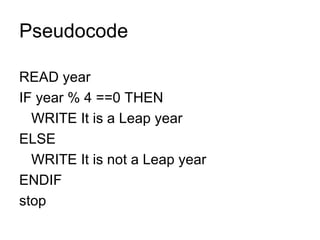
Pseudocode READ year IF year % 4 ==0 THEN WRITE It is a Leap year  ELSE  WRITE It is not a Leap year  ENDIF stop
Flowchart Start Read year year % 4 ==0 Print It is  a Leap year Print It is not a  Leap year Stop no yes
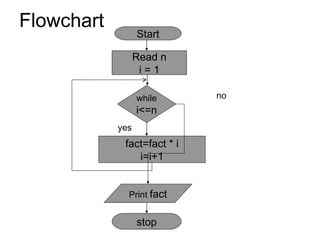
Finding the Factorial Algorithm  Step1: Start Step2: Read the value of n and set i =1 Step3: While i <= n do   fact =fact * i   i = i + 1   else Goto step5 Step4: Goto step 3 Step5: print the value of fact Step6: Stop
Pseudocode READ the value of n and set i =1 WHILE (i <= n) do   fact =fact * i   i = i + 1 ENDWHILE Repeat the loop until condition fails WRITE fact stop
Flowchart Start Read n i = 1 fact=fact * i i=i+1 Print  fact while i<=n stop no yes
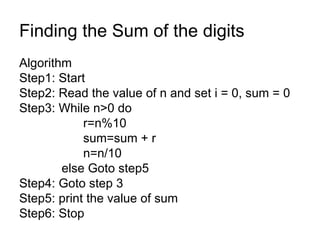
Finding the Sum of the digits Algorithm  Step1: Start Step2: Read the value of n and set i = 0, sum = 0 Step3: While n>0 do r=n%10 sum=sum + r n=n/10   else Goto step5 Step4: Goto step 3 Step5: print the value of sum Step6: Stop
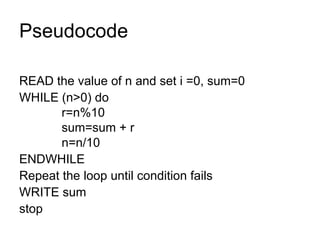
Pseudocode READ the value of n and set i =0, sum=0 WHILE (n>0) do   r=n%10   sum=sum + r   n=n/10 ENDWHILE Repeat the loop until condition fails WRITE sum stop
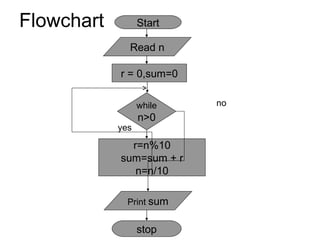
Flowchart Start r = 0,sum=0 r=n%10 sum=sum + r n=n/10 Print  sum while n>0 stop no yes Read n
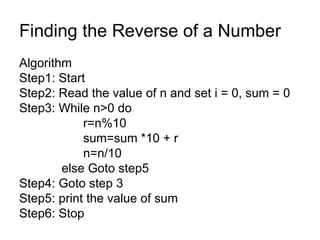
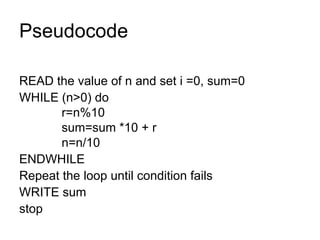
Finding the Reverse of a Number Algorithm  Step1: Start Step2: Read the value of n and set i = 0, sum = 0 Step3: While n>0 do r=n%10 sum=sum *10 + r n=n/10   else Goto step5 Step4: Goto step 3 Step5: print the value of sum Step6: Stop
Pseudocode READ the value of n and set i =0, sum=0 WHILE (n>0) do   r=n%10   sum=sum *10 + r   n=n/10 ENDWHILE Repeat the loop until condition fails WRITE sum stop
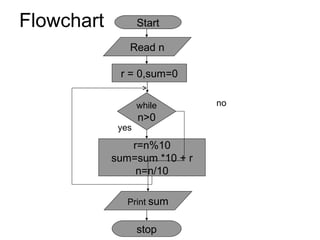
Flowchart Start r = 0,sum=0 r=n%10 sum=sum *10 + r n=n/10 Print  sum while n>0 stop no yes Read n
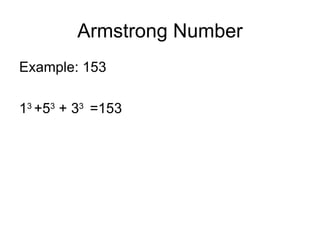
Armstrong Number Example: 153 1 3  +5 3  + 3 3  =153
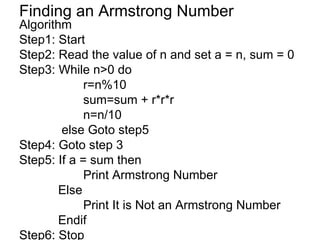
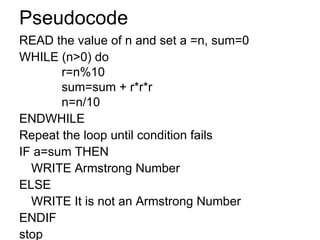
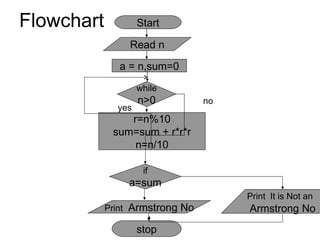
Finding an Armstrong Number Algorithm  Step1: Start Step2: Read the value of n and set a = n, sum = 0 Step3: While n>0 do r=n%10 sum=sum + r*r*r n=n/10   else Goto step5 Step4: Goto step 3 Step5: If a = sum then Print Armstrong Number   Else Print It is Not an Armstrong Number   Endif Step6: Stop
Pseudocode READ the value of n and set a =n, sum=0 WHILE (n>0) do   r=n%10   sum=sum + r*r*r   n=n/10 ENDWHILE Repeat the loop until condition fails IF a=sum THEN WRITE Armstrong Number ELSE WRITE It is not an Armstrong Number ENDIF stop
Flowchart Start a = n,sum=0 r=n%10 sum=sum + r*r*r n=n/10 Print  Armstrong No while n>0 stop no yes Read n if a=sum Print  It is Not an  Armstrong No
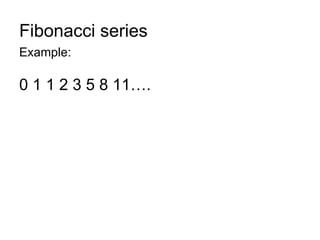
Fibonacci series Example: 0 1 1 2 3 5 8 11….
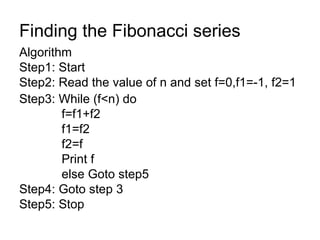
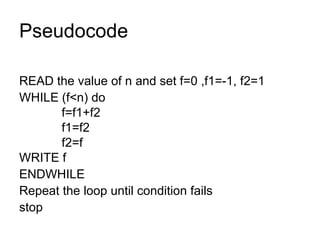
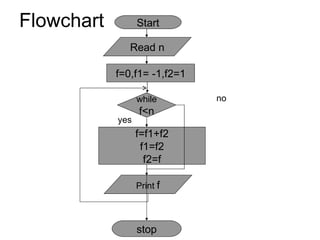
Finding the Fibonacci series Algorithm  Step1: Start Step2: Read the value of n and set f=0,f1=-1, f2=1  Step3: While (f<n) do   f=f1+f2   f1=f2   f2=f   Print f   else Goto step5 Step4: Goto step 3 Step5: Stop
Pseudocode READ the value of n and set f=0 ,f1=-1, f2=1  WHILE (f<n) do   f=f1+f2   f1=f2   f2=f WRITE f ENDWHILE Repeat the loop until condition fails stop
Flowchart Start f=0,f1= -1,f2=1 f=f1+f2 f1=f2 f2=f Print  f while f<n stop no yes Read n
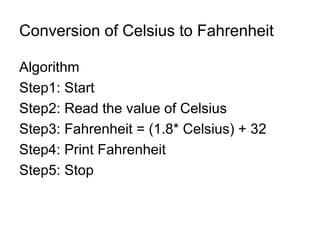
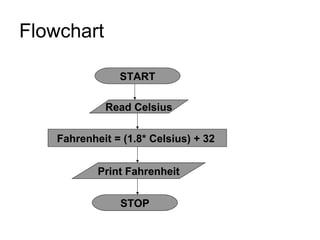
Conversion of Celsius to Fahrenheit Algorithm  Step1: Start Step2: Read the value of Celsius  Step3: Fahrenheit = (1.8* Celsius) + 32 Step4: Print Fahrenheit  Step5: Stop
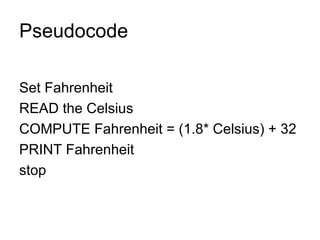
Pseudocode Set Fahrenheit READ the Celsius COMPUTE Fahrenheit = (1.8* Celsius) + 32 PRINT Fahrenheit stop
Flowchart START Fahrenheit = (1.8* Celsius) + 32  Print Fahrenheit Read Celsius STOP
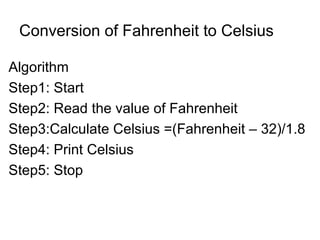
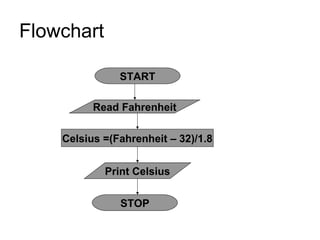
Conversion of Fahrenheit to Celsius Algorithm  Step1: Start Step2: Read the value of Fahrenheit Step3:Calculate Celsius =(Fahrenheit – 32)/1.8 Step4: Print Celsius Step5: Stop
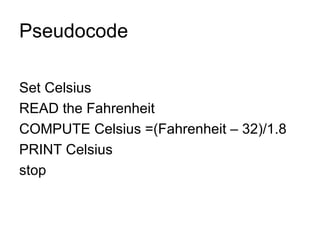
Pseudocode Set Celsius READ the Fahrenheit COMPUTE Celsius =(Fahrenheit – 32)/1.8 PRINT Celsius stop
Flowchart START Celsius =(Fahrenheit – 32)/1.8 Print Celsius Read Fahrenheit STOP
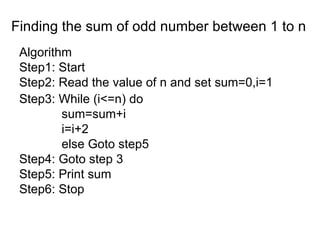
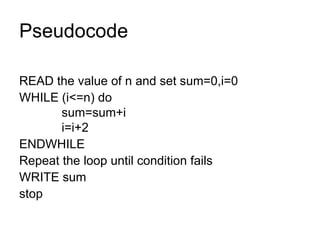
Finding the sum of odd number between 1 to n Algorithm  Step1: Start Step2: Read the value of n and set sum=0,i=1  Step3: While (i<=n) do   sum=sum+i   i=i+2   else Goto step5 Step4: Goto step 3 Step5: Print sum Step6: Stop
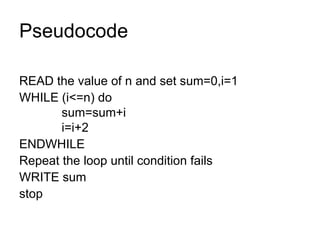
Pseudocode READ the value of n and set sum=0,i=1  WHILE (i<=n) do   sum=sum+i   i=i+2 ENDWHILE Repeat the loop until condition fails WRITE sum stop
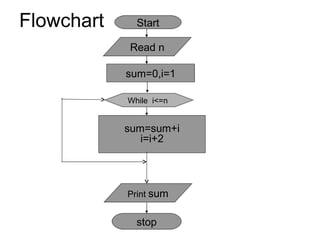
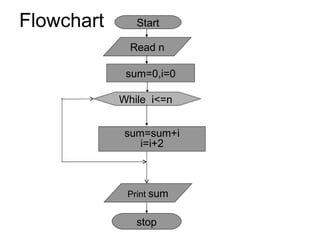
Flowchart Start sum=0,i=1 sum=sum+i i=i+2 Print  sum stop Read n While  i<=n
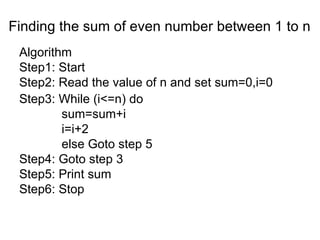
Finding the sum of even number between 1 to n Algorithm  Step1: Start Step2: Read the value of n and set sum=0,i=0  Step3: While (i<=n) do   sum=sum+i   i=i+2   else Goto step 5 Step4: Goto step 3 Step5: Print sum Step6: Stop
Pseudocode READ the value of n and set sum=0,i=0  WHILE (i<=n) do   sum=sum+i   i=i+2 ENDWHILE Repeat the loop until condition fails WRITE sum stop
Flowchart Start sum=0,i=0 sum=sum+i i=i+2 Print  sum stop Read n While  i<=n
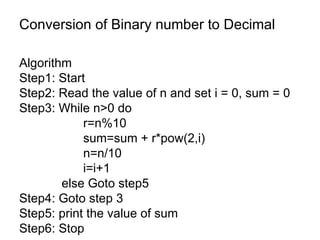
Conversion of Binary number to Decimal Algorithm  Step1: Start Step2: Read the value of n and set i = 0, sum = 0 Step3: While n>0 do r=n%10 sum=sum + r*pow(2,i) n=n/10 i=i+1   else Goto step5 Step4: Goto step 3 Step5: print the value of sum Step6: Stop
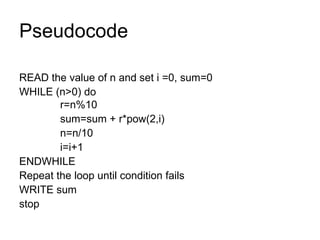
Pseudocode READ the value of n and set i =0, sum=0 WHILE (n>0) do   r=n%10   sum=sum + r*pow(2,i)   n=n/10   i=i+1 ENDWHILE Repeat the loop until condition fails WRITE sum stop
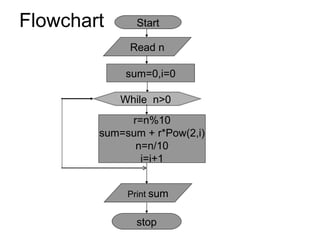
Flowchart Start sum=0,i=0 Print  sum stop Read n While  n>0  r=n%10 sum=sum + r*Pow(2,i) n=n/10 i=i+1
Application software Packages
Application software Set of programs, which is used to perform  some specific task. Example: Word processor Spreadsheet program Database program etc,.
MS-Word Starting MS-Word Start    All Programs    Microsoft Office    Microsoft Office Word
Creating a New Document File    New (or)  ctrl+N (or) clicking the new button Opening a Document File    Open (or)  ctrl+O (or) clicking the open button
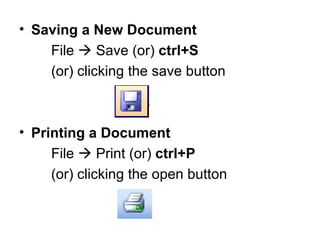
Saving a New Document File    Save (or)  ctrl+S (or) clicking the save button Printing a Document File    Print (or)  ctrl+P (or) clicking the open button
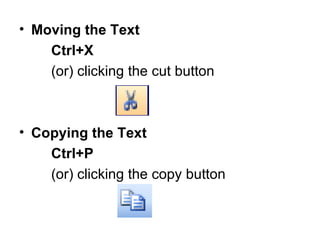
Moving the Text Ctrl+X (or) clicking the cut button Copying the Text Ctrl+P (or) clicking the copy button
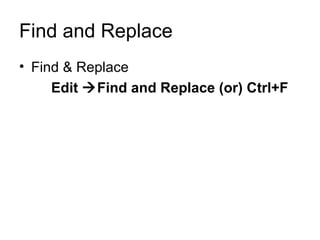
Find and Replace Find & Replace Edit   Find and Replace (or) Ctrl+F
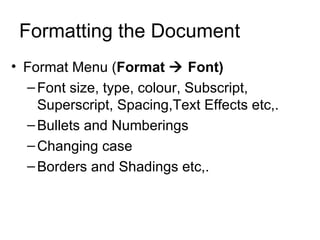
Formatting the Document Format Menu ( Format    Font) Font size, type, colour, Subscript, Superscript, Spacing,Text Effects etc,. Bullets and Numberings Changing case Borders and Shadings etc,.
 

Unit 3 Foc

  • 1.
    UNIT - 3PROBLEM SOLVING AND OFFICE AUTOMATION
  • 2.
    Program Program isa collection of instructions that will perform some task.
  • 3.
    Problem Solving StepsAnalyse the problem. Identify the solution for the problem and divide it into small task. Algorithm has to be prepared. Based on the algorithm the program will be created. Then it has to be executed.
  • 4.
    Program Development CycleMethodologies Program planning method Waterfall method etc,.
  • 5.
    Program planning methodSpecification Review Informal Design Test & Debug Coding Formal Design Maintaining
  • 6.
    Specification review collectthe requirements understand the requirements Informal Design Identifies the major tasks Identifies the subtasks Formal Design It converts the informal design to some format that can be understand by others.
  • 7.
    Coding It convertsthe Design into Programs. It translate these programs to machine language. Test & Debug It use sample data to test whether it works properly. It also eliminate the errors.
  • 8.
    Maintaining It Modifiesthe programs if necessary.
  • 9.
    Waterfall method FeasibilityAnalysis Maintenance Testing Impl Design
  • 10.
    Feasibility It determineswhether it is possible to create the project or not. It also produce the plans and the estimates. Analysis It get the requirements from the customer. It analysis the requirements.
  • 11.
    Design It isthe process of designing how the requirements to be implemented. Implementation It converts the designs into code. After coding it use language translators to compile the code.
  • 12.
    Testing Here themodules are integrated together. Then the project is tested and find whether it meets the customer/user requirements. Maintenance It make modifications based on the customer feedbacks.
  • 13.
    Algorithm Algorithm isa finite sequence of instructions required for producing the desired result.
  • 14.
    Characteristics The stepsin the algorithm must be unambiguous . It should be written in sequence. Ensure that the algorithm will terminate. It should conclude after a finite number of steps.
  • 15.
    Factors used tojudge the algorithm Time Memory Accuracy Sequence etc,.
  • 16.
    Representations Flowcharts NormalEnglish Pseudo code etc,.
  • 17.
    Example Addition oftwo numbers Step1: Start Step2: Read a, b Step3: Add the value of a with b and store the result in c. Step4: Display the value of c Step5: Stop
  • 18.
    Flowcharts It isthe pictorial representation of the algorithm.
  • 19.
    Flowchart Symbols Terminalsymbol It is used to represent the start, end of the program logic. Input/Output It is used for input or output. Process Symbol It is used to represent the calculations, data movements, initialization operations etc,.
  • 20.
    Decision Symbol Itis used to denote a decision to be made at that point Flow lines It is used to connect the symbols Connectors It is used to connect the flow lines.
  • 21.
    Guidelines for preparingflowcharts It should be simple. Standard symbols should be used. The flow lines should not intersect each others. In case of complex flowcharts use the connectors symbols.
  • 22.
    Only one flowline should enter the process symbol and only one flow line should come out from a process symbol. Only one flow line used with the terminal symbol. START STOP
  • 23.
    Only one flowline should enter the decision symbol and two or three flowlines may leave from the decision symbol.
  • 24.
    Benefits of FlowchartsMakes Logic Clear Communication Effective Analysis Useful in coding Useful in Testing etc,.
  • 25.
    Limits of FlowchartsIt is difficult to use flowcharts for large program Difficult to modify Cost etc,.
  • 26.
    Pseudocode Pseudo means imitates and code means instruction. It is formal design tool. It is also called Program Design Language.
  • 27.
  • 28.
    Guideline for writingPseudocode Steps should be understandable Capitalize the keyword. Indent to show hierarchy. End multiple line structure etc,.
  • 29.
    Example READ a,bC=a+b WRITE C stop
  • 30.
    Example READ a,bIF a>b PRINT a is greater ELSE PRINT b is greater ENDIF stop
  • 31.
    Advantage & DisadvantageIt can be easily modified It can be understood easily Compare to flowchart it is difficult to understand the program logic.
  • 32.
    Sequence control structureFlow chart Pseudocode Process 1 Process 2 Process n Design Structures Process 2 Process n Process 1
  • 33.
    Sequence control structureThe instructions are computed in sequence i.e. it performs instruction one after another. It uses top-down approach. Design Structures
  • 34.
    Example START C=a+bPrint c Read a,b STOP
  • 35.
    SELECTION CONTROL STRUCTUREIt is used for making decisions. It allows the program to make a choice from alternative paths. IF …THEN IF …THEN… ELSE CASE etc.,
  • 36.
    IF…THEN Pseudocode Flowchart IF condition THEN process 1 . . END IF . . If condition NO YES Process 1
  • 37.
    Example Start Reada If a>0 Print a is Positive Stop no yes
  • 38.
    IF…THEN…ELSE Pseudocode FlowchartIF condition THEN process 1 . . ELSE process 2 . . END IF . . If condition YES NO Process 1 Process 2
  • 39.
    Example Start Reada,b If a>b Print a is Greater Print b is Greater Stop no yes
  • 40.
    CASE structure PseudocodeFlow chart . . CASE Type Case Type-1: Process 1 Case Type-2: Process 2 . . Case Type-n: Process n . . END CASE Type 1 Type 2 Type 3 Process 1 Process 2 Process 3 no no no yes yes yes
  • 41.
    start stop Readm1,m2,m3 Avg=(m1+m2+m3)/3 If Avg>=60 If Avg>=50 If Avg>=35 Fail Print First Class Print Second Class Print Third Class Example: Finding the Grade
  • 42.
    Looping control structureIt is used to execute some instructions several time based on some condition. WHILE loop Do…WHILE loop etc.,
  • 43.
    WHILE Loop Pseudocode Flow chart . . WHILE condition . . Body of the loop . . END WHILE Body of The loop condition no yes
  • 44.
    Example Start Num=0Num=Num+1 Print Num while Num<5 stop no yes
  • 45.
    DO…WHILE Loop Pseudocode Flow chart DO . . Body of the loop . . WHILE condition . . END WHILE Body of The loop condition no yes
  • 46.
    Example Start Num=0Num=Num+1 Print Num while Num<5 stop no yes
  • 47.
    Example: Finding thearea of a circle Algorithm Step1: Start Step2: Read the value of r Step3: Calculate area = 3.14*r*r Step4: Print area Step5: Stop
  • 48.
    Pseudocode Set areaREAD the r COMPUTE area=3.14*r*r PRINT area stop
  • 49.
    Flowchart START area=3.14*r*rPrint area Read r STOP
  • 50.
    Find the largestamong three Numbers Algorithm Step1: Start Step2: Read the value of a, b, c Step3: IF (a>b) and (a>c) THEN print a is largest ELSE IF (b>c) THEN print b is largest ELSE print c is largest Step4: Stop
  • 51.
    Pseudocode READ a,b, c IF (a>b) and (a>c) THEN WRITE a is largest ELSE IF (b>c) THEN WRITE b is largest ELSE WRITE c is largest ENDIF stop
  • 52.
    Flowchart START Printb Is largest Read a,b,c stop If (a>b) and (a>c) If b>c Print a Is largest Print c Is largest no yes yes no
  • 53.
  • 54.
    Finding roots ofthe Quadratic equation Step:1 Start Step:2 Enter the values of a,b,c Step:3 Find the value of D Using the Formula, D = b*b-4*a*c Step:4 If D is greater than or equal to zero find 2 roots root1  (-b+sqrt(D))/(2*a) root2  (-b-sqrt(D))/(2*a) Step:5 Print root1 & root2 Step:6 If D is less than zero, then print the roots are imaginary Step:7 Stop
  • 55.
    Pseudocode Set root1,root2READ the value of a, b, c Find D  b*b-4*a*c IF D>=0 THEN calculate root1=(-b+sqrt(D))/(2*a) root2=(-b-sqrt(D))/(2*a) ELSE Roots are imaginary END IF WRITE root1,root2 Stop
  • 56.
    Flow chart StartStop D=b*b-4*a*c Root1=[-b+sqrt(D)]/(2*a) Root2=[-b+sqrt(D)]/(2*a) Read a,b,c Print root1,root2 If D>=0 no yes Print roots are imaginary
  • 57.
  • 58.
    Swapping two variablesAlgorithm Step1: Start Step2: Read the value of a, b Step3: c = a a = b b = c Step4: Print the value of a and b Step5: Stop
  • 59.
    Pseudocode READ thevalue of a, b To swap use c = a a = b b = c WRITE a, b stop
  • 60.
    Flowchart START c= a a = b b = c Print a, b Read a, b STOP
  • 61.
    Swapping two variableswithout using another variable Algorithm Step1: Start Step2: Read the value of a, b Step3: a = a + b b = a - b a = a - b Step4: Print the value of a and b Step5: Stop
  • 62.
    Pseudocode READ thevalue of a, b To swap use a = a + b b = a - b a = a - b WRITE a, b stop
  • 63.
    Flowchart START a= a + b b = a - b a = a - b Print a, b Read a, b STOP
  • 64.
    Finding the yearis leap year or not Algorithm Step1: Start Step2: Read the value of year Step3: IF year % 4 ==0 THEN print It is a Leap year ELSE print It is not a Leap year Step4: Stop
  • 65.
    Pseudocode READ yearIF year % 4 ==0 THEN WRITE It is a Leap year ELSE WRITE It is not a Leap year ENDIF stop
  • 66.
    Flowchart Start Readyear year % 4 ==0 Print It is a Leap year Print It is not a Leap year Stop no yes
  • 67.
    Finding the FactorialAlgorithm Step1: Start Step2: Read the value of n and set i =1 Step3: While i <= n do fact =fact * i i = i + 1 else Goto step5 Step4: Goto step 3 Step5: print the value of fact Step6: Stop
  • 68.
    Pseudocode READ thevalue of n and set i =1 WHILE (i <= n) do fact =fact * i i = i + 1 ENDWHILE Repeat the loop until condition fails WRITE fact stop
  • 69.
    Flowchart Start Readn i = 1 fact=fact * i i=i+1 Print fact while i<=n stop no yes
  • 70.
    Finding the Sumof the digits Algorithm Step1: Start Step2: Read the value of n and set i = 0, sum = 0 Step3: While n>0 do r=n%10 sum=sum + r n=n/10 else Goto step5 Step4: Goto step 3 Step5: print the value of sum Step6: Stop
  • 71.
    Pseudocode READ thevalue of n and set i =0, sum=0 WHILE (n>0) do r=n%10 sum=sum + r n=n/10 ENDWHILE Repeat the loop until condition fails WRITE sum stop
  • 72.
    Flowchart Start r= 0,sum=0 r=n%10 sum=sum + r n=n/10 Print sum while n>0 stop no yes Read n
  • 73.
    Finding the Reverseof a Number Algorithm Step1: Start Step2: Read the value of n and set i = 0, sum = 0 Step3: While n>0 do r=n%10 sum=sum *10 + r n=n/10 else Goto step5 Step4: Goto step 3 Step5: print the value of sum Step6: Stop
  • 74.
    Pseudocode READ thevalue of n and set i =0, sum=0 WHILE (n>0) do r=n%10 sum=sum *10 + r n=n/10 ENDWHILE Repeat the loop until condition fails WRITE sum stop
  • 75.
    Flowchart Start r= 0,sum=0 r=n%10 sum=sum *10 + r n=n/10 Print sum while n>0 stop no yes Read n
  • 76.
    Armstrong Number Example:153 1 3 +5 3 + 3 3 =153
  • 77.
    Finding an ArmstrongNumber Algorithm Step1: Start Step2: Read the value of n and set a = n, sum = 0 Step3: While n>0 do r=n%10 sum=sum + r*r*r n=n/10 else Goto step5 Step4: Goto step 3 Step5: If a = sum then Print Armstrong Number Else Print It is Not an Armstrong Number Endif Step6: Stop
  • 78.
    Pseudocode READ thevalue of n and set a =n, sum=0 WHILE (n>0) do r=n%10 sum=sum + r*r*r n=n/10 ENDWHILE Repeat the loop until condition fails IF a=sum THEN WRITE Armstrong Number ELSE WRITE It is not an Armstrong Number ENDIF stop
  • 79.
    Flowchart Start a= n,sum=0 r=n%10 sum=sum + r*r*r n=n/10 Print Armstrong No while n>0 stop no yes Read n if a=sum Print It is Not an Armstrong No
  • 80.
    Fibonacci series Example:0 1 1 2 3 5 8 11….
  • 81.
    Finding the Fibonacciseries Algorithm Step1: Start Step2: Read the value of n and set f=0,f1=-1, f2=1 Step3: While (f<n) do f=f1+f2 f1=f2 f2=f Print f else Goto step5 Step4: Goto step 3 Step5: Stop
  • 82.
    Pseudocode READ thevalue of n and set f=0 ,f1=-1, f2=1 WHILE (f<n) do f=f1+f2 f1=f2 f2=f WRITE f ENDWHILE Repeat the loop until condition fails stop
  • 83.
    Flowchart Start f=0,f1=-1,f2=1 f=f1+f2 f1=f2 f2=f Print f while f<n stop no yes Read n
  • 84.
    Conversion of Celsiusto Fahrenheit Algorithm Step1: Start Step2: Read the value of Celsius Step3: Fahrenheit = (1.8* Celsius) + 32 Step4: Print Fahrenheit Step5: Stop
  • 85.
    Pseudocode Set FahrenheitREAD the Celsius COMPUTE Fahrenheit = (1.8* Celsius) + 32 PRINT Fahrenheit stop
  • 86.
    Flowchart START Fahrenheit= (1.8* Celsius) + 32 Print Fahrenheit Read Celsius STOP
  • 87.
    Conversion of Fahrenheitto Celsius Algorithm Step1: Start Step2: Read the value of Fahrenheit Step3:Calculate Celsius =(Fahrenheit – 32)/1.8 Step4: Print Celsius Step5: Stop
  • 88.
    Pseudocode Set CelsiusREAD the Fahrenheit COMPUTE Celsius =(Fahrenheit – 32)/1.8 PRINT Celsius stop
  • 89.
    Flowchart START Celsius=(Fahrenheit – 32)/1.8 Print Celsius Read Fahrenheit STOP
  • 90.
    Finding the sumof odd number between 1 to n Algorithm Step1: Start Step2: Read the value of n and set sum=0,i=1 Step3: While (i<=n) do sum=sum+i i=i+2 else Goto step5 Step4: Goto step 3 Step5: Print sum Step6: Stop
  • 91.
    Pseudocode READ thevalue of n and set sum=0,i=1 WHILE (i<=n) do sum=sum+i i=i+2 ENDWHILE Repeat the loop until condition fails WRITE sum stop
  • 92.
    Flowchart Start sum=0,i=1sum=sum+i i=i+2 Print sum stop Read n While i<=n
  • 93.
    Finding the sumof even number between 1 to n Algorithm Step1: Start Step2: Read the value of n and set sum=0,i=0 Step3: While (i<=n) do sum=sum+i i=i+2 else Goto step 5 Step4: Goto step 3 Step5: Print sum Step6: Stop
  • 94.
    Pseudocode READ thevalue of n and set sum=0,i=0 WHILE (i<=n) do sum=sum+i i=i+2 ENDWHILE Repeat the loop until condition fails WRITE sum stop
  • 95.
    Flowchart Start sum=0,i=0sum=sum+i i=i+2 Print sum stop Read n While i<=n
  • 96.
    Conversion of Binarynumber to Decimal Algorithm Step1: Start Step2: Read the value of n and set i = 0, sum = 0 Step3: While n>0 do r=n%10 sum=sum + r*pow(2,i) n=n/10 i=i+1 else Goto step5 Step4: Goto step 3 Step5: print the value of sum Step6: Stop
  • 97.
    Pseudocode READ thevalue of n and set i =0, sum=0 WHILE (n>0) do r=n%10 sum=sum + r*pow(2,i) n=n/10 i=i+1 ENDWHILE Repeat the loop until condition fails WRITE sum stop
  • 98.
    Flowchart Start sum=0,i=0Print sum stop Read n While n>0 r=n%10 sum=sum + r*Pow(2,i) n=n/10 i=i+1
  • 99.
  • 100.
    Application software Setof programs, which is used to perform some specific task. Example: Word processor Spreadsheet program Database program etc,.
  • 101.
    MS-Word Starting MS-WordStart  All Programs  Microsoft Office  Microsoft Office Word
  • 102.
    Creating a NewDocument File  New (or) ctrl+N (or) clicking the new button Opening a Document File  Open (or) ctrl+O (or) clicking the open button
  • 103.
    Saving a NewDocument File  Save (or) ctrl+S (or) clicking the save button Printing a Document File  Print (or) ctrl+P (or) clicking the open button
  • 104.
    Moving the TextCtrl+X (or) clicking the cut button Copying the Text Ctrl+P (or) clicking the copy button
  • 105.
    Find and ReplaceFind & Replace Edit  Find and Replace (or) Ctrl+F
  • 106.
    Formatting the DocumentFormat Menu ( Format  Font) Font size, type, colour, Subscript, Superscript, Spacing,Text Effects etc,. Bullets and Numberings Changing case Borders and Shadings etc,.
  • 107.