What is it and why use it? 
 A pretend programming language 
 Meant to capture the important structure 
of a program 
 Used for setting out the logic of a 
program before writing the code 
 Meant to be understandable by anyone
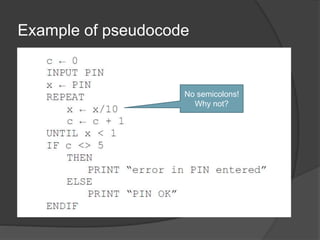
Example of pseudocode 
No semicolons! 
Why not?
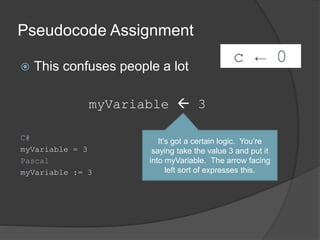
Pseudocode Assignment 
 This confuses people a lot 
myVariable  3 
C# 
myVariable = 3 
Pascal 
myVariable := 3 
It’s got a certain logic. You’re 
saying take the value 3 and put it 
into myVariable. The arrow facing 
left sort of expresses this.
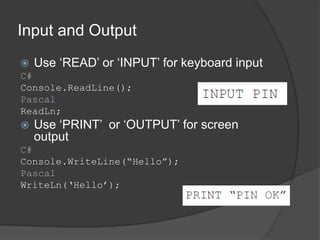
Input and Output 
 Use ‘READ’ or ‘INPUT’ for keyboard input 
C# 
Console.ReadLine(); 
Pascal 
ReadLn; 
 Use ‘PRINT’ or ‘OUTPUT’ for screen 
output 
C# 
Console.WriteLine(“Hello”); 
Pascal 
WriteLn(‘Hello’);
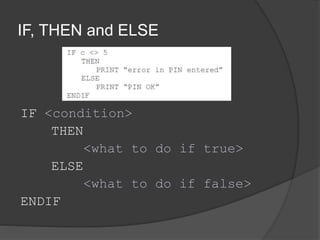
IF, THEN and ELSE 
IF <condition> 
THEN 
<what to do if true> 
ELSE 
<what to do if false> 
ENDIF
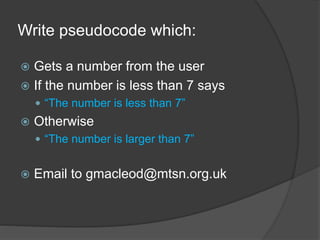
Write pseudocode which: 
 Gets a number from the user 
 If the number is less than 7 says 
 “The number is less than 7” 
 Otherwise 
 “The number is larger than 7” 
 Email to gmacleod@mtsn.org.uk
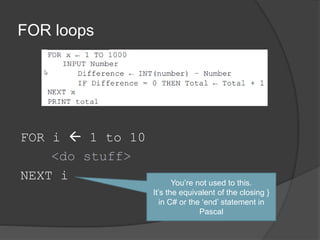
FOR loops 
FOR i  1 to 10 
<do stuff> 
NEXT i 
You’re not used to this. 
It’s the equivalent of the closing } 
in C# or the ‘end’ statement in 
Pascal
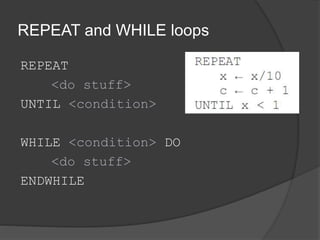
REPEAT and WHILE loops 
REPEAT 
<do stuff> 
UNTIL <condition> 
WHILE <condition> DO 
<do stuff> 
ENDWHILE
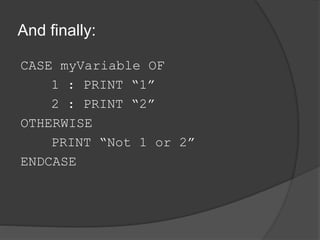
And finally: 
CASE myVariable OF 
1 : PRINT “1” 
2 : PRINT “2” 
OTHERWISE 
PRINT “Not 1 or 2” 
ENDCASE

Pseudocode

  • 2.
    What is itand why use it?  A pretend programming language  Meant to capture the important structure of a program  Used for setting out the logic of a program before writing the code  Meant to be understandable by anyone
  • 3.
    Example of pseudocode No semicolons! Why not?
  • 4.
    Pseudocode Assignment This confuses people a lot myVariable  3 C# myVariable = 3 Pascal myVariable := 3 It’s got a certain logic. You’re saying take the value 3 and put it into myVariable. The arrow facing left sort of expresses this.
  • 5.
    Input and Output  Use ‘READ’ or ‘INPUT’ for keyboard input C# Console.ReadLine(); Pascal ReadLn;  Use ‘PRINT’ or ‘OUTPUT’ for screen output C# Console.WriteLine(“Hello”); Pascal WriteLn(‘Hello’);
  • 6.
    IF, THEN andELSE IF <condition> THEN <what to do if true> ELSE <what to do if false> ENDIF
  • 7.
    Write pseudocode which:  Gets a number from the user  If the number is less than 7 says  “The number is less than 7”  Otherwise  “The number is larger than 7”  Email to gmacleod@mtsn.org.uk
  • 8.
    FOR loops FORi  1 to 10 <do stuff> NEXT i You’re not used to this. It’s the equivalent of the closing } in C# or the ‘end’ statement in Pascal
  • 9.
    REPEAT and WHILEloops REPEAT <do stuff> UNTIL <condition> WHILE <condition> DO <do stuff> ENDWHILE
  • 10.
    And finally: CASEmyVariable OF 1 : PRINT “1” 2 : PRINT “2” OTHERWISE PRINT “Not 1 or 2” ENDCASE