Pascal Programming Language
Omar ElSabek & Fayez Ghazzawi
IT Engineering
3th year – UNKNOWN Department
•Quiet!!!!!!!!!!
•Pay the fine! :P :D
•Being late!
•Talking!
•Procedures and Functions
• The most important material
• which are very important and you
should keep on practicing more
often.
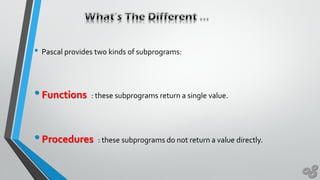
• Pascal provides two kinds of subprograms:
•Functions : these subprograms return a single value.
•Procedures : these subprograms do not return a value directly.
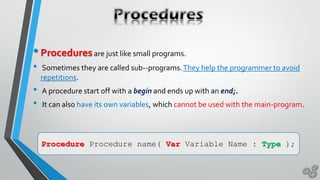
•Proceduresare just like small programs.
• Sometimes they are called sub--programs.They help the programmer to avoid
repetitions.
• A procedure start off with a begin and ends up with an end;.
• It can also have its own variables, which cannot be used with the main-program.
Procedure Procedure name( Var Variable Name : Type );
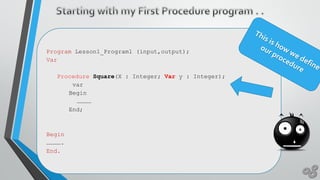
Program Lesson1_Program1 (input,output);
Var
Procedure Square(X : Integer; Var y : Integer);
var
Begin
…………
End;
Begin
………….
End.
New knowledge aboutVariables !
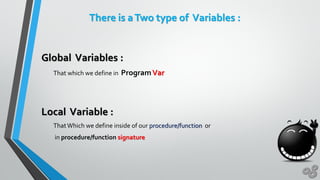
There is aTwo type of Variables :
Global Variables :
That which we define in ProgramVar
Local Variable :
ThatWhich we define inside of our procedure/function or
in procedure/function signature
What is the signature !!!
Procedure Procedure name( Var Variable Name : Type );Var Variable Name : Type
What is the prototype {define} !!!
What is the prototype !!!
Procedure Procedure name( Var Variable Name : Type );
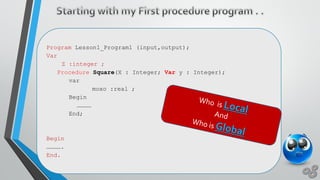
Program Lesson1_Program1 (input,output);
Var
Z :integer ;
Procedure Square(X : Integer; Var y : Integer);
var
moxo :real ;
Begin
…………
End;
Begin
………….
End.
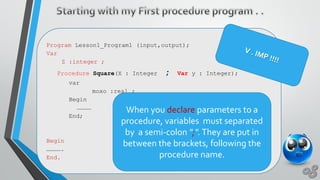
Program Lesson1_Program1 (input,output);
Var
Z :integer ;
Procedure Square(X : Integer ; Var y : Integer);
var
moxo :real ;
Begin
…………
End;
Begin
………….
End.
When you declare parameters to a
procedure, variables must separated
by a semi-colon ";".They are put in
between the brackets, following the
procedure name.
Program Lesson1_Program1 (input,output);
Var
X , Z : integer ;
Procedure Square(R : Integer ; Var Result : Integer);
Begin
Result := R * R ;
End;
Begin
Readln(X);
Square(X,Z);
Writeln('The square of X is: '); Writeln( Z );
End.
Program Lesson1_Program1 (input,output);
Var
X , Z : integer ;
Procedure Square(R : Integer);
Var
Result : Integer;
Begin
Result := R * R ;
writeln ('The square of X is: ' , Result);
End;
Begin
Readln(X);
Square(X);
End.
•Let’sTalk a little bit a bout our built in function !!
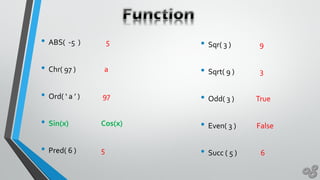
• ABS( -5 ) 5
• Chr( 97 ) a
• Ord( ‘ a ’ ) 97
• Sin(x) Cos(x)
• Pred( 6 ) 5
• Sqr( 3 ) 9
• Sqrt( 9 ) 3
• Odd( 3 ) True
• Even( 3 ) False
• Succ ( 5 ) 6
• Round( 3.14 ) 3
• Round( 3.64 ) 4
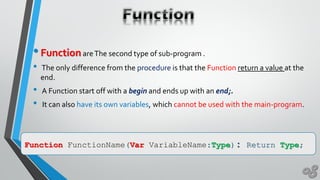
•FunctionareThe second type of sub-program .
• The only difference from the procedure is that the Function return a value at the
end.
• A Function start off with a begin and ends up with an end;.
• It can also have its own variables, which cannot be used with the main-program.
Function FunctionName(Var VariableName:Type): Return Type;
Program Lesson1_Program1 (input,output);
Var
Function Square(X : Integer): Integer ;
var
Begin
…………
End;
Begin
………….
End.
Program Lesson1_Program1 (input,output);
Var
X , Z : integer ;
Function Square(R : Integer) : Integer;
Begin
Square := R * R ;
End;
Begin
Readln(X);
Z:= Square(X);
Writeln('The square of X is: '); Writeln( Z );
End.

Function procedure c6 c7

  • 1.
    Pascal Programming Language OmarElSabek & Fayez Ghazzawi IT Engineering 3th year – UNKNOWN Department
  • 2.
    •Quiet!!!!!!!!!! •Pay the fine!:P :D •Being late! •Talking!
  • 3.
    •Procedures and Functions •The most important material • which are very important and you should keep on practicing more often.
  • 4.
    • Pascal providestwo kinds of subprograms: •Functions : these subprograms return a single value. •Procedures : these subprograms do not return a value directly.
  • 5.
    •Proceduresare just likesmall programs. • Sometimes they are called sub--programs.They help the programmer to avoid repetitions. • A procedure start off with a begin and ends up with an end;. • It can also have its own variables, which cannot be used with the main-program. Procedure Procedure name( Var Variable Name : Type );
  • 6.
    Program Lesson1_Program1 (input,output); Var ProcedureSquare(X : Integer; Var y : Integer); var Begin ………… End; Begin …………. End.
  • 7.
  • 8.
    There is aTwotype of Variables : Global Variables : That which we define in ProgramVar Local Variable : ThatWhich we define inside of our procedure/function or in procedure/function signature
  • 9.
    What is thesignature !!!
  • 10.
    What is thesignature !!! Procedure Procedure name( Var Variable Name : Type );Var Variable Name : Type
  • 11.
    What is theprototype {define} !!!
  • 12.
    What is theprototype !!! Procedure Procedure name( Var Variable Name : Type );
  • 13.
    Program Lesson1_Program1 (input,output); Var Z:integer ; Procedure Square(X : Integer; Var y : Integer); var moxo :real ; Begin ………… End; Begin …………. End.
  • 14.
    Program Lesson1_Program1 (input,output); Var Z:integer ; Procedure Square(X : Integer ; Var y : Integer); var moxo :real ; Begin ………… End; Begin …………. End. When you declare parameters to a procedure, variables must separated by a semi-colon ";".They are put in between the brackets, following the procedure name.
  • 15.
    Program Lesson1_Program1 (input,output); Var X, Z : integer ; Procedure Square(R : Integer ; Var Result : Integer); Begin Result := R * R ; End; Begin Readln(X); Square(X,Z); Writeln('The square of X is: '); Writeln( Z ); End.
  • 16.
    Program Lesson1_Program1 (input,output); Var X, Z : integer ; Procedure Square(R : Integer); Var Result : Integer; Begin Result := R * R ; writeln ('The square of X is: ' , Result); End; Begin Readln(X); Square(X); End.
  • 17.
    •Let’sTalk a littlebit a bout our built in function !!
  • 18.
    • ABS( -5) 5 • Chr( 97 ) a • Ord( ‘ a ’ ) 97 • Sin(x) Cos(x) • Pred( 6 ) 5 • Sqr( 3 ) 9 • Sqrt( 9 ) 3 • Odd( 3 ) True • Even( 3 ) False • Succ ( 5 ) 6
  • 19.
    • Round( 3.14) 3 • Round( 3.64 ) 4
  • 20.
    •FunctionareThe second typeof sub-program . • The only difference from the procedure is that the Function return a value at the end. • A Function start off with a begin and ends up with an end;. • It can also have its own variables, which cannot be used with the main-program. Function FunctionName(Var VariableName:Type): Return Type;
  • 21.
    Program Lesson1_Program1 (input,output); Var FunctionSquare(X : Integer): Integer ; var Begin ………… End; Begin …………. End.
  • 22.
    Program Lesson1_Program1 (input,output); Var X, Z : integer ; Function Square(R : Integer) : Integer; Begin Square := R * R ; End; Begin Readln(X); Z:= Square(X); Writeln('The square of X is: '); Writeln( Z ); End.