The Pseudo code
Programming Process
Code Complete
Author : Steven C. McConnell.

Prof. Asha N

1
Summary of Steps in Building Classes
and Routines




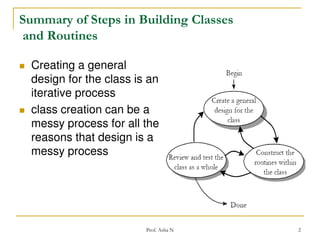
Creating a general
design for the class is an
iterative process
class creation can be a
messy process for all the
reasons that design is a
messy process

Prof. Asha N

2
Steps in Creating a Class




Create a general design for the class
Construct each routine within the class
Review and test the class as a whole

Prof. Asha N

3
Steps in Building a Routine


creating a routine—
designing the routine,
checking the design,
coding the routine,
and checking the
code

Prof. Asha N

4
Pseudo code for Pros




“pseudocode” – English-like notation for
describing how an algorithm, a routine, a
class, or a program will work
Pseudocode Programming Process (PPP)
defines a specific approach to use
pseudocode to streamline the creation of
code within routines.

Prof. Asha N

5
Contd…
guidelines for using pseudocode





Use English-like statements that precisely
describe specific operations.
Avoid syntactic elements from the target
programming language.
Write pseudocode at the level of intent.
Write pseudocode at a low enough level that
generating code from it will be nearly automatic.

Prof. Asha N

6
Contd…


Example of Bad Pseudocode
increment resource number by 1
allocate a dlg struct using malloc
if malloc() returns NULL then return 1
invoke OSrsrc_init to initialize a resource for the operating system
*hRsrcPtr = resource number
return 0

Prof. Asha N

7
Contd…


Example of Good Pseudocode
Keep track of current number of resources in use
If another resource is available
Allocate a dialog box structure
If a dialog box structure could be allocated
Note that one more resource is in use
Initialize the resource
Store the resource number at the location provided by the caller
Endif
Endif
Return TRUE if a new resource was created; else return FALSE

Prof. Asha N

8
Constructing Routines Using the PPP


the activities involved in constructing a
routine
1.
2.
3.
4.
5.

Design the routine
Code the routine
Check the code
Clean up leftovers
Repeat as needed

Prof. Asha N

9
1. Design the Routine













Check the prerequisites
Define the problem the routine will solve
Name the routine
Decide how to test the routine
Think about error handling
Think about efficiency
Research functionality available in the standard libraries
Research the algorithms and data types
Write the pseudocode
Think about the data
Check the pseudocode
Try a few ideas in pseudocode, and keep the best (iterate)

Prof. Asha N

10
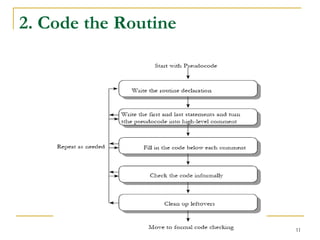
2. Code the Routine

Prof. Asha N

11
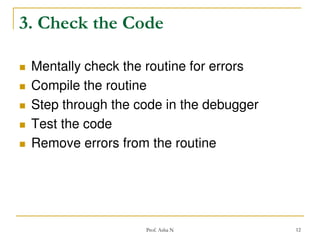
3. Check the Code







Mentally check the routine for errors
Compile the routine
Step through the code in the debugger
Test the code
Remove errors from the routine

Prof. Asha N

12
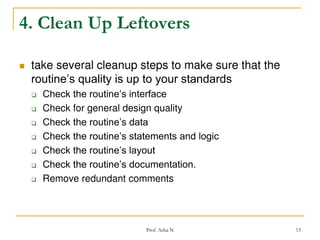
4. Clean Up Leftovers


take several cleanup steps to make sure that the
routine’s quality is up to your standards









Check the routine’s interface
Check for general design quality
Check the routine’s data
Check the routine’s statements and logic
Check the routine’s layout
Check the routine’s documentation.
Remove redundant comments

Prof. Asha N

13
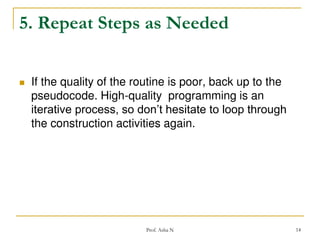
5. Repeat Steps as Needed


If the quality of the routine is poor, back up to the
pseudocode. High-quality programming is an
iterative process, so don’t hesitate to loop through
the construction activities again.

Prof. Asha N

14

The pseudocode

  • 1.
    The Pseudo code ProgrammingProcess Code Complete Author : Steven C. McConnell. Prof. Asha N 1
  • 2.
    Summary of Stepsin Building Classes and Routines   Creating a general design for the class is an iterative process class creation can be a messy process for all the reasons that design is a messy process Prof. Asha N 2
  • 3.
    Steps in Creatinga Class    Create a general design for the class Construct each routine within the class Review and test the class as a whole Prof. Asha N 3
  • 4.
    Steps in Buildinga Routine  creating a routine— designing the routine, checking the design, coding the routine, and checking the code Prof. Asha N 4
  • 5.
    Pseudo code forPros   “pseudocode” – English-like notation for describing how an algorithm, a routine, a class, or a program will work Pseudocode Programming Process (PPP) defines a specific approach to use pseudocode to streamline the creation of code within routines. Prof. Asha N 5
  • 6.
    Contd… guidelines for usingpseudocode     Use English-like statements that precisely describe specific operations. Avoid syntactic elements from the target programming language. Write pseudocode at the level of intent. Write pseudocode at a low enough level that generating code from it will be nearly automatic. Prof. Asha N 6
  • 7.
    Contd…  Example of BadPseudocode increment resource number by 1 allocate a dlg struct using malloc if malloc() returns NULL then return 1 invoke OSrsrc_init to initialize a resource for the operating system *hRsrcPtr = resource number return 0 Prof. Asha N 7
  • 8.
    Contd…  Example of GoodPseudocode Keep track of current number of resources in use If another resource is available Allocate a dialog box structure If a dialog box structure could be allocated Note that one more resource is in use Initialize the resource Store the resource number at the location provided by the caller Endif Endif Return TRUE if a new resource was created; else return FALSE Prof. Asha N 8
  • 9.
    Constructing Routines Usingthe PPP  the activities involved in constructing a routine 1. 2. 3. 4. 5. Design the routine Code the routine Check the code Clean up leftovers Repeat as needed Prof. Asha N 9
  • 10.
    1. Design theRoutine             Check the prerequisites Define the problem the routine will solve Name the routine Decide how to test the routine Think about error handling Think about efficiency Research functionality available in the standard libraries Research the algorithms and data types Write the pseudocode Think about the data Check the pseudocode Try a few ideas in pseudocode, and keep the best (iterate) Prof. Asha N 10
  • 11.
    2. Code theRoutine Prof. Asha N 11
  • 12.
    3. Check theCode      Mentally check the routine for errors Compile the routine Step through the code in the debugger Test the code Remove errors from the routine Prof. Asha N 12
  • 13.
    4. Clean UpLeftovers  take several cleanup steps to make sure that the routine’s quality is up to your standards        Check the routine’s interface Check for general design quality Check the routine’s data Check the routine’s statements and logic Check the routine’s layout Check the routine’s documentation. Remove redundant comments Prof. Asha N 13
  • 14.
    5. Repeat Stepsas Needed  If the quality of the routine is poor, back up to the pseudocode. High-quality programming is an iterative process, so don’t hesitate to loop through the construction activities again. Prof. Asha N 14