Class 7 – Intro to Notation, Flowcharts and Pseudocode
Agenda
 Process development
 Algorithmic approaches to problem-solving
 Pseudocode
 Algorithm Structure
 Flowcharting
 Application
 Project Development
What is a Process?
 Discuss: what is a process?
 What are some examples of processes you
encounter in your day-to-day routine?
 How can you describe a process
 What are the important criterion and
parameters of a process?
 Exercise 7-1: What is a Process?
Process Debrief
 What issues occurred in developing your
process?
 What important considerations were
necessary?
 What elements are common to the various
processes described?
 What elements were unique?
Process as Problem-Solving
 ALGORITHMIC SOLUTIONS
 some problems such as baking a cake, or balancing a
cheque book can be solved with a concise set of
instructions or actions
 HEURISITIC SOLUTIONS
 some problems aren’t so straight forward and rely heavily
on knowledge and experience; i.e. whether to expand a
company; how to best buy stocks on the stock market, etc.
 heavily reliant on the process of trial and error and cannot
be reached by a series of direct steps
Algorithmic Solutions
 An ALGORITHM is a set of precise steps that
describe exactly the tasks to be performed,
and the order in which they are to be carried
out
 It can be defined in programming terms as a
set of detailed, unambiguous and ordered
instructions, developed to describe the
processes necessary to produce the desired
output from a given input
 Algorithms may be described in structured
language or graphically
Algorithm Approaches
 IPO
 Input
 Processing
 Output
 Expanded IPO
 Includes Problem Statement
 Risk – certainty & uncertainty
 Approach
 Diagram
 Testing Options
 Pseudo-code – structured syntax
Pseudocode
 Pseudo-code is structured English that
states the steps to the problem solution
1. Statements are written in simple English
2. Each instruction/step is written on a separate
line
3. Keywords and indentation are used to signify
particular control structures
4. Each set of instructions is written from top to
bottom, with only one entry and one exit
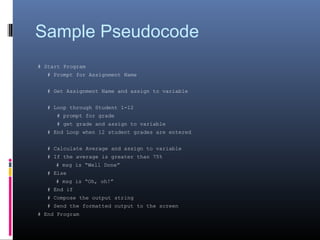
Sample Pseudocode
# Start Program
# Prompt for Assignment Name
# Get Assignment Name and assign to variable
# Loop through Student 1-12
# prompt for grade
# get grade and assign to variable
# End Loop when 12 student grades are entered
# Calculate Average and assign to variable
# If the average is greater than 75%
# msg is “Well Done”
# Else
# msg is “Oh, oh!”
# End if
# Compose the output string
# Send the formatted output to the screen
# End Program
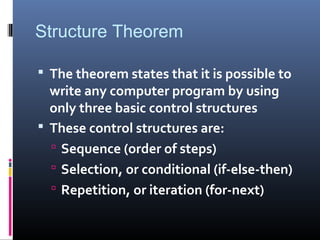
Structure Theorem
 The theorem states that it is possible to
write any computer program by using
only three basic control structures
 These control structures are:
 Sequence (order of steps)
 Selection, or conditional (if-else-then)
 Repetition, or iteration (for-next)
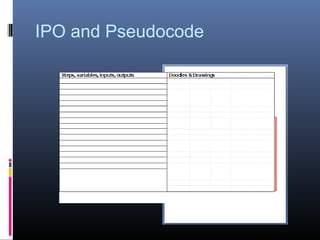
IPO and Pseudocode
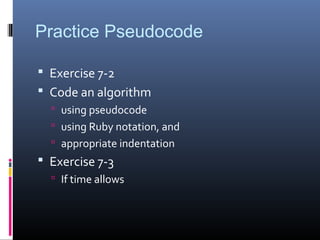
Practice Pseudocode
 Exercise 7-2
 Code an algorithm
 using pseudocode
 using Ruby notation, and
 appropriate indentation
 Exercise 7-3
 If time allows
Flowcharting
 A graphical representation of program logic
using a series of geometric symbols and
connecting lines
 Flowcharts are relatively easy to learn and are
intuitive
 Help to identify flow of data
 Track variables through the life of the
application
Flow Chart Notation
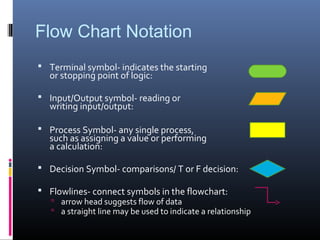
 Terminal symbol- indicates the starting
or stopping point of logic:
 Input/Output symbol- reading or
writing input/output:
 Process Symbol- any single process,
such as assigning a value or performing
a calculation:
 Decision Symbol- comparisons/ T or F decision:
 Flowlines- connect symbols in the flowchart:
 arrow head suggests flow of data
 a straight line may be used to indicate a relationship
Sample FlowChart
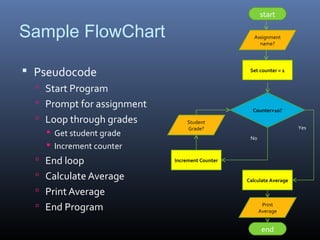
 Pseudocode
 Start Program
 Prompt for assignment
 Loop through grades
 Get student grade
 Increment counter
 End loop
 Calculate Average
 Print Average
 End Program
start
end
Assignment
name?
Set counter = 1
Counter>10?
Calculate Average
Print
Average
Increment Counter
Student
Grade? Yes
No
Flowchart Practice
 Develop Flowchart for the last pseudocode
exercise
 Notes:
 Pseudocode often follows the development of a
flowchart
 Some applications are developed to generate code or
pseudocode based on a work flow or flow chart
 Application flowcharts are often very complex
 Please ensure future Ruby solutions are properly
documented with pseudocode notation (# plus
indentation)
Application
 Project Work
 Begin to develop your project flowchart and
pseudocode
Summary
 Process
 Algorithm and structure
 Notation
 Pseudocode
 Flowchart
 Next steps
 Refine your notation for Project 1

Class 7 lecture notes

  • 1.
    Class 7 –Intro to Notation, Flowcharts and Pseudocode
  • 2.
    Agenda  Process development Algorithmic approaches to problem-solving  Pseudocode  Algorithm Structure  Flowcharting  Application  Project Development
  • 3.
    What is aProcess?  Discuss: what is a process?  What are some examples of processes you encounter in your day-to-day routine?  How can you describe a process  What are the important criterion and parameters of a process?  Exercise 7-1: What is a Process?
  • 4.
    Process Debrief  Whatissues occurred in developing your process?  What important considerations were necessary?  What elements are common to the various processes described?  What elements were unique?
  • 5.
    Process as Problem-Solving ALGORITHMIC SOLUTIONS  some problems such as baking a cake, or balancing a cheque book can be solved with a concise set of instructions or actions  HEURISITIC SOLUTIONS  some problems aren’t so straight forward and rely heavily on knowledge and experience; i.e. whether to expand a company; how to best buy stocks on the stock market, etc.  heavily reliant on the process of trial and error and cannot be reached by a series of direct steps
  • 6.
    Algorithmic Solutions  AnALGORITHM is a set of precise steps that describe exactly the tasks to be performed, and the order in which they are to be carried out  It can be defined in programming terms as a set of detailed, unambiguous and ordered instructions, developed to describe the processes necessary to produce the desired output from a given input  Algorithms may be described in structured language or graphically
  • 7.
    Algorithm Approaches  IPO Input  Processing  Output  Expanded IPO  Includes Problem Statement  Risk – certainty & uncertainty  Approach  Diagram  Testing Options  Pseudo-code – structured syntax
  • 8.
    Pseudocode  Pseudo-code isstructured English that states the steps to the problem solution 1. Statements are written in simple English 2. Each instruction/step is written on a separate line 3. Keywords and indentation are used to signify particular control structures 4. Each set of instructions is written from top to bottom, with only one entry and one exit
  • 9.
    Sample Pseudocode # StartProgram # Prompt for Assignment Name # Get Assignment Name and assign to variable # Loop through Student 1-12 # prompt for grade # get grade and assign to variable # End Loop when 12 student grades are entered # Calculate Average and assign to variable # If the average is greater than 75% # msg is “Well Done” # Else # msg is “Oh, oh!” # End if # Compose the output string # Send the formatted output to the screen # End Program
  • 10.
    Structure Theorem  Thetheorem states that it is possible to write any computer program by using only three basic control structures  These control structures are:  Sequence (order of steps)  Selection, or conditional (if-else-then)  Repetition, or iteration (for-next)
  • 11.
  • 12.
    Practice Pseudocode  Exercise7-2  Code an algorithm  using pseudocode  using Ruby notation, and  appropriate indentation  Exercise 7-3  If time allows
  • 13.
    Flowcharting  A graphicalrepresentation of program logic using a series of geometric symbols and connecting lines  Flowcharts are relatively easy to learn and are intuitive  Help to identify flow of data  Track variables through the life of the application
  • 14.
    Flow Chart Notation Terminal symbol- indicates the starting or stopping point of logic:  Input/Output symbol- reading or writing input/output:  Process Symbol- any single process, such as assigning a value or performing a calculation:  Decision Symbol- comparisons/ T or F decision:  Flowlines- connect symbols in the flowchart:  arrow head suggests flow of data  a straight line may be used to indicate a relationship
  • 15.
    Sample FlowChart  Pseudocode Start Program  Prompt for assignment  Loop through grades  Get student grade  Increment counter  End loop  Calculate Average  Print Average  End Program start end Assignment name? Set counter = 1 Counter>10? Calculate Average Print Average Increment Counter Student Grade? Yes No
  • 16.
    Flowchart Practice  DevelopFlowchart for the last pseudocode exercise  Notes:  Pseudocode often follows the development of a flowchart  Some applications are developed to generate code or pseudocode based on a work flow or flow chart  Application flowcharts are often very complex  Please ensure future Ruby solutions are properly documented with pseudocode notation (# plus indentation)
  • 17.
    Application  Project Work Begin to develop your project flowchart and pseudocode
  • 18.
    Summary  Process  Algorithmand structure  Notation  Pseudocode  Flowchart  Next steps  Refine your notation for Project 1

Editor's Notes

  • #7 Algorithms may be described in structured language or graphically
  • #9 Programmatic Algorithms will be interested in efficiency and effectiveness – elegance