Chapter 2 Algorithm
Representation
Pseudocode and flow chart
Introduction
Performing a Task on The Computer
• The first step in writing instructions to carry out a task is to
determine what the output should be—that is, exactly
what the task should produce.
• The second step is to identify the data, or input, necessary
to obtain the output.
• The last step is to determine how to process the input to
obtain the desired output, that is, to determine what
formulas or ways of doing things can be used to obtain the
output.
Introduction
Programming Tools
• Tools used to convert algorithms into computer
programs:
• Pseudocode: An informal high-level description of the
operating principle of a computer program. It uses the
structural conventions of a programming language, but
is intended for human reading rather than machine
reading.
• Flowcharts: Graphically depict the logical steps to carry
out a task and show how the steps relate to each other.
How to write Pseudocode and draw
Flowcharts for a given algorithm
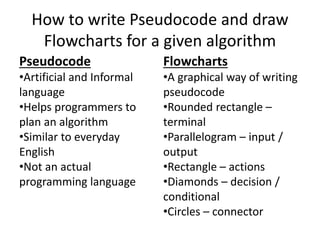
Pseudocode
•Artificial and Informal
language
•Helps programmers to
plan an algorithm
•Similar to everyday
English
•Not an actual
programming language
Flowcharts
•A graphical way of writing
pseudocode
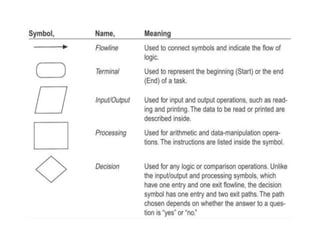
•Rounded rectangle –
terminal
•Parallelogram – input /
output
•Rectangle – actions
•Diamonds – decision /
conditional
•Circles – connector
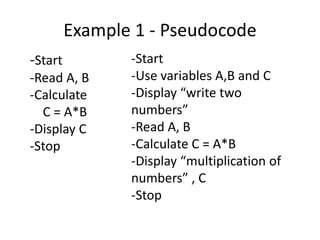
Example 1 - Pseudocode
-Start
-Read A, B
-Calculate
C = A*B
-Display C
-Stop
-Start
-Use variables A,B and C
-Display “write two
numbers”
-Read A, B
-Calculate C = A*B
-Display “multiplication of
numbers” , C
-Stop
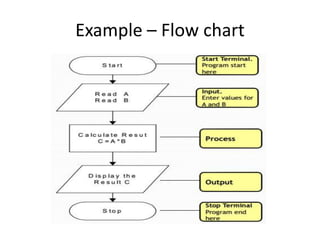
Example – Flow chart
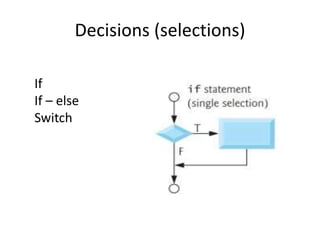
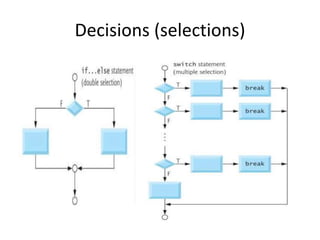
Decisions (selections)
If
If – else
Switch
Decisions (selections)
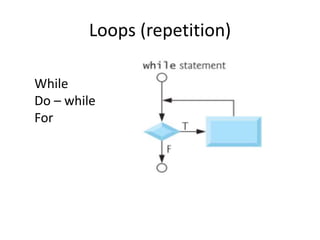
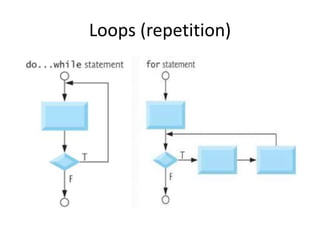
Loops (repetition)
While
Do – while
For
Loops (repetition)
Example - 2
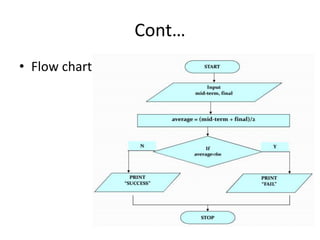
• Write an algorithm to determine a student’s
average grade and indicate whether he is
successful or not.
• The average grade is calculated as the average
of mid-term and final marks.
• Student will be successful if his average grade
is grater or equals to 60.
Cont…
Pseudocode
- Start
- Use variables mid term , final and average
- Input mid term and final
- Calculate the average by summing mid term and
final and dividing by 2
- if average is below 60
Print “FAIL”
else
Print “SUCCESS”
- Stop
Cont…
• Detailed Algorithm
1. Step: Input mid-term and final
2. Step: average = (mid-term + final)/2
3. Step: if (average < 60) then
Print “FAIL”
else
Print “SUCCESS”
endif
Cont…
• Flow chart
Cont…
• Nested If Simply, if structure in if structure
Example - 3: Both final and average grades must
be grater than or equals to 2.0 for calculation in
DBU.
if (final >= 35) then
{ if (average >= 35) then
execute calculation commands
endif }
else
Print “F grade”
endif
Example - 3
• Write an algorithm which calculates the average exam
grade for a class of 5 students.
• What are the program inputs?
 The exam grades
• Processing:
 Find the sum of the grades;
 Count the number of students; (counter controlled)
 Calculate average grade = sum of grades / number of
students.
• What is the program output?
 The average exam grade
Cont…
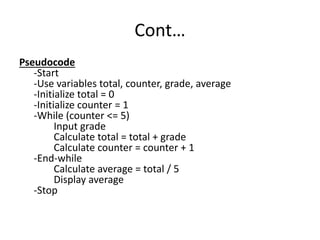
Pseudocode
-Start
-Use variables total, counter, grade, average
-Initialize total = 0
-Initialize counter = 1
-While (counter <= 5)
Input grade
Calculate total = total + grade
Calculate counter = counter + 1
-End-while
Calculate average = total / 5
Display average
-Stop
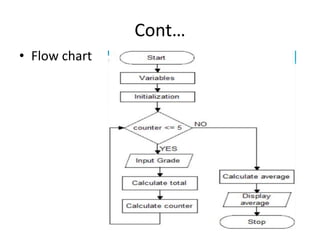
Cont…
• Flow chart
Example 4
• Write an algorithm which calculates the average exam
grade for a class of unknown number of students.
• What are the program inputs?
 The exam grades
 Number of students
• Processing:
 Find the sum of the grades
 Calculate average grade = sum of grades / number of
students.
• What is the program output?
 The average exam grade
Cont…
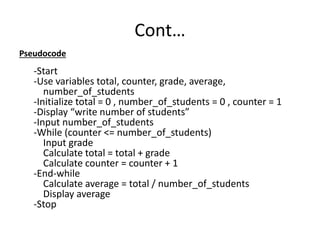
Pseudocode
-Start
-Use variables total, counter, grade, average,
number_of_students
-Initialize total = 0 , number_of_students = 0 , counter = 1
-Display “write number of students”
-Input number_of_students
-While (counter <= number_of_students)
Input grade
Calculate total = total + grade
Calculate counter = counter + 1
-End-while
Calculate average = total / number_of_students
Display average
-Stop
Question
• Please try to draw the flow chart for the
above problem (example 4).

2. Algorithms Representations (C++).pptx

  • 1.
  • 2.
    Introduction Performing a Taskon The Computer • The first step in writing instructions to carry out a task is to determine what the output should be—that is, exactly what the task should produce. • The second step is to identify the data, or input, necessary to obtain the output. • The last step is to determine how to process the input to obtain the desired output, that is, to determine what formulas or ways of doing things can be used to obtain the output.
  • 3.
    Introduction Programming Tools • Toolsused to convert algorithms into computer programs: • Pseudocode: An informal high-level description of the operating principle of a computer program. It uses the structural conventions of a programming language, but is intended for human reading rather than machine reading. • Flowcharts: Graphically depict the logical steps to carry out a task and show how the steps relate to each other.
  • 4.
    How to writePseudocode and draw Flowcharts for a given algorithm Pseudocode •Artificial and Informal language •Helps programmers to plan an algorithm •Similar to everyday English •Not an actual programming language Flowcharts •A graphical way of writing pseudocode •Rounded rectangle – terminal •Parallelogram – input / output •Rectangle – actions •Diamonds – decision / conditional •Circles – connector
  • 6.
    Example 1 -Pseudocode -Start -Read A, B -Calculate C = A*B -Display C -Stop -Start -Use variables A,B and C -Display “write two numbers” -Read A, B -Calculate C = A*B -Display “multiplication of numbers” , C -Stop
  • 7.
  • 8.
  • 9.
  • 10.
  • 11.
  • 12.
    Example - 2 •Write an algorithm to determine a student’s average grade and indicate whether he is successful or not. • The average grade is calculated as the average of mid-term and final marks. • Student will be successful if his average grade is grater or equals to 60.
  • 13.
    Cont… Pseudocode - Start - Usevariables mid term , final and average - Input mid term and final - Calculate the average by summing mid term and final and dividing by 2 - if average is below 60 Print “FAIL” else Print “SUCCESS” - Stop
  • 14.
    Cont… • Detailed Algorithm 1.Step: Input mid-term and final 2. Step: average = (mid-term + final)/2 3. Step: if (average < 60) then Print “FAIL” else Print “SUCCESS” endif
  • 15.
  • 16.
    Cont… • Nested IfSimply, if structure in if structure Example - 3: Both final and average grades must be grater than or equals to 2.0 for calculation in DBU. if (final >= 35) then { if (average >= 35) then execute calculation commands endif } else Print “F grade” endif
  • 17.
    Example - 3 •Write an algorithm which calculates the average exam grade for a class of 5 students. • What are the program inputs?  The exam grades • Processing:  Find the sum of the grades;  Count the number of students; (counter controlled)  Calculate average grade = sum of grades / number of students. • What is the program output?  The average exam grade
  • 18.
    Cont… Pseudocode -Start -Use variables total,counter, grade, average -Initialize total = 0 -Initialize counter = 1 -While (counter <= 5) Input grade Calculate total = total + grade Calculate counter = counter + 1 -End-while Calculate average = total / 5 Display average -Stop
  • 19.
  • 20.
    Example 4 • Writean algorithm which calculates the average exam grade for a class of unknown number of students. • What are the program inputs?  The exam grades  Number of students • Processing:  Find the sum of the grades  Calculate average grade = sum of grades / number of students. • What is the program output?  The average exam grade
  • 21.
    Cont… Pseudocode -Start -Use variables total,counter, grade, average, number_of_students -Initialize total = 0 , number_of_students = 0 , counter = 1 -Display “write number of students” -Input number_of_students -While (counter <= number_of_students) Input grade Calculate total = total + grade Calculate counter = counter + 1 -End-while Calculate average = total / number_of_students Display average -Stop
  • 22.
    Question • Please tryto draw the flow chart for the above problem (example 4).