Protocols
and
Client-Server Applications
Unit 3
By
Deep Raj Bhujel
SMTP (Simple Mail Transfer Protocol)
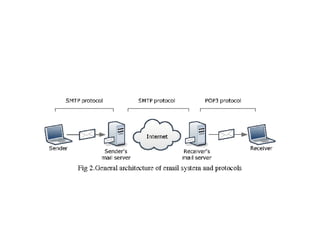
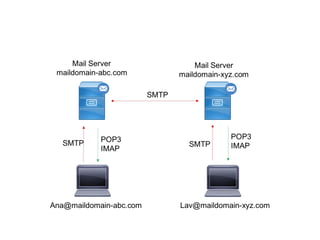
• SMTP is an internet standard for e-mail
transmission across Internet Protocol (IP)
networks.
• SMTP uses TCP port 25.
• SMTP is a connection-oriented, text-
based protocol which uses TCP connection.
• SMTP is a delivery protocol only.
• An SMTP transaction consists of three command/reply
sequences. They are:
1. MAIL command, to establish the return address, a.k.a.
Return-Path, 5321.From, mfrom, or envelope sender. This
is the address for bounce messages.
2. RCPT command, to establish a recipient of this message.
This command can be issued multiple times, one for each
recipient. These addresses are also part of the envelope.
3. DATA to send the message text. This is the content of the
message, as opposed to its envelope. It consists of
a message header and a message body separated by an
empty line. DATA is actually a group of commands, and
the server replies twice: once to the DATA
command proper, to acknowledge that it is ready to
receive the text, and the second time after the end-of-
data sequence, to either accept or reject the entire
message.
Limitations of SMTP
1. It does not include authentication. This is quite useful for sending
spam.
2. SMTP transfers ASCII messages, not binary data. This is why the
base64 MIME content transfer encoding was needed. However,
with that encoding the mail transmission uses bandwidth
inefficiently, which is an issue for large messages.
3. SMTP sends messages in the clear. It has no encryption to
provide a measure of privacy against prying eyes.
• To allow these and many other problems related to message
processing to be addressed, SMTP was revised to have an extension
mechanism. This mechanism is a mandatory part of the RFC 5321
standard. The use of SMTP with extensions is called ESMTP
(Extended SMTP).
POP (Post Office Protocol)
• POP is an internet standard protocol used by
local e-mail clients to retrieve mail from a
remote server over a TCP/IP connection.
• POP server listens to port 110.
Things that can be done via the POP include:
– Retrieve mail from an ISP and delete it on the
server.
– Retrieve mail from an ISP but not delete it on the
server.
– Ask whether new mail has arrived but not retrieve
it.
– Look at a few lines of a message to see whether it
is worth retrieving.
IMAP (Internet Message Access Protocol)
• It is a method of accessing electronic mail or bulletin
board messages that are kept on a (possibly shared)
mail server.
• In other words, it permits a "client" email program to
access remote message stores as if they were local.
• IMAP server listens to port 143.
• For example, email stored on an IMAP server can be
manipulated from a desktop computer at home, a
workstation at the office, and a notebook computer
while traveling, without the need to transfer messages
or files back and forth between these computers.
Things that can be done via the IMAP include:
– Be fully compatible with Internet messaging
standards, e.g. MIME.
– Allow message access and management from more
than one computer.
– Allow access without reliance on less efficient file
access protocols.
– Provide support for "online", "offline", and
"disconnected" access modes
– Support for concurrent access to shared mailboxes
– Client software needs no knowledge about the
server's file store format.
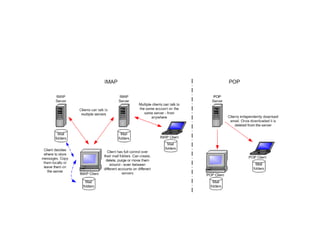
• Essentially, the main difference of the two
protocols is that POP downloads emails from
the server for permanent local storage,
while IMAP leaves them on the server and just
caches (temporarily stores) emails locally. In
other words, IMAP is a form of cloud storage.
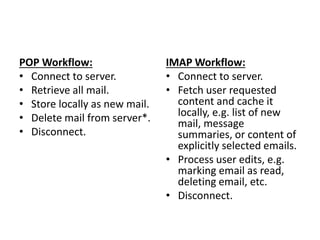
POP Workflow:
• Connect to server.
• Retrieve all mail.
• Store locally as new mail.
• Delete mail from server*.
• Disconnect.
IMAP Workflow:
• Connect to server.
• Fetch user requested
content and cache it
locally, e.g. list of new
mail, message
summaries, or content of
explicitly selected emails.
• Process user edits, e.g.
marking email as read,
deleting email, etc.
• Disconnect.
PGP (Pretty Good Privacy)
• PGP is a public key encryption package to
protect e-mail and data files.
• The actual operation of PGP is based on five
services: authentication, confidentiality,
compression, e-mail compatibility, and
segmentation.
• PGP provides authentication via a digital signature
scheme.
• PGP provides confidentiality by encrypting messages
before transmission.
• PGP compresses the message after applying the
signature and before encryption.
• PGP accommodates email compatibility by converting
the raw 8-bit binary streams into streams of printable
ASCII characters using a radix-64 conversion scheme.
• To accommodate e-mail size restrictions, PGP
automatically segments email messages that are too
long.
HTTP (HyperText Transfer Protocol)
• HTTP is the protocol to exchange or transfer hypertext.
• It is the underlying protocol used by the World Wide
Web.
• For example, when you enter a URL in your browser,
this actually sends an HTTP command to the Web
server directing it to fetch and transmit the
requested Web page.
• HTTP is the framework for how browsers will display
and use file formats.
• HTTP utilizes TCP port 80.
• Q. Elaborate on HTTP 1.0, 1.1 and 2.0.
Features of HTTP
• Connectionless:
• Media-independent:
• Stateless:
• An HTTP session is a sequence of network
request-response transactions.
An HTTP client initiates a request by establishing
a Transmission Control Protocol (TCP) connection
to a particular port on a server (typically port 80).
An HTTP server listening on that port waits for a
client's request message.
Upon receiving the request, the server sends back
a status line, such as "HTTP/1.1 200 OK", and a
message of its own.
HTTP Request Methods:
o HEAD
o GET
o POST
o PUT
o DELETE
o TRACE
o OPTIONS
o CONNECT
o PATCH
FTP (File Transfer Protocol)
• FTP lives up to its name and provides a
method for transferring files over a network
from one computer to another.
• Old protocol, replaced by HTTP for
downloading.
• If FTP is involved, the URL will have ftp: at the
front.
• TCP control connection: port 21
• TCP data connection: port 20
Data transfer can be done in any of three modes:
• Stream mode: Data is sent as a continuous stream,
relieving FTP from doing any processing. Rather, all
processing is left up to TCP. No End-of-file indicator is
needed, unless the data is divided into records.
• Block mode: FTP breaks the data into several blocks
(block header, byte count, and data field) and then
passes it on to TCP.
• Compressed mode: Data is compressed using a single
algorithm (usually run-length encoding).
Client/Server Model
• It is a computing model that acts as distributed application
which partitions tasks or workloads between the providers
of a resource or service, called servers, and service
requesters, called clients.
• Often clients and servers communicate over a computer
network on separate hardware, but both client and server
may reside in the same system.
• A server machine is a host that is running one or more
server programs which share their resources with clients.
• A client does not share any of its resources, but requests a
server's content or service function. Clients therefore
initiate communication sessions with servers which await
incoming requests.
Client/Server Architecture:
Advantages
– The client/ server architecture reduces network
traffic by providing a query response to the user
rather than transferring total files.
– The client/ server model improves multi-user
updating through a graphical user interface (GUI)
front end to the shared database.
– Easy to implement security policies, since the data
are stored in central location
– Simplified network administration
Disadvantages
– Failure of the server causes whole network to be
collapsed
– Expensive than P2P, Dedicated powerful servers
are needed
– Extra effort are needed for administering and
managing the server.
• Client/Server architecture can be of different
model based on the number of layers it holds.
Some of them are;
• 2-Tier Architecture
• 3-Tier Architecture
• N-Tier Architecture (multi-tier)
2-Tier Architecture
– The client processes provide an interface for the customer,
and gather and present data usually on the customer’s
computer. This part of the application is the presentation
layer
– The server processes provide an interface with the data
store of the business. This part of the application is the
data layer.
– The business logic that validates data, monitors security
and permissions, and performs other business rules can be
housed on either the client or the server, or split between
the two.
• Fundamental units of work required to complete the business
process
• Business rules can be automated by an application program.
3-Tier Architecture
In 3-tier architecture, there is an intermediary level,
meaning the architecture is generally split up
between:
• A client, i.e. the computer, which requests the
resources, equipped with a user interface (usually
a web browser) for presentation purposes
• The application server (also called middleware),
whose task it is to provide the requested
resources, but by calling on another server
• The data server, which provides the application
server with the data it requires
N-Tier Architecture (multi-tier)
Advantages
• Changes to the user interface or to the application logic are largely
independent from one another, allowing the application to evolve easily to
meet new requirements.
• Network bottlenecks are minimized because the application layer does not
transmit extra data to the client, only what is needed to handle a task.
• The client is insulated from database and network operations. The client
can access data easily and quickly without having to know where data is or
how many servers are on the system.
• Database connections can be 'pooled' and thus shared by several users,
which greatly reduces the cost associated with per-user licensing.
• The organization has database independence because the data layer is
written using standard SQL which is platform independent. The enterprise
is not tied to vendor-specific stored procedures.
• The application layer can be written in standard third or fourth generation
languages, such as ASP, PHP with which the organization's in-house
programmers are experienced.
•
Disadvantages
• difficult to program and test an N-tier architecture due to its increased
complexity.
Universal Internet Browsing
Multiple Protocol Support:
Complex data communication systems no longer utilize
a single protocol to handle all transmission tasks.
Instead, they require a set of protocols, called a
protocol suite.
Problems while communicating over a network:
• Hardware failure:
• Network congestion:
• Packet delay or loss:
• Data corruption:
• Data duplication or sequence error:
• It is difficult or undesirable to write a single
protocol that will handle everything in the
network, particularly since many networks are
heterogeneous.
• Hence, multiple protocols are needed in
network communications. There has been lots
of protocols adapted till the date.

Unit 3 - Protocols and Client-Server Applications - IT

  • 1.
  • 2.
    SMTP (Simple MailTransfer Protocol) • SMTP is an internet standard for e-mail transmission across Internet Protocol (IP) networks. • SMTP uses TCP port 25. • SMTP is a connection-oriented, text- based protocol which uses TCP connection. • SMTP is a delivery protocol only.
  • 3.
    • An SMTPtransaction consists of three command/reply sequences. They are: 1. MAIL command, to establish the return address, a.k.a. Return-Path, 5321.From, mfrom, or envelope sender. This is the address for bounce messages. 2. RCPT command, to establish a recipient of this message. This command can be issued multiple times, one for each recipient. These addresses are also part of the envelope. 3. DATA to send the message text. This is the content of the message, as opposed to its envelope. It consists of a message header and a message body separated by an empty line. DATA is actually a group of commands, and the server replies twice: once to the DATA command proper, to acknowledge that it is ready to receive the text, and the second time after the end-of- data sequence, to either accept or reject the entire message.
  • 5.
    Limitations of SMTP 1.It does not include authentication. This is quite useful for sending spam. 2. SMTP transfers ASCII messages, not binary data. This is why the base64 MIME content transfer encoding was needed. However, with that encoding the mail transmission uses bandwidth inefficiently, which is an issue for large messages. 3. SMTP sends messages in the clear. It has no encryption to provide a measure of privacy against prying eyes. • To allow these and many other problems related to message processing to be addressed, SMTP was revised to have an extension mechanism. This mechanism is a mandatory part of the RFC 5321 standard. The use of SMTP with extensions is called ESMTP (Extended SMTP).
  • 6.
    POP (Post OfficeProtocol) • POP is an internet standard protocol used by local e-mail clients to retrieve mail from a remote server over a TCP/IP connection. • POP server listens to port 110.
  • 7.
    Things that canbe done via the POP include: – Retrieve mail from an ISP and delete it on the server. – Retrieve mail from an ISP but not delete it on the server. – Ask whether new mail has arrived but not retrieve it. – Look at a few lines of a message to see whether it is worth retrieving.
  • 8.
    IMAP (Internet MessageAccess Protocol) • It is a method of accessing electronic mail or bulletin board messages that are kept on a (possibly shared) mail server. • In other words, it permits a "client" email program to access remote message stores as if they were local. • IMAP server listens to port 143. • For example, email stored on an IMAP server can be manipulated from a desktop computer at home, a workstation at the office, and a notebook computer while traveling, without the need to transfer messages or files back and forth between these computers.
  • 9.
    Things that canbe done via the IMAP include: – Be fully compatible with Internet messaging standards, e.g. MIME. – Allow message access and management from more than one computer. – Allow access without reliance on less efficient file access protocols. – Provide support for "online", "offline", and "disconnected" access modes – Support for concurrent access to shared mailboxes – Client software needs no knowledge about the server's file store format.
  • 10.
    • Essentially, themain difference of the two protocols is that POP downloads emails from the server for permanent local storage, while IMAP leaves them on the server and just caches (temporarily stores) emails locally. In other words, IMAP is a form of cloud storage.
  • 11.
    POP Workflow: • Connectto server. • Retrieve all mail. • Store locally as new mail. • Delete mail from server*. • Disconnect. IMAP Workflow: • Connect to server. • Fetch user requested content and cache it locally, e.g. list of new mail, message summaries, or content of explicitly selected emails. • Process user edits, e.g. marking email as read, deleting email, etc. • Disconnect.
  • 14.
    PGP (Pretty GoodPrivacy) • PGP is a public key encryption package to protect e-mail and data files. • The actual operation of PGP is based on five services: authentication, confidentiality, compression, e-mail compatibility, and segmentation.
  • 15.
    • PGP providesauthentication via a digital signature scheme. • PGP provides confidentiality by encrypting messages before transmission. • PGP compresses the message after applying the signature and before encryption. • PGP accommodates email compatibility by converting the raw 8-bit binary streams into streams of printable ASCII characters using a radix-64 conversion scheme. • To accommodate e-mail size restrictions, PGP automatically segments email messages that are too long.
  • 16.
    HTTP (HyperText TransferProtocol) • HTTP is the protocol to exchange or transfer hypertext. • It is the underlying protocol used by the World Wide Web. • For example, when you enter a URL in your browser, this actually sends an HTTP command to the Web server directing it to fetch and transmit the requested Web page. • HTTP is the framework for how browsers will display and use file formats. • HTTP utilizes TCP port 80. • Q. Elaborate on HTTP 1.0, 1.1 and 2.0.
  • 17.
    Features of HTTP •Connectionless: • Media-independent: • Stateless:
  • 18.
    • An HTTPsession is a sequence of network request-response transactions. An HTTP client initiates a request by establishing a Transmission Control Protocol (TCP) connection to a particular port on a server (typically port 80). An HTTP server listening on that port waits for a client's request message. Upon receiving the request, the server sends back a status line, such as "HTTP/1.1 200 OK", and a message of its own.
  • 19.
    HTTP Request Methods: oHEAD o GET o POST o PUT o DELETE o TRACE o OPTIONS o CONNECT o PATCH
  • 21.
    FTP (File TransferProtocol) • FTP lives up to its name and provides a method for transferring files over a network from one computer to another. • Old protocol, replaced by HTTP for downloading. • If FTP is involved, the URL will have ftp: at the front. • TCP control connection: port 21 • TCP data connection: port 20
  • 22.
    Data transfer canbe done in any of three modes: • Stream mode: Data is sent as a continuous stream, relieving FTP from doing any processing. Rather, all processing is left up to TCP. No End-of-file indicator is needed, unless the data is divided into records. • Block mode: FTP breaks the data into several blocks (block header, byte count, and data field) and then passes it on to TCP. • Compressed mode: Data is compressed using a single algorithm (usually run-length encoding).
  • 23.
    Client/Server Model • Itis a computing model that acts as distributed application which partitions tasks or workloads between the providers of a resource or service, called servers, and service requesters, called clients. • Often clients and servers communicate over a computer network on separate hardware, but both client and server may reside in the same system. • A server machine is a host that is running one or more server programs which share their resources with clients. • A client does not share any of its resources, but requests a server's content or service function. Clients therefore initiate communication sessions with servers which await incoming requests.
  • 24.
  • 25.
    Advantages – The client/server architecture reduces network traffic by providing a query response to the user rather than transferring total files. – The client/ server model improves multi-user updating through a graphical user interface (GUI) front end to the shared database. – Easy to implement security policies, since the data are stored in central location – Simplified network administration
  • 26.
    Disadvantages – Failure ofthe server causes whole network to be collapsed – Expensive than P2P, Dedicated powerful servers are needed – Extra effort are needed for administering and managing the server.
  • 27.
    • Client/Server architecturecan be of different model based on the number of layers it holds. Some of them are; • 2-Tier Architecture • 3-Tier Architecture • N-Tier Architecture (multi-tier)
  • 28.
    2-Tier Architecture – Theclient processes provide an interface for the customer, and gather and present data usually on the customer’s computer. This part of the application is the presentation layer – The server processes provide an interface with the data store of the business. This part of the application is the data layer. – The business logic that validates data, monitors security and permissions, and performs other business rules can be housed on either the client or the server, or split between the two. • Fundamental units of work required to complete the business process • Business rules can be automated by an application program.
  • 30.
    3-Tier Architecture In 3-tierarchitecture, there is an intermediary level, meaning the architecture is generally split up between: • A client, i.e. the computer, which requests the resources, equipped with a user interface (usually a web browser) for presentation purposes • The application server (also called middleware), whose task it is to provide the requested resources, but by calling on another server • The data server, which provides the application server with the data it requires
  • 32.
  • 33.
    Advantages • Changes tothe user interface or to the application logic are largely independent from one another, allowing the application to evolve easily to meet new requirements. • Network bottlenecks are minimized because the application layer does not transmit extra data to the client, only what is needed to handle a task. • The client is insulated from database and network operations. The client can access data easily and quickly without having to know where data is or how many servers are on the system. • Database connections can be 'pooled' and thus shared by several users, which greatly reduces the cost associated with per-user licensing. • The organization has database independence because the data layer is written using standard SQL which is platform independent. The enterprise is not tied to vendor-specific stored procedures. • The application layer can be written in standard third or fourth generation languages, such as ASP, PHP with which the organization's in-house programmers are experienced. • Disadvantages • difficult to program and test an N-tier architecture due to its increased complexity.
  • 34.
  • 39.
    Multiple Protocol Support: Complexdata communication systems no longer utilize a single protocol to handle all transmission tasks. Instead, they require a set of protocols, called a protocol suite. Problems while communicating over a network: • Hardware failure: • Network congestion: • Packet delay or loss: • Data corruption: • Data duplication or sequence error:
  • 40.
    • It isdifficult or undesirable to write a single protocol that will handle everything in the network, particularly since many networks are heterogeneous. • Hence, multiple protocols are needed in network communications. There has been lots of protocols adapted till the date.